In the case of AWS Cloud WAN as well, when aggregating outbound internet traffic across multiple segments, explicit Blackhole routes are required.

This page has been translated by machine translation. View original
When setting routes to an Egress VPC that aggregates internet outbound traffic from each segment, I want to prevent unintended cross-segment communication
Hello, I'm Nonpi (@non____97).
Have you ever wanted to prevent unintended cross-segment communication when setting routes to an Egress VPC that aggregates internet outbound traffic from each segment? I have.
Using Transit Gateway to inspect East-West and North-South traffic, or to aggregate outbound traffic to the internet, is a common practice.
At this time, if you don't control things with route tables, communication may become possible between unexpected networks.
A specific example is introduced in the following article.
Does Cloud WAN also require some kind of care?
I actually tried to verify this.
I will regenerate the content incorporating the additional notes at the end (operational burden perspective / prefix collision warnings with Site-to-Site VPN and Direct Connect).
Summary Up Front
- In a configuration where multiple segments aggregate internet outbound traffic to a single Network Function Group (NFG) via
send-toin AWS Cloud WAN, unintended cross-segment communication can occur even without explicitly writing cross-segment permissions in segment-actions- This is because
send-tocauses the NFG to learn the prefixes of each segment, enabling return communication between segments via the NFG
- This is because
- The countermeasure is to add Blackhole routes with RFC 1918 (
10.0.0.0/8/172.16.0.0/12/192.168.0.0/16) as destinations to each segment using thecreate-routeaction- Because Blackhole routes take priority over
0.0.0.0/0 → NFGdue to longest match, cross-segment communication can be blocked while outbound internet communication continues
- Because Blackhole routes take priority over
- When handling this with Cloud WAN settings alone, there appears to be no method other than adding Blackhole Static routes
- That said, even when segments increase, it's only a matter of adding about 3
create-routeentries per segment, so the operational burden is not high
- That said, even when segments increase, it's only a matter of adding about 3
- Notes
- If the same prefix as the Blackhole route is advertised from Site-to-Site VPN or Direct Connect, the Static Blackhole route will take priority, making routing to those resources impossible
- Design review is needed to determine whether routes advertised from the peer router side can be subdivided
- If the same prefix as the Blackhole route is advertised from Site-to-Site VPN or Direct Connect, the Static Blackhole route will take priority, making routing to those resources impossible
{
  "segment": "prod",
  "destinations": ["blackhole"],
  "action": "create-route",
  "description": "Block cross-segment RFC1918 leakage from prod",
  "destination-cidr-blocks": [
    "10.0.0.0/8",
    "172.16.0.0/12",
    "192.168.0.0/16"
  ]
}
Transit Gateway Case
Here is a review of the Transit Gateway case.
We have a network configuration like the following.
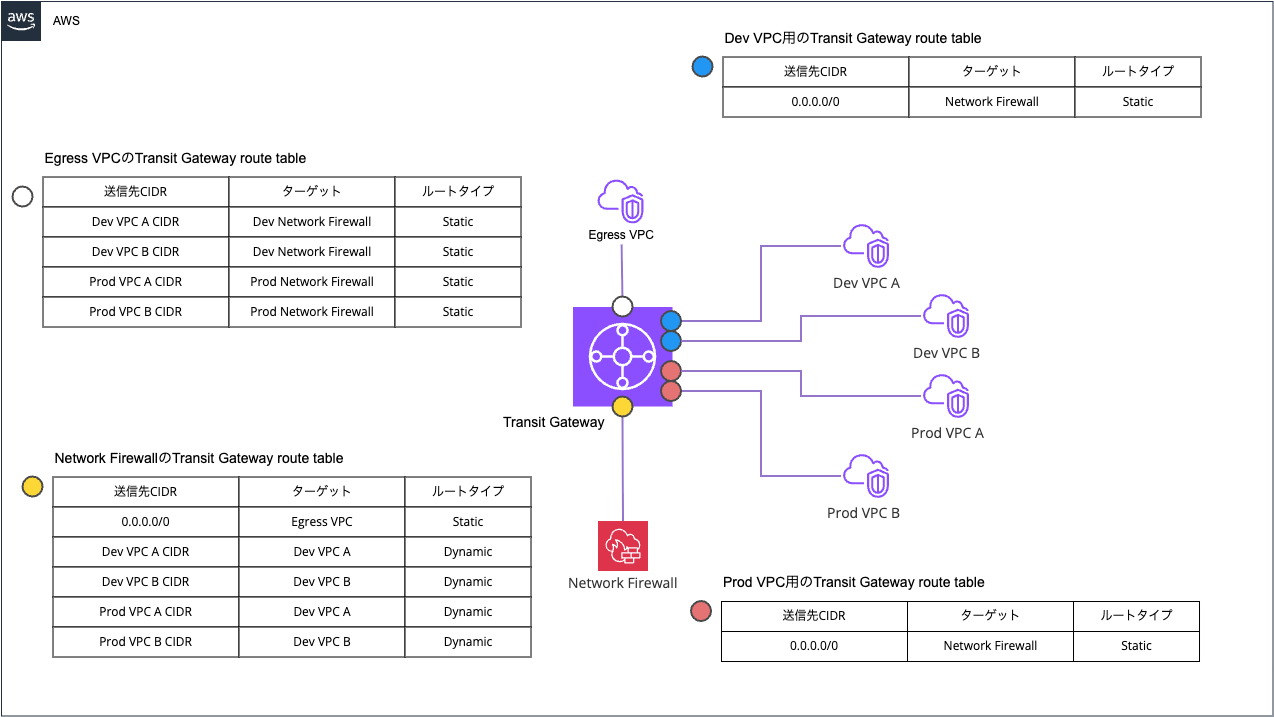
At this time, even if you want to prevent communication between the Prod VPC and the Dev VPC, communication between Prod and Dev becomes possible according to the Network Firewall's Transit Gateway route table.
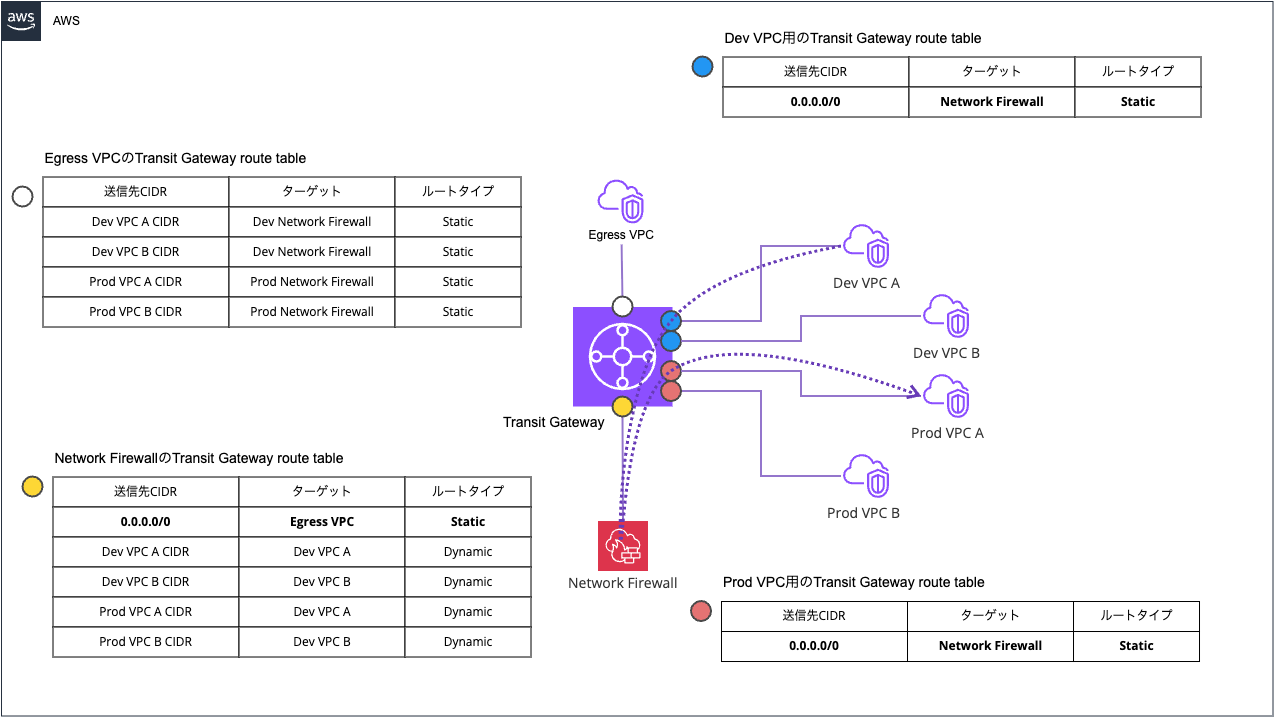
This is because a default route must be added to aggregate outbound internet traffic.
When not aggregating outbound internet traffic, each Transit Gateway route table can be defined as follows, which allows preventing communication between Prod and Dev.
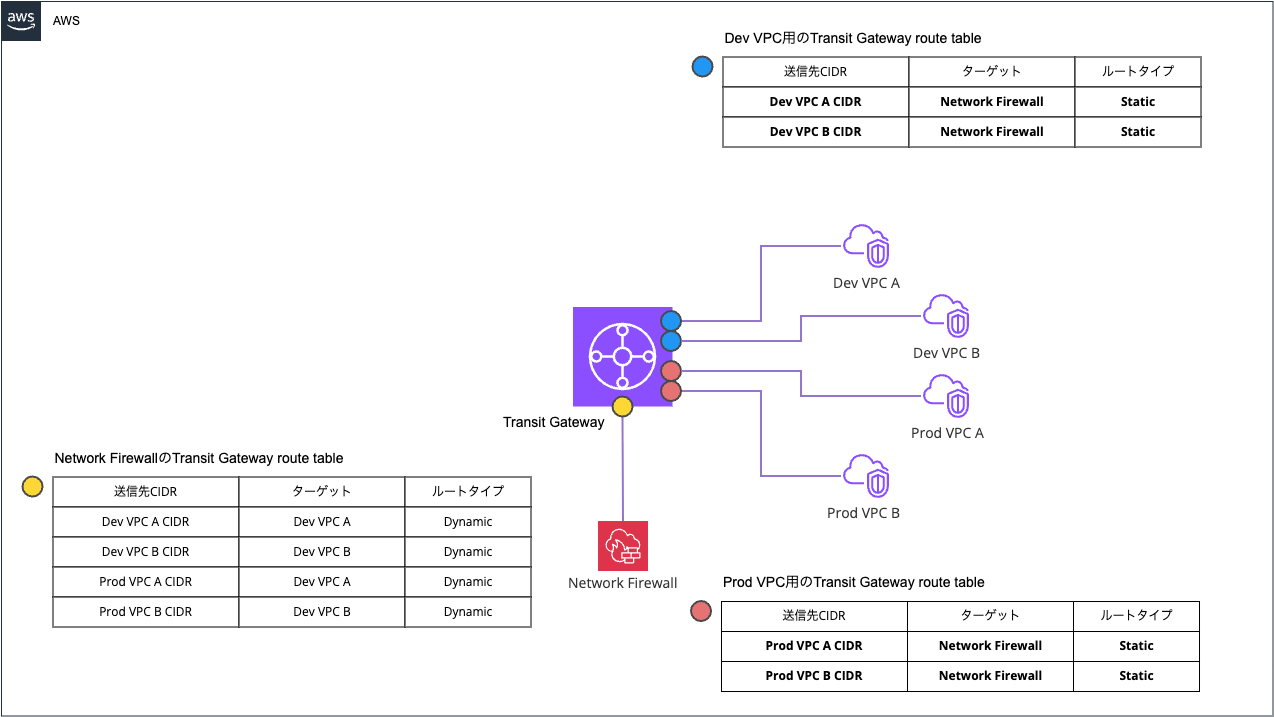
When you want to aggregate outbound internet traffic, one possible approach is to add a Blackhole route for a prefix that aggregates each VPC CIDR. Basically, specifying RFC 1918 private IP addresses should suffice.
Specifically, it looks like the following.
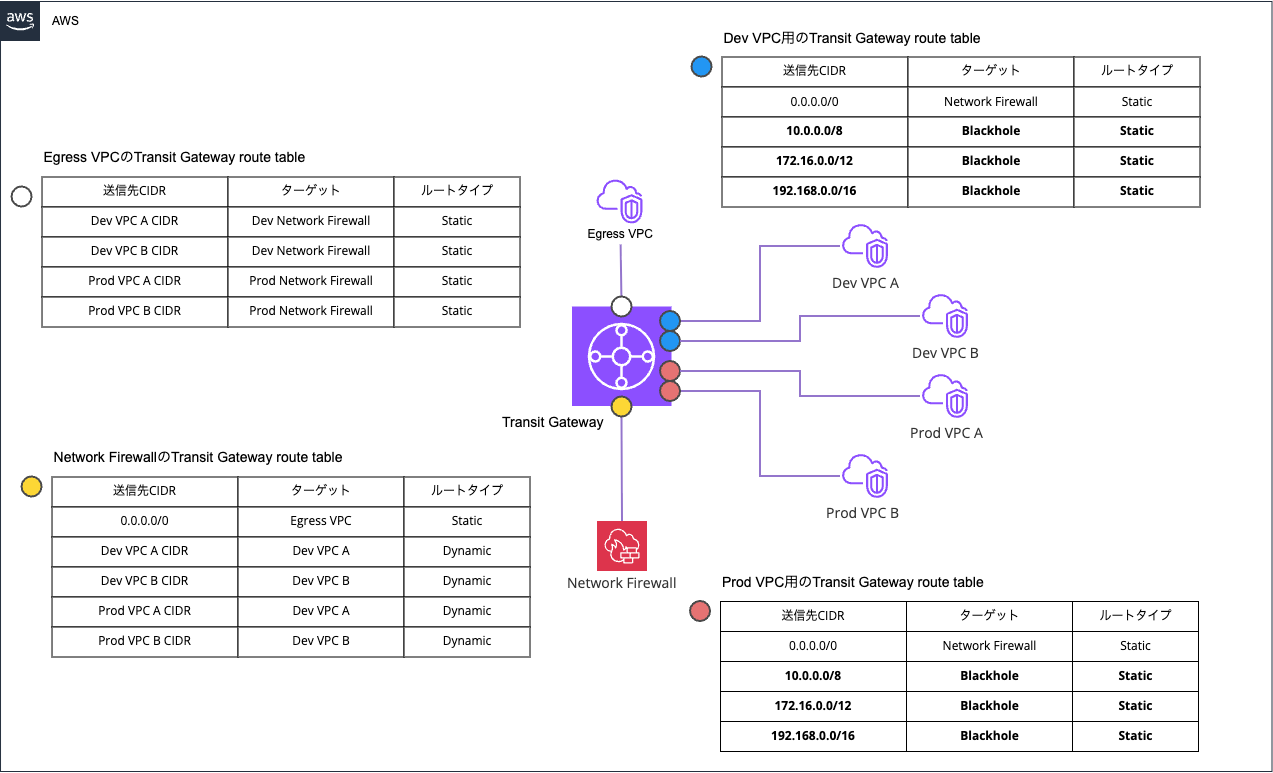
This way, any attempt to communicate between Prod and Dev is blocked by the Blackhole route. Communication within Prod and within Dev can continue via longest match.
Also, if you accept the additional cost and want to separate the Network Firewall rules between Prod and Dev, you can configure it as follows.
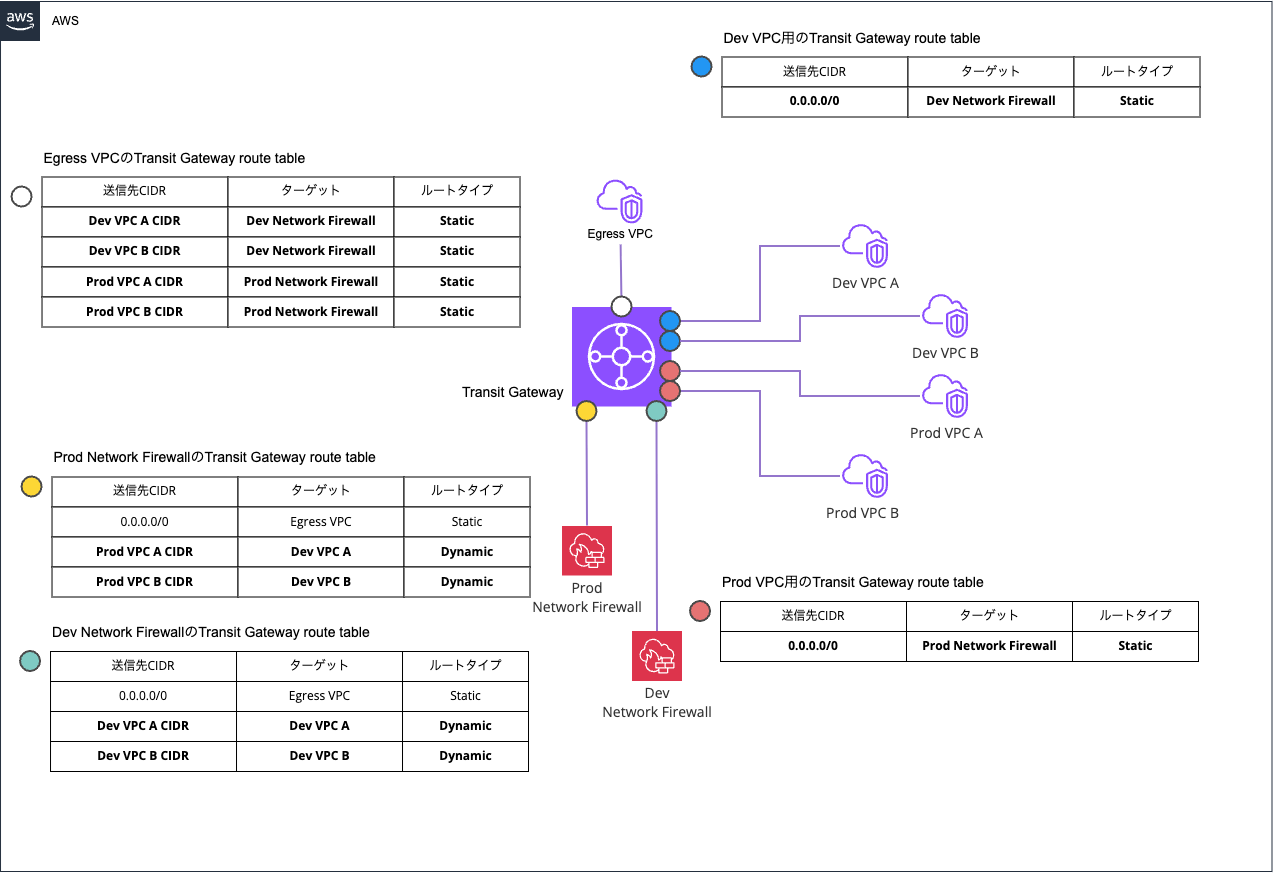
This configuration also makes it possible to prevent communication between Prod and Dev.
If you accept the cost but want to manage Network Firewall rules with a single firewall policy, you can handle this by adding another Inspection VPC and additionally associating the existing Network Firewall's VPC endpoint with it.
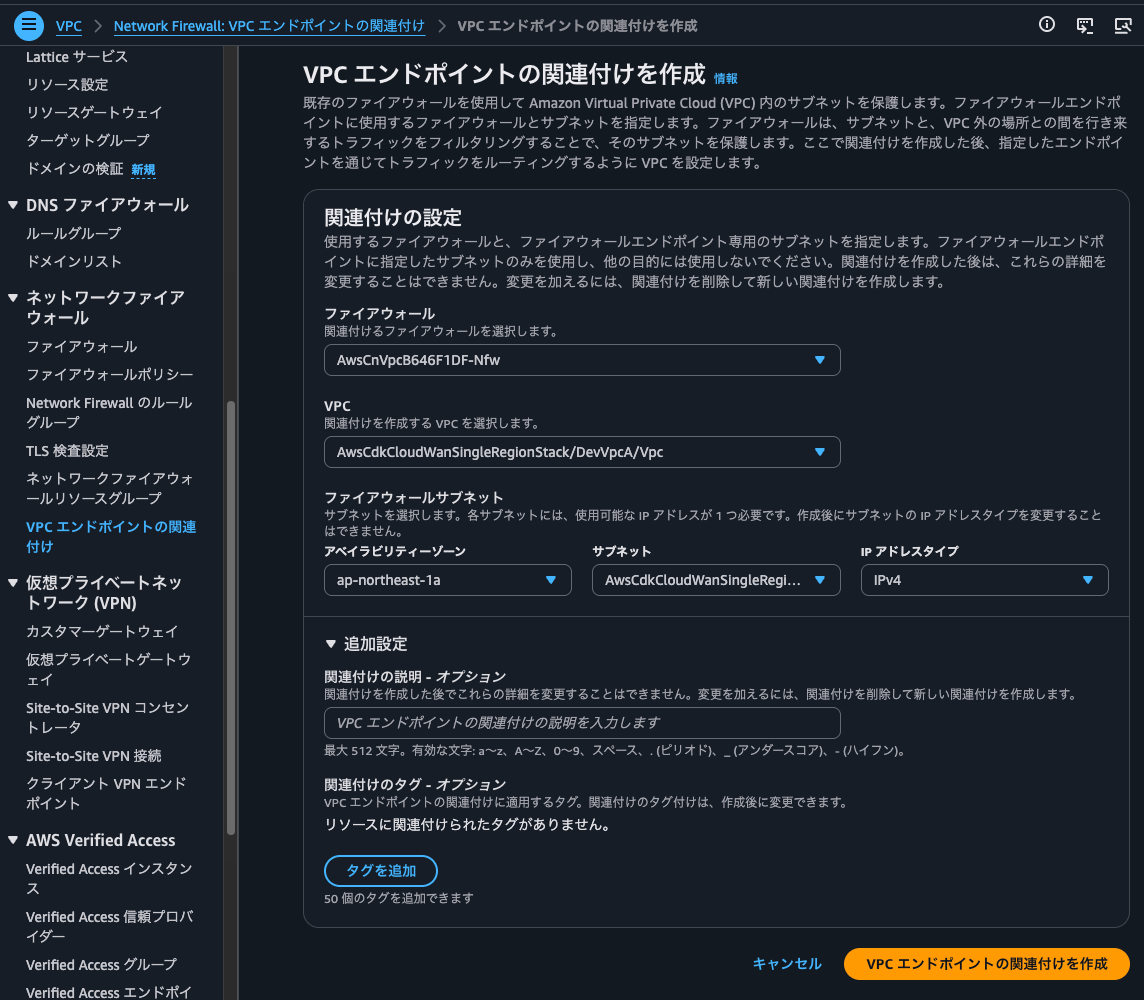
Since you only need to manage a single Network Firewall and firewall policy, management costs can be reduced compared to simply preparing two Network Firewalls.
Furthermore, it's also a nice bonus that secondary endpoints have a lower hourly rate than regular Network Firewall endpoints.
| Resource Type | Price |
|---|---|
| Network Firewall Endpoint | USD 0.395/hour |
| Network Firewall Secondary Endpoint | USD 0.158/hour |
Note that in these configurations, routes for each VPC must be defined statically in the Egress VPC's Transit Gateway route table, so as the number of VPCs increases, the burden of managing routes may increase. It would be fine if routes could be aggregated separately for Prod and Dev, but as VPC division progresses, assigning VPC CIDRs in clean consecutive numbers becomes difficult.
Cloud WAN Case (Without Blackhole Routes)
So, what about the Cloud WAN case? Let me actually try it.
The configuration diagram is as follows.
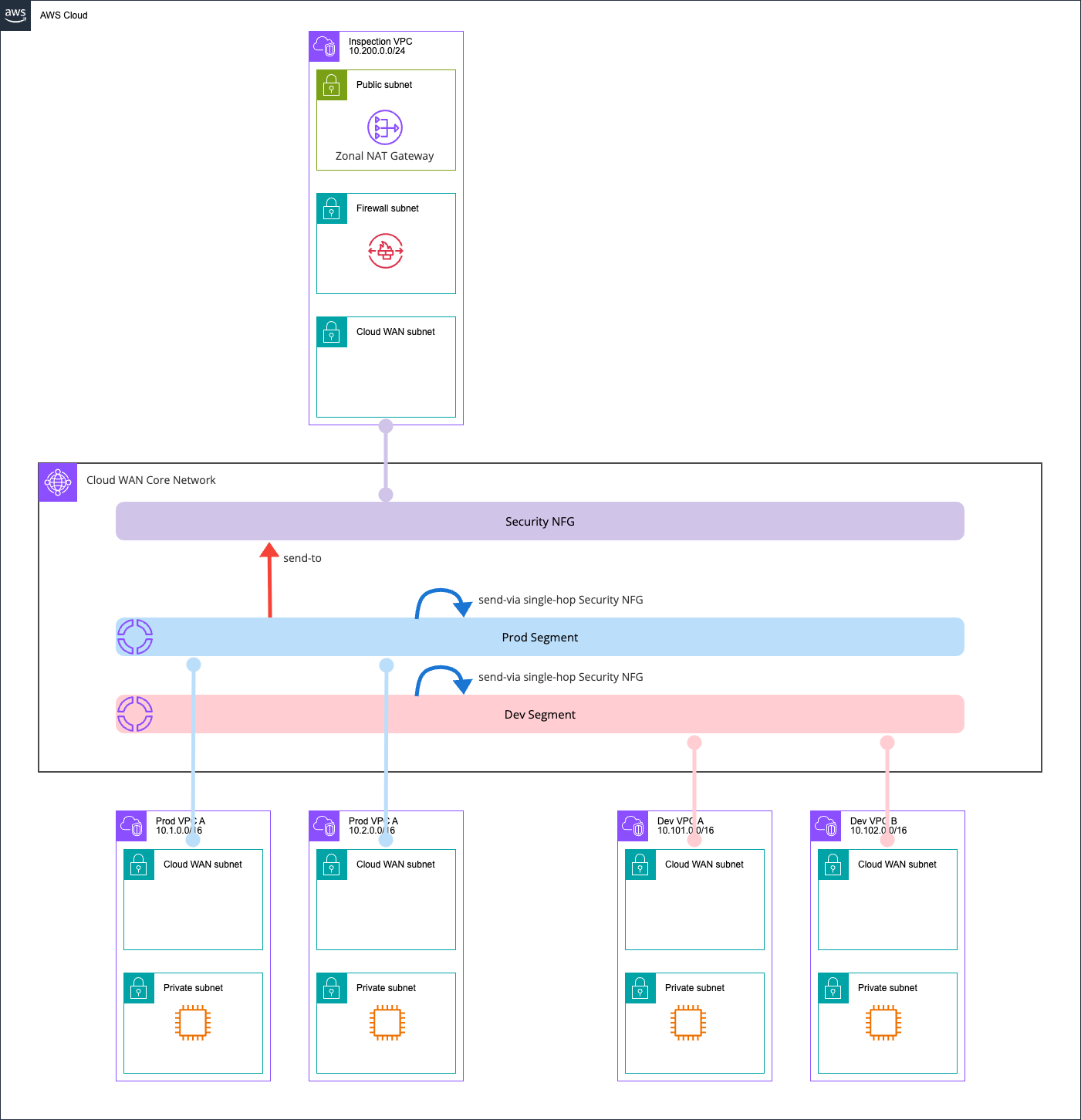
Without any Blackhole routes configured, routing from each segment to the Inspection VPC is done using send-via and send-to actions.
All resources are created with AWS CDK, and the repository is stored in the following GitHub.
The Core Network Policy is as follows.
{
  "core-network-configuration": {
    "asn-ranges": [
      "65000-65099"
    ],
    "edge-locations": [
      {
        "location": "ap-northeast-1",
        "asn": 65001
      }
    ]
  },
  "version": "2025.11",
  "attachment-policies": [
    {
      "rule-number": 200,
      "condition-logic": "or",
      "description": "attachment segment prod",
      "action": {
        "association-method": "constant",
        "segment": "prod"
      },
      "conditions": [
        {
          "type": "tag-value",
          "value": "prod",
          "operator": "equals",
          "key": "cloudwan-seg"
        }
      ]
    },
    {
      "rule-number": 300,
      "condition-logic": "or",
      "description": "attachment segment dev",
      "action": {
        "association-method": "constant",
        "segment": "dev"
      },
      "conditions": [
        {
          "type": "tag-value",
          "value": "dev",
          "operator": "equals",
          "key": "cloudwan-seg"
        }
      ]
    },
    {
      "rule-number": 400,
      "condition-logic": "or",
      "description": "attachment nfg security",
      "action": {
        "add-to-network-function-group": "security"
      },
      "conditions": [
        {
          "type": "tag-value",
          "value": "security",
          "operator": "equals",
          "key": "cloudwan-nfg"
        }
      ]
    }
  ],
  "network-function-groups": [
    {
      "name": "security",
      "require-attachment-acceptance": false
    }
  ],
  "segments": [
    {
      "isolate-attachments": true,
      "name": "prod",
      "require-attachment-acceptance": false,
      "edge-locations": [
        "ap-northeast-1"
      ]
    },
    {
      "isolate-attachments": true,
      "name": "dev",
      "require-attachment-acceptance": false,
      "edge-locations": [
        "ap-northeast-1"
      ]
    }
  ],
  "segment-actions": [
    {
      "segment": "prod",
      "action": "send-to",
      "via": {
        "network-function-groups": [
          "security"
        ]
      },
      "when-sent-to": {
        "segments": "prod"
      }
    },
    {
      "mode": "single-hop",
      "when-sent-to": {
        "segments": [
          "prod"
        ]
      },
      "segment": "prod",
      "action": "send-via",
      "via": {
        "network-function-groups": [
          "security"
        ]
      }
    },
    {
      "segment": "dev",
      "action": "send-to",
      "via": {
        "network-function-groups": [
          "security"
        ]
      },
      "when-sent-to": {
        "segments": "dev"
      }
    },
    {
      "mode": "single-hop",
      "when-sent-to": {
        "segments": [
          "dev"
        ]
      },
      "segment": "dev",
      "action": "send-via",
      "via": {
        "network-function-groups": [
          "security"
        ]
      }
    }
  ]
}
Checking Route Information
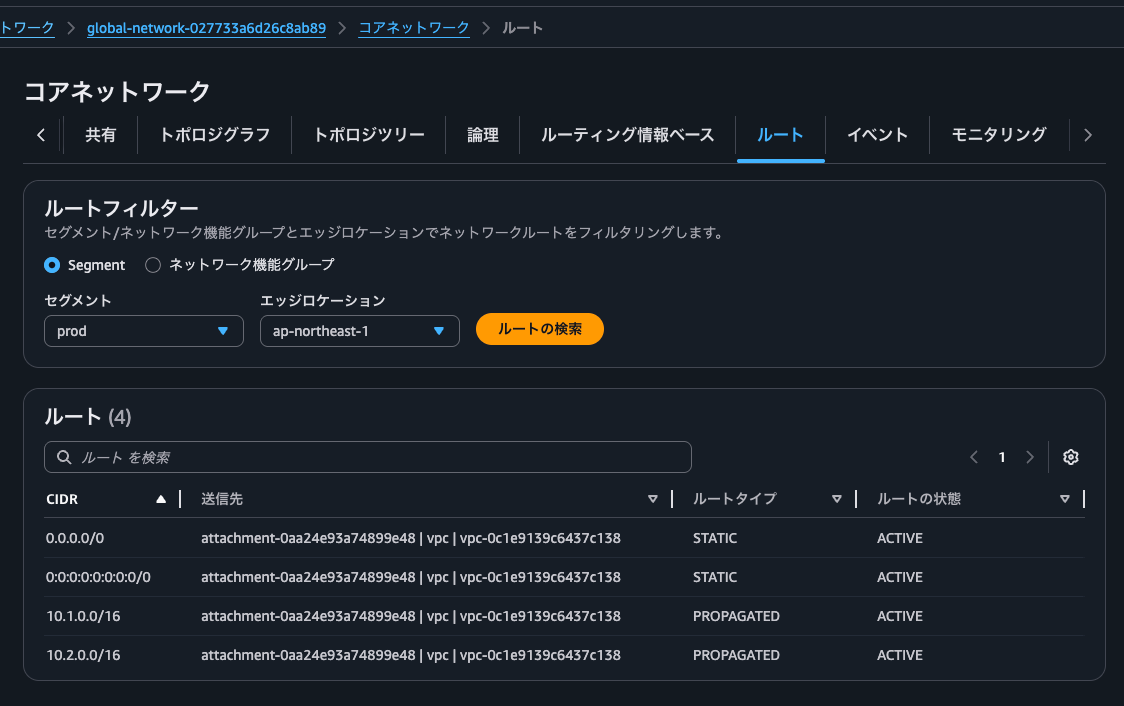
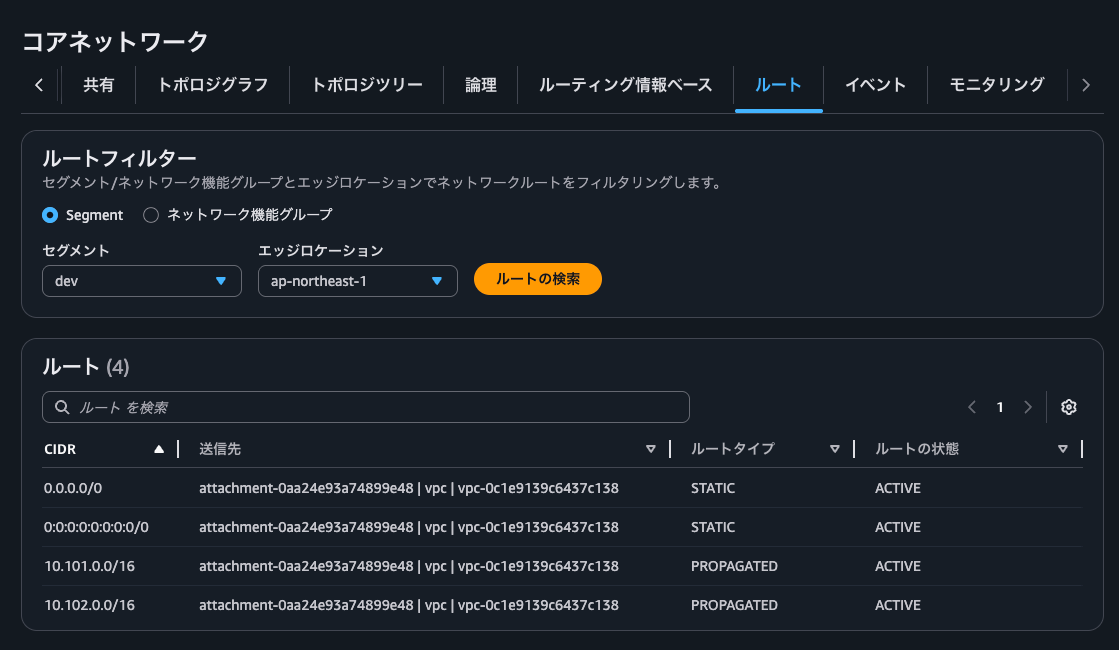
The route information is as follows.
- Prod segment routes
- Dev segment routes
- Security NFG routes
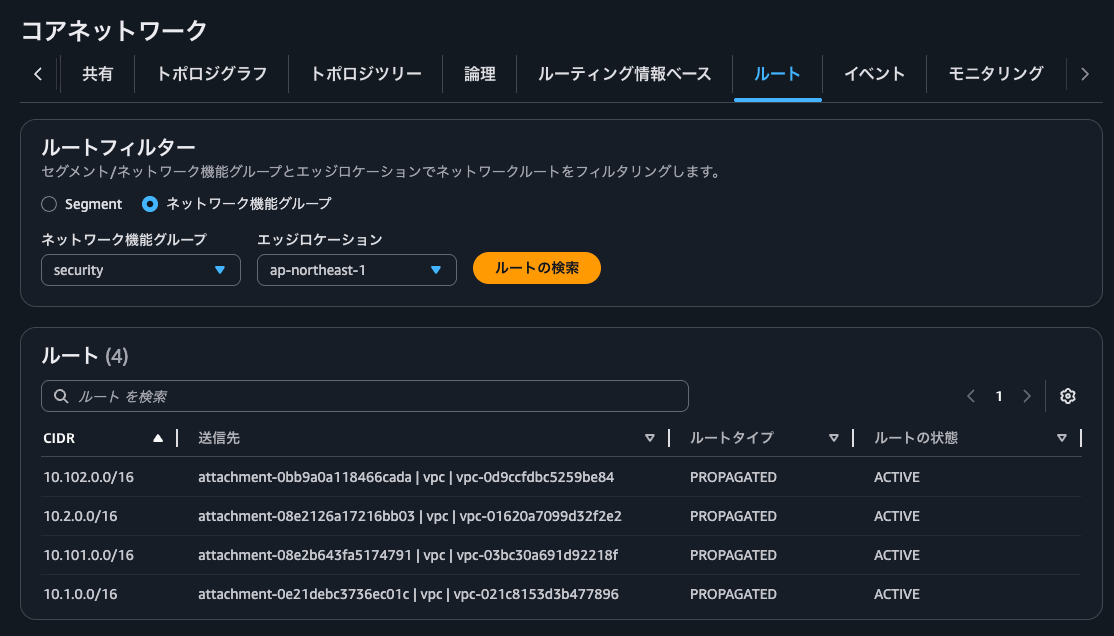
Although there are no direct routes between Prod and Dev, it looks like return communication between Prod and Dev could be possible via the Security NFG.
Prod VPC A → Prod VPC B
Let's actually verify connectivity.
This is Prod VPC A → Prod VPC B.
$ hostname -i
10.1.0.223

$ ping -c 4 10.2.0.234
PING 10.2.0.234 (10.2.0.234) 56(84) bytes of data.
64 bytes from 10.2.0.234: icmp_seq=1 ttl=123 time=2.76 ms
64 bytes from 10.2.0.234: icmp_seq=2 ttl=123 time=1.13 ms
64 bytes from 10.2.0.234: icmp_seq=3 ttl=123 time=1.16 ms
64 bytes from 10.2.0.234: icmp_seq=4 ttl=123 time=1.13 ms

--- 10.2.0.234 ping statistics ---
4 packets transmitted, 4 received, 0% packet loss, time 3005ms
rtt min/avg/max/mdev = 1.131/1.545/2.757/0.699 ms
Communication succeeded without any issues.
Network Firewall is also passing through without issues.
{
    "firewall_name": "AwsCnVpcB646F1DF-Nfw",
    "availability_zone": "ap-northeast-1a",
    "event_timestamp": "1779857072",
    "event": {
        "icmp_type": 8,
        "aws_category": "",
        "src_ip": "10.1.0.223",
        "src_port": 0,
        "event_type": "alert",
        "alert": {
            "severity": 3,
            "signature_id": 2000002,
            "rev": 1,
            "signature": "ICMP ping detected",
            "action": "allowed",
            "category": ""
        },
        "flow_id": 53708269902472,
        "dest_ip": "10.2.0.234",
        "proto": "ICMP",
        "verdict": {
            "action": "alert"
        },
        "icmp_code": 0,
        "dest_port": 0,
        "pkt_src": "geneve encapsulation",
        "timestamp": "2026-05-27T04:44:32.798936+0000",
        "direction": "to_server"
    }
}
Dev VPC A → Dev VPC B
Next, Dev VPC A → Dev VPC B.
$ hostname -i
10.101.0.156

$ ping -c 4 10.102.0.48
PING 10.102.0.48 (10.102.0.48) 56(84) bytes of data.
64 bytes from 10.102.0.48: icmp_seq=1 ttl=123 time=2.51 ms
64 bytes from 10.102.0.48: icmp_seq=2 ttl=123 time=1.10 ms
64 bytes from 10.102.0.48: icmp_seq=3 ttl=123 time=1.08 ms
64 bytes from 10.102.0.48: icmp_seq=4 ttl=123 time=1.22 ms

--- 10.102.0.48 ping statistics ---
4 packets transmitted, 4 received, 0% packet loss, time 3004ms
rtt min/avg/max/mdev = 1.082/1.478/2.514/0.599 ms
This also succeeded without any issues.
Network Firewall is also passing through without issues.
{
    "firewall_name": "AwsCnVpcB646F1DF-Nfw",
    "availability_zone": "ap-northeast-1a",
    "event_timestamp": "1779857184",
    "event": {
        "icmp_type": 8,
        "aws_category": "",
        "src_ip": "10.101.0.156",
        "src_port": 0,
        "event_type": "alert",
        "alert": {
            "severity": 3,
            "signature_id": 2000002,
            "rev": 1,
            "signature": "ICMP ping detected",
            "action": "allowed",
            "category": ""
        },
        "flow_id": 218232706638873,
        "dest_ip": "10.102.0.48",
        "proto": "ICMP",
        "verdict": {
            "action": "alert"
        },
        "icmp_code": 0,
        "dest_port": 0,
        "pkt_src": "geneve encapsulation",
        "timestamp": "2026-05-27T04:46:24.050811+0000",
        "direction": "to_server"
    }
}
Prod VPC A → Dev VPC A
Now, Prod VPC A → Dev VPC A.
$ hostname -i
10.1.0.223

$ ping -c 4 10.101.0.156
PING 10.101.0.156 (10.101.0.156) 56(84) bytes of data.
64 bytes from 10.101.0.156: icmp_seq=1 ttl=123 time=3.17 ms
64 bytes from 10.101.0.156: icmp_seq=2 ttl=123 time=1.18 ms
64 bytes from 10.101.0.156: icmp_seq=3 ttl=123 time=1.19 ms
64 bytes from 10.101.0.156: icmp_seq=4 ttl=123 time=1.16 ms

--- 10.101.0.156 ping statistics ---
4 packets transmitted, 4 received, 0% packet loss, time 3004ms
rtt min/avg/max/mdev = 1.162/1.674/3.167/0.861 ms
Yes, communication was possible.
So, when connecting two or more segments to the same NFG with send-to, some countermeasure is necessary.
Regarding send-via, as introduced in the following article, communication between Prod and Dev is not possible.
By the way, Network Firewall was passing through without issues.
{
    "firewall_name": "AwsCnVpcB646F1DF-Nfw",
    "availability_zone": "ap-northeast-1a",
    "event_timestamp": "1779857255",
    "event": {
        "icmp_type": 8,
        "aws_category": "",
        "src_ip": "10.1.0.223",
        "src_port": 0,
        "event_type": "alert",
        "alert": {
            "severity": 3,
            "signature_id": 2000002,
            "rev": 1,
            "signature": "ICMP ping detected",
            "action": "allowed",
            "category": ""
        },
        "flow_id": 2098777114342334,
        "dest_ip": "10.101.0.156",
        "proto": "ICMP",
        "verdict": {
            "action": "alert"
        },
        "icmp_code": 0,
        "dest_port": 0,
        "pkt_src": "geneve encapsulation",
        "timestamp": "2026-05-27T04:47:35.029907+0000",
        "direction": "to_server"
    }
}
Prod VPC A → Internet
Let's also verify outbound internet communication.
First, Prod VPC A.
$ hostname -i
10.1.0.223

$ curl https://checkip.amazonaws.com
57.181.152.161
Communication succeeded.
Network Firewall is also passing through.
{
    "firewall_name": "AwsCnVpcB646F1DF-Nfw",
    "availability_zone": "ap-northeast-1a",
    "event_timestamp": "1779857528",
    "event": {
        "aws_category": "",
        "tx_id": 0,
        "app_proto": "tls",
        "src_ip": "10.1.0.223",
        "src_port": 40812,
        "event_type": "alert",
        "alert": {
            "severity": 3,
            "signature_id": 2000001,
            "rev": 1,
            "signature": "Access to checkip.amazonaws.com detected",
            "action": "allowed",
            "category": ""
        },
        "flow_id": 2210287241619623,
        "dest_ip": "52.220.207.21",
        "proto": "TCP",
        "verdict": {
            "action": "alert"
        },
        "tls": {
            "sni": "checkip.amazonaws.com",
            "version": "UNDETERMINED"
        },
        "dest_port": 443,
        "pkt_src": "geneve encapsulation",
        "timestamp": "2026-05-27T04:52:08.046582+0000",
        "direction": "to_server"
    }
}
Dev VPC A → Internet
Next, Dev VPC A.
$ hostname -i
10.101.0.156

$ curl https://checkip.amazonaws.com
57.181.152.161
Communication succeeded. The fact that the same IP address is returned confirms that outbound internet traffic aggregation is working as intended.
The Network Firewall log is as follows.
{
    "firewall_name": "AwsCnVpcB646F1DF-Nfw",
    "availability_zone": "ap-northeast-1a",
    "event_timestamp": "1779857534",
    "event": {
        "aws_category": "",
        "tx_id": 0,
        "app_proto": "tls",
        "src_ip": "10.101.0.156",
        "src_port": 36608,
        "event_type": "alert",
        "alert": {
            "severity": 3,
            "signature_id": 2000001,
            "rev": 1,
            "signature": "Access to checkip.amazonaws.com detected",
            "action": "allowed",
            "category": ""
        },
        "flow_id": 1706644564071687,
        "dest_ip": "52.220.101.240",
        "proto": "TCP",
        "verdict": {
            "action": "alert"
        },
        "tls": {
            "sni": "checkip.amazonaws.com",
            "version": "UNDETERMINED"
        },
        "dest_port": 443,
        "pkt_src": "geneve encapsulation",
        "timestamp": "2026-05-27T04:52:14.143970+0000",
        "direction": "to_server"
    }
}
Cloud WAN Case (With Blackhole Routes)
Now, let's look at the case with Blackhole routes added.
The Core Network Policy is as follows, with create-route actions added to each segment that set RFC 1918 IP addresses as Blackhole routes.
{
  "core-network-configuration": {
    "asn-ranges": [
      "65000-65099"
    ],
    "edge-locations": [
      {
        "location": "ap-northeast-1",
        "asn": 65001
      }
    ]
  },
  "version": "2025.11",
  "attachment-policies": [
    {
      "rule-number": 200,
      "condition-logic": "or",
      "description": "attachment segment prod",
      "action": {
        "association-method": "constant",
        "segment": "prod"
      },
      "conditions": [
        {
          "type": "tag-value",
          "value": "prod",
          "operator": "equals",
          "key": "cloudwan-seg"
        }
      ]
    },
    {
      "rule-number": 300,
      "condition-logic": "or",
      "description": "attachment segment dev",
      "action": {
        "association-method": "constant",
        "segment": "dev"
      },
      "conditions": [
        {
          "type": "tag-value",
          "value": "dev",
          "operator": "equals",
          "key": "cloudwan-seg"
        }
      ]
    },
    {
      "rule-number": 400,
      "condition-logic": "or",
      "description": "attachment nfg security",
      "action": {
        "add-to-network-function-group": "security"
      },
      "conditions": [
        {
          "type": "tag-value",
          "value": "security",
          "operator": "equals",
          "key": "cloudwan-nfg"
        }
      ]
    }
  ],
  "network-function-groups": [
    {
      "name": "security",
      "require-attachment-acceptance": false
    }
  ],
  "segments": [
    {
      "isolate-attachments": true,
      "name": "prod",
      "require-attachment-acceptance": false,
      "edge-locations": [
        "ap-northeast-1"
      ]
    },
    {
      "isolate-attachments": true,
      "name": "dev",
      "require-attachment-acceptance": false,
      "edge-locations": [
        "ap-northeast-1"
      ]
    }
  ],
  "segment-actions": [
    {
      "segment": "prod",
      "action": "send-to",
      "via": {
        "network-function-groups": [
          "security"
        ]
      },
      "when-sent-to": {
        "segments": "prod"
      }
    },
    {
      "mode": "single-hop",
      "when-sent-to": {
        "segments": [
          "prod"
        ]
      },
      "segment": "prod",
      "action": "send-via",
      "via": {
        "network-function-groups": [
          "security"
        ]
      }
    },
    {
      "segment": "dev",
      "action": "send-to",
      "via": {
        "network-function-groups": [
          "security"
        ]
      },
      "when-sent-to": {
        "segments": "dev"
      }
    },
    {
      "mode": "single-hop",
      "when-sent-to": {
        "segments": [
          "dev"
        ]
      },
      "segment": "dev",
      "action": "send-via",
      "via": {
        "network-function-groups": [
          "security"
        ]
      }
    },
    {
      "segment": "prod",
      "destinations": [
        "blackhole"
      ],
      "action": "create-route",
      "description": "Block cross-segment RFC1918 leakage from prod",
      "destination-cidr-blocks": [
        "10.0.0.0/8",
        "172.16.0.0/12",
        "192.168.0.0/16"
      ]
    },
    {
      "segment": "dev",
      "destinations": [
        "blackhole"
      ],
      "action": "create-route",
      "description": "Block cross-segment RFC1918 leakage from dev",
      "destination-cidr-blocks": [
        "10.0.0.0/8",
        "172.16.0.0/12",
        "192.168.0.0/16"
      ]
    }
  ]
}
Checking Route Information
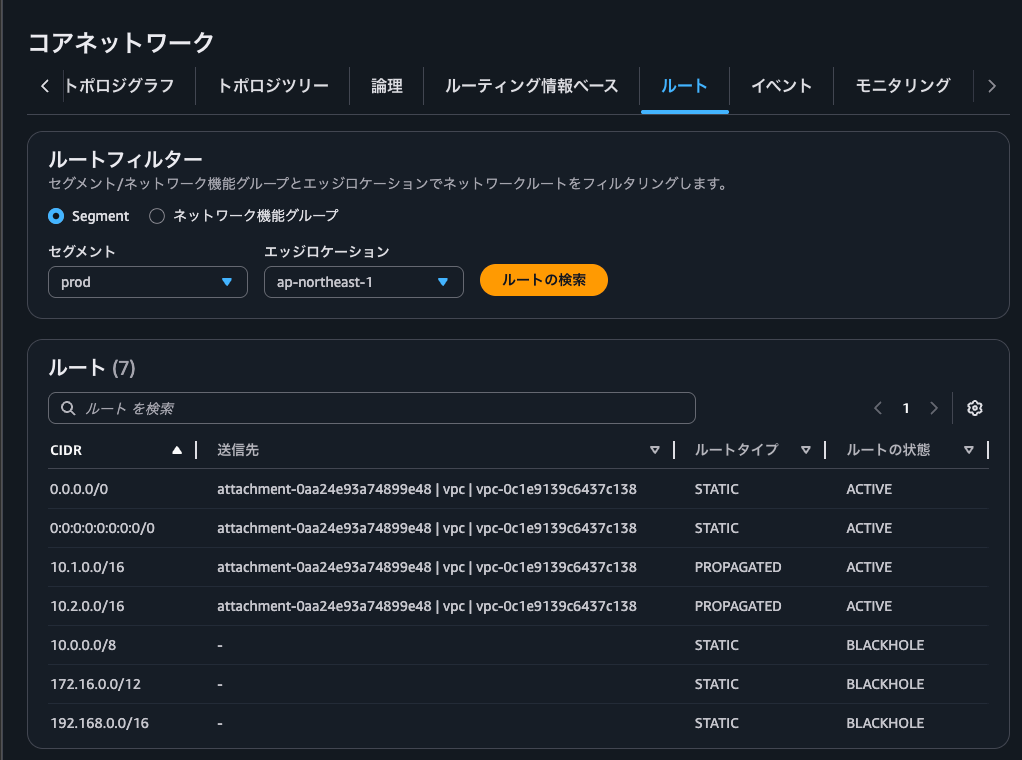
The route information is as follows.
- Prod segment routes
- Dev segment routes
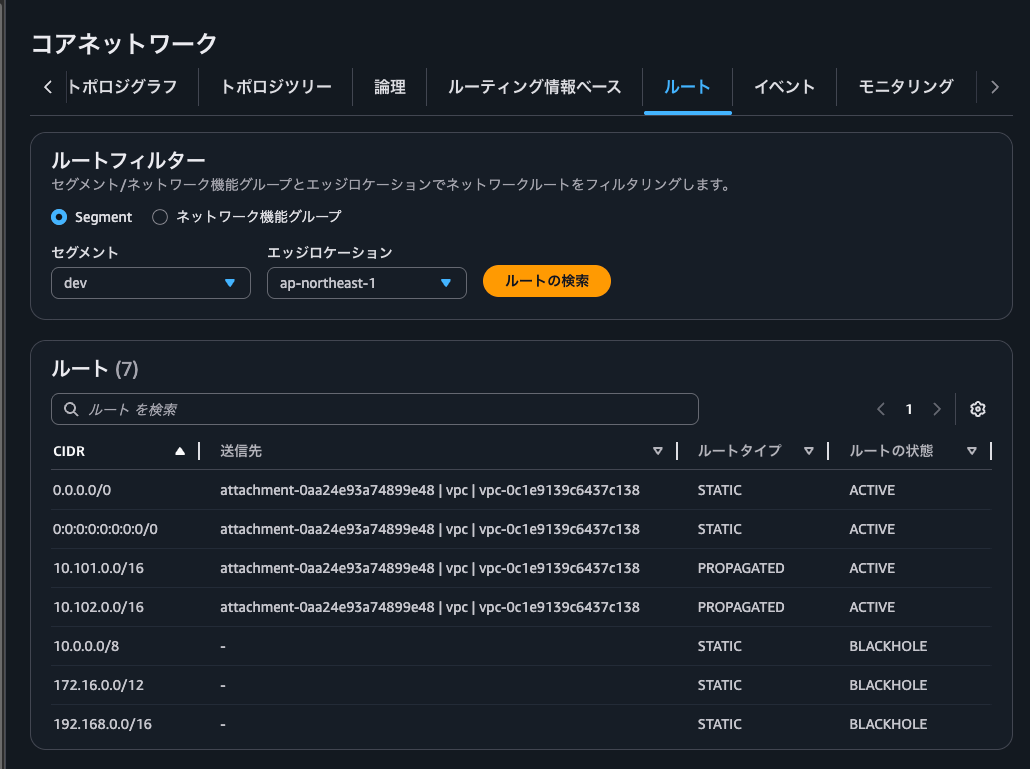
- Security NFG routes
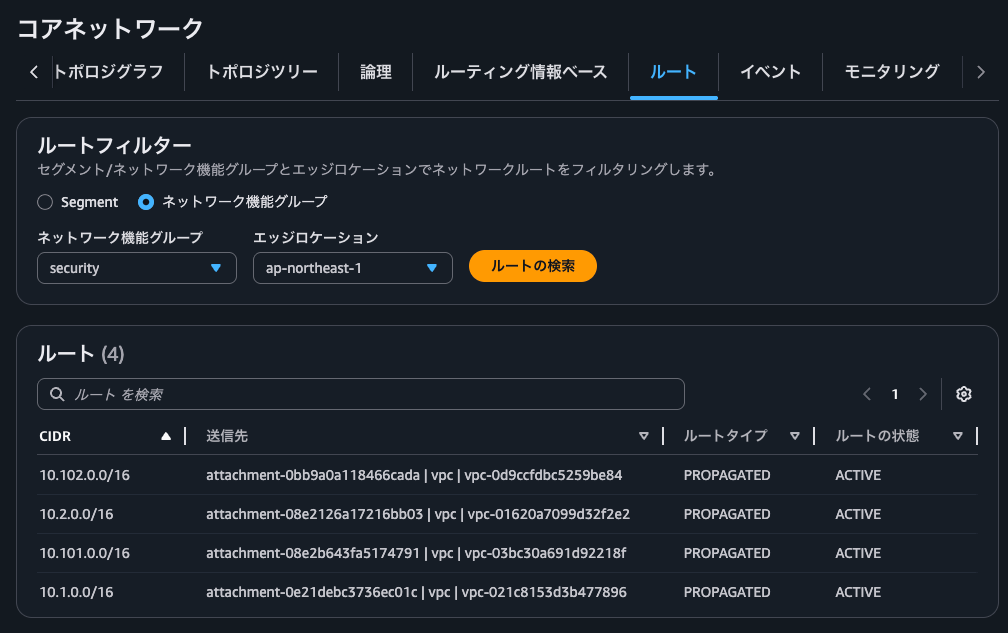
You can see that Blackhole routes are present in the Prod segment and Dev segment.
Prod VPC A → Prod VPC B
We will try the same communication as when the Blackhole route was not configured.
First, Prod VPC A → Prod VPC B.
$ hostname -i
10.1.0.223

$ ping -c 4 10.2.0.234
PING 10.2.0.234 (10.2.0.234) 56(84) bytes of data.
64 bytes from 10.2.0.234: icmp_seq=1 ttl=123 time=2.79 ms
64 bytes from 10.2.0.234: icmp_seq=2 ttl=123 time=1.30 ms
64 bytes from 10.2.0.234: icmp_seq=3 ttl=123 time=3.66 ms
64 bytes from 10.2.0.234: icmp_seq=4 ttl=123 time=1.02 ms

--- 10.2.0.234 ping statistics ---
4 packets transmitted, 4 received, 0% packet loss, time 3004ms
rtt min/avg/max/mdev = 1.017/2.192/3.661/1.082 ms
Communication was successful without any issues.
The Network Firewall logs are as follows.
{
    "firewall_name": "AwsCnVpcB646F1DF-Nfw",
    "availability_zone": "ap-northeast-1a",
    "event_timestamp": "1779857950",
    "event": {
        "icmp_type": 8,
        "aws_category": "",
        "src_ip": "10.1.0.223",
        "src_port": 0,
        "event_type": "alert",
        "alert": {
            "severity": 3,
            "signature_id": 2000002,
            "rev": 1,
            "signature": "ICMP ping detected",
            "action": "allowed",
            "category": ""
        },
        "flow_id": 1816427272690312,
        "dest_ip": "10.2.0.234",
        "proto": "ICMP",
        "verdict": {
            "action": "alert"
        },
        "icmp_code": 0,
        "dest_port": 0,
        "pkt_src": "geneve encapsulation",
        "timestamp": "2026-05-27T04:59:10.291847+0000",
        "direction": "to_server"
    }
}
Dev VPC A → Dev VPC B
Next is Dev VPC A → Dev VPC B.
$ hostname -i
10.101.0.156

$ ping -c 4 10.102.0.48
PING 10.102.0.48 (10.102.0.48) 56(84) bytes of data.
64 bytes from 10.102.0.48: icmp_seq=1 ttl=123 time=2.51 ms
64 bytes from 10.102.0.48: icmp_seq=2 ttl=123 time=1.05 ms
64 bytes from 10.102.0.48: icmp_seq=3 ttl=123 time=1.05 ms
64 bytes from 10.102.0.48: icmp_seq=4 ttl=123 time=1.13 ms

--- 10.102.0.48 ping statistics ---
4 packets transmitted, 4 received, 0% packet loss, time 3004ms
rtt min/avg/max/mdev = 1.047/1.433/2.509/0.621 ms
This one also communicated successfully without any issues.
The Network Firewall logs are as follows.
{
    "firewall_name": "AwsCnVpcB646F1DF-Nfw",
    "availability_zone": "ap-northeast-1a",
    "event_timestamp": "1779857975",
    "event": {
        "icmp_type": 8,
        "aws_category": "",
        "src_ip": "10.101.0.156",
        "src_port": 0,
        "event_type": "alert",
        "alert": {
            "severity": 3,
            "signature_id": 2000002,
            "rev": 1,
            "signature": "ICMP ping detected",
            "action": "allowed",
            "category": ""
        },
        "flow_id": 2069543908974998,
        "dest_ip": "10.102.0.48",
        "proto": "ICMP",
        "verdict": {
            "action": "alert"
        },
        "icmp_code": 0,
        "dest_port": 0,
        "pkt_src": "geneve encapsulation",
        "timestamp": "2026-05-27T04:59:35.678461+0000",
        "direction": "to_server"
    }
}
Prod VPC A → Dev VPC A
Now, Prod VPC A → Dev VPC A.
$ hostname -i
10.1.0.223

$ ping -c 4 10.101.0.156
PING 10.101.0.156 (10.101.0.156) 56(84) bytes of data.

--- 10.101.0.156 ping statistics ---
4 packets transmitted, 0 received, 100% packet loss, time 3085ms
Yes, all packets were dropped.
The Blackhole route is working as expected.
Prod VPC A → Internet
Let's also verify that outbound communication to the internet continues to work.
First, Prod VPC A.
$ hostname -i
10.1.0.223

$ curl https://checkip.amazonaws.com
57.181.152.161
Communication was successful.
The Network Firewall logs are as follows.
{
    "firewall_name": "AwsCnVpcB646F1DF-Nfw",
    "availability_zone": "ap-northeast-1a",
    "event_timestamp": "1779858030",
    "event": {
        "aws_category": "",
        "tx_id": 0,
        "app_proto": "tls",
        "src_ip": "10.1.0.223",
        "src_port": 40374,
        "event_type": "alert",
        "alert": {
            "severity": 3,
            "signature_id": 2000001,
            "rev": 1,
            "signature": "Access to checkip.amazonaws.com detected",
            "action": "allowed",
            "category": ""
        },
        "flow_id": 1841923384537736,
        "dest_ip": "54.179.238.89",
        "proto": "TCP",
        "verdict": {
            "action": "alert"
        },
        "tls": {
            "sni": "checkip.amazonaws.com",
            "version": "UNDETERMINED"
        },
        "dest_port": 443,
        "pkt_src": "geneve encapsulation",
        "timestamp": "2026-05-27T05:00:30.567173+0000",
        "direction": "to_server"
    }
}
Dev VPC A → Internet
Next, Dev VPC A.
$ hostname -i
10.101.0.156

$ curl https://checkip.amazonaws.com
57.181.152.161
This one was also able to communicate without any changes.
The Network Firewall logs are as follows.
{
    "firewall_name": "AwsCnVpcB646F1DF-Nfw",
    "availability_zone": "ap-northeast-1a",
    "event_timestamp": "1779858037",
    "event": {
        "aws_category": "",
        "tx_id": 0,
        "app_proto": "tls",
        "src_ip": "10.101.0.156",
        "src_port": 36738,
        "event_type": "alert",
        "alert": {
            "severity": 3,
            "signature_id": 2000001,
            "rev": 1,
            "signature": "Access to checkip.amazonaws.com detected",
            "action": "allowed",
            "category": ""
        },
        "flow_id": 1297804386883438,
        "dest_ip": "18.141.46.247",
        "proto": "TCP",
        "verdict": {
            "action": "alert"
        },
        "tls": {
            "sni": "checkip.amazonaws.com",
            "version": "UNDETERMINED"
        },
        "dest_port": 443,
        "pkt_src": "geneve encapsulation",
        "timestamp": "2026-05-27T05:00:37.029528+0000",
        "direction": "to_server"
    }
}
Blackhole routes need to be added even when using Cloud WAN
I introduced that even with AWS Cloud WAN, explicit Blackhole routes are required when consolidating outbound internet communication across multiple segments.
It appeared that there was no other method besides adding Blackhole Static routes through Cloud WAN configuration alone. Even as the number of segments increases, it only requires adding about 3 create-route entries per segment, so I don't think the operational burden would be particularly high.
One thing to be careful about is whether the same prefix as the Blackhole route prefix might be advertised from Site-to-Site VPN or Direct Connect. If the same prefix were to be advertised, Static routes take priority = Blackhole takes priority, making it impossible to route to those resources. Consider whether the routes advertised by the router on the other side of the Site-to-Site VPN or Direct Connect can be broken down into more specific prefixes.
I hope this article helps someone.
That's all from nonPi (@non____97) of the Cloud Business Division, Consulting Department!
