AWS Cloud WAN の Service Insertion の send-via は推移的にルート伝播を行わないことを確認してみた

share action は推移的にルート伝播を行わないけど、send-via action はどうなのか
こんにちは、のんピ(@non____97)です。
皆さんはAWS Cloud WANを利用していて、send-via actionを設定した場合に推移的にルート情報が伝播されるのか気になったことはありますか? 私はあります。
share actionについては以下のように推移的な伝播は行われません。
share attachments across segments. Use the share action so that attachments from two different segments can reach each other. For example, if you've set a segment to isolate-attachments, the segment can't reach anything unless it has a share relationship with other segments. The share statement creates routes between attachments in the provided segments. If you're creating a share between one segment and an array of segments, the segment to share allows attachments from the segments in the array. However, sharing does not occur between the segments within the array. For example, if a segment named shared-service is defined as a segment with a share-with array of segments named prod and prod2, the network policy will allow the attachments in both prod and prod2 to reach shared-service. But the network policy will not allow sharing of attachments between prod and prod2.
Core network policy version parameters in AWS Cloud WAN - AWS Network Manager
これにより、share actionで共有されているセグメントが複数ある場合、直接share actionで繋がっていないセグメント同士のルートは伝播されないようになっています。
一方、send-via actionについてはドキュメントを見ても、そのような言及を見つけることができませんでした。
わざわざsend-viaでそのような挙動は行わないとは思いますが、念の為実際に動作確認してみます。
やってみた
検証環境
検証環境は以下のとおりです。
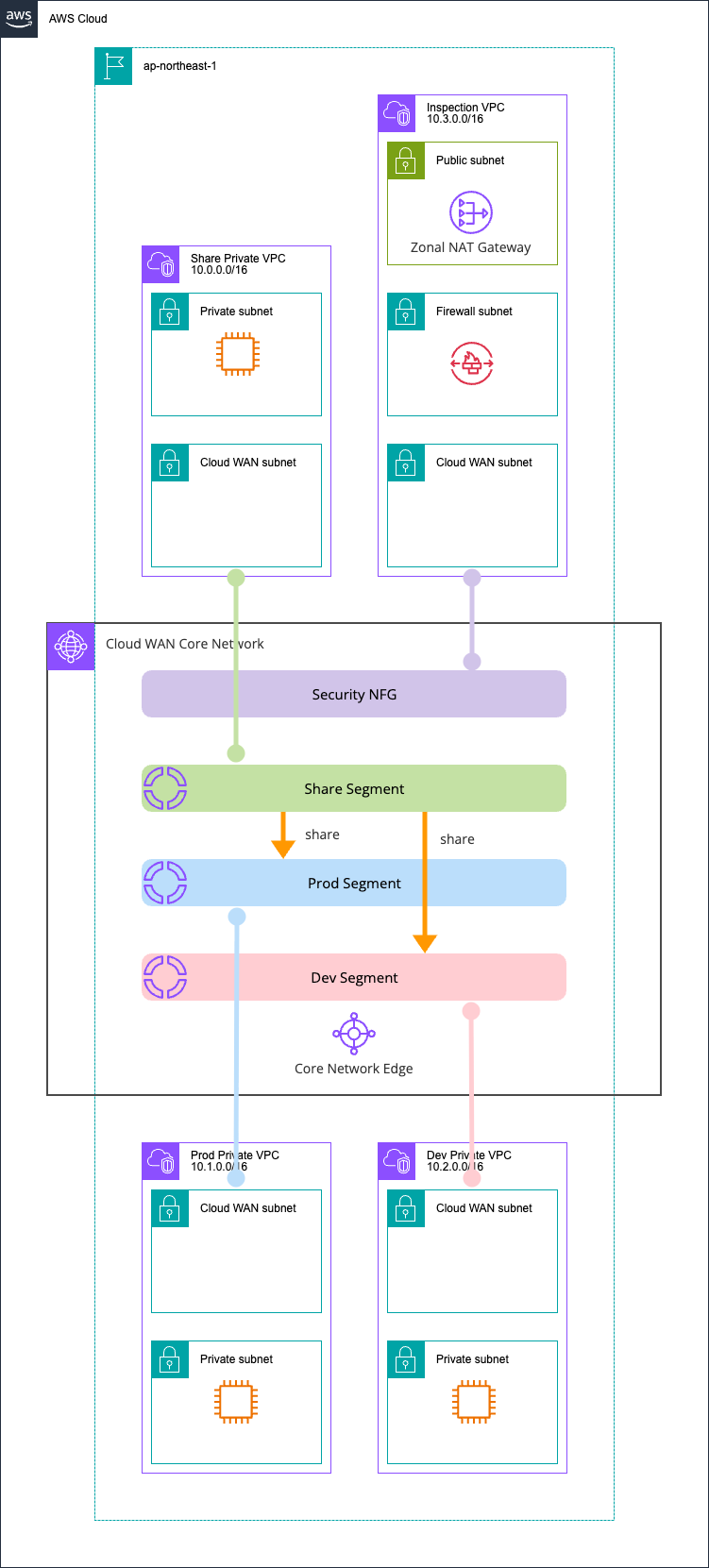
ProdとDev、Shareの3つのセグメントと、Security NFGがあります。
このとき、Prod と Dev 間では通信できないことを確認します。
リソースは全てAWS CDKでデプロイしました。使用したコードは以下GitHubリポジトリにあります。
参考までにCore Network Policyは以下のとおりです。
{
  "core-network-configuration": {
    "vpn-ecmp-support": true,
    "asn-ranges": [
      "65000-65099"
    ],
    "edge-locations": [
      {
        "location": "ap-northeast-1",
        "asn": 65001
      }
    ],
    "inside-cidr-blocks": [
      "192.168.0.0/16"
    ]
  },
  "version": "2021.12",
  "attachment-policies": [
    {
      "rule-number": 100,
      "condition-logic": "or",
      "description": "attachment segment share",
      "action": {
        "association-method": "constant",
        "segment": "share"
      },
      "conditions": [
        {
          "type": "tag-value",
          "value": "share",
          "operator": "equals",
          "key": "cloudwan-seg"
        }
      ]
    },
    {
      "rule-number": 200,
      "condition-logic": "or",
      "description": "attachment segment prod",
      "action": {
        "association-method": "constant",
        "segment": "prod"
      },
      "conditions": [
        {
          "type": "tag-value",
          "value": "prod",
          "operator": "equals",
          "key": "cloudwan-seg"
        }
      ]
    },
    {
      "rule-number": 300,
      "condition-logic": "or",
      "description": "attachment segment dev",
      "action": {
        "association-method": "constant",
        "segment": "dev"
      },
      "conditions": [
        {
          "type": "tag-value",
          "value": "dev",
          "operator": "equals",
          "key": "cloudwan-seg"
        }
      ]
    },
    {
      "rule-number": 400,
      "condition-logic": "or",
      "description": "attachment nfg security",
      "action": {
        "add-to-network-function-group": "security"
      },
      "conditions": [
        {
          "type": "tag-value",
          "value": "security",
          "operator": "equals",
          "key": "cloudwan-nfg"
        }
      ]
    }
  ],
  "network-function-groups": [
    {
      "name": "security",
      "require-attachment-acceptance": false
    }
  ],
  "segments": [
    {
      "name": "share",
      "require-attachment-acceptance": false,
      "edge-locations": [
        "ap-northeast-1"
      ]
    },
    {
      "isolate-attachments": false,
      "name": "prod",
      "require-attachment-acceptance": false,
      "edge-locations": [
        "ap-northeast-1"
      ]
    },
    {
      "isolate-attachments": false,
      "name": "dev",
      "require-attachment-acceptance": false,
      "edge-locations": [
        "ap-northeast-1"
      ]
    }
  ],
  "segment-actions": [
    {
      "mode": "attachment-route",
      "segment": "share",
      "action": "share",
      "share-with": [
        "prod",
        "dev"
      ]
    }
  ]
}
Shareセグメントと各セグメントとをshare actionで接続した場合
Shareセグメントと各セグメントとをshare actionで接続した場合の確認を行います。
この状態のShareセグメントのルートを確認します。
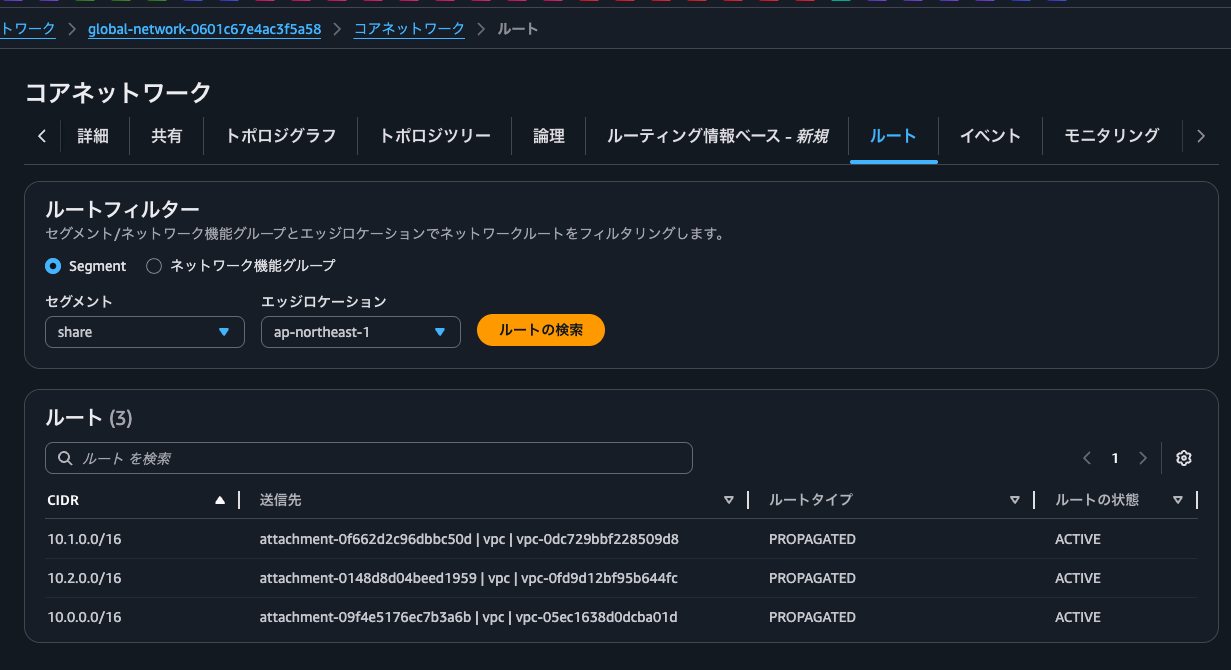
Prod Private VPCとDev Private VPCの両方のルートが確認できますね。
続いて、Prodセグメントです。
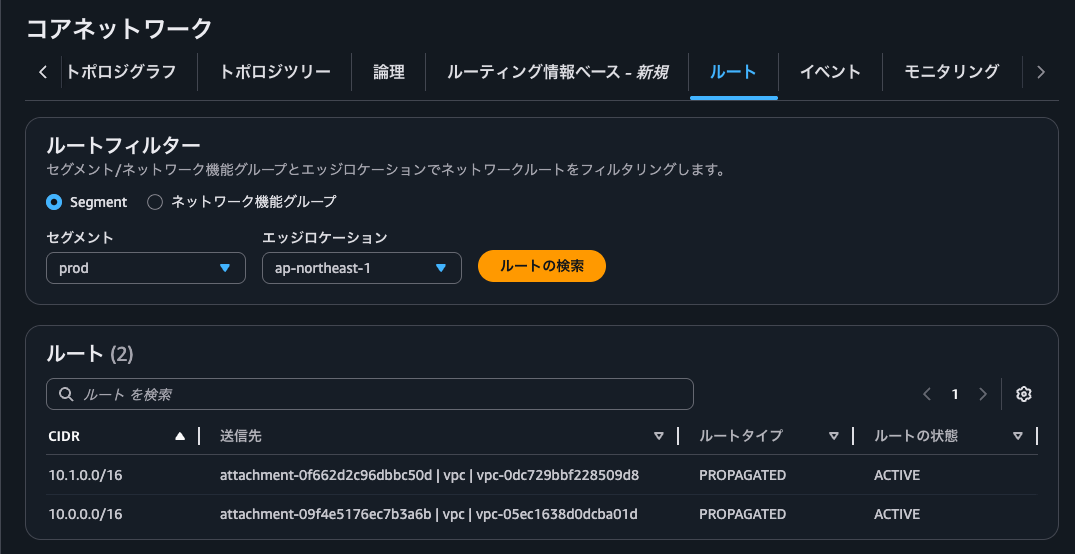
自セグメントのVPCとShareセグメントのVPCのルートが確認できます。
ちなみに、"isolate-attachments": falseとした場合は自セグメントのアタッチメントのルートは見えません。(今回でいうところの10.1.0.0/16)
続いて、Devセグメントです。
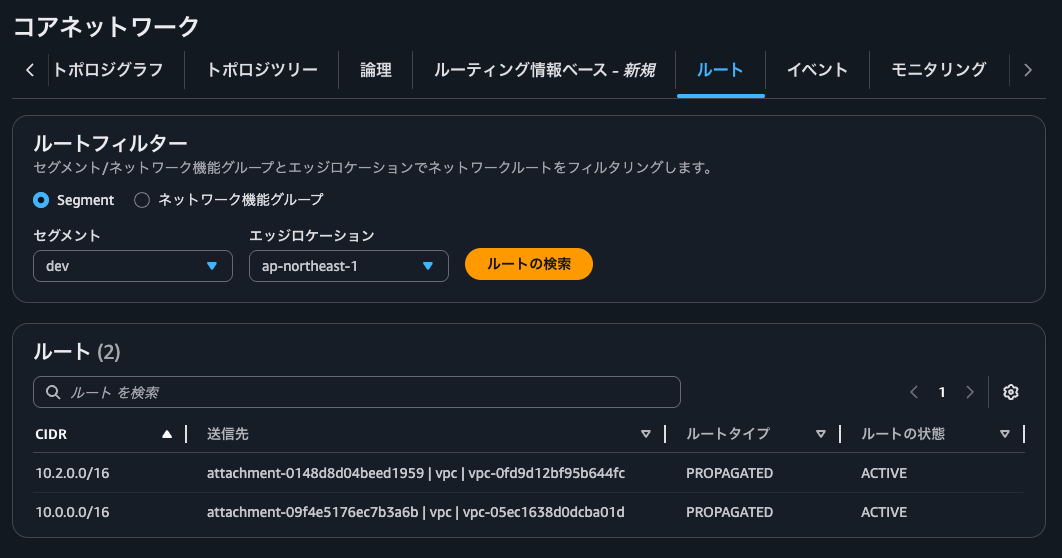
こちらもProdセグメントと同じように自セグメントのVPCとShareセグメントのVPCのルートが確認できます。
実際に疎通確認をしてみましょう。
$ hostname -f
ip-10-1-0-242.ap-northeast-1.compute.internal

$ ping -c 4 10.2.0.75
PING 10.2.0.75 (10.2.0.75) 56(84) bytes of data.

--- 10.2.0.75 ping statistics ---
4 packets transmitted, 0 received, 100% packet loss, time 3138ms
$ hostname -f
ip-10-0-0-233.ap-northeast-1.compute.internal

$ ping -c 4 10.1.0.242
PING 10.1.0.242 (10.1.0.242) 56(84) bytes of data.
64 bytes from 10.1.0.242: icmp_seq=1 ttl=126 time=0.551 ms
64 bytes from 10.1.0.242: icmp_seq=2 ttl=126 time=0.339 ms
64 bytes from 10.1.0.242: icmp_seq=3 ttl=126 time=0.340 ms
64 bytes from 10.1.0.242: icmp_seq=4 ttl=126 time=0.357 ms
$ hostname -f
ip-10-0-0-233.ap-northeast-1.compute.internal

$ ping -c 4 10.2.0.75
PING 10.2.0.75 (10.2.0.75) 56(84) bytes of data.
64 bytes from 10.2.0.75: icmp_seq=1 ttl=126 time=0.794 ms
64 bytes from 10.2.0.75: icmp_seq=2 ttl=126 time=0.349 ms
64 bytes from 10.2.0.75: icmp_seq=3 ttl=126 time=0.291 ms
64 bytes from 10.2.0.75: icmp_seq=4 ttl=126 time=0.285 ms

--- 10.2.0.75 ping statistics ---
4 packets transmitted, 4 received, 0% packet loss, time 3145ms
rtt min/avg/max/mdev = 0.285/0.429/0.794/0.211 ms
$
はい、ProdとDevは直接通信をすることはできず、中間に位置する形になるShareからのみ双方に通信できることが確認できました。
Shareセグメントと各セグメントとをsend-via actionで接続した場合
Shareセグメントと各セグメントとをsend-via actionで接続した場合です。
構成図は以下のとおりです。
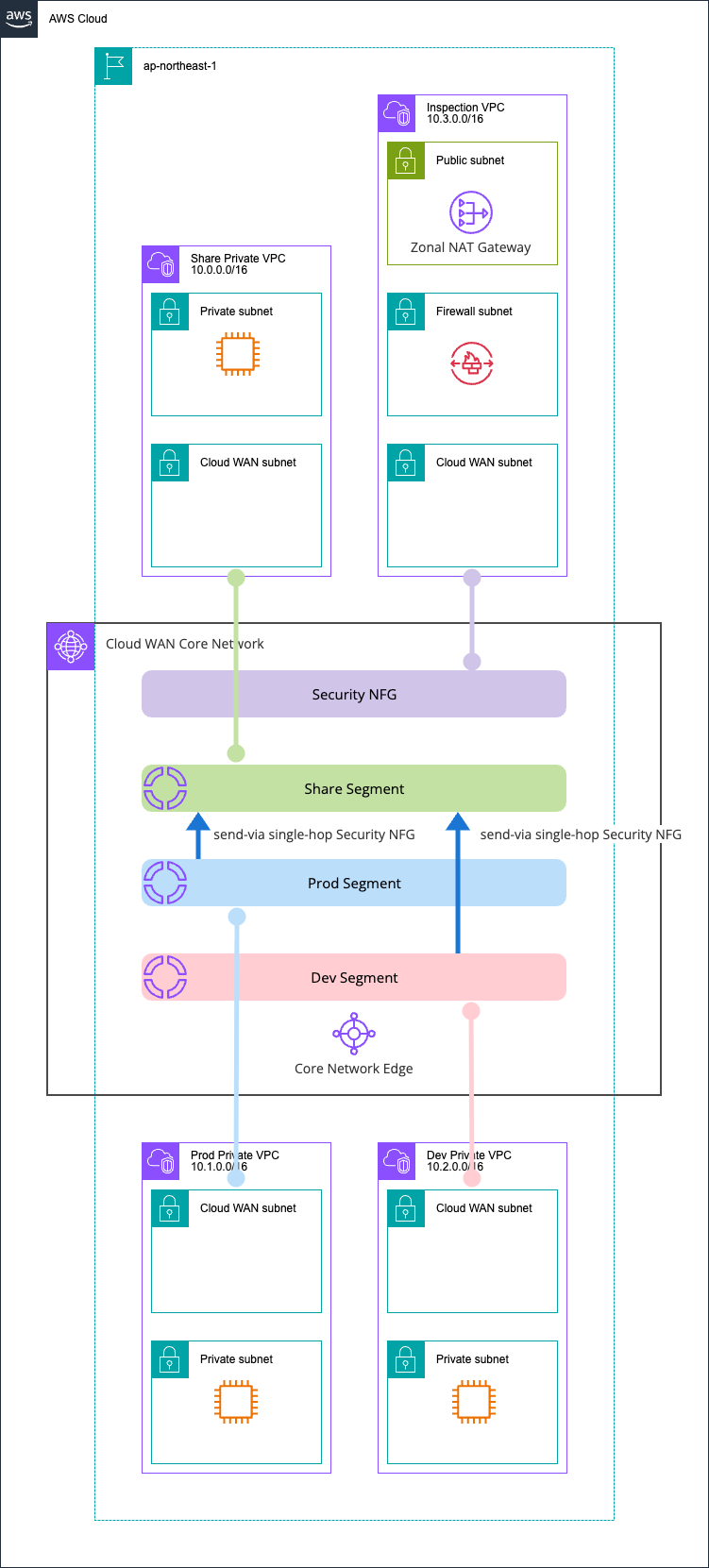
Core Networkのポリシーの差分は以下のとおりです。
> diff -u policy1.json policy2.json
--- policy1.json 2026-04-29 21:45:26
+++ policy2.json 2026-04-29 21:45:10
@@ -117,13 +117,20 @@
   ],
   "segment-actions": [
     {
-      "mode": "attachment-route",
+      "mode": "single-hop",
+      "when-sent-to": {
+        "segments": [
+          "prod",
+          "dev"
+        ]
+      },
       "segment": "share",
-      "action": "share",
-      "share-with": [
-        "prod",
-        "dev"
-      ]
+      "action": "send-via",
+      "via": {
+        "network-function-groups": [
+          "security"
+        ]
+      }
     }
   ]
 }
\ No newline at end of file
この状態でShareセグメントのルートを確認しましょう。
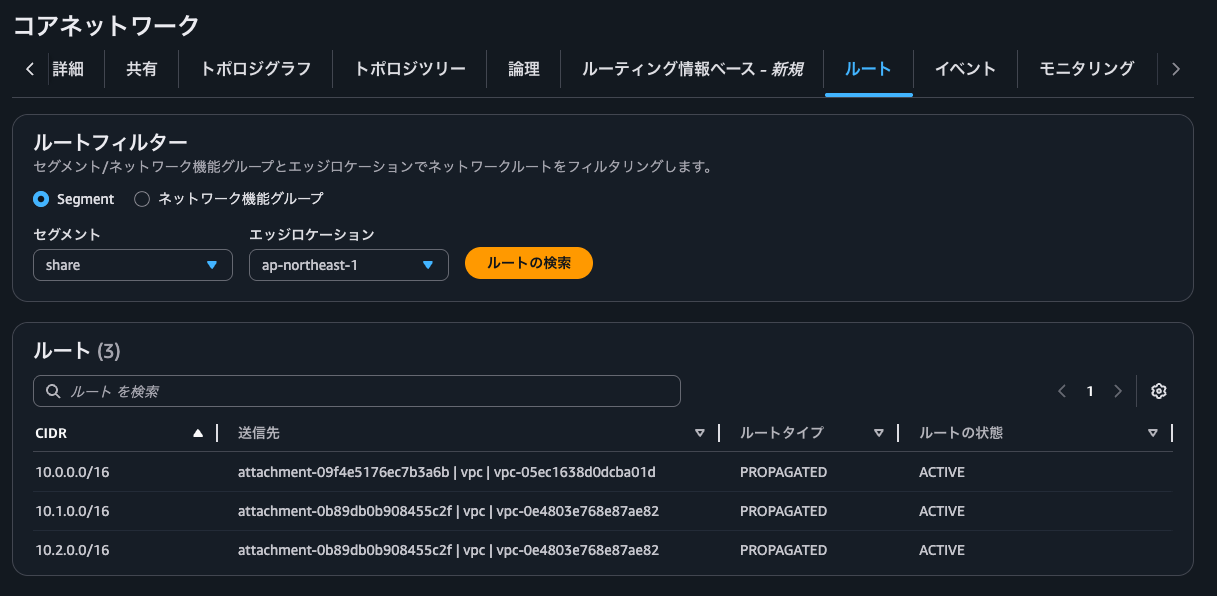
share actionと同様にProd Private VPCとDev Private VPCの両方のルートが確認できますね。
続いて、Prodセグメントです。
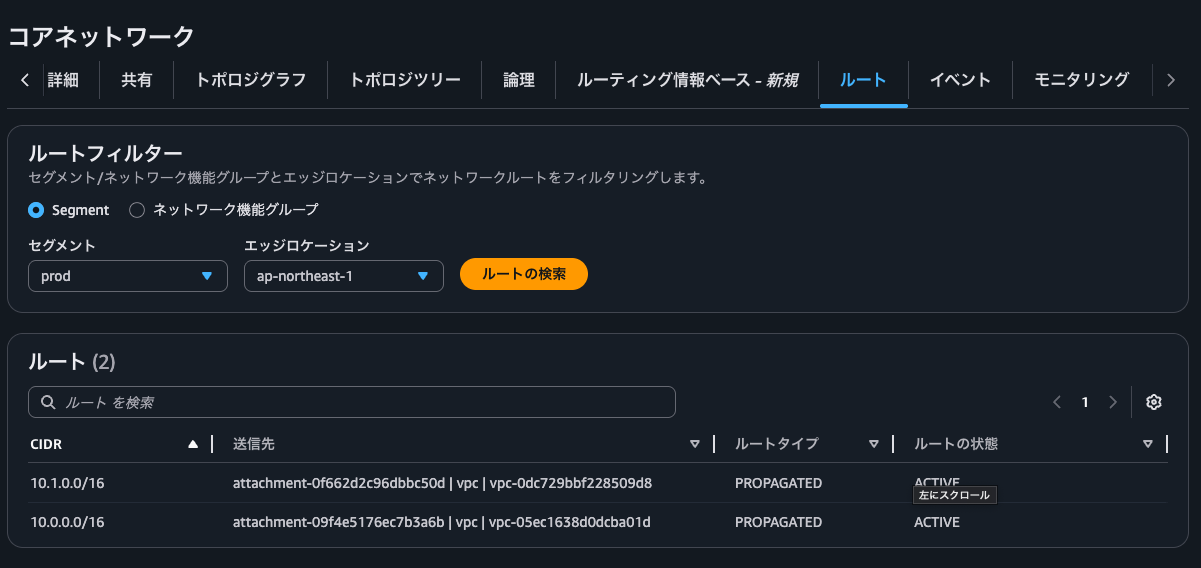
こちらもshare action時と同様です。
続いて、Devセグメントです。
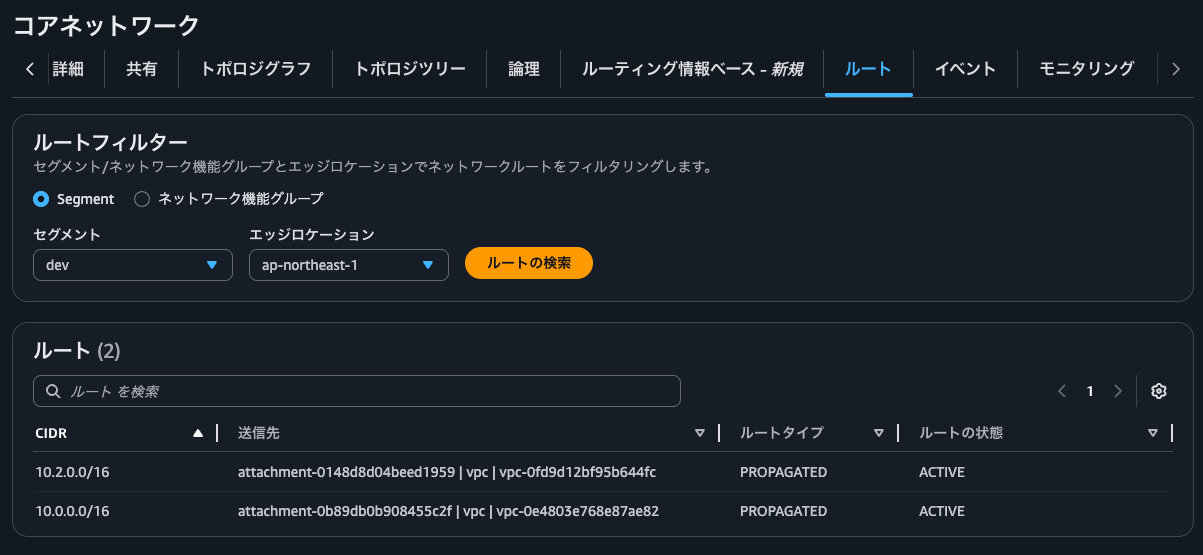
share action時と変わりないですね。
Security NFGのルートも確認します。
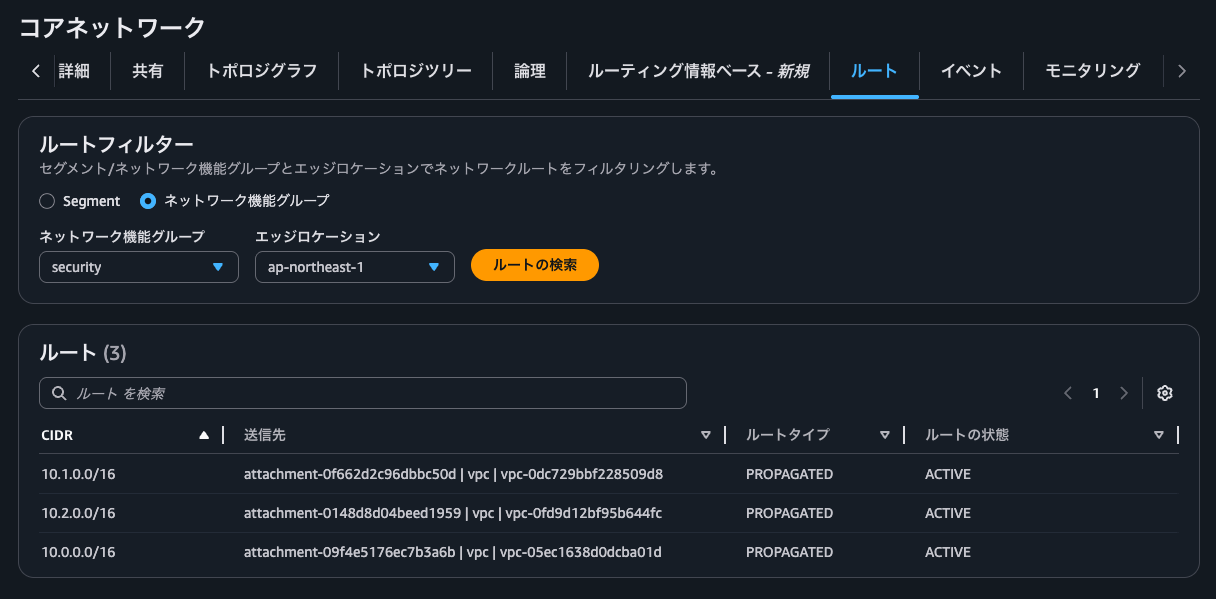
Shareセグメントのルート情報と全く同じですね。
ということで、send-via actionであっても推移的にルート伝播は行われません。
疎通確認をしてみましょう。
$ hostname -f
ip-10-1-0-242.ap-northeast-1.compute.internal

$ ping -c 4 10.2.0.75
PING 10.2.0.75 (10.2.0.75) 56(84) bytes of data.

--- 10.2.0.75 ping statistics ---
4 packets transmitted, 0 received, 100% packet loss, time 3095ms
$ hostname -f
ip-10-0-0-233.ap-northeast-1.compute.internal

$ ping -c 4 10.1.0.242
PING 10.1.0.242 (10.1.0.242) 56(84) bytes of data.
64 bytes from 10.1.0.242: icmp_seq=1 ttl=123 time=4.59 ms
64 bytes from 10.1.0.242: icmp_seq=2 ttl=123 time=1.61 ms
64 bytes from 10.1.0.242: icmp_seq=3 ttl=123 time=1.62 ms
64 bytes from 10.1.0.242: icmp_seq=4 ttl=123 time=1.73 ms

--- 10.1.0.242 ping statistics ---
4 packets transmitted, 4 received, 0% packet loss, time 3005ms
rtt min/avg/max/mdev = 1.606/2.386/4.591/1.273 ms
$ hostname -f
ip-10-0-0-233.ap-northeast-1.compute.internal

$ ping -c 4 10.2.0.75
PING 10.2.0.75 (10.2.0.75) 56(84) bytes of data.
64 bytes from 10.2.0.75: icmp_seq=1 ttl=123 time=4.51 ms
64 bytes from 10.2.0.75: icmp_seq=2 ttl=123 time=0.975 ms
64 bytes from 10.2.0.75: icmp_seq=3 ttl=123 time=0.974 ms
64 bytes from 10.2.0.75: icmp_seq=4 ttl=123 time=0.966 ms

--- 10.2.0.75 ping statistics ---
4 packets transmitted, 4 received, 0% packet loss, time 3004ms
rtt min/avg/max/mdev = 0.966/1.856/4.510/1.532 ms
ちなみに、Network Firewallのログを確認すると、以下のようにsend-viaの検証をした際のShare Private VPCからの通信のものが記録されていました。
{
    "firewall_name": "AwsCdkCloudWnspectionVpc2F340095",
    "availability_zone": "ap-northeast-1a",
    "event_timestamp": "1777467133",
    "event": {
        "icmp_type": 8,
        "aws_category": "",
        "src_ip": "10.0.0.233",
        "src_port": 0,
        "event_type": "alert",
        "alert": {
            "severity": 3,
            "signature_id": 2000002,
            "rev": 1,
            "signature": "ICMP ping detected",
            "action": "allowed",
            "category": ""
        },
        "flow_id": 1586168575467861,
        "dest_ip": "10.1.0.242",
        "proto": "ICMP",
        "verdict": {
            "action": "alert"
        },
        "icmp_code": 0,
        "dest_port": 0,
        "pkt_src": "geneve encapsulation",
        "timestamp": "2026-04-29T12:52:13.828060+0000",
        "direction": "to_server"
    }
}
{
    "firewall_name": "AwsCdkCloudWnspectionVpc2F340095",
    "availability_zone": "ap-northeast-1a",
    "event_timestamp": "1777467188",
    "event": {
        "icmp_type": 8,
        "aws_category": "",
        "src_ip": "10.0.0.233",
        "src_port": 0,
        "event_type": "alert",
        "alert": {
            "severity": 3,
            "signature_id": 2000002,
            "rev": 1,
            "signature": "ICMP ping detected",
            "action": "allowed",
            "category": ""
        },
        "flow_id": 1173452449120460,
        "dest_ip": "10.2.0.75",
        "proto": "ICMP",
        "verdict": {
            "action": "alert"
        },
        "icmp_code": 0,
        "dest_port": 0,
        "pkt_src": "geneve encapsulation",
        "timestamp": "2026-04-29T12:53:08.142143+0000",
        "direction": "to_server"
    }
}
こまめにCloud WANの各セグメントのルート情報は確認しておこう
AWS Cloud WAN の Service Insertion の send-via は推移的にルート伝播を行わないことを確認してみました。
セグメントやセグメントアクション、ルーティングポリシーが増えてくるとどうしても考慮漏れは起きてしまいます。個人的にはこまめにCloud WANの各セグメントのルート情報は確認しておきたいところです。
その時はぜひ以下記事で紹介しているように、Core Networkのトポロジグラフタブや論理タブから確認できる情報が役に立つはずです。
この記事が誰かの助けになれば幸いです。
以上、クラウド事業本部 コンサルティング部の のんピ(@non____97)でした!