I Checked That Send-Via in AWS Cloud WAN Service Insertion Does Not Propagate Routes Transitively

This page has been translated by machine translation. View original
The share action doesn't propagate routes transitively, but what about the send-via action?
Hello, this is Nonpi (@non____97).
When using AWS Cloud WAN, have you ever wondered whether route information is propagated transitively when you configure the send-via action? I have.
As for the share action, transitive propagation is not performed, as described below.
share attachments across segments. Use the share action so that attachments from two different segments can reach each other. For example, if you've set a segment to isolate-attachments, the segment can't reach anything unless it has a share relationship with other segments. The share statement creates routes between attachments in the provided segments. If you're creating a share between one segment and an array of segments, the segment to share allows attachments from the segments in the array. However, sharing does not occur between the segments within the array. For example, if a segment named shared-service is defined as a segment with a share-with array of segments named prod and prod2, the network policy will allow the attachments in both prod and prod2 to reach shared-service. But the network policy will not allow sharing of attachments between prod and prod2.
Core network policy version parameters in AWS Cloud WAN - AWS Network Manager
As a result, when multiple segments are shared via the share action, routes between segments that are not directly connected by the share action are not propagated.
On the other hand, for the send-via action, I couldn't find any such mention in the documentation.
I don't think send-via would behave that way, but just to be safe, let's actually verify its behavior.
Let's try it
Test environment
The test environment is as follows.
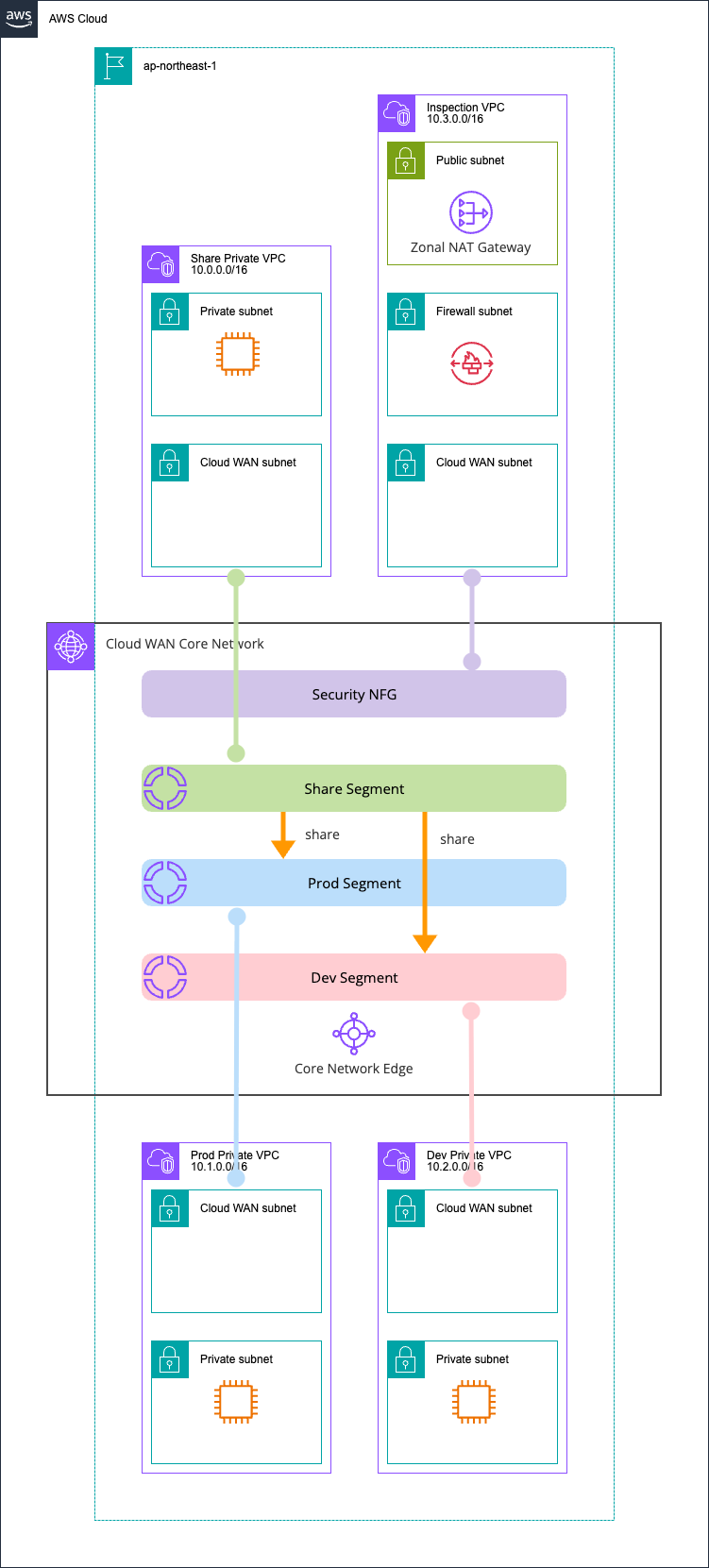
There are three segments, Prod, Dev, and Share, plus a Security NFG.
We will confirm that Prod and Dev cannot communicate with each other.
All resources were deployed with AWS CDK. The code I used is in the following GitHub repository.
For reference, the Core Network Policy is as follows.
{
  "core-network-configuration": {
    "vpn-ecmp-support": true,
    "asn-ranges": [
      "65000-65099"
    ],
    "edge-locations": [
      {
        "location": "ap-northeast-1",
        "asn": 65001
      }
    ],
    "inside-cidr-blocks": [
      "192.168.0.0/16"
    ]
  },
  "version": "2021.12",
  "attachment-policies": [
    {
      "rule-number": 100,
      "condition-logic": "or",
      "description": "attachment segment share",
      "action": {
        "association-method": "constant",
        "segment": "share"
      },
      "conditions": [
        {
          "type": "tag-value",
          "value": "share",
          "operator": "equals",
          "key": "cloudwan-seg"
        }
      ]
    },
    {
      "rule-number": 200,
      "condition-logic": "or",
      "description": "attachment segment prod",
      "action": {
        "association-method": "constant",
        "segment": "prod"
      },
      "conditions": [
        {
          "type": "tag-value",
          "value": "prod",
          "operator": "equals",
          "key": "cloudwan-seg"
        }
      ]
    },
    {
      "rule-number": 300,
      "condition-logic": "or",
      "description": "attachment segment dev",
      "action": {
        "association-method": "constant",
        "segment": "dev"
      },
      "conditions": [
        {
          "type": "tag-value",
          "value": "dev",
          "operator": "equals",
          "key": "cloudwan-seg"
        }
      ]
    },
    {
      "rule-number": 400,
      "condition-logic": "or",
      "description": "attachment nfg security",
      "action": {
        "add-to-network-function-group": "security"
      },
      "conditions": [
        {
          "type": "tag-value",
          "value": "security",
          "operator": "equals",
          "key": "cloudwan-nfg"
        }
      ]
    }
  ],
  "network-function-groups": [
    {
      "name": "security",
      "require-attachment-acceptance": false
    }
  ],
  "segments": [
    {
      "name": "share",
      "require-attachment-acceptance": false,
      "edge-locations": [
        "ap-northeast-1"
      ]
    },
    {
      "isolate-attachments": false,
      "name": "prod",
      "require-attachment-acceptance": false,
      "edge-locations": [
        "ap-northeast-1"
      ]
    },
    {
      "isolate-attachments": false,
      "name": "dev",
      "require-attachment-acceptance": false,
      "edge-locations": [
        "ap-northeast-1"
      ]
    }
  ],
  "segment-actions": [
    {
      "mode": "attachment-route",
      "segment": "share",
      "action": "share",
      "share-with": [
        "prod",
        "dev"
      ]
    }
  ]
}
When connecting the Share segment to each segment with the share action
Let's check the case where the Share segment is connected to each segment with the share action.
First, check the routes of the Share segment in this state.
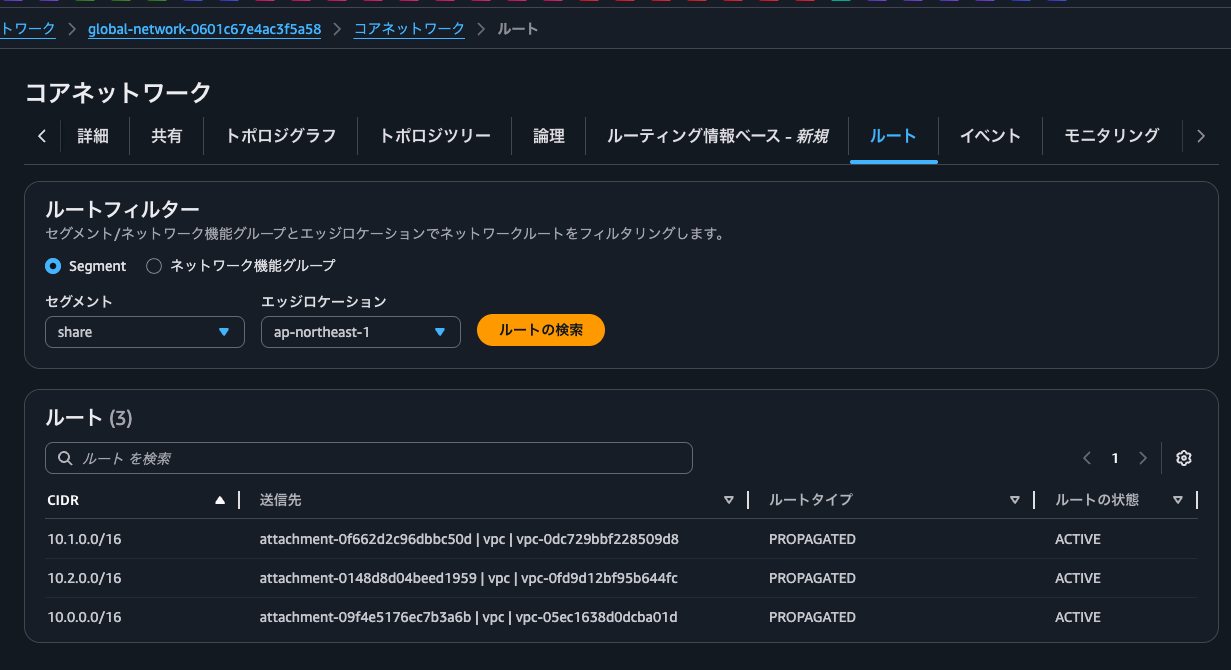
You can see the routes of both the Prod Private VPC and the Dev Private VPC.
Next, the Prod segment.
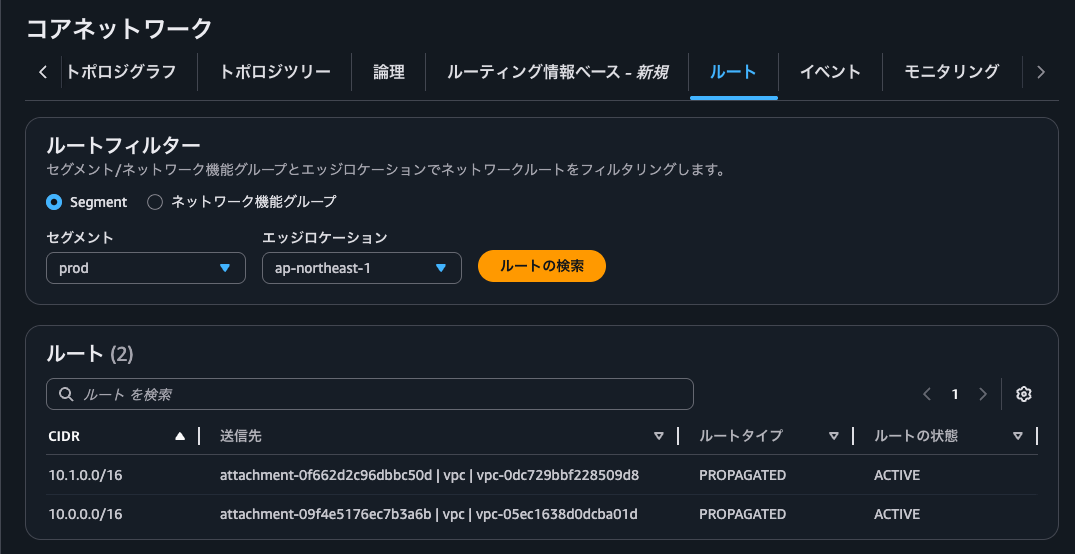
You can see the routes of the VPC in its own segment and the VPC in the Share segment.
By the way, if you set "isolate-attachments": false, the routes of attachments in its own segment are not visible. (In this case, 10.1.0.0/16)
Next, the Dev segment.
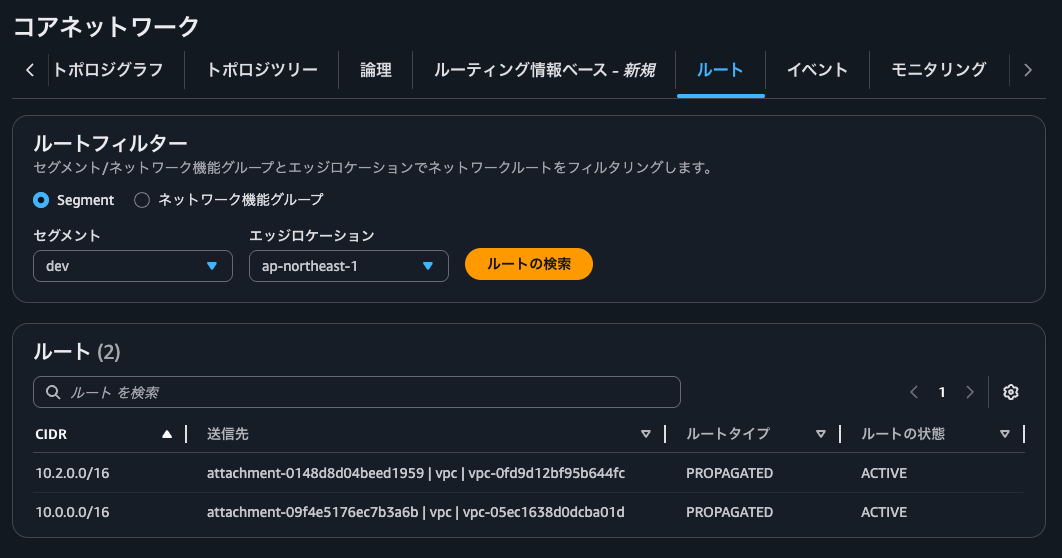
As with the Prod segment, you can see the routes of the VPC in its own segment and the VPC in the Share segment.
Let's actually test connectivity.
$ hostname -f
ip-10-1-0-242.ap-northeast-1.compute.internal

$ ping -c 4 10.2.0.75
PING 10.2.0.75 (10.2.0.75) 56(84) bytes of data.

--- 10.2.0.75 ping statistics ---
4 packets transmitted, 0 received, 100% packet loss, time 3138ms
$ hostname -f
ip-10-0-0-233.ap-northeast-1.compute.internal

$ ping -c 4 10.1.0.242
PING 10.1.0.242 (10.1.0.242) 56(84) bytes of data.
64 bytes from 10.1.0.242: icmp_seq=1 ttl=126 time=0.551 ms
64 bytes from 10.1.0.242: icmp_seq=2 ttl=126 time=0.339 ms
64 bytes from 10.1.0.242: icmp_seq=3 ttl=126 time=0.340 ms
64 bytes from 10.1.0.242: icmp_seq=4 ttl=126 time=0.357 ms
$ hostname -f
ip-10-0-0-233.ap-northeast-1.compute.internal

$ ping -c 4 10.2.0.75
PING 10.2.0.75 (10.2.0.75) 56(84) bytes of data.
64 bytes from 10.2.0.75: icmp_seq=1 ttl=126 time=0.794 ms
64 bytes from 10.2.0.75: icmp_seq=2 ttl=126 time=0.349 ms
64 bytes from 10.2.0.75: icmp_seq=3 ttl=126 time=0.291 ms
64 bytes from 10.2.0.75: icmp_seq=4 ttl=126 time=0.285 ms

--- 10.2.0.75 ping statistics ---
4 packets transmitted, 4 received, 0% packet loss, time 3145ms
rtt min/avg/max/mdev = 0.285/0.429/0.794/0.211 ms
$
As expected, Prod and Dev cannot communicate directly, and we confirmed that only Share, which sits in the middle, can communicate with both.
When connecting the Share segment to each segment with the send-via action
This is the case where the Share segment is connected to each segment with the send-via action.
The architecture diagram is as follows.
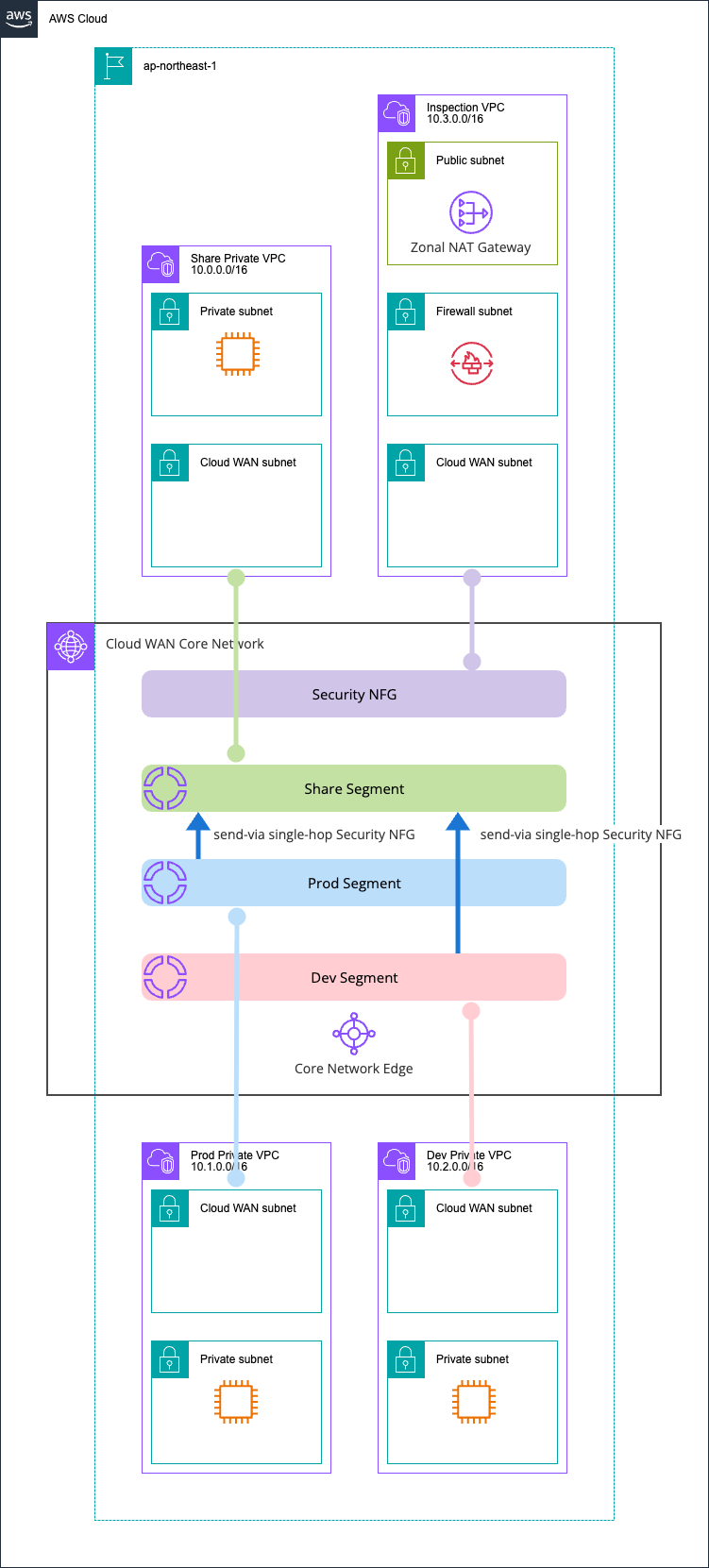
The difference in the Core Network policy is as follows.
> diff -u policy1.json policy2.json
--- policy1.json 2026-04-29 21:45:26
+++ policy2.json 2026-04-29 21:45:10
@@ -117,13 +117,20 @@
   ],
   "segment-actions": [
     {
-      "mode": "attachment-route",
+      "mode": "single-hop",
+      "when-sent-to": {
+        "segments": [
+          "prod",
+          "dev"
+        ]
+      },
       "segment": "share",
-      "action": "share",
-      "share-with": [
-        "prod",
-        "dev"
-      ]
+      "action": "send-via",
+      "via": {
+        "network-function-groups": [
+          "security"
+        ]
+      }
     }
   ]
 }
\ No newline at end of file
Let's check the routes of the Share segment in this state.
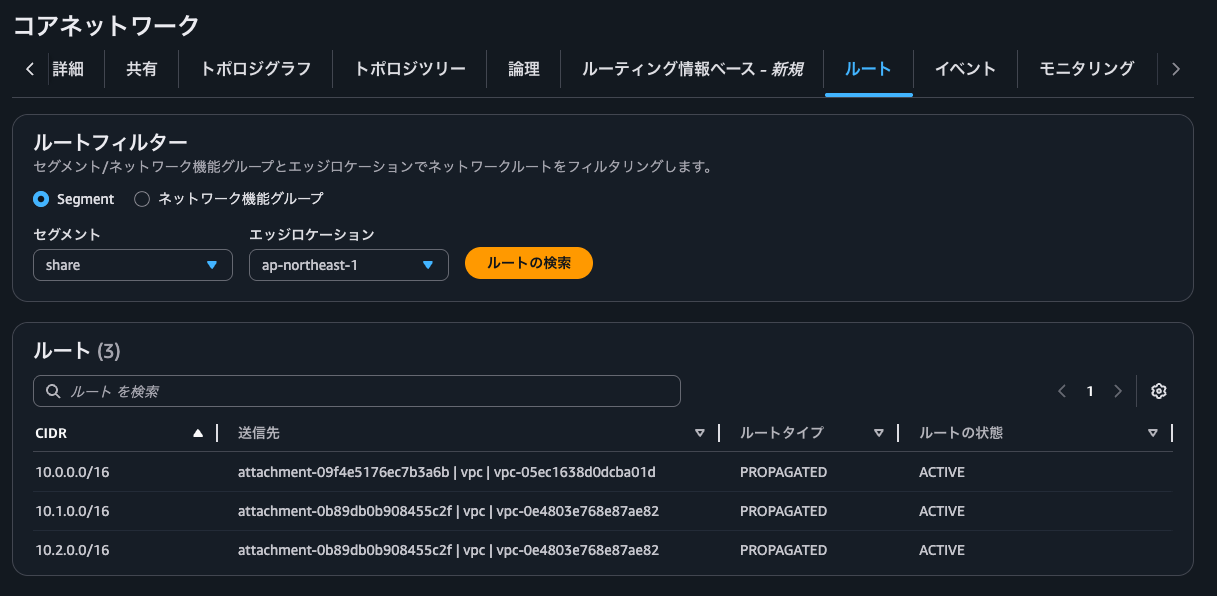
As with the share action, you can see the routes of both the Prod Private VPC and the Dev Private VPC.
Next, the Prod segment.
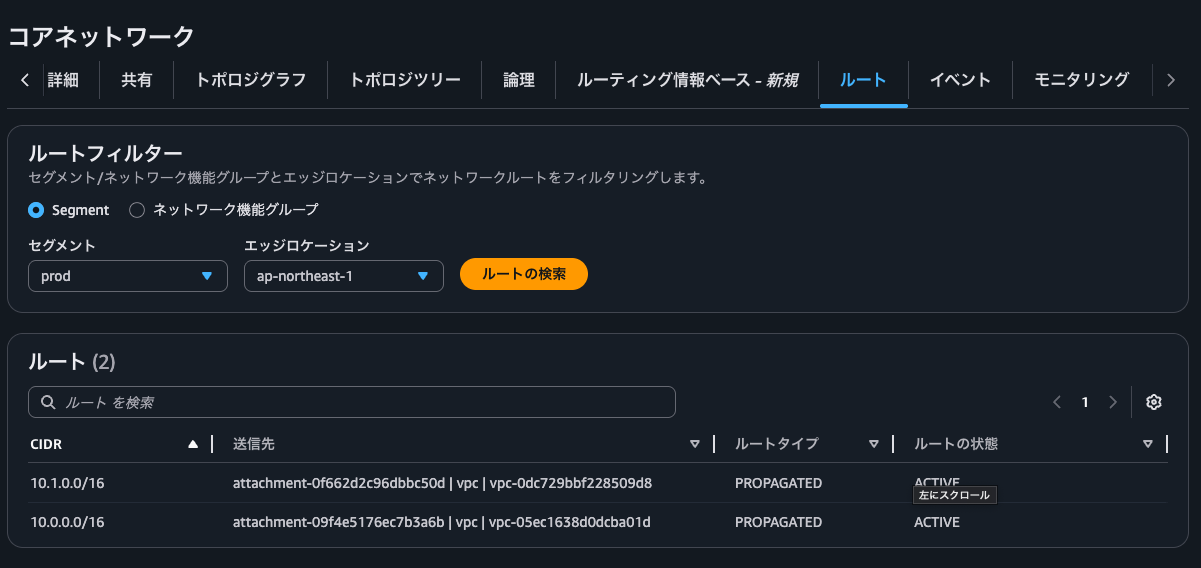
This is the same as with the share action.
Next, the Dev segment.
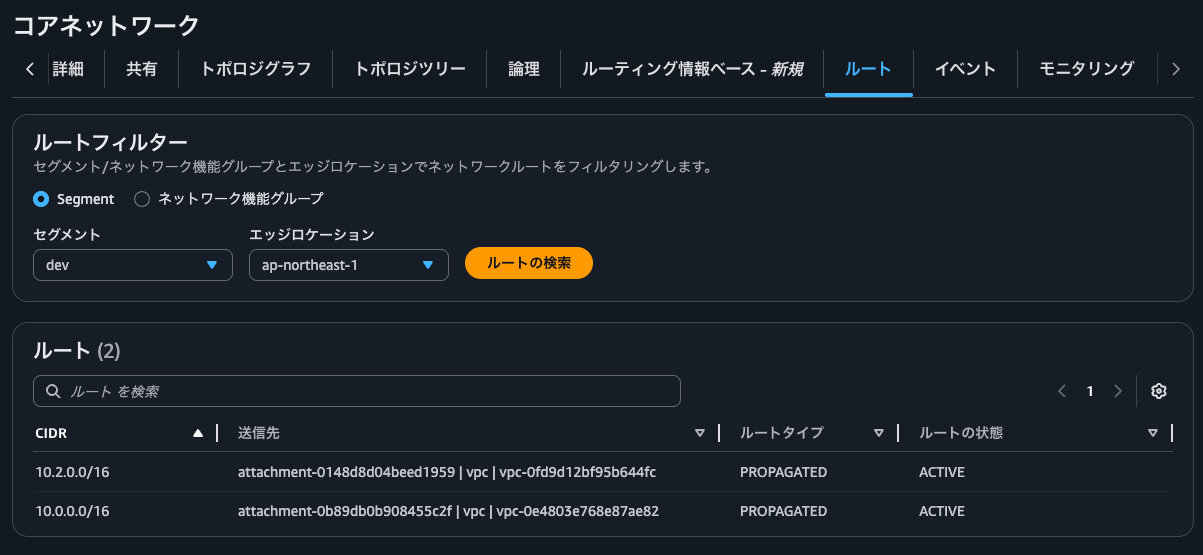
No different from the share action.
Let's also check the routes of the Security NFG.
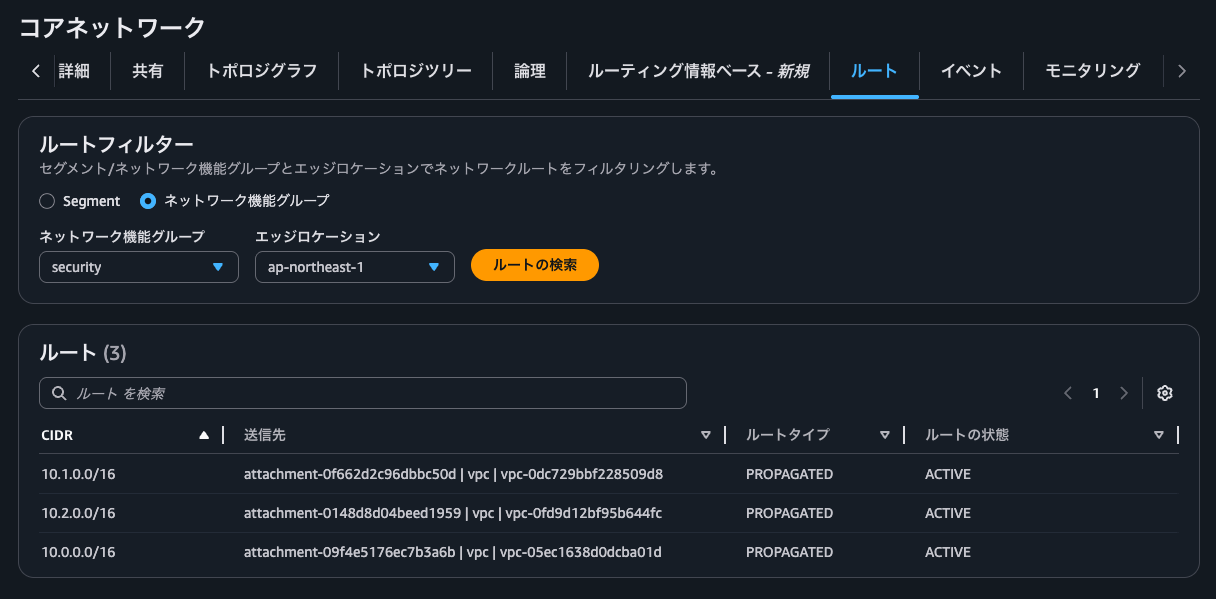
It's exactly the same as the route information of the Share segment.
So, even with the send-via action, routes are not propagated transitively.
Let's test connectivity.
$ hostname -f
ip-10-1-0-242.ap-northeast-1.compute.internal

$ ping -c 4 10.2.0.75
PING 10.2.0.75 (10.2.0.75) 56(84) bytes of data.

--- 10.2.0.75 ping statistics ---
4 packets transmitted, 0 received, 100% packet loss, time 3095ms
$ hostname -f
ip-10-0-0-233.ap-northeast-1.compute.internal

$ ping -c 4 10.1.0.242
PING 10.1.0.242 (10.1.0.242) 56(84) bytes of data.
64 bytes from 10.1.0.242: icmp_seq=1 ttl=123 time=4.59 ms
64 bytes from 10.1.0.242: icmp_seq=2 ttl=123 time=1.61 ms
64 bytes from 10.1.0.242: icmp_seq=3 ttl=123 time=1.62 ms
64 bytes from 10.1.0.242: icmp_seq=4 ttl=123 time=1.73 ms

--- 10.1.0.242 ping statistics ---
4 packets transmitted, 4 received, 0% packet loss, time 3005ms
rtt min/avg/max/mdev = 1.606/2.386/4.591/1.273 ms
$ hostname -f
ip-10-0-0-233.ap-northeast-1.compute.internal

$ ping -c 4 10.2.0.75
PING 10.2.0.75 (10.2.0.75) 56(84) bytes of data.
64 bytes from 10.2.0.75: icmp_seq=1 ttl=123 time=4.51 ms
64 bytes from 10.2.0.75: icmp_seq=2 ttl=123 time=0.975 ms
64 bytes from 10.2.0.75: icmp_seq=3 ttl=123 time=0.974 ms
64 bytes from 10.2.0.75: icmp_seq=4 ttl=123 time=0.966 ms

--- 10.2.0.75 ping statistics ---
4 packets transmitted, 4 received, 0% packet loss, time 3004ms
rtt min/avg/max/mdev = 0.966/1.856/4.510/1.532 ms
By the way, when I checked the Network Firewall logs, traffic from the Share Private VPC during the send-via test was recorded as shown below.
{
    "firewall_name": "AwsCdkCloudWnspectionVpc2F340095",
    "availability_zone": "ap-northeast-1a",
    "event_timestamp": "1777467133",
    "event": {
        "icmp_type": 8,
        "aws_category": "",
        "src_ip": "10.0.0.233",
        "src_port": 0,
        "event_type": "alert",
        "alert": {
            "severity": 3,
            "signature_id": 2000002,
            "rev": 1,
            "signature": "ICMP ping detected",
            "action": "allowed",
            "category": ""
        },
        "flow_id": 1586168575467861,
        "dest_ip": "10.1.0.242",
        "proto": "ICMP",
        "verdict": {
            "action": "alert"
        },
        "icmp_code": 0,
        "dest_port": 0,
        "pkt_src": "geneve encapsulation",
        "timestamp": "2026-04-29T12:52:13.828060+0000",
        "direction": "to_server"
    }
}
{
    "firewall_name": "AwsCdkCloudWnspectionVpc2F340095",
    "availability_zone": "ap-northeast-1a",
    "event_timestamp": "1777467188",
    "event": {
        "icmp_type": 8,
        "aws_category": "",
        "src_ip": "10.0.0.233",
        "src_port": 0,
        "event_type": "alert",
        "alert": {
            "severity": 3,
            "signature_id": 2000002,
            "rev": 1,
            "signature": "ICMP ping detected",
            "action": "allowed",
            "category": ""
        },
        "flow_id": 1173452449120460,
        "dest_ip": "10.2.0.75",
        "proto": "ICMP",
        "verdict": {
            "action": "alert"
        },
        "icmp_code": 0,
        "dest_port": 0,
        "pkt_src": "geneve encapsulation",
        "timestamp": "2026-04-29T12:53:08.142143+0000",
        "direction": "to_server"
    }
}
Check the route information of each Cloud WAN segment regularly
I confirmed that send-via in AWS Cloud WAN Service Insertion does not propagate routes transitively.
As segments, segment actions, and routing policies increase, oversights inevitably occur. Personally, I'd like to check the route information of each Cloud WAN segment regularly.
When you do, the information available from the Topology graph tab and the Logical tab of the Core Network, as introduced in the following article, should be useful.
I hope this article helps someone.
This was Nonpi (@non____97) from the Consulting Department, Cloud Business Division!
