
I tried checking the presence of CloudTrail local trails, event selectors, and Insights settings within an organization using AWS Config Aggregator

This page has been translated by machine translation. View original
Introduction
When operating AWS CloudTrail across multiple accounts under AWS Organizations, even if an organization trail has been created, individual trails (hereafter referred to as local trails) may remain in each member account.
Organization trails can record not only management events, but also data events, network activity events, and CloudTrail Insights events. On the other hand, if the event types recorded by the organization trail overlap with those recorded by local trails in member accounts, the local trails may have become unnecessary.
However, caution is required if there are events configured only in the local trail. For example, if the organization trail records only management events, while the local trail records data events, network activity events, or CloudTrail Insights events, deleting the local trail may result in the inability to obtain necessary logs.
- Data events
- Network activity events
- CloudTrail Insights events
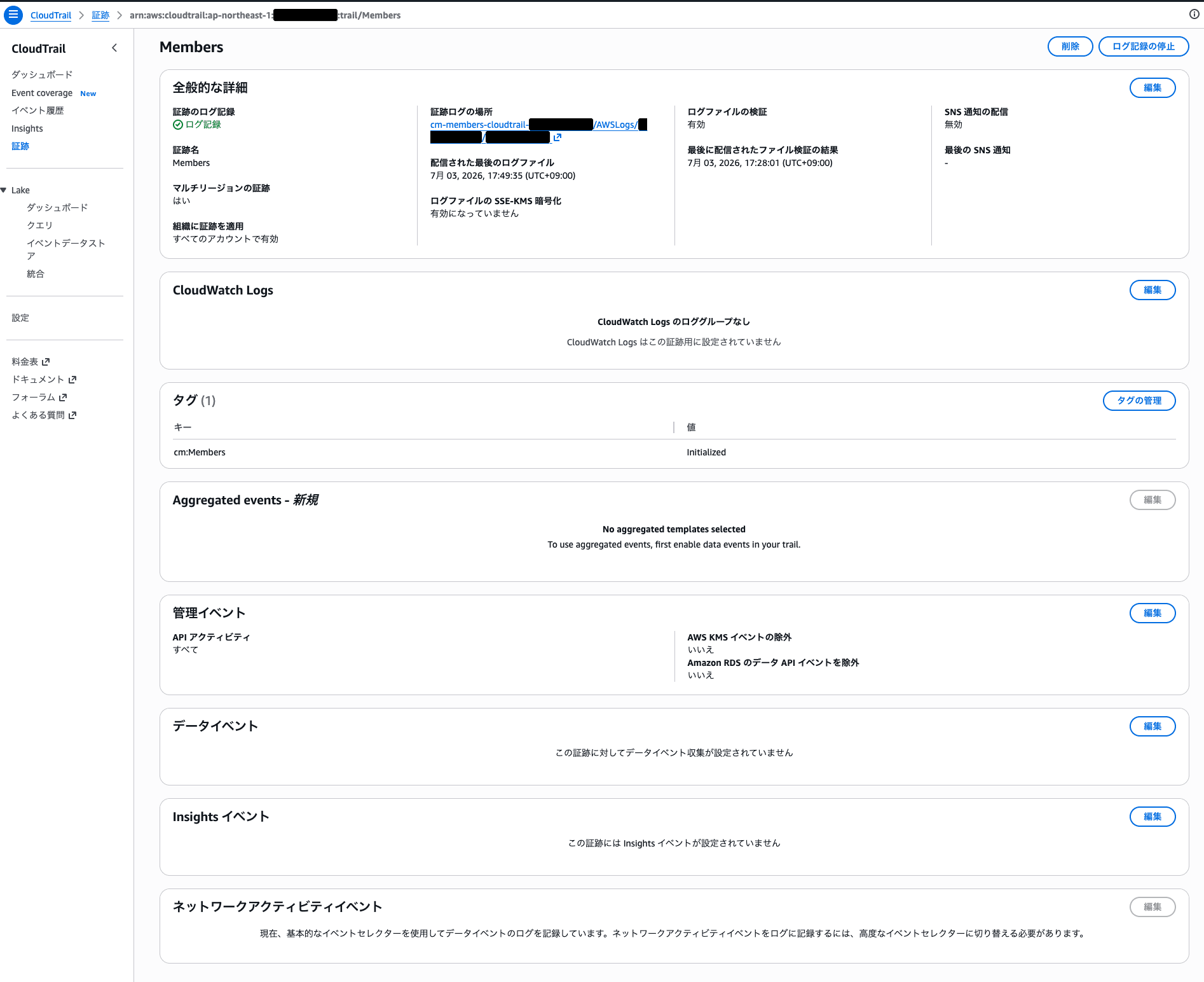
In addition to management events, CloudTrail trails can be configured with data events, Insights events, network activity events, and more
Therefore, as a preliminary investigation for organizing and deleting unnecessary local trails, we will use the AWS Config aggregator's Advanced Query to comprehensively list the local trails existing within the organization, and extract trails that may be recording events other than management events based on whether custom event selectors or CloudTrail Insights events are configured.
Advanced Query is a feature that queries resource configuration information recorded by AWS Config in SQL format. Combined with an aggregator, it allows you to check resource configurations across multiple accounts and multiple regions from a central account.
Note that this article focuses specifically on checking whether custom event selectors or CloudTrail Insights events are configured.
If custom event selectors are configured, you will need to check the details of the event selectors and verify the actual types of events being recorded.
Prerequisites
The following prerequisites apply in this case.
- Multiple accounts are being operated under AWS Organizations
- An organization trail has already been created
- An AWS Config aggregator has already been created
- Resource configurations of accounts within the organization are aggregated in the AWS Config aggregator
AWS::CloudTrail::Trailis included as a recording target in AWS Config- You have permissions to run AWS Config Advanced Query
In this article, we will operate from the account where the AWS Config aggregator is created.
What We Want to Check
The two things we want to check this time are as follows.
- List all local trails existing within the organization
- Among the local trails, extract those that have custom event selectors or CloudTrail Insights events configured and require individual review
In this article, trails created individually in each AWS account, as opposed to organization trails, are referred to as local trails.
Opening AWS Config Advanced Query
From the AWS Config console, navigate to [Advanced queries] and click [New query].
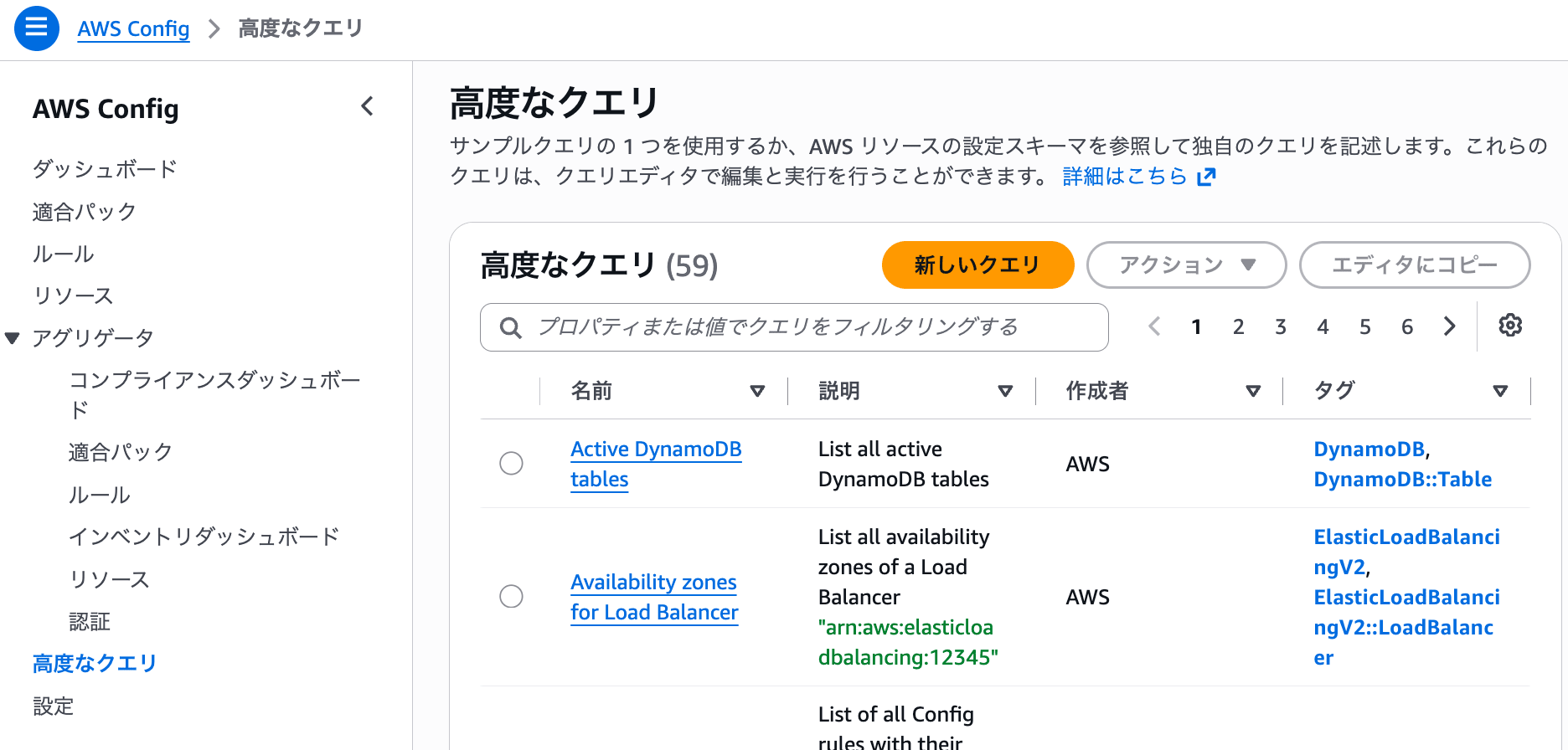
Create a new query on the AWS Config Advanced Query screen
Then, specify the created aggregator, enter the query, and execute it.
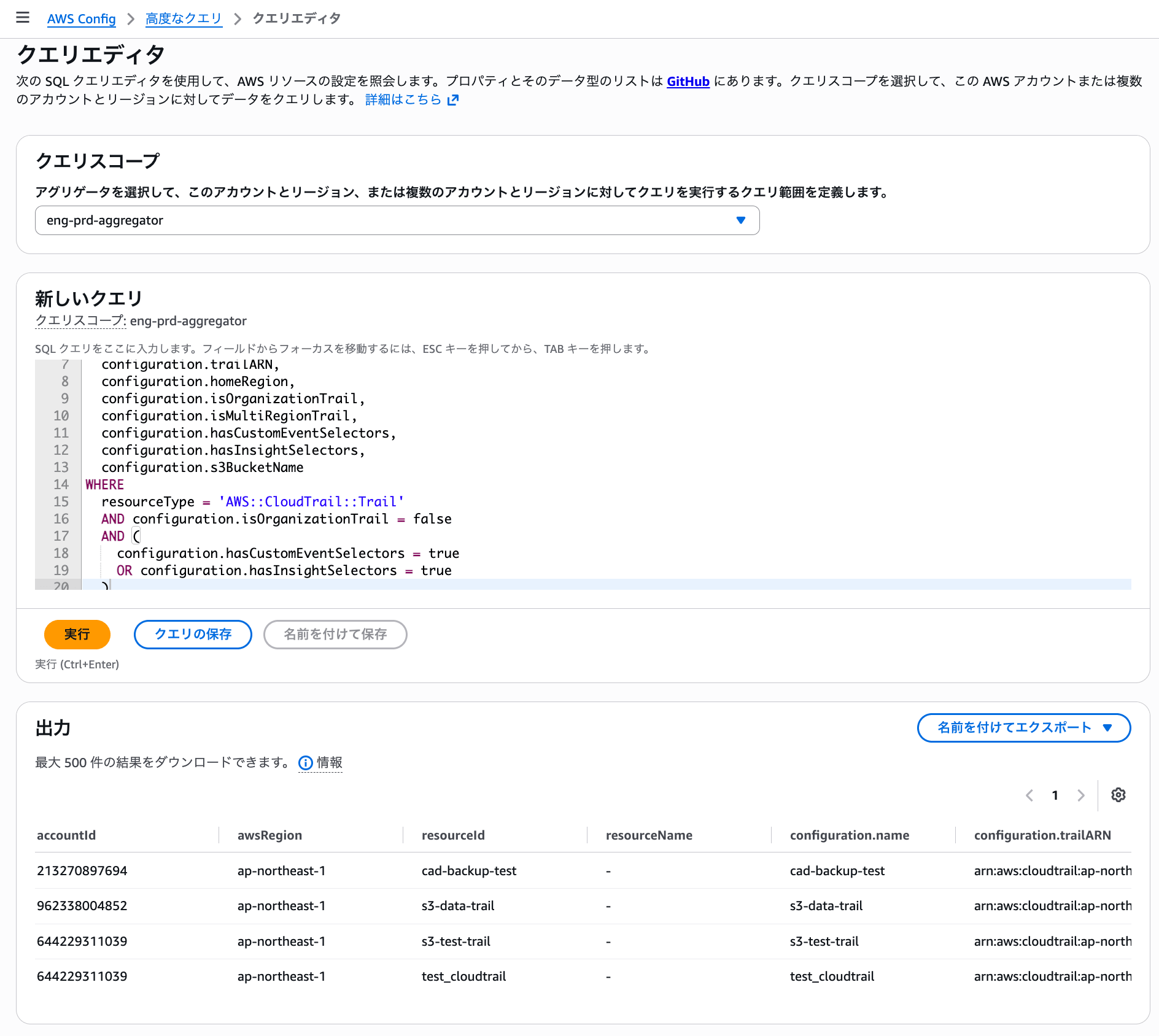
Specify the created aggregator, enter the query, and execute it
This time, we will check the configuration information of AWS::CloudTrail::Trail aggregated in the AWS Config aggregator.
Outputting All Local Trails
First, output all local trails.
Execute the following in AWS Config Advanced Query.
SELECT
  accountId,
  awsRegion,
  resourceId,
  resourceName,
  configuration.name,
  configuration.trailARN,
  configuration.homeRegion,
  configuration.isOrganizationTrail,
  configuration.isMultiRegionTrail,
  configuration.hasCustomEventSelectors,
  configuration.hasInsightSelectors,
  configuration.s3BucketName
WHERE
  resourceType = 'AWS::CloudTrail::Trail'
  AND configuration.isOrganizationTrail = false
This query extracts only those resources of resourceType = 'AWS::CloudTrail::Trail' where configuration.isOrganizationTrail = false.
The main items to check are as follows.
| Item | Description |
|---|---|
accountId |
The AWS account ID where the trail exists |
awsRegion |
The region recorded by AWS Config |
configuration.name |
CloudTrail trail name |
configuration.trailARN |
CloudTrail trail ARN |
configuration.homeRegion |
The home region of the trail |
configuration.isOrganizationTrail |
Whether it is an organization trail. Those with false are local trails |
configuration.isMultiRegionTrail |
Whether it is a multi-region trail |
configuration.hasCustomEventSelectors |
Whether custom event selectors are configured |
configuration.hasInsightSelectors |
Whether CloudTrail Insights events are configured |
configuration.s3BucketName |
The S3 bucket to which CloudTrail logs are delivered |
This query allows you to list the local trails existing in accounts within the organization.
After execution, the output can be viewed on the console. If needed, the results can also be exported in CSV or JSON format.
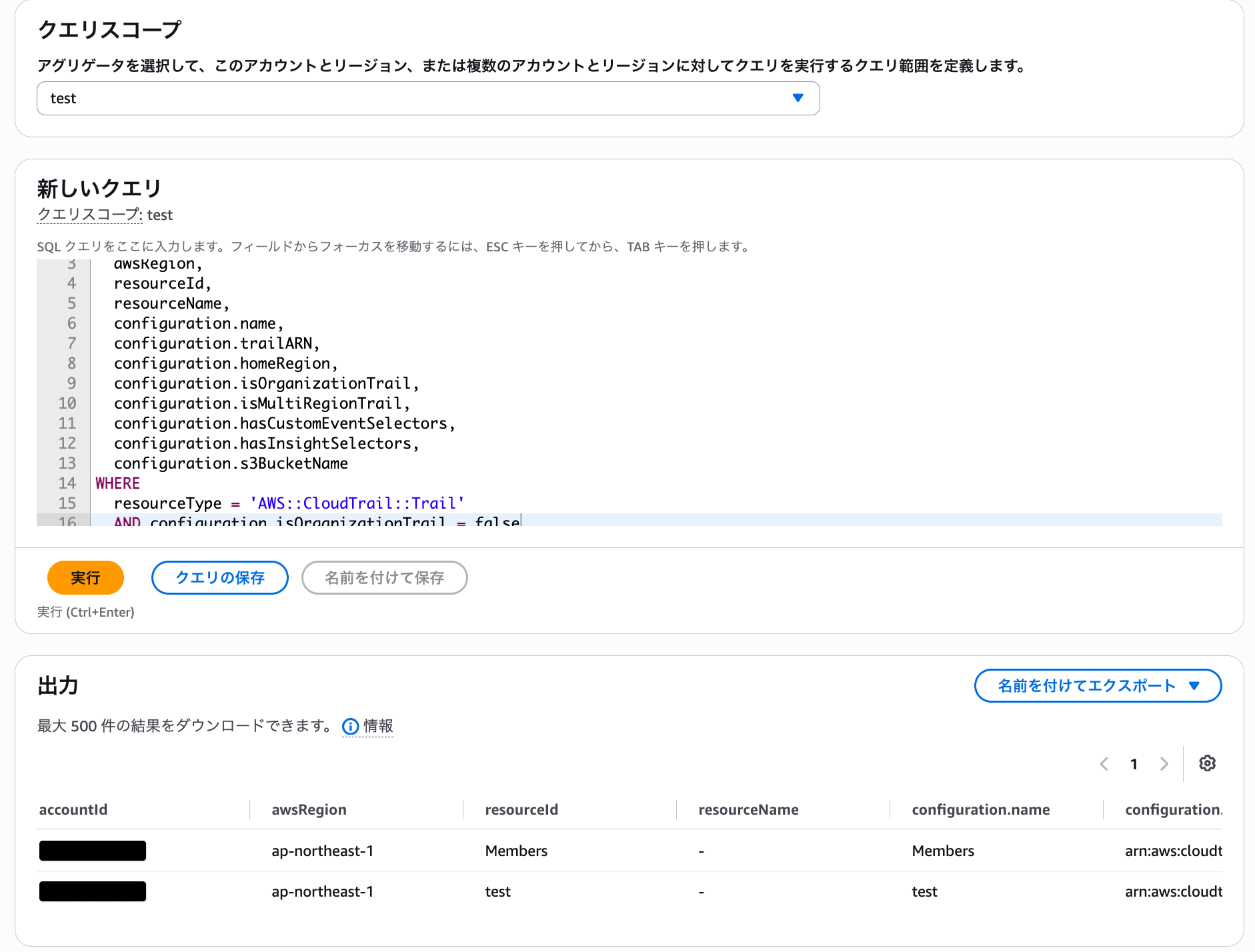
Query execution results can be checked on the console and exported in CSV or JSON format
For example, you might see results like the following.
The account IDs are for illustration purposes.
| accountId | awsRegion | Trail name | isOrganizationTrail | isMultiRegionTrail | hasCustomEventSelectors | hasInsightSelectors |
|---|---|---|---|---|---|---|
111111111111 |
ap-northeast-1 |
Members |
false |
true |
false |
false |
222222222222 |
ap-northeast-1 |
app-prd-trail |
false |
true |
false |
false |
222222222222 |
ap-northeast-1 |
s3-data-trail |
false |
true |
true |
false |
In this way, you can view a list of local trails existing in each member account.
Extracting Local Trails with Custom Event Selectors or Insights Configured
Next, extract local trails that have custom event selectors or CloudTrail Insights events configured.
SELECT
  accountId,
  awsRegion,
  resourceId,
  resourceName,
  configuration.name,
  configuration.trailARN,
  configuration.homeRegion,
  configuration.isOrganizationTrail,
  configuration.isMultiRegionTrail,
  configuration.hasCustomEventSelectors,
  configuration.hasInsightSelectors,
  configuration.s3BucketName
WHERE
  resourceType = 'AWS::CloudTrail::Trail'
  AND configuration.isOrganizationTrail = false
  AND (
    configuration.hasCustomEventSelectors = true
    OR configuration.hasInsightSelectors = true
  )
This query extracts local trails that match either of the following conditions.
configuration.hasCustomEventSelectors = trueconfiguration.hasInsightSelectors = true
hasCustomEventSelectors indicates whether the CloudTrail trail has custom event selectors.
CloudTrail event selectors allow you to control the configuration of management events and data events. The documentation states that a trail created without specifying particular event selectors records read and write management events by default, and does not record data events.
Therefore, trails with hasCustomEventSelectors = true may be recording data events or network activity events.
However, custom event selectors and advanced event selectors can also be used to customize the read/write type, event source, and other settings targeting only management events. Therefore, hasCustomEventSelectors = true alone is not conclusive evidence that data events or network activity events are being recorded.
Execution Results
In this environment, the following results were obtained as local trails that have custom event selectors or CloudTrail Insights events configured and require individual review before deletion.
The account IDs are for illustration purposes.
| accountId | awsRegion | Trail name | hasCustomEventSelectors | hasInsightSelectors |
|---|---|---|---|---|
111111111111 |
ap-northeast-1 |
cad-backup-test |
true |
true |
222222222222 |
ap-northeast-1 |
s3-data-trail |
true |
false |
222222222222 |
ap-northeast-1 |
s3-test-trail |
true |
false |
222222222222 |
ap-northeast-1 |
test_cloudtrail |
true |
false |
From these results, the above trails are treated as local trails that have custom event selectors or CloudTrail Insights events configured and should have their details reviewed before deletion.
For trails with hasCustomEventSelectors = true, in addition to the case where data events or network activity events are being recorded, there are also cases where only the recording conditions for management events are customized. Therefore, the contents of the event selectors will be checked individually.
On the other hand, local trails that did not appear in this query are in the following state.
configuration.hasCustomEventSelectors = false
configuration.hasInsightSelectors = false
In this case, custom event selectors and CloudTrail Insights events are not configured.
In CloudTrail, a trail without explicitly configured event selectors records read and write management events by default and does not record data events. Additionally, recording network activity events requires configuring advanced event selectors.
Therefore, from the perspective of this review, these can be treated as trails with a low likelihood of individually recording data events, network activity events, or CloudTrail Insights events.
How to Interpret the Results
When hasCustomEventSelectors = true
When hasCustomEventSelectors = true, custom event selectors are configured on the trail.
This value alone does not tell us specifically which events are being recorded.
For example, the following configurations may be included.
- Data events are being recorded
- Network activity events are being recorded
- The read/write conditions for management events are customized
- Advanced event selectors are being used
Therefore, for trails with hasCustomEventSelectors = true, it would be a good idea to check the details of the event selectors using the CloudTrail console or AWS CLI as needed.
The CloudTrail CLI documentation also describes commands for checking event selectors and Insights selectors.
When hasInsightSelectors = true
When hasInsightSelectors = true, CloudTrail Insights events are enabled.
CloudTrail Insights events are events recorded separately from regular management events when enabled.
Therefore, before deleting a local trail, it is advisable to confirm the reason why Insights is being used on that trail.
When Both Are false
Consider the case where both hasCustomEventSelectors and hasInsightSelectors are false, as shown below.
hasCustomEventSelectors = false
hasInsightSelectors = false
In this case, custom event selectors and CloudTrail Insights events are not configured.
In CloudTrail, a trail without explicitly configured event selectors records read and write management events by default and does not record data events. Additionally, recording network activity events requires configuring advanced event selectors.
Therefore, from the perspective of this review, these can be treated as trails with a low likelihood of individually recording data events, network activity events, or CloudTrail Insights events. However, before deleting a local trail, compare it with the event selectors on the organization trail side and confirm that the necessary events can be recorded by the organization trail.
Summary
Using the AWS Config aggregator's Advanced Query, we performed a cross-organizational review of CloudTrail local trails existing within the organization.
By using configuration.isOrganizationTrail = false as a condition, you can list local trails.
Additionally, by checking configuration.hasCustomEventSelectors and configuration.hasInsightSelectors, you can extract trails that have custom event selectors or CloudTrail Insights events configured and require individual review before deletion.
When considering organizing local trails in an environment that uses organization trails, a good approach seems to be to first perform a comprehensive inventory using the AWS Config aggregator, and then individually review only the trails that appear to be exceptions.
