I tried running 3ds Max with CMF + UBL on AWS Deadline Cloud

This page has been translated by machine translation. View original
Introduction
In configurations where DCC (Digital Content Creation) applications used for 3DCG / VFX production are installed on multiple render nodes, the number of DCC license contracts increases with the number of nodes.
AWS Deadline Cloud has a mechanism called UBL (Usage-Based Licensing) that allows licenses to be used on a pay-as-you-go basis based on job execution time. While it is available by default with SMF (Service-Managed Fleet), the official documentation states that UBL can also be used with CMF (Customer-Managed Fleet), where you register your own EC2 instances as Workers, by creating a License Endpoint — an endpoint via AWS PrivateLink.
This article shares the results of testing whether rendering with Autodesk 3ds Max actually works in practice using this combination of CMF + UBL, along with two findings obtained during the verification process.
What is AWS Deadline Cloud
AWS Deadline Cloud is a managed service for building render farms in the cloud for 3DCG / VFX production. It provides the features necessary for render farm operations, including Worker auto-scaling, job management, and license provisioning.
Target Audience
- Those who are building or considering building a CMF with AWS Deadline Cloud
- Those who want to build an Autodesk 3ds Max render farm on AWS
- Those who want to compare options for operating DCC license costs on a pay-as-you-go basis
References
- AWS Deadline Cloud Developer Guide: Using software licenses
- AWS Deadline Cloud Developer Guide: Connect customer-managed fleets to a license endpoint
- AWS Deadline Cloud User Guide: Autodesk 3ds Max
- aws-deadline/deadline-cloud-for-3ds-max
- aws-deadline/deadline-cloud-samples / host configuration scripts for 3ds Max
Verification Goals and Configuration
The verification aimed to satisfy all three of the following criteria.
- A job submitted from the Submitter runs to completion with a SUCCEEDED status on the Worker EC2
- During job execution, 3ds Max starts on the Worker and obtains a license via the License Endpoint
- The rendered image can be retrieved via S3
The verification configuration is as follows. Both the Submitter host and Worker host are Windows Server 2022 EC2 instances, with a License Endpoint created and placed as an interface VPC endpoint via AWS PrivateLink within the same VPC. 3ds Max 2026 was used for verification.
On the Submitter side, install Deadline Cloud Monitor and sign in via Identity Center. The 3ds Max Submitter plugin uses the AWS credentials obtained from the Monitor sign-in to submit jobs.
Verification Results
As a test scene, a minimal configuration with just a single teapot placed in 3ds Max was created, and a job was submitted from the Submitter plugin.
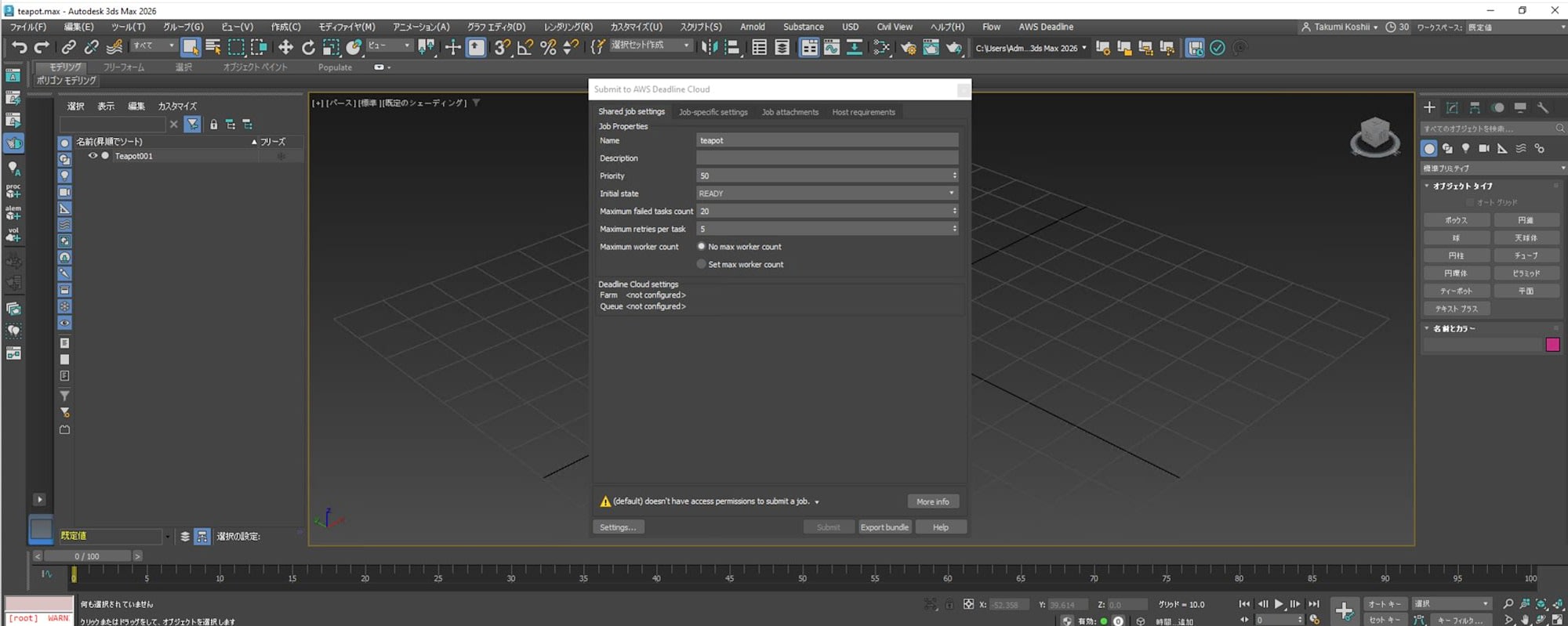
The job status transitioned from READY through STARTING and RUNNING to SUCCEEDED.
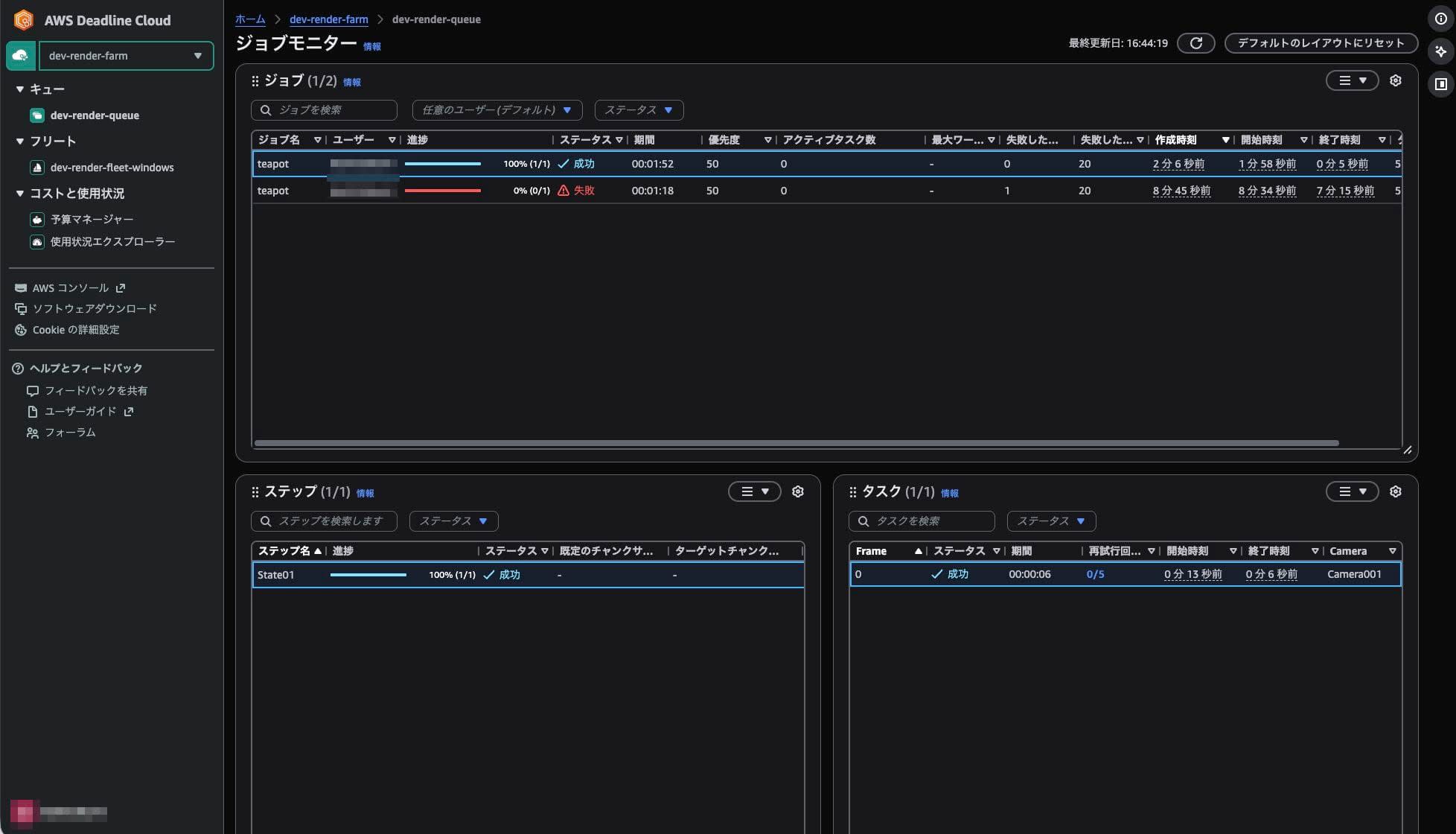
The total time was approximately 2 minutes, broken down as follows: S3 sync took 4 seconds, 3ds Max startup took 1 minute 40 seconds, and rendering a single frame with the Scanline renderer took 6.8 seconds. The job output could be retrieved locally using deadline job download-output, producing a PNG image like the one below.

It was confirmed in practice that 3ds Max on a CMF Fleet can obtain a license from the License Endpoint and perform rendering.
Findings from Verification
Finding 1. 3ds Max can obtain a UBL license even when installed in Trial state
At the start of verification, the plan was to switch the 3ds Max on the Worker EC2 to NETWORK License mode and route it to the License Endpoint via the environment variable ADSKFLEX_LICENSE_FILE. This is because it is the standard way to use the Autodesk Network License Manager.
However, in practice, the STANDALONE license type is enforced by Autodesk's PIT config file (C:\ProgramData\Autodesk\Adlm\ProductInformation.pit), and running AdskLicensingInstHelper change --lm NETWORK does not switch it. Attempting to switch via the GUI is also unstable.
The correct approach was to follow the AWS official SMF sample scripts (host configuration scripts for 3ds Max in deadline-cloud-samples). At the time of writing this article, scripts are provided for different versions of 3ds Max. These samples do not include any license type switching process, and 3ds Max is left installed in Trial state. Since the deadline-cloud-for-3ds-max Adaptor obtains a license from the License Endpoint at job execution time, simply setting the environment variable ADSKFLEX_LICENSE_FILE at the Machine scope is all that is needed — 3ds Max in Trial state will be activated via UBL and rendering will work.
[System.Environment]::SetEnvironmentVariable(
  "ADSKFLEX_LICENSE_FILE",
  "2704@<license-endpoint-dns>",
  "Machine"
)
Pursuing the idea of switching the license type tends to waste time due to constraints on the Autodesk side, so the best approach from the start is to leave 3ds Max in Trial state and let the Adaptor handle it.
Finding 2. CloudWatch Logs permissions must be manually granted to the CMF Fleet Worker Role
When only the AWS managed policy AWSDeadlineCloud-FleetWorker is attached to the Fleet Worker Role specified when creating a new CMF Fleet, write permissions to CloudWatch Logs are insufficient. This is because the managed policy only includes Deadline Cloud-related permissions and does not include CloudWatch Logs-related permissions.
As a result, when the Worker Agent service is started on the Worker EC2, API calls required for log delivery are denied and the following error occurs.
AccessDeniedException: User does not have sufficient access to perform CreateLogStream
Since the role automatically generated by SMF Fleet has equivalent policies attached inline, proceeding with the same expectations as SMF will cause issues on the first Worker connection.
As a solution, manually add an inline policy like the following to the Fleet Worker Role. The log group used by the Worker Agent is created in the format /aws/deadline/<farm-id>/<fleet-id>, so adjust the Resource to match the actual log group name.
{
  "Version": "2012-10-17",
  "Statement": [
    {
      "Effect": "Allow",
      "Action": ["logs:CreateLogStream"],
      "Resource": "arn:aws:logs:ap-northeast-1:<aws-account-id>:log-group:/aws/deadline/<farm-id>/*",
      "Condition": {
        "ForAnyValue:StringEquals": {
          "aws:CalledVia": ["deadline.amazonaws.com"]
        }
      }
    },
    {
      "Effect": "Allow",
      "Action": ["logs:PutLogEvents", "logs:GetLogEvents"],
      "Resource": "arn:aws:logs:ap-northeast-1:<aws-account-id>:log-group:/aws/deadline/<farm-id>/*"
    }
  ]
}
After adding the inline policy and restarting the Worker Agent service, the Worker will join the Fleet in an IDLE state and will be able to receive jobs.
Scope of UBL
Note that UBL is a mechanism for making the licenses used by Deadline Cloud Workers during job execution pay-as-you-go, and it does not replace the licenses used by artists on Submitter machines for their regular DCC work. Also, since supported products and versions are subject to change, please check the official documentation and the output of aws deadline list-available-metered-products when adopting this approach.
Summary
It was confirmed in practice that 3ds Max rendering works with AWS Deadline Cloud's CMF + UBL, and it became clear that migrating to a configuration where license contracts for the number of Worker instances are operated on a pay-as-you-go basis is feasible.
Since this verification covered only a single frame with Scanline, verifying additional renderers such as V-Ray and Arnold, multi-frame rendering, and Fleet scaling behavior will be the next steps.
We hope this article serves as a useful reference when considering a CMF + UBL configuration with AWS Deadline Cloud.