![[AWS IoT Core] Considering how to divide authentication roles between device manufacturers and device users (comparison of pros and cons of private CA vs AWS-managed CA, and certificate management)](https://images.ctfassets.net/ct0aopd36mqt/wp-thumbnail-06e039aecab973a68134b7db69ff9ffd/bd37c8691e5a1f5e3b239f6e8a3888af/aws-iot-core?w=3840&fm=webp)
[AWS IoT Core] Considering how to divide authentication roles between device manufacturers and device users (comparison of pros and cons of private CA vs AWS-managed CA, and certificate management)

This page has been translated by machine translation. View original
Introduction
Hello, I'm Jinno from the Consulting Department.
In this article, I've compared several options for authentication methods when connecting IoT devices to AWS IoT Core, considering the implementation burden when there are both device manufacturers and device users involved.
I'd like to explore the following three options from the perspective of "who does what?":
- Device manufacturers (or certificate-issuing entities) build their own CA and issue device certificates and private keys
- Device users (or service providers) use AWS-managed CAs to issue device certificates and private keys
- (Reference) Using external SaaS services
Option 3 briefly touches on external SaaS related to certificate issuance and management, but it's just for reference. I'm not recommending any specific service, so please confirm compatibility with your actual requirements with each service provider.
Let's get started!
About the Characters and Scenario
Let me clarify the main roles appearing in this discussion.
-
Device Manufacturer
- A company that manufactures IoT devices. In some cases, they may also be the issuing entity for certificates embedded in devices. However, we'll assume they don't provide their own IoT platform.
-
Device User / Service Provider
- Companies or individuals who use manufactured IoT devices to provide some kind of service. They connect devices to AWS IoT Core to collect and utilize data.
As a scenario, imagine a case where devices manufactured by Company A (device manufacturer) are used by Company B (service provider) in their own AWS environment. In this case, an important point is which company should be responsible for issuing and managing certificates.
For authentication methods, please refer to the following very clear document provided by AWS when necessary.
Overview of Authentication Methods to Consider
To reiterate, here's an overview of the authentication methods we'll compare.
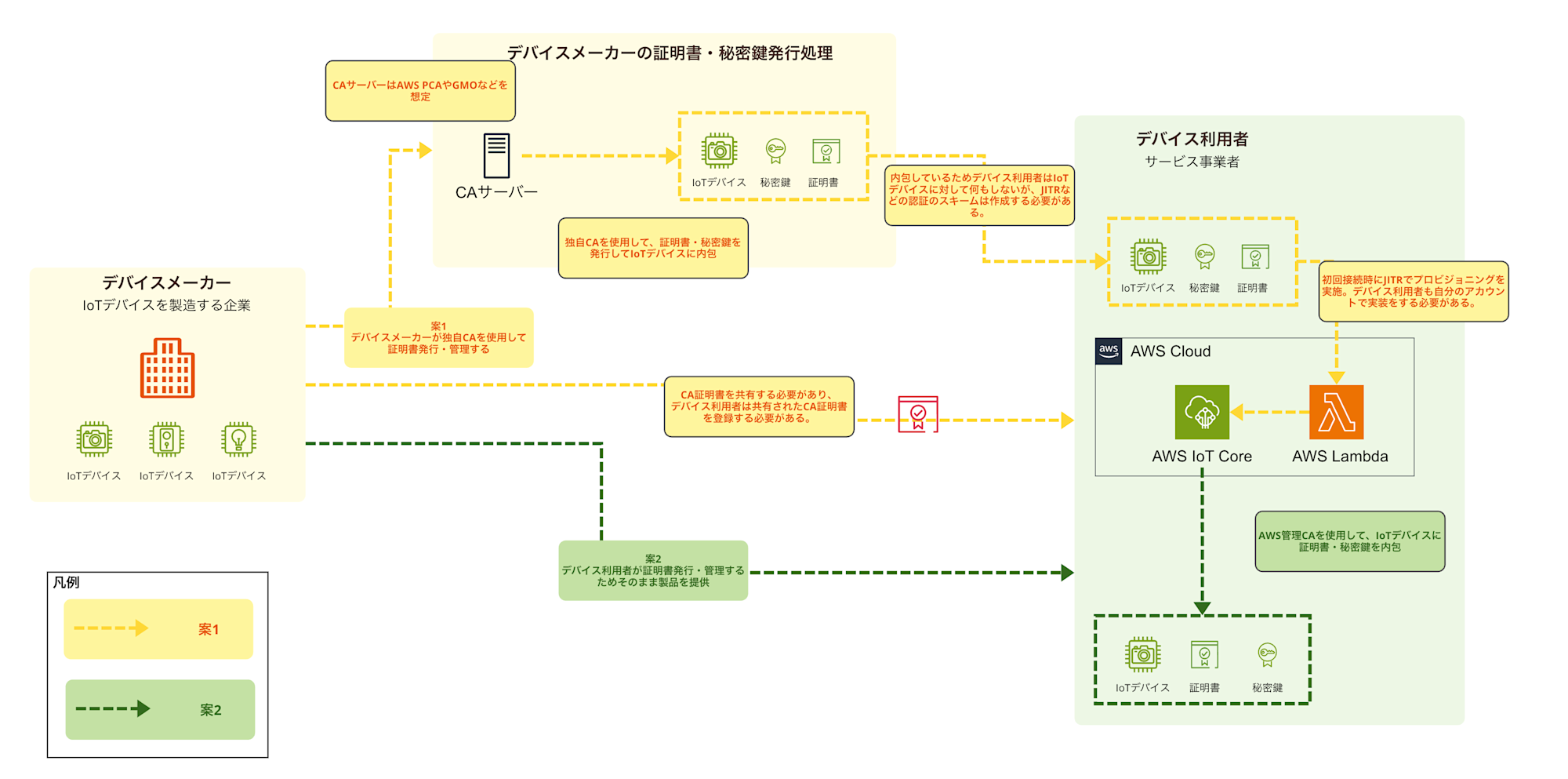
- Option 1: Device manufacturer issues with their own CA
- The device manufacturer uses and manages their own Certificate Authority (CA) such as AWS Private CA, and issues certificates and private keys for each device.
- Device users connect to AWS IoT Core using the provided certificates and private keys.
- Option 2: Device users issue with AWS-managed CA
- The device manufacturer is not involved in the certificate issuance process, and device users themselves issue and manage certificates and private keys using AWS IoT Core functionality (AWS-managed CA).
- Option 3: Using external SaaS (reference)
- A method of outsourcing certificate issuance and management to specialized external SaaS providers.
Here's an image of the processing flow and organization of roles for Options 1 and 2.
(Option 3 is not included as it's just for reference)
Deep Dive into Option 1: Device Manufacturer Issues Certificates with Their Own CA
Let's first look at the option where the device manufacturer takes the central role in issuing certificates. In this scenario, the device manufacturer establishes their own Certificate Authority (CA) using AWS Private CA (PCA) and issues certificates and private keys for each device.
Scope of Work
Here's a rough image of the work scope:
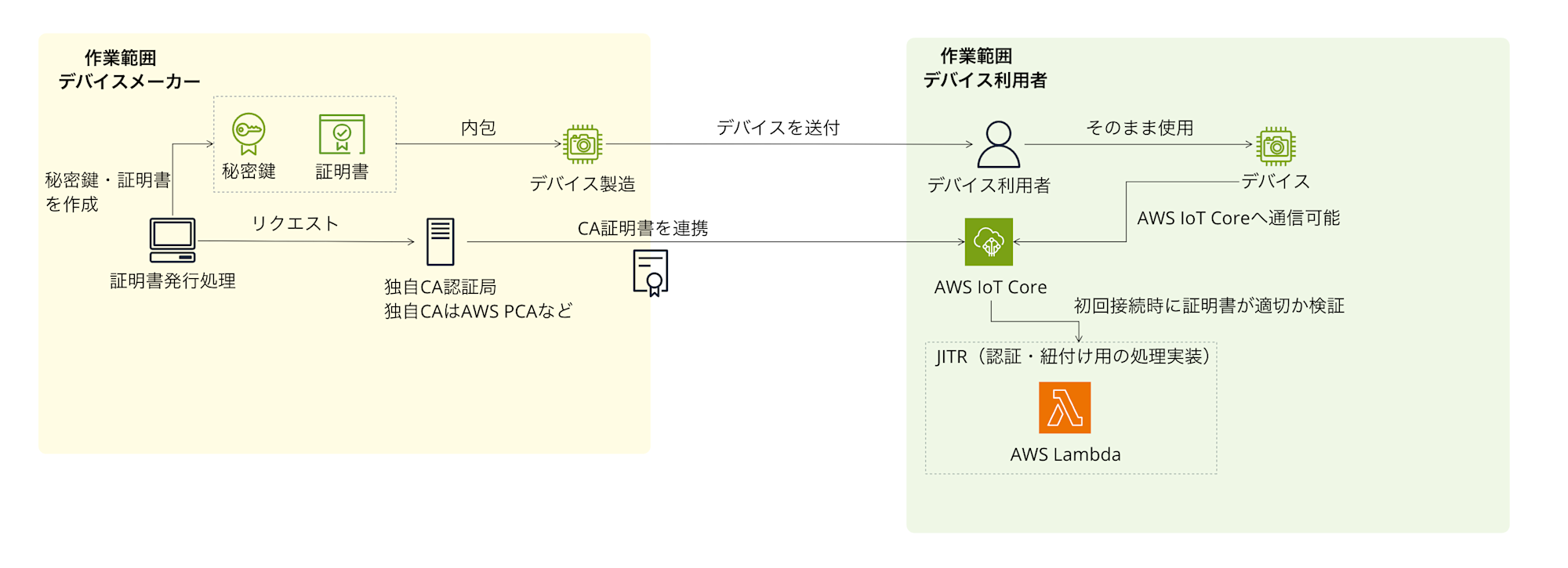
The certificate issuing entity (device manufacturer) builds and manages their own CA, and issues certificates and private keys. The device user (service provider) connects devices to AWS IoT Core in their own AWS account using the provided certificates, private keys, and the CA certificate from the issuing entity.
Advantages
Advantages of this method include:
- Flexible control over certificate validity periods
With your own CA, you can freely set the validity period for certificates and private keys. When using AWS-managed CAs, the validity period is fixed to December 31, 2049, so considering a renewal process is essential for longer-term use, but with your own CA, you can handle this flexibly. - Potential to reduce certificate management burden for device users
By having the certificate issuing entity issue all certificates in bulk, it may reduce the effort of certificate management for device users. This could be offered as a kind of added value.
Disadvantages
There are also several disadvantages and points to consider:
- Requires AWS accounts for both parties and a multi-account structure (or similar environment)
This method requires both the certificate issuing entity and device users to have AWS accounts and work in a multi-account structure. And because of this multi-account structure, issuing certificates and private keys with your own CA becomes essentially mandatory.- Burden on certificate issuing entity
- Managing your own CA (e.g., operating AWS Private CA)
- Building and operating certificate/private key creation and issuance processes (may require Lambda as mentioned later)
- Continuous maintenance of issuance processes
- Primary response for certificate-related issues
- Burden on device users
- Receiving the CA certificate from the certificate issuing entity and registering it in AWS IoT Core in their own AWS account
- Burden on certificate issuing entity
- AWS Private CA costs
When using AWS Private CA, there's a fixed cost of $400 per month (per CA) plus usage-based charges depending on the number of certificates issued. You'll need to consider how to incorporate this cost into product pricing from a business perspective. - Secure transfer of certificates and private keys
The certificate issuing entity needs to establish a method to securely transfer the issued device certificates and especially private keys to device users. Alternatively, they must consider mechanisms to safely write them to devices during manufacturing. This is quite a challenging issue... - Implementing JITR (Just-in-Time Registration)
There's a need to implement and operate mechanisms like JITR in the device user's AWS environment to automatically register things and attach policies when devices connect to AWS IoT Core for the first time.
Implementation Image for Certificate and Private Key Issuance
What does the process of issuing certificates and private keys using your own CA look like? Here's an implementation image. This is just an example and will need to be adjusted based on specific requirements. The image below primarily shows the processes handled by the certificate issuing entity.
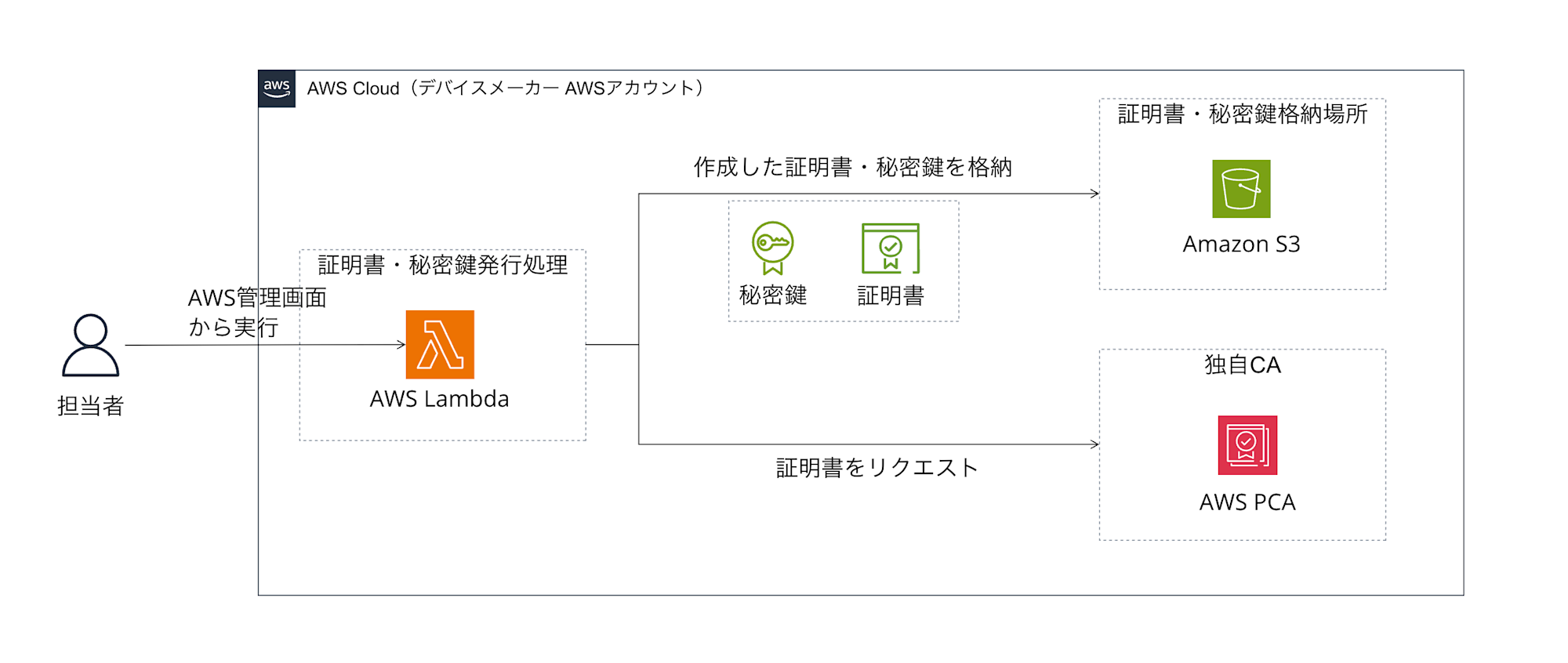
While AWS managed services like AWS Private CA have the function to "issue certificates," there is no single managed service that automatically handles the entire process of "securely generating key pairs for devices, and requesting certificate issuance from PCA using the public key" as a standard offering. (AWS IoT Core also has certificate issuance functionality, but it can't be used directly when using your own CA in a multi-account configuration)
Therefore, as shown in the figure, you often need an environment that can "execute programs" such as AWS Lambda.
In this example, the Lambda function plays the following roles:
- Generate a private key and public key pair (using a cryptographic library like OpenSSL)
- Create a CSR (Certificate Signing Request) containing the generated public key
- Send the CSR to AWS Private CA (your own CA) and request certificate issuance
- Receive the issued certificate from PCA
- Store the generated private key and the certificate received from PCA in a secure location (Amazon S3 bucket in the figure)
The image assumes using Lambda and S3, but you should consider the architecture of the compute part based on your actual requirements and familiarity.
Deep Dive 1: Why is a Custom CA Necessary with Multi-Account?
I mentioned that "a custom CA is necessary in a multi-account configuration," but why is that?
Let me try to explain with an analogy.
-
AWS IoT Core is like a "members-only club"
First, imagine the AWS IoT Core in a device user's AWS account as a "members-only club" with good security. For a device to enter (connect to) this club (AWS IoT Core), it needs to present a valid "membership card" (= device certificate). There's a doorkeeper at the club entrance checking if the membership card is genuine. -
The "issuer" of membership cards is crucial
Who issued the membership card (certificate) is important. The club doorkeeper only accepts membership cards from "trusted issuers." In AWS, there are broadly two types of issuers:-
AWS-managed CA
This is like the "internal reception" that AWS provides for each account (club). Membership cards (certificates) issued here are exclusive to that club (account). It's convenient but not valid at other clubs. -
Custom CA (e.g., AWS Private CA)
This is like establishing your own "trusted ID card center." ID cards (certificates) issued here can be valid at multiple clubs if you register with other clubs in advance, saying "certificates issued by this center are trustworthy."
-
-
The problem with multi-account configuration
In Option 1's configuration, the certificate issuing entity (Account A) issues certificates, and devices try to connect to the device user's (Account B) AWS IoT Core with those certificates. If the certificate issuing entity issued certificates using AWS-managed CA in Account A, when devices present those certificates to Account B's AWS IoT Core (doorkeeper), they'll be rejected with "This is a certificate for Account A only. It can't be used here (Account B)." Because the accounts are different, Account B's AWS IoT Core cannot trust certificates issued by Account A's AWS-managed CA. -
Why a custom CA is the solution
This is where a "custom CA" comes in.
The certificate issuing entity (Account A) establishes a custom CA using AWS Private CA. Then, the device user (Account B) registers with their AWS IoT Core that "the certificate issuing entity's custom CA is trustworthy." This way, when a device with a certificate issued by the custom CA tries to connect to Account B's AWS IoT Core, it will be accepted with "Ah, this is a certificate issued by a trusted CA that we've registered in advance. Please come in."
In other words, when device authentication needs to be performed across multiple AWS accounts, a "common certificate authority (CA)" that can be trusted across accounts is necessary, and a "custom CA" created with AWS Private CA can fulfill this role.
Deep Dive 2: What is JITR? Why is it Necessary in Option 1?
I mentioned "the need to implement device registration schemes like JITR in the device user's environment" as a disadvantage of Option 1. What is this "JITR"?
Basics of JITR
JITR (Just-in-Time Registration) is short for "just-in-time registration," a mechanism that automatically registers devices in the system when they connect for the first time. This eliminates the need to manually register each device in advance, which is convenient when dealing with a large number of devices.
Why JITR is Necessary in Option 1
Continuing with the members-only club analogy:
- A device with a "membership card" (device certificate) issued by the device manufacturer (Account A) using their custom CA tries to connect to the device user's (Account B) AWS IoT Core.
- AWS IoT Core can verify that "this certificate is from a trusted issuer," but there's one problem. This "person with a trusted certificate" is not yet registered in the club's member list.
- JITR's role is to automatically perform this "registration in the member list."
- When there's a connection attempt with an unregistered but trusted CA-issued certificate, AWS IoT Core issues a special event notification
- A Lambda function is triggered by this event
- The Lambda function automatically executes "thing registration," "policy attachment," "certificate activation," etc.
JITR Implementation Responsibility in Option 1
In Option 1, the device manufacturer's role is limited to issuing certificates, while the device user themselves must implement and configure the device registration mechanism (JITR) in their own AWS account.
In other words, if you adopt Option 1, device users need to consider not only receiving certificates from device manufacturers but also the burden of building a JITR mechanism in their AWS environment.
Deep Dive into Option 2: Device Users Issue Certificates with AWS-managed CA
Next, let's look at "Option 2," where device users (or service providers) take the lead and issue certificates using AWS-managed CAs.
Scope of Work
Here's an image of the work scope in this case:
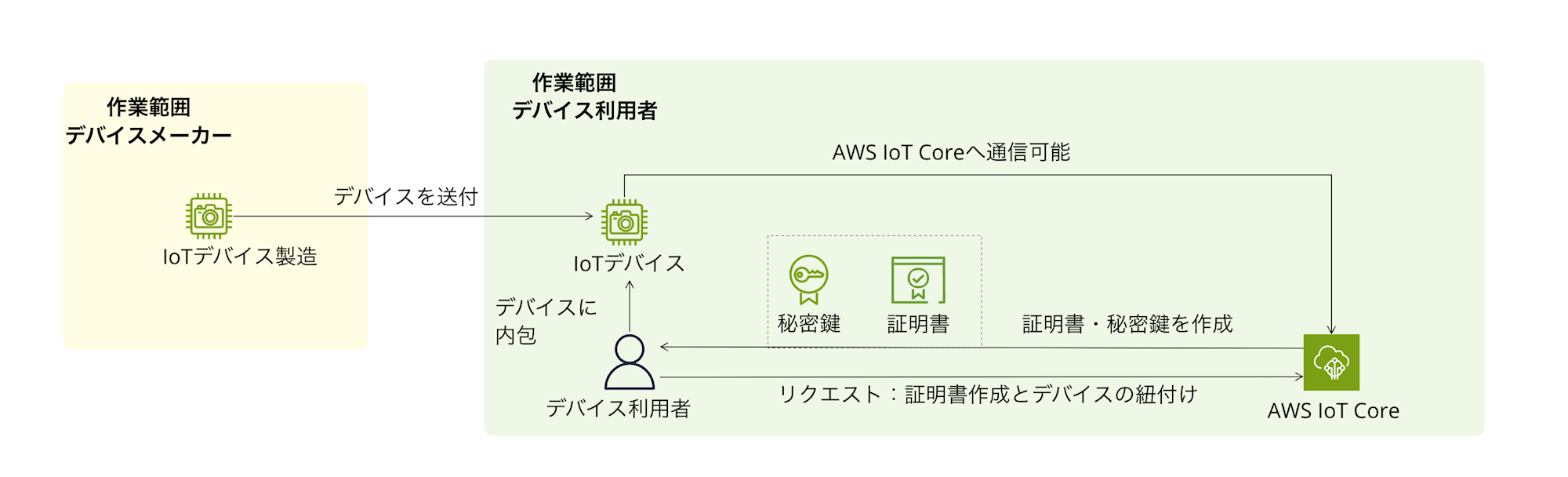
The device manufacturer is not directly involved in the certificate issuance process. Device users themselves issue device certificates and private keys using AWS IoT Core functionality (AWS-managed CA) in their own AWS account, and connect devices to AWS IoT Core. A key feature is that since AWS accounts can be completed with just the device user in a single-account configuration, there's no need for an expensive custom CA, and AWS-managed CA can be used.
Of course, device users can also use their own CA instead of AWS-managed CA.
For this article, to contrast with Option 1, we're assuming the use of AWS-managed CA for clarity.
Advantages
The main advantages of this method are as follows:
- Lower burden and cost for device manufacturers
Device manufacturers don't need to own AWS accounts or issue certificates, making their scope of responsibility clear and significantly reducing their burden. This is quite beneficial. - Cost reduction and simplicity for device users
Since everything is completed within the device user's AWS account, there's no need for the management cost of a custom CA (from $400/month). The configuration can also remain simple. - Flexible issuance methods
It's possible to issue certificates and key pairs in bulk with simple scripts using AWS CloudShell, or to use fleet provisioning, a scalable mechanism that doesn't require pre-issuing device-specific certificates.
Disadvantages
Disadvantages include:
-
Work burden on device users
Device users themselves need to build, manage, and operate certificate issuance and device registration processes (managing CloudShell scripts or creating fleet provisioning templates, IAM settings, implementing device-side logic, etc.). -
Fixed certificate validity period
When using AWS-managed CAs, the validity period of issued certificates is fixed to December 31, 2049. If the expected device lifetime exceeds this, device users need to design, implement, and operate a certificate rotation (renewal) mechanism. (This is possible using AWS IoT Device Management, but device-side support is also required.)
Implementation Images
The device user takes the lead in issuing and managing device authentication information (certificates, private keys) within their own AWS account. There are mainly two options for doing this:
-
Manual or script-based issuance
Using the AWS Management Console, AWS CLI, or scripts with AWS CloudShell to issue and manage the required number of certificates and private keys. -
Fleet provisioning for large-scale automation
Using AWS IoT Core fleet provisioning. This is a mechanism that automatically handles certificate issuance, thing registration, policy attachment, etc., when a device connects to the cloud for the first time. It greatly streamlines and automates the onboarding process for mass production, which is extremely convenient!
Which method to choose depends on factors like device production scale, device user's technical capabilities, and automation requirements. Fleet provisioning is a bit more complex in initial setup, but it's an attractive option when considering long-term operational load and scalability.
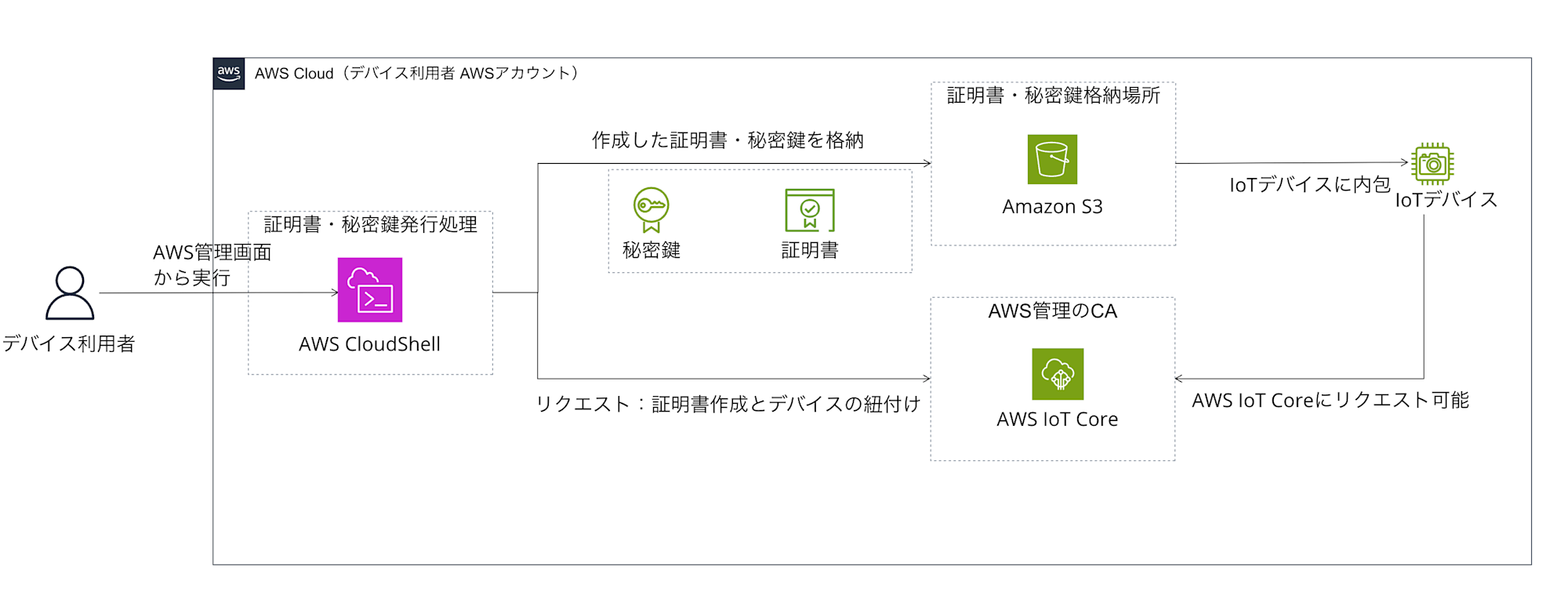
1. Using CloudShell to Run Scripts
Here's an image of using CloudShell to issue and manage certificates. We're assuming CloudShell for the convenience of bulk issuance, but Lambda or similar services as mentioned in Option 1 would also work.
2. Using Fleet Provisioning
Here's an image of using fleet provisioning.
We're also assuming CloudShell here, but Lambda or similar services as mentioned in Option 1 would work too.
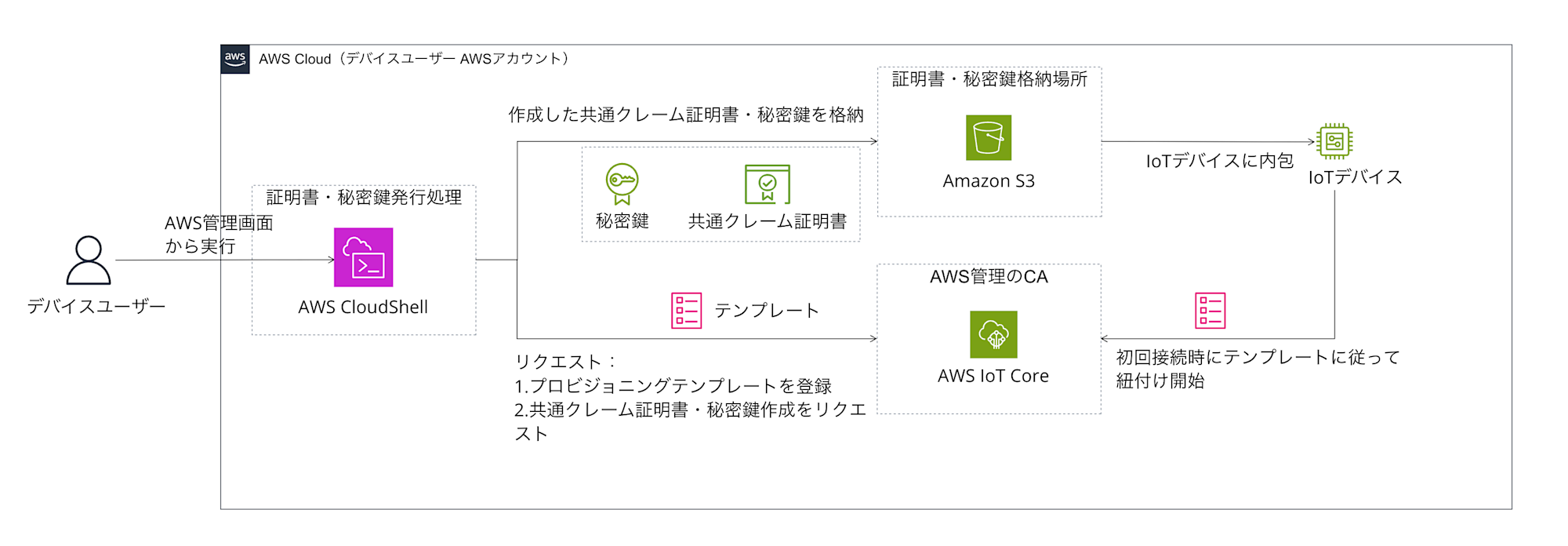
While fleet provisioning is convenient, creating provisioning templates and implementing device-side support make it slightly more challenging than CloudShell scripts. Please consider this as an option for "a scalable and secure automation method."
Deep Dive 4: What Are CloudShell Scripts and Fleet Provisioning?
Let's look a bit more closely at the "CloudShell scripts" and "fleet provisioning" that came up in Option 2.
Running Scripts with AWS CloudShell
AWS CloudShell is a browser-based command-line environment that can be launched directly from the AWS Management Console. It allows you to run commands like AWS CLI without installing or configuring special software.
The kind of script we're talking about in Option 2's scenario is an automation script that helps device users efficiently create, register, and store "private keys" and "certificates" for many IoT devices within their own AWS account. Specifically, it generates a specified number of certificates and key pairs using the aws iot create-keys-and-certificate command and stores them in an S3 bucket. It can optionally create things and associate certificates with them.
Advantages of Running in CloudShell (for Option 2)
- Ease of use
Device users don't need to prepare a special development environment. - Automation
It streamlines bulk issuance and reduces manual errors. - AWS integration
AWS CLI is pre-installed, making it easy to interact with AWS services. This is really helpful.
Points to Note
-
Private key management
Private keys generated and stored by the script need to be strictly managed, such as minimizing S3 access permissions. A secure method for writing to devices also needs to be established. -
S3 bucket preparation
An S3 bucket with appropriate permission settings needs to be created in advance. -
Error handling
Sample scripts often include only basic error checking, so more robust error handling should be implemented for production use.
This script is one specific means of streamlining certificate issuance in Option 2. I've included a script image below to give you a feel for it. This is just a sample, so sufficient verification and customization are necessary for actual use.
Script Sample
#!/bin/bash

# --- Configuration Items ---
NUM_CERTIFICATES=10       # Number of certificates to issue
S3_BUCKET="your-iot-certificates-bucket" # S3 bucket name to store certificates (create in advance)
S3_PREFIX="certificates"  # Prefix in S3 bucket (e.g., certificates/device-001/)
THING_NAME_PREFIX="my-device-" # Prefix for thing names (e.g., my-device-001)
REGION="ap-northeast-1"   # AWS region

# --- Script Body ---
set -e # Exit script if an error occurs

echo "Starting certificate provisioning..."
echo "Number of certificates to create: ${NUM_CERTIFICATES}"
echo "Target S3 Bucket: s3://${S3_BUCKET}/${S3_PREFIX}"
echo "Thing name prefix: ${THING_NAME_PREFIX}"
echo "Region: ${REGION}"

# Create temporary working directory
WORK_DIR=$(mktemp -d)
echo "Working directory: ${WORK_DIR}"
cd "${WORK_DIR}"

for i in $(seq 1 ${NUM_CERTIFICATES})
do
  DEVICE_ID=$(printf "%s%03d" "${THING_NAME_PREFIX}" "${i}")
  echo "----------------------------------------"
  echo "Processing device: ${DEVICE_ID}"

  # 1. Create thing (if it doesn't exist - optional)
  # aws iot create-thing --thing-name "${DEVICE_ID}" --region "${REGION}" > /dev/null || echo "Thing ${DEVICE_ID} already exists or failed to create."

  # 2. Create key pair and certificate & activate
  echo "Creating keys and certificate for ${DEVICE_ID}..."
  OUTPUT=$(aws iot create-keys-and-certificate \
            --set-as-active \
            --region "${REGION}" \
            --output json)

  if [ $? -ne 0 ]; then
    echo "ERROR: Failed to create keys and certificate for ${DEVICE_ID}. Skipping."
    continue # Skip to next loop if an error occurs
  fi

  CERT_ARN=$(echo "${OUTPUT}" | jq -r '.certificateArn')
  CERT_ID=$(echo "${OUTPUT}" | jq -r '.certificateId')
  CERT_PEM=$(echo "${OUTPUT}" | jq -r '.certificatePem')
  KEY_PAIR_PUBLIC=$(echo "${OUTPUT}" | jq -r '.keyPair.PublicKey')
  KEY_PAIR_PRIVATE=$(echo "${OUTPUT}" | jq -r '.keyPair.PrivateKey') # ★★★ Private key ★★★

  echo "Certificate ID: ${CERT_ID}"
  echo "Certificate ARN: ${CERT_ARN}"

  # Save to files
  CERT_FILE="${DEVICE_ID}_${CERT_ID}_cert.pem"
  PUB_KEY_FILE="${DEVICE_ID}_${CERT_ID}_pub.key"
  PRV_KEY_FILE="${DEVICE_ID}_${CERT_ID}_prv.key" # ★★★ Private key file ★★★

  echo "${CERT_PEM}" > "${CERT_FILE}"
  echo "${KEY_PAIR_PUBLIC}" > "${PUB_KEY_FILE}"
  echo "${KEY_PAIR_PRIVATE}" > "${PRV_KEY_FILE}"
  echo "Files created locally: ${CERT_FILE}, ${PUB_KEY_FILE}, ${PRV_KEY_FILE}"

  # 3. Attach certificate to thing (optional - if thing was created)
  # echo "Attaching certificate ${CERT_ARN} to thing ${DEVICE_ID}..."
  # aws iot attach-thing-principal \
  #  --thing-name "${DEVICE_ID}" \
  #  --principal "${CERT_ARN}" \
  #  --region "${REGION}"
  # if [ $? -ne 0 ]; then
  #  echo "WARNING: Failed to attach certificate to thing ${DEVICE_ID}."
  # fi

  # 4. Upload to S3 (encrypted with SSE-S3)
  S3_DEVICE_PATH="${S3_PREFIX}/${DEVICE_ID}"
  echo "Uploading files to s3://${S3_BUCKET}/${S3_DEVICE_PATH}/ ..."

  aws s3 cp "${CERT_FILE}" "s3://${S3_BUCKET}/${S3_DEVICE_PATH}/${CERT_FILE}" --sse AES256
  aws s3 cp "${PUB_KEY_FILE}" "s3://${S3_BUCKET}/${S3_DEVICE_PATH}/${PUB_KEY_FILE}" --sse AES256
  aws s3 cp "${PRV_KEY_FILE}" "s3://${S3_BUCKET}/${S3_DEVICE_PATH}/${PRV_KEY_FILE}" --sse AES256 # ★★★ Protection of private key is critical ★★★

  if [ $? -ne 0 ]; then
    echo "ERROR: Failed to upload files to S3 for ${DEVICE_ID}. Check permissions and bucket settings."
    # Error handling
    continue
  fi

  echo "Successfully processed ${DEVICE_ID}."

  # Wait to avoid rate limits (adjust as needed)
  sleep 0.5
done

# Clean up temporary working directory
echo "Cleaning up working directory: ${WORK_DIR}"
rm -rf "${WORK_DIR}"

echo "----------------------------------------"
echo "Certificate provisioning finished."
AWS IoT Core Fleet Provisioning
For a more scalable and secure method, there's the fleet provisioning feature of AWS IoT Core.
What is Fleet Provisioning?
It's a mechanism that automatically provisions (prepares and configures) necessary resources (device certificates, things, policies) when a device connects to AWS IoT Core for the first time. You don't need to create and distribute individual device certificates in advance; just start the device with a common "claim certificate," and the onboarding process completes.
Main Components
Provisioning templates, claim certificates, and some logic are needed.
-
Provisioning Template
A JSON (YAML) template that defines the processes (creating things, attaching policies, etc.) executed during device registration. -
Claim Certificate
A common certificate that all unregistered devices use to authenticate themselves during initial connection. It's used only for provisioning purposes with minimal permissions. The device user creates it in advance and writes it to devices during manufacturing. -
Device-side Logic
Devices connect to AWS IoT Core using the claim certificate and request provisioning. If successful, they receive and store a newly issued device-specific certificate.
Simple Flow of Fleet Provisioning
Here's a summary of the flow. Automatic provisioning is really helpful!
- [Preparation] The device user creates and registers an IAM role for provisioning, a provisioning template, and a claim certificate.
- [Manufacturing] The device user or manufacturing contractor writes the common claim certificate and private key to devices.
- [First boot] The device connects to AWS IoT Core's provisioning endpoint using the claim certificate.
- [Automatic processing] AWS IoT Core verifies the claim certificate and, based on the provisioning template, issues a new device-specific certificate, registers the thing, attaches policies, etc. Then it returns the new device-specific certificate to the device.
- [Registration complete] The device receives the new device-specific certificate and private key and stores them in secure storage. It will use this new certificate for future connections to AWS IoT Core.
I've also organized the advantages and disadvantages. It's a method that excels in scalability, but has some implementation costs.
Advantages
- Scalability
It's strong for onboarding large numbers of devices. - Automation
It's easy to incorporate into manufacturing lines or first-boot processes. - Security
No need for pre-distribution of device-specific certificates, reducing the risk of leakage during manufacturing.
Disadvantages/Considerations
-
Initial setup complexity
Creating provisioning templates, configuring IAM roles, implementing device-side logic, etc., requires more initial effort than CloudShell scripts. -
Device-side implementation
Logic for initial connection, certificate reception/storage, and certificate switching needs to be implemented on the device.
CloudShell scripts are an easy option, but fleet provisioning is a strong choice if you're aiming for more large-scale, automated, and secure operations.
Option 3: Using External SaaS (Reference Information)
Finally, I'd like to briefly touch on the option of using external SaaS as reference information. There are external services that provide certificate issuance and management functions. For example, GMO GlobalSign's IoT Device Security Service can be mentioned.
Advantages
- Possibility of delegating certificate and private key issuance processes to external specialized SaaS
Disadvantages
-
Detailed confirmation is needed on how specifically it fits this requirement, including integration with AWS IoT Core, and whether it's feasible. The pricing structure would also need to be inquired about.
-
If the SaaS generates and holds private keys, it's important to confirm compliance with your company's security policies and requirements.
-
Naturally, there's a dependency on external services.
This option is just a "there might be such an option" level of consideration, and I won't go into depth here. If you're considering it, please contact the service provider directly to confirm functions, pricing, alignment with security requirements, etc.
Comparing Each Authentication Method
Now that we've looked at the two options, let's organize and compare their characteristics. I'll summarize from perspectives like "who does what," "advantages and disadvantages," "cost impression," and "ease of implementation." (Option 3 is excluded due to its many unclear aspects.)
| Comparison Item | Option 1: Certificate Issuer's Custom CA (AWS Private CA) | Option 2: Device User's AWS-managed CA |
|---|---|---|
| Authentication Method Overview | Certificate issuer builds and manages custom CA, issues certificates/keys. Device user uses them. | Device user issues and manages certificates/keys using AWS-managed CA in their own AWS account. |
| Main Work Entities | Certificate issuer: CA management, building/maintaining issuance system Device user: CA registration, JITR implementation |
Device user: Certificate issuance/management, building/operating device registration process |
| Main Advantages | - Flexible certificate validity period setting - Device users don't need to issue (but CA registration/JITR setup required) |
- No burden/cost for certificate issuer - Low cost (no CA maintenance fee) - Simple (completed within AWS) - Automation/scalability possible with fleet provisioning |
| Main Disadvantages | - High cost (PCA $400+/month + usage-based + system maintenance) - Complex configuration (multi-account) - Continuous operational load on certificate issuer - Secure key transfer is challenging - Device user needs JITR implementation/CA registration |
- Device user must handle certificate issuance/management - Certificate validity fixed to end of 2049 (renewal needed after) - Initial setup/implementation needed for fleet provisioning |
| Cost Impression | High (both initial and operational) | Low (AWS usage fees only, no CA fixed costs) |
| Ease of Implementation | Difficult (technical complexity, stakeholder coordination) | Relatively easy (based on AWS standard functions, device user-led) |
| Security Considerations | - Proper management/operation of custom CA - Secure generation/storage/transfer of private keys - Security of JITR implementation |
- Strict management of private keys by device user (S3 access control etc.) - Certificate rotation planning (after 2049) - Common claim certificate management when using fleet provisioning |
| Recommendation Level (personal evaluation) | △ (Cost/complexity somewhat high) | ◎ (Realistic, low-cost, simple to start) |
Comparing like this, we can see that each option has its pros and cons.
Analysis: Which Method Should Be Chosen?
Based on these comparisons, which method should be chosen? Let me consider from several perspectives.
If prioritizing simplicity, low cost, and reducing the burden on device manufacturers, Option 2 (device users using AWS-managed CA) seems the most realistic and easy to implement in my personal opinion. Though device users will have to handle certificate management tasks, this can be handled using AWS's standard features (CloudShell scripts or fleet provisioning), and it's nice that there are no high fixed costs like AWS Private CA. The configuration can be kept simple too.
If there's a strong requirement to flexibly control certificate validity beyond 2049, or if device users absolutely want to avoid certificate issuance tasks (though CA registration and JITR setup are still required), then Option 1 (certificate issuer managing custom CA) might be worth considering. However, it's important to keep in mind the increased costs and overall system complexity.
For Option 3 (external SaaS), given the many uncertainties at this point, it's difficult to actively recommend. If a service that perfectly fits specific requirements is found, it could certainly become a good option.
There's no single "correct answer" – the optimal method should be selected by comprehensively considering the role division between related companies, technical capabilities, cost tolerance, security requirements, device lifecycle, and other factors.
Conclusion
What did you think of this comparison of authentication methods when connecting IoT devices to AWS IoT Core?
- Option 1 (Device Manufacturer Custom CA): High flexibility, but cost and complexity are challenges. Multi-account configuration is a prerequisite.
- Option 2 (Device User AWS-managed CA): Simple and low-cost. Less burden on device manufacturers. However, validity period ends December 31, 2049.
- Option 3 (External SaaS): Could be viable depending on requirements, but detailed confirmation is essential.
Even with a limited scenario, there are so many aspects to consider, making this a challenging topic.
For such technical selections, I think it's important to create a draft, share opinions among stakeholders, clarify requirements, and iteratively make adjustments.
I hope this article has been helpful as a reference.
Thank you for reading to the end!