We have published a hands-on CI/CD introductory workshop to get started with GitHub and AWS Lambda

This page has been translated by machine translation. View original
With the promotion of DX, AI, and in-house development, more people are finding opportunities to step into software development.
When trying to do team development from scratch, the following problems tend to arise.
- Deploying by directly operating the AWS console
- Deployment work is dependent on specific individuals
- Source code during development and deployment is not managed well
- Test automation has not been systematized
The beginner-oriented workshop we are releasing today was born from supporting teams facing exactly these kinds of situations.
In this workshop, you will build a CI/CD pipeline from GitHub to AWS Lambda in just a few hours.
Introduction to GitHub Actions CI/CD for AWS Lambda | lambda-cicd-workshop
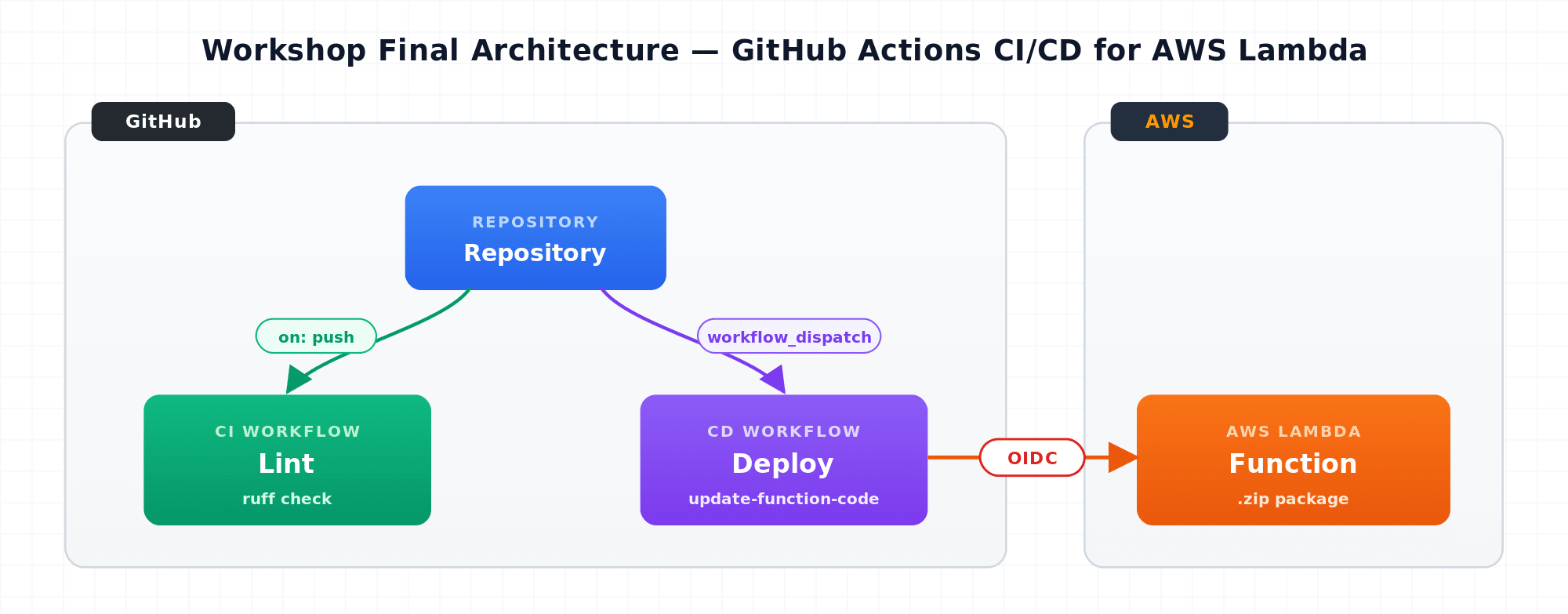
By building CI/CD to deploy AWS Lambda functions from GitHub to AWS, you will learn the following.
- Leveraging temporary authentication via
aws login/ OIDC - Creating resources using IaC
- Automating testing (CI) and deployment (CD)
Please note that the workshop prioritizes ease of use and clarity, so some parts may not be directly applicable to production environments.
Steps
The workshop is divided into 10 steps.
Here is a brief overview.
1. Prepare the Lambda function -- Set up a Lambda function with CloudFormation
In Step 1, you will build the AWS Lambda function used in the workshop using CloudFormation, AWS's IaC service.
By using IaC, you can create the same resources in a reproducible way without relying on console operations.
This CloudFormation template includes both the infrastructure layer and the application layer.
2. Put the code on GitHub -- Create a repository and push
In Step 2, of the resources deployed in Step 1, only the application code—which changes frequently and has a different lifecycle from the infrastructure—is managed on GitHub.
The program is written in Python.
3. CI (Static Analysis) -- Manual testing in the local environment
The Lambda function is written in Python.
Using uv, you will set up a development environment locally and enable the use of Ruff, a static analysis tool (linter).
4. GitHub Actions CI -- Automated testing with GitHub Actions
You will configure GitHub Actions so that the static analysis run in the local environment is automatically executed every time code is changed on GitHub (i.e., when a Pull Request is created).
5. Authenticate with AWS CLI -- Obtain temporary credentials with aws login
Using aws login, you will obtain temporary credentials and prepare to operate AWS via the CLI.
6. Manual deployment -- Deploy from the local environment
Using the temporary credentials issued by aws login, you will deploy the Lambda function from your local environment using the AWS CLI.
No permanent credentials need to be issued.
7. OIDC -- Build a trust relationship between GitHub and AWS
In phases 5 and 6, a human logged in via a browser to operate AWS.
In this phase, you will configure the authentication mechanism (OIDC) that allows GitHub Actions to operate AWS in the same way.
Just like aws login, no permanent credentials need to be issued.
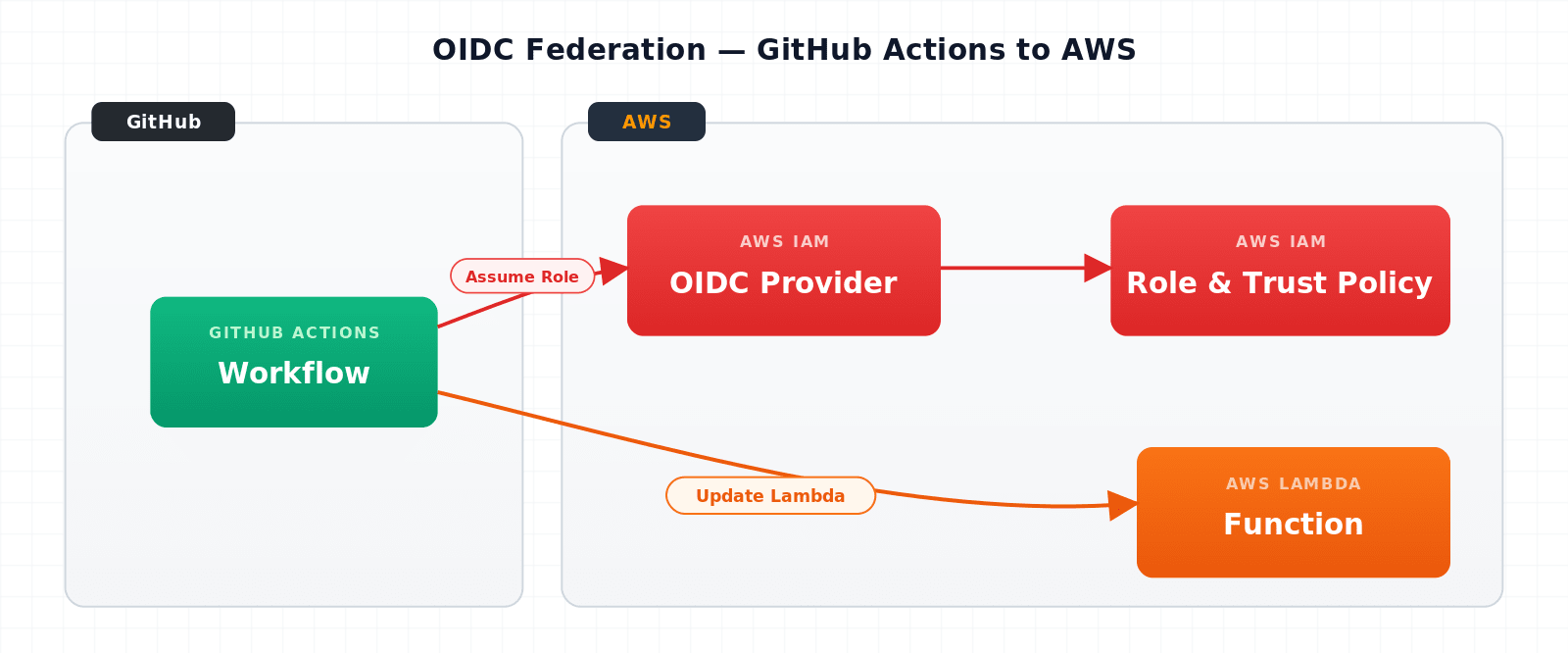
8. GitHub Actions CD -- Automated deployment from GitHub Actions
The manual deployment performed in phase 6 is systematized using the OIDC trust relationship established in phase 7.
9. CI/CD Pipeline -- From Issue through PR to AWS deployment
At this point, the entire CI/CD system is in place. In this phase, you will experience the flow from code change to deployment in a way that closely resembles real-world development.
In particular, you will describe the changes in an Issue and delegate the code modifications to GitHub Copilot's Coding Agent.
The agent will branch off, fix the code, and create a draft Pull Request. CI will run against that PR, and once the tests pass, you merge it and deploy via CD.
10. Summary -- Review and looking ahead
Using the CI/CD pipeline built in this workshop as a foundation, try the following extensions.
- Applying it to existing AWS Lambda functions
- Switching the target AWS account for deployment
- Adding tests for CI
- Applying it to AWS services other than AWS Lambda
Finally
This workshop is designed for users who have been developing on AWS using a console-based approach without AWS CLI or IaC, allowing them to experience a full GitHub × AWS CI/CD workflow in just a few hours.
- Replacing local -> AWS operations with GitHub Actions
- Using temporary credentials without issuing any permanent credentials
- Development delegated to GitHub Copilot's coding agent
It covers all the basic features and concepts in one go.
Please give it a try.
Introduction to GitHub Actions CI/CD for AWS Lambda | lambda-cicd-workshop
