I tried restricting AWS Marketplace product subscriptions with AWS Organizations SCP and IAM Identity Center permission sets

This page has been translated by machine translation. View original
Introduction
In AWS Marketplace, various software is available in formats such as Amazon Machine Images (AMIs).
While convenient, users utilizing the AdministratorAccess permission set in AWS IAM Identity Center may be able to subscribe to AWS Marketplace products without internal organizational approval.
This time, assuming the following requirements, I tried restricting AWS Marketplace product subscribe operations by combining AWS Organizations Service Control Policies (SCPs) with IAM Identity Center permission sets.
- Prevent subscribing to AWS Marketplace products with the normal
AdministratorAccesspermission set - Only when subscribing is needed, temporarily assign a dedicated permission set to the target user
- Revoke the dedicated permission set assignment after subscribing
- Do not restrict the target products themselves via SCP
In this verification, I confirmed that the AWS Marketplace product subscribe operation is denied with the normal AdministratorAccess permission set, and is allowed with the dedicated permission set.
Prerequisites
The verification environment is as follows.
- AWS Organizations is in use
- All features are enabled in Organizations
- The target of verification is an Organizations member account
- IAM Identity Center is in use
- IAM Identity Center region is
ap-northeast-1 - The normally used permission set is
AdministratorAccess - The permission set name for subscribing is
MarketplaceSubscribeAccess - The SCP is attached to a verification OU or member account
- AWS Marketplace products targeted for subscription are not restricted
The permission set names and regions used in this article are examples. When actually using them, please change them to match your own environment.
SCPs apply to member accounts in Organizations but do not apply to users or roles in the management account. Therefore, this method cannot restrict AWS Marketplace product subscribe operations on the management account.
Also, SCPs are not policies that grant permissions. They define the maximum permissions available to IAM users and IAM roles in member accounts within the organization.
Overall Control Flow
The normal flow is as follows.
User
↓
Log in with the normal AdministratorAccess permission set
↓
Explicitly deny aws-marketplace:Subscribe via SCP
↓
Cannot subscribe to AWS Marketplace products
When subscribing to an AWS Marketplace product becomes necessary, assign the dedicated permission set to the target user.
User requests to subscribe to an AWS Marketplace product
↓
Administrator assigns MarketplaceSubscribeAccess
↓
User logs in with the subscribe permission set
↓
The subscribe role is excluded from SCP Deny targets
↓
User subscribes to the AWS Marketplace product
↓
Administrator revokes the permission set assignment
In this SCP, the IAM role created from the subscribe permission set is excluded from the aws-marketplace:Subscribe Deny targets.
The SCP does not grant permission for aws-marketplace:Subscribe to the subscribe permission set.
To actually perform the subscribe operation, in addition to being excluded from the SCP Deny targets, aws-marketplace:Subscribe must also be allowed by the IAM policy configured in the IAM Identity Center permission set.
What is aws-marketplace:Subscribe
aws-marketplace:Subscribe is an IAM action that controls operations related to subscribing to AWS Marketplace products.
The AWS service authorization reference describes the following operations as included:
- Subscribing to AWS Marketplace products
- Sending subscription requests for products that require subscription validation
- Enabling auto-renewal of existing subscriptions
Since this SCP restricts aws-marketplace:Subscribe, it targets not only AMI products but subscribe operations for AWS Marketplace products in general.
On the other hand, the following operations are not directly restricted by this SCP.
- Viewing existing subscriptions
- Launching EC2 instances from already-subscribed AMIs
- Unsubscribing via
aws-marketplace:Unsubscribe - Disabling auto-renewal of existing subscriptions
- Using AMIs obtained from outside AWS Marketplace
aws-marketplace:Unsubscribe includes not only unsubscribing from AWS Marketplace products but also the operation of disabling auto-renewal of existing subscriptions.
Since the purpose this time is to make the subscribe operation subject to approval, aws-marketplace:Unsubscribe is not a restriction target.
Creating the SCP
The SCP used this time is as follows.
{
  "Version": "2012-10-17",
  "Statement": [
    {
      "Sid": "DenyMarketplaceSubscribeExceptAllowedRole",
      "Effect": "Deny",
      "Action": "aws-marketplace:Subscribe",
      "Resource": "*",
      "Condition": {
        "ArnNotLike": {
          "aws:PrincipalArn": [
            "arn:aws:iam::*:role/aws-reserved/sso.amazonaws.com/ap-northeast-1/AWSReservedSSO_MarketplaceSubscribeAccess_*"
          ]
        }
      }
    }
  ]
}
Let's review each element.
Action
"Action": "aws-marketplace:Subscribe"
Operations related to subscribing to AWS Marketplace products are targeted for Deny.
Specifically, this covers not only product subscription but also sending subscription requests and enabling auto-renewal of existing subscriptions.
Resource
"Resource": "*"
AWS Marketplace does not support resource-level permissions where resource ARNs are specified in the Resource element of IAM policies.
Therefore, * is specified for Resource.
aws:PrincipalArn
"ArnNotLike": {
  "aws:PrincipalArn": [
    "arn:aws:iam::*:role/aws-reserved/sso.amazonaws.com/ap-northeast-1/AWSReservedSSO_MarketplaceSubscribeAccess_*"
  ]
}
aws:PrincipalArn is used to evaluate the ARN of the IAM principal that made the request.
Since ArnNotLike is used, principals that do not match the specified ARN pattern become the Deny targets.
The subscribe role that matches the ARN pattern specified this time is excluded from the Deny targets.
When a request is made using temporary credentials for an IAM role, aws:PrincipalArn is set to the IAM role ARN rather than the Assumed Role session ARN.
Therefore, the ARN of the IAM role created by IAM Identity Center can be used as a condition.
IAM Roles Created by IAM Identity Center
When an IAM Identity Center permission set is assigned to an AWS account, an IAM role beginning with AWSReservedSSO_ is created in the target account.
When the permission set name is MarketplaceSubscribeAccess and the IAM Identity Center region is the Tokyo region, the ARN would look like the following.
arn:aws:iam::111111111111:role/aws-reserved/sso.amazonaws.com/ap-northeast-1/AWSReservedSSO_MarketplaceSubscribeAccess_0123456789abcdef
The role name and ARN format created by IAM Identity Center are as follows.
Role name:
AWSReservedSSO_<permission set name>_<unique suffix>

ARN:
arn:aws:iam::<AWS account ID>:role/aws-reserved/sso.amazonaws.com/<region>/AWSReservedSSO_<permission set name>_<unique suffix>
Since the unique suffix at the end differs by environment, a wildcard is specified at the end in the SCP.
AWSReservedSSO_MarketplaceSubscribeAccess_*
This allows the IAM role created from MarketplaceSubscribeAccess to be used as a condition without depending on the value of the unique suffix.
The AWS documentation also introduces examples of using a wildcard at the end without fixing the unique suffix when referencing IAM Identity Center role ARNs.
Note that if IAM Identity Center is enabled in us-east-1, the region is not included in the IAM role ARN path.
arn:aws:iam::*:role/aws-reserved/sso.amazonaws.com/AWSReservedSSO_MarketplaceSubscribeAccess_*
Please verify the ARN of the actually created IAM role and specify the ARN pattern that matches your own environment in the SCP.
Creating the Subscribe Permission Set
Create a permission set in IAM Identity Center to use for subscribing to AWS Marketplace products.
The settings this time are as follows.
| Item | Setting |
|---|---|
| Permission set name | MarketplaceSubscribeAccess |
| Permission set type | Custom permission set |
| AWS managed policy | AdministratorAccess |
The permission set name and the permission set name portion of the IAM role ARN specified in the SCP must match.
Permission set name:
MarketplaceSubscribeAccess

ARN specified in SCP:
arn:aws:iam::*:role/aws-reserved/sso.amazonaws.com/ap-northeast-1/AWSReservedSSO_MarketplaceSubscribeAccess_*
Permission Set Creation Steps
Open the IAM Identity Center console and select [Permission sets] under [Multi-account permissions].
Click [Create permission set] and select custom permission set.
Select AdministratorAccess as the AWS managed policy and enter the following for the permission set name.
MarketplaceSubscribeAccess
Review the settings and create the permission set.
At the time of creation, the permission set is not yet provisioned to an AWS account. By assigning the permission set to a target user or group and AWS account, an IAM role is created in the target account.
Reason for Configuring AdministratorAccess
AdministratorAccess is an AWS managed policy that allows operations on all AWS services and resources.
The policy content is as follows.
{
  "Version": "2012-10-17",
  "Statement": [
    {
      "Effect": "Allow",
      "Action": "*",
      "Resource": "*"
    }
  ]
}
Therefore, aws-marketplace:Subscribe is also included in the allowed targets.
This time, in order to maintain the same permissions as normal administrative tasks while allowing AWS Marketplace product subscriptions only when using the dedicated permission set, AdministratorAccess was also configured for MarketplaceSubscribeAccess.
In this configuration, the IAM policies set for the two permission sets are the same.
| Permission set | IAM policy | SCP evaluation |
|---|---|---|
AdministratorAccess |
AdministratorAccess |
Subject to aws-marketplace:Subscribe Deny |
MarketplaceSubscribeAccess |
AdministratorAccess |
Excluded from aws-marketplace:Subscribe Deny |
The difference is whether or not they are excluded from the Deny targets by the aws:PrincipalArn condition in the SCP.
If you want a permission set with more restricted permissions than AdministratorAccess, the AWS managed policy AWSMarketplaceManageSubscriptions or a custom policy that allows only the necessary actions are also candidates.
However, AWSMarketplaceManageSubscriptions includes AWS Marketplace-related permissions other than aws-marketplace:Subscribe. If using it, please review the current policy content and the operations required for your operations.
Why Permission Set Tags Were Not Used as SCP Conditions
In IAM Identity Center, tags can be set on permission sets.
However, tags set on permission sets are not inherited by the IAM roles that IAM Identity Center creates in each AWS account.
The AWS documentation also states that tags can be applied to permission sets, but cannot be applied to the corresponding roles that IAM Identity Center creates in AWS accounts.
Therefore, even if a tag like the following is set on a permission set, that tag cannot be directly referenced from the SCP as a principal tag of the IAM role.
MarketplacePurchase=allow
For example, the following condition cannot evaluate the resource tag set on a permission set.
"StringNotEquals": {
  "aws:PrincipalTag/MarketplacePurchase": "allow"
}
What is evaluated by aws:PrincipalTag are the tags and session tags set on the principal that made the request.
The resource tags set on a permission set are not automatically passed as IAM role tags or session tags of the IAM roles created by IAM Identity Center.
This time, since the requirement was "only exclude from Deny targets when logged in with the subscribe permission set," the IAM role ARN created from the permission set was used as the condition.
Attaching the SCP
Attach the created SCP to the verification target OU or member account.
When an SCP is attached to an OU, it also affects the member accounts under that OU.
Therefore, rather than applying it to the entire production environment OU from the start, it seems better to attach it to a verification member account, confirm that the control behaves as expected, and then expand the scope of application.
The patterns to verify this time are as follows.
| Permission set used for login | Expected result |
|---|---|
AdministratorAccess |
Cannot subscribe |
MarketplaceSubscribeAccess |
Can subscribe |
Verification
Attach the SCP to the target member account and verify the AWS Marketplace product subscribe operation for each permission set.
Verifying with the Normal AdministratorAccess
First, log in to the target member account with the normal AdministratorAccess permission set.
When I opened the subscribe screen for an AMI product in AWS Marketplace, the subscribe button was grayed out and the operation was not possible.
The following error was displayed on the screen.
User: arn:aws:sts::111111111111:assumed-role/AWSReservedSSO_AdministratorAccess_<unique suffix>/<session-name> is not authorized to perform: aws-marketplace:Subscribe on resource: * with an explicit deny in a service control policy: arn:aws:organizations::222222222222:policy/o-xxxxxxxxxx/service_control_policy/p-xxxxxxxx
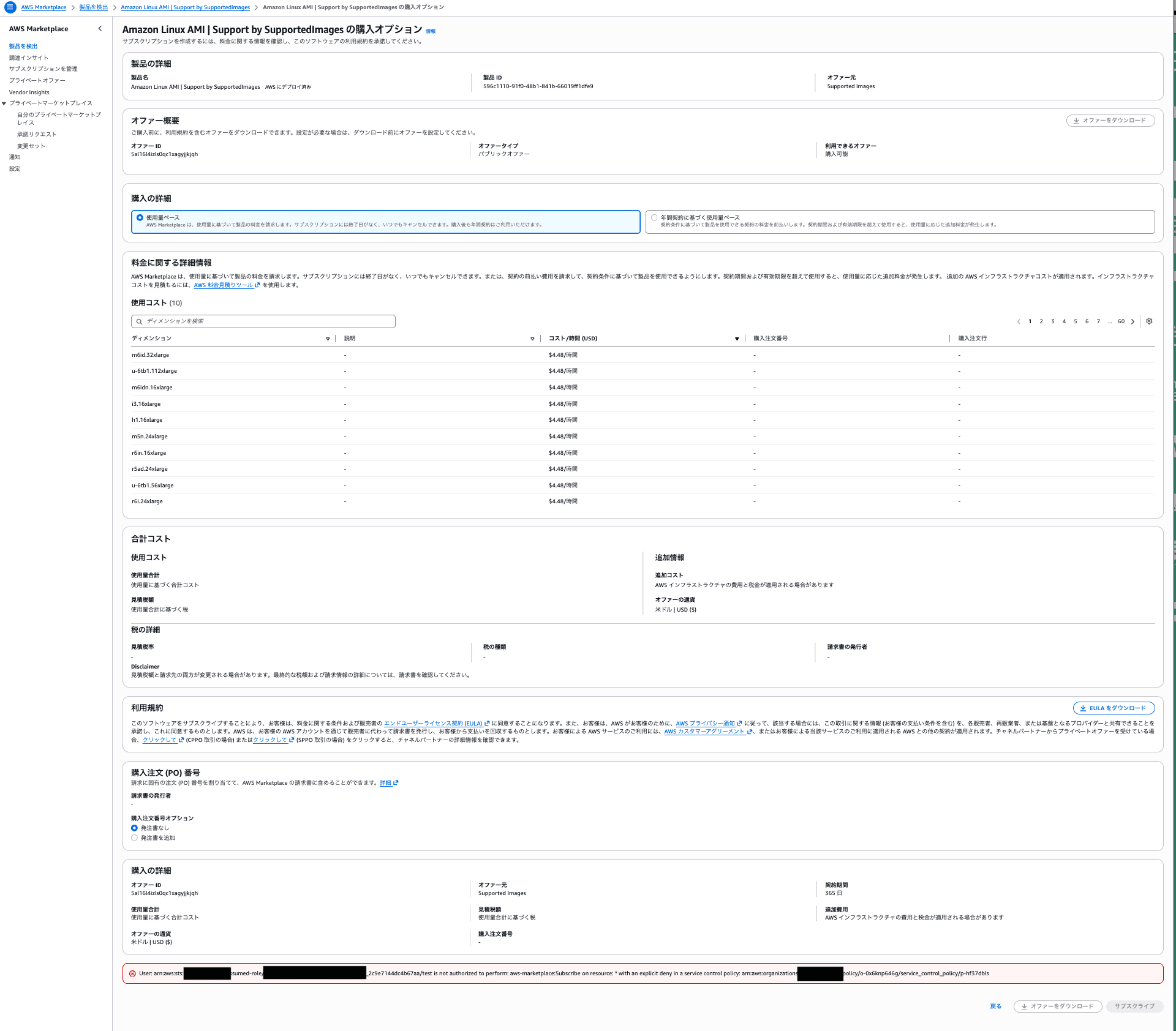
The error indicates that aws-marketplace:Subscribe was denied by an explicit Deny in the SCP.
With the normal AdministratorAccess permission set, aws-marketplace:Subscribe is allowed by the IAM policy.
However, in this SCP, aws-marketplace:Subscribe is explicitly denied for principals that do not match the ARN pattern of IAM roles created from MarketplaceSubscribeAccess.
Since explicit Deny takes priority in IAM permission evaluation, subscribing is not possible even when AdministratorAccess is configured.
Verifying with MarketplaceSubscribeAccess
Next, assign MarketplaceSubscribeAccess to the target user and target member account in IAM Identity Center.
The target user selects MarketplaceSubscribeAccess from the AWS access portal and logs in to the same AWS account.
When I opened the same AWS Marketplace product subscribe screen as before, I confirmed that the subscribe button was enabled and the operation was possible.
The IAM role created from MarketplaceSubscribeAccess matches the following ARN pattern.
arn:aws:iam::*:role/aws-reserved/sso.amazonaws.com/ap-northeast-1/AWSReservedSSO_MarketplaceSubscribeAccess_*
Since ArnNotLike is used in the SCP, IAM roles matching this ARN pattern are excluded from the aws-marketplace:Subscribe Deny targets.
Also, since AdministratorAccess is configured in the permission set, aws-marketplace:Subscribe is allowed by the IAM policy.
As a result, with the subscribe permission set, the AWS Marketplace product subscribe operation could be executed.
In this verification, the following controls were confirmed.
- Cannot subscribe with the normal
AdministratorAccess - Can subscribe with
MarketplaceSubscribeAccess
Operational Flow
The operational flow assumed this time is as follows.
User requests to subscribe to an AWS Marketplace product
↓
Administrator reviews the request content
↓
Administrator assigns MarketplaceSubscribeAccess to the target user and target account
↓
User logs in with MarketplaceSubscribeAccess
↓
User subscribes to the AWS Marketplace product
↓
User notifies administrator of subscription completion
↓
Administrator revokes the MarketplaceSubscribeAccess assignment
IAM Identity Center permission sets are assigned to combinations of users or groups and AWS accounts.
Therefore, assigning MarketplaceSubscribeAccess to a certain AWS account does not make it available in all accounts in the organization.
Assign the permission set to the combination of user and AWS account that needs to perform the subscribe operation.
Also, if a user has both the normal AdministratorAccess and the subscribe MarketplaceSubscribeAccess assigned, both permission sets will be displayed in the AWS access portal.
When subscribing, the user needs to select MarketplaceSubscribeAccess and log in.
Scope of This Control
What can be restricted by this SCP is operations that require aws-marketplace:Subscribe.
The main target is subscribing to AWS Marketplace products, but it also includes sending requests for products that require subscription validation and enabling auto-renewal of existing subscriptions.
On the other hand, it is not a control that stops the use of products that were already subscribed before the SCP was applied.
For example, the operation of launching EC2 instances from an already-subscribed AMI is not directly restricted by this SCP.
Subscribing to a new AWS Marketplace product
→ Restricted by this SCP

Launching an EC2 instance from a subscribed AMI
→ Not directly restricted by this SCP
If you want to restrict EC2 instance launches from subscribed AMIs as well, separate controls such as IAM policies or SCPs targeting ec2:RunInstances need to be considered.
Also, since this SCP does not target aws-marketplace:Unsubscribe, unsubscribing and disabling auto-renewal operations are not restricted.
Whether to require approval for subscribing, unsubscribing, or both needs to be decided based on requirements.
Summary
By combining AWS Organizations SCPs with IAM Identity Center permission sets, I was able to restrict AWS Marketplace product subscribe operations to go through a specific permission set.
The key point is excluding the IAM role ARN created from the subscribe permission set from the aws-marketplace:Subscribe Deny targets.
Also, since tags configured on IAM Identity Center permission sets are not inherited by the corresponding IAM roles, aws:PrincipalArn was used as the condition this time.
This method can be useful when you want to temporarily limit which users can subscribe to AWS Marketplace products, rather than restricting the target products in advance.

