I tried web category-based filtering with AWS Network Firewall

This page has been translated by machine translation. View original
Category-Based Filtering
Hello, this is nonPi (@non____97).
Have you ever wanted to perform category-based filtering in AWS Network Firewall? I certainly have.
Web proxy products like i-Filter allow you to control allow/deny settings based on categories.
This makes it possible to control access to unknown domains and URLs.
Although it will be a January 2026 update, AWS Network Firewall now has the ability to perform category-based domain and URL filtering as well.
I gave it a try.
Summary
- Category-based domain filtering and URL filtering are now possible
- Specified using Suricata keywords
- Use
aws_url_categoryfor fine control including URL paths, andaws_domain_categorywhen judging from host headers and SNI fields- If you don't enable TLS inspection, understand the risks of SNI spoofing
- AWS service endpoints are categorized as
Technology and Internet - Not every domain or URL is guaranteed to be assigned a category
Feature Introduction
The category-based domain filtering and URL filtering in this update are not provided through dedicated managed rule groups. Instead, they are defined using keywords in Suricata-based rules.
The good news is that there are no additional costs.
Two new keywords have been added:
- aws_url_category
- aws_domain_category
Information is compiled in the following AWS official documentation.
Here's a summary of their features:
| Item | aws_url_category | aws_domain_category |
|---|---|---|
| Evaluation Target | Complete URLs and domains | Domain information only |
| Supported Protocols | HTTP | TLS, HTTP |
| TLS Inspection | Required for HTTPS | Not required |
| HTTP Traffic | Evaluates complete URL | Evaluates domain from Host field |
| HTTPS / TLS Traffic | Evaluates URL with TLS inspection (impossible without it) | Evaluates domain from SNI field |
| Evaluation Logic | 1. URL path evaluation (max 30 recursions) → 2. Falls back to domain evaluation (max 10 recursions) | Domain level evaluation only (max 10 recursions) |
| HTTP Request URI Field | Yes (HTTPS requires TLS inspection) | - |
| HTTP Request Host Field | Yes | Yes |
| TLS Handshake SNI Field | - | Yes |
Use aws_url_category for fine control including URL paths, and aws_domain_category when judging from host headers and SNI fields.
While aws_domain_category doesn't require TLS inspection, note that without TLS inspection enabled, SNI spoofing is possible as described here:
Currently supported categories are as follows:
- Abortion
- Adult and Mature Content
- Artificial Intelligence and Machine Learning
- Arts and Culture
- Business and Economy
- Career and Job Search
- Child Abuse
- Command and Control
- Criminal and Illegal Activities
- Cryptocurrency
- Dating
- Education
- Entertainment
- Family and Parenting
- Fashion
- Financial Services
- Food and Dining
- For Kids
- Gambling
- Government and Legal
- Hacking
- Health
- Hobbies and Interest
- Home and Garden
- Lifestyle
- Malicious
- Malware
- Marijuana
- Military
- News
- Online Ads
- Parked Domains
- Pets
- Phishing
- Private IP Address
- Proxy Avoidance
- Real Estate
- Redirect
- Religion
- Search Engines and Portals
- Science
- Shopping
- Social Networking
- Spam
- Sports and Recreation
- Technology and Internet
- Translation
- Travel
- Vehicles
- Violence and Hate Speech
There is no way to check which category a domain or URL belongs to using the AWS Management Console or AWS CLI.
It would be nice if a checking tool similar to i-Filter were provided.
Other points to note:
- A URL may be mapped to multiple categories
- Category databases are automatically maintained and updated
- Multiple categories can be specified in a single rule
- aws_url_category / aws_domain_category cannot be combined with geographical IP filtering (geoip) in the same rule
- Separate rules must be created if both are needed
- Using aws_url_category / aws_domain_category may increase traffic latency
- Additional category lookups are performed for each connection matching the rule's protocol and IP specifications
Hands-On Testing
Test Environment
Let's try it out.
The test environment is as follows:
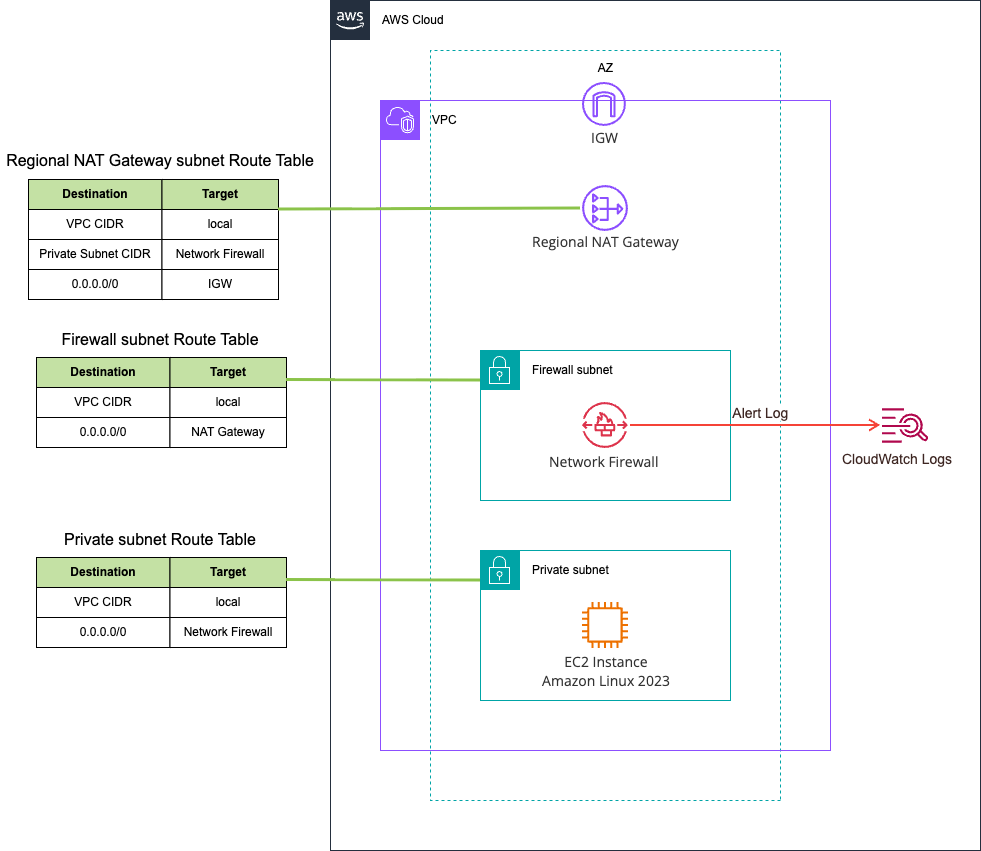
We'll perform domain filtering in this test.
Rule Configuration
Let's create a rule group and set up rules for domain filtering.
Since stuffing everything into a single rule resulted in a stateful rule is invalid error, I've split them into about 5 rules.
alert tls any any -> any any (msg:"Domain category check 1"; aws_domain_category:Abortion,Adult and Mature Content,Artificial Intelligence and Machine Learning,Arts and Culture,Business and Economy,Career and Job Search,Child Abuse,Command and Control,Criminal and Illegal Activities,Cryptocurrency; sid:99999901; rev:1;)
alert tls any any -> any any (msg:"Domain category check 2"; aws_domain_category:Dating,Education,Email,Entertainment,Family and Parenting,Fashion,Financial Services,Food and Dining,For Kids,Gambling; sid:99999902; rev:1;)
alert tls any any -> any any (msg:"Domain category check 3"; aws_domain_category:Government and Legal,Hacking,Health,Hobbies and Interest,Home and Garden,Lifestyle,Malicious,Malware,Marijuana,Military; sid:99999903; rev:1;)
alert tls any any -> any any (msg:"Domain category check 4"; aws_domain_category:News,Online Ads,Parked Domains,Pets,Phishing,Private IP Address,Proxy Avoidance,Real Estate,Redirect,Religion; sid:99999904; rev:1;)
alert tls any any -> any any (msg:"Domain category check 5"; aws_domain_category:Search Engines and Portals,Science,Shopping,Social Networking,Spam,Sports and Recreation,Technology and Internet,Translation,Travel,Vehicles,Violence and Hate Speech; sid:99999905; rev:1;)
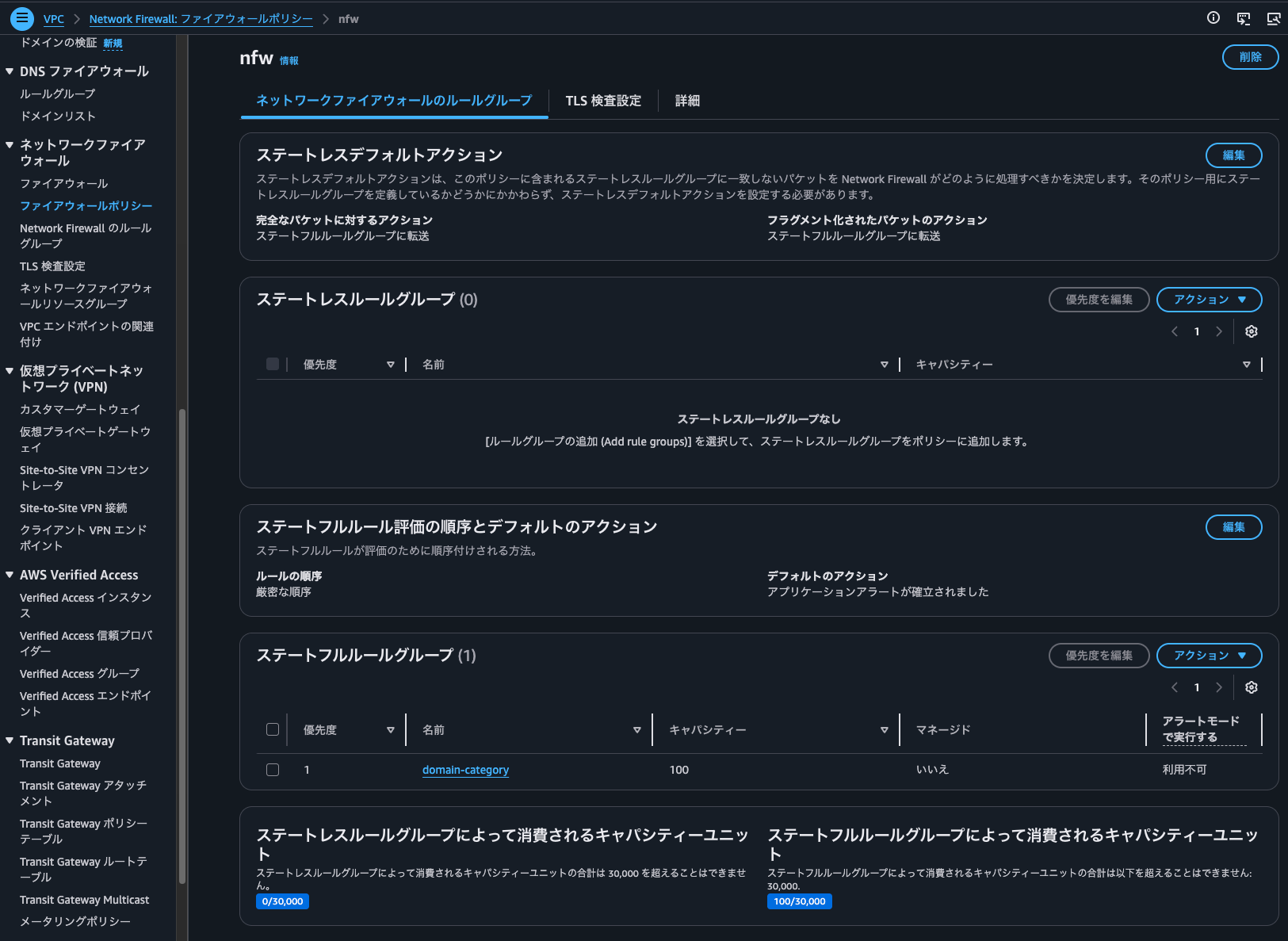
The firewall policy itself is as follows. Key points are that rule ordering is strict, and there's no default drop action:
> aws network-firewall describe-firewall-policy --firewall-policy-name nfw
{
    "UpdateToken": "23d629f6-4f6c-4eca-89ec-a76cf2e020e8",
    "FirewallPolicyResponse": {
        "FirewallPolicyName": "nfw",
        "FirewallPolicyArn": "arn:aws:network-firewall:us-east-1:<AWSAccountID>:firewall-policy/nfw",
        "FirewallPolicyId": "7cb036ef-4087-4054-b72b-a59156e7476b",
        "FirewallPolicyStatus": "ACTIVE",
        "Tags": [],
        "ConsumedStatelessRuleCapacity": 0,
        "ConsumedStatefulRuleCapacity": 100,
        "NumberOfAssociations": 1,
        "EncryptionConfiguration": {
            "KeyId": "AWS_OWNED_KMS_KEY",
            "Type": "AWS_OWNED_KMS_KEY"
        },
        "LastModifiedTime": "2026-03-30T19:21:01.981000+09:00"
    },
    "FirewallPolicy": {
        "StatelessDefaultActions": [
            "aws:forward_to_sfe"
        ],
        "StatelessFragmentDefaultActions": [
            "aws:forward_to_sfe"
        ],
        "StatelessCustomActions": [],
        "StatefulRuleGroupReferences": [
            {
                "ResourceArn": "arn:aws:network-firewall:us-east-1:<AWSAccountID>:stateful-rulegroup/domain-category",
                "Priority": 1
            }
        ],
        "StatefulDefaultActions": [
            "aws:alert_established_app_layer"
        ],
        "StatefulEngineOptions": {
            "RuleOrder": "STRICT_ORDER",
            "StreamExceptionPolicy": "REJECT"
        }
    }
}
Verification
Let's verify operation.
After launching an EC2 instance and waiting a while, alerts for AWS service endpoints such as ec2messages.us-east-1.amazonaws.com and ssmmessages.us-east-1.amazonaws.com appeared as follows:
{
    "firewall_name": "nfw",
    "availability_zone": "us-east-1a",
    "event_timestamp": "1774866209",
    "event": {
        "aws_category": "[\"Technology and Internet\"]",
        "tx_id": 0,
        "app_proto": "tls",
        "src_ip": "10.0.144.118",
        "src_port": 53030,
        "event_type": "alert",
        "alert": {
            "severity": 3,
            "signature_id": 2,
            "rev": 0,
            "signature": "aws:alert_established_app_layer action",
            "action": "allowed",
            "category": ""
        },
        "flow_id": 490844992185568,
        "dest_ip": "98.87.173.75",
        "proto": "TCP",
        "verdict": {
            "action": "alert"
        },
        "tls": {
            "sni": "ec2messages.us-east-1.amazonaws.com",
            "version": "UNDETERMINED"
        },
        "dest_port": 443,
        "pkt_src": "geneve encapsulation",
        "timestamp": "2026-03-30T10:23:29.249995+0000",
        "direction": "to_server"
    }
}
{
    "firewall_name": "nfw",
    "availability_zone": "us-east-1a",
    "event_timestamp": "1774866217",
    "event": {
        "aws_category": "[\"Technology and Internet\"]",
        "tx_id": 0,
        "app_proto": "tls",
        "src_ip": "10.0.144.118",
        "src_port": 56410,
        "event_type": "alert",
        "alert": {
            "severity": 3,
            "signature_id": 2,
            "rev": 0,
            "signature": "aws:alert_established_app_layer action",
            "action": "allowed",
            "category": ""
        },
        "flow_id": 381111503837525,
        "dest_ip": "44.216.203.22",
        "proto": "TCP",
        "verdict": {
            "action": "alert"
        },
        "tls": {
            "sni": "ssmmessages.us-east-1.amazonaws.com",
            "version": "UNDETERMINED"
        },
        "dest_port": 443,
        "pkt_src": "geneve encapsulation",
        "timestamp": "2026-03-30T10:23:37.354876+0000",
        "direction": "to_server"
    }
}
{
    "firewall_name": "nfw",
    "availability_zone": "us-east-1a",
    "event_timestamp": "1774866217",
    "event": {
        "aws_category": "[\"Technology and Internet\"]",
        "tx_id": 0,
        "app_proto": "tls",
        "src_ip": "10.0.144.118",
        "src_port": 49646,
        "event_type": "alert",
        "alert": {
            "severity": 3,
            "signature_id": 2,
            "rev": 0,
            "signature": "aws:alert_established_app_layer action",
            "action": "allowed",
            "category": ""
        },
        "flow_id": 286300343235295,
        "dest_ip": "3.236.94.144",
        "proto": "TCP",
        "verdict": {
            "action": "alert"
        },
        "tls": {
            "sni": "logs.us-east-1.amazonaws.com",
            "version": "UNDETERMINED"
        },
        "dest_port": 443,
        "pkt_src": "geneve encapsulation",
        "timestamp": "2026-03-30T10:23:37.398683+0000",
        "direction": "to_server"
    }
}
{
    "firewall_name": "nfw",
    "availability_zone": "us-east-1a",
    "event_timestamp": "1774866218",
    "event": {
        "aws_category": "[\"Technology and Internet\"]",
        "tx_id": 0,
        "app_proto": "tls",
        "src_ip": "10.0.144.118",
        "src_port": 54486,
        "event_type": "alert",
        "alert": {
            "severity": 3,
            "signature_id": 99999905,
            "rev": 1,
            "signature": "Domain category check 5",
            "action": "allowed",
            "category": ""
        },
        "flow_id": 744622004207624,
        "dest_ip": "13.220.36.112",
        "proto": "TCP",
        "verdict": {
            "action": "alert"
        },
        "tls": {
            "sni": "ssm.us-east-1.amazonaws.com",
            "version": "UNDETERMINED"
        },
        "dest_port": 443,
        "pkt_src": "geneve encapsulation",
        "timestamp": "2026-03-30T10:23:38.045992+0000",
        "direction": "to_server"
    }
}
{
    "firewall_name": "nfw",
    "availability_zone": "us-east-1a",
    "event_timestamp": "1774866218",
    "event": {
        "aws_category": "[\"Technology and Internet\"]",
        "tx_id": 0,
        "app_proto": "tls",
        "src_ip": "10.0.144.118",
        "src_port": 54486,
        "event_type": "alert",
        "alert": {
            "severity": 3,
            "signature_id": 2,
            "rev": 0,
            "signature": "aws:alert_established_app_layer action",
            "action": "allowed",
            "category": ""
        },
        "flow_id": 744622004207624,
        "dest_ip": "13.220.36.112",
        "proto": "TCP",
        "verdict": {
            "action": "alert"
        },
        "tls": {
            "sni": "ssm.us-east-1.amazonaws.com",
            "version": "UNDETERMINED"
        },
        "dest_port": 443,
        "pkt_src": "geneve encapsulation",
        "timestamp": "2026-03-30T10:23:38.045992+0000",
        "direction": "to_server"
    }
}
Therefore, if you add a rule to block Technology and Internet, all these services will be blocked unless you have corresponding VPC endpoints. Otherwise, you need to explicitly allow these domains with domain filtering rules before category-based filtering.
Next, let's access dev.classmethod.jp.
$ curl https://dev.classmethod.jp/ -I
HTTP/2 200
content-type: text/html; charset=utf-8
date: Mon, 30 Mar 2026 10:29:20 GMT
cache-control: public, max-age=45, stale-if-error=21600
link: <https://devio2025-elb-apn1.developers.io/en/>; rel="alternate"; hreflang="en", <https://devio2025-elb-apn1.developers.io/>; rel="alternate"; hreflang="ja", <https://devio2025-elb-apn1.developers.io/>; rel="alternate"; hreflang="x-default"
x-custom-lang: ja
x-middleware-rewrite: /ja
x-powered-by: Next.js
vary: Accept-Encoding
x-cache: Miss from cloudfront
via: 1.1 da473159f6f131ea8035a6279b0f60aa.cloudfront.net (CloudFront)
x-amz-cf-pop: IAD61-P11
alt-svc: h3=":443"; ma=86400
x-amz-cf-id: jerZ4r-JrTl42eq_giW_6p5hbljGosh1CNkQAfL3tI1fnFU14ZASTg==
server-timing: cdn-upstream-layer;desc="REC",cdn-upstream-dns;dur=0,cdn-upstream-connect;dur=0,cdn-upstream-fbl;dur=174,cdn-cache-miss,cdn-pop;desc="IAD61-P11",cdn-rid;desc="jerZ4r-JrTl42eq_giW_6p5hbljGosh1CNkQAfL3tI1fnFU14ZASTg==",cdn-downstream-fbl;dur=182
The log at that time shows the category as Technology and Internet:
{
    "firewall_name": "nfw",
    "availability_zone": "us-east-1a",
    "event_timestamp": "1774866560",
    "event": {
        "aws_category": "[\"Technology and Internet\"]",
        "tx_id": 0,
        "app_proto": "tls",
        "src_ip": "10.0.144.118",
        "src_port": 52656,
        "event_type": "alert",
        "alert": {
            "severity": 3,
            "signature_id": 99999905,
            "rev": 1,
            "signature": "Domain category check 5",
            "action": "allowed",
            "category": ""
        },
        "flow_id": 79365365321249,
        "dest_ip": "13.35.78.60",
        "proto": "TCP",
        "verdict": {
            "action": "alert"
        },
        "tls": {
            "sni": "dev.classmethod.jp",
            "version": "UNDETERMINED"
        },
        "dest_port": 443,
        "pkt_src": "geneve encapsulation",
        "timestamp": "2026-03-30T10:29:20.809583+0000",
        "direction": "to_server"
    }
}
{
    "firewall_name": "nfw",
    "availability_zone": "us-east-1a",
    "event_timestamp": "1774866560",
    "event": {
        "aws_category": "[\"Technology and Internet\"]",
        "tx_id": 0,
        "app_proto": "tls",
        "src_ip": "10.0.144.118",
        "src_port": 52656,
        "event_type": "alert",
        "alert": {
            "severity": 3,
            "signature_id": 2,
            "rev": 0,
            "signature": "aws:alert_established_app_layer action",
            "action": "allowed",
            "category": ""
        },
        "flow_id": 79365365321249,
        "dest_ip": "13.35.78.60",
        "proto": "TCP",
        "verdict": {
            "action": "alert"
        },
        "tls": {
            "sni": "dev.classmethod.jp",
            "version": "UNDETERMINED"
        },
        "dest_port": 443,
        "pkt_src": "geneve encapsulation",
        "timestamp": "2026-03-30T10:29:20.809583+0000",
        "direction": "to_server"
    }
}
Next, I'll access my website www.non-97.net:
$ curl http://www.non-97.net/ -I
HTTP/1.1 301 Moved Permanently
Server: CloudFront
Date: Mon, 30 Mar 2026 10:31:40 GMT
Content-Type: text/html
Content-Length: 167
Connection: keep-alive
Location: https://www.non-97.net/
X-Cache: Redirect from cloudfront
Via: 1.1 2ad6789a221bb559c9b8ce946b65a03a.cloudfront.net (CloudFront)
X-Amz-Cf-Pop: IAD12-P2
X-Amz-Cf-Id: uVaPBSPSd7ezfx0bJgqyHlBFdgsKgO4QCH7FEQVPdwdL0t4BQV9VSA==
X-XSS-Protection: 1; mode=block
X-Frame-Options: SAMEORIGIN
Referrer-Policy: strict-origin-when-cross-origin
X-Content-Type-Options: nosniff

$ curl https://www.non-97.net/ -I
HTTP/2 200
content-type: text/html
content-length: 12
date: Mon, 30 Mar 2026 10:31:47 GMT
last-modified: Tue, 25 Feb 2025 02:38:39 GMT
etag: "56aec8b7843df637b3fb2ec0b027e5b6"
x-amz-server-side-encryption: AES256
accept-ranges: bytes
server: AmazonS3
x-cache: Miss from cloudfront
via: 1.1 d4313104085979d3472fae656cd1ecc2.cloudfront.net (CloudFront)
x-amz-cf-pop: IAD12-P2
x-amz-cf-id: Z9XoxyejKDlV9x9Jg9OnJp2_uN2C1f4evm0qs8_8r7m-vAFQ4dY9NA==
x-xss-protection: 1; mode=block
x-frame-options: SAMEORIGIN
referrer-policy: strict-origin-when-cross-origin
x-content-type-options: nosniff
strict-transport-security: max-age=31536000
The log at that time was as follows:
{
    "firewall_name": "nfw",
    "availability_zone": "us-east-1a",
    "event_timestamp": "1774866700",
    "event": {
        "aws_category": "",
        "tx_id": 0,
        "app_proto": "http",
        "src_ip": "10.0.144.118",
        "src_port": 57116,
        "event_type": "alert",
        "alert": {
            "severity": 3,
            "signature_id": 4,
            "rev": 0,
            "signature": "aws:alert_established_app_layer action",
            "action": "allowed",
            "category": ""
        },
        "flow_id": 1302647705937450,
        "dest_ip": "108.138.85.82",
        "proto": "TCP",
        "verdict": {
            "action": "alert"
        },
        "http": {
            "hostname": "www.non-97.net",
            "url": "/",
            "http_user_agent": "curl/8.17.0",
            "http_method": "HEAD",
            "protocol": "HTTP/1.1",
            "length": 0
        },
        "dest_port": 80,
        "pkt_src": "geneve encapsulation",
        "timestamp": "2026-03-30T10:31:40.371787+0000",
        "direction": "to_server"
    }
}
{
    "firewall_name": "nfw",
    "availability_zone": "us-east-1a",
    "event_timestamp": "1774866706",
    "event": {
        "aws_category": "",
        "tx_id": 0,
        "app_proto": "tls",
        "src_ip": "10.0.144.118",
        "src_port": 34464,
        "event_type": "alert",
        "alert": {
            "severity": 3,
            "signature_id": 2,
            "rev": 0,
            "signature": "aws:alert_established_app_layer action",
            "action": "allowed",
            "category": ""
        },
        "flow_id": 788394307038501,
        "dest_ip": "108.138.85.20",
        "proto": "TCP",
        "verdict": {
            "action": "alert"
        },
        "tls": {
            "sni": "www.non-97.net",
            "version": "UNDETERMINED"
        },
        "dest_port": 443,
        "pkt_src": "geneve encapsulation",
        "timestamp": "2026-03-30T10:31:46.516139+0000",
        "direction": "to_server"
    }
}
The category field is empty. This means that not every domain or URL is guaranteed to be assigned to a category.
Categories not used for business operations may be appropriate to block
I tested AWS Network Firewall's category-based filtering.
It seems appropriate to block categories not used for business operations, such as Gambling and Cryptocurrency, in addition to obvious categories like Spam and Command and Control.
For reference, AWS Network Firewall's best practices include the following examples of category-based filtering:
# Block higher risk domain categories
reject tls $HOME_NET any -> any any (msg:"Category:Command and Control"; aws_domain_category:Command and Control; ja4.hash; content:"_"; flow:to_server; sid:202602061;)
reject tls $HOME_NET any -> any any (msg:"Category:Hacking"; aws_domain_category:Hacking; ja4.hash; content:"_"; flow:to_server; sid:202602062;)
reject tls $HOME_NET any -> any any (msg:"Category:Malicious"; aws_domain_category:Malicious; ja4.hash; content:"_"; flow:to_server; sid:202602063;)
reject tls $HOME_NET any -> any any (msg:"Category:Malware"; aws_domain_category:Malware; ja4.hash; content:"_"; flow:to_server; sid:202602064;)
reject tls $HOME_NET any -> any any (msg:"Category:Phishing"; aws_domain_category:Phishing; ja4.hash; content:"_"; flow:to_server; sid:202602065;)
reject tls $HOME_NET any -> any any (msg:"Category:Proxy Avoidance"; aws_domain_category:Proxy Avoidance; ja4.hash; content:"_"; flow:to_server; sid:202602066;)
reject tls $HOME_NET any -> any any (msg:"Category:Spam"; aws_domain_category:Spam; ja4.hash; content:"_"; flow:to_server; sid:202602067;)
reject http $HOME_NET any -> any any (msg:"Category:Command and Control"; aws_url_category:Command and Control; flow:to_server; sid:202602068;)
reject http $HOME_NET any -> any any (msg:"Category:Hacking"; aws_url_category:Hacking; flow:to_server; sid:202602069;)
reject http $HOME_NET any -> any any (msg:"Category:Malicious"; aws_url_category:Malicious; flow:to_server; sid:2026020610;)
reject http $HOME_NET any -> any any (msg:"Category:Malware"; aws_url_category:Malware; flow:to_server; sid:2026020611;)
reject http $HOME_NET any -> any any (msg:"Category:Phishing"; aws_url_category:Phishing; flow:to_server; sid:2026020612;)
reject http $HOME_NET any -> any any (msg:"Category:Proxy Avoidance"; aws_url_category:Proxy Avoidance; flow:to_server; sid:2026020613;)
reject http $HOME_NET any -> any any (msg:"Category:Spam"; aws_url_category:Spam; flow:to_server; sid:2026020614;)
Excerpt from: AWS Network Firewall Best Practices - AWS Security Services Best Practices
I hope this article helps someone.
This was nonP (@non____97) from the Consulting Department of the Cloud Business Division!