![[Verification] Using Brave Search from VPC: Testing whether web search and AI answers work by opening only api.search.brave.com in Network Firewall](https://images.ctfassets.net/ct0aopd36mqt/348VnC3440CoUtpS4pd5NS/8a7182ab96a0851a72a88d40328811b3/aws.png?w=3840&fm=webp)
[Verification] Using Brave Search from VPC: Testing whether web search and AI answers work by opening only api.search.brave.com in Network Firewall

This page has been translated by machine translation. View original
Hello, I'm kema.
I often hear requests to integrate web search functionality into AI agents running on Fargate or AgentCore.
However, corporate network requirements generally don't freely allow communication from VPCs to the external internet, and it's common practice to use firewalls like AWS Network Firewall to open holes only for "permitted destinations."
So what I'm curious about is: how many holes do we need to open to add web search?
Looking at the Brave Search API documentation, endpoints such as Web Search and Summarizer (AI summarization) are all consolidated under subpaths of api.search.brave.com.
For example, Web Search requests are sent to api.search.brave.com like this:
curl "https://api.search.brave.com/res/v1/web/search?q=machine+learning+tutorials&freshness=pw"
Source: API Documentation: Web Search API | Brave Search API
In other words, if you allow just the single domain api.search.brave.com in Network Firewall, both web search and AI responses from the AI agent should pass through.
In this article, I'll verify whether this assumption actually holds true.
I set up a minimal configuration with a single VPC and Network Firewall, allowed only the single domain api.search.brave.com, and confirmed whether curl, Python programs, and AI responses (summarization) actually work.
These are the results of actually deploying to the Tokyo region (ap-northeast-1) as of June 2026.
I hope this serves as a reference for how to open firewall holes when adding search functionality to AI agents.
Target audience: Those considering opening firewall holes to call external APIs (such as web search APIs) from a VPC, and those who want to try AWS Network Firewall's domain filtering (SNI filtering).
1. What We'll Build in This Hands-On
We'll deploy the following foundation in one shot with CDK, then experience "opening a domain hole" via CLI.
- Single VPC, single AZ. Three-tier subnets (workload / public(NAT) / firewall)
- AWS Network Firewall (stateful, initially blocking all egress)
- Verification EC2 (Amazon Linux 2023). Connect via SSM Session Manager
- VPC interface endpoints for SSM and Secrets Manager
- Secrets Manager secret for the Brave API key
The domain allowance (api.search.brave.com) is intentionally not included in the CDK.
Opening that hole via CLI after deployment is the main focus of this hands-on.
What I most want to confirm here is: with only the single domain api.search.brave.com allowed, do all Brave Search API features—from web search to AI responses (summarization)—work end to end?
2. Architecture and Traffic Flow
2.1 Overall Architecture
Here is the overall picture of the architecture verified this time.
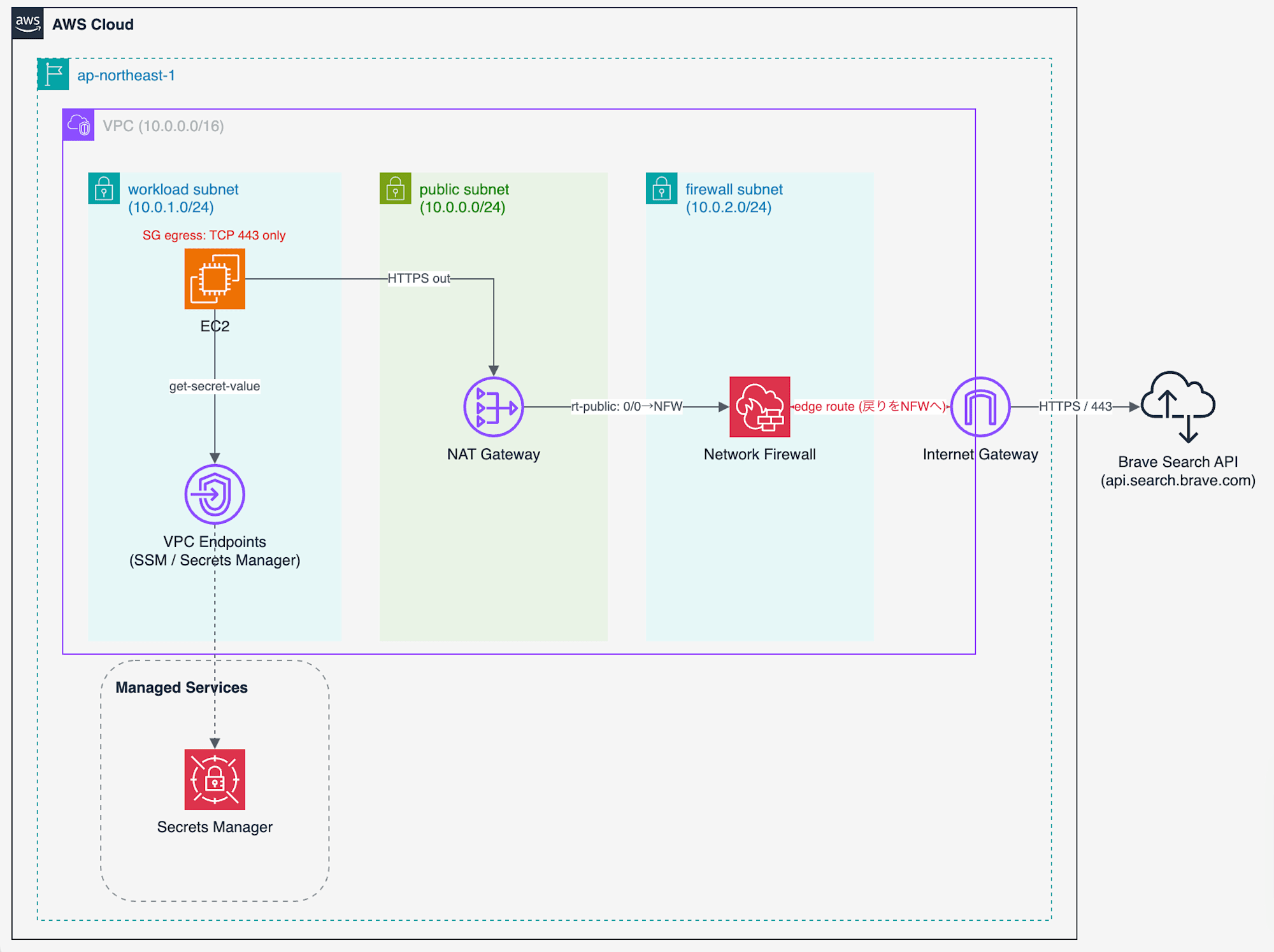
Single VPC architecture. Security groups restrict ports to TCP 443, and Network Firewall handles destination domain determination based on SNI
Traffic originates from the EC2 in the workload subnet, and passes through NAT Gateway → Network Firewall → Internet Gateway to reach api.search.brave.com.
The security group attached to the EC2 in the workload subnet only restricts outbound traffic to port 443, leaving the destination IP as 0.0.0.0/0.
Which domains can be reached is determined by Network Firewall inspecting the SNI.
The API key is retrieved from Secrets Manager via a VPC endpoint without going out to the internet.
2.2 Return Traffic Also Passes Through Network Firewall
Not only outbound traffic (EC2 → Internet), but return traffic (responses from the internet) must also pass through Network Firewall.
This is because the domain (SNI) filter used here is "stateful" inspection, which needs to see both the outbound and inbound of a single communication on the same path (Network Firewall also has stateless inspection, but domain determination is done on the stateful side).
If return traffic doesn't pass through Network Firewall, the inspection becomes asymmetric and communication breaks.
Therefore, an "edge route table" is associated with the Internet Gateway, detouring return traffic (destination = public subnet where NAT resides) to the Network Firewall.
In the architecture diagram above, the red dotted line returning from the Internet Gateway to the Network Firewall represents this path.
In production, a configuration where multiple application VPCs are aggregated via Transit Gateway, and a Network Firewall placed in a central egress VPC inspects all outbound traffic together, is commonly adopted.
The purpose of this verification is to confirm "whether allowing just 1 domain is sufficient," so we keep it to a single VPC and single AZ that can reliably be operated with one CDK file.
3. Prerequisites
| Required | Details |
|---|---|
| AWS Account | Verification account |
| Region | This article uses ap-northeast-1 (Tokyo) |
| Node.js / AWS CDK | Node.js 18 or later, AWS CDK v2 |
| AWS CLI v2 | Used for Network Firewall CLI operations and SSM connections |
| Session Manager Plugin | Required for aws ssm start-session |
| Brave Search API Key | Subscribe via AWS Marketplace to obtain |
The Brave Search API is available on AWS Marketplace.
Subscribe to "Brave Search API" on AWS Marketplace and issue a key from the Brave dashboard (Marketplace page: AWS Marketplace: Brave Search API | AWS).
4. Deploy with CDK
4.1 What app.ts Creates
The CDK is consolidated into a single stack definition file (app.ts).
Reading through app.ts from top to bottom, it creates the following:
- VPC and Internet Gateway: Creates a VPC with
10.0.0.0/16and attaches an IGW. - Three-tier subnets: workload (for EC2, private) / public (for NAT) / firewall (for Network Firewall endpoint). All placed in a single AZ.
- NAT Gateway: Placed in the public subnet. EC2 instances in private subnets have no public IPs; outbound traffic goes through NAT.
- Network Firewall Policy: Stateful with
STRICT_ORDER, default action set toaws:drop_established. No rule groups attached = initial state blocks all egress. - Network Firewall itself: Creates the firewall in the firewall subnet.
- Four route tables: workload subnet → NAT, public subnet (NAT) → Network Firewall, firewall subnet → IGW, and an "IGW edge route" that detours return traffic from IGW to Network Firewall. This ensures all traffic passes through Network Firewall.
- Secrets Manager secret: Creates a placeholder for the Brave API key (the value is populated later via CLI).
- VPC interface endpoints:
ssm/ssmmessages(for SSM connections) andsecretsmanager(for key retrieval). By making these endpoints, SSM connections and key retrieval are completed within the VPC even when Network Firewall drops everything except Brave. - Verification EC2: Amazon Linux 2023. SG outbound is limited to
TCP 443 to 0.0.0.0/0and DNS (53) only. Destination IPs are not restricted; domain control is delegated to Network Firewall.
The full text of app.ts and configuration files are included in the collapsible sections below.
app.ts (click to expand)
#!/usr/bin/env node
import * as cdk from 'aws-cdk-lib';
import { Construct } from 'constructs';
import {
  aws_ec2 as ec2,
  aws_iam as iam,
  aws_logs as logs,
  aws_networkfirewall as netfw,
  aws_secretsmanager as secretsmanager,
} from 'aws-cdk-lib';

// Educational parameters (change as needed)
const VPC_CIDR = '10.0.0.0/16';
const WORKLOAD_CIDR = '10.0.1.0/24'; // Verification EC2 (private)
const PUBLIC_CIDR = '10.0.0.0/24'; // NAT Gateway (public)
const FIREWALL_CIDR = '10.0.2.0/24'; // Network Firewall endpoint
const SECRET_NAME = 'brave-search/api-key';
const FIREWALL_NAME = 'brave-egress-fw';

class BraveNfwEgressStack extends cdk.Stack {
  constructor(scope: Construct, id: string, props?: cdk.StackProps) {
    super(scope, id, props);

    const az = cdk.Fn.select(0, cdk.Fn.getAzs());

    // 1. VPC and Internet Gateway
    const vpc = new ec2.CfnVPC(this, 'Vpc', {
      cidrBlock: VPC_CIDR,
      enableDnsSupport: true,
      enableDnsHostnames: true,
      tags: [{ key: 'Name', value: 'brave-nfw-egress-vpc' }],
    });
    const igw = new ec2.CfnInternetGateway(this, 'Igw', {
      tags: [{ key: 'Name', value: 'brave-nfw-igw' }],
    });
    const igwAttach = new ec2.CfnVPCGatewayAttachment(this, 'IgwAttach', {
      vpcId: vpc.ref,
      internetGatewayId: igw.ref,
    });

    // 2. Three-tier subnets (all single AZ)
    const workloadSubnet = new ec2.CfnSubnet(this, 'WorkloadSubnet', {
      vpcId: vpc.ref, cidrBlock: WORKLOAD_CIDR, availabilityZone: az,
      mapPublicIpOnLaunch: false, tags: [{ key: 'Name', value: 'workload-private' }],
    });
    const publicSubnet = new ec2.CfnSubnet(this, 'PublicSubnet', {
      vpcId: vpc.ref, cidrBlock: PUBLIC_CIDR, availabilityZone: az,
      mapPublicIpOnLaunch: false, tags: [{ key: 'Name', value: 'nat-public' }],
    });
    const firewallSubnet = new ec2.CfnSubnet(this, 'FirewallSubnet', {
      vpcId: vpc.ref, cidrBlock: FIREWALL_CIDR, availabilityZone: az,
      mapPublicIpOnLaunch: false, tags: [{ key: 'Name', value: 'firewall' }],
    });

    // 3. NAT Gateway (placed in public subnet)
    const natEip = new ec2.CfnEIP(this, 'NatEip', { domain: 'vpc' });
    const natgw = new ec2.CfnNatGateway(this, 'NatGw', {
      subnetId: publicSubnet.ref, allocationId: natEip.attrAllocationId,
      tags: [{ key: 'Name', value: 'brave-nfw-nat' }],
    });
    natgw.addDependency(igwAttach);

    // 4. Network Firewall (policy + firewall itself). Initially no rule groups = blocks all egress.
    //    Use drop_established instead of drop_strict (allows connection establishment to read SNI).
    const policy = new netfw.CfnFirewallPolicy(this, 'FwPolicy', {
      firewallPolicyName: 'brave-egress-policy',
      firewallPolicy: {
        statelessDefaultActions: ['aws:forward_to_sfe'],
        statelessFragmentDefaultActions: ['aws:forward_to_sfe'],
        statefulEngineOptions: { ruleOrder: 'STRICT_ORDER' },
        statefulDefaultActions: ['aws:drop_established'],
      },
    });
    const firewall = new netfw.CfnFirewall(this, 'Firewall', {
      firewallName: FIREWALL_NAME,
      firewallPolicyArn: policy.attrFirewallPolicyArn,
      vpcId: vpc.ref,
      subnetMappings: [{ subnetId: firewallSubnet.ref }],
    });
    // attrEndpointIds is returned as an array in ["<az>:<vpce-id>"] format
    const fwEndpointId = cdk.Fn.select(1, cdk.Fn.split(':', cdk.Fn.select(0, firewall.attrEndpointIds)));

    // NFW flow logs
    const fwLogGroup = new logs.LogGroup(this, 'FwFlowLogs', {
      logGroupName: '/brave-nfw/flow',
      retention: logs.RetentionDays.ONE_WEEK,
      removalPolicy: cdk.RemovalPolicy.DESTROY,
    });
    new netfw.CfnLoggingConfiguration(this, 'FwLogging', {
      firewallArn: firewall.attrFirewallArn,
      loggingConfiguration: {
        logDestinationConfigs: [
          { logType: 'FLOW', logDestinationType: 'CloudWatchLogs',
            logDestination: { logGroup: fwLogGroup.logGroupName } },
        ],
      },
    });

    // 5. Route tables and routes
    // 5-1. workload → NAT
    const rtWorkload = new ec2.CfnRouteTable(this, 'RtWorkload', { vpcId: vpc.ref, tags: [{ key: 'Name', value: 'rt-workload' }] });
    new ec2.CfnSubnetRouteTableAssociation(this, 'AssocWorkload', { subnetId: workloadSubnet.ref, routeTableId: rtWorkload.ref });
    new ec2.CfnRoute(this, 'WorkloadDefaultRoute', { routeTableId: rtWorkload.ref, destinationCidrBlock: '0.0.0.0/0', natGatewayId: natgw.ref });
    // 5-2. public(NAT) → NFW endpoint
    const rtPublic = new ec2.CfnRouteTable(this, 'RtPublic', { vpcId: vpc.ref, tags: [{ key: 'Name', value: 'rt-nat-public' }] });
    new ec2.CfnSubnetRouteTableAssociation(this, 'AssocPublic', { subnetId: publicSubnet.ref, routeTableId: rtPublic.ref });
    new ec2.CfnRoute(this, 'PublicDefaultRoute', { routeTableId: rtPublic.ref, destinationCidrBlock: '0.0.0.0/0', vpcEndpointId: fwEndpointId });
    // 5-3. firewall → IGW
    const rtFirewall = new ec2.CfnRouteTable(this, 'RtFirewall', { vpcId: vpc.ref, tags: [{ key: 'Name', value: 'rt-firewall' }] });
    new ec2.CfnSubnetRouteTableAssociation(this, 'AssocFirewall', { subnetId: firewallSubnet.ref, routeTableId: rtFirewall.ref });
    const fwDefaultRoute = new ec2.CfnRoute(this, 'FirewallDefaultRoute', { routeTableId: rtFirewall.ref, destinationCidrBlock: '0.0.0.0/0', gatewayId: igw.ref });
    fwDefaultRoute.addDependency(igwAttach);
    // 5-4. IGW edge route (detour return traffic to NFW)
    const rtIgwEdge = new ec2.CfnRouteTable(this, 'RtIgwEdge', { vpcId: vpc.ref, tags: [{ key: 'Name', value: 'rt-igw-edge' }] });
    const igwEdgeAssoc = new ec2.CfnGatewayRouteTableAssociation(this, 'AssocIgwEdge', { gatewayId: igw.ref, routeTableId: rtIgwEdge.ref });
    igwEdgeAssoc.addDependency(igwAttach);
    new ec2.CfnRoute(this, 'IgwEdgeReturnRoute', { routeTableId: rtIgwEdge.ref, destinationCidrBlock: PUBLIC_CIDR, vpcEndpointId: fwEndpointId });

    // 6. Secrets Manager (placeholder)
    const braveSecret = new secretsmanager.Secret(this, 'BraveApiKey', {
      secretName: SECRET_NAME,
      description: 'Brave Search API key. Set via: aws secretsmanager put-secret-value',
    });
    braveSecret.applyRemovalPolicy(cdk.RemovalPolicy.DESTROY);

    // 7. VPC endpoints (ssm / ssmmessages / secretsmanager)
    const endpointSg = new ec2.CfnSecurityGroup(this, 'EndpointSg', {
      vpcId: vpc.ref,
      groupDescription: 'SG for interface endpoints (allow 443 from VPC)',
      securityGroupIngress: [{ ipProtocol: 'tcp', fromPort: 443, toPort: 443, cidrIp: VPC_CIDR, description: 'HTTPS from within VPC' }],
      tags: [{ key: 'Name', value: 'endpoint-sg' }],
    });
    for (const svc of ['ssm', 'ssmmessages', 'secretsmanager']) {
      new ec2.CfnVPCEndpoint(this, `Endpoint-${svc}`, {
        vpcId: vpc.ref,
        serviceName: `com.amazonaws.${this.region}.${svc}`,
        vpcEndpointType: 'Interface',
        subnetIds: [workloadSubnet.ref],
        securityGroupIds: [endpointSg.ref],
        privateDnsEnabled: true,
      });
    }

    // 8. Verification EC2 (Amazon Linux 2023). SG description uses ASCII only.
    const instanceSg = new ec2.CfnSecurityGroup(this, 'InstanceSg', {
      vpcId: vpc.ref,
      groupDescription: 'Workload SG: egress 443 + DNS only (domain control is on NFW)',
      securityGroupEgress: [
        { ipProtocol: 'tcp', fromPort: 443, toPort: 443, cidrIp: '0.0.0.0/0', description: 'HTTPS out (dest IP not restricted; domain control on NFW)' },
        { ipProtocol: 'udp', fromPort: 53, toPort: 53, cidrIp: VPC_CIDR, description: 'DNS' },
        { ipProtocol: 'tcp', fromPort: 53, toPort: 53, cidrIp: VPC_CIDR, description: 'DNS over TCP' },
      ],
      tags: [{ key: 'Name', value: 'workload-sg' }],
    });
    const role = new iam.Role(this, 'InstanceRole', {
      assumedBy: new iam.ServicePrincipal('ec2.amazonaws.com'),
      managedPolicies: [iam.ManagedPolicy.fromAwsManagedPolicyName('AmazonSSMManagedInstanceCore')],
    });
    braveSecret.grantRead(role);
    const instanceProfile = new iam.CfnInstanceProfile(this, 'InstanceProfile', { roles: [role.roleName] });
    const ami = ec2.MachineImage.latestAmazonLinux2023().getImage(this);
    const instance = new ec2.CfnInstance(this, 'WorkloadInstance', {
      imageId: ami.imageId,
      instanceType: 't3.micro',
      subnetId: workloadSubnet.ref,
      securityGroupIds: [instanceSg.ref],
      iamInstanceProfile: instanceProfile.ref,
      tags: [{ key: 'Name', value: 'brave-workload' }],
    });

    // 9. Outputs
    new cdk.CfnOutput(this, 'FirewallName', { value: FIREWALL_NAME });
    new cdk.CfnOutput(this, 'FirewallPolicyArn', { value: policy.attrFirewallPolicyArn });
    new cdk.CfnOutput(this, 'InstanceId', { value: instance.ref });
    new cdk.CfnOutput(this, 'SecretName', { value: SECRET_NAME });
    new cdk.CfnOutput(this, 'SsmStartSession', { value: `aws ssm start-session --target ${instance.ref}` });
  }
}

const app = new cdk.App();
new BraveNfwEgressStack(app, 'BraveNfwEgressStack', {
  env: { account: process.env.CDK_DEFAULT_ACCOUNT, region: process.env.CDK_DEFAULT_REGION },
});
app.synth();
package.json / tsconfig.json / cdk.json (click to expand)
package.json
{
  "name": "brave-nfw-egress-cdk",
  "version": "1.0.0",
  "private": true,
  "scripts": { "synth": "cdk synth", "deploy": "cdk deploy", "destroy": "cdk destroy" },
  "devDependencies": {
    "@types/node": "^22.10.2",
    "aws-cdk": "^2.1000.0",
    "ts-node": "^10.9.2",
    "typescript": "~5.6.3"
  },
  "dependencies": { "aws-cdk-lib": "^2.170.0", "constructs": "^10.4.2" }
}
tsconfig.json
{
  "compilerOptions": {
    "target": "ES2022",
    "module": "commonjs",
    "lib": ["ES2022"],
    "strict": true,
    "esModuleInterop": true,
    "skipLibCheck": true,
    "forceConsistentCasingInFileNames": true
  },
  "exclude": ["node_modules", "cdk.out"]
}
cdk.json
{
  "app": "npx ts-node --prefer-ts-exts app.ts"
}
4.2 Deployment Steps
cd cdk
npm install

# First time only: CDK bootstrap
npx cdk bootstrap --profile <YOUR_PROFILE>

# Deploy (takes 5-10 minutes including Network Firewall creation)
npx cdk deploy --profile <YOUR_PROFILE>
In my own environment, the deployment took about 6 minutes to complete.
Upon completion, the following values appear in Outputs (used in later steps).
# Example output
BraveNfwEgressStack.FirewallName = brave-egress-fw
BraveNfwEgressStack.InstanceId = i-085a093e0b9a31177
BraveNfwEgressStack.SecretName = brave-search/api-key
BraveNfwEgressStack.SsmStartSession = aws ssm start-session --target i-085a093e0b9a31177
5. [Step 1] Verify the All-Blocked State
First, connect to the EC2.
Connect via SSM using the command from the Outputs.
aws ssm start-session --target <InstanceId> --profile <YOUR_PROFILE> --region ap-northeast-1
From inside the EC2, try curl to Brave and some other arbitrary domain.
Since no domain permissions have been added yet right after deployment, both should be blocked.
# Confirm that the domain name can be resolved (translated) to an IP address
getent hosts api.search.brave.com

# Since nothing is allowed yet, connections to any site should time out (be blocked)
curl -sS -o /dev/null -w 'http_code=%{http_code} time=%{time_total}s\n' --max-time 12 https://api.search.brave.com/
curl -sS -o /dev/null -w 'http_code=%{http_code} time=%{time_total}s\n' --max-time 12 https://example.com/
The actual output was as follows:
# Example output
15.197.138.111  api.search.brave.com
3.33.153.106    api.search.brave.com

http_code=000 time=12.001807s   # Brave    → timeout
http_code=000 time=12.000979s   # example  → timeout
curl: (28) Connection timed out after 12001 milliseconds
While getent hosts successfully resolves the domain name to IP addresses, HTTPS for both shows http_code=000 with a 12-second timeout, confirming that outbound communication is blocked.
6. [Step 2] Open a Hole to api.search.brave.com via CLI
This is the main topic.
To add domain allowances in Network Firewall, you need to be aware of the following three-level hierarchy:
[Network Firewall Configuration Hierarchy]

 1. Rule Group          <-- [Create] List of "which sites to allow"
          ▼ (attach)
 2. Firewall Policy     <-- [Update] Bundles rule groups and passes to the engine
          ▼ (auto-sync)
 3. Firewall            <-- [Apply] Configuration is delivered to the VPC endpoint
This time, we'll create a new "rule group" that allows only traffic to api.search.brave.com (TLS SNI), and attach it to the policy (brave-egress-policy) already created by the CDK in Chapter 4, to actually open a hole in VPC communications.
This policy was created by CDK with STRICT_ORDER and default action aws:drop_established (no rule groups = blocks all egress). By adding an allow rule group to it, traffic to api.search.brave.com can finally pass through.
This work is executed from your local machine (not from inside the EC2).
First, create the allowlist (ALLOWLIST) rule group definition.
Save the following content on your local machine with the filename allow-brave.json (it will be read as file://allow-brave.json in the subsequent create-rule-group command).
Note that STRICT_ORDER is one of the stateful rule evaluation methods. It evaluates rules "from top to bottom in the order you assign (by Priority, smaller numbers are evaluated first), and if no rule matches, applies the default action (in this case drop = block)." This creates the behavior of "allow only domains on the allowlist, block everything else." Since the CDK policy (brave-egress-policy) was created with STRICT_ORDER, the rule group side must also be aligned with STRICT_ORDER (if the evaluation methods don't match, attachment will fail).
{
  "RulesSource": {
    "RulesSourceList": {
      "Targets": ["api.search.brave.com"],
      "TargetTypes": ["TLS_SNI"],
      "GeneratedRulesType": "ALLOWLIST"
    }
  },
  "StatefulRuleOptions": {
    "RuleOrder": "STRICT_ORDER"
  }
}
The meaning of each item in this JSON is as follows:
Targets: List of destination domains to allow. Onlyapi.search.brave.comis written here (= allow only this 1 domain)TLS_SNIinTargetTypes: Specifies looking at the destination hostname (SNI) included in the TLS handshake of HTTPS communications, and matching it against theTargetsaboveALLOWLISTinGeneratedRulesType: Allow only the domains listed here, and don't pass anything else (allowlist method)
In other words, this rule group is the content of the "1-domain hole" opened in Network Firewall only for api.search.brave.com.
6.1 Creating the Rule Group
Create the actual "rule group" entity from the allow-brave.json saved earlier.
RG_ARN=$(aws network-firewall create-rule-group \
  --rule-group-name allow-brave \
  --type STATEFUL \
  --capacity 100 \
  --rule-group file://allow-brave.json \
  --region ap-northeast-1 --profile <YOUR_PROFILE> \
  --query 'RuleGroupResponse.RuleGroupArn' --output text)

echo "$RG_ARN"
# Example output
arn:aws:network-firewall:ap-northeast-1:<ACCOUNT_ID>:stateful-rulegroup/allow-brave
Done!
6.2 Attaching to a Policy (Associating)
Next, we add the rule group we created to the policy created by CDK (brave-egress-policy).
Since Network Firewall only actually uses rules associated with a policy, the allow rule only becomes effective after this association.
The current UpdateToken is required for the update. This is a passphrase indicating "the policy I have right now is the latest version," and by including it when sending, you can safely overwrite without conflicting with other operations. Let's retrieve it first.
# Retrieve the current policy token
TOKEN=$(aws network-firewall describe-firewall-policy \
  --firewall-policy-name brave-egress-policy \
  --region ap-northeast-1 --profile <YOUR_PROFILE> \
  --query 'UpdateToken' --output text)

# Update the policy by adding the rule group reference
aws network-firewall update-firewall-policy \
  --firewall-policy-name brave-egress-policy \
  --update-token "$TOKEN" \
  --region ap-northeast-1 --profile <YOUR_PROFILE> \
  --firewall-policy "{
    \"StatelessDefaultActions\": [\"aws:forward_to_sfe\"],
    \"StatelessFragmentDefaultActions\": [\"aws:forward_to_sfe\"],
    \"StatefulEngineOptions\": {\"RuleOrder\": \"STRICT_ORDER\"},
    \"StatefulDefaultActions\": [\"aws:drop_established\"],
    \"StatefulRuleGroupReferences\": [
      {\"ResourceArn\": \"$RG_ARN\", \"Priority\": 100}
    ]
  }"
Each item in the JSON passed to --firewall-policy is as follows. The only new addition this time is the last StatefulRuleGroupReferences; the rest re-specifies the initial settings created by CDK as-is.
StatelessDefaultActions/StatelessFragmentDefaultActions: Default behavior at the stateless stage.aws:forward_to_sfemeans "forward to the stateful engine for inspection"StatefulEngineOptions.RuleOrder:STRICT_ORDER(strict order as explained above)StatefulDefaultActions:aws:drop_established(traffic that doesn't match any rule is blocked)StatefulRuleGroupReferences: This is the addition. Adds the allow-brave rule group created earlier ($RG_ARN) as a reference withPriority: 100
Since update-firewall-policy replaces the entire policy, items that are not being changed (such as StatelessDefaultActions) must also be included without omission.
After the update, wait until the firewall configuration becomes IN_SYNC.
aws network-firewall describe-firewall --firewall-name brave-egress-fw \
  --region ap-northeast-1 --profile <YOUR_PROFILE> \
  --query 'FirewallStatus.ConfigurationSyncStateSummary' --output text
In my environment, it became IN_SYNC within a few tens of seconds.
7. [Step 3] End-to-end: Question → AI Answer (Summary)
When adding search functionality to an AI agent, what you want is not "a list of search result URLs" but "an answer to the question."
The Brave Search API has a Summarizer where Brave reads multiple pages and synthesizes an answer, and this also completes on the same api.search.brave.com.
Here, we verify that "question → AI answer (summary)" works end-to-end through the hole we opened.
| API | What it returns | Use case |
|---|---|---|
| Web Search | title, url, description (excerpt) | Basic web search |
Summarizer (summary=1 → /res/v1/summarizer/search) |
AI answer synthesized by Brave after reading multiple pages + citations | Answering questions, AI assistant |
Both are subpaths of api.search.brave.com, so just one hole is needed.
7.1 Enter the API Key
CDK only creates a placeholder secret; the value hasn't been entered yet.
Let's enter the Brave API key.
aws secretsmanager put-secret-value \
  --secret-id brave-search/api-key \
  --secret-string '<YOUR_BRAVE_API_KEY>' \
  --region ap-northeast-1 --profile <YOUR_PROFILE>
7.2 Verify that Question → AI Answer (Summary) Works
What we actually want to accomplish through the hole we opened is not a list of URLs but getting "an answer to a question."
Here, we try sending the question "What is AWS Network Firewall and what is it used for?" and verify that we can receive the answer from Brave's Summarizer (AI-generated summary answer).
The Summarizer works by making 2 requests using this question.
- Receive the summary key: Pass the question to the regular web search endpoint
web/searchwithsummary=1appended. Thesummary=1parameter instructs Brave to "create an AI summary answer based on these search results." Instead of the answer body, a "summary key" (an ID used to retrieve the answer afterward) is returned insummarizer.keyof the response. - Receive the AI answer: Pass that summary key to the
keyparameter of thesummarizer/searchendpoint, and Brave returns an AI answer synthesized from reading multiple pages.
The flow is "question → summary key → AI answer."
First, retrieve the key from Secrets Manager, then use curl to verify that the first stage (sending the question with summary=1) can reach api.search.brave.com.
TOKEN=$(aws secretsmanager get-secret-value \
  --secret-id brave-search/api-key \
  --query SecretString --output text --region ap-northeast-1)

# Summarizer stage 1: Web search with summary=1 (destination is api.search.brave.com)
curl -s -o /dev/null -w 'http_code=%{http_code}\n' \
  -H "X-Subscription-Token: $TOKEN" \
  "https://api.search.brave.com/res/v1/web/search?q=What+is+AWS+Network+Firewall+and+what+is+it+used+for&summary=1&count=5"

# Other domains that are not allowed still time out
curl -sS -o /dev/null -w 'http_code=%{http_code} time=%{time_total}s\n' --max-time 12 https://example.com/
Here is a comparison before and after opening the hole.
| Destination | Step 1 (before opening) | Step 3 (after opening) |
|---|---|---|
api.search.brave.com |
http_code=000 (timeout = blocked) |
http_code=200 (reached, success) |
example.com |
http_code=000 (timeout = blocked) |
http_code=000 (12-second timeout = still blocked) |
The security group has not been changed at all (egress remains TCP443 to 0.0.0.0/0).
Yet only Brave passes through while others do not.
This confirms that domain control is working on the Network Firewall side.
Next, here is Python that executes the above two stages (retrieving the summary key → retrieving the AI answer) (assuming a Fargate / AgentCore agent in a real application).
The two central requests are as follows.
# The two central requests (variable/function definitions are in the full brave_answer.py below)
# 1) Web search with summary=1, extract the summary key (summarizer.key) from the response
st1, d1 = get_json(f"{BASE}/web/search?q={question}&summary=1&count=5", key)
skey = (d1.get("summarizer") or {}).get("key")   # summary key to pass to the next request

# 2) Pass the summary key to key parameter to retrieve the synthesized AI answer
st2, d2 = get_json(f"{BASE}/summarizer/search?key={skey}&inline_references=true", key)
The key is not stored in environment variables or plaintext, but retrieved at runtime from Secrets Manager.
The full code that can be copied and run as-is is below. It runs with python3 brave_answer.py "<question>".
Full brave_answer.py (click to expand)
#!/usr/bin/env python3
"""A sample that uses Brave Search API's "AI Summary (Summarizer / AI Answers)" from a VPC
to obtain an answer (summary + citations) to a question.

Flow (all completed within the same domain api.search.brave.com):
  1) /res/v1/web/search?q=...&summary=1   → Obtain summarizer.key from the response
  2) /res/v1/summarizer/search?key=...     → Retrieve the summary (answer to the question)
Summary and content extraction are performed server-side by Brave, so the outbound hole remains just 1 domain.
"""
import json
import sys
import urllib.parse
import urllib.request
import urllib.error

REGION = "ap-northeast-1"
SECRET_ID = "brave-search/api-key"
BASE = "https://api.search.brave.com/res/v1"

def get_api_key() -> str:
    """Retrieve the Brave API key from Secrets Manager (via AWS CLI if boto3 is not available)."""
    try:
        import boto3  # type: ignore

        return boto3.client("secretsmanager", region_name=REGION).get_secret_value(
            SecretId=SECRET_ID
        )["SecretString"]
    except ImportError:
        import subprocess

        return subprocess.run(
            ["aws", "secretsmanager", "get-secret-value", "--secret-id", SECRET_ID,
             "--query", "SecretString", "--output", "text", "--region", REGION],
            capture_output=True, text=True, check=True,
        ).stdout.strip()

def get_json(url: str, key: str):
    """GET and return (HTTP status, JSON). Returns body as JSON even on HTTPError."""
    req = urllib.request.Request(
        url, headers={"Accept": "application/json", "X-Subscription-Token": key}
    )
    try:
        with urllib.request.urlopen(req, timeout=20) as r:
            return r.status, json.loads(r.read())
    except urllib.error.HTTPError as e:
        try:
            return e.code, json.loads(e.read() or b"{}")
        except Exception:
            return e.code, {}

def extract_summary_text(d: dict) -> str:
    """Extract the body text from the summary response.

    summary is an array of {type, data}, where data can be a string (answer text)
    or a dict (images, entities, etc.). Only string data values are concatenated.
    """
    parts = []
    summ = d.get("summary")
    if isinstance(summ, list):
        for p in summ:
            if isinstance(p, str):
                parts.append(p)
            elif isinstance(p, dict):
                data = p.get("data")
                if isinstance(data, str):
                    parts.append(data)
                elif isinstance(data, dict):
                    t = data.get("text") or data.get("title")
                    if isinstance(t, str):
                        parts.append(t)
    return "".join(parts).strip()

def main() -> None:
    question = sys.argv[1] if len(sys.argv) > 1 else "What is AWS Network Firewall?"
    key = get_api_key()

    # 1) Search with summary=1 to obtain the summarizer key
    url1 = f"{BASE}/web/search?" + urllib.parse.urlencode(
        {"q": question, "summary": 1, "count": 5}
    )
    st1, d1 = get_json(url1, key)
    print(f"[1] web/search?summary=1   http={st1}  question={question!r}")

    skey = (d1.get("summarizer") or {}).get("key")
    if not skey:
        print("    -> No summarizer key was returned (plan not supported or query not eligible for summarization).")
        print("    -> Displaying regular search snippets instead:")
        for r in (d1.get("web", {}).get("results", []) or [])[:3]:
            print("    -", r.get("title"))
            print("      ", (r.get("description") or "")[:160])
        return

    # 2) Retrieve the answer (summary) from summarizer/search
    url2 = f"{BASE}/summarizer/search?" + urllib.parse.urlencode(
        {"key": skey, "inline_references": "true"}
    )
    st2, d2 = get_json(url2, key)
    print(f"[2] summarizer/search      http={st2}")

    text = extract_summary_text(d2)
    print("=== ANSWER (Summary answer from Brave) ===")
    print(text[:2000] if text else json.dumps(d2, ensure_ascii=False)[:1500])

if __name__ == "__main__":
    main()
Here is the result of asking "What is AWS Network Firewall and what is it used for?" on EC2.
# Output example (python3 brave_answer.py "What is AWS Network Firewall and what is it used for?")
[1] web/search?summary=1   http=200  question='What is AWS Network Firewall and what is it used for?'
[2] summarizer/search      http=200
=== ANSWER (Summary answer from Brave) ===
AWS Network Firewall is a fully managed, stateful network firewall and intrusion
detection and prevention service designed to protect Amazon Virtual Private Clouds (VPCs).
It acts as a digital guard at the perimeter of your VPC, inspecting and filtering both
incoming and outgoing network traffic ...
- Traffic Filtering and Control: ... IP addresses, ports, protocols, domain names, and URLs ...
- Intrusion Prevention and Threat Detection: ... deep packet inspection (DPI) ... Suricata-compatible rules.
- Encrypted Traffic Inspection: ... decrypt and inspect HTTPS traffic ...
- Centralized Security Management: ... integrates with AWS Firewall Manager ...
- Compliance and Data Protection: ... HIPAA, PCI DSS, and GDPR ...
Both [1] the summary=1 search (retrieving the summary key) and [2] the summary retrieval returned http=200, and instead of a list of URLs, we received an AI answer synthesized by Brave after reading multiple pages.
Since the summary also uses the same domain api.search.brave.com, it passes through the hole opened in Step 2 without any additional firewall changes.
8. Cleanup
Network Firewall endpoints and NAT Gateways are billed while running even without traffic.
Be sure to delete them when the hands-on is complete.
# 1) Delete the CDK stack (deleting the stack first removes the policy and detaches the rule group reference)
cd cdk
npx cdk destroy --profile <YOUR_PROFILE>

# 2) Delete the rule group created via CLI (manual deletion required since it's outside CDK management)
aws network-firewall delete-rule-group \
  --rule-group-name allow-brave --type STATEFUL \
  --region ap-northeast-1 --profile <YOUR_PROFILE>

# 3) Secrets have a recovery window. Use force delete if you want immediate deletion
aws secretsmanager delete-secret \
  --secret-id brave-search/api-key --force-delete-without-recovery \
  --region ap-northeast-1 --profile <YOUR_PROFILE>
Closing Thoughts
We verified with Network Firewall the assumption that "the Brave Search API is self-contained within the single domain api.search.brave.com."
With only api.search.brave.com allowed, we confirmed that everything from web search to AI answers via the Summarizer works end-to-end.
To summarize the division of responsibilities in words:
- Security Groups: Restrict ports. This time, the outbound traffic from the application (EC2 / Fargate) was set to
TCP443 to 0.0.0.0/0. Since destination IPs cannot be restricted due to Brave's variable IPs, the IP is left open. - Network Firewall: Restrict domains. The only hole opened here is
api.search.brave.com, and all other domains are blocked.
In a configuration where traffic exits from a VPC through a firewall, these two layers are stacked.
Ports are restricted by security groups, and domains are restricted by Network Firewall—that is the division.
For the Brave Search API in this case, just one hole in the firewall for api.search.brave.com (HTTPS / 443) was sufficient.
This is a domain specific to the Brave Search API. For web search APIs, other services like Tavily also have their calls aggregated to specific domains respectively, so the concept of only needing to open one domain corresponding to the service you use is common.
When adding web search to AI agents on Fargate or AgentCore, you only need to open the specific single domain corresponding to the web search API you've adopted, and everything from search to AI answers will reach you.