
AWS Organizations Inspector policies apply to new member accounts even when the auto-activation setting is shown as disabled

This page has been translated by machine translation. View original
Issue
We are managing Amazon Inspector within our organization by attaching an Inspector policy to the AWS Organizations root (Root, hereinafter referred to as Root).
The Inspector policy configures target regions and enables or disables each scan type. Since the Inspector policy attached to Root is inherited by accounts beneath it, we expect that Amazon Inspector will be automatically enabled based on the policy content for any new member accounts added to AWS Organizations in the future.
However, in the Amazon Inspector console of the delegated administrator account, "Automatically activate Inspector for new member accounts" is displayed as disabled.
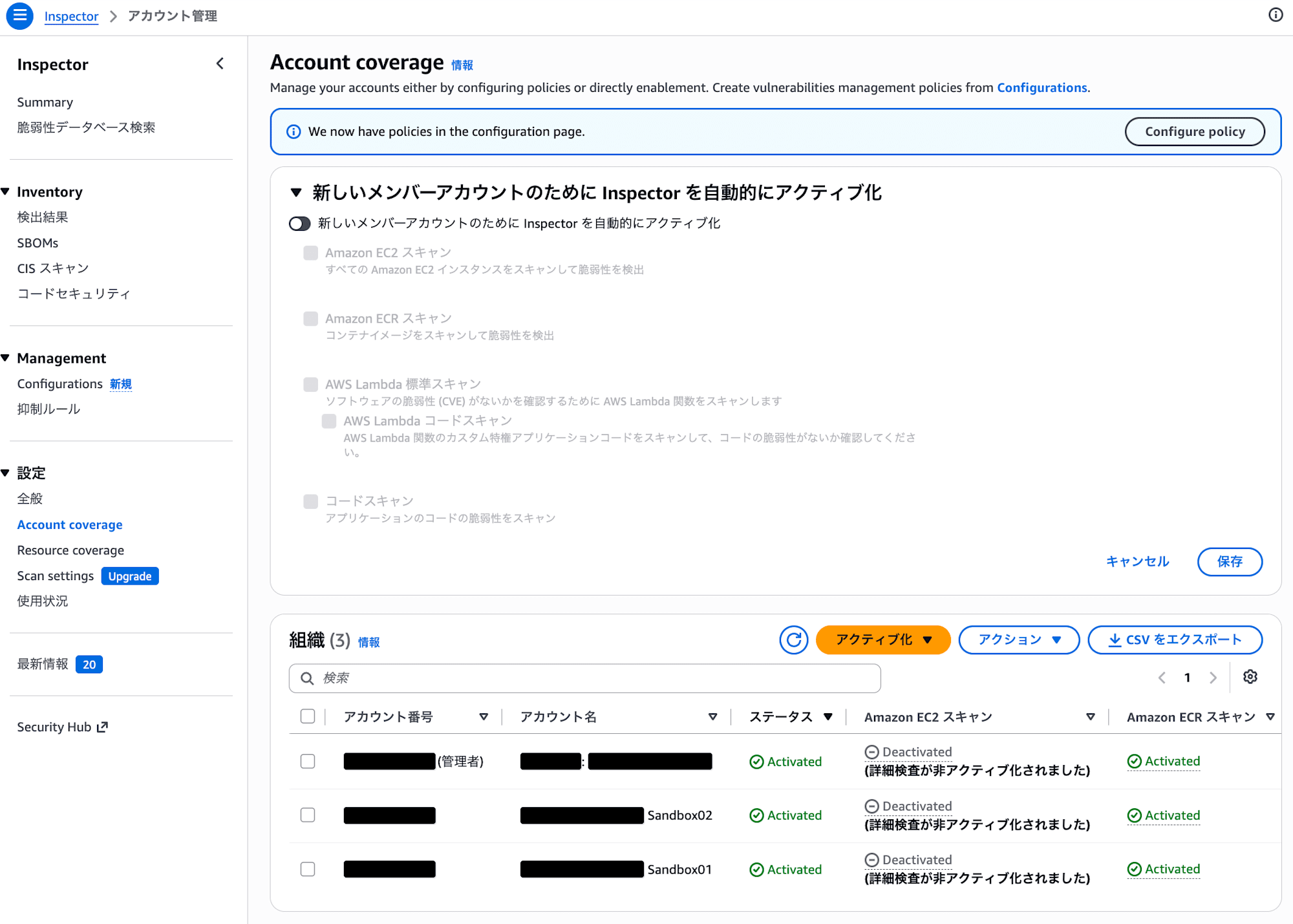
In the delegated administrator account, the auto-activation setting for new member accounts is displayed as disabled
Note that in member accounts, only their own account is displayed, and "Automatically activate Inspector for new member accounts" is not shown.
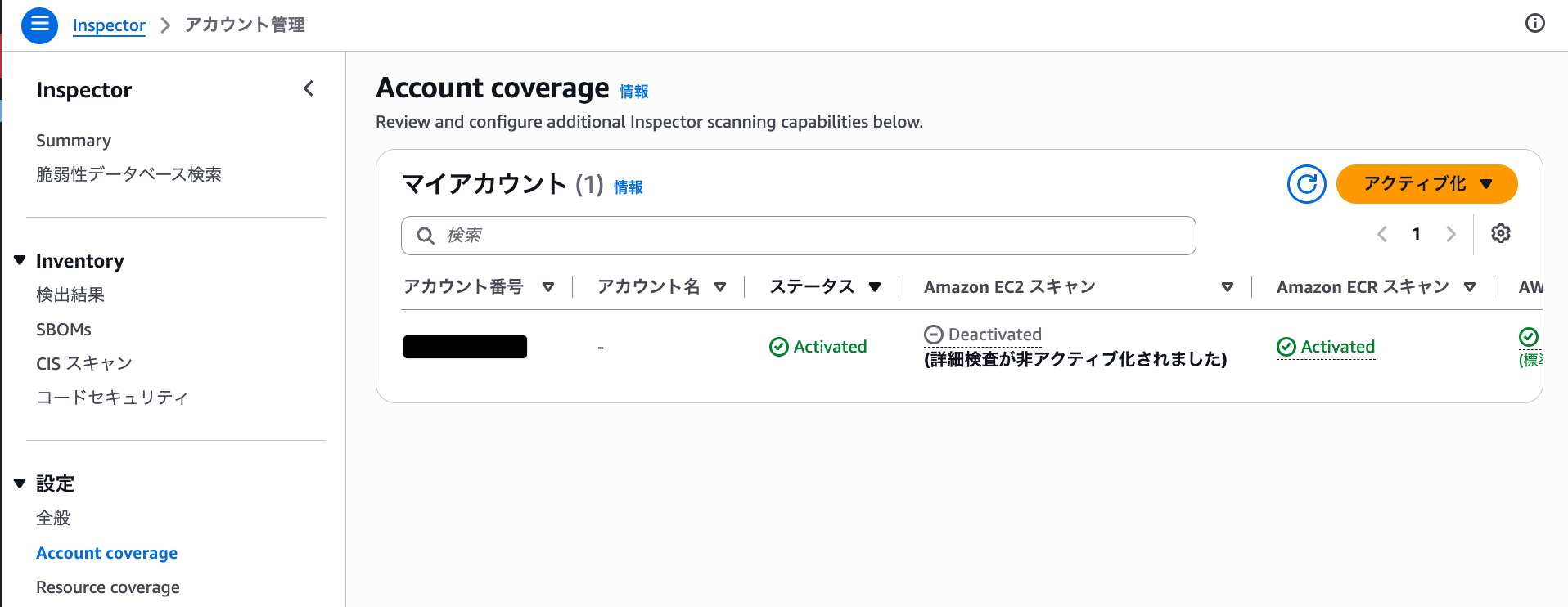
In member accounts, the auto-activation setting for new member accounts is not displayed
Even though the auto-activation setting appears as disabled in the delegated administrator account console, will the Inspector policy still be applied to new member accounts in regions where enablement is configured, automatically enabling the scan types specified in the policy?
Answer
In conclusion, even if "Automatically activate Inspector for new member accounts" is displayed as disabled in the delegated administrator account console, the Inspector policy will still be applied to new member accounts.
What is displayed as disabled here is the auto-activation setting in the delegated administrator account console. It does not indicate that Amazon Inspector itself is disabled.
In regions where enablement is configured in the Inspector policy, the enablement of Amazon Inspector and the scan types for new member accounts are controlled by the Inspector policy.
Therefore, even if the auto-activation setting in the console is displayed as disabled, the scan types specified in the Inspector policy will be enabled for new member accounts in accordance with the policy content.
Behavior When Managed by Inspector Policy
Scan types that are explicitly enabled or disabled by an AWS Organizations Inspector policy cannot be individually changed from the delegated administrator account or member accounts. If you attempt to enable or disable a scan type managed by a policy via the API, an error will occur indicating that it is under organizational policy management.
On the other hand, scan types not managed by an Inspector policy can be individually enabled or disabled from the delegated administrator account or member accounts.
In the environment we verified, the checkboxes for scan types managed by the Inspector policy were grayed out and could not be individually changed from the console.
The enablement of Amazon Inspector for new member accounts is also controlled by the Inspector policy. For this reason, the following two points must be considered separately:
- The auto-activation setting in the delegated administrator account console: displayed as disabled
- New member accounts in regions where enablement is configured in the Inspector policy: scan types enabled in the policy are activated
In other words, even if the auto-activation setting is displayed as disabled in the console, it does not mean that enablement by the Inspector policy is disabled.
For details on the management model for delegated administrator accounts and member accounts using Inspector policy, please refer to the following documentation.
Policies Attached to Root Are Also Inherited by New Member Accounts
When an Inspector policy is attached to Root, the policy is inherited by the organizational units (OUs) and accounts beneath Root.
When a new member account is added to AWS Organizations in the future, that account will also inherit the Inspector policy from Root. For new member accounts, Amazon Inspector will be enabled in the regions configured for enablement in the policy, and they will be associated with the delegated administrator account.
Therefore, even if the auto-activation setting in the delegated administrator account console is displayed as disabled, the scan types for new member accounts will be enabled based on the Inspector policy content.
For each scan type as well, the content specified in the Inspector policy is applied, not the auto-activation setting in the console.
For details on Inspector policy inheritance and application to new accounts, please refer to the following documentation.
For example, consider the case where the Inspector policy is configured as follows:
| Scan Type | Inspector Policy Setting |
|---|---|
| Amazon EC2 scanning | Disabled |
| Amazon ECR scanning | Enabled |
| AWS Lambda standard scanning | Enabled |
| Code repository scanning | Disabled |
In this case, for new member accounts, Amazon ECR scanning and AWS Lambda standard scanning will be enabled in the regions targeted for enablement in the Inspector policy.
On the other hand, Amazon EC2 scanning and code repository scanning will not be enabled because they are configured as disabled in the Inspector policy.
Note: Impact on Existing Member Accounts
In this verification, we checked the scan types of existing member accounts after changing the auto-activation setting in the delegated administrator account console.
Within the scope of our verification, there were no changes to the scan types of existing member accounts, and they were configured in accordance with the Inspector policy content.
However, "Automatically activate Inspector for new member accounts" is a setting targeting new member accounts. In this verification, no new member accounts were added after changing the setting, so the behavior for new member accounts has not been confirmed on actual hardware.
The fact that new member accounts inherit the Inspector policy and are enabled based on the policy content is based on the official documentation.
Summary
When an Inspector policy is attached to the Root of AWS Organizations, the Inspector policy will be inherited by new member accounts even if the auto-activation setting in the console is displayed as disabled.
In regions where enablement is configured in the Inspector policy, the scan types enabled in the policy will also be enabled for new member accounts.
Do not judge based solely on the console display — please verify the target regions and scan type settings of the Inspector policy attached to Root or organizational units.

