![[With animation] Organizing the behavior of visibility timeout and FIFO queues focusing on AWS SQS consumers](https://images.ctfassets.net/ct0aopd36mqt/wp-thumbnail-7bd31c5d86fb67bb4d44344177cb2763/30777b650669cffd4ee5a0b41cef116f/amazon-sqs?w=3840&fm=webp)
[With animation] Organizing the behavior of visibility timeout and FIFO queues focusing on AWS SQS consumers

This page has been translated by machine translation. View original
Introduction
In this article, we will use animations to explain the behavior of SQS, focusing on the consumer side.
We will explain the often confusing concepts of "visibility timeout," "FIFO queue operation," and what happens when these two are combined.
For information about SQS itself, the following article might be useful:
Preliminary knowledge
Here, we'll organize the prerequisite knowledge for the following explanations.
SQS process flow
First, let's clarify these two terms:
- Producer: The entity that sends messages to the queue
- Consumer: The entity that retrieves messages from the queue
The basic flow of SQS is as follows:
- The producer adds messages to SQS
- The consumer retrieves messages
- After processing is complete, the consumer deletes messages
Note that if an error occurs and the consumer cannot process a message, the message will remain in the queue.
Types of SQS queues
SQS offers two types of queues: Standard queues and FIFO (First-In-First-Out) queues.
In standard queues, there is no guarantee that messages will be retrieved in the same order they arrived.
On the other hand, FIFO queues provide this guarantee.
We'll look at this in more detail later, so for now just remember that there are two types of queues.
About visibility timeout
Visibility timeout is a setting that prevents the same message from being retrieved multiple times by consumers.
Each message has a visibility timeout, and once retrieved, the message becomes invisible to other consumers.
After a certain period of time, the message becomes visible again to consumers.
At this time, even if the first consumer that retrieved the message does nothing to the queue, SQS automatically makes the message available for retrieval again.
Basic SQS operations (Standard queue)
First, let's confirm the basic operations.
Here we'll explain the case of a standard queue.
Simple example
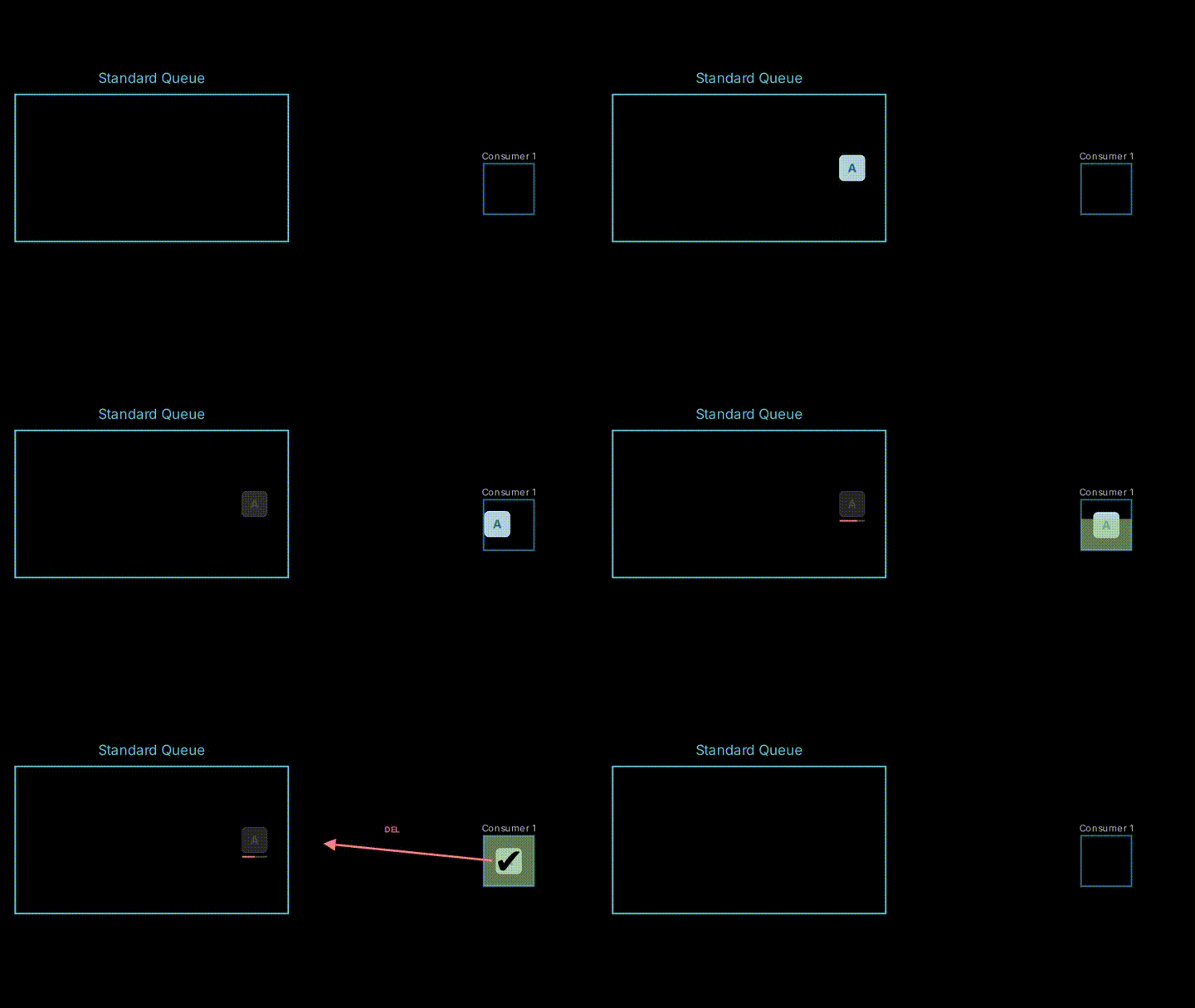
The basic flow is as follows:
- A message arrives in the queue.
- The consumer retrieves (GET) the message.
- The consumer processes the message and completes.
- Finally, a delete request (DEL) is sent and the message is removed.
When multiple consumers are operating
This is similar even with multiple consumers.
When there are many messages, a single consumer may not be able to keep up with the processing.
In such cases, multiple consumers will operate in parallel to process messages.
*In the animation, we're processing one by one for simplification, but in reality, it's possible to retrieve messages in batches.
Each consumer will process different messages.
However, it's important to note that in a standard queue, consumers don't necessarily process messages in the order they arrived.

Visibility timeout
Next, we'll explain the concept of exclusive control, which becomes an issue when multiple consumers operate in parallel.
This is a mechanism to prevent duplicate processing of the same message.
The "visibility timeout" is what performs this exclusive control.
We're explaining this with standard queues, but standard queues do not strictly enforce exclusive control.
Even with appropriate visibility timeout settings, standard queues guarantee at least once delivery, so occasionally a message might be delivered to multiple consumers simultaneously.
If you need to strictly limit the number of consumers processing a message simultaneously to one, you should use a FIFO queue.
When message processing succeeds
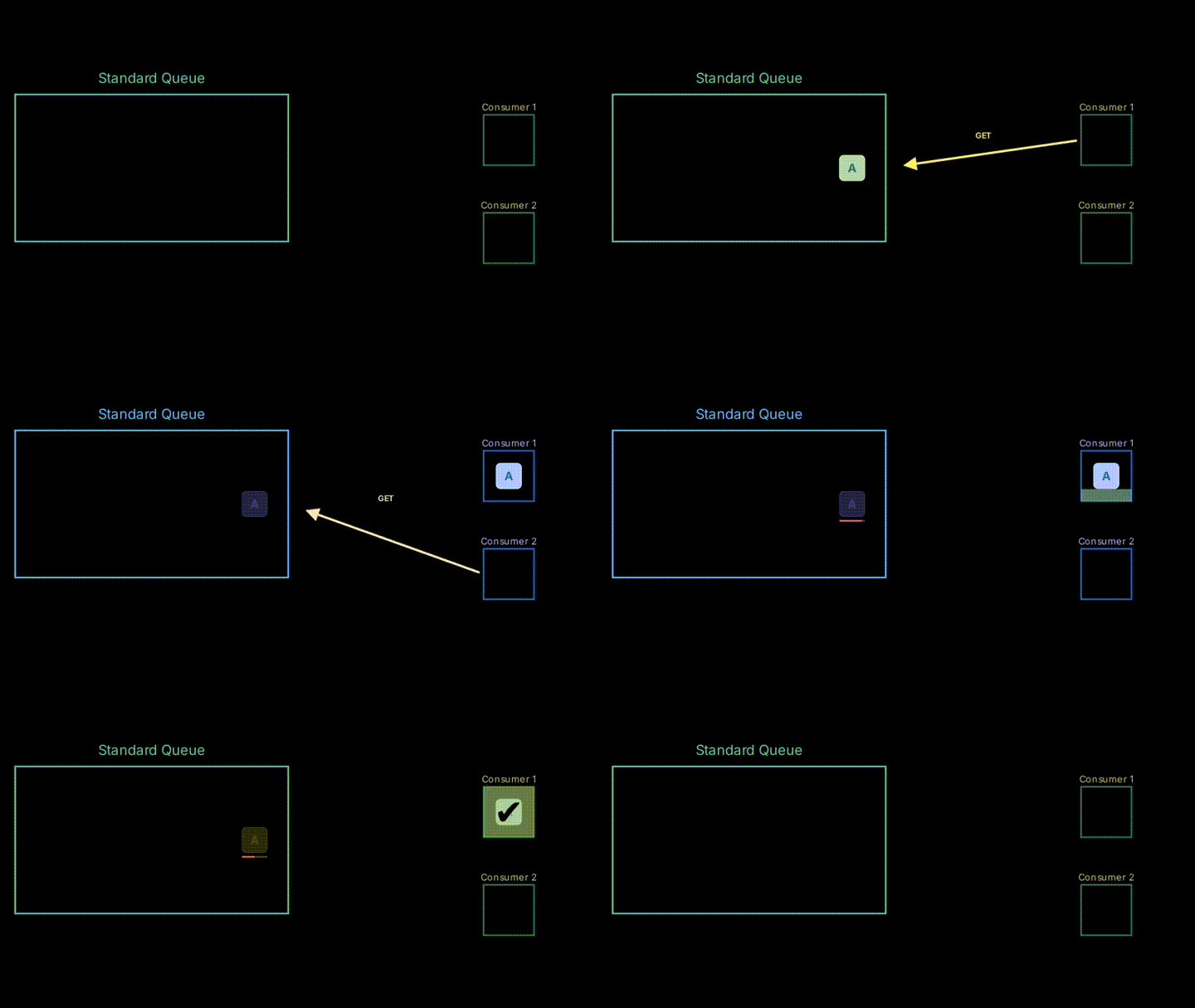
First, let's look at a simple example of what happens when another consumer tries to retrieve a message while it's being processed.
A message arrives, and Consumer 1 processes it.
During processing, since the visibility timeout hasn't expired, Consumer 2 cannot retrieve any messages when it tries (the queue appears empty to Consumer 2).
*The empty appearance behavior depends on polling settings, but here we're providing a conceptual explanation.
Retry with visibility timeout
Let's consider a more complex case.
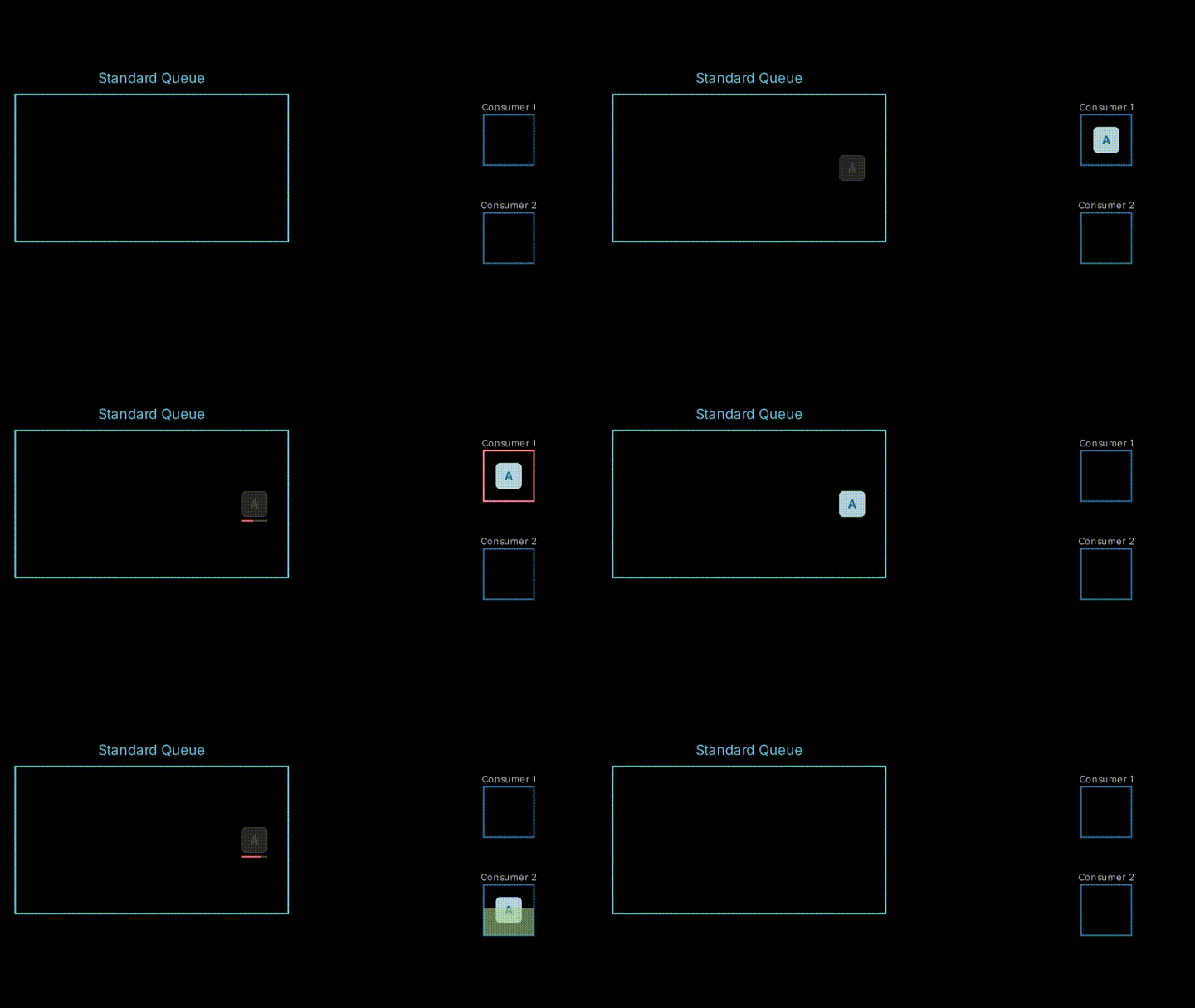
An error occurs while Consumer 1 is processing a message.
At this point, Consumer 1 cannot delete the message, and an invisible message remains in the queue.
After a certain period of time, when the visibility timeout expires, the message becomes retrievable by consumers again.
This effectively acts as a retry mechanism.
FIFO queue
So far we've been explaining using standard queues, but now let's move on to FIFO queues.
As mentioned earlier, message order is strictly maintained in FIFO queues.
Let's look at how this affects behavior.
Note that when adding messages to a FIFO queue, you need to specify something called a "group ID."
For now, let's proceed assuming all messages arrive in the same group.
Order control
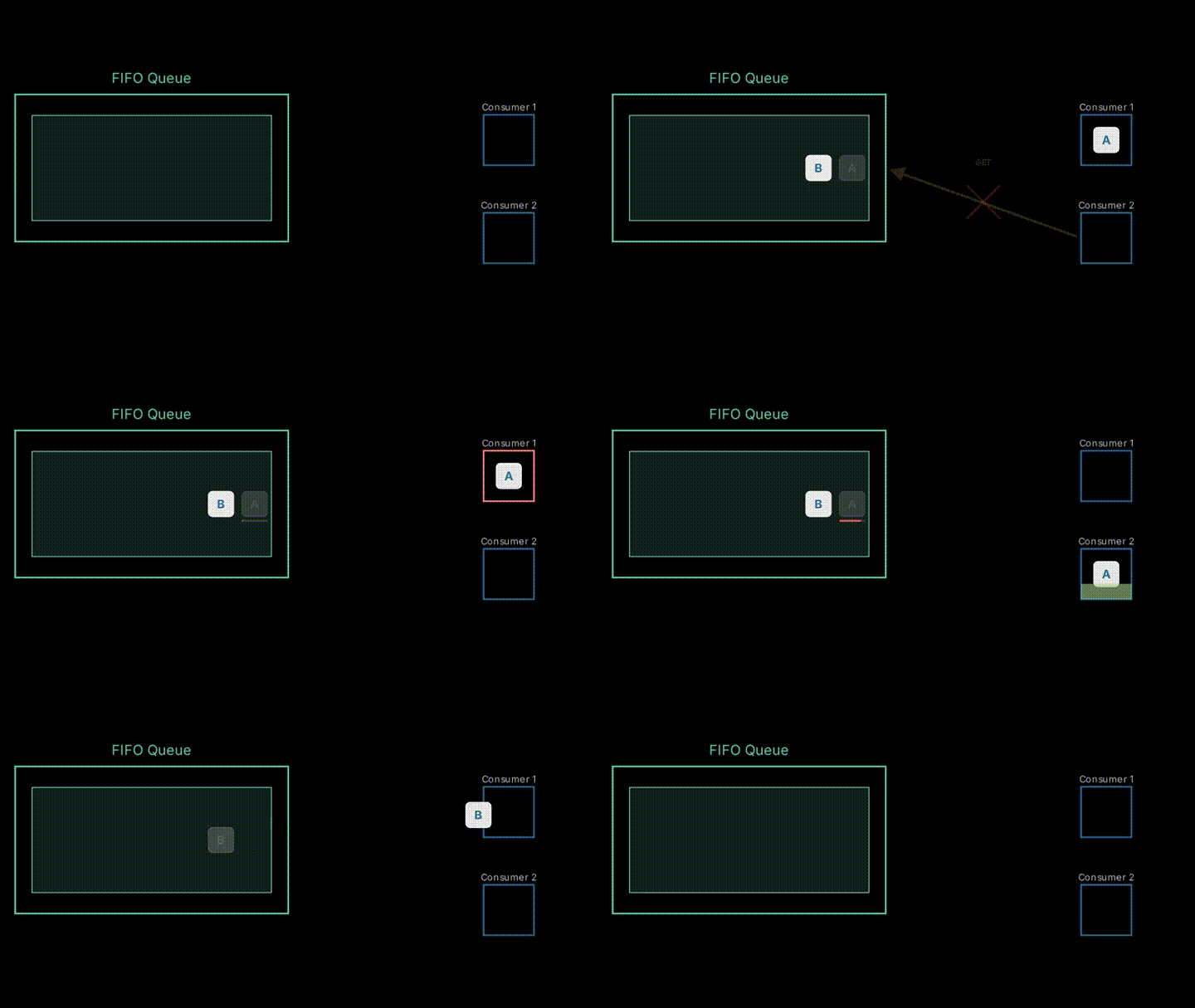
In FIFO queues, message order is strictly controlled within the same group.
This works because a FIFO queue doesn't deliver other messages while the message at the head of the queue remains.
The flow is as follows:
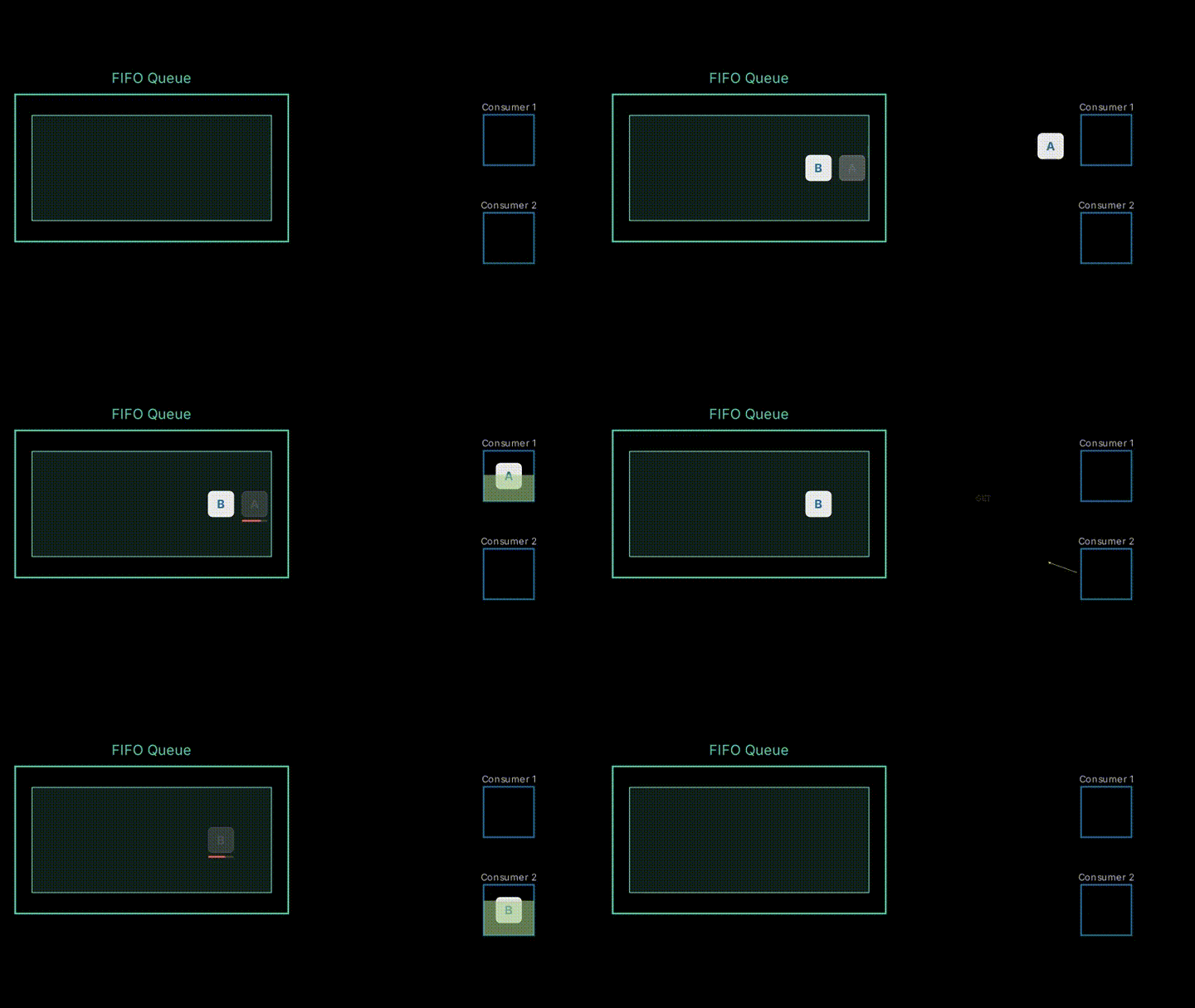
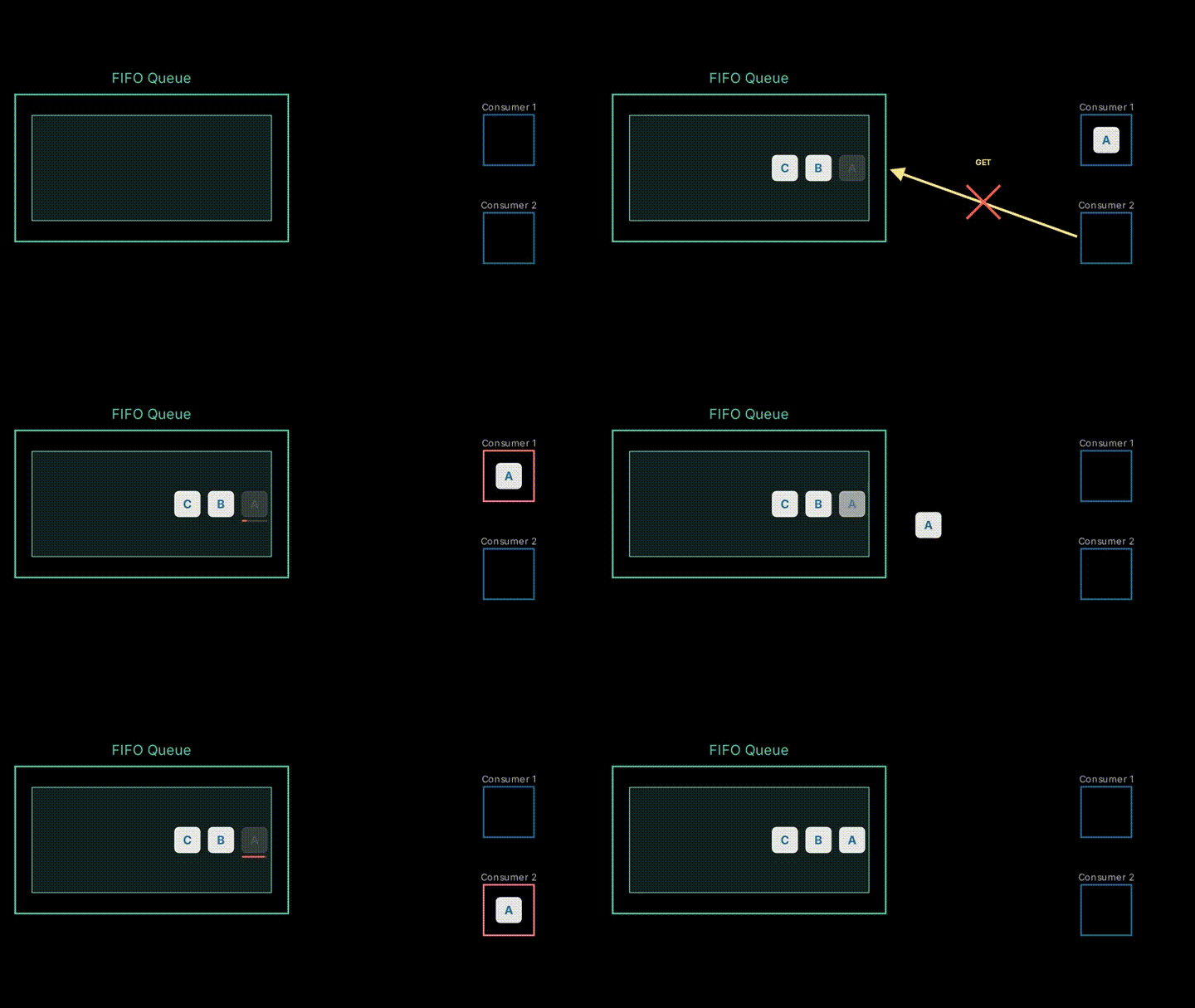
- Two messages, A and B, arrive in the queue in that order
- Consumer 1 retrieves a message
- Consumer 2 attempts to retrieve a message
At this point, Consumer 2 cannot retrieve message B even though it's in the queue.
*In the animation, we're simplifying by showing it as a failure, but more precisely, the queue would appear empty.
Visibility timeout in FIFO queues
In FIFO queues, within the same group, the next message cannot be retrieved until the message at the head is deleted.
For example, if Consumer 1 encounters an error while processing message A, the next message at the head of the queue won't be retrievable until the visibility timeout of the message in the queue expires.
In standard queues, you can retrieve messages further back even if previous messages haven't been deleted.
FIFO queue (multiple groups)
Let's develop this further and consider the case where there are multiple message groups in a FIFO queue.
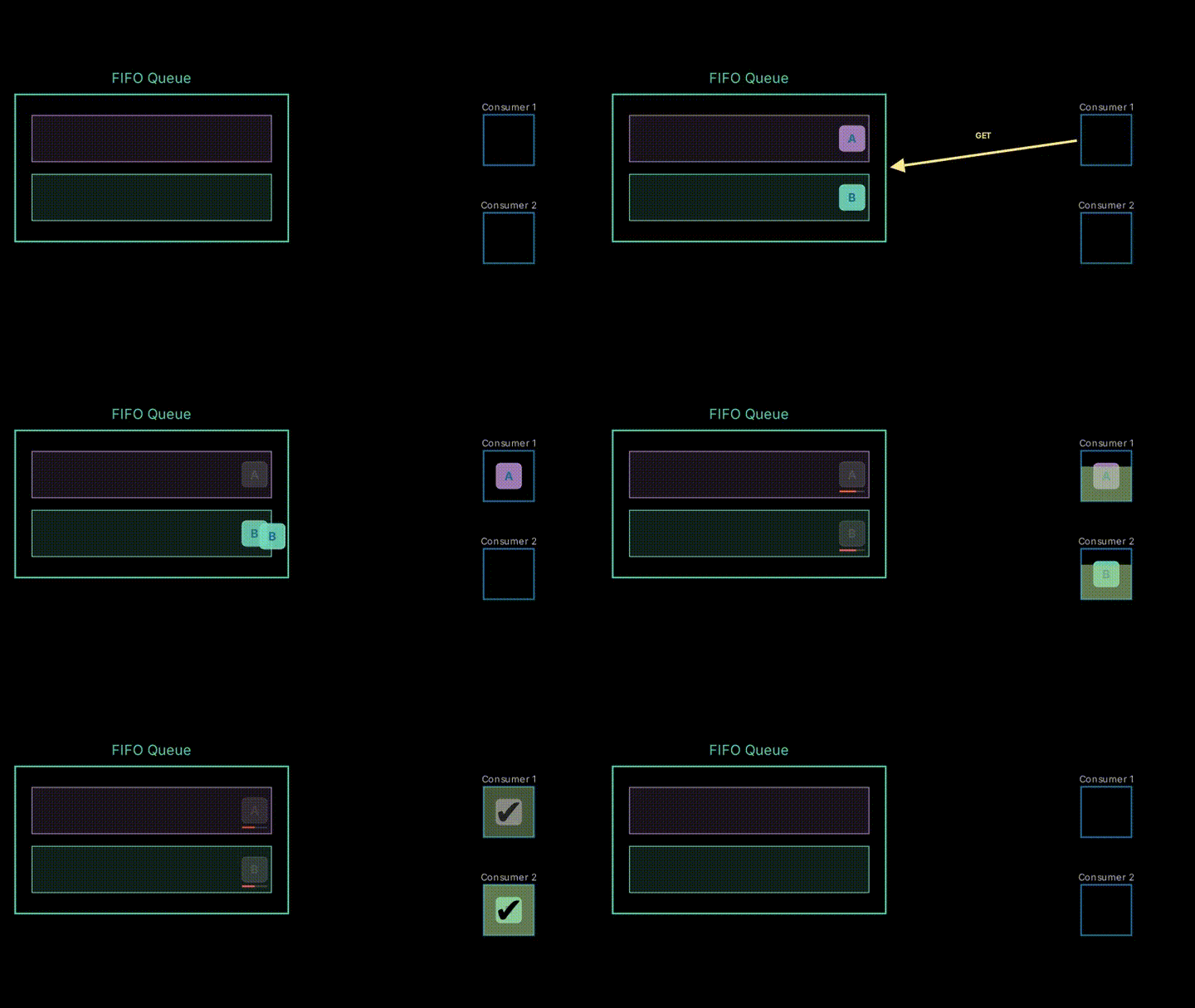
Parallel processing per group
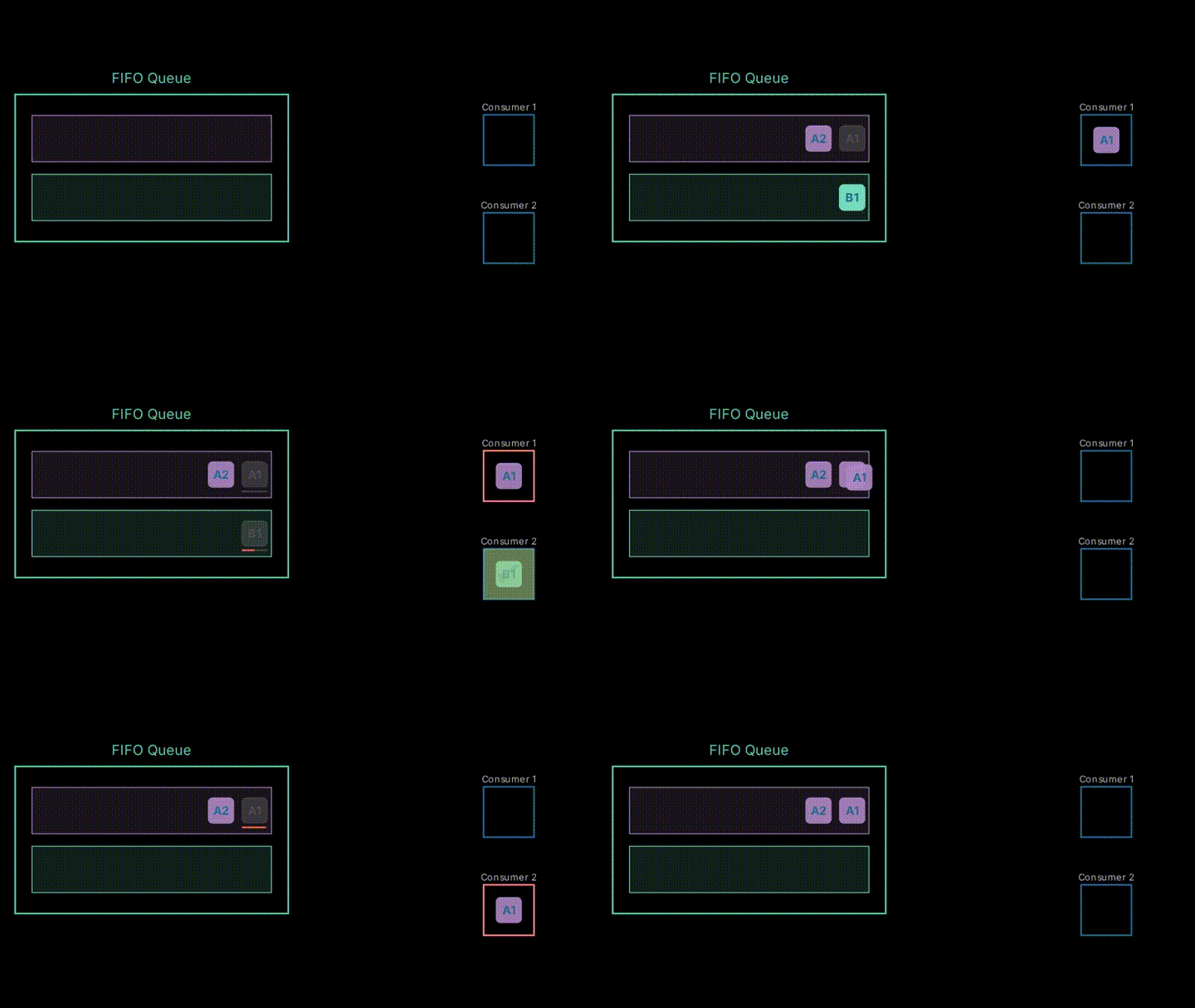
Let's say we have two message groups, red and blue.
Our previous explanation covered the case with only one group, but now we're dealing with multiple groups.
In this case, order is maintained within each group, but not between groups.
For example, even if a message in Group A arrives before a message in Group B, the message in Group B might be processed first.
Therefore, two consumers can retrieve messages from different groups and process them in parallel.
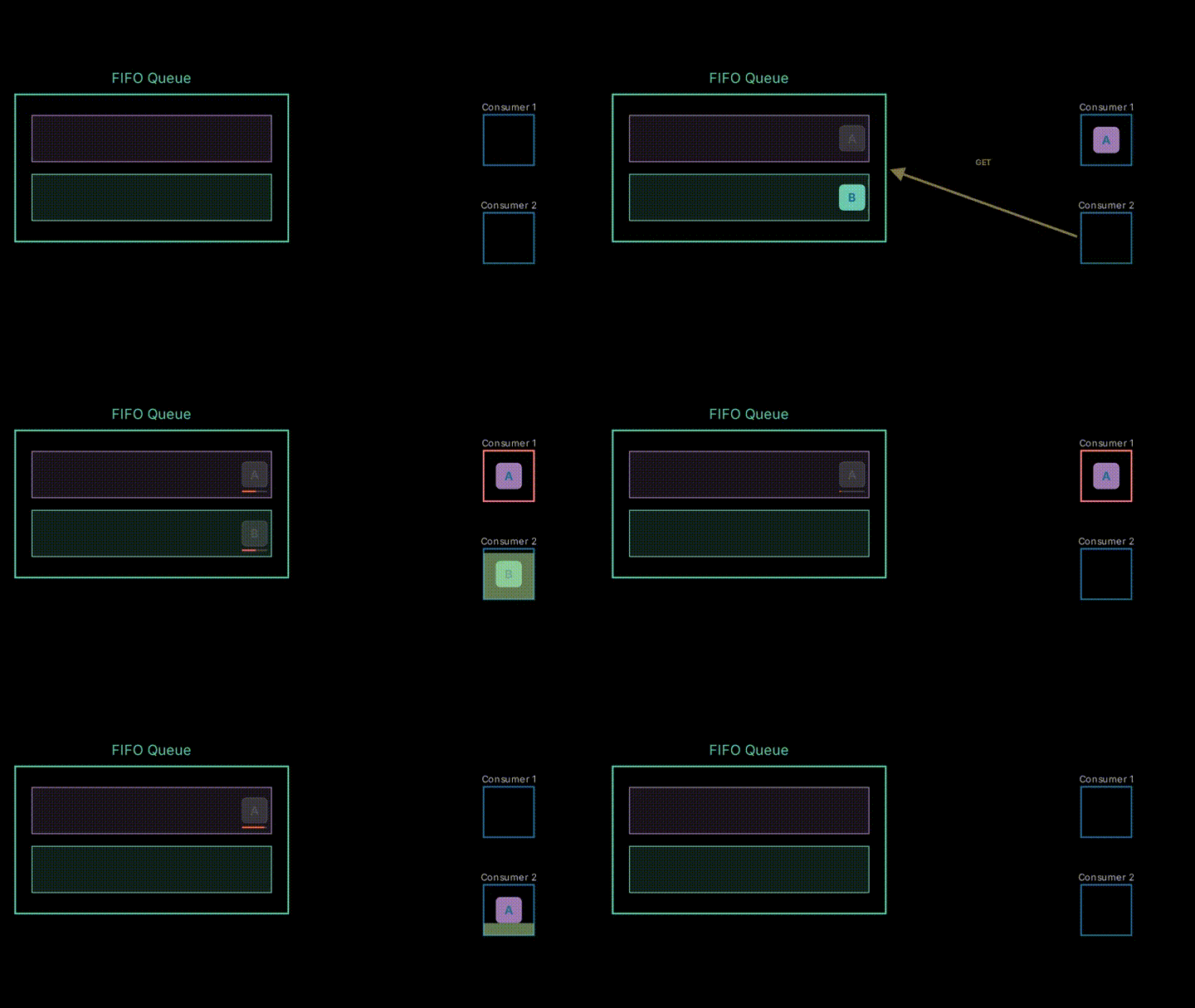
Since groups are independent, even if the processing of the message at the head of one group fails, it's still possible to retrieve messages from another group.
Troubleshooting with SQS
Here, we'll explain common issues that occur when using SQS.
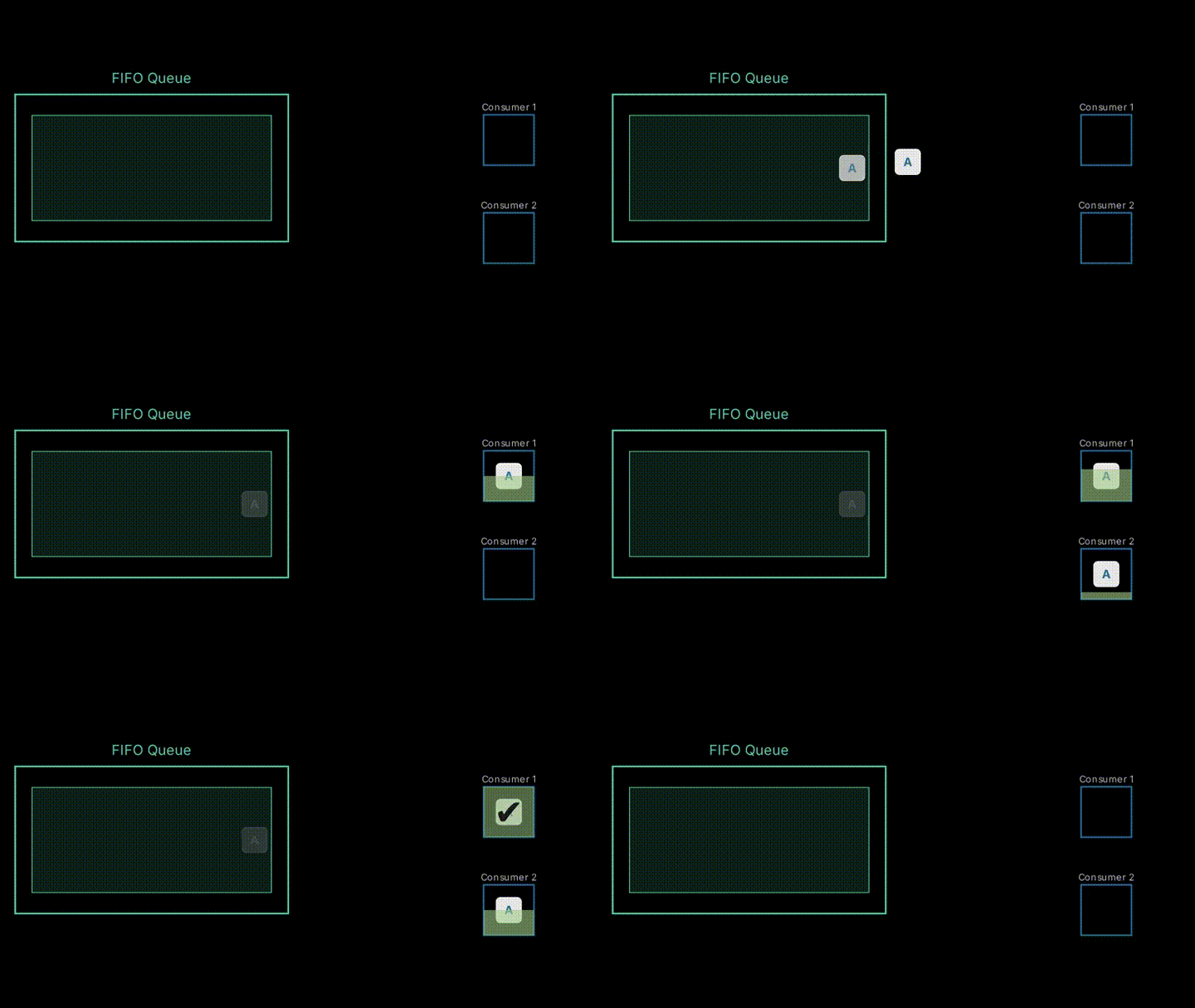
Duplicate processing due to visibility timeout
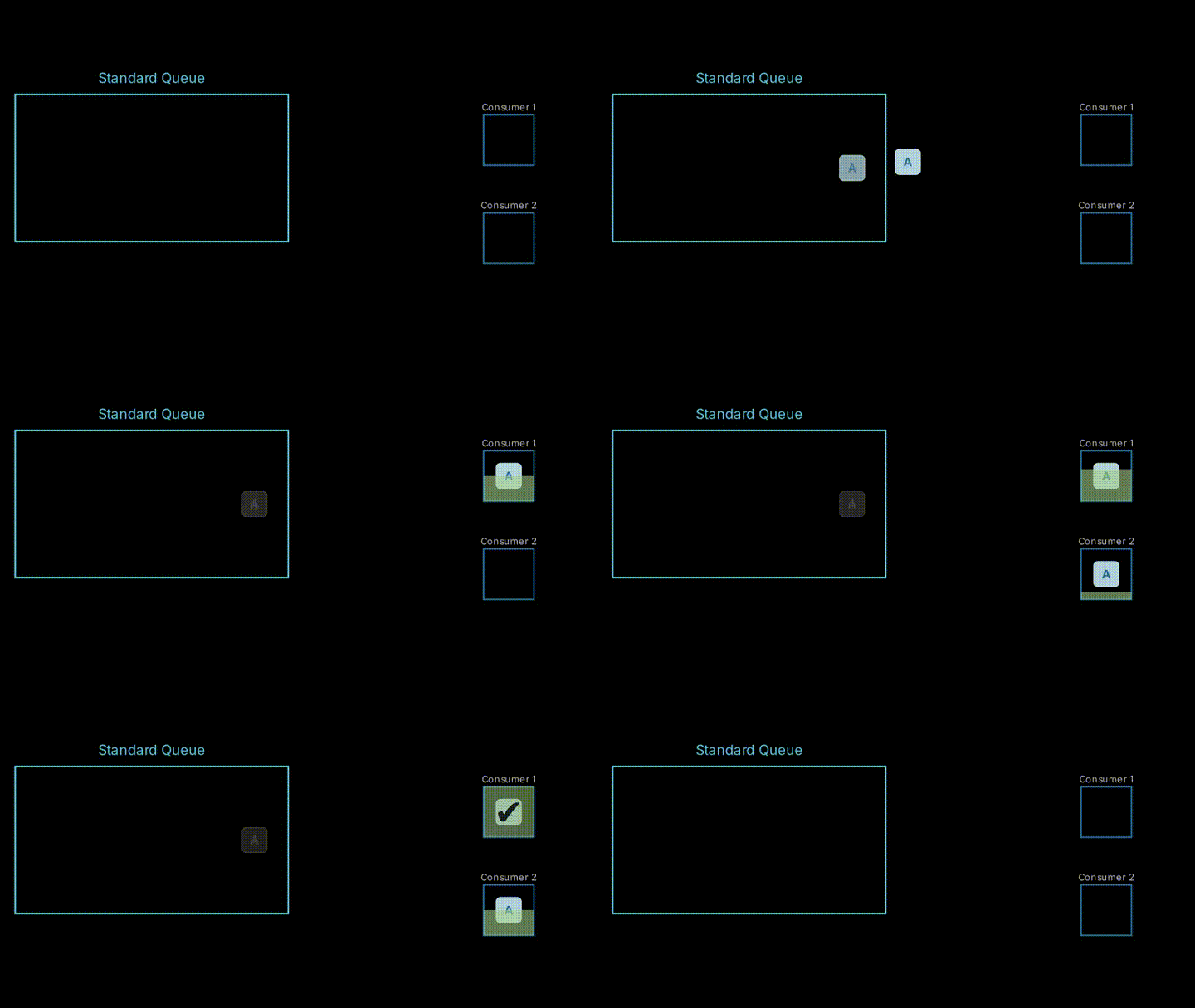
This problem occurs when the visibility timeout is shorter than the consumer's processing time.
It happens when the visibility timeout expires during consumer processing, allowing another consumer to retrieve the same message.
This can be avoided by properly setting the visibility timeout or extending the visibility timeout.
If estimating the visibility timeout is difficult and processing takes time, duplicate retrieval can be prevented by extending the visibility timeout during processing (like a heartbeat operation).
The ChangeMessageVisibility API exists for this purpose.
As a rule, with standard queues, the same message may be processed multiple times, so it's preferable to make processing idempotent.
The same problem can occur with FIFO queues.
In my experience, this pattern is often the cause of a message being processed twice, even when using FIFO queues.
FIFO queue blockage
This is a problem that occurs when using FIFO queues.
In FIFO queues, subsequent messages cannot be retrieved until the previous message is deleted from the queue.
As mentioned earlier, this is also true during the visibility timeout of the head message.
This occurs in cases where there's an issue with the message itself, and the message cannot be processed by any consumer.
In this situation, the message at the head is constantly retrieved, and subsequent messages are never processed.
This can be avoided by implementing error handling on the consumer side to properly process (delete) messages, or by diverting them to a DLQ if they cannot be processed.
This can also occur with multiple groups.
Messages can get stuck within a specific group (while messages in other groups are processed).
On the other hand, with standard queues, messages further back can be retrieved even if there's a message at the head, so critical cases should be fewer.

Conclusion
Since the behavior of the SQS consumer side is closely related to the passage of time, I thought that explanation through animations would be beneficial, which is why I created this article.
I hope it helps with your understanding.