How to Choose Between System-Assigned and User-Assigned Managed Identities in Azure? I Tested It by Deleting and Recreating

This page has been translated by machine translation. View original
Hello! I'm Yuji Nishimura from the Ops team!
When connecting from an app on Azure to Storage and other services, using a managed identity lets you obtain a Microsoft Entra ID token without giving the app an authentication secret. The point where design decisions get confusing is choosing between system-assigned and user-assigned.
Rather than deciding based only on the number of apps, such as "system-assigned if there is one app, user-assigned if there are several," it becomes easier to choose if you consider "whether to keep the same identity after recreating the resource" and "whether it is acceptable to share the same permissions."
I applied these two axes to concrete examples and verified on real resources how identity lifetime and role assignments are handled. On November 10, 2026, I used Azure CLI 2.91.0 in the Japan East region. A storage account can itself have a managed identity, so I used it as a resource that is quick to create and delete, in place of a web app's hosting platform. I did not test behavior on an actual app hosting platform (such as App Service or VMs), token acquisition, or access being allowed or denied.
What happened to identities and role assignments after deleting and recreating
The principal ID shown in the results table is the value that identifies the party you grant permissions to when assigning a role.
| What I tried | Result |
|---|---|
| Delete a resource with a system-assigned identity and recreate it with the same name | It became a different identity (the principal ID changed from b1ffeba1-… to d0ffd147-…) |
| Delete a resource with a user-assigned identity | The identity remained (the principal ID stayed 7eea9e16-…) |
| Attach the remaining user-assigned identity to another resource | It could be attached, and the principal ID was the same 7eea9e16-… |
| Delete a system-assigned identity that had a role assigned, together with its resource | The role assignment remained. The name became empty in the CLI, and the portal showed "Unknown" |
First, separate the identity's lifetime and sharing scope
Based on the official comparison table and the best practices, the differences between the two types are as follows.
| Aspect | System-assigned | User-assigned |
|---|---|---|
| Unit of creation | Enabled on the Azure resource that uses it | Created as an independent Azure resource |
| Identity lifetime | The identity is deleted when the resource that uses it is deleted | The identity remains even if the resource that uses it is deleted. Delete it separately when no longer needed |
| Sharing scope | Dedicated to that resource | Can be shared by multiple resources |
| Preparing access permissions in advance | Granted after the resource and identity exist (roles cannot be assigned beforehand) | The identity and its access permissions can be prepared before creating the resource that uses it |
The "user" in "user-assigned" does not refer to a person who signs in. User-assigned is a method of managing the identity used by an app or similar as an independent resource.
The developer guide recommends user-assigned for many scenarios. For both types, it is a prerequisite that the service using the identity supports it.
In AWS terms, the role is close to passing an IAM role to an EC2 instance via an instance profile. The IAM role and instance profile are created separately from the instance, and can be attached to or detached from a running instance. The analogy holds only as far as granting permissions without giving the resource a secret, and managing the identity separately from the resource that uses it (the user-assigned side).
Even with one app, do you want to keep the same identity after recreating it?
For example, consider a design in which the hosting platform of a single web app is deleted and recreated. Recreating here does not mean updating app code or a normal restart, but involves deleting the Azure resource itself to which the identity is tied. The resource group is assumed to have been created already.
With system-assigned, recreating produced a different identity
I created a storage account with a system-assigned identity, deleted it, and then recreated it with the same name.
az storage account create --resource-group <resource-group> --name <storage-account> --location japaneast \
  --sku Standard_LRS --identity-type SystemAssigned --query '{type:identity.type, principalId:identity.principalId}'
az storage account delete --resource-group <resource-group> --name <storage-account> --yes
# Run the same create command again with the same name
The first principal ID was b1ffeba1-…-e217, and after recreation it was d0ffd147-…-5419. Even though the resource name is the same, the identity is a different one. The Azure RBAC troubleshooting also states that if you delete and recreate a managed identity, the new identity's principal ID will be different. Permissions granted to the previous identity are not carried over to the new one.
With user-assigned, the identity remained after deleting the resource
Next, I created a user-assigned identity first and deleted the storage account it was attached to.
az identity create --resource-group <resource-group> --name id-app --location japaneast
ID_APP=$(az identity show --resource-group <resource-group> --name id-app --query id -o tsv)

az storage account create --resource-group <resource-group> --name <storage-account-1> --location japaneast \
  --sku Standard_LRS --identity-type UserAssigned --user-identity-id "$ID_APP"
az storage account delete --resource-group <resource-group> --name <storage-account-1> --yes
az identity show --resource-group <resource-group> --name id-app --query '{name:name, principalId:principalId}'

# Attach the same id-app to another storage account
az storage account create --resource-group <resource-group> --name <storage-account-2> --location japaneast \
  --sku Standard_LRS --identity-type UserAssigned --user-identity-id "$ID_APP" \
  --query "identity.userAssignedIdentities.*.principalId"
Even after the resource was deleted, id-app remained, and its principal ID was still 7eea9e16-…-883f. When I attached the same id-app to another storage account, its principal ID was also 7eea9e16-…-883f. Because role assignments are attached to the principal ID, permissions granted to id-app can be used from the replacement resource as well (this time I did not assign any role to id-app and did not test access). Note that, according to the official documentation, even with user-assigned, deleting and recreating the identity itself results in a different identity (I did not test recreating a user-assigned identity this time).
The diagram is a conceptual diagram I made myself, not an official architecture diagram. It shows whether the identity is also deleted or remains independently when the resource that uses it is deleted.
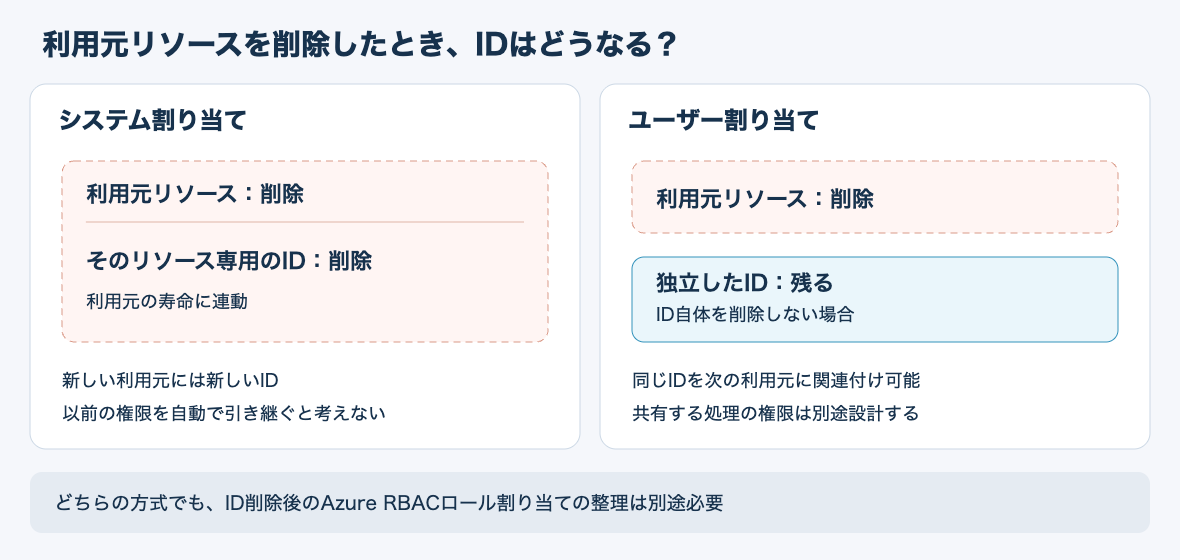
The best practices list system-assigned for cases where you want permissions to be removed together with the resource. Based on this result, I would consider system-assigned for a standalone workload whose identity can be discarded together with its resource, and user-assigned for an app whose identity should be maintained even if the hosting platform is recreated.
Even with multiple workloads, is it acceptable to share the same permissions?
Next is an example of a web app and a batch job that use the same Storage. Suppose the web app needs read access and the batch job needs write access. From here on, this is a design discussion based on the official documentation, and I did not test sharing one identity by attaching it to multiple resources simultaneously.
Azure RBAC role assignments are configured by combining who receives the permissions, the role, and the scope to which it applies. If you grant both read and write to a single shared identity, the web app that uses that identity will also be able to write.
In this case, I would design it so the identities are separated for the web app and the batch job, with each granted only the permissions it needs. If an independent lifetime is required, one option is to create a user-assigned identity for each purpose. Choosing user-assigned and having all workloads share a single identity are separate decisions.
Conversely, if multiple hosting platforms handling the same workload need the same permissions, a shared identity can reduce the number of role assignments to manage. The best practices also cite this use case.
When deciding the sharing scope, you need to check not only the workloads that use the identity, but also whether it is acceptable for the people who can change and run code on that resource to use the same permissions. The security boundary item in the official FAQ explains that any principal that can run code on that resource can use the associated identity.
Even after deleting the identity, the role assignment remained
Even if you choose system-assigned, not all cleanup becomes automatic. The official maintenance section explains that, for both system-assigned and user-assigned, role assignments are not automatically deleted when the identity is deleted.
To confirm this, I assigned "Storage Blob Data Reader" to the system-assigned identity (d0ffd147-…) attached to the recreated storage account. The scope was the resource group. For this operation I used an account with the subscription Owner role. After that, I deleted the storage account.
az role assignment create --assignee-object-id <システム割り当てのプリンシパルID> --assignee-principal-type ServicePrincipal \
  --role "Storage Blob Data Reader" --scope /subscriptions/<subscription-id>/resourceGroups/<resource-group>
az storage account delete --resource-group <resource-group> --name <storage-account> --yes
az role assignment list --resource-group <resource-group> \
  --query "[].{role:roleDefinitionName, principalId:principalId, principalName:principalName}"
When I retrieved the list 60 seconds after the deletion, the role assignment remained. The principal ID was unchanged, and the name (principalName) was empty. Since the name of the assignee identity could no longer be resolved, I concluded that the system-assigned identity had been deleted together with its resource.
[
  {
    "principalId": "d0ffd147-…-5419",
    "principalName": "",
    "role": "Storage Blob Data Reader"
  }
]
In the portal's "Access control (IAM)" under "Role assignments," the name and type were displayed as "Unknown" (the red frame was added by me).
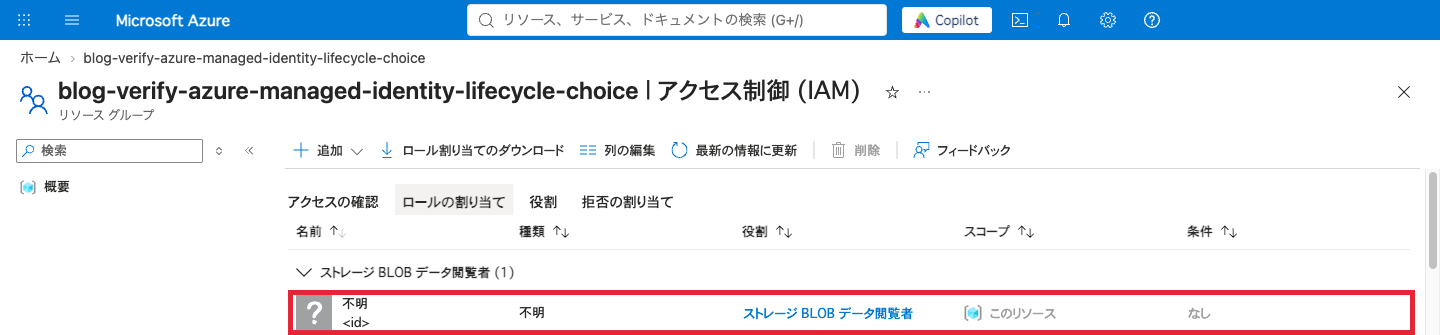
The official RBAC documentation states that after an identity is deleted, its role assignment is shown in the English portal with the name "Identity not found" and the type "Unknown." In the Japanese portal this time, both were "Unknown" (不明). However, the same display also appears when a newly created principal is still being replicated across regions. Don't delete an assignment based on the display alone; you need to match the target principal ID with the retired resource.
This time, after confirming that the principal ID (d0ffd147-…) of the remaining role assignment matched the system-assigned identity of the deleted storage account, I deleted it with the Owner account.
az role assignment list --resource-group <resource-group> --query "[?principalName==''].{id:id, principalId:principalId}"
az role assignment delete --ids <ロールの割り当てのID>
The official documentation says that role assignments also remain when a user-assigned identity is deleted (I did not test this time).
Which to choose
Summarizing the results so far and the official documentation, you can choose as follows.
| Condition | Type to choose | Reason |
|---|---|---|
| The identity can be discarded together with its resource and is not shared with other workloads | System-assigned | Deleting the resource also deletes the identity (recreating produced a different identity) |
| You want to keep the same identity and permissions even if the hosting platform is recreated | User-assigned | The identity remained after the resource was deleted, and could be attached to another resource with the same principal ID |
| There are multiple hosting platforms running with the same permissions | Shared user-assigned | Reduces the number of role assignments to manage. Do not share with workloads that have different permissions |
Summary
When choosing a managed identity, it is easier if you think along two axes: "whether to keep the same identity after recreating" and "whether it is acceptable to share the same permissions." On the lifetime axis, on real resources too, a system-assigned identity became a different identity when recreated, while a user-assigned identity remained after its resource was deleted and could be attached to another resource with the same principal ID. On the sharing axis, even when choosing user-assigned, it seems best to separate identities for workloads that need different permissions.
With either type, role assignments remain after the identity is deleted (confirmed this time with system-assigned). It seems necessary to include in operations a procedure of matching the principal ID of a role assignment shown as "Unknown" against the retired resource before deleting it.