Does Azure Policy's deny effect stop existing resources? Testing update denial, tag changes, and remediation on a real environment

This page has been translated by machine translation. View original
Hello! I'm Yuji Nishimura from the Operations Department!
When you want to use Azure Policy to restrict the regions or resource settings that can be used, you may worry about the impact on resources that are already running. If you assign deny, will existing resources that violate the rule stop?
I checked on a real environment, and the existing storage account did not stop, and I could still upload a blob. The evaluation merely recorded it as Non-compliant. On the other hand, an update that changed the settings of that existing resource was denied, while a change to tags only went through.
I tested what happens to existing resources when a deny is assigned, in the order of creation, update, tag change, evaluation, and remediation, and finally compared DoNotEnforce and audit, which are used for impact assessment before denying. Based on those results, I will organize the points to consider when introducing Policy into a running environment. These are the results of testing on November 10, 2026, in the East Japan region using Azure CLI 2.91.0. The target is Resource Manager mode policies, which evaluate Azure resource management operations; Resource Provider mode (one of the policy definition modes), which targets things like Kubernetes, is not covered.
Summary of test results
I assigned a policy that allows only West Japan (japanwest) as the region to a resource group containing a storage account in East Japan. All times are values from the single run performed this time.
| What I tried | Result |
|---|---|
| Create a new network security group (NSG) in East Japan | Denied (RequestDisallowedByPolicy). It was denied when tried 12 seconds after the assignment |
| Use the existing storage account | Did not stop. I could retrieve keys and upload a blob |
| Change the access tier of the existing storage account | Denied (RequestDisallowedByPolicy) |
| PATCH that only adds tags to the existing storage account | Went through |
| Mix an access tier change into the same PATCH | Denied |
| Compliance evaluation | The existing storage account was NonCompliant |
Create a remediation task for the deny assignment |
Creation succeeded, but there were 0 remediation deployments |
Create the assignment with DoNotEnforce |
Went through. Neither denial nor audit was recorded in the activity log |
Create with the effect set to audit |
Went through. An audit record remained in the activity log, and the resource became non-compliant in evaluation |
I assigned a custom definition that restricts location to a resource group
For the policy, I created a custom definition with almost the same conditions as the built-in "Allowed locations". In version 1.1.0, the built-in definition also lets you choose the effect from Audit / Deny / Disabled, and its condition includes an added line that excludes Azure AD B2C directories. This time I made a minimal definition that parameterizes only the effect and the allowed regions.
{
  "if": {
    "allOf": [
      { "field": "location", "notIn": "[parameters('allowedLocations')]" },
      { "field": "location", "notEquals": "global" }
    ]
  },
  "then": { "effect": "[parameters('effect')]" }
}
{
  "allowedLocations": { "type": "Array", "metadata": { "displayName": "Allowed locations" } },
  "effect": { "type": "String", "allowedValues": ["Audit", "Deny", "Disabled"], "defaultValue": "Deny" }
}
az policy definition create --name allowed-locations-test --display-name "allowed locations (test)" \
  --mode Indexed --rules @rule.json --params @params.json
az policy assignment create --name pol-deny --display-name "allowed locations (Deny)" \
  --policy allowed-locations-test --resource-group <resource-group> \
  --params '{"allowedLocations": {"value": ["japanwest"]}, "effect": {"value": "Deny"}}'
- The assignment scope is the resource group.
enforcementModeis not specified (Default) - Before the assignment, I created a storage account (Standard_LRS, access tier Hot) in East Japan in the same resource group
- The operations were performed by a service principal holding two roles: "Contributor" and "Resource Policy Contributor"
In the test, I used test-specific names for the definition name and display name. In the commands in this article I have replaced them with more readable names, but the screenshot shown later displays the names used during testing.
New creation was denied, and existing resources kept running
When I tried to create an NSG in East Japan in the same resource group 12 seconds after the assignment, it was denied. Microsoft.Authorization/policies/deny/action was recorded in the activity log.
Code: RequestDisallowedByPolicy
Message: Resource 'nsg-new-1' was disallowed by policy. Policy identifiers: '[{"policyAssignment":{"name":"<割り当ての表示名>", ...
According to the explanation of deny, create and update requests in Resource Manager mode are denied before being passed to the Resource Provider (the mechanism responsible for managing resources of each Azure service). The response is 403 (Forbidden). This time it was denied on the first try 12 seconds later, but the timing of when it takes effect is not guaranteed.
On the other hand, the storage account that existed before the assignment did not stop. The state shown by az storage account show remained Succeeded, and the primary status remained available. Retrieving account keys, creating a container, and uploading a blob all succeeded.
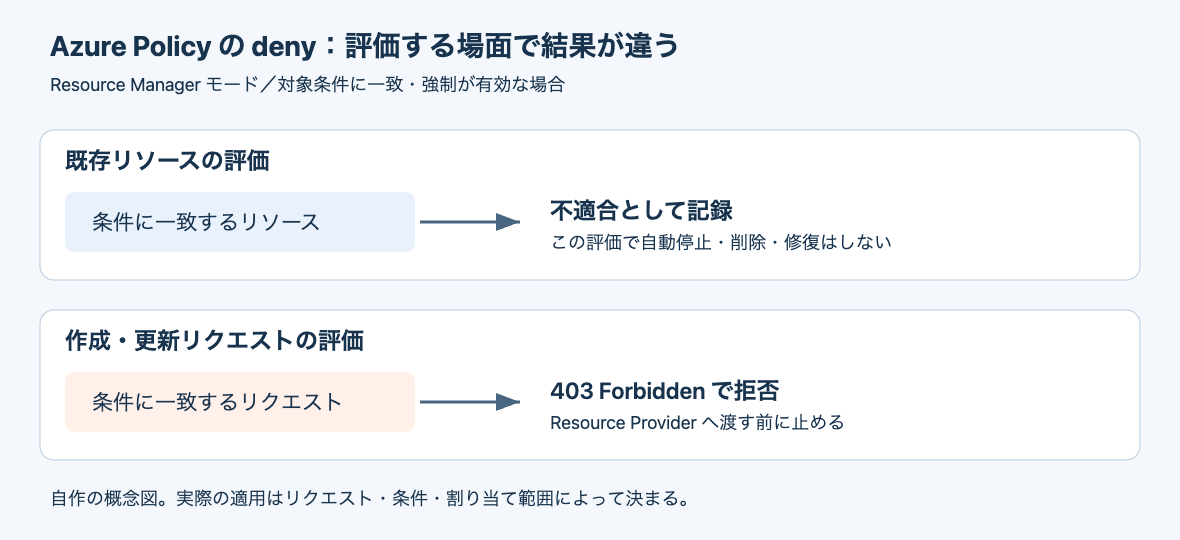
The following figure is a conceptual diagram I made myself, not an official architecture diagram. Even with the same deny, the evaluation of existing resources merely records non-compliance, while create and update requests that match the condition are denied before being passed to the Resource Provider. As described in the next section, there is an exception for requests that change only tags.
Changing the settings of an existing resource was denied, but a tag-only change went through
I tried to change the access tier of the existing storage account from Hot to Cool.
az storage account update --resource-group <resource-group> --name <storage-account> --access-tier Cool --yes
The result was the same RequestDisallowedByPolicy as for new creation, and the access tier remained Hot. Even for an existing resource, an update request in a state that matches the condition is denied.
I also sent a PATCH that only adds tags ({subscriptionId} is replaced by az rest with the current subscription ID).
az rest --method patch \
  --url "/subscriptions/{subscriptionId}/resourceGroups/<resource-group>/providers/Microsoft.Storage/storageAccounts/<storage-account>?api-version=2023-05-01" \
  --body '{"tags": {"owner": "test"}}'
This succeeded, and the tag was added. However, when I mixed an access tier change into the same PATCH ({"tags": {...}, "properties": {"accessTier": "Cool"}}), it was denied.
The explanation of the order of evaluation of effects describes an exception: for a PATCH request that changes only tag-related fields, only policies that have conditions related to tags are evaluated. The policy this time uses only location (location) as its condition, so the tag-only PATCH was probably not subject to evaluation and went through. You cannot say flatly that "all updates to non-compliant resources are denied." Whether something is denied is determined by the combination of the actual contents of the request and the policy's conditions.
Evaluation recorded it as non-compliant
I checked the compliance state of the existing resource by running an evaluation.
az policy state trigger-scan --resource-group <resource-group>
az policy state list --resource-group <resource-group> --query "[].{resource:resourceId, state:complianceState}"
As a result of the evaluation, the existing storage account became NonCompliant. Even after I created a remediation task afterward, the access tier remained Hot, and the storage account's settings did not change. The explanation of deny also says that existing resources matching the condition during evaluation are recorded as non-compliant. Becoming non-compliant in evaluation does not in itself amount to a request to stop or delete the resource.
A deny non-compliance was not fixed by a remediation task
I created a remediation task twice for the deny assignment: before confirming the non-compliance (rem-deny) and after confirming NonCompliant (rem-deny-2).
az policy remediation create --name rem-deny-2 --resource-group <resource-group> --policy-assignment pol-deny
az policy remediation show --name rem-deny-2 --resource-group <resource-group> \
  --query '{provisioningState:provisioningState, deploymentStatus:deploymentStatus}'
Both had the state Succeeded, and there were 0 remediation deployments. Nothing changed on the storage account.
{
  "deploymentStatus": { "failedDeployments": 0, "successfulDeployments": 0, "totalDeployments": 0 },
  "provisioningState": "Succeeded"
}
Remediation tasks target existing non-compliance for modify or deployIfNotExists. A deny rule does not define what to rewrite at remediation time. For example, a condition alone such as "deny anything other than the allowed regions" does not determine the destination or method of migration for existing resources.
I have not tried modify and deployIfNotExists. Both require assigning a role to the managed identity used for remediation (how remediation access control works), and the service principal used for this test does not have permission to assign roles. Therefore, I have not confirmed whether existing non-compliance can actually be fixed with a remediation task.
With DoNotEnforce and audit, creation went through, but the way it was recorded differed
Finally, I tried two methods that can be used for impact assessment before enabling denial.
First, I changed the deny assignment to enforcementMode: DoNotEnforce.
az policy assignment update --name pol-deny --resource-group <resource-group> --enforcement-mode DoNotEnforce
When I created an NSG in East Japan 5 seconds after the change, it succeeded. Neither denial nor audit was recorded in the activity log.
Next, I deleted the deny assignment and created an assignment with the effect Audit using the same definition.
az policy assignment create --name pol-audit --display-name "allowed locations (Audit)" \
  --policy allowed-locations-test --resource-group <resource-group> \
  --params '{"allowedLocations": {"value": ["japanwest"]}, "effect": {"value": "Audit"}}'
When I created an NSG in East Japan 24 seconds after the assignment, this also succeeded. Microsoft.Authorization/policies/audit/action was recorded in the activity log for the creation of that NSG.
| Assignment | Creation in East Japan | Activity log |
|---|---|---|
deny (Default) |
Denied | Microsoft.Authorization/policies/deny/action |
deny (DoNotEnforce) |
Went through | No record |
audit |
Went through | Microsoft.Authorization/policies/audit/action |
After that, when I ran an evaluation with the audit assignment, three resources became non-compliant: the storage account that existed from the start, the NSG created during DoNotEnforce, and the NSG created under audit. When I opened the audit assignment in the portal, "Create remediation task" could not be clicked (red frames added by me).
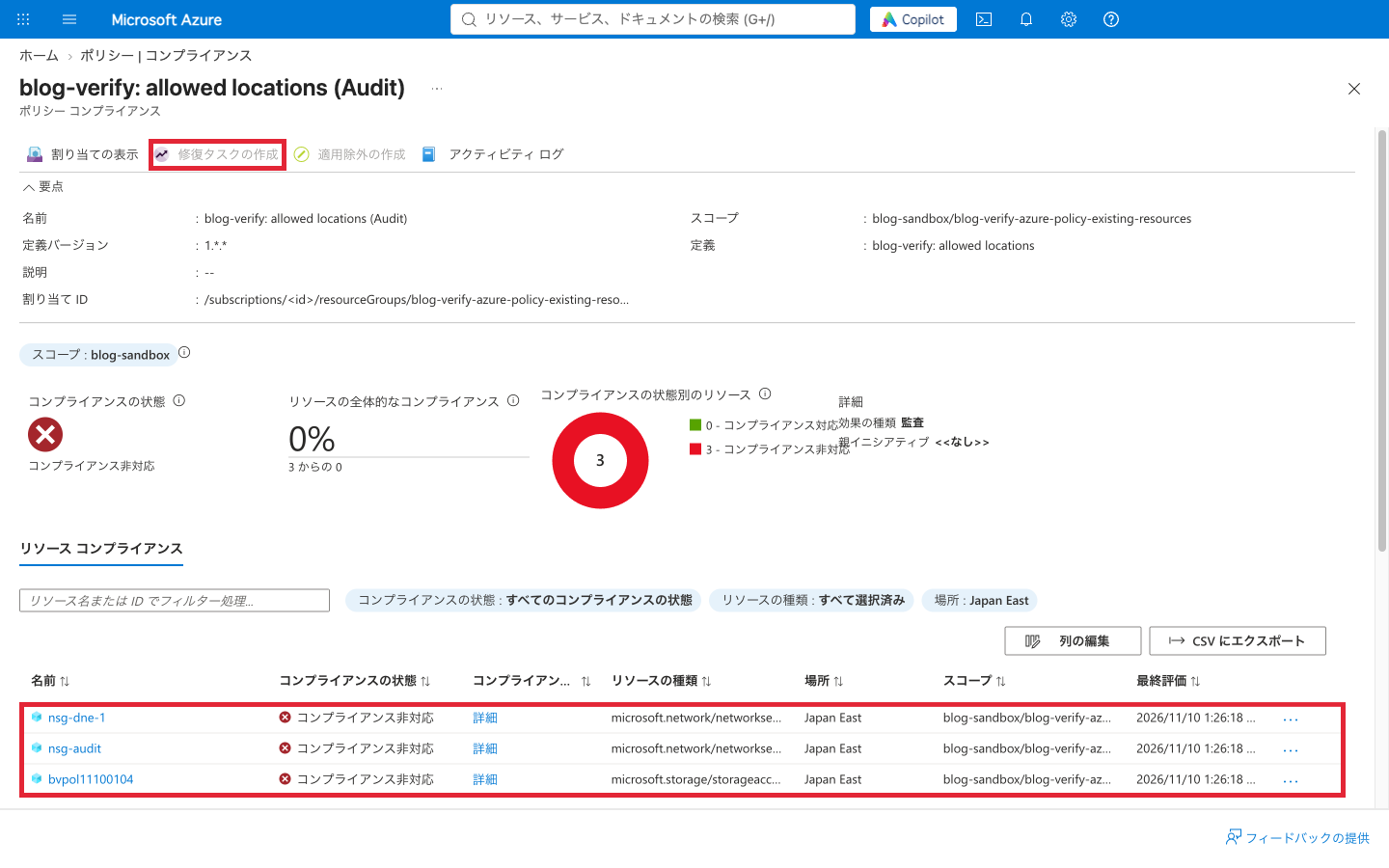
I did not look at the results of an evaluation with the DoNotEnforce assignment this time (because I deleted the assignment before evaluating). According to the official documentation, DoNotEnforce is a mode for when you want to evaluate an assignment before enforcing it, and it is said to be useful for checking the impact on compliance. Both are ways to identify resources matching the condition without blocking creation, and the difference confirmed this time was whether an audit record remains in the activity log each time something is created.
In a running environment, pair the "prohibition rule" with a "remediation policy for existing resources"
The evaluation of the impact of a new policy introduces a flow of validating the evaluation of existing resources, gradually expanding the scope, and also assessing the impact on create and update requests.
Based on these results, before enabling deny in production, I would decide the following three points as the introduction policy.
| What to decide | What to settle |
|---|---|
| What to treat as non-compliant | Whether the conditions and scope are as intended. Evaluate with DoNotEnforce or audit and check that resources that should be compliant are not falsely detected |
| How to handle existing non-compliance | Since a deny remediation task cannot fix it, decide whether to remediate by hand or with other automation, migrate, or manage the reason and deadline and make it an exemption |
| From when to deny updates | Changes to the settings of existing resources (maintenance and configuration changes) are also denied, so assess that impact and check whether you are ready for remediation and exception handling |
One possible way to choose is audit if you want to leave an audit record each time something is created, and setting the assignment to DoNotEnforce for evaluation if the definition's effect cannot be changed. However, even when you switch to audit and evaluate, not all effects can be interchanged with one another. You need to choose by checking which effects the existing definition allows and whether it includes conditions on related resources.
Summary
Even when I assigned Azure Policy's deny, the existing storage account did not stop and was only recorded as non-compliant in evaluation. On the other hand, an update that changed the settings of that existing resource was denied, and a PATCH that changed only tags went through. The deny remediation task could be created but fixed nothing.
When putting deny into a running environment, you should not judge the impact merely by the fact that existing resources keep running; you need to evaluate it including the fact that updates for maintenance and configuration changes will be denied. With DoNotEnforce, nothing remained in the activity log, and with audit, an audit record remained each time something was created. It seems best to identify non-compliant resources first with one of them, and, together with the prohibition rule, decide the policy for remediation, exceptions, and updates of existing resources.