![[Update] Session endpoints, a feature that allows direct access to servers running within Amazon Bedrock AgentCore Runtime sessions, has been added!](https://devio2024-media.developers.io/image/upload/f_auto,q_auto,w_3840/f_auto,q_auto/v1790875048/eyecatch/edq4dfptctqlcwjhffhs.png)
[Update] Session endpoints, a feature that allows direct access to servers running within Amazon Bedrock AgentCore Runtime sessions, has been added!

This page has been translated by machine translation. View original
Introduction
Hello, I'm Kanno from the Consulting Department, and I love supermarkets.
On October 30, 2026, the AWS official blog announced Session endpoints for Amazon Bedrock AgentCore Runtime! It's a feature that provides an endpoint for directly accessing the server running inside a session. It's a bit unusual that it's introduced only on the blog and not in What's New. (Sorry if I just missed it...)
The official documentation also has solid information on it!
It felt like an update that lets you build an experience like Claude's Artifacts using AgentCore's managed features...!
First we'll go over what the update contains, and then we'll have an agent built with Strands harness create a full website, preview the finished site in our own browser, and experience this update firsthand!
Main Changes
First, what kind of update is this? Let's look at the changes in the APIs!
| API | Change |
|---|---|
| CreateAgentRuntime / UpdateAgentRuntime / GetAgentRuntime | Added allowedPorts and the port and path of protocolConfiguration |
| InvokeAgentRuntime | sessionEndpointUrl added to the response |
There are two main changes. One is that you can now directly access the server inside a session, and the other is that you can now change the port and path the agent listens on.
First, I illustrated the first change!
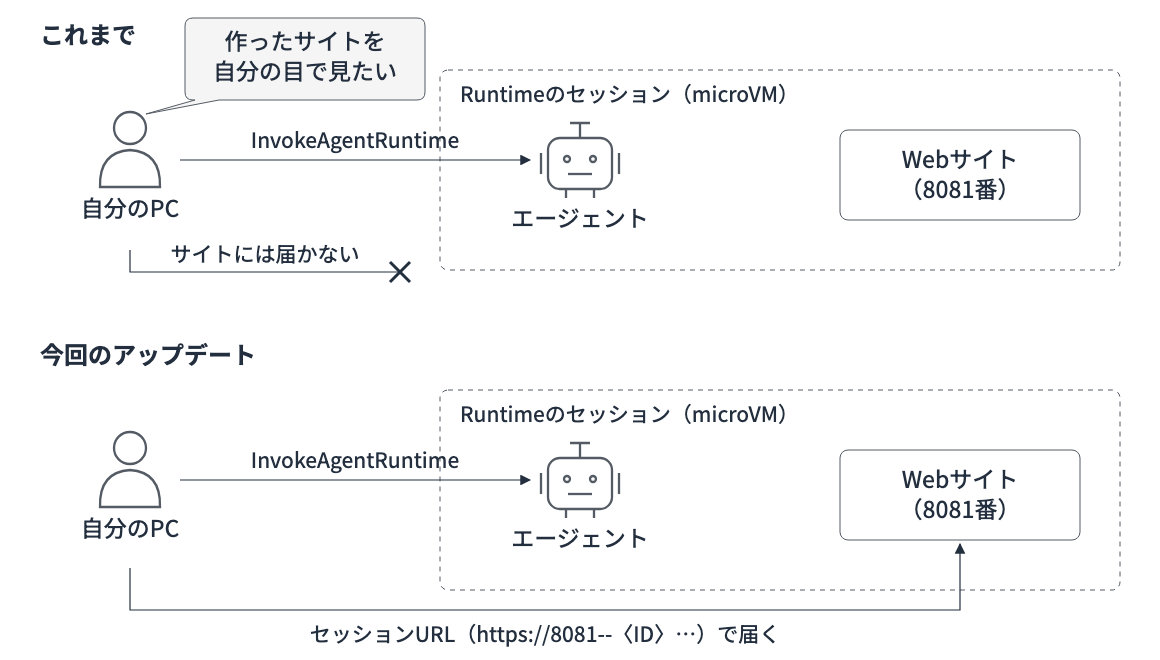
Until now you could already invoke the agent and run commands, but you couldn't open a website running inside a session in your own browser. From now on, you can access allowed ports through a dedicated URL (the session URL)!
It's nice that there's now one more easy way to check an AI agent's output!
Let's dig a little deeper into how it works!
How the Session URL Works
First, let's look at how the session URL is issued.
To use the session URL, you specify the ports to allow access to when creating the Runtime.
This setting is allowedPorts.
When you invoke the agent on the Runtime you configured, the response contains the session URL (sessionEndpointUrl). If you want to access an arbitrary port, you choose it by prefixing the URL with something like 8081--; if you don't add a prefix, the request reaches the agent's listening port.
https://<識別子>.runtime.bedrock-agentcore.<リージョン>.on.aws/            ← エージェントの待ち受けポート
https://8081--<識別子>.runtime.bedrock-agentcore.<リージョン>.on.aws/      ← 8081番
Here's the flow illustrated.
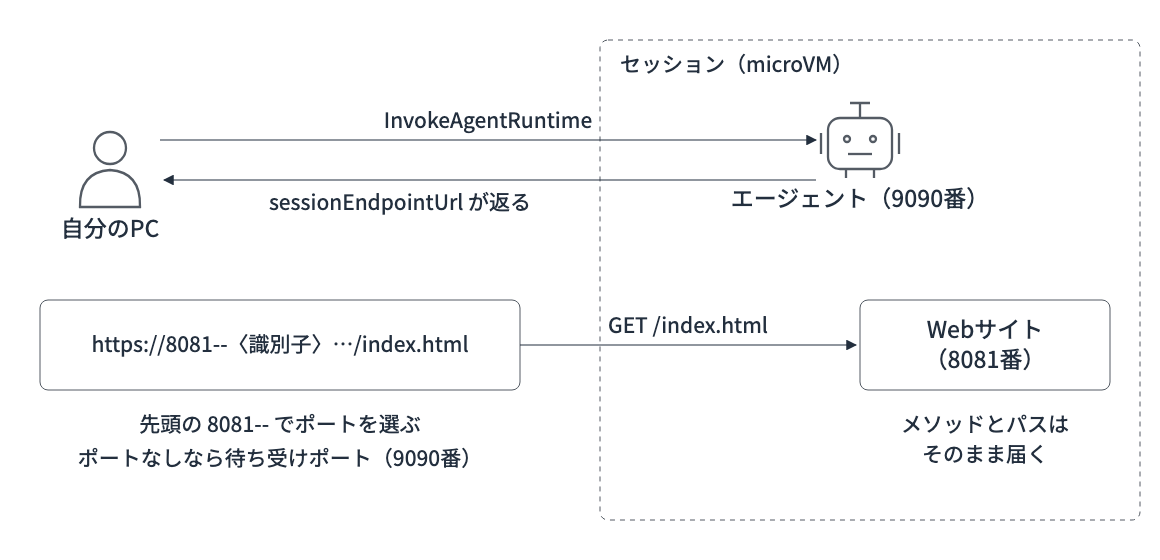
The method and path reach the server inside as they are, so you can call any route the app has. All destination ports, including the listening port, must be registered in allowedPorts.
You can use ports 8000 to 12000, up to a maximum of 5 entries.
Of course, just knowing the URL isn't enough to access it. Authentication and authorization using the method configured on the Runtime are required, and when authenticating with IAM, you attach a signature (SigV4) made with AWS credentials to each request. The caller also needs the bedrock-agentcore:InvokeAgentRuntimeProxy permission.
With JWT authentication, you attach a Bearer Token.
Changing the Listening Port and Path
The other change is that you can now change the port and path the agent listens on to anything you like!
Until now, the agent was specified to listen on port 8080 at /invocations, but with this update you can change it to, for example, port 9090 at /agent/invoke. What you set is the port and path in protocolConfiguration.
Here's an illustration for this one too.
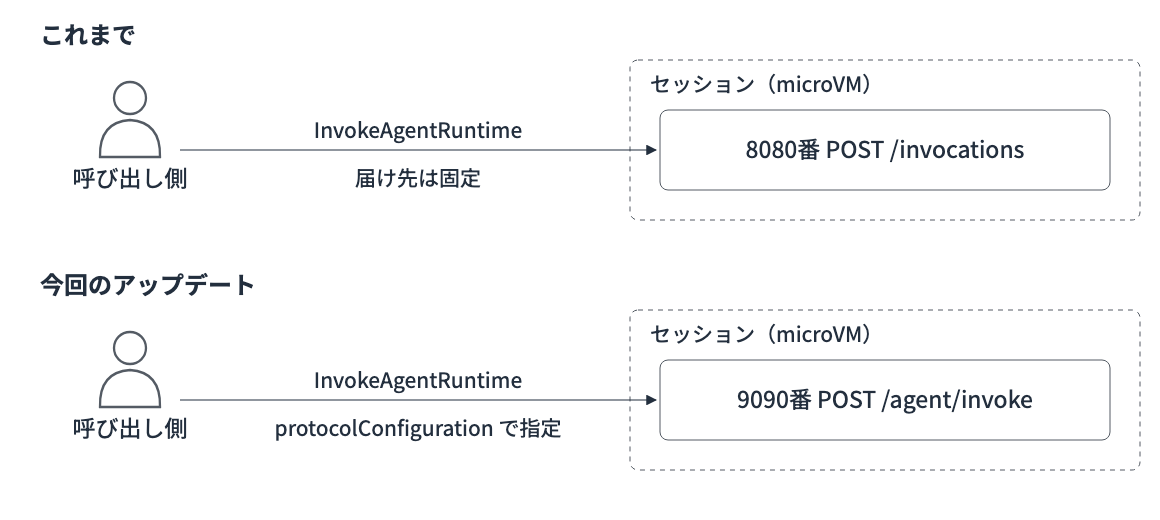
Note that what changes is just the single destination used when invoking the agent; it doesn't add more entry points for invocation!
When you want to split routes by path and call them, you use the session URL. The two settings can each be used on their own. This time, since we have the chance, we'll try combining both!
Prerequisites
We'll proceed with the following setup!
| Item | Version, etc. |
|---|---|
| Region | Tokyo (ap-northeast-1) |
| Python | 3.14 |
| Container base image | ghcr.io/astral-sh/uv:python3.14-bookworm-slim |
| boto3 | 1.43.123 |
| bedrock-agentcore | 1.25.2 |
| strands-harness | 0.3.2 (strands-agents 1.62.0) |
| fastapi / uvicorn | 0.162.0 / 0.54.0 |
| Model | Claude Haiku 5.5 (jp.anthropic.claude-haiku-5-5) |
To work with allowedPorts and sessionEndpointUrl, boto3 1.43.122 or later is required. The client that accesses the session URL with signing was added in bedrock-agentcore 1.25.2.
Now let's get started!
Trying It Out
Here's the setup for this time!
We'll have the Strands harness agent listen on port 9090 at /agent/invoke. The site the agent builds will be served on port 8081 of the same session.
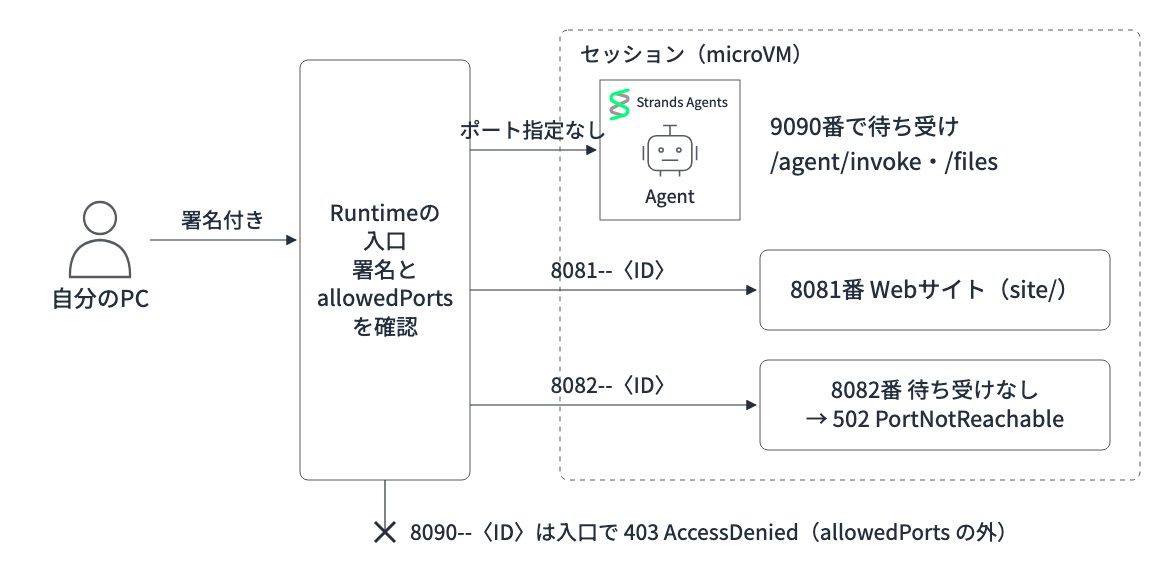
For allowedPorts, we'll include port 9090 and the range 8081 to 8083.
We'll deliberately have nothing listen on port 8082, and together with the non-allowed port 8090, we'll also check the difference in errors.
Setup
Let's install the dependencies and so on!
uv init --python 3.14 agentcore-session-endpoints
cd agentcore-session-endpoints
uv add "boto3>=1.43.122" "bedrock-agentcore>=1.25.2"

# コンテナに入れるエージェント側のプロジェクト
mkdir agent && cd agent
uv init --bare --no-workspace --name session-endpoint-agent --python 3.14
uv add "strands-harness==0.3.2" fastapi uvicorn
cd ..
Preparing the Agent
The Strands harness we'll use this time is a package that lets you create, with create_harness(), an agent equipped with tools such as shell and file operations along with a system prompt. It's good for quickly having something built, so we'll use it here!
I've introduced it in detail in a previous article!
We instruct the agent to create files in /tmp/workspace/site, and in the same process we also start a server that serves ./site on port 8081.
On port 9090, we also add /files as a custom route to be called from the session URL.
import os
import threading
from functools import partial
from http.server import SimpleHTTPRequestHandler, ThreadingHTTPServer
from pathlib import Path

import uvicorn
from fastapi import FastAPI
from pydantic import BaseModel
from strands_harness import create_harness

WORKSPACE = Path("/tmp/workspace")
SITE_DIR = WORKSPACE / "site"
SITE_DIR.mkdir(parents=True, exist_ok=True)
os.chdir(WORKSPACE)

agent = create_harness(
    model="jp.anthropic.claude-haiku-5-5",
    instructions=(
        "あなたはWebサイトを作るアシスタントです。"
        "ファイルはすべて ./site 配下に作成してください。"
        "./site はポート8081で配信済みなので、サーバーを起動する必要はありません。"
    ),
    session=False,
    memory=False,
    callback_handler=None,
)

app = FastAPI()

class InvokeRequest(BaseModel):
    prompt: str

@app.get("/ping")
def ping():
    return {"status": "Healthy"}

# protocolConfiguration.path で指定したパス
@app.post("/agent/invoke")
def invoke(request: InvokeRequest):
    result = agent(request.prompt)
    return {"response": str(result).strip()}

# セッションURLからだけ届く独自のルート
@app.get("/files")
def files():
    return {"files": sorted(str(p.relative_to(SITE_DIR)) for p in SITE_DIR.rglob("*") if p.is_file())}

def serve_site():
    handler = partial(SimpleHTTPRequestHandler, directory=str(SITE_DIR))
    ThreadingHTTPServer(("0.0.0.0", 8081), handler).serve_forever()

if __name__ == "__main__":
    threading.Thread(target=serve_site, daemon=True).start()
    uvicorn.run(app, host="0.0.0.0", port=9090)
For AgentCore's SDK, you may be familiar with BedrockAgentCoreApp, which can build a server for agents, but using it fixes the entry path to /invocations. Since we also want to try changing the path this time, we prepared /agent/invoke with FastAPI, the same as the example in the official documentation.
Deploying
We'll deploy it as a container image. Place the following Dockerfile in agent/.
FROM ghcr.io/astral-sh/uv:python3.14-bookworm-slim
WORKDIR /app
COPY pyproject.toml uv.lock ./
RUN uv sync --frozen --no-dev
COPY main.py ./
EXPOSE 9090 8081
CMD ["uv", "run", "--no-sync", "main.py"]
AgentCore Runtime runs on arm64, so we build for arm64. We push the resulting image to Amazon ECR, the storage location for container images.
#!/bin/sh
set -eu
REGION=ap-northeast-1
REPO=session-endpoint-demo
ACCOUNT=$(aws sts get-caller-identity --query Account --output text)
REGISTRY=$ACCOUNT.dkr.ecr.$REGION.amazonaws.com

aws ecr describe-repositories --repository-names $REPO --region $REGION >/dev/null 2>&1 \
  || aws ecr create-repository --repository-name $REPO --region $REGION >/dev/null
aws ecr get-login-password --region $REGION | docker login --username AWS --password-stdin $REGISTRY
docker buildx build --platform linux/arm64 -t $REGISTRY/$REPO:latest --push agent
We create the Runtime by specifying the ECR image.
The key points this time are the two places: protocolConfiguration and allowedPorts. Specify them as follows!
runtime = control.create_agent_runtime(
    agentRuntimeName=NAME,
    agentRuntimeArtifact={"containerConfiguration": {"containerUri": image_uri}},
    roleArn=role_arn,
    networkConfiguration={"networkMode": "PUBLIC"},
    # エージェントの待ち受けを 9090番の /agent/invoke に変える
    protocolConfiguration={"serverProtocol": "HTTP", "port": 9090, "path": "/agent/invoke"},
    # セッションURLから届くポート
    allowedPorts=[
        {"port": 9090},
        {"portRange": {"from": 8081, "to": 8083}},
    ],
)
Full deploy.py (including creation of the execution role)
import json
import time

import boto3

REGION = "ap-northeast-1"
NAME = "session_endpoint_demo"
ROLE_NAME = "AgentCoreSessionEndpointDemoRole"

account_id = boto3.client("sts").get_caller_identity()["Account"]
image_uri = f"{account_id}.dkr.ecr.{REGION}.amazonaws.com/session-endpoint-demo:latest"

# 実行ロール(ECRからのイメージ取得、Bedrockのモデル呼び出し、ログ出力)
iam = boto3.client("iam")
try:
    role_arn = iam.get_role(RoleName=ROLE_NAME)["Role"]["Arn"]
except iam.exceptions.NoSuchEntityException:
    role_arn = iam.create_role(
        RoleName=ROLE_NAME,
        AssumeRolePolicyDocument=json.dumps({
            "Version": "2012-10-17",
            "Statement": [{
                "Effect": "Allow",
                "Principal": {"Service": "bedrock-agentcore.amazonaws.com"},
                "Action": "sts:AssumeRole",
                "Condition": {"StringEquals": {"aws:SourceAccount": account_id}},
            }],
        }),
    )["Role"]["Arn"]
    iam.put_role_policy(
        RoleName=ROLE_NAME,
        PolicyName="runtime",
        PolicyDocument=json.dumps({
            "Version": "2012-10-17",
            "Statement": [
                {
                    "Effect": "Allow",
                    "Action": ["ecr:BatchGetImage", "ecr:GetDownloadUrlForLayer"],
                    "Resource": f"arn:aws:ecr:{REGION}:{account_id}:repository/session-endpoint-demo",
                },
                {"Effect": "Allow", "Action": "ecr:GetAuthorizationToken", "Resource": "*"},
                {
                    "Effect": "Allow",
                    "Action": ["bedrock:InvokeModel", "bedrock:InvokeModelWithResponseStream"],
                    "Resource": "*",
                },
                {
                    "Effect": "Allow",
                    "Action": [
                        "logs:CreateLogGroup", "logs:CreateLogStream", "logs:PutLogEvents",
                        "logs:DescribeLogGroups", "logs:DescribeLogStreams",
                    ],
                    "Resource": "*",
                },
            ],
        }),
    )
    time.sleep(15)  # ロールの反映待ち

control = boto3.client("bedrock-agentcore-control", region_name=REGION)
runtime = control.create_agent_runtime(
    agentRuntimeName=NAME,
    agentRuntimeArtifact={"containerConfiguration": {"containerUri": image_uri}},
    roleArn=role_arn,
    networkConfiguration={"networkMode": "PUBLIC"},
    # エージェントの待ち受けを 9090番の /agent/invoke に変える
    protocolConfiguration={"serverProtocol": "HTTP", "port": 9090, "path": "/agent/invoke"},
    # セッションURLから届くポート
    allowedPorts=[
        {"port": 9090},
        {"portRange": {"from": 8081, "to": 8083}},
    ],
)
runtime_id = runtime["agentRuntimeId"]

while (detail := control.get_agent_runtime(agentRuntimeId=runtime_id))["status"] not in ("READY", "CREATE_FAILED"):
    time.sleep(5)

print("status:", detail["status"])
print("protocolConfiguration:", detail.get("protocolConfiguration"))
print("allowedPorts:", detail.get("allowedPorts"))

with open("runtime.json", "w") as f:
    json.dump({"arn": runtime["agentRuntimeArn"], "id": runtime_id}, f)
Run the script to deploy!
chmod +x build_push.sh
./build_push.sh
uv run deploy.py
status: READY
protocolConfiguration: {'serverProtocol': 'HTTP', 'port': 9090, 'path': '/agent/invoke'}
allowedPorts: [{'port': 9090}, {'portRange': {'from': 8081, 'to': 8083}}]
It deployed without problems and became READY! The GetAgentRuntime response also contains the port and path we set.
Now that the Runtime is ready, let's have the agent build a site and take a look at it!
Having It Build a Full Site
As usual, we invoke the agent with InvokeAgentRuntime and get the sessionEndpointUrl from the response.
response = client.invoke_agent_runtime(
    agentRuntimeArn=runtime_arn,
    runtimeSessionId=session_id,
    contentType="application/json",
    payload=json.dumps({"prompt": sys.argv[1]}).encode(),
)

print("runtimeSessionId:", response["runtimeSessionId"])
print("sessionEndpointUrl:", response.get("sessionEndpointUrl"))
Full invoke.py
import json
import sys
import uuid

import boto3
from botocore.config import Config

REGION = "ap-northeast-1"
runtime_arn = json.load(open("runtime.json"))["arn"]

# 引数でセッションIDを渡すと、同じセッションで続きを依頼する
session_id = sys.argv[2] if len(sys.argv) > 2 else str(uuid.uuid4())
client = boto3.client(
    "bedrock-agentcore", region_name=REGION, config=Config(read_timeout=900)
)
response = client.invoke_agent_runtime(
    agentRuntimeArn=runtime_arn,
    runtimeSessionId=session_id,
    contentType="application/json",
    payload=json.dumps({"prompt": sys.argv[1]}).encode(),
)

print("runtimeSessionId:", response["runtimeSessionId"])
print("sessionEndpointUrl:", response.get("sessionEndpointUrl"))
print(json.loads(response["response"].read())["response"])

with open("session.json", "w") as f:
    json.dump({"session_id": session_id, "url": response.get("sessionEndpointUrl")}, f)
The theme is a website for a fictional cafe, "Kotori Coffee," and we'll have it build the whole thing with three files: HTML, CSS, and JavaScript!
uv run invoke.py "架空のカフェ「ことり珈琲」のWebサイトを新規作成してください。index.html・style.css・script.js の3ファイル構成で、トップ・メニュー・営業時間のセクションを入れてください。"
runtimeSessionId: 55f06e7e-0bb1-46b7-97bf-3f8fac1f78a9
sessionEndpointUrl: https://4z5rgmg2norwijgqme6dp3ik.runtime.bedrock-agentcore.ap-northeast-1.on.aws
「ことり珈琲」のWebサイトを `./site` に作成しました(`index.html` / `style.css` / `script.js`)。ポート8081で配信されており、3ファイルとも 200 で取得できることを確認しています。
(構成やscript.jsの機能などの説明が続く)
It created the three files in about a minute and a half!
The response contains the sessionEndpointUrl too! We'll use this URL to access the site inside the session.
Also, a response came back even for an app that doesn't provide /invocations!
It's reaching /agent/invoke on port 9090 specified in protocolConfiguration properly.
Accessing the Session URL
Let's send requests to the session URL!
IAM signing is required, but session_endpoint_client in bedrock-agentcore attaches the signature for us.
We'll try sending requests to the following four endpoints:
- /files on the no-port-specified (port 9090)
- index.html on port 8081
- Port 8082 (allowed but nothing is running)
- Port 8090 (not in allowedPorts)
import json

from bedrock_agentcore.runtime import AgentCoreRuntimeClient

session = json.load(open("session.json"))
client = AgentCoreRuntimeClient(region="ap-northeast-1")
endpoint = client.session_endpoint_client(session["url"])

# ポート指定なし = エージェントの待ち受けポート(9090)の独自ルート
files = endpoint.request("GET", "/files")
print("GET /files ->", files.status, files.json())

# 8081番 = エージェントが作ったサイト
page = endpoint.request("GET", "/index.html", port=8081)
print("GET :8081/index.html ->", page.status, page.headers.get("content-type"), len(page.data), "bytes")
print(page.text[:300])

# 許可したが何も待ち受けていないポートと、許可していないポート
for port in (8082, 8090):
    r = endpoint.request("GET", "/", port=port)
    print(f"GET :{port}/ ->", r.status, "proxy_error:", r.proxy_error)
GET /files -> 200 {'files': ['index.html', 'script.js', 'style.css']}
GET :8081/index.html -> 200 text/html 10197 bytes
<!DOCTYPE html>
<html lang="ja">
<head>
  <meta charset="UTF-8">
  ...
  <title>ことり珈琲</title>
  <link rel="stylesheet" href="style.css">
GET :8082/ -> 502 proxy_error: PortNotReachable
GET :8090/ -> 403 proxy_error: AccessDenied
/files returned a list of the three files the agent created.
Port 8081 returned index.html, port 8082 returned 502 because nothing is running there, and port 8090 returned 403 because it isn't allowed — results just as expected!
Since calling it from a script worked without problems, let's look at it in the browser next!
Previewing in the Browser
The session URL requires a signature for each request, so you can't just open it in the browser as is. So we use bedrock-agentcore's local relay (open_local_endpoint). It attaches a signature to requests received on port 8088 of your PC and forwards them to port 8081 of the session.
import json

from bedrock_agentcore.runtime import AgentCoreRuntimeClient

session = json.load(open("session.json"))
client = AgentCoreRuntimeClient(region="ap-northeast-1")
endpoint = client.session_endpoint_client(session["url"])

# localhost:8088 へのリクエストに署名を付けて、セッションの8081番へ中継する
with endpoint.open_local_endpoint(port=8081) as local:
    print("Open", local.url)
    input("Enterで終了します")
uv run preview.py
When we open the displayed http://localhost:8088...
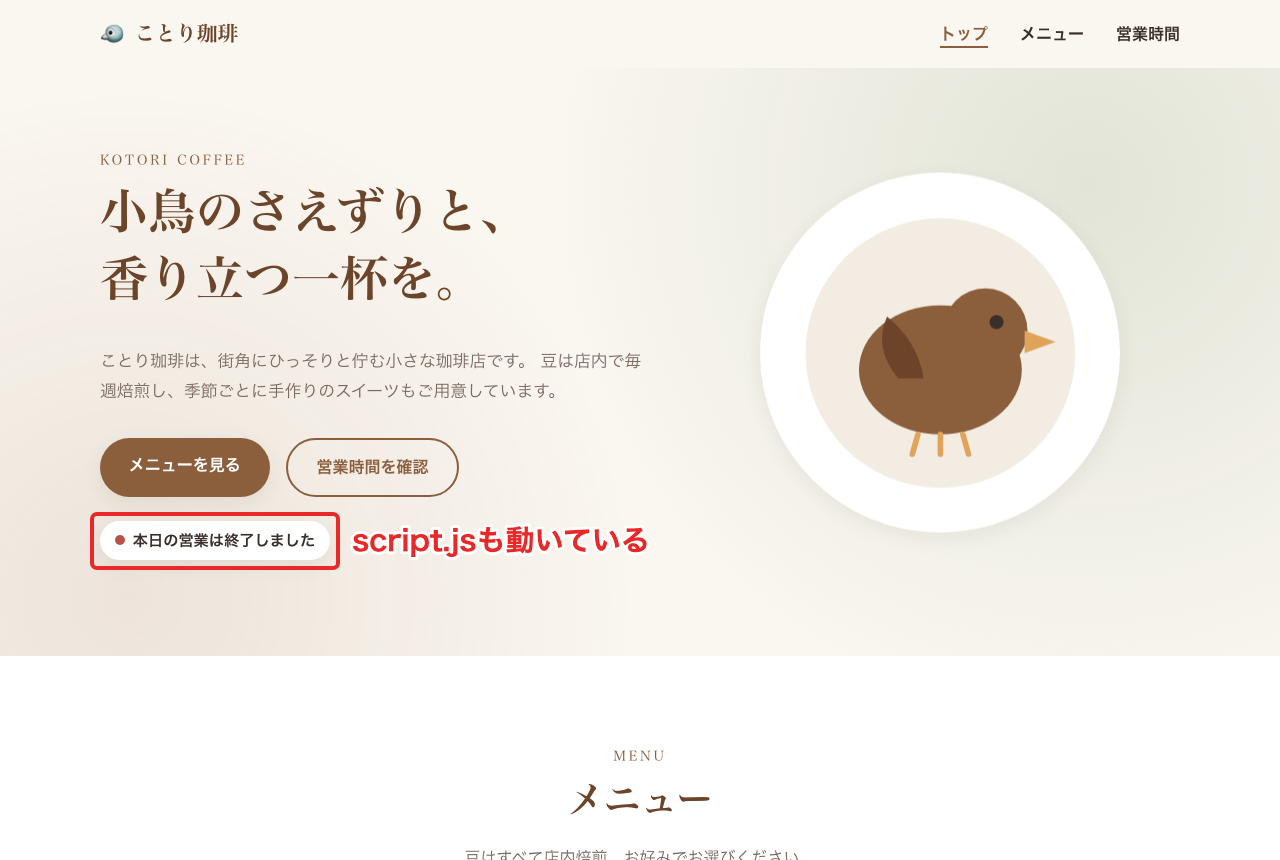
The little bird is so cute!!!
All impressions aside, the site the agent built inside the session was displayed in my own browser! Not only the CSS and fonts, but also the business-hours check handled by script.js works, and the "Today's business hours have ended" message is displayed correctly. I took the screenshot at 11:30 PM, so it correctly determined that it's after closing time!
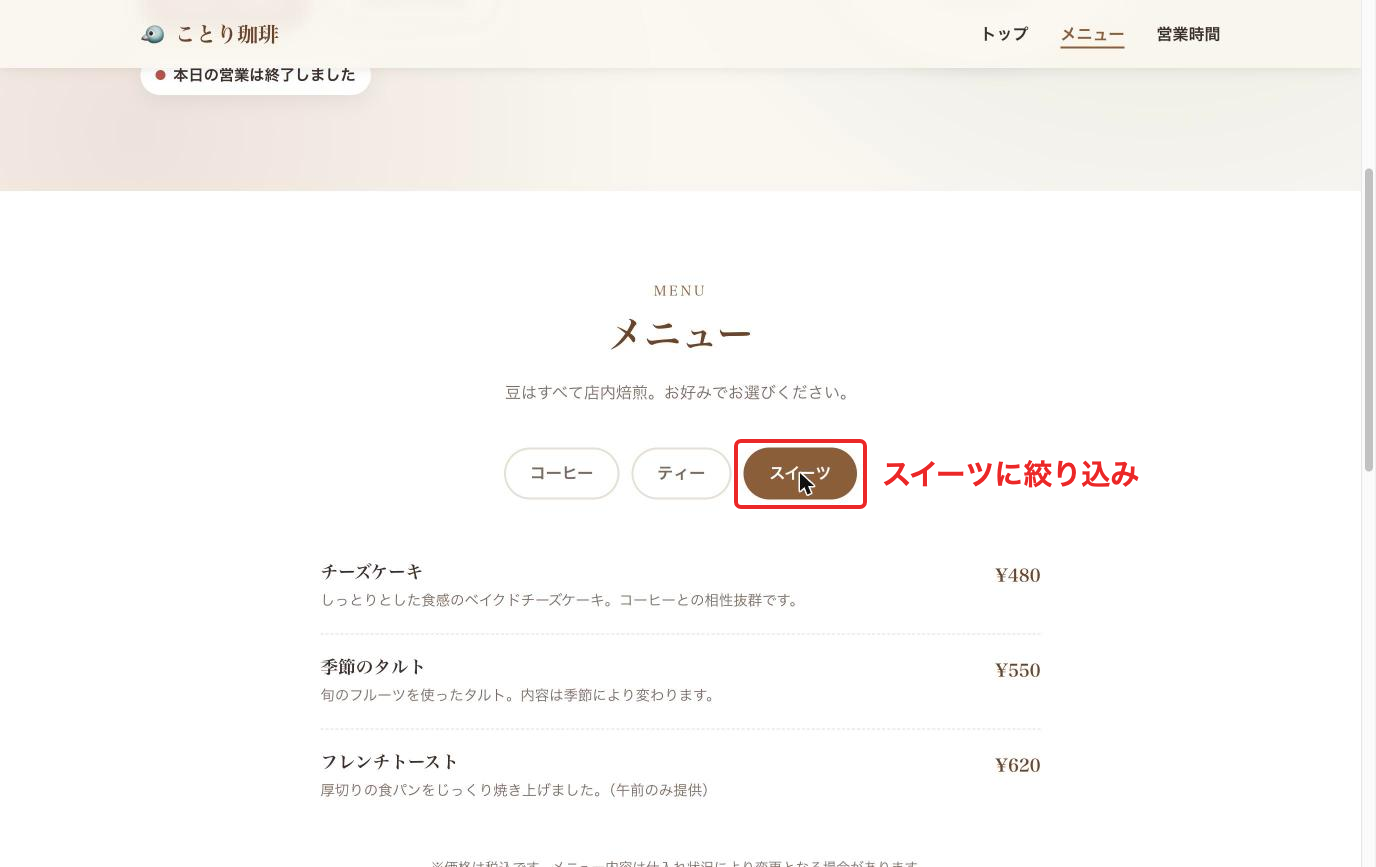
Let's also lightly check the JavaScript behavior by interacting with the browser. Clicking "Sweets" in the menu narrowed it down to three items.
In the business hours table, the row for Saturday, the day I ran this, is marked with a "Today" indicator.
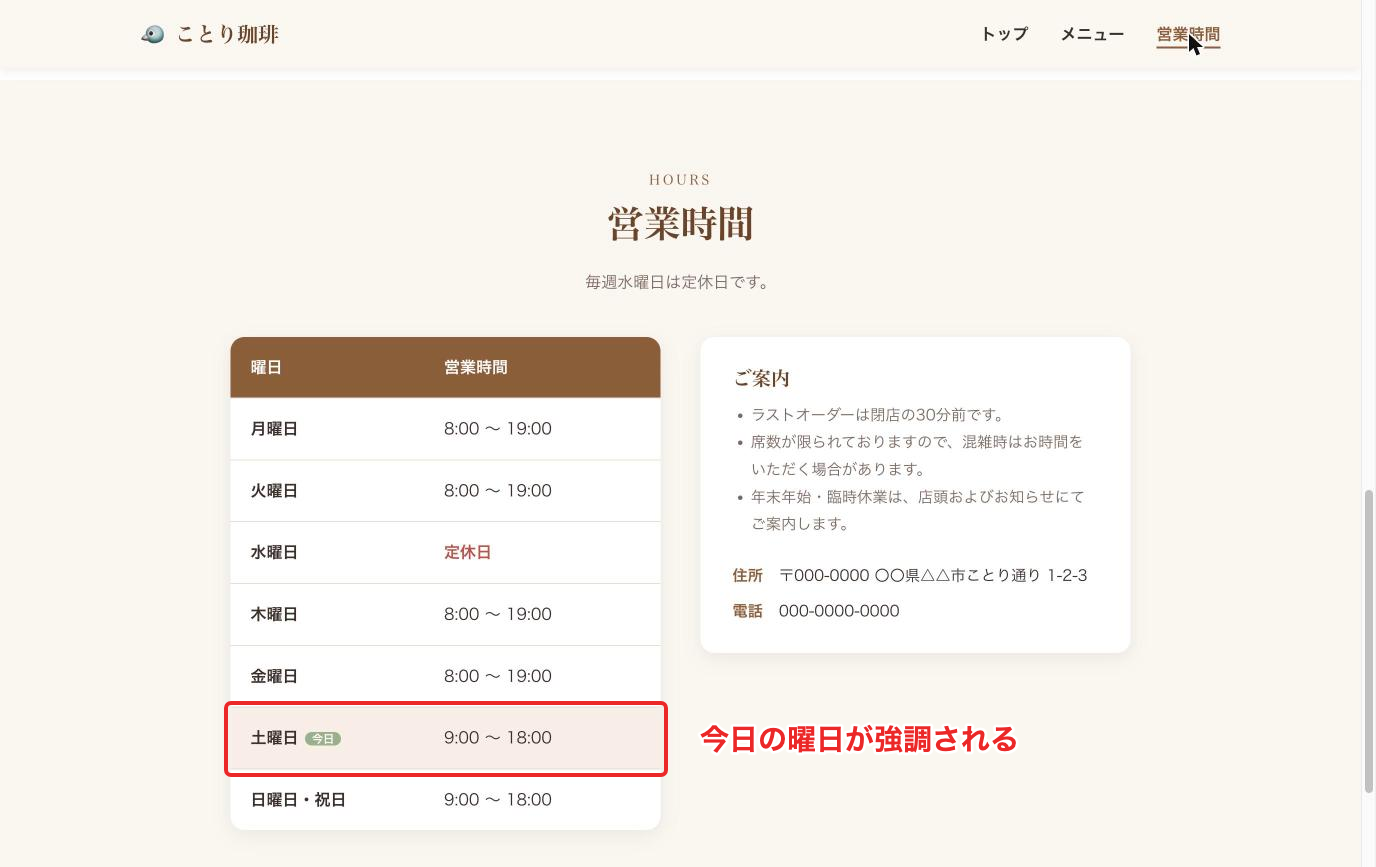
Links and scripts on the page work just like on a normal site. It's nice to be able to touch and check what the agent made.
Having It Fix Things in the Same Session
Finally, with the preview left open, let's ask for a fix using the same session ID. If the request reaches the same session, we should be able to see the changed screen at the same URL.
Replace the session ID at the end with the runtimeSessionId shown in the first run's output.
uv run invoke.py "夜カフェ風に、背景を濃い紺色・文字を明るい色にした配色へ変えてください。" 55f06e7e-0bb1-46b7-97bf-3f8fac1f78a9
runtimeSessionId: 55f06e7e-0bb1-46b7-97bf-3f8fac1f78a9
sessionEndpointUrl: https://4z5rgmg2norwijgqme6dp3ik.runtime.bedrock-agentcore.ap-northeast-1.on.aws
配色を夜カフェ風(濃い紺の背景・明るい文字・ランプ色のアクセント)に変更しました。変更は `style.css` のみで、`index.html` と `script.js` は変えていません。
It's the same session, so the session URL is the same as the first time. When we reload the browser...
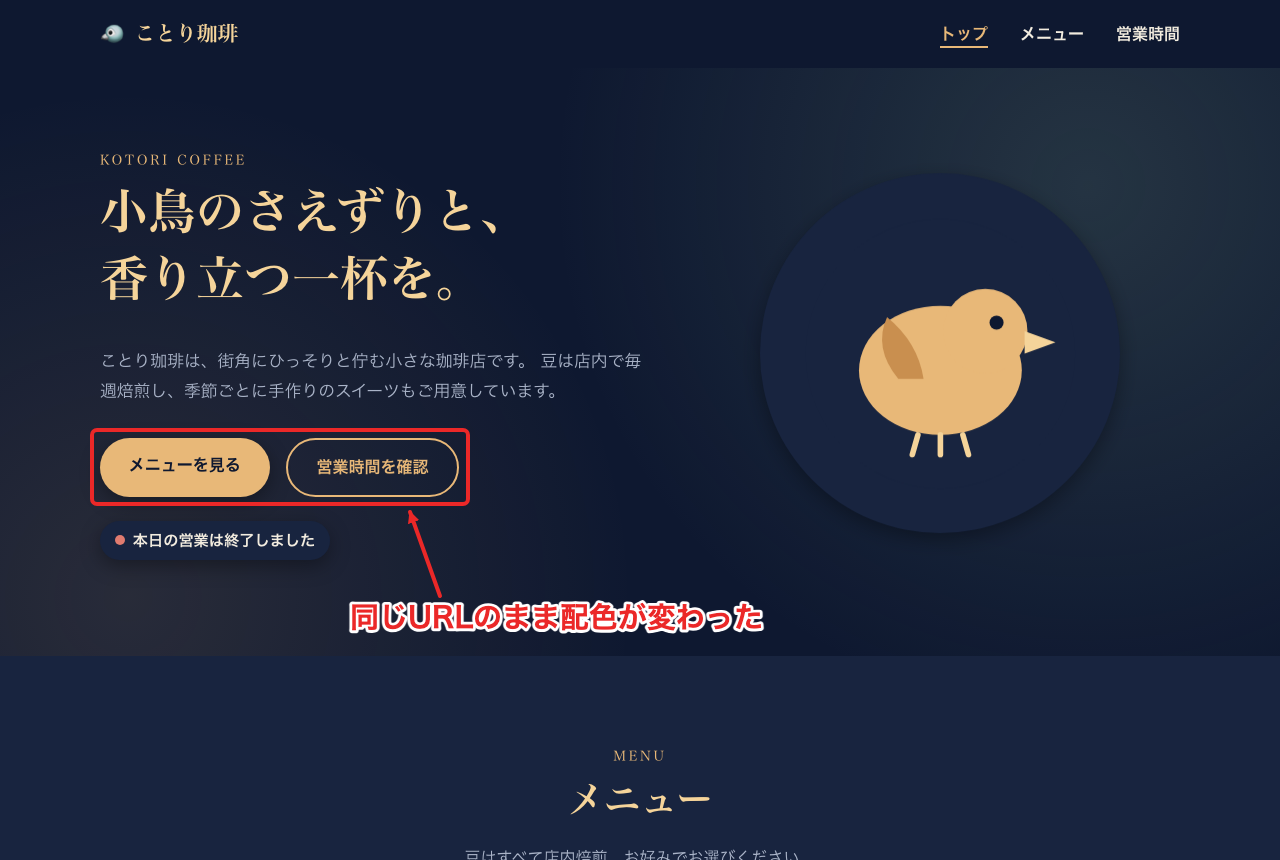
It changed to a night-cafe color scheme at the same URL!
There's no need to restart the local relay either!
You can keep repeating the flow of asking the agent, checking in the browser, and asking again.
Cleanup
Stop preview.py with Enter, and then delete the Runtime, the ECR repository, and the execution role.
cleanup.py
import json

import boto3

REGION = "ap-northeast-1"
runtime_id = json.load(open("runtime.json"))["id"]

boto3.client("bedrock-agentcore-control", region_name=REGION).delete_agent_runtime(agentRuntimeId=runtime_id)
boto3.client("ecr", region_name=REGION).delete_repository(repositoryName="session-endpoint-demo", force=True)

iam = boto3.client("iam")
iam.delete_role_policy(RoleName="AgentCoreSessionEndpointDemoRole", PolicyName="runtime")
iam.delete_role(RoleName="AgentCoreSessionEndpointDemoRole")
uv run cleanup.py
Use Cases
Finally, let's look back at where this could be used!
Session URL
The first thing that comes to mind is using it, as we did this time, to check on the spot a screen built by a coding agent. Just as Claude and Codex let you easily view output in their Desktop apps, it seems the same kind of thing could be done in apps you build with AgentCore!
Development servers and dashboards launched inside a session can be opened in the same way, so it also looks usable for UIs that interact with an agent in real time.
Changing the Listening Port and Path
This seems helpful when you want to deploy an existing web app or API server to AgentCore Runtime! Until now, for HTTP the port had to be 8080 and the path /invocations, so I think it will help in cases where you want to use other paths or port numbers...
Conclusion
You can now access servers running inside a session through allowed ports with signed requests! I thought it could be used in cases such as coding-agent-type apps that want to show output immediately, or having AI build a UI in real time!
You can also change the agent's default listening port and path! It seems useful for cases where you absolutely want to move away from the default port or path.
Thank you for reading to the end!
Supplement: Detailed Specs Described in the Documentation
The official documentation also describes specs and cautions we didn't touch on this time, and I've briefly summarized the ones that caught my interest.
Session URL Validity Period
The session URL is a URL tied to the session, and you can keep using the same URL while the session continues.
By default, a session's execution environment stops after 15 minutes without requests or after 8 hours. Even after it stops, sending a request to the URL prepares a new execution environment and makes it accessible. However, in-memory state and files are not carried over, so if you want to keep the files you created, use session storage.
By the way, I tried session storage in a previous article, so please refer to it as needed!
Default Ports and Paths
If you don't specify protocolConfiguration, the following values are used for each protocol.
You can also change only the port or only the path.
This feature is supported even for protocols other than HTTP!
| Protocol | Port | Path |
|---|---|---|
| HTTP | 8080 | /invocations |
| AG-UI | 8080 | /invocations |
| MCP | 8000 | /mcp |
| A2A | 9000 | / |
The path change is reflected only for InvokeAgentRuntime; invocation over WebSocket goes to /ws on the listening port.
Things to Watch Out for on the App Side
The Host header of requests arriving via the session URL contains an internal hostname. For development servers that check the hostname, such as Vite, you need a setting like setting server.allowedHosts to true. Links and redirects within pages also need to use relative URLs.
Unsupported Configurations
Session endpoints can't be used with Instances (capacity providers). Also, access goes through public HTTPS and doesn't support PrivateLink.
Telling Errors Apart
Errors from the Runtime side have an empty body, and the reason is in the X-Amzn-Bedrock-AgentCore-Runtime-Error header. Besides the 502 and 403 we saw this time, there are the following.
| Status | Reason | Main Cause |
|---|---|---|
| 401 | AuthenticationRequired | Credentials not attached |
| 404 | SessionNotFound | Wrong URL or no session |
| 424 | RuntimeClientError | App doesn't start or respond in time |
| 429 | Throttled | Too many requests |
Recording in CloudTrail
Requests to the session URL can be recorded in CloudTrail as a data event called InvokeAgentRuntimeProxy. Data events aren't recorded by default, so configure them in a trail or an event data store. A web preview generates a request for each image and script, so be careful about costs if you record them.