I tried creating a web application that performs real-time transcription using Amazon Transcribe via backend for browser microphone audio

This page has been translated by machine translation. View original
I created a web application that performs real-time transcription using the browser's microphone with Amazon Transcribe's streaming API as a learning exercise.
In this article, I'll focus specifically on the design points for passing browser audio to the Transcribe SDK rather than implementation details. While building this, I encountered the challenge of "how to connect push data arriving via WebSocket with the pull interface expected by the SDK," and the solution turned out to be quite interesting, so I'll focus on that.
The complete code is available on GitHub.
Please also check our company blog for an explanation of Amazon Transcribe's real-time transcription.
What I Built
A web application that transcribes in real-time as you speak into your browser's microphone.
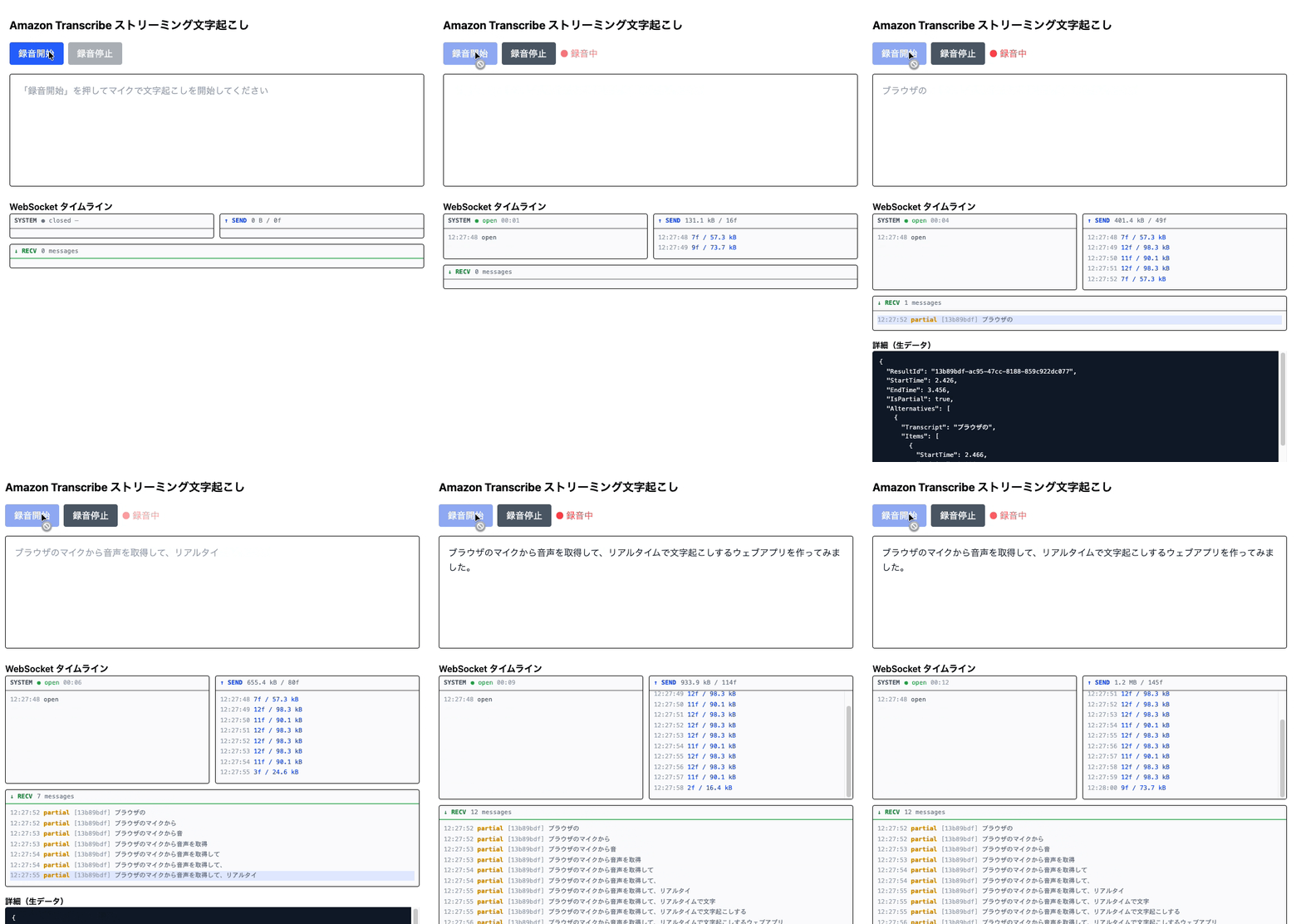
When you press "Start Recording" and allow microphone access, transcription begins. While speaking, partial results appear in gray, and when speech is segmented, it becomes fixed as confirmed results in black.
The tech stack consists of React + Vite for the frontend, Hono + Node.js for the backend, and I'm using @aws-sdk/client-transcribe-streaming as the AWS SDK.
Why a Different Design from Regular APIs is Needed
Think about an API call using fetch. It follows the pattern: "send a request → receive a response once and done." You fetch data at your timing, and once received, the process is complete.
Real-time audio processing is fundamentally different. Audio data flows continuously from the microphone, arriving as small pieces (chunks) at the producer's timing. This model, where the producer sets the pace, can be conveniently called a push model. On the other hand, the Transcribe SDK requests data one by one with for await...of. This model, where data flows only when the SDK (consumer) calls next(), can be conveniently called a pull model.
- Reference: AWS SDKs - Amazon Transcribe
- Reference: for await...of - JavaScript | MDN
Problems arise when these two models—push and pull—coexist. Push uses a callback pattern that "gets called when data arrives," while pull uses an iterator pattern that "returns when requested," so the timing doesn't match.
If you try to connect them directly, data might arrive when the SDK hasn't yet asked for "next," or conversely, the SDK might be waiting but no data has arrived yet.
Therefore, a mechanism like a queue is necessary.
This app has three push-pull boundaries. The cylinder shapes in the following diagram (PcmQueue / TranscribeAudioQueue / TranscribeEventQueue) represent these boundaries. Arrows flowing into cylinders represent push, and arrows flowing out represent pull.
System Architecture and Data Flow
Let's first understand the overall system architecture and data flow.
The cylinder shapes in the diagram (PcmQueue / TranscribeAudioQueue / TranscribeEventQueue) are the main focus of this article. All three function as bridges converting push to pull using the same pattern. Next, we'll look at the design of each bridge in sequence.
AudioWorklet and PcmQueue
What is AudioWorklet
To receive and process audio data from a microphone in the browser, we use the Web Audio API's AudioWorklet.
AudioWorklet is important because it operates on a dedicated thread independent from the main thread. Real-time audio processing requires timely handling that can't be done on the main thread, which is busy with DOM operations and JavaScript execution. The AudioWorklet thread is called directly by the browser's audio engine, so it's not affected by the state of the main thread.
- Reference: AudioWorklet - Web APIs | MDN
In this app, I define a PCMProcessor class that extends AudioWorkletProcessor in public/worklets/pcm-processor.js, and connect it as an AudioWorkletNode to the audio graph.
// Frontend side
await audioCtx.audioWorklet.addModule("/worklets/pcm-processor.js");
const workletNode = new AudioWorkletNode(audioCtx, "pcm-processor", {
  processorOptions: { bufferSize: 4096 },
});
const source = audioCtx.createMediaStreamSource(stream);
source.connect(workletNode);
How process() gets called
The core of AudioWorkletProcessor is the process() method.
process(inputs) {
  const input = inputs[0]?.[0] // Mono ch0, Float32Array with 128 samples
  // ...
  return true // returning false stops the processor
}
The browser's audio engine calls this automatically every 128 samples. At 48kHz, that's about once every 2.7 milliseconds.
Float32 → Int16 PCM conversion
Audio samples from the microphone are in Float32 (decimal values from -1.0 to 1.0).
Meanwhile, the format to send to Amazon Transcribe is signed 16-bit PCM (Little Endian).
Since this makes the size smaller than Float32, we perform this conversion in the browser's javascript (_flush()).
_flush() {
  const pcm = new ArrayBuffer(this._offset * 2)
  const view = new DataView(pcm)
  for (let i = 0; i < this._offset; i++) {
    const s = Math.max(-1, Math.min(1, this._buffer[i]))
    // Scale Float32 (-1.0 to 1.0) to Int16 (-32768 to 32767)
    view.setInt16(i * 2, s < 0 ? s * 0x8000 : s * 0x7fff, true)
  }
  this.port.postMessage({ type: "pcm", audioData: new Uint8Array(pcm) })
  this._offset = 0
}
Sending all 128 samples each time would call postMessage too frequently, so we accumulate them in an internal buffer and send them together when 4096 samples (about 85 milliseconds) have accumulated.
public/worklets/pcm-processor.js full code
class PCMProcessor extends AudioWorkletProcessor {
  constructor(options) {
    super()
    this._bufferSize = options.processorOptions?.bufferSize || 4096
    this._buffer = new Float32Array(this._bufferSize)
    this._offset = 0
    this._ended = false

    this.port.onmessage = (e) => {
      if (e.data.type === "end") this._ended = true
    }
  }

  process(inputs) {
    const input = inputs[0]?.[0]
    if (input) {
      let i = 0
      while (i < input.length) {
        const remaining = this._bufferSize - this._offset
        const toCopy = Math.min(remaining, input.length - i)
        this._buffer.set(input.subarray(i, i + toCopy), this._offset)
        this._offset += toCopy
        i += toCopy
        if (this._offset >= this._bufferSize) this._flush()
      }
    }
    if (this._ended) {
      if (this._offset > 0) this._flush()
      this.port.postMessage({ type: "ended" })
      return false
    }
    return true
  }

  _flush() {
    const pcm = new ArrayBuffer(this._offset * 2)
    const view = new DataView(pcm)
    for (let i = 0; i < this._offset; i++) {
      const s = Math.max(-1, Math.min(1, this._buffer[i]))
      view.setInt16(i * 2, s < 0 ? s * 0x8000 : s * 0x7fff, true)
    }
    this.port.postMessage({ type: "pcm", audioData: new Uint8Array(pcm) })
    this._offset = 0
  }
}

registerProcessor("pcm-processor", PCMProcessor)
To the main thread via MessagePort
To transfer data from the AudioWorklet thread to the main thread, we use MessagePort. We send with postMessage() and receive with an onmessage handler on the main thread side.
- Reference: MessagePort - Web APIs | MDN
// Main thread side
workletNode.port.onmessage = (e) => {
  if (e.data.type === "pcm")
    audioQueue.push(e.data.audioData); // push!
  else if (e.data.type === "ended") audioQueue.end();
};
This is a push model where "a callback is called when data arrives."
From frontend PcmQueue to WebSocket transmission
PCM data accumulated in PcmQueue is retrieved one by one with for await...of (pull) and sent via WebSocket.
// transcribeClient.ts
for await (const chunk of audioStream) {
  ws.send(chunk); // chunk is Uint8Array
}
for await...of is a pull model where "I receive data one by one each time I request it." This is where the first push→pull conversion happens. With PcmQueue acting as a buffer, audio data sent by the AudioWorklet (push) and WebSocket sending (pull) can operate at different paces without getting stuck.
TranscribeAudioQueue: Converting push to pull
The same push/pull conversion that exists in the frontend also exists in the backend. Just as PcmQueue in the frontend connects AudioWorklet and WebSocket sending, TranscribeAudioQueue in the backend connects WebSocket receiving and the Transcribe SDK.
Transcribe SDK pulls audio with requests
The AudioStream parameter of StartStreamTranscriptionCommand accepts an AsyncIterable<AudioEvent>.
new StartStreamTranscriptionCommand({
  LanguageCode: "ja-JP",
  MediaEncoding: "pcm",
  MediaSampleRateHertz: opts.sampleRate,
  AudioStream: opts.audioStream, // Pass AsyncIterable
});
Internally, the SDK consumes this with for await...of. for await...of is a pull model that receives one item at a time whenever it requests "next".
- Reference: Transcribe Streaming::StartStreamTranscriptionCommand - AWS SDK for JavaScript v3
- Reference: Iteration protocols - JavaScript | MDN
Mismatch between push and pull
In summary, there's this mismatch:
WebSocket.onmessage → Called when data arrives (push)
                                  ↕ mismatch
Transcribe SDK      → Requests next data with for await...of (pull)
If you try to connect these two directly, the timing won't align.
- Even when data arrives from WebSocket, the SDK might not have said "next please" yet
- Even when the SDK says "next please," data might not have arrived from WebSocket yet
Solving with TranscribeAudioQueue
TranscribeAudioQueue uses a queue as a buffer to absorb this timing mismatch.
async *[Symbol.asyncIterator](): AsyncGenerator<AudioEvent> {
  while (true) {
    // If there's data in the queue, yield it in order (pass to pull side)
    while (this.queue.length > 0) {
      yield { AudioEvent: { AudioChunk: this.queue.shift()! } }
    }
    if (this.ended) break
    // If queue is empty, wait with Promise until next push arrives
    await new Promise<void>((r) => (this.notify = r))
  }
}
The operation flow works like this:
[WebSocket] chunk1 arrives → audioQueue.push(chunk1)
[SDK] "next please" → chunk1 is in queue → yield chunk1
[SDK] "next please" → queue is empty → wait with Promise
[WebSocket] chunk2 arrives → push() → notify() → wait resolved → yield chunk2
[WebSocket] chunk3, chunk4 arrive consecutively → accumulate in queue
[SDK] "next please" → yield chunk3
[SDK] "next please" → yield chunk4
Even if push and pull paces don't match, the queue absorbs the difference and both sides continue running without getting stuck.
backend/src/lib/transcribeAudioQueue.ts full code
export class TranscribeAudioQueue {
  private queue: Uint8Array[] = []
  private notify: (() => void) | null = null
  private ended = false

  push(chunk: Uint8Array) {
    this.queue.push(chunk)
    this.notify?.()
    this.notify = null
  }

  end() {
    this.ended = true
    this.notify?.()
    this.notify = null
  }

  async *[Symbol.asyncIterator](): AsyncGenerator<AudioEvent> {
    while (true) {
      while (this.queue.length > 0) {
        yield { AudioEvent: { AudioChunk: this.queue.shift()! } }
      }
      if (this.ended) break
      await new Promise<void>((r) => (this.notify = r))
    }
  }
}
The same conversion appears in the result receiving direction
So far we've discussed TranscribeAudioQueue (sending audio data to the Transcribe SDK), but the exact same push/pull conversion was needed in the result receiving direction as well.
Transcription results return to the browser via WebSocket, and this data also arrives with ws.onmessage (push). To receive it with for await...of (pull), the same bridge is needed.
I implemented the same structure as TranscribeEventQueue.
export class TranscribeEventQueue {
  private queue: TranscribeEvent[] = [];
  private resolve: (() => void) | null = null;
  private closed = false;

  send(event: TranscribeEvent) {
    this.queue.push(event);
    this.resolve?.();
    this.resolve = null;
  }

  close() {
    this.closed = true;
    this.resolve?.();
    this.resolve = null;
  }

  async *[Symbol.asyncIterator](): AsyncGenerator<TranscribeEvent> {
    while (true) {
      while (this.queue.length > 0) {
        yield this.queue.shift()!;
      }
      if (this.closed) break;
      await new Promise<void>((r) => (this.resolve = r));
    }
  }
}
The pattern core is identical to TranscribeAudioQueue. In transcribeClient.ts, we instantiate TranscribeEventQueue and delegate to it with yield*.
// Note: This is simplified code to show the concept
export async function* startTranscription(...): AsyncGenerator<TranscribeEvent> {
  const channel = new TranscribeEventQueue();

  ws.onmessage = (event) => {
    channel.send({ type: "result", data: ... }); // push
  };
  ws.onclose = () => {
    channel.close(); // termination signal
  };

  yield* channel; // Delegate yields from TranscribeEventQueue as is
}
When channel.close() is called, TranscribeEventQueue terminates, and startTranscription itself also terminates. For details on yield*, please refer to MDN.
- Reference: yield* - JavaScript | MDN
Managing partial results with resultId
So far we've talked about the sending side, but there are also characteristics on the receiving side from Transcribe.
Streaming transcription results come in two types:
| Type | isPartial |
Description |
|---|---|---|
| Partial result | true |
Preliminary text being recognized. May change later |
| Final result | false |
Confirmed text. Will not change anymore |
- Reference: Result - Amazon Transcribe
Partial and final results for the same utterance segment share the same resultId. On the frontend, by managing "overwrite if same resultId, add if new," we can display partial results updating in real-time and ultimately being replaced by final results.
for await (const event of startTranscription(
  handle.audioStream,
  handle.sampleRate,
)) {
  if (event.type === "result") {
    setSegments((prev) => {
      const idx = prev.findIndex((s) => s.resultId === event.data.resultId);
      return idx >= 0 ? prev.with(idx, event.data) : [...prev, event.data];
    });
  }
}
Conclusion
This was my first time working with AudioWorklet, but I found it interesting to learn how real-time audio processing works with its separate thread communicating via MessagePort. Low-level processing like converting from Float32 to Int16 PCM became clearer through hands-on practice.
I hope this blog is helpful to someone.