
Claude Code Self-Hosted Environment Feature Arrives: Trying an EC2 Instance as the Execution Environment

This page has been translated by machine translation. View original
製造ビジネステクノロジー部 This is Kazue.
In Claude Code v2.1.224 released on August 7th, self-hosted environments became available as execution environments for Claude Code on the Web. As of August 12, 2026, this is a public beta feature available only on Team and Enterprise plans.
Cloud sessions for Claude Code on the Web run by default on Anthropic-managed infrastructure. By using a self-hosted environment, you can bring that session execution portion into your own managed network.
What's great about it
- Network access: Since sessions run within your own network, you can access internal services, databases, registries, etc. without exposing them to the public internet
- Custom tools: Compilers, SDKs, internal CLIs, etc. can be pre-installed in the runner image
- Compliance: Repository checkouts and build artifacts can remain within your own managed infrastructure (however, the session content itself is sent to
api.anthropic.comfor model inference)
Conversely, unless you have the above requirements, the Anthropic-hosted environment is more suitable as it requires no infrastructure setup or operation. If you choose self-hosting, you will bear the operational costs of creating and maintaining runner images, operating runners, and managing networks.
Understanding the concepts
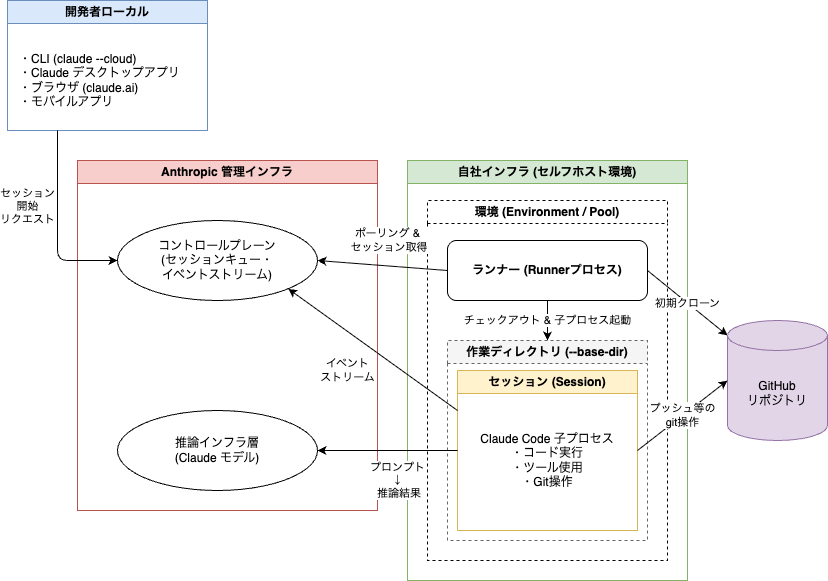
※ Click the image above to enlarge
The main concepts involved are as follows.
- Environment (Environment / Pool): A named group that serves as the destination for cloud sessions. Created in the organization settings on claude.ai, it groups multiple runners under it. Sessions are routed to the environment rather than to individual runners (meaning developers select an environment rather than a runner when starting a session)
- Environment secret: Shared credentials used by runners to authenticate and register with the environment. Displayed only once when the environment is created (does not appear in the diagram above)
- Runner: A resident process running on a host within your own network. It registers with the environment, retrieves sessions via polling, and executes them
- Session: A single Claude Code task started by a developer. The runner launches Claude Code as a child process to execute it
The flow until a session is executed is as follows.
- When a developer selects a self-hosted environment when starting a cloud session, Anthropic's control plane queues the session for that environment
- A runner with available capacity retrieves the session from the queue, clones the repository, and launches a child process of Claude Code
- The child process communicates with Anthropic via HTTPS for event streaming and model inference
Key points to understand regarding network and data boundaries are as follows.
- All communication is outbound HTTPS from your own network; no inbound connections from Anthropic to your network are required
- Repository checkouts, build artifacts, secrets, and files created or modified by the session remain in your own infrastructure
- On the other hand, the conversation content itself—such as prompts, responses, and tool execution results—is sent to Anthropic for model inference, and session transcripts are stored on the Anthropic side
- Session orchestration, queuing, and the claude.ai UI continue to be hosted by Anthropic. In other words, what the self-hosted environment moves to your side is "session execution," not the control plane
New commands added
The claude self-hosted-runner command for configuring self-hosted environments, along with subcommands such as claude self-hosted-runner setup, have been added.
※ The following are command execution results from v2.1.226.
% claude self-hosted-runner
error: No environment secret provided. Use --environment-secret-file or set SELF_HOSTED_RUNNER_ENVIRONMENT_SECRET.
Run 'claude self-hosted-runner --help' for usage.
% claude self-hosted-runner --help
Usage: claude self-hosted-runner [options]

Connection:
  --api-url <url>             API base URL (default: https://api.anthropic.com)
  --environment-secret-file <path>
                              Path to environment secret file (or set SELF_HOSTED_RUNNER_ENVIRONMENT_SECRET)
                              (--pool-secret-file / SELF_HOSTED_RUNNER_POOL_SECRET are deprecated aliases.)
  --lock-to-account <id>      Lock runner to a single account at registration (webhook-driven on-demand
                              spawn). Only that account's sessions are assigned.
                              [env: SELF_HOSTED_RUNNER_LOCK_TO_ACCOUNT]

Runtime:
  --capacity <n>              Max concurrent sessions (default: 1)
  --base-dir <path>           Base directory for repo checkouts (default: /workspace)
                              [env: SELF_HOSTED_RUNNER_BASE_DIR]
  --exec-path <path>          Binary to spawn for child sessions. Default: this process's own binary.
                              [env: SELF_HOSTED_RUNNER_EXEC_PATH]
  --hooks-dir <path>          Directory of lifecycle hook scripts (checkout, command, post-session).
                              Absent hooks fall through to built-in behavior.
                              [env: SELF_HOSTED_RUNNER_HOOKS_DIR]
  --session-stop-grace-sec <n>
                              How long to wait for the Claude process to exit cleanly after a
                              session ends, before force-killing it. The post-session hook runs
                              after this. Default: 5.
                              [env: SELF_HOSTED_RUNNER_SESSION_STOP_GRACE_MS, in ms]
  --post-session-hook-timeout-sec <n>
                              SIGTERM budget for the post-session lifecycle hook, on every session
                              end including runner shutdown. Default: 60.
                              [env: SELF_HOSTED_RUNNER_POST_SESSION_HOOK_TIMEOUT_MS, in ms]
  --drain-wait-sec <n>        On SIGTERM/SIGINT, wait up to N seconds for each session's in-flight
                              turn (a foreground tool call) and running background tasks to finish
                              before sending the session process its SIGTERM. Adds N to the
                              advertised shutdown budget.
                              Default: 0 (send SIGTERM immediately). Max: 86400.
                              [env: SELF_HOSTED_RUNNER_DRAIN_WAIT_MS, in ms]
                              (--drain-wait-bg-tasks-sec is a deprecated alias for this flag.)
  --git-ssh-rewrite <host>    Rewrite https://<host>/... source URLs to git@<host>:... (repeatable).
                              For SSH-only git hosts.
  --git-host-rewrite <f>=<t>  Rewrite https://<f>/... source URLs to https://<t>/... (repeatable).
                              For split-horizon DNS where the runner reaches GHE via a different
                              hostname than the control plane. Applied before --git-ssh-rewrite.
  --use-anthropic-git-proxy   Clone via Anthropic's git proxy (uses the session creator's stored
                              GitHub OAuth token, or the org's GitHub App installation token for
                              bot/agent sessions; you don't manage git auth on the runner). Supersedes
                              --git-host-rewrite and --git-ssh-rewrite.
                              [env: CLAUDE_RUNNER_USE_GIT_PROXY=1]
  --configure-git             Set global git identity to Claude <noreply@anthropic.com> and enable
                              commit signing via Anthropic's signing service, matching 1P sessions.
                              Writes ~/.gitconfig at runner startup. Without this flag, your image
                              must provide its own git identity.
                              [env: SELF_HOSTED_RUNNER_CONFIGURE_GIT=1]
  --push-outcome-on-release   On a runner-initiated non-completed session end (SIGTERM drain,
                              idle-release, failed), push every tracked outcome branch to origin
                              before deleting it, so in-flight commits survive a runner restart.
                              Skipped on server-initiated deassign. On a resumed session (worker
                              epoch > 1), the prep path fetches any previously pushed outcome
                              branch from origin and continues from it, so histories stay
                              linear. CAVEAT: the resume-fetch trusts refs/heads/<outcome-branch>
                              on the source remote — anyone with push access to that ref can
                              place content into the resumed workspace; if your source revision
                              is protected but claude/* refs are not, that collaborator write
                              surface widens on resume. Repos checked out via the checkout
                              lifecycle hook are NOT pushed — use the post-session hook to
                              snapshot those. Adds 30s
                              (total, shared across all pushes) to the advertised
                              shutdown budget.
                              [env: SELF_HOSTED_RUNNER_PUSH_OUTCOME_ON_RELEASE=1]
  --trust-workspace [bool]    Seed persisted trust for each session's repo paths so repo-level
                              .claude/settings.json permissions.allow and additionalDirectories
                              are honored by the child. Default: true.
                              Set to false for cli#44151's stricter gate: repo-committed grants
                              are dropped with an "Ignoring N permissions.allow" stderr
                              diagnostic; configure host-level grants via the host-config dir's
                              settings.json permissions.allow (userSettings source) instead.
                              [env: SELF_HOSTED_RUNNER_TRUST_WORKSPACE=0 to disable]
  --confine-repo-settings <mode>
                              Repo-committed-settings confine guard mode: warn (default) logs
                              a would-refuse diagnostic per violation and still spawns;
                              enforce refuses to spawn the session; off disables the scan.
                              Invalid values fail closed at startup.
                              [env: SELF_HOSTED_RUNNER_CONFINE_REPO_SETTINGS]
  [env: SELF_HOSTED_RUNNER_HOST_CONFIG_DIR]
                              Directory seeded into each session's CLAUDE_CONFIG_DIR (settings,
                              agents/, skills/, …; runtime state excluded). Default: ~/.claude.
                              Point at an empty dir to disable.
  --health-port <port>        Port for /healthz HTTP listener (default: 8080). 0 disables.
                              [env: SELF_HOSTED_RUNNER_HEALTH_PORT]
  --log-level <level>         Log level: info or debug (default: info)
  --log-file <path>           Tee runner logs to a file in append mode. Stdout is unchanged.
                              [env: SELF_HOSTED_RUNNER_LOG_FILE]

Runner lifecycle:
  --exit-if-unused-min <n>    Exit the runner if never assigned work for N min (autoscaler scale-down).
                              Default: never. Max: 10080.
                              [env: SELF_HOSTED_RUNNER_IDLE_SHUTDOWN_MS, in ms]
  --drain-grace-sec <n>       Default: 0 — exit immediately after active sessions finish, WITHOUT
                              polling for more (one-shot when --capacity=1).
                              Set a positive value (e.g. 30) to keep the runner warm and re-poll the
                              locked account's queue for that many seconds before exiting.
                              Max: 604800. [env: SELF_HOSTED_RUNNER_DRAIN_GRACE_MS, in ms]
  --retire-at <epoch-seconds> Retire the runner at the given wall-clock time (absolute Unix timestamp, in
                              seconds): release every active session through the ReleaseSession path that
                              --release-idle-session-min uses (the session parks server-side and a fresh
                              runner picks it up on the user's next message), stop taking new work, and
                              exit 0 once the slots are empty. A session still mid-turn at that time is
                              released as soon as its turn ends; background work a finished turn left
                              running gets up to 60s of grace, then the session parks anyway (perpetual
                              monitor tasks don't hold it at all). Use this when the host hard-kills the
                              runner at a known time (e.g. a sandbox lifetime cap): set it far enough
                              before the kill to cover typical turns PLUS the per-session shutdown
                              budget (--session-stop-grace-sec, the push-outcome window, the full
                              --post-session-hook-timeout-sec, the 60s background-work grace, one poll)
                              so sessions park cleanly and the post-session hook isn't truncated by
                              the kill. Default: never. [env: SELF_HOSTED_RUNNER_RETIRE_AT, in seconds]

Per-session watchdogs:
  --release-idle-session-min <n>  Release a session slot after N min of no user input (turn finished,
                                  or parked at a permission prompt, user idle). Runner exits if this
                                  drops it to zero active sessions.
                                  Default: never. Max: 10080.
                                  [env: SELF_HOSTED_RUNNER_SESSION_IDLE_MS, in ms]
  --startup-timeout-min <n>       Release a session slot if the child has not completed initialization
                                  N min after spawn — covers a child hung during --resume hydration or
                                  MCP connect, and a session assigned with no pending input. Cleared
                                  once the child emits system:init, after which --release-idle-session-min
                                  takes over. Default: 15. 0 disables. Max: 10080.
                                  [env: SELF_HOSTED_RUNNER_STARTUP_TIMEOUT_MS, in ms]
  --kill-session-after-min <n>    SIGTERM a session child after N min wall-clock (runaway backstop).
                                  If a turn is in flight at the deadline, the kill is deferred until
                                  the turn finishes, with a hard cap of 15 min past the deadline
                                  (override: SELF_HOSTED_RUNNER_MAX_LIFETIME_GRACE_MS, in ms).
                                  Default: never. Max: 10080.
                                  [env: SELF_HOSTED_RUNNER_MAX_LIFETIME_MS, in ms]

Debug:
  --debug-token-dir <path>    DEBUG ONLY — writes live tokens to disk. Do not use in production.
                              [env: SELF_HOSTED_RUNNER_DEBUG_TOKEN_DIR]

  --help, -h                  Show this help message
Running % claude self-hosted-runner setup launched the following session. I understood this to be a command that assists with configuration work when run inside the runner. (You can therefore see that a similar set of steps to those in the "Try it out" section below is returned as the session response.)
❯ Start the self-hosted runner setup wizard. Greet me and begin Phase 1 (create an environment in the Admin UI). Walk me through one step at a time.

Starting the self-hosted runner setup wizard. Welcome! Let's begin by creating an environment in the Admin UI.

Step 1: Create an environment in the Admin UI

1. Open https://claude.ai/admin-settings/claude-code in your browser
2. Scroll down to the Self-hosted environments section
3. Click Create environment and give it a name
4. Copy the environment secret that appears (make sure to copy it as it will only be shown on this screen)
5. Paste the copied secret into ./runner-setup/ENVIRONMENT_SECRET on this machine and save it (I will run chmod 600 on it later)
6. Also copy the environment ID (the one starting with ccpool_)

When you're ready, please tell me the environment ID and say "done".
Try it out
Testing with the Team plan.
Self-hosted environments quickstart - Claude Code Docs Based on this quickstart guide, I'll try building a configuration that uses an EC2 instance as the execution environment.
Enable self-hosted environments in organization settings
Self-hosted environments are disabled by default, so you need to enable them. Owner or administrator permissions are required.
Go to Organization settings → Cloud features → toggle "Allow self-hosted environments" to on. The "Self-hosted environments" section will then appear at the bottom.
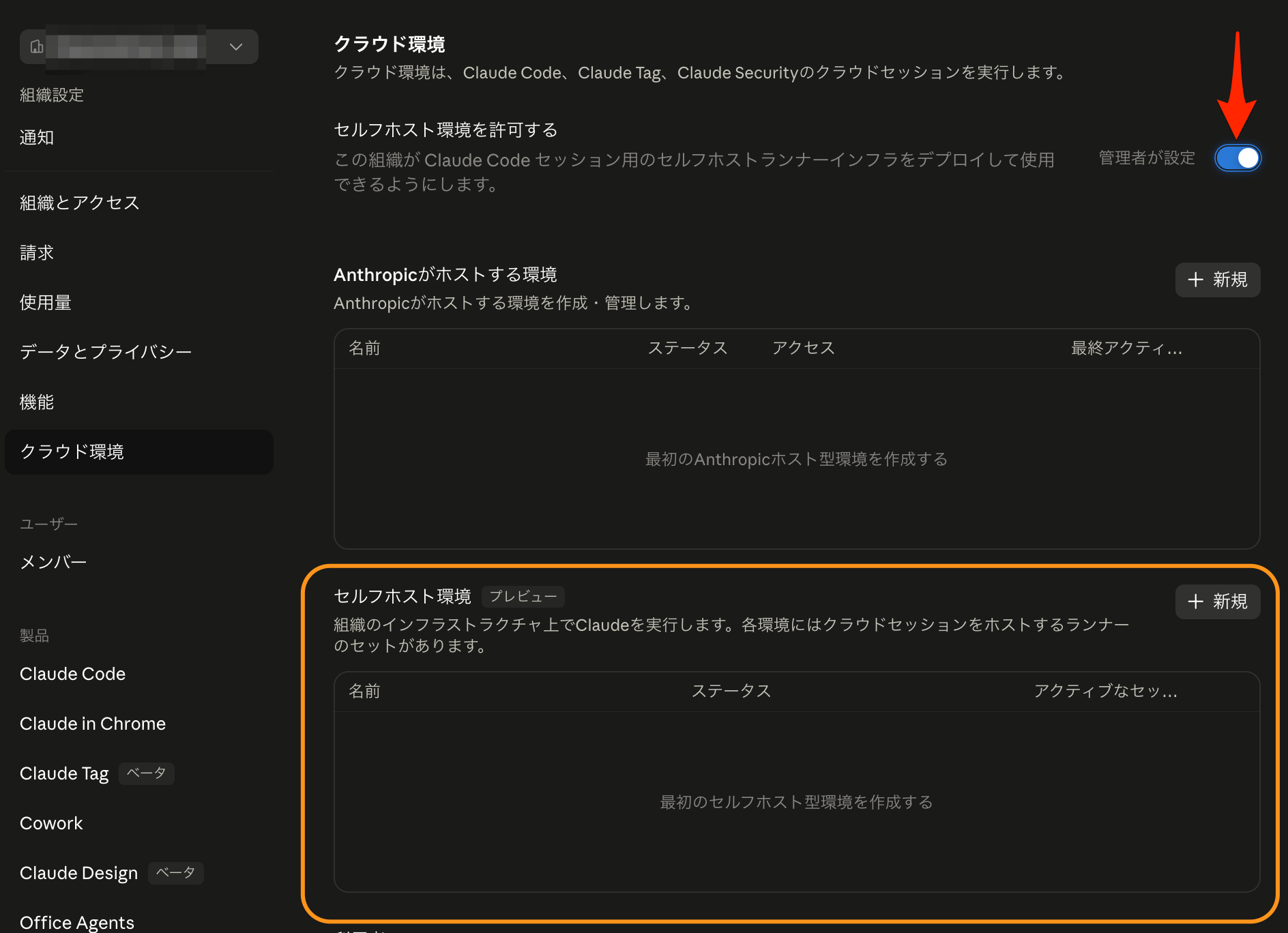
Create an environment
Click "+ New" at the top right of the "Self-hosted environments" section on the same screen to create an environment. First, enter a name.
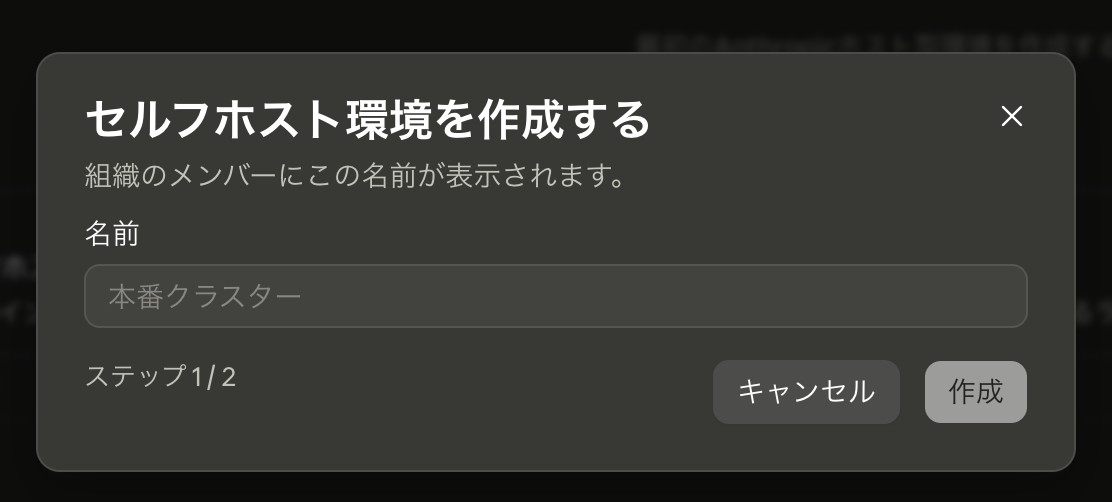
Save the secret displayed on the next screen.
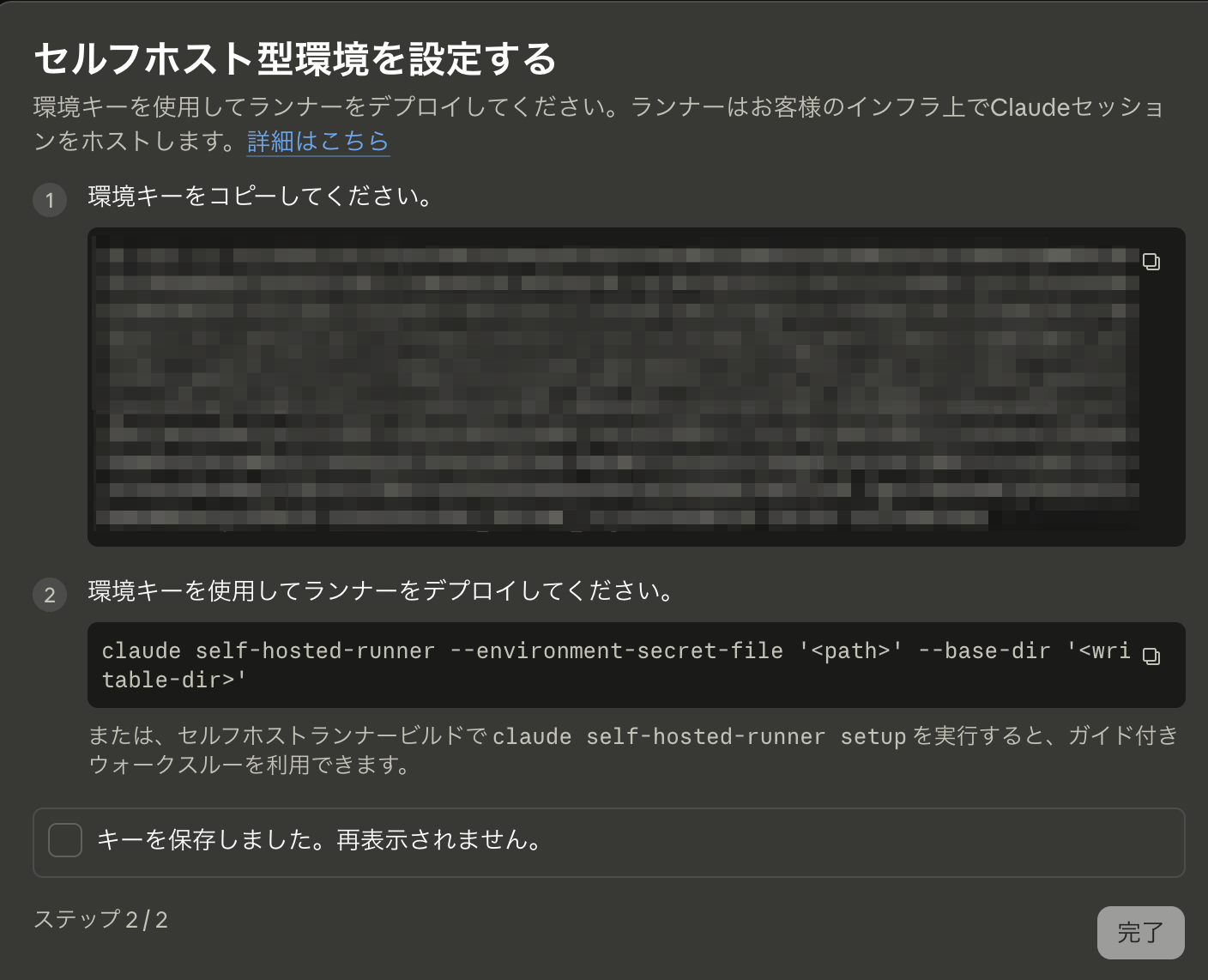
Next screen. The environment has been created.
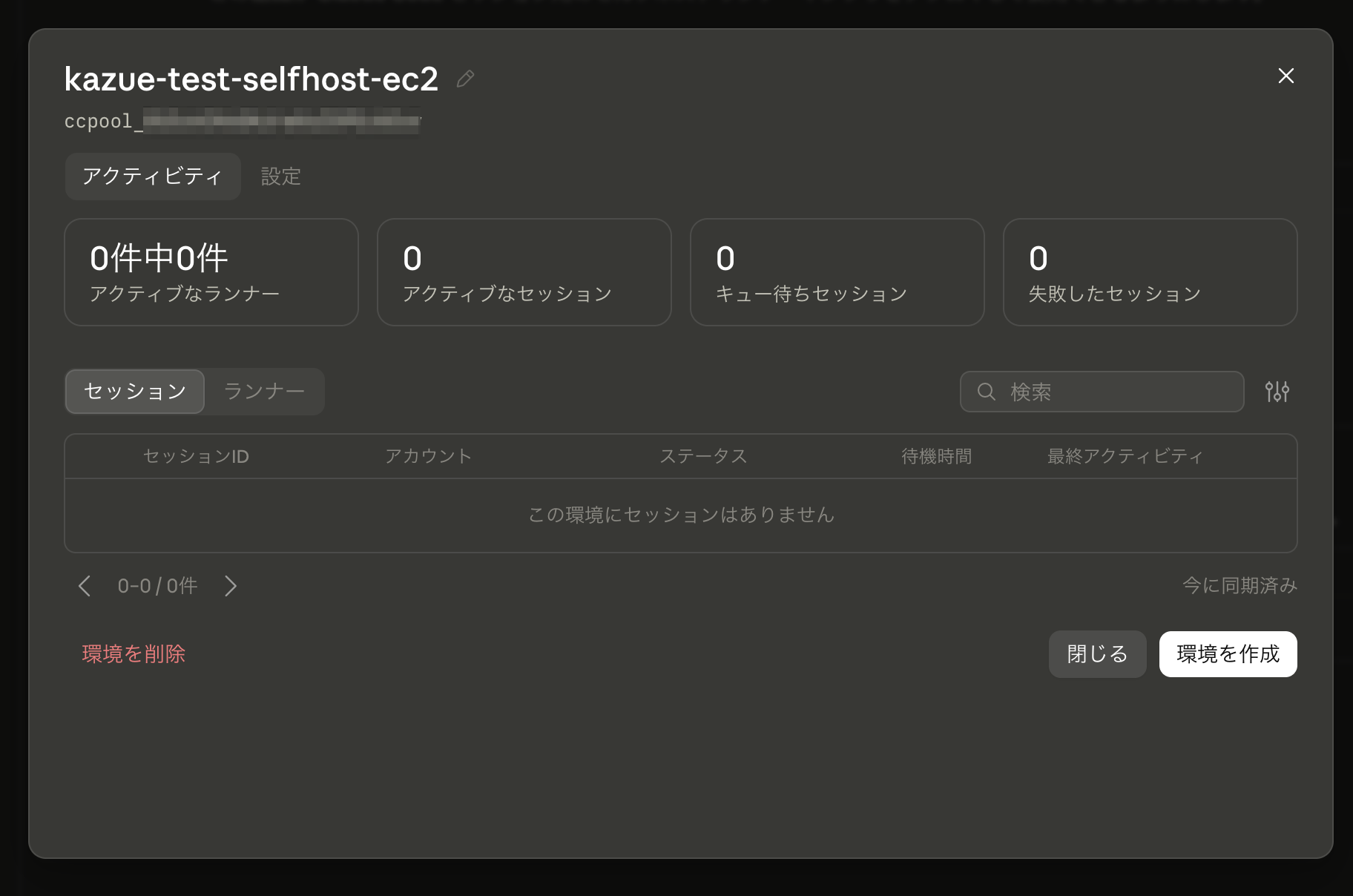
It also appears in the list.

Create an EC2 instance
I created one EC2 instance with Terraform using the following configuration.
- Placed in a private subnet
- NAT Gateway installed to allow outbound communication
- OS: Ubuntu 24.04
- Instance type: m8i-flex.large
- Security Group
- No inbound rules (deny all)
- For outbound rules, based on the network requirements, only 443/tcp needs to be fully open. However, since bare Ubuntu 24.04 uses http://archive.ubuntu.com (port 80) as the default apt mirror, 80/tcp should also be allowed
- Attached the
AmazonSSMManagedInstanceCorepolicy to enable shell access via SSM Session Manager
Install Claude Code
Connect via SSM Session Manager shell and run the following.
$ curl -fsSL https://claude.ai/install.sh | bash
Setting up Claude Code...

✔ Claude Code successfully installed!

  Version: 2.1.226

  Location: ~/.local/bin/claude

  Next: Run claude --help to get started

⚠ Setup notes:
  ● Native installation exists but ~/.local/bin is not in your PATH. Run:

    echo 'export PATH="$HOME/.local/bin:$PATH"' >> your shell config file && source your shell config file

✅ Installation complete!

$  echo 'export PATH="$HOME/.local/bin:$PATH"' >> ~/.profile
$ .  ~/.profile
$ claude -v
2.1.226 (Claude Code)
Actually, at this point the claude command results in "not found" in a separate session (~/.profile is not loaded automatically), but I'll ignore that for now.
Runner setup
First, create a location to store the secret issued in Organization settings → Cloud features.
$ mkdir ~/claude
Place the secret.
# Copy the secret value to your clipboard first
$ (umask 077 && cat > ~/claude/environment-secret)
# Paste the secret value → Enter → Ctrl-D to finish writing
Create the base directory.
$ mkdir ~/claude-runner
Now it's time to register the runner.
$ claude self-hosted-runner --environment-secret-file '/home/ssm-user/claude/environment-secret' --base-dir '/home/ssm-user/claude-runner'
2026-08-10T09:49:17.942Z [self-hosted-runner] [runner] This runner needs up to 80s to stop the Claude process and run the post-session hook on shutdown, and force-exits after 80s. Configure your process supervisor's stop timeout to at least 80s (e.g. terminationGracePeriodSeconds on Kubernetes, stop_grace_period on Docker Compose, TimeoutStopSec on systemd, or your platform's equivalent).
2026-08-10T09:49:17.942Z [self-hosted-runner] [runner] watchdog config: idle-release=disabled (not configured); startup-timeout=15m (default); kill-session-after=disabled (not configured); exit-if-unused=disabled (not configured)
2026-08-10T09:49:17.942Z [self-hosted-runner] Connecting to https://api.anthropic.com (capacity=1, baseDir=/home/ssm-user/claude-runner, execPath=/home/ssm-user/.local/share/claude/versions/2.1.226)
2026-08-10T09:49:18.276Z [self-hosted-runner] Registered: runner_id=ccrunner_01L9xnpeTinmjvs24jnxxxxx
2026-08-10T09:49:18.281Z [self-hosted-runner] [runner:health] /healthz and /metrics listening on :8080
2026-08-10T09:49:18.313Z [self-hosted-runner] [runner:startup] host config snapshot: 434 file(s), 5917.0 KiB from /home/ssm-user/.claude
2026-08-10T09:52:20.568Z [self-hosted-runner] [runner:health] polling ok · 0/1 slots · last_poll=20215ms ago · locked_account=no · runner_token expires in 3h · 0 sessions handled
2026-08-10T09:55:42.805Z [self-hosted-runner] [runner:health] polling ok · 0/1 slots · last_poll=20221ms ago · locked_account=no · runner_token expires in 3h · 0 sessions handled
After a while, the runner was recognized in claude.ai Organization settings → Cloud features!
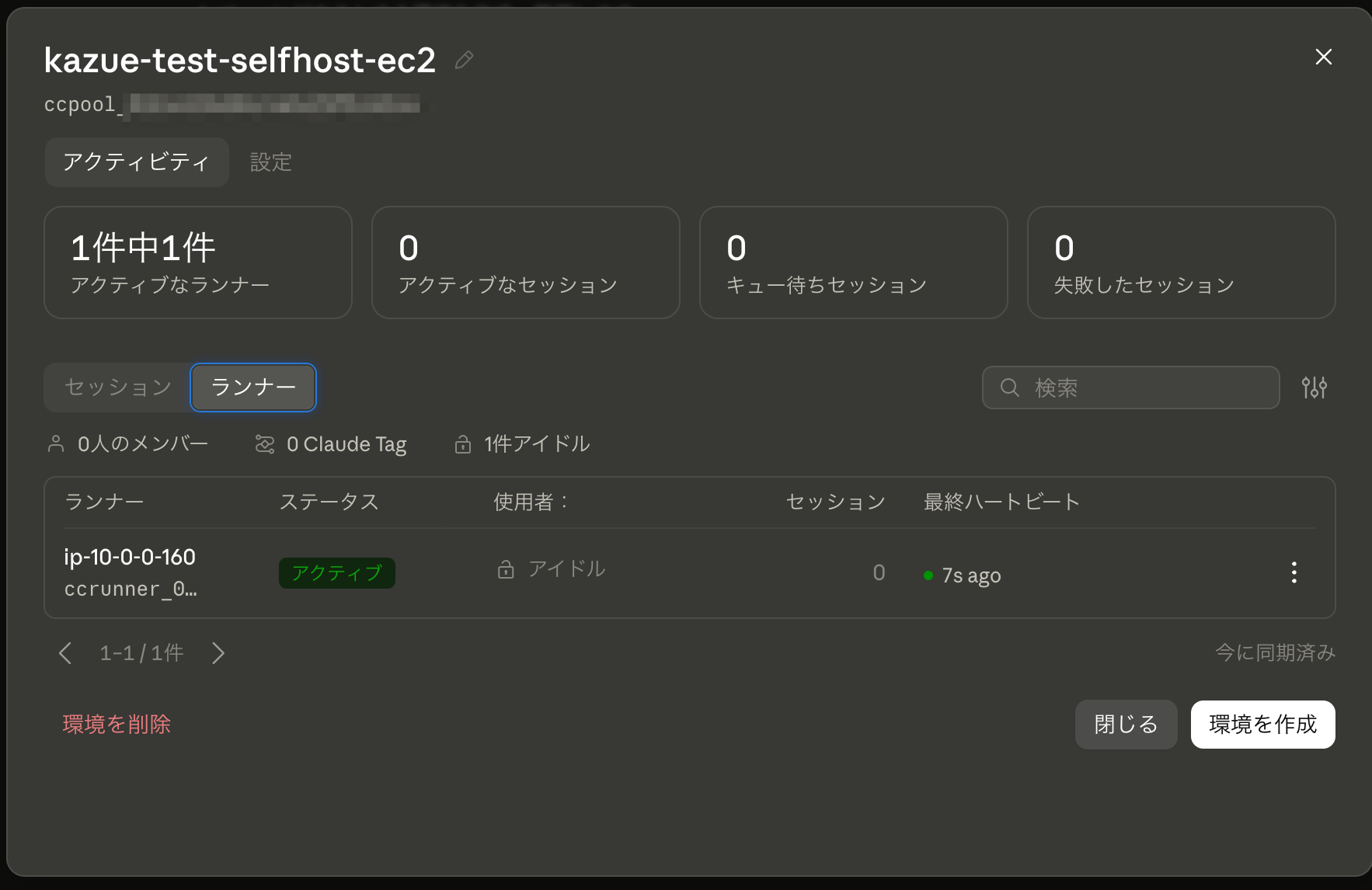
Try Using the Self-Hosted Environment
Under "Self-hosted environment pool," the environment you created is now available for selection.
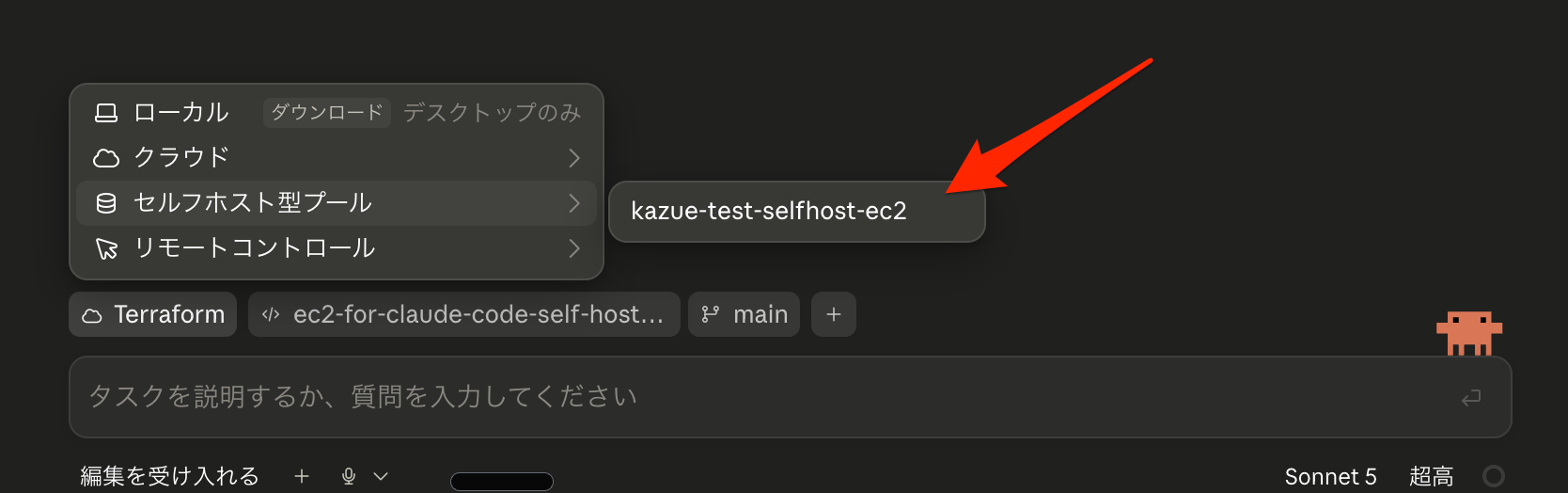
Let's select it and start a session with an appropriate prompt.
An error occurred.
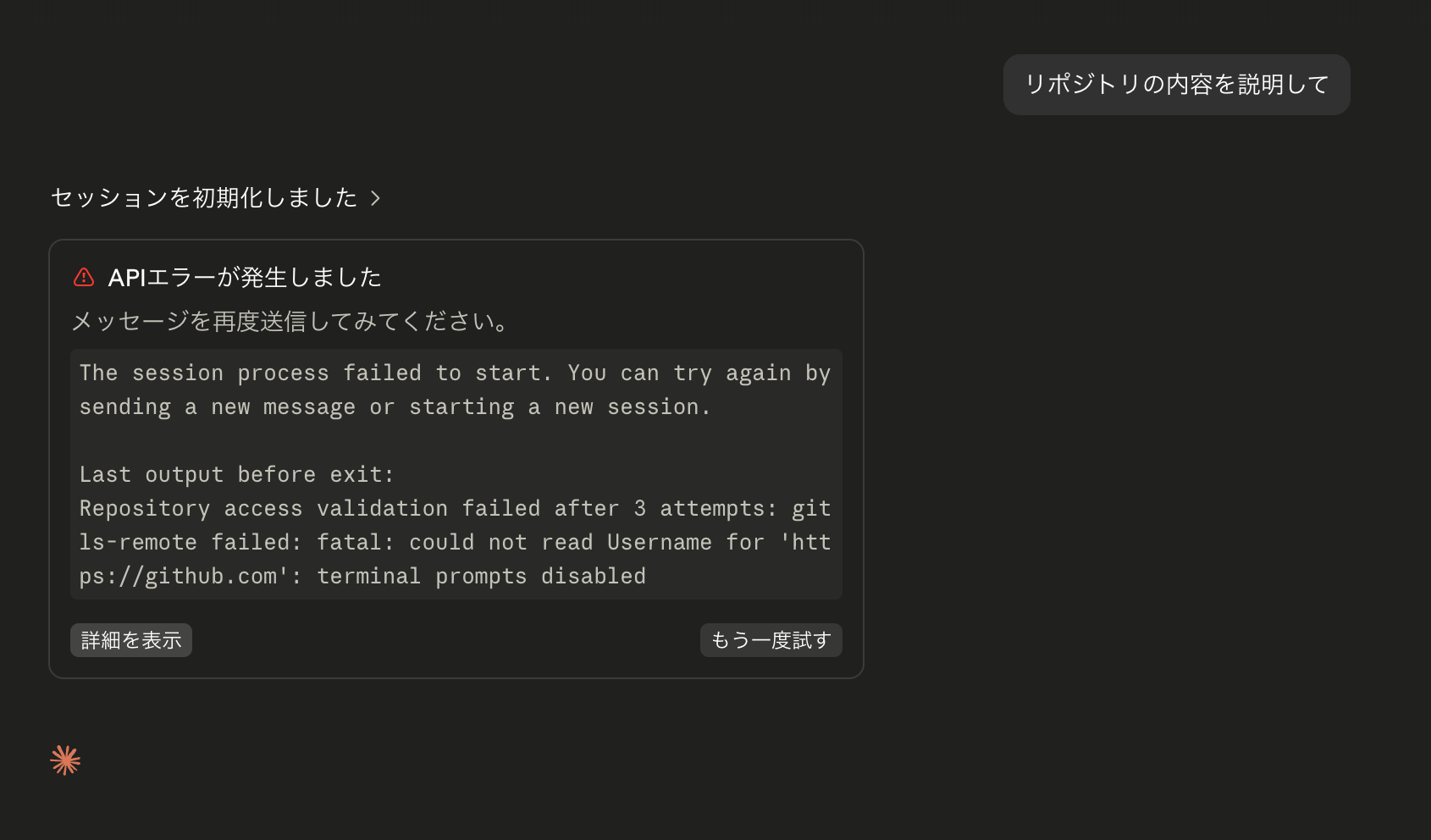
Up to this point, we had been following the Self-hosted environments quickstart - Claude Code Docs, a quickstart guide for using a local environment as the runner, but it seems there are missing parts when doing this with an EC2 instance.
The error message is as follows:
The session process failed to start. You can try again by sending a new message or starting a new session.
Last output before exit:
Repository access validation failed after 3 attempts: git ls-remote failed: fatal: could not read Username for 'https://github.com': terminal prompts disabled
When using the Git command, it's complaining with could not read Username. Indeed, nothing has been configured.
Specifying the --use-anthropic-git-proxy option will route the clone process through Anthropic's Git proxy, using the GitHub or GitHub Enterprise OAuth token of the user who created the session. (Reference: Use the Anthropic git proxy) Let's try using this.
$ claude self-hosted-runner --environment-secret-file '/home/ssm-user/claude/environment-secret' --base-dir '/home/ssm-user/claude-runner' --use-anthropic-git-proxy
2026-08-12T07:01:31.733Z [self-hosted-runner] [runner] This runner needs up to 80s to stop the Claude process and run the post-session hook on shutdown, and force-exits after 80s. Configure your process supervisor's stop timeout to at least 80s (e.g. terminationGracePeriodSeconds on Kubernetes, stop_grace_period on Docker Compose, TimeoutStopSec on systemd, or your platform's equivalent).
2026-08-12T07:01:31.734Z [self-hosted-runner] [runner] watchdog config: idle-release=disabled (not configured); startup-timeout=15m (default); kill-session-after=disabled (not configured); exit-if-unused=disabled (not configured); bg-result-grace=30s (default)
2026-08-12T07:01:31.734Z [self-hosted-runner] Connecting to https://api.anthropic.com (capacity=1, baseDir=/home/ssm-user/claude-runner, execPath=/home/ssm-user/.local/share/claude/versions/2.1.228)
2026-08-12T07:01:32.048Z [self-hosted-runner] Registered: runner_id=ccrunner_01SQadmqMv8vRf7fWaNxxxxx
2026-08-12T07:01:32.052Z [self-hosted-runner] [runner:git] --use-anthropic-git-proxy: wiping HOME-level git config (/home/ssm-user/.gitconfig, /home/ssm-user/.config/git, /home/ssm-user/claude-runner/.runner) for cross-session isolation.Operator-provisioned git config must live in system config (/etc/gitconfig) or via --configure-git; see the self-hosted runners guide.
2026-08-12T07:01:32.062Z [self-hosted-runner] [runner:git] --use-anthropic-git-proxy: credential helper registered for https://api.anthropic.com (/home/ssm-user/claude-runner/.runner/git-proxy-cred)
2026-08-12T07:01:32.067Z [self-hosted-runner] [runner:health] /healthz and /metrics listening on :8080
2026-08-12T07:01:32.534Z [self-hosted-runner] [runner:startup] host config snapshot: 435 file(s), 5920.4 KiB from /home/ssm-user/.claude
2026-08-12T07:01:32.857Z [self-hosted-runner] Picked up session cse_01QgQaksiAiCKWQMszAFUQGa (1/1 active)
2026-08-12T07:01:40.362Z [self-hosted-runner] [runner:confine] WARN (would refuse): [runner:session] repo-committed operator-posture override entry 'env: {ENABLE_TOOL_SEARCH}' in /home/ssm-user/claude-runner/kazuemasaki/nippo/.claude/settings.json sets env vars that reach every child subprocess (BASH_ENV/LD_PRELOAD/NODE_OPTIONS/GIT_* are unsandboxed-exec inlets). Runner-level env belongs in the operator wrapper script or runner env, not repo settings — refusing to spawn.Host-specific write-scope entries belong in the operator's user-level settings.json (userSettings source, not trust-gated — see --trust-workspace docs).
2026-08-12T07:01:40.952Z [self-hosted-runner] [runner:session] cse_01QgQaksiAiCKWQMszAFUQGa child spawned pid=1582 cwd=/home/ssm-user/claude-runner/kazuemasaki/nippo
2026-08-12T07:01:40.953Z [self-hosted-runner] [runner:session] cse_01QgQaksiAiCKWQMszAFUQGa idle clock armed (startup): releases in 15m at 2026-08-12T07:16:40.953Z unless new activity arrives
The session that had been failing resumed, the repository was cloned, and a response was returned successfully! 🙌
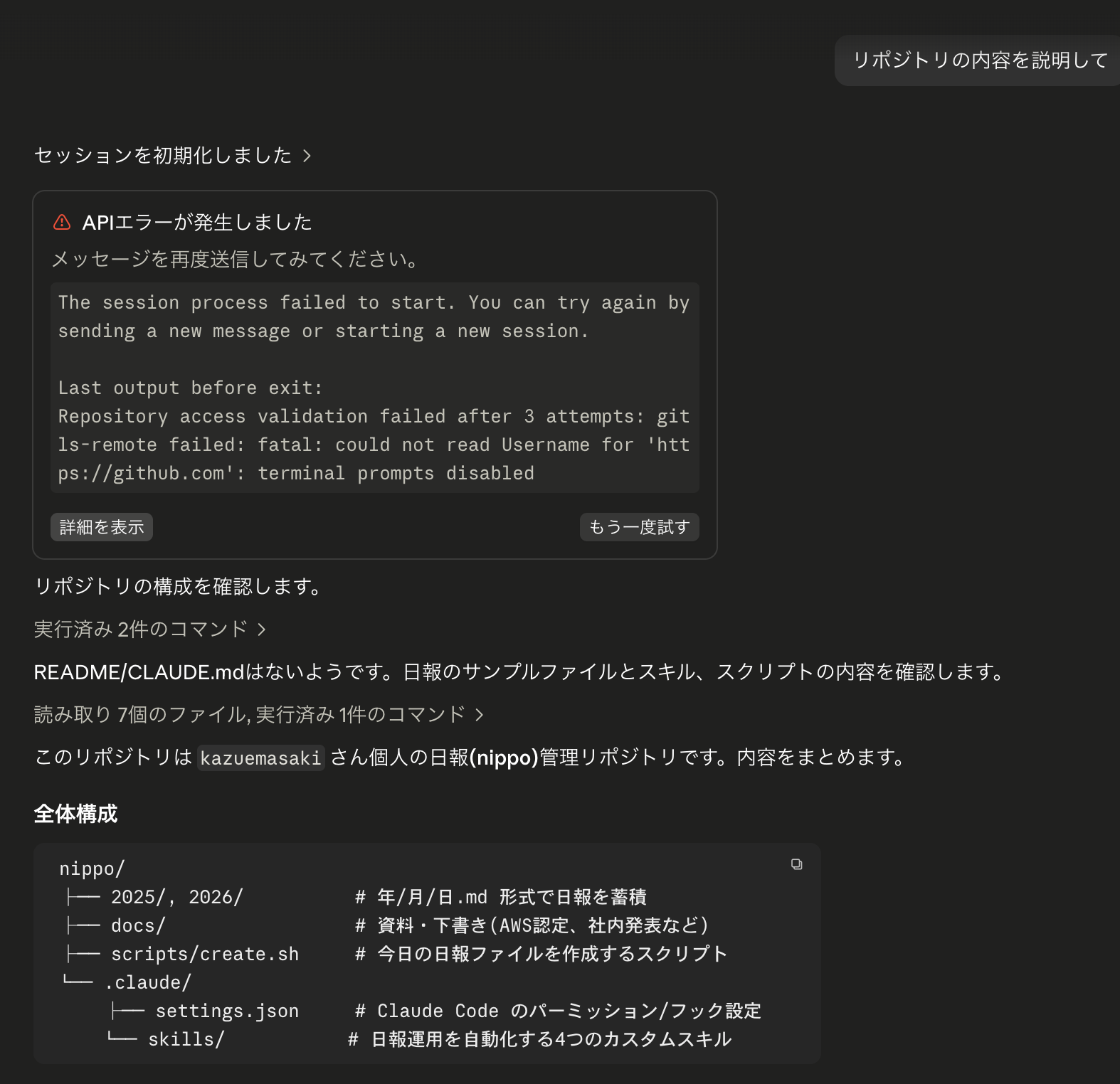
There are still many things↓ that need to be worked out for actual production use, but this concludes our verification for now.
Known Issues at This Point (= Areas That Need Further Configuration)
- The number of sessions that can run concurrently in this self-hosted environment is limited to 1
- This is because only 1 runner has been created, and the
--capacityoption for specifying the number of parallel sessions within a single runner has not been specified, so the default value of 1 is applied
- This is because only 1 runner has been created, and the
- Sessions do not become inactive, making it impossible to start the next session
- This is also expected to be resolved through options in
claude self-hosted-runner
- This is also expected to be resolved through options in
- (As mentioned earlier,)
~/.profileis not read, making theclaudecommand (especially theclaude self-hosted-runnercommand required for runner setup) unavailable in new Session Manager sessions - Systemd-ification of the
claude self-hosted-runnercommand- With the current approach, when the Session Manager session running
claude self-hosted-runnerends, this EC2 instance will no longer be recognized as a runner. It should be systemd-ified to run continuously in the background
- With the current approach, when the Session Manager session running
Summary
We actually built a self-hosted environment for Claude Code on the Web using a single EC2 instance.
The concept itself is straightforward: register a runner to an "environment," and the runner polls for sessions and launches child process Claude Code instances.
Teams with requirements for a development environment confined within their own company network should consider adopting this. However, please keep in mind, as mentioned repeatedly, that this is currently a public beta feature.
References
- Self-hosted environments - Claude Code Docs
- Self-hosted environments quickstart - Claude Code Docs
- Deploy self-hosted environments to production - Claude Code Docs
- Customize sessions in self-hosted environments - Claude Code Docs
- Test self-hosted environments end to end - Claude Code Docs
- Self-hosted environments reference - Claude Code Docs
- Verify session identity in self-hosted environments - Claude Code Docs
