Claude Code セルフホスト環境機能が登場。EC2インスタンスを実行環境にしてみた

製造ビジネステクノロジー部のかずえです。
8月7日にリリースされた Claude Code の v2.1.224 にて、Claude Code on the Webの実行環境としてセルフホスト環境が利用可能になりました。2026年8月12日時点では、Team と Enterprise planでのみ利用可能な パブリックベータ機能 です。
Claude Code on the Webのクラウドセッションは、デフォルトではAnthropicが管理するインフラ上で実行されます。セルフホスト環境を使うと、そのセッション実行部分を自社が管理するネットワーク内に持ち込めます。
何が嬉しいか
- ネットワークアクセス: セッションが自社ネットワーク内で実行されるため、パブリックインターネットに公開せずに内部サービス・データベース・レジストリなどにアクセスできる
- カスタムツール: コンパイラ・SDK・社内CLIなどをランナーのイメージに事前インストールしておける
- コンプライアンス: リポジトリのチェックアウト内容やビルド成果物を自社管理下のインフラに留められる(ただし、セッションの内容自体はモデル推論のため
api.anthropic.comに送信される)
逆に言うと上記のような要件がない限りは、インフラの構築・運用が不要なAnthropicホスト環境の方が向いています。セルフホスティングを選ぶ場合は、ランナーイメージの作成・保守、ランナーの運用、ネットワーク管理といった運用コストを自社で負うことになります。
概念を理解する
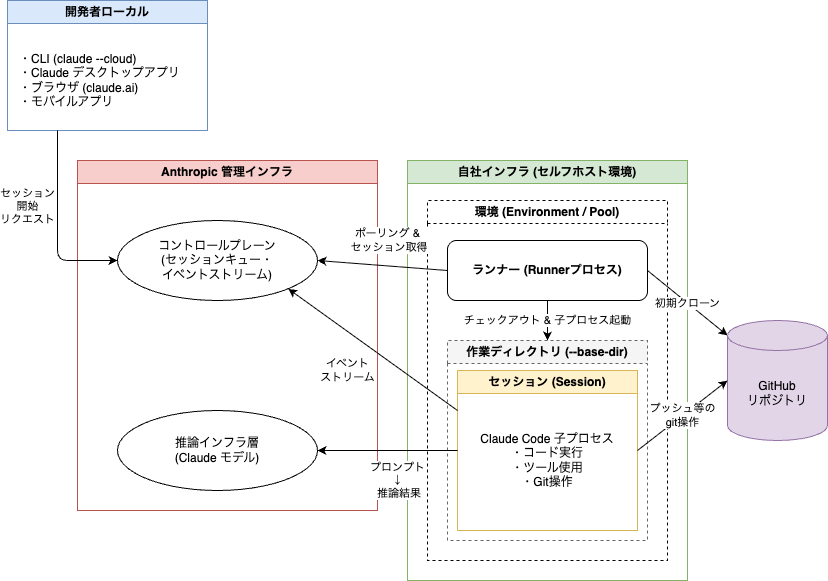
※上記図はクリックで拡大表示できます
登場する主な概念は以下のとおりです。
- 環境 (Environment / Pool): クラウドセッションの送り先となる名前付きのグループ。claude.aiの組織設定で作成し、配下に複数のランナーをまとめる。セッションは個々のランナーではなく環境に対してルーティングされる(つまり開発者はランナーではなく環境を選択してセッションを開始する)
- 環境シークレット (Environment secret): ランナーが環境への認証・登録に使う共有クレデンシャル。環境作成時に一度だけ表示される(上記図内には登場しません)
- ランナー (Runner): 自社ネットワーク内のホスト上で動かす常駐プロセス。環境に登録し、セッションをポーリングで取得して実行する
- セッション (Session): 開発者が開始した1つのClaude Codeタスク。ランナーが子プロセスとしてClaude Codeを起動して実行する
セッションが実行されるまでの流れは以下のとおりです。
- 開発者がクラウドセッションの開始時にセルフホスト環境を選択すると、Anthropicのコントロールプレーンがその環境のキューにセッションを積む
- 空きキャパシティのあるランナーがキューからセッションを取得し、リポジトリをクローンして子プロセスのClaude Codeを起動する
- 子プロセスはイベントストリームやモデル推論のためにAnthropicへHTTPSで通信する。
ネットワークとデータの境界について押さえておきたいポイントは以下です。
- 通信はすべて自社ネットワークからのアウトバウンドHTTPSであり、Anthropicから自社ネットワークへのインバウンド接続は不要
- リポジトリのチェックアウト、ビルド成果物、シークレット、セッションが作成・変更したファイルは自社インフラに留まる
- 一方、プロンプト・レスポンス・ツール実行結果といった会話の内容自体はモデル推論のためAnthropicへ送信され、セッションのトランスクリプトはAnthropic側に保存される
- セッションのオーケストレーション・キューイング・claude.aiのUIは引き続きAnthropicがホストする。つまりセルフホスト環境が自社側に移すのは「セッションの実行」であり、コントロールプレーンではない
コマンドが追加された
セルフホスト環境設定に使うclaude self-hosted-runner コマンドと、claude self-hosted-runner setupなどのサブコマンドが追加されました。
※ 以下、v2.1.226 でのコマンド実行結果です。
% claude self-hosted-runner
error: No environment secret provided. Use --environment-secret-file or set SELF_HOSTED_RUNNER_ENVIRONMENT_SECRET.
Run 'claude self-hosted-runner --help' for usage.
% claude self-hosted-runner --help
Usage: claude self-hosted-runner [options]

Connection:
  --api-url <url>             API base URL (default: https://api.anthropic.com)
  --environment-secret-file <path>
                              Path to environment secret file (or set SELF_HOSTED_RUNNER_ENVIRONMENT_SECRET)
                              (--pool-secret-file / SELF_HOSTED_RUNNER_POOL_SECRET are deprecated aliases.)
  --lock-to-account <id>      Lock runner to a single account at registration (webhook-driven on-demand
                              spawn). Only that account's sessions are assigned.
                              [env: SELF_HOSTED_RUNNER_LOCK_TO_ACCOUNT]

Runtime:
  --capacity <n>              Max concurrent sessions (default: 1)
  --base-dir <path>           Base directory for repo checkouts (default: /workspace)
                              [env: SELF_HOSTED_RUNNER_BASE_DIR]
  --exec-path <path>          Binary to spawn for child sessions. Default: this process's own binary.
                              [env: SELF_HOSTED_RUNNER_EXEC_PATH]
  --hooks-dir <path>          Directory of lifecycle hook scripts (checkout, command, post-session).
                              Absent hooks fall through to built-in behavior.
                              [env: SELF_HOSTED_RUNNER_HOOKS_DIR]
  --session-stop-grace-sec <n>
                              How long to wait for the Claude process to exit cleanly after a
                              session ends, before force-killing it. The post-session hook runs
                              after this. Default: 5.
                              [env: SELF_HOSTED_RUNNER_SESSION_STOP_GRACE_MS, in ms]
  --post-session-hook-timeout-sec <n>
                              SIGTERM budget for the post-session lifecycle hook, on every session
                              end including runner shutdown. Default: 60.
                              [env: SELF_HOSTED_RUNNER_POST_SESSION_HOOK_TIMEOUT_MS, in ms]
  --drain-wait-sec <n>        On SIGTERM/SIGINT, wait up to N seconds for each session's in-flight
                              turn (a foreground tool call) and running background tasks to finish
                              before sending the session process its SIGTERM. Adds N to the
                              advertised shutdown budget.
                              Default: 0 (send SIGTERM immediately). Max: 86400.
                              [env: SELF_HOSTED_RUNNER_DRAIN_WAIT_MS, in ms]
                              (--drain-wait-bg-tasks-sec is a deprecated alias for this flag.)
  --git-ssh-rewrite <host>    Rewrite https://<host>/... source URLs to git@<host>:... (repeatable).
                              For SSH-only git hosts.
  --git-host-rewrite <f>=<t>  Rewrite https://<f>/... source URLs to https://<t>/... (repeatable).
                              For split-horizon DNS where the runner reaches GHE via a different
                              hostname than the control plane. Applied before --git-ssh-rewrite.
  --use-anthropic-git-proxy   Clone via Anthropic's git proxy (uses the session creator's stored
                              GitHub OAuth token, or the org's GitHub App installation token for
                              bot/agent sessions; you don't manage git auth on the runner). Supersedes
                              --git-host-rewrite and --git-ssh-rewrite.
                              [env: CLAUDE_RUNNER_USE_GIT_PROXY=1]
  --configure-git             Set global git identity to Claude <noreply@anthropic.com> and enable
                              commit signing via Anthropic's signing service, matching 1P sessions.
                              Writes ~/.gitconfig at runner startup. Without this flag, your image
                              must provide its own git identity.
                              [env: SELF_HOSTED_RUNNER_CONFIGURE_GIT=1]
  --push-outcome-on-release   On a runner-initiated non-completed session end (SIGTERM drain,
                              idle-release, failed), push every tracked outcome branch to origin
                              before deleting it, so in-flight commits survive a runner restart.
                              Skipped on server-initiated deassign. On a resumed session (worker
                              epoch > 1), the prep path fetches any previously pushed outcome
                              branch from origin and continues from it, so histories stay
                              linear. CAVEAT: the resume-fetch trusts refs/heads/<outcome-branch>
                              on the source remote — anyone with push access to that ref can
                              place content into the resumed workspace; if your source revision
                              is protected but claude/* refs are not, that collaborator write
                              surface widens on resume. Repos checked out via the checkout
                              lifecycle hook are NOT pushed — use the post-session hook to
                              snapshot those. Adds 30s
                              (total, shared across all pushes) to the advertised
                              shutdown budget.
                              [env: SELF_HOSTED_RUNNER_PUSH_OUTCOME_ON_RELEASE=1]
  --trust-workspace [bool]    Seed persisted trust for each session's repo paths so repo-level
                              .claude/settings.json permissions.allow and additionalDirectories
                              are honored by the child. Default: true.
                              Set to false for cli#44151's stricter gate: repo-committed grants
                              are dropped with an "Ignoring N permissions.allow" stderr
                              diagnostic; configure host-level grants via the host-config dir's
                              settings.json permissions.allow (userSettings source) instead.
                              [env: SELF_HOSTED_RUNNER_TRUST_WORKSPACE=0 to disable]
  --confine-repo-settings <mode>
                              Repo-committed-settings confine guard mode: warn (default) logs
                              a would-refuse diagnostic per violation and still spawns;
                              enforce refuses to spawn the session; off disables the scan.
                              Invalid values fail closed at startup.
                              [env: SELF_HOSTED_RUNNER_CONFINE_REPO_SETTINGS]
  [env: SELF_HOSTED_RUNNER_HOST_CONFIG_DIR]
                              Directory seeded into each session's CLAUDE_CONFIG_DIR (settings,
                              agents/, skills/, …; runtime state excluded). Default: ~/.claude.
                              Point at an empty dir to disable.
  --health-port <port>        Port for /healthz HTTP listener (default: 8080). 0 disables.
                              [env: SELF_HOSTED_RUNNER_HEALTH_PORT]
  --log-level <level>         Log level: info or debug (default: info)
  --log-file <path>           Tee runner logs to a file in append mode. Stdout is unchanged.
                              [env: SELF_HOSTED_RUNNER_LOG_FILE]

Runner lifecycle:
  --exit-if-unused-min <n>    Exit the runner if never assigned work for N min (autoscaler scale-down).
                              Default: never. Max: 10080.
                              [env: SELF_HOSTED_RUNNER_IDLE_SHUTDOWN_MS, in ms]
  --drain-grace-sec <n>       Default: 0 — exit immediately after active sessions finish, WITHOUT
                              polling for more (one-shot when --capacity=1).
                              Set a positive value (e.g. 30) to keep the runner warm and re-poll the
                              locked account's queue for that many seconds before exiting.
                              Max: 604800. [env: SELF_HOSTED_RUNNER_DRAIN_GRACE_MS, in ms]
  --retire-at <epoch-seconds> Retire the runner at the given wall-clock time (absolute Unix timestamp, in
                              seconds): release every active session through the ReleaseSession path that
                              --release-idle-session-min uses (the session parks server-side and a fresh
                              runner picks it up on the user's next message), stop taking new work, and
                              exit 0 once the slots are empty. A session still mid-turn at that time is
                              released as soon as its turn ends; background work a finished turn left
                              running gets up to 60s of grace, then the session parks anyway (perpetual
                              monitor tasks don't hold it at all). Use this when the host hard-kills the
                              runner at a known time (e.g. a sandbox lifetime cap): set it far enough
                              before the kill to cover typical turns PLUS the per-session shutdown
                              budget (--session-stop-grace-sec, the push-outcome window, the full
                              --post-session-hook-timeout-sec, the 60s background-work grace, one poll)
                              so sessions park cleanly and the post-session hook isn't truncated by
                              the kill. Default: never. [env: SELF_HOSTED_RUNNER_RETIRE_AT, in seconds]

Per-session watchdogs:
  --release-idle-session-min <n>  Release a session slot after N min of no user input (turn finished,
                                  or parked at a permission prompt, user idle). Runner exits if this
                                  drops it to zero active sessions.
                                  Default: never. Max: 10080.
                                  [env: SELF_HOSTED_RUNNER_SESSION_IDLE_MS, in ms]
  --startup-timeout-min <n>       Release a session slot if the child has not completed initialization
                                  N min after spawn — covers a child hung during --resume hydration or
                                  MCP connect, and a session assigned with no pending input. Cleared
                                  once the child emits system:init, after which --release-idle-session-min
                                  takes over. Default: 15. 0 disables. Max: 10080.
                                  [env: SELF_HOSTED_RUNNER_STARTUP_TIMEOUT_MS, in ms]
  --kill-session-after-min <n>    SIGTERM a session child after N min wall-clock (runaway backstop).
                                  If a turn is in flight at the deadline, the kill is deferred until
                                  the turn finishes, with a hard cap of 15 min past the deadline
                                  (override: SELF_HOSTED_RUNNER_MAX_LIFETIME_GRACE_MS, in ms).
                                  Default: never. Max: 10080.
                                  [env: SELF_HOSTED_RUNNER_MAX_LIFETIME_MS, in ms]

Debug:
  --debug-token-dir <path>    DEBUG ONLY — writes live tokens to disk. Do not use in production.
                              [env: SELF_HOSTED_RUNNER_DEBUG_TOKEN_DIR]

  --help, -h                  Show this help message
% claude self-hosted-runner setup を実行すると、以下のセッションが立ち上がりました。ランナー内で実行し、設定作業を補助するコマンドと理解しました。(そのため次項「やってみる」と似たような工程がセッションレスポンスとして返ってきていることがわかります)
❯ Start the self-hosted runner setup wizard. Greet me and begin Phase 1 (create an environment in the Admin UI). Walk me through one step at a time.

セルフホストランナーのセットアップウィザードを開始します。ようこそ!まずはAdmin UIで環境を作成するところから始めましょう。

ステップ1: Admin UIで環境を作成してください

1. ブラウザで https://claude.ai/admin-settings/claude-code を開いてください
2. Self-hosted environments セクションまでスクロールしてください
3. Create environment をクリックし、名前を付けてください
4. 表示される環境シークレットをコピーしてください(この画面でしか表示されないので必ずコピーしてください)
5. コピーしたシークレットを、このマシン上の ./runner-setup/ENVIRONMENT_SECRET に貼り付けて保存してください(私の方で後ほど chmod 600 をかけます)
6. 環境ID(ccpool_ から始まるもの)もコピーしておいてください

準備ができたら、環境IDを教えていただき、「done」と言ってください。
やってみる
Teamプランで試しています。
Self-hosted environments quickstart - Claude Code Docs こちらのクイックスタートガイドをベースにEC2インスタンスを実行環境とする構成を作ってみます。
組織設定でセルフホスト環境を有効にする
デフォルトではセルフホスト環境は無効化されているので、有効化する必要があります。オーナーまたは管理者権限が必要です。
組織設定 → クラウド機能 → セルフホスト環境を許可する のトグルをオンにします。すると下部の「セルフホスト環境」欄が表示されるようになります。
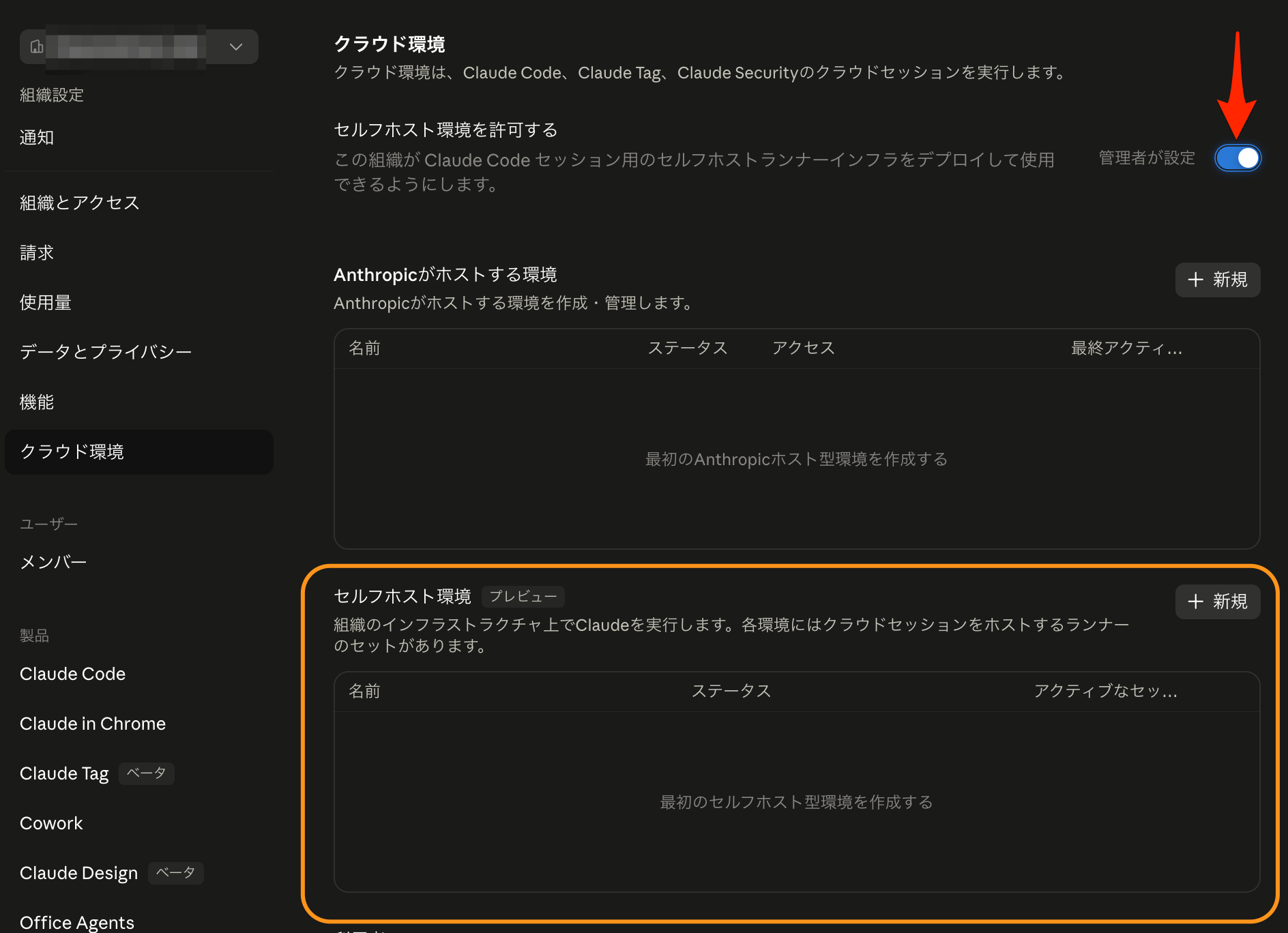
環境作成
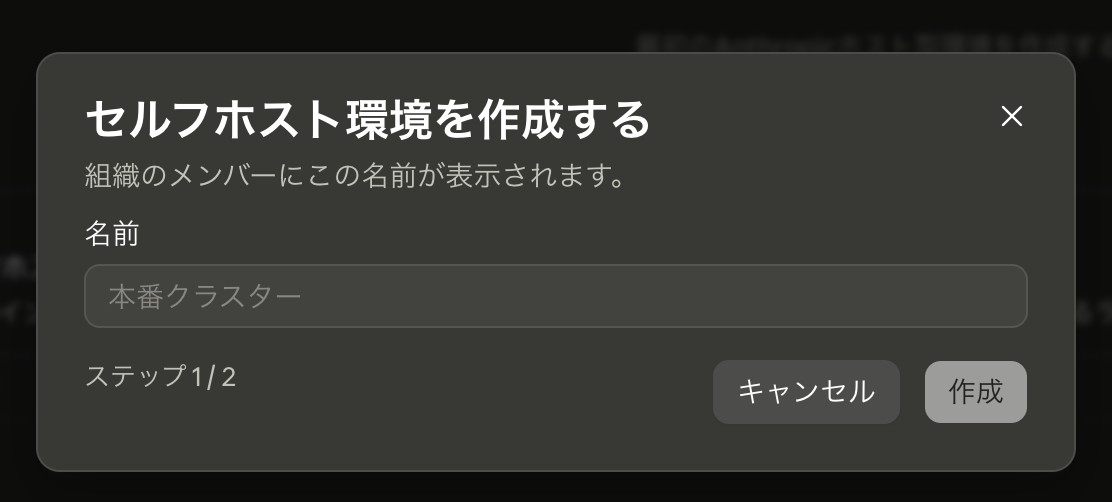
同画面「セルフホスト環境」欄右上「+ 新規」をクリックして環境を作成していきます。まずは名前を入力。
次画面で表示されるシークレットを保存しておきます。
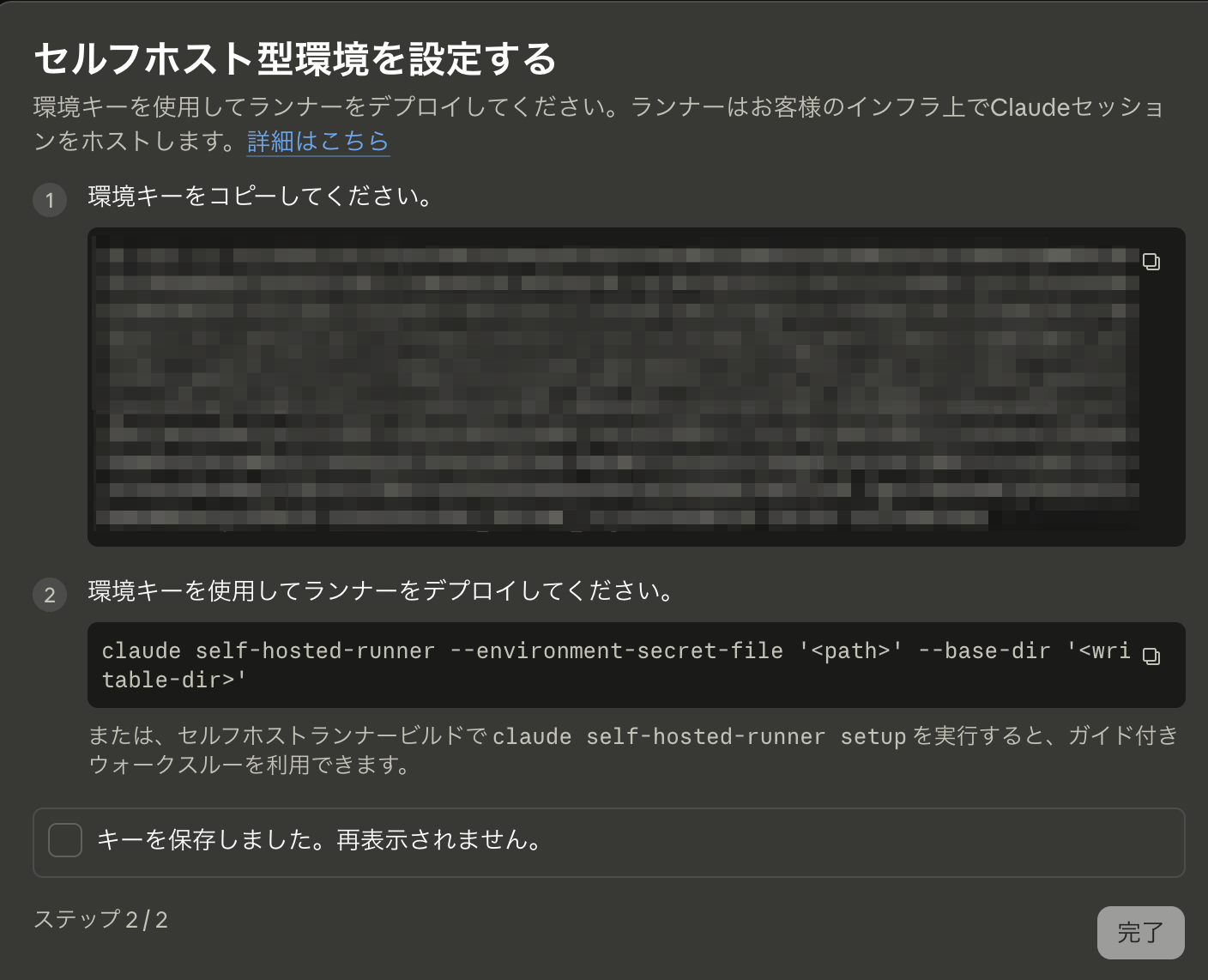
次画面。環境作成できました。
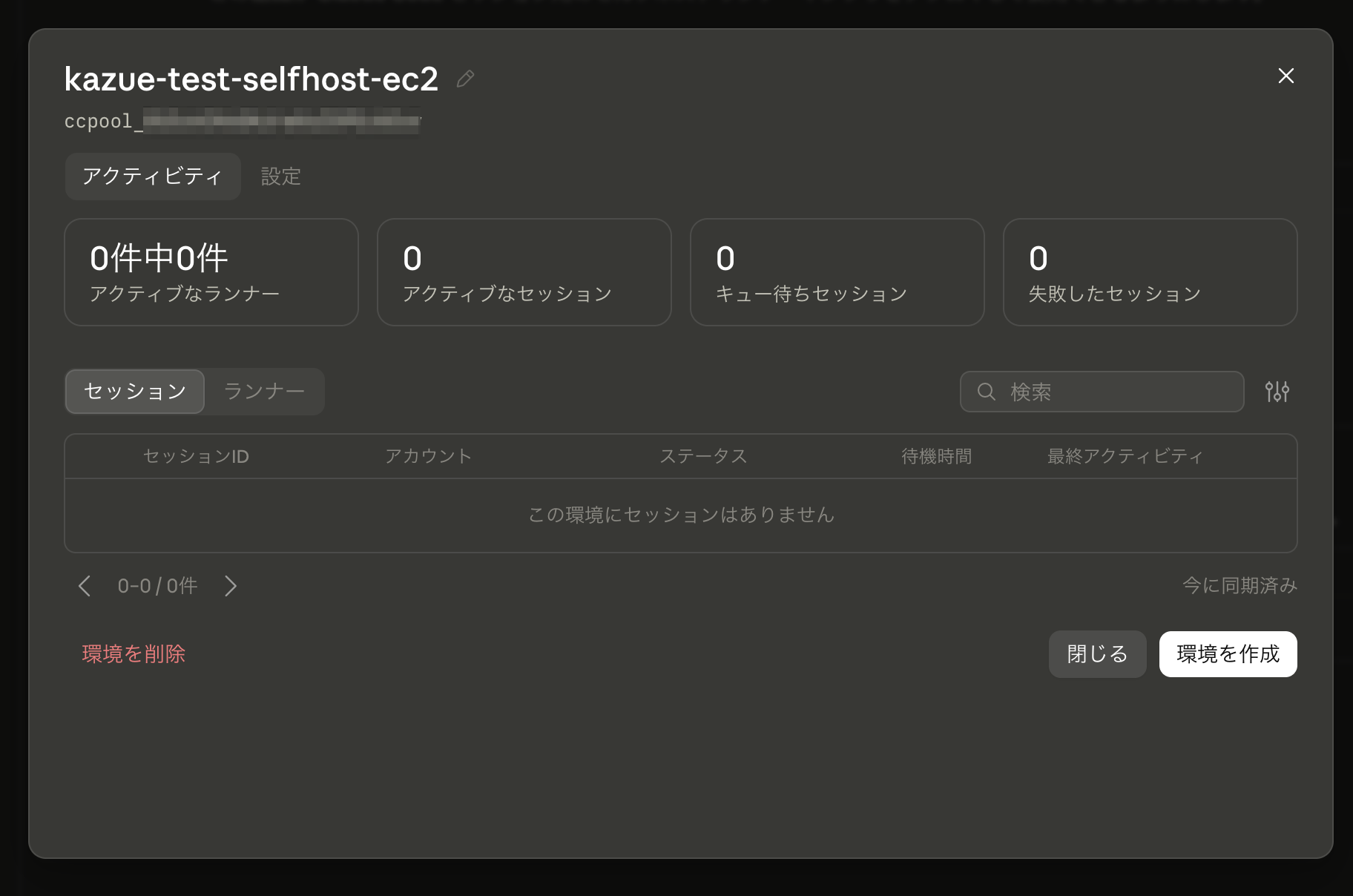
一覧にも表示されています。

EC2インスタンス作成
以下のEC2インスタンスを一台、Terraformで作成しました。
- private subnetに配置
- NAT Gatewayを設置し、アウトバウンド通信は可能にする
- OSはUbuntu 24.04
- インスタンスタイプは m8i-flex.large
- Security Group
- インバウンドルールは無し(全拒否)
- アウトバウンドルールは、 ネットワーク要件を見る限り 443/tcpのみ全開放でよい。ただし素のUbuntu 24.04は apt の既定ミラーが http://archive.ubuntu.com (80番)なので、80/tcpも許可する
- SSM Session Managerでシェル接続できるように
AmazonSSMManagedInstanceCoreポリシーをアタッチ
Claude Codeインストール
SSM Session Managerでシェル接続し、以下を実行します。
$ curl -fsSL https://claude.ai/install.sh | bash
Setting up Claude Code...

✔ Claude Code successfully installed!

  Version: 2.1.226

  Location: ~/.local/bin/claude

  Next: Run claude --help to get started

⚠ Setup notes:
  ● Native installation exists but ~/.local/bin is not in your PATH. Run:

    echo 'export PATH="$HOME/.local/bin:$PATH"' >> your shell config file && source your shell config file

✅ Installation complete!

$  echo 'export PATH="$HOME/.local/bin:$PATH"' >> ~/.profile
$ .  ~/.profile
$ claude -v
2.1.226 (Claude Code)
実はこの時点で別セッションでは claude コマンドが not found になるという問題が発生している(~/.profileは自動で読み込まれない)のですが、一旦無視します。
ランナーセットアップ
最初に組織設定 → クラウド機能にて発行したシークレットを置く場所を作成します。
$ mkdir ~/claude
シークレットを配置します。
# 先にシークレット値をクリップボードにコピーしておく
$ (umask 077 && cat > ~/claude/environment-secret)
# シークレット値をペースト → Enter → Ctrl-D で書き込み完了
ベースディレクトリを作成します。
$ mkdir ~/claude-runner
いよいよランナーの登録です。
$ claude self-hosted-runner --environment-secret-file '/home/ssm-user/claude/environment-secret' --base-dir '/home/ssm-user/claude-runner'
2026-08-10T09:49:17.942Z [self-hosted-runner] [runner] This runner needs up to 80s to stop the Claude process and run the post-session hook on shutdown, and force-exits after 80s. Configure your process supervisor's stop timeout to at least 80s (e.g. terminationGracePeriodSeconds on Kubernetes, stop_grace_period on Docker Compose, TimeoutStopSec on systemd, or your platform's equivalent).
2026-08-10T09:49:17.942Z [self-hosted-runner] [runner] watchdog config: idle-release=disabled (not configured); startup-timeout=15m (default); kill-session-after=disabled (not configured); exit-if-unused=disabled (not configured)
2026-08-10T09:49:17.942Z [self-hosted-runner] Connecting to https://api.anthropic.com (capacity=1, baseDir=/home/ssm-user/claude-runner, execPath=/home/ssm-user/.local/share/claude/versions/2.1.226)
2026-08-10T09:49:18.276Z [self-hosted-runner] Registered: runner_id=ccrunner_01L9xnpeTinmjvs24jnxxxxx
2026-08-10T09:49:18.281Z [self-hosted-runner] [runner:health] /healthz and /metrics listening on :8080
2026-08-10T09:49:18.313Z [self-hosted-runner] [runner:startup] host config snapshot: 434 file(s), 5917.0 KiB from /home/ssm-user/.claude
2026-08-10T09:52:20.568Z [self-hosted-runner] [runner:health] polling ok · 0/1 slots · last_poll=20215ms ago · locked_account=no · runner_token expires in 3h · 0 sessions handled
2026-08-10T09:55:42.805Z [self-hosted-runner] [runner:health] polling ok · 0/1 slots · last_poll=20221ms ago · locked_account=no · runner_token expires in 3h · 0 sessions handled
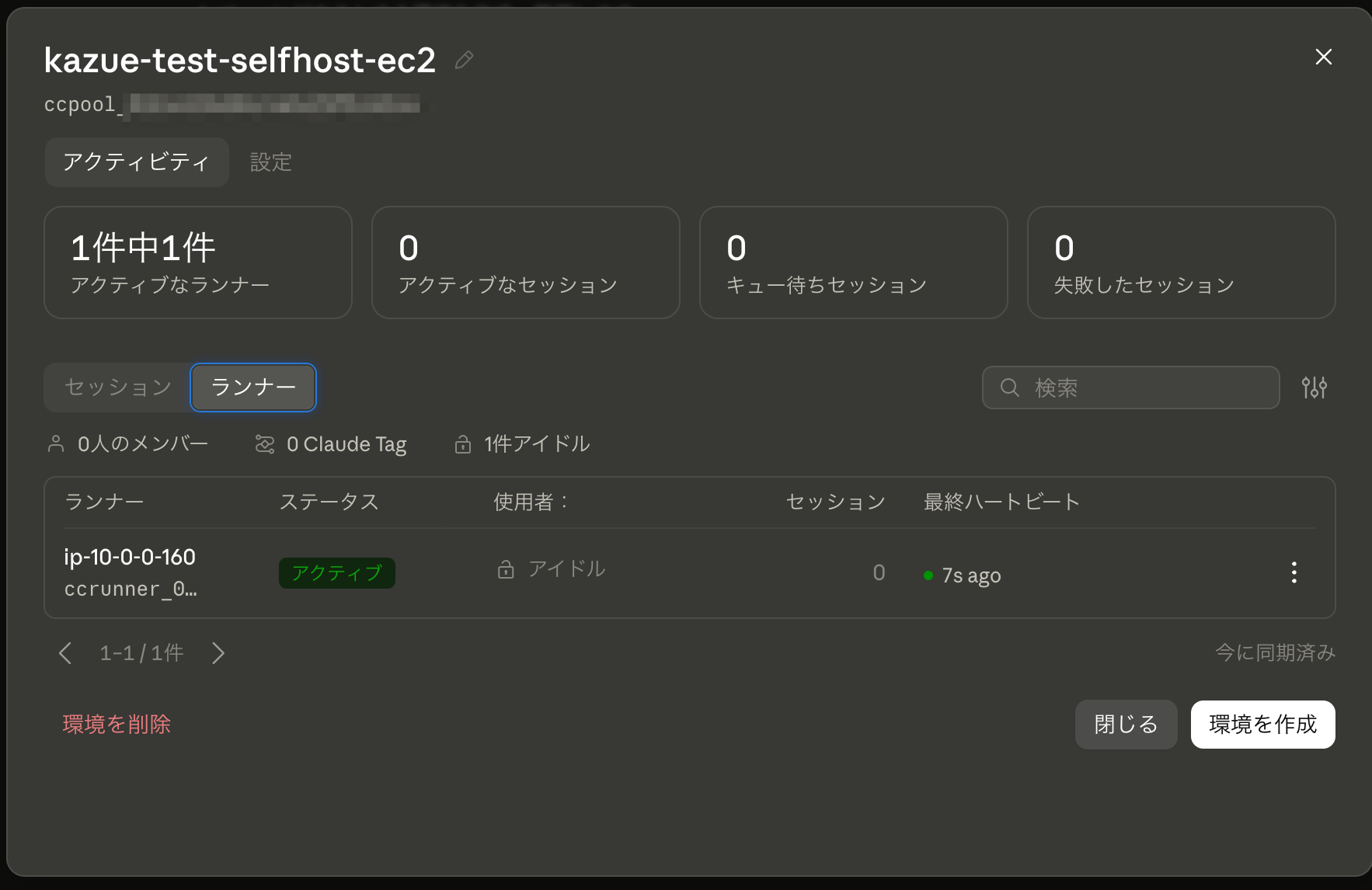
しばらくすると claude.ai 組織設定 → クラウド機能 でランナーが認識されました!
セルフホスト環境を使ってみる
「セルフホスト環境型プール」下に、作成した環境が選択可能になっています。
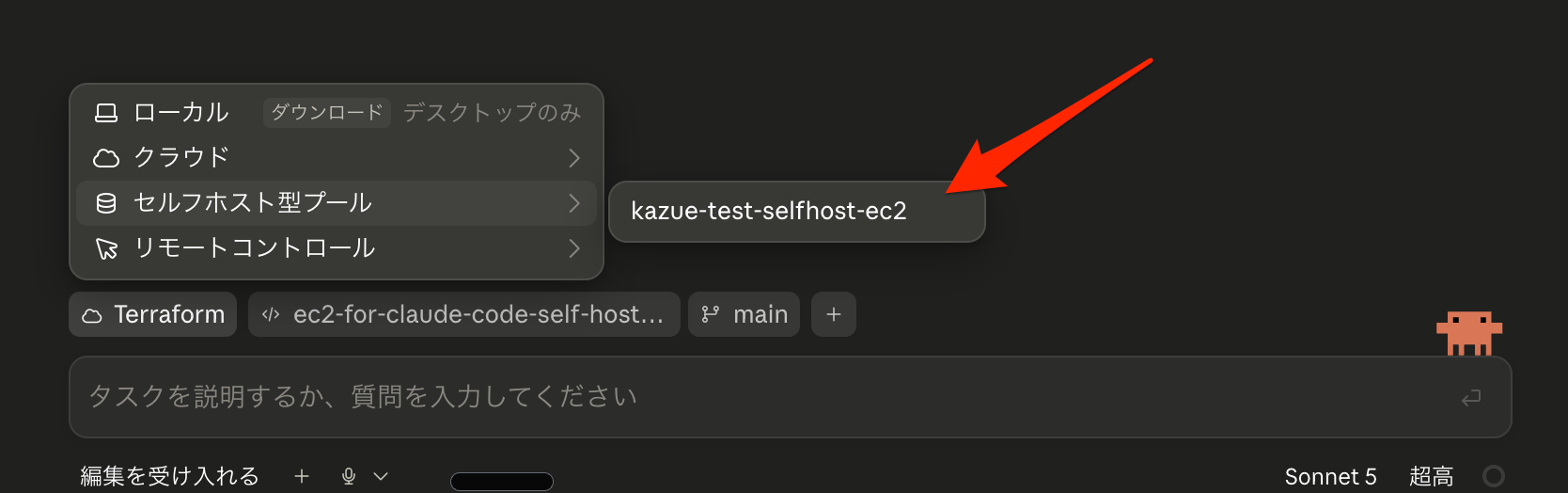
選択して適当なプロンプトでセッションを始めてみます。
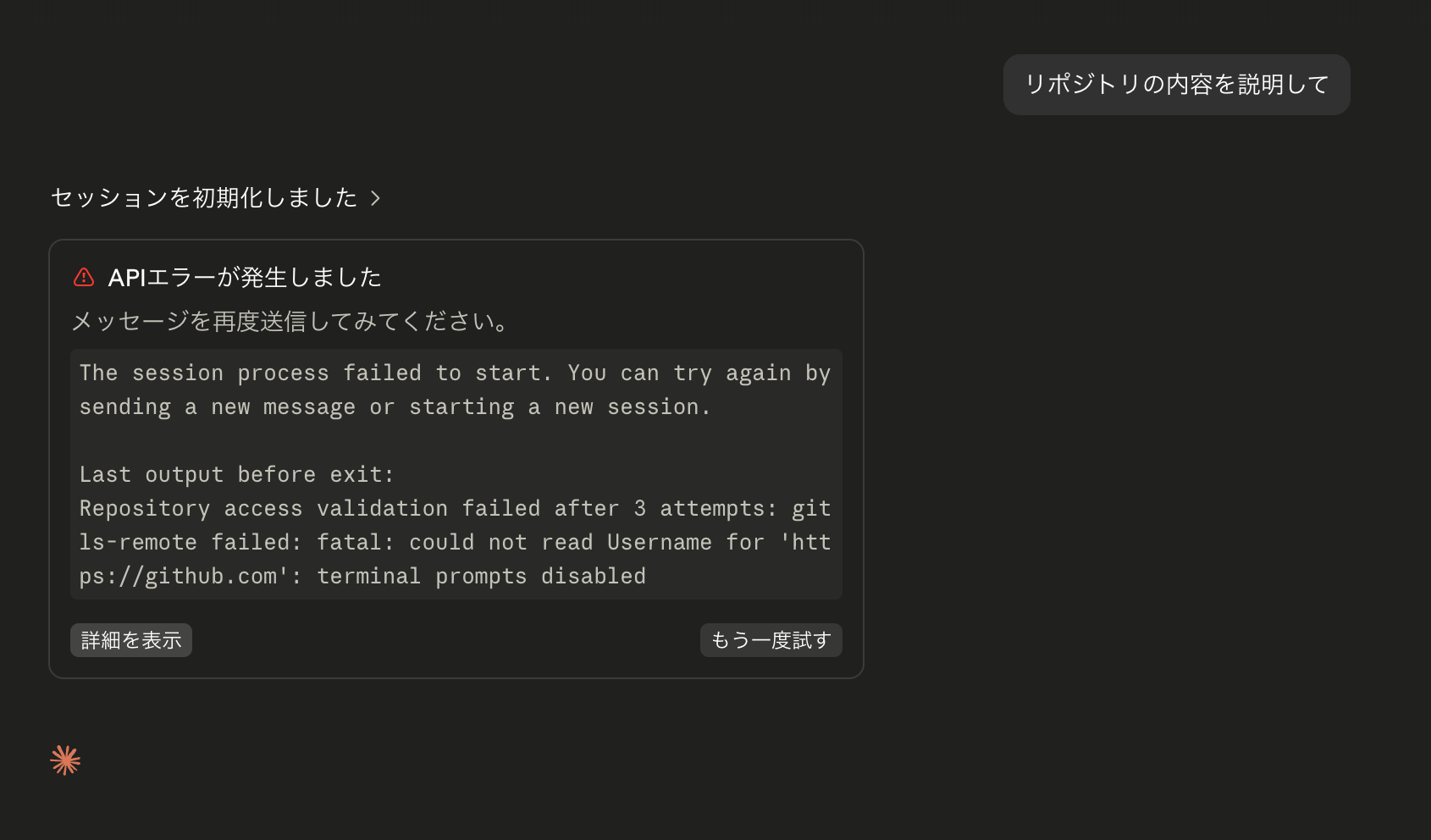
エラーになりました。
ここまで、Self-hosted environments quickstart - Claude Code Docsというローカル環境をランナーにするクイックスタートガイドをもとに設定を進めてきましたが、EC2インスタンスでやる場合は足りない部分があるようです。
エラーメッセージは以下です。
The session process failed to start. You can try again by sending a new message or starting a new session.
Last output before exit:
Repository access validation failed after 3 attempts: git ls-remote failed: fatal: could not read Username for 'https://github.com': terminal prompts disabled
Gitコマンドを使う際に、could not read Username と怒られていますね。確かに何も設定していないです。
--use-anthropic-git-proxy というオプションを指定すると、AnthropicのGitプロキシを経由してクローン処理が行われ、セッションを作成したユーザーのGitHubまたはGitHub EnterpriseのOAuthトークンを使用してくれるそうです。(参考:Use the Anthropic git proxy) こちらを使用してみます。
$ claude self-hosted-runner --environment-secret-file '/home/ssm-user/claude/environment-secret' --base-dir '/home/ssm-user/claude-runner' --use-anthropic-git-proxy
2026-08-12T07:01:31.733Z [self-hosted-runner] [runner] This runner needs up to 80s to stop the Claude process and run the post-session hook on shutdown, and force-exits after 80s. Configure your process supervisor's stop timeout to at least 80s (e.g. terminationGracePeriodSeconds on Kubernetes, stop_grace_period on Docker Compose, TimeoutStopSec on systemd, or your platform's equivalent).
2026-08-12T07:01:31.734Z [self-hosted-runner] [runner] watchdog config: idle-release=disabled (not configured); startup-timeout=15m (default); kill-session-after=disabled (not configured); exit-if-unused=disabled (not configured); bg-result-grace=30s (default)
2026-08-12T07:01:31.734Z [self-hosted-runner] Connecting to https://api.anthropic.com (capacity=1, baseDir=/home/ssm-user/claude-runner, execPath=/home/ssm-user/.local/share/claude/versions/2.1.228)
2026-08-12T07:01:32.048Z [self-hosted-runner] Registered: runner_id=ccrunner_01SQadmqMv8vRf7fWaNxxxxx
2026-08-12T07:01:32.052Z [self-hosted-runner] [runner:git] --use-anthropic-git-proxy: wiping HOME-level git config (/home/ssm-user/.gitconfig, /home/ssm-user/.config/git, /home/ssm-user/claude-runner/.runner) for cross-session isolation.Operator-provisioned git config must live in system config (/etc/gitconfig) or via --configure-git; see the self-hosted runners guide.
2026-08-12T07:01:32.062Z [self-hosted-runner] [runner:git] --use-anthropic-git-proxy: credential helper registered for https://api.anthropic.com (/home/ssm-user/claude-runner/.runner/git-proxy-cred)
2026-08-12T07:01:32.067Z [self-hosted-runner] [runner:health] /healthz and /metrics listening on :8080
2026-08-12T07:01:32.534Z [self-hosted-runner] [runner:startup] host config snapshot: 435 file(s), 5920.4 KiB from /home/ssm-user/.claude
2026-08-12T07:01:32.857Z [self-hosted-runner] Picked up session cse_01QgQaksiAiCKWQMszAFUQGa (1/1 active)
2026-08-12T07:01:40.362Z [self-hosted-runner] [runner:confine] WARN (would refuse): [runner:session] repo-committed operator-posture override entry 'env: {ENABLE_TOOL_SEARCH}' in /home/ssm-user/claude-runner/kazuemasaki/nippo/.claude/settings.json sets env vars that reach every child subprocess (BASH_ENV/LD_PRELOAD/NODE_OPTIONS/GIT_* are unsandboxed-exec inlets). Runner-level env belongs in the operator wrapper script or runner env, not repo settings — refusing to spawn.Host-specific write-scope entries belong in the operator's user-level settings.json (userSettings source, not trust-gated — see --trust-workspace docs).
2026-08-12T07:01:40.952Z [self-hosted-runner] [runner:session] cse_01QgQaksiAiCKWQMszAFUQGa child spawned pid=1582 cwd=/home/ssm-user/claude-runner/kazuemasaki/nippo
2026-08-12T07:01:40.953Z [self-hosted-runner] [runner:session] cse_01QgQaksiAiCKWQMszAFUQGa idle clock armed (startup): releases in 15m at 2026-08-12T07:16:40.953Z unless new activity arrives
エラーになっていたセッションが再開して、リポジトリをクローンし、無事レスポンスが返ってきました! 🙌
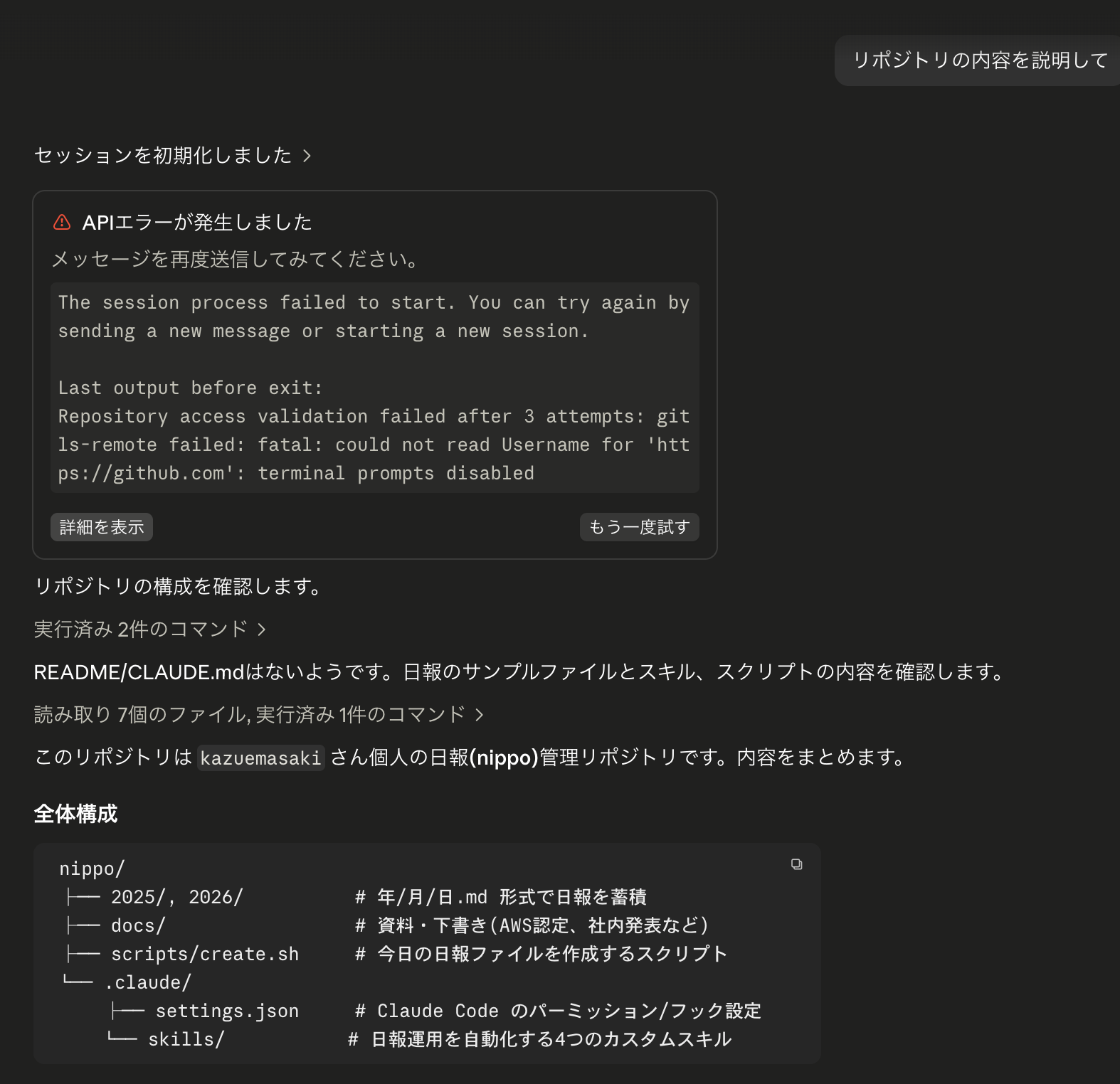
実運用するにあたってはまだまだ色々詰めないといけない点↓がありますが、今回の検証は以上とします。
現時点で判明している問題点(=設定を詰める必要がある箇所)
- 本セルフホスト環境で同時実行できるセッション数が1に制限されている
- 1ランナーしか作成していないかつ、1ランナー内での並列数を指定する
--capacityオプション未指定によりデフォルト値1が設定されているため
- 1ランナーしか作成していないかつ、1ランナー内での並列数を指定する
- セッションが非アクティブにならないため、次のセッションを開始できない
- これも
claude self-hosted-runnerのオプションで解消できる見込み
- これも
- (前述のとおり、)
~/.profileが読まれず、セッションマネージャー新セッションでclaudeコマンド(特にランナーセットアップに必要なclaude self-hosted-runnerコマンド)が使えない claude self-hosted-runnerコマンドのsystemd化- 現状のやり方だと
claude self-hosted-runnerを実行したセッションマネージャーセッションが終了するとこのEC2インスタンスはランナーとして認識されなくなってしまう。systemd化してバックグラウンドで常時起動させておくべき
- 現状のやり方だと
まとめ
Claude Code on the Webのセルフホスト環境を、EC2インスタンス1台で実際に構築してみました。
概念自体はシンプルで、「環境」にランナーを登録し、ランナーがセッションをポーリングして子プロセスのClaude Codeを起動するという流れでした。
自社ネットワーク内で閉じた開発環境を求める要件があるチームは、導入を検討されてみてはいかがでしょうか。ただし繰り返しますが現時点ではパブリックベータ機能であるという点はご留意ください。
参考情報
- Self-hosted environments - Claude Code Docs
- Self-hosted environments quickstart - Claude Code Docs
- Deploy self-hosted environments to production - Claude Code Docs
- Customize sessions in self-hosted environments - Claude Code Docs
- Test self-hosted environments end to end - Claude Code Docs
- Self-hosted environments reference - Claude Code Docs
- Verify session identity in self-hosted environments - Claude Code Docs