![[Non-Engineer's Claude/Claude Code Series]
A salesperson who wants to graduate from hard-to-read materials tried out Claude's design features](https://images.ctfassets.net/ct0aopd36mqt/3KBTm8tdpO9RJJuaVvVzod/a9964bb03097b448b2327edc6920bf9f/Claude.png?w=3840&fm=webp)
[Non-Engineer's Claude/Claude Code Series] A salesperson who wants to graduate from hard-to-read materials tried out Claude's design features

This page has been translated by machine translation. View original
Introduction
As the heat of summer continues to intensify, I hope you are all doing well. I'm Nakagiri from Classmethod's West Japan Sales Division.
I am absolutely terrible at making the "look" of presentation materials.
As it happens, this is the time of year when we reflect on our activities for the first half or quarter.
Event results, sales data, project movements... picking up numbers from various places, compiling them, making charts in Excel, pasting them into PowerPoint, and tidying up the formatting.
This work used to take me more than 3 hours every time.
And my own impression of the finished materials was "well, it's readable."
Readable, after 3 hours. No wonder I'm getting older.
This article is about how I used "Claude Design" to defeat this time-thief in material creation.
By the way, I am neither an engineer nor a designer — I've been in sales for over a decade.
Even so, when I tried it, the way my materials looked became something entirely different. Don't you want to see a new view?
First, What is "Claude Design"? My Non-Engineer Understanding
Let me give a quick explanation first.
Claude Design is an AI design tool provided by Anthropic. Simply by giving instructions in text, it generates visuals such as presentation materials and graphs.
With previous versions of Claude, you could hand over data and it would neatly organize it into md (Markdown: a text format where headings and bullet points are written with symbols), and it could even create slide decks themselves.
However, to be honest, the hurdle of "formatting was ultimately my job" remained. Work arose to manually adjust colors, layouts, and font balance, and every time I created something, I had to reconsider the formatting from scratch. This was the final wall.
Claude Design is different in this regard. By loading a Classmethod-specific format (design rules) in advance, visuals with unified colors, layouts, and fonts are produced simply by giving instructions. Moreover, since you can make fine adjustments on the spot while having a dialogue on the canvas, it feels less like "redoing" and more like "having it fixed for you." In other words, both the compiling work and the formatting work are now completed within the Claude interface.
What I Actually Tried: 2 Changes
Here is the main topic. I'll write an honest Before/After.
Before (The Problem)
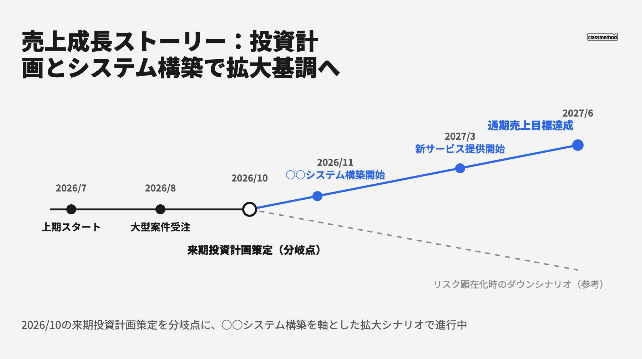
Reporting materials to review event results and sales data. Picking up numbers → compiling in Excel → pasting into PowerPoint → adjusting fonts, colors, and layouts, all taking more than 3 hours each time. On top of that, my "sales growth story" type of timeline charts were nothing more than manually arranging black and red circles and positioning text boxes one by one. The appearance was less "simple" and more like hieroglyphics.
During reporting meetings, time was spent being asked back "so what's the point?", and the "aspirations and sense of progress for the first half" I wanted to convey had vanished somewhere. This made it a reflection meeting rather than a reporting meeting.
After (The Result)
By handing md files prepared for each purpose (compiled activity data) to Claude Design and specifying the Classmethod-specific format (already created in-house), the reporting materials were complete.
Even with the same "sales growth story," risk factors were highlighted in red, milestones were arranged along the natural flow of the eye, and it became a diagram where "why these numbers?" was conveyed at a glance. The time taken, even including formatting adjustments, was a fraction of the original. Honestly, while it is simple, for internal sharing purposes there was no sense of dissatisfaction with the quality, and I was able to focus on what I wanted to convey without worrying about how the materials looked.
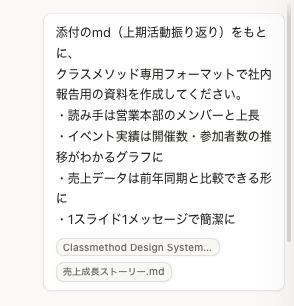
Here is how I gave instructions to Claude Design and the resulting After diagram.
Pitfall Points
At first, when I carelessly asked "design this material nicely," what came out was certainly pretty but "unclear about what it was trying to convey." And the slides were subtly not that different from the originals.
Because the appearance is good, the scary part is almost believing it for a moment. Include in your instructions "for whom" and "what the material is meant to convey," and always check the digits and units of numbers yourself. The persuasiveness of appearance and the correctness of content are separate things. I'll keep this as human work.
Instruction Template I Use
Based on the attached md (first-half activity review),
please create internal reporting materials using the Classmethod-specific format.
・Readers are members and supervisors of the Sales Division
・Event results should be in a graph showing trends in number of events held and number of participants
・Sales data should be in a form that allows comparison with the same period last year
・One message per slide, kept concise
By Managing md Files by Purpose, Materials Became "Assets Usable Next Year Too"
Before (The Problem)
Reporting materials were created from scratch every time. I would start by digging up materials my past self made half a year ago and thinking "how did I make this again...". Since the data compilation methods and formatting were created on the fly each time, there was no reproducibility. My past self is a stranger to me.
After (The Result)
Now I manage separate md files by purpose. One for event results, one for sales reports, and so on. When the time for reviews comes, I just add the current figures to the relevant md and hand it to Claude Design. Since the format is Classmethod's original, it can be used as-is next year simply by adding the necessary items. By shifting my thinking from "nurturing the materials themselves" to "nurturing the md that becomes the basis for materials," it has become a system with high maintainability (the quality of being easily updatable by anyone afterwards).
Pitfall Points
If the md is written sloppily, the structure of the generated materials will also be sloppy. The trick is to organize things at the md stage, such as "write numbers in table format" and "align heading hierarchy." As I also wrote in my previous article, since I started using Claude, I feel like the quality of my own notes and data organization has improved. Of course, I still have room to evolve.
What I Learned From Trying It
I'll honestly write about what I noticed from trying it.
Design Sense Can Be Supplemented With Instructions
I thought "it can't be helped that my materials look dull because I'm not a designer," but I was wrong. Even without design sense, as long as you can verbalize "who you want to convey what to," Claude Design takes care of the visual side. Verbalization is a field that can be covered with effort. My verbalization skills are on point!
The md Files You've Cultivated Become Assets
In my previous article I wrote that instruction templates become assets, but this time the md files themselves became assets. By cultivating md files for each purpose, my future self will be freed from 3 hours of work next period. It's the best handover document for my future self.
Summary
Even if you're not an engineer or a designer, using Claude Design lets you tackle all at once the important yet tediously time-consuming task of "picking up numbers, compiling them, and turning them into materials."
What I especially feel the effect of is the combination with managing md files by purpose. The review materials that used to take more than 3 hours each time now finish with adding entries to an md and a single instruction.
First, try taking one of your reporting materials at hand, compiling it into an md, and handing it to Claude Design. It starts with the single sentence "Based on this md, please create a report for ○○."
Please give it a try!
Advanced Section (What I Want to Try Next)
From here, the topic is ideas for "things I haven't tried yet but want to do next." Please read this as conceptual rather than based on personal experience.
Advancement ① Automate Brand Consistency Through Design System Integration
Claude Design has a feature to load a design system (a collection of rules for colors, fonts, layouts, etc.). If Classmethod's brand rules are registered, materials should come out looking "like us" no matter who creates them. A future where the look of every team member's materials is consistent is right before us.
Advancement ② Expand to Customer-Facing Materials via Output to Canva and Similar Tools
I'm thinking about whether the visuals used in internal reports could be expanded into customer-facing proposal materials using an output feature to external tools. If we could achieve a state where "create it once for internal use and repurpose it for external use too," we could further reduce the time spent making materials and instead spend more time thinking deeply about our customers.
Advancement ③ Eliminate "Data Collection" Too via MCP Integration with CRM and Sales Management Systems
Currently, the part where I add numbers to the md is done manually. Like the Google Calendar MCP from last time, if we could integrate with CRM and sales management systems via MCP (connectors), the work of going to collect results data each time would disappear entirely.
For example, just by saying "tell me this period's pipeline results," it would pull the latest deal phase figures from the CRM, reflect them directly in the md, and turn them into materials with Claude Design. If this could be done end-to-end, all three steps of picking up numbers → compiling → creating materials would become "just speak to it." A state where "almost all manual work related to review materials is zero" — or rather, where the review materials themselves "exist a few minutes after you speak" — doesn't seem like a pipe dream. They say dreams come true someday.
