
Understanding Cloudinary's Pricing Structure - How Credit Units Work and How to Check Usage

This page has been translated by machine translation. View original
From Berlin, this is Ito from Classmethod Europe.
Cloudinary's pricing includes "credits" and "units," but the pricing structure can be confusing, and there are times when you want to check how much you're currently using. In this article, I'll organize the pricing structure and introduce methods for checking usage through the console and API.
Cloudinary Pricing Plans
Cloudinary's pricing structure is broadly divided into two types based on the contract plan.
For Regular Plans
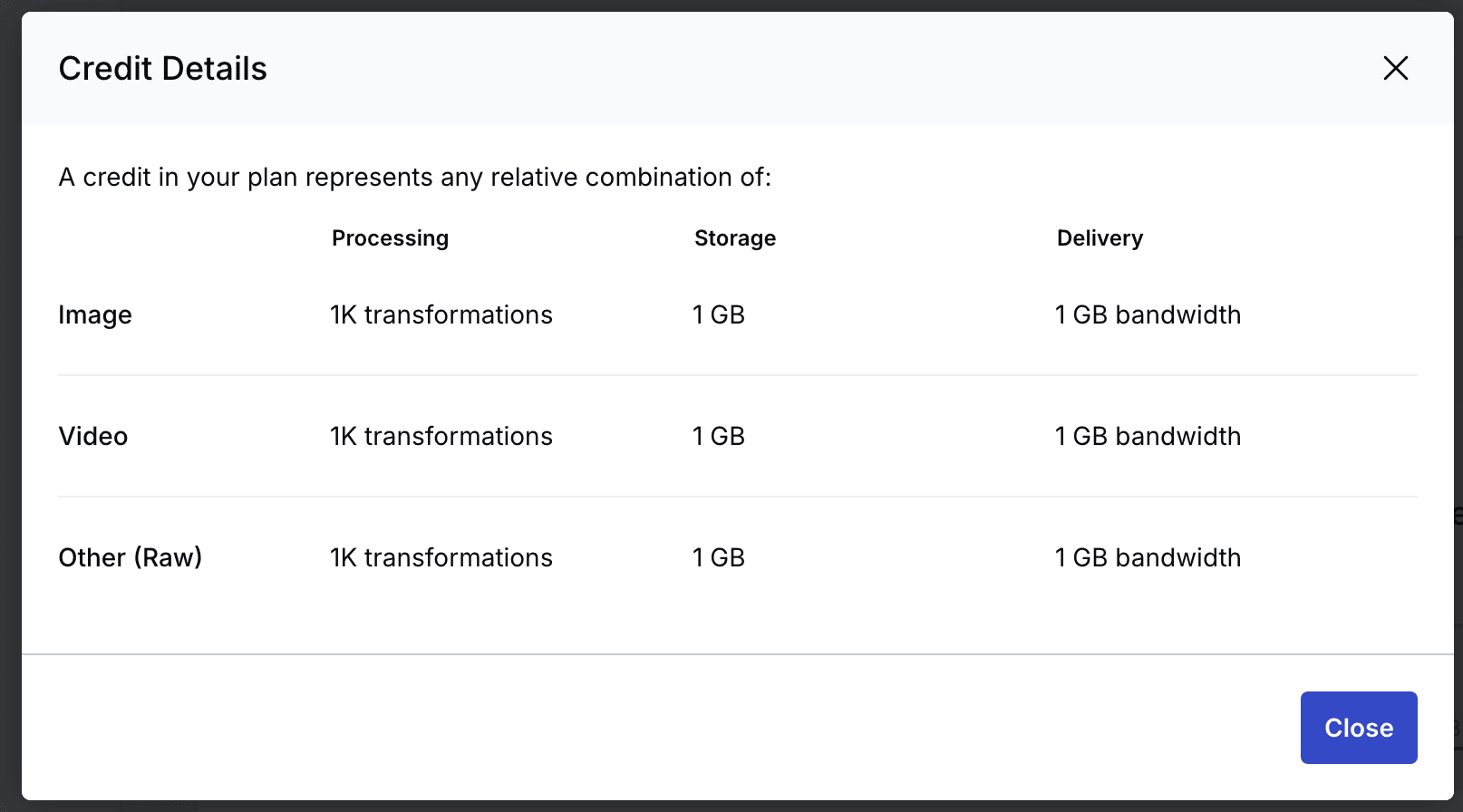
Self-service plans such as Free, Plus, and Advanced use a "credit"-based pricing structure. Credits are consumed according to the following three items and conversion rates:
- 1 credit =
- Transformations: 1,000 times (※ Video is counted by specific conversion seconds based on resolution)
- Storage: 1 GB
- Bandwidth: 1 GB
For example, if 25 credits are provided with the free plan, you can use any combination up to "5,000 transformations + 10 GB storage + 10 GB bandwidth."
Monthly credits are not reset to 25 at the beginning of each month but are measured over the past 30 days.
Reference: How do Cloudinary credits work?, How does Cloudinary count my plan's quotas and what does every quota mean?
For Enterprise Plans
When we resell to customers, we provide this Enterprise plan.
Enterprise plans have a similar pricing structure, but use "units" as the measurement, and the conversion rate per unit varies depending on the contract terms.
In addition to Transformations, Storage, and Bandwidth, depending on the contract, the following items may also be calculated:
- Image Impressions: Number of times images are successfully delivered (converted instead of image Bandwidth)
- Video Seconds: Video delivery seconds (converted instead of video Bandwidth)
The specific form varies by contract, but essentially you agree on a number of units for a billing cycle and use them, with overage fees if you exceed the usage limit during the cycle period.
Reference: How do Cloudinary units work?
Checking Usage in Cloudinary Console
You can check a usage overview by opening the Dashboard in the Cloudinary console.
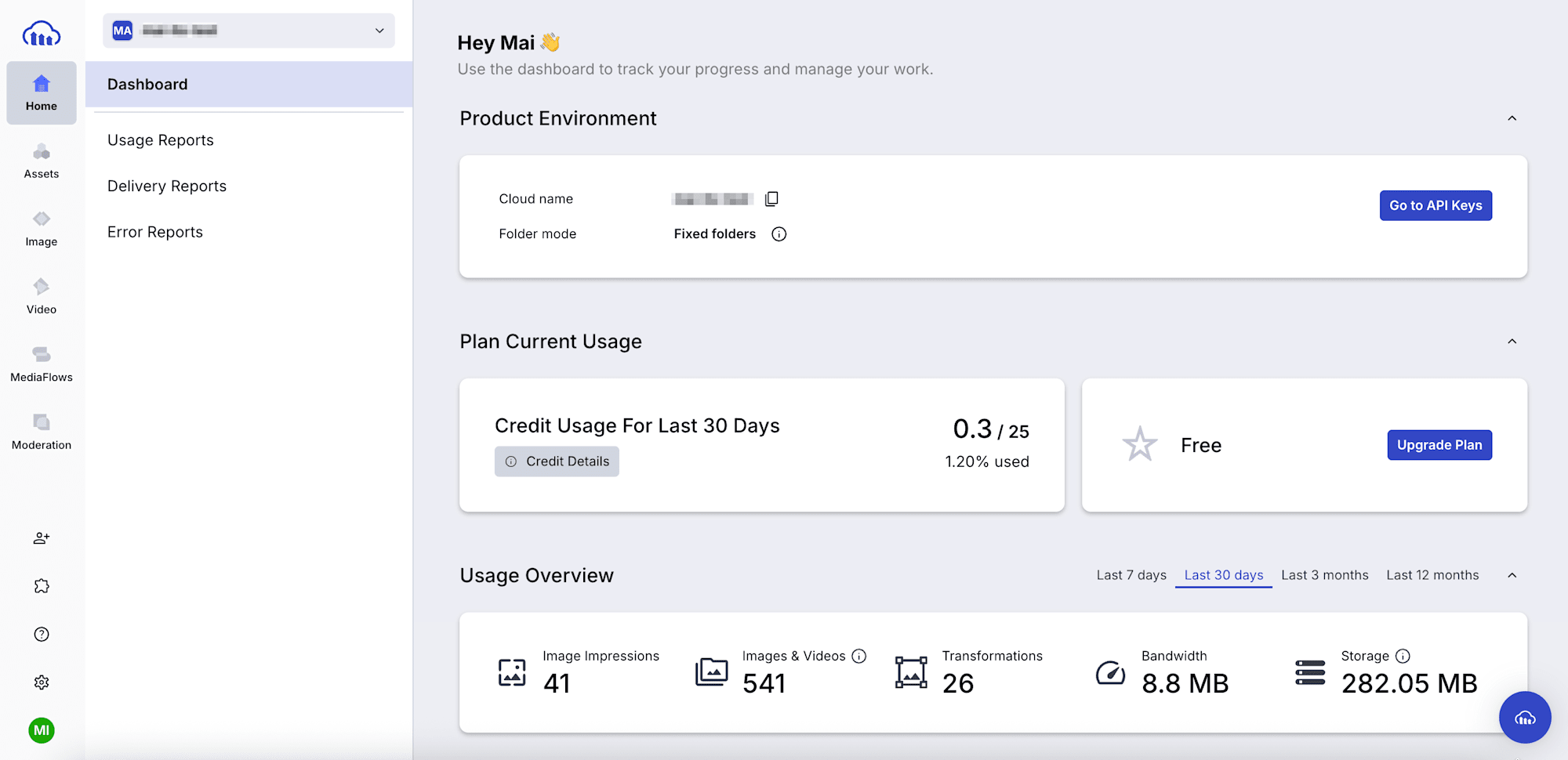
Clicking on [Credit Details] allows you to check the applicable conversion rates. (Requires Master admin permissions)
The environment used for this verification is on the free plan, so it follows the conversion rates of the "regular plan" mentioned above.
Usage Reports and Delivery Reports allow you to specifically check usage by item for up to the past 12 months. You can analyze in detail with graphs and export results in CSV or PDF format.
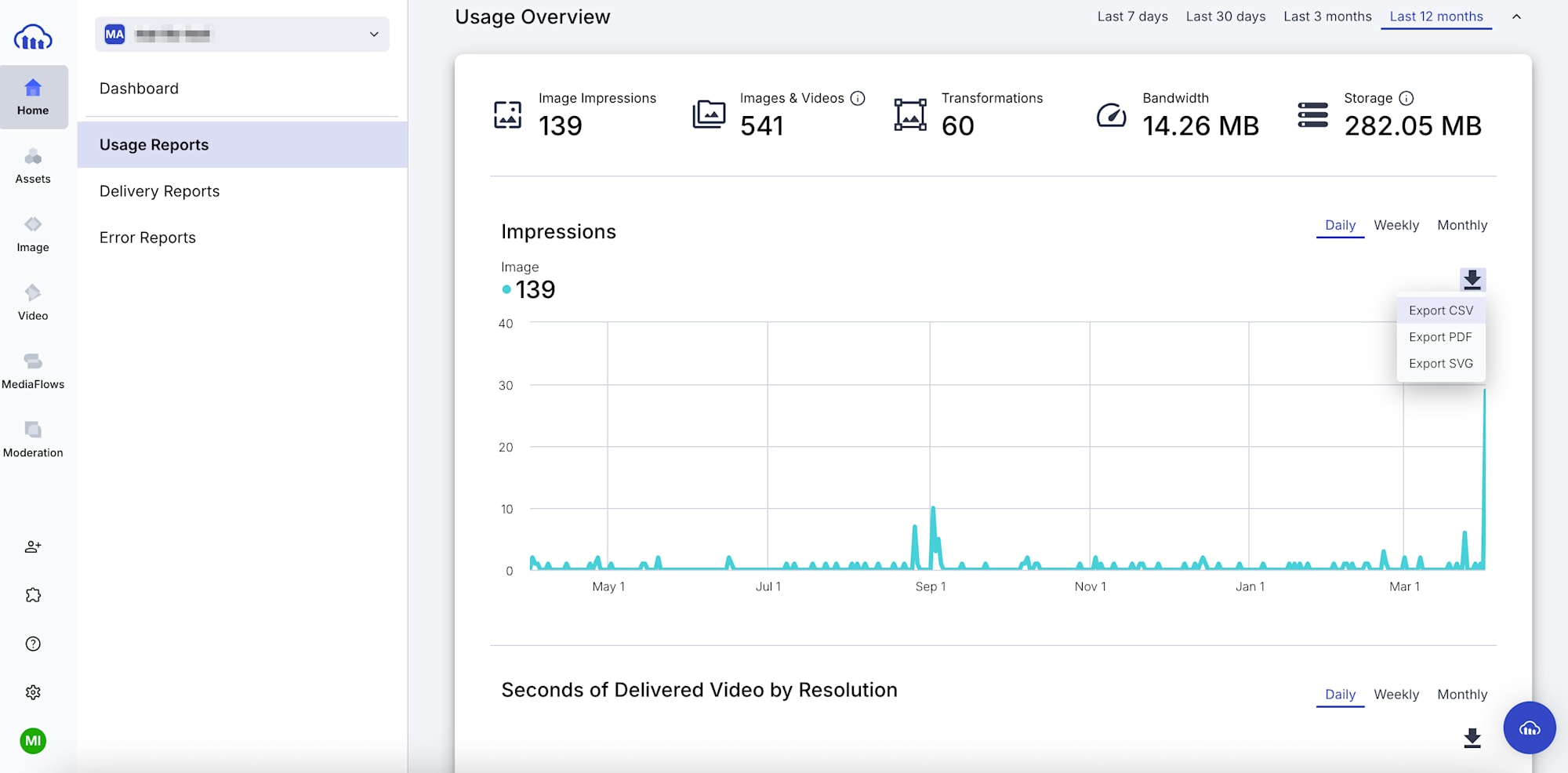
Note that while the credit (unit) consumption balance at the beginning of the Dashboard is for the entire account, Usage & Delivery Reports are output per environment (cloud), so if you have multiple environments within one account, you need to switch environments from the top left to check each one.
Retrieving Usage with API
The usage() method retrieves daily usage and consumed units (credits).
const cloudinary = require("cloudinary").v2;
const fs = require("fs");

cloudinary.config({ cloud_name: "...", api_key: "...", api_secret: "..." }); // authentication

cloudinary.api.usage().then((r) => {
  fs.writeFileSync("latest_usage.json", JSON.stringify(r, null, 2));
});
Result:
{
  "plan": "Free",
  "last_updated": "2026-04-01",
  "date_requested": "2026-04-02T00:00:00Z",
  "transformations": {
    "usage": 26,
    "credits_usage": 0.03,
    "breakdown": {
      "transformation": 26
    }
  },
  "objects": {
    "usage": 541
  },
  "bandwidth": {
    "usage": 9227721,
    "credits_usage": 0.01
  },
  "storage": {
    "usage": 295753639,
    "credits_usage": 0.28
  },
  "impressions": {
    "usage": 41,
    "credits_usage": 0
  },
  "seconds_delivered": {
    "usage": 0,
    "credits_usage": 0
  },
  "credits": {
    "usage": 0.32,
    "limit": 25,
    "used_percent": 1.28
  },
  "resources": 130,
  "derived_resources": 411,
  "requests": 43,
  "aws_rek_tagging": {
    "usage": 1,
    "limit": 50
  },
  "cloudinary_ai": {
    "usage": 20,
    "limit": 15
  },
  "media_limits": {
    "image_max_size_bytes": 10485760,
    "video_max_size_bytes": 104857600,
    "raw_max_size_bytes": 10485760,
    "image_max_px": 25000000,
    "asset_max_total_px": 50000000
  },
  "rate_limit_allowed": 500,
  "rate_limit_reset_at": "2026-04-02T09:00:00.000Z",
  "rate_limit_remaining": 499
}
The call can specify a retrieval date with the date option (example: usage({ date: "2026-04-01" })). If omitted, the latest data is returned.
The credits.usage returns the unit consumption for the requested date, but it seems that only with no options specified, limit (credit limit/contracted unit number) and used_percent (credit/unit usage rate) are also included.
Calculating manually from usage based on conversion rates:
transformations: 26 / 1,000 (1K) = 0.026 → 0.03 ✅bandwidth: 9227721 / 1,073,741,824 (1GiB) = 0.008… → 0.01 ✅storage: 295753639 / 1,073,741,824 (1GiB) = 0.275.. → 0.28 ✅
The credit consumption figures also appear correct.
Note that while the conversion rate says "1 GB," when the calculation didn't match, I checked with support and found that it's actually calculated as "1 GiB." (So it's slightly more favorable.)
Checking Unit Consumption with Quota Dashboard
Enterprise Plan offers a beta version of Quota Usage (Quota Dashboard) page, which is the easiest way to analyze unit numbers.
Currently, you can access it from Home > Quota Dashboard or Settings > Billing > Quota Usage in the console.
※ Requires Master admin permissions
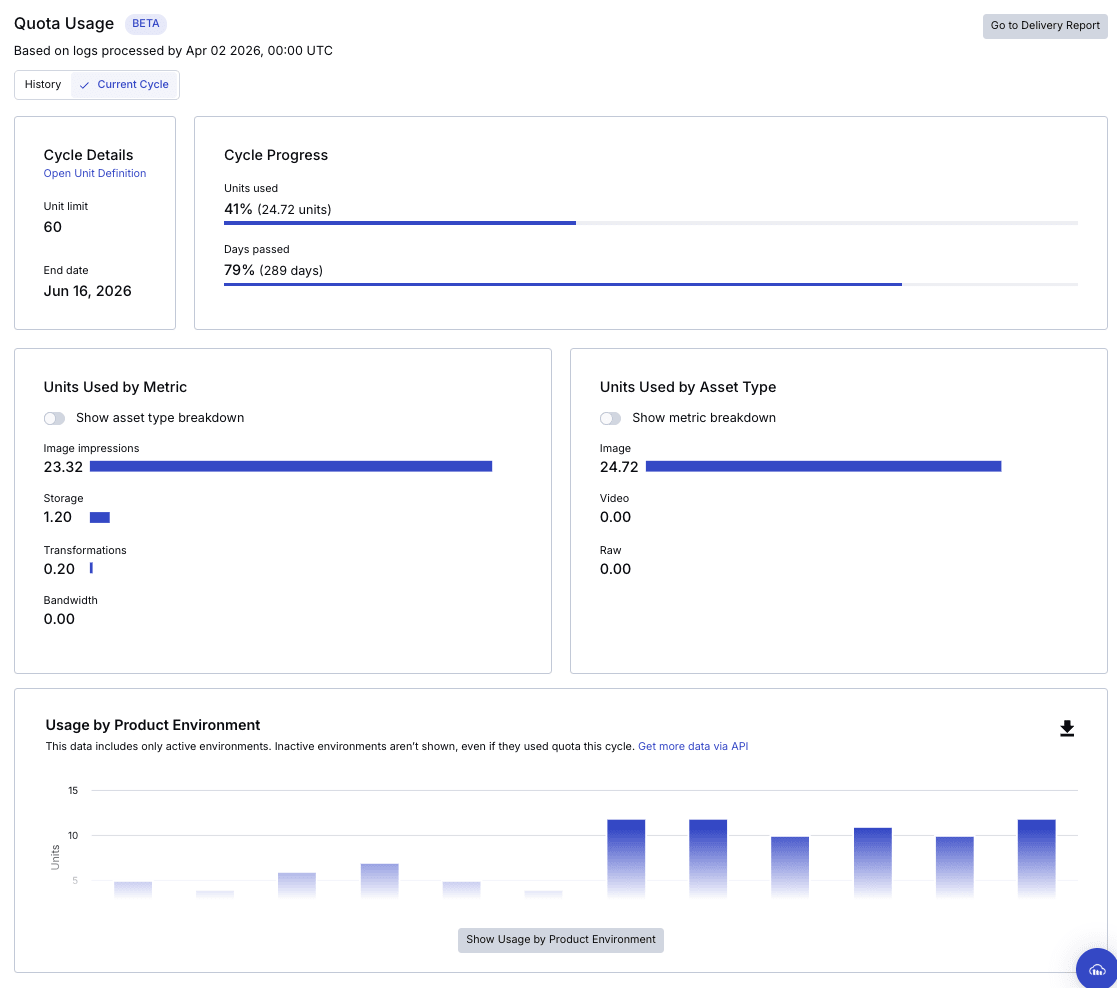
In this account example, 24.72 units out of the contracted 60 units have already been used in the billing cycle (June 17, 2025 - June 16, 2026).
The "Cycle Progress" makes it easy to compare the elapsed percentage of the billing cycle period with the unit consumption rate.
Other information that can be checked at this time includes:
- Usage by Product Environment
- Usage Summary (monthly unit consumption)
- Units Used by Metric (monthly unit consumption by metric)
- Storage Usage by Asset Type (storage unit consumption by asset type)
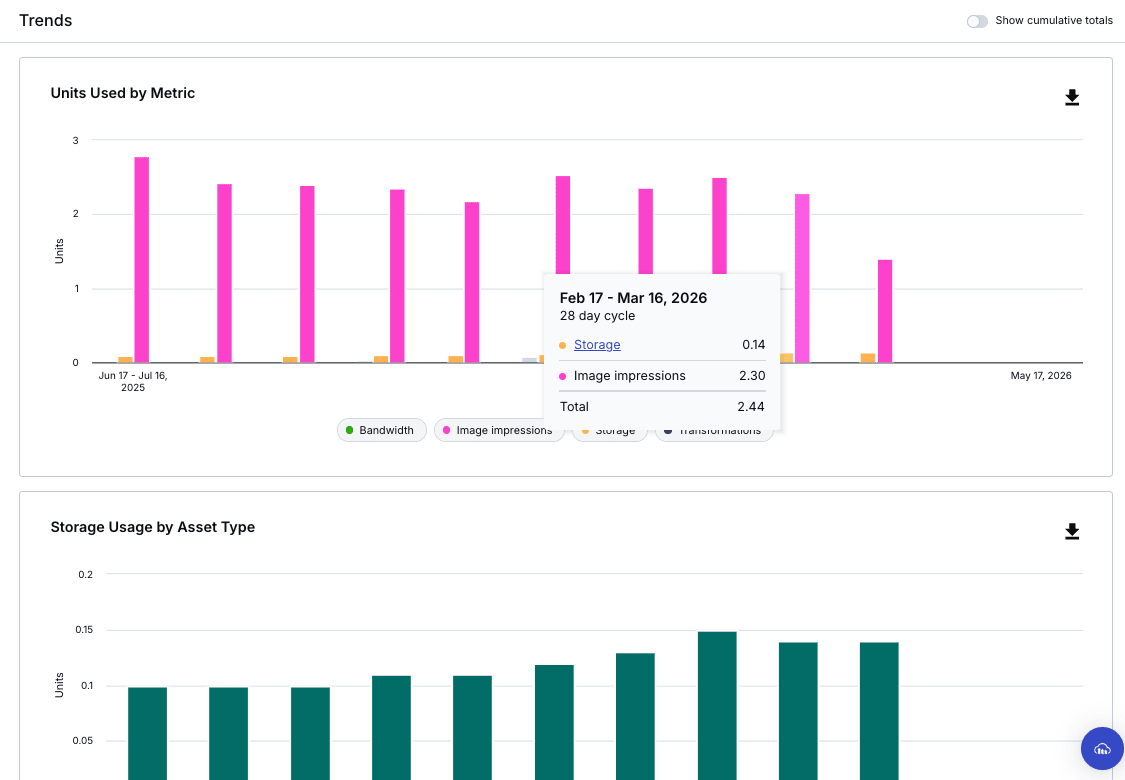
When I inquired with support, they said that since it's currently in Beta, they can't guarantee the values for billing and audit purposes, but when I repeatedly executed the recommended API usage() method over the billing cycle period and totaled the results, I confirmed that the numbers matched.
Python script
from datetime import date, timedelta

import cloudinary, cloudinary.api

cloudinary.config(
    cloud_name="cloud_name",
    api_key="API_key",
    api_secret="API_secret",
)

START = "2026-02-17"
END   = "2026-03-16"

d0, d1 = date.fromisoformat(START), date.fromisoformat(END)
dates  = [(d0 + timedelta(n)).isoformat() for n in range((d1 - d0).days + 1)]

rows = []
for day in dates:
    r = cloudinary.api.usage(date=day)
    t, b, s, i = r["transformations"], r["bandwidth"], r["storage"], r["impressions"]
    rows.append({
        "t_credits": t["credits_usage"],
        "b_credits": b["credits_usage"],
        "s_credits": s["credits_usage"],
        "i_credits": i["credits_usage"],
    })

total_t = sum(r["t_credits"] for r in rows)
total_b = sum(r["b_credits"] for r in rows)
total_s = max(r["s_credits"] for r in rows)
total_i = sum(r["i_credits"] for r in rows)
print(f"t_credits: {total_t:.2f}")
print(f"b_credits: {total_b:.2f}")
print(f"s_credits: {total_s:.2f}  (max)")
print(f"i_credits: {total_i:.2f}")
print(f"total:     {total_t + total_b + total_s + total_i:.2f}")
※ Storage is calculated as the maximum value during the period, not the sum
Result (Environment ①)
t_credits: 0.00
b_credits: 0.00
s_credits: 0.12  (max)
i_credits: 1.80
total:     1.92
Result (Environment ②)
t_credits: 0.00
b_credits: 0.00
s_credits: 0.02  (max)
i_credits: 0.50
total:     0.52
→ Account total 2.44 ✅
Since usage() is executed per environment where the API key is issued, you need to sum the totals if you have multiple environments. Conversely, Quota Usage doesn't allow detailed analysis by environment, so scripts are useful for flexible analysis.
I hope this helps all users feel more comfortable using Cloudinary!