
Understanding Cloudinary's pricing structure ― The credit unit system and how to check usage

This page has been translated by machine translation. View original
From Berlin, this is Ito from Classmethod Europe.
Cloudinary pricing uses "credits" or "units," but its pricing structure can be confusing, and there are times when you want to check how much you're currently using. This article explains the pricing structure and introduces methods to check usage through the console and API.
Cloudinary Pricing Plans
Cloudinary's pricing structure is broadly divided into two categories based on the contract plan.
For Standard Plans
Self-service plans such as Free, Plus, and Advanced use a "credit"-based pricing system. Credits are consumed across three items with conversion rates as follows:
- 1 credit =
- 1,000 Transformations (※ For videos, counted in specific transformation seconds based on resolution)
- 1 GB of Storage
- 1 GB of Bandwidth
For example, if you have 25 credits allocated in the free plan, you can freely combine usage up to a maximum of "5,000 transformations + 10 GB storage + 10 GB bandwidth."
Monthly credits are not reset to 25 at the beginning of the month but are measured over the past 30 days at all times.
Reference: How do Cloudinary credits work?, How does Cloudinary count my plan's quotas and what does every quota mean?
For Enterprise Plans
When we resell to our customers, we offer this Enterprise plan.
Enterprise plans have a similar pricing structure but use "units" as the measurement, and the conversion rate per unit varies depending on the contract details.
In addition to Transformations, Storage, and Bandwidth, depending on the contract, the following items may be converted:
- Image Impressions: The number of times images are successfully delivered (converted instead of Bandwidth for images)
- Video Seconds: The seconds of video delivered (converted instead of Bandwidth for videos)
The specific form varies by contract, but basically, units are agreed upon for each billing cycle rather than calendar month, and if the usage limit is exceeded during the cycle period, an excess fee is paid.
Reference: How do Cloudinary units work?
Checking Usage in the Cloudinary Console
You can check an overview of your usage by opening the Dashboard in the Cloudinary console.
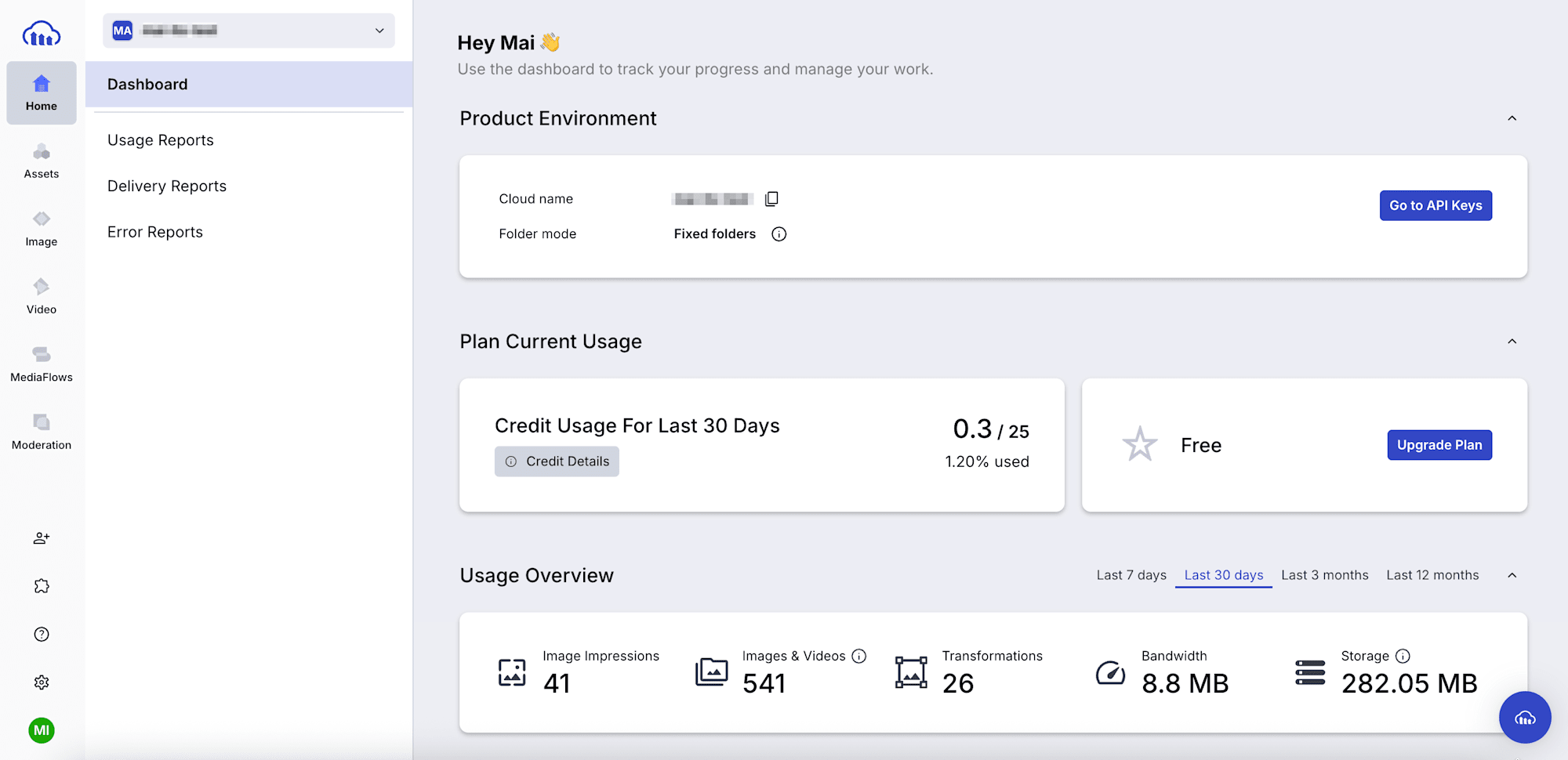
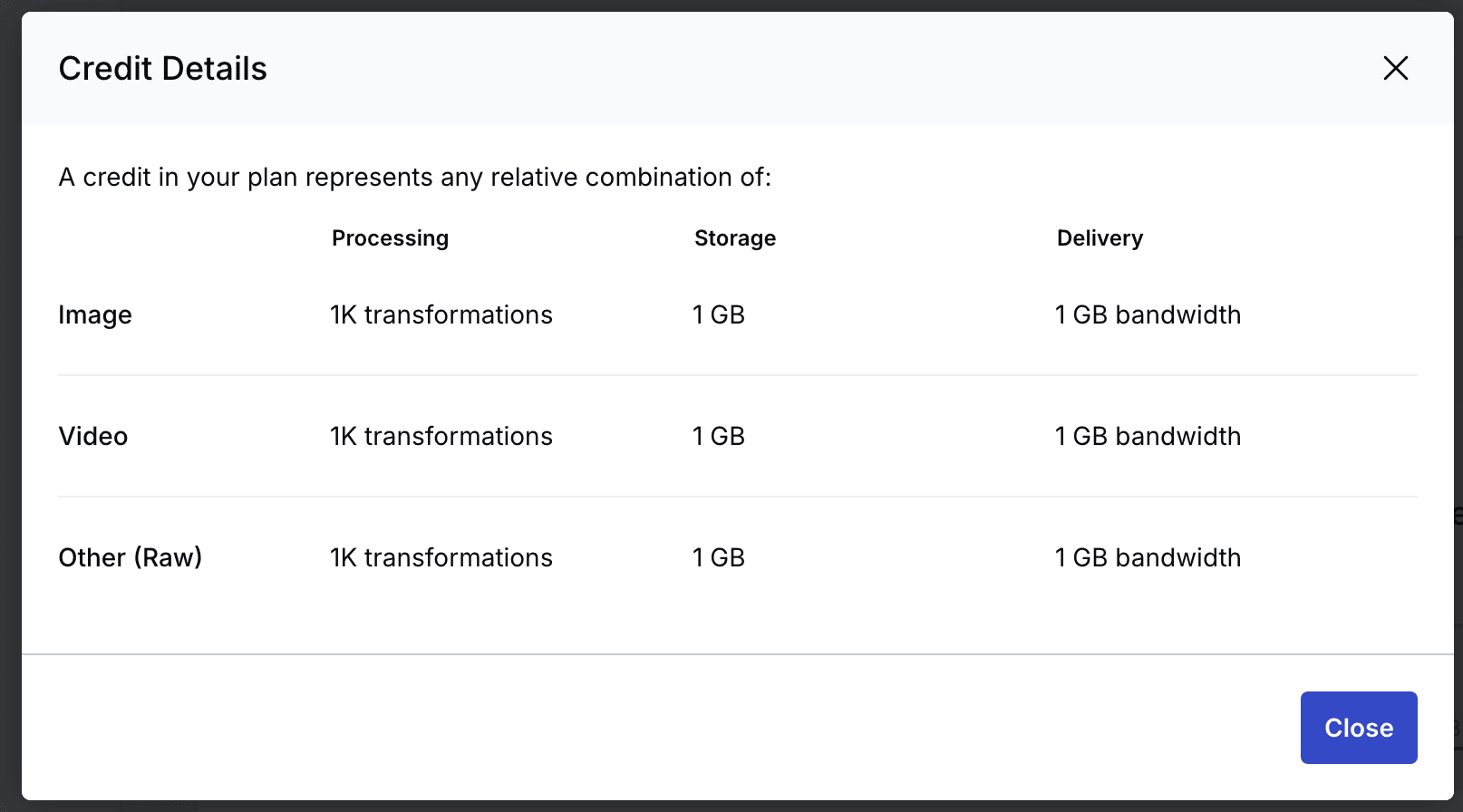
The card in the middle left of this screen displays the unit (credit) limit and consumption. By clicking [Credit Details], you can check the applicable conversion rates. (Requires Master admin permissions)
The environment used for this verification is on the free plan, so it follows the conversion rates of the "standard plan" mentioned above.
Usage Reports and Delivery Reports allow you to check specific usage by item for the past 12 months maximum. You can analyze in detail with graphs and export results in CSV or PDF format.
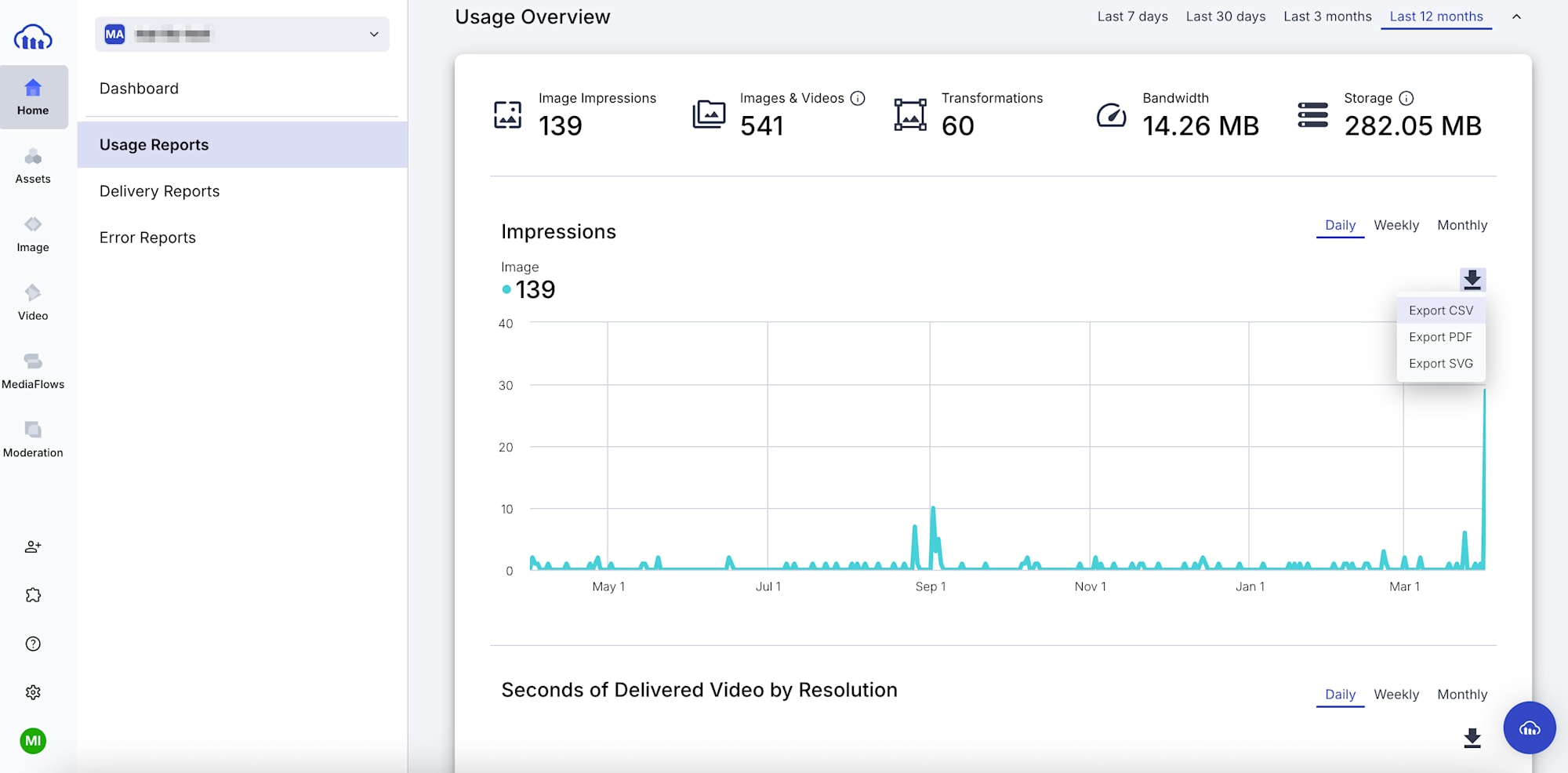
While the credit (unit) consumption balance at the beginning of the Dashboard is for the entire account, Usage & Delivery Reports are output per environment (cloud). If you have multiple environments in one account, switch environments from the top left to check each one.
Getting Usage via API
The usage() method retrieves daily usage and consumed units (credits).
const cloudinary = require("cloudinary").v2;
const fs = require("fs");

cloudinary.config({ cloud_name: "...", api_key: "...", api_secret: "..." }); // authentication

cloudinary.api.usage().then((r) => {
  fs.writeFileSync("latest_usage.json", JSON.stringify(r, null, 2));
});
Result:
{
  "plan": "Free",
  "last_updated": "2026-04-01",
  "date_requested": "2026-04-02T00:00:00Z",
  "transformations": {
    "usage": 26,
    "credits_usage": 0.03,
    "breakdown": {
      "transformation": 26
    }
  },
  "objects": {
    "usage": 541
  },
  "bandwidth": {
    "usage": 9227721,
    "credits_usage": 0.01
  },
  "storage": {
    "usage": 295753639,
    "credits_usage": 0.28
  },
  "impressions": {
    "usage": 41,
    "credits_usage": 0
  },
  "seconds_delivered": {
    "usage": 0,
    "credits_usage": 0
  },
  "credits": {
    "usage": 0.32,
    "limit": 25,
    "used_percent": 1.28
  },
  "resources": 130,
  "derived_resources": 411,
  "requests": 43,
  "aws_rek_tagging": {
    "usage": 1,
    "limit": 50
  },
  "cloudinary_ai": {
    "usage": 20,
    "limit": 15
  },
  "media_limits": {
    "image_max_size_bytes": 10485760,
    "video_max_size_bytes": 104857600,
    "raw_max_size_bytes": 10485760,
    "image_max_px": 25000000,
    "asset_max_total_px": 50000000
  },
  "rate_limit_allowed": 500,
  "rate_limit_reset_at": "2026-04-02T09:00:00.000Z",
  "rate_limit_remaining": 499
}
The call can specify the retrieval date with the date option (example: usage({ date: "2026-04-01" })). If omitted, the latest data is returned.
credits.usage returns the unit consumption for the request date, but only with no options specified, it also includes limit (credit limit/contracted unit count) and that day's used_percent (credit/unit usage rate).
If we manually calculate from each usage based on the conversion rates mentioned earlier:
transformations: 26 / 1,000 (1K) = 0.026 → 0.03 ✅bandwidth: 9227721 / 1,073,741,824 (1GiB) = 0.008… → 0.01 ✅storage: 295753639 / 1,073,741,824 (1GiB) = 0.275.. → 0.28 ✅
These match the credit consumption credit_usage. While the conversion rate states "1 GB," when calculations didn't match, I confirmed with support that they are actually calculated as "1 GiB." (So it's slightly more favorable)
For more details on the usage method, I've summarized it in the following blog:
Checking Unit Consumption in the Quota Dashboard
Enterprise Plan offers a beta version of Quota Usage (Quota Dashboard) page, which is the easiest way to analyze unit numbers.
Currently, it can be accessed from the console via Home > Quota Dashboard or Settings > Billing > Quota Usage.
※ Requires Master admin permissions
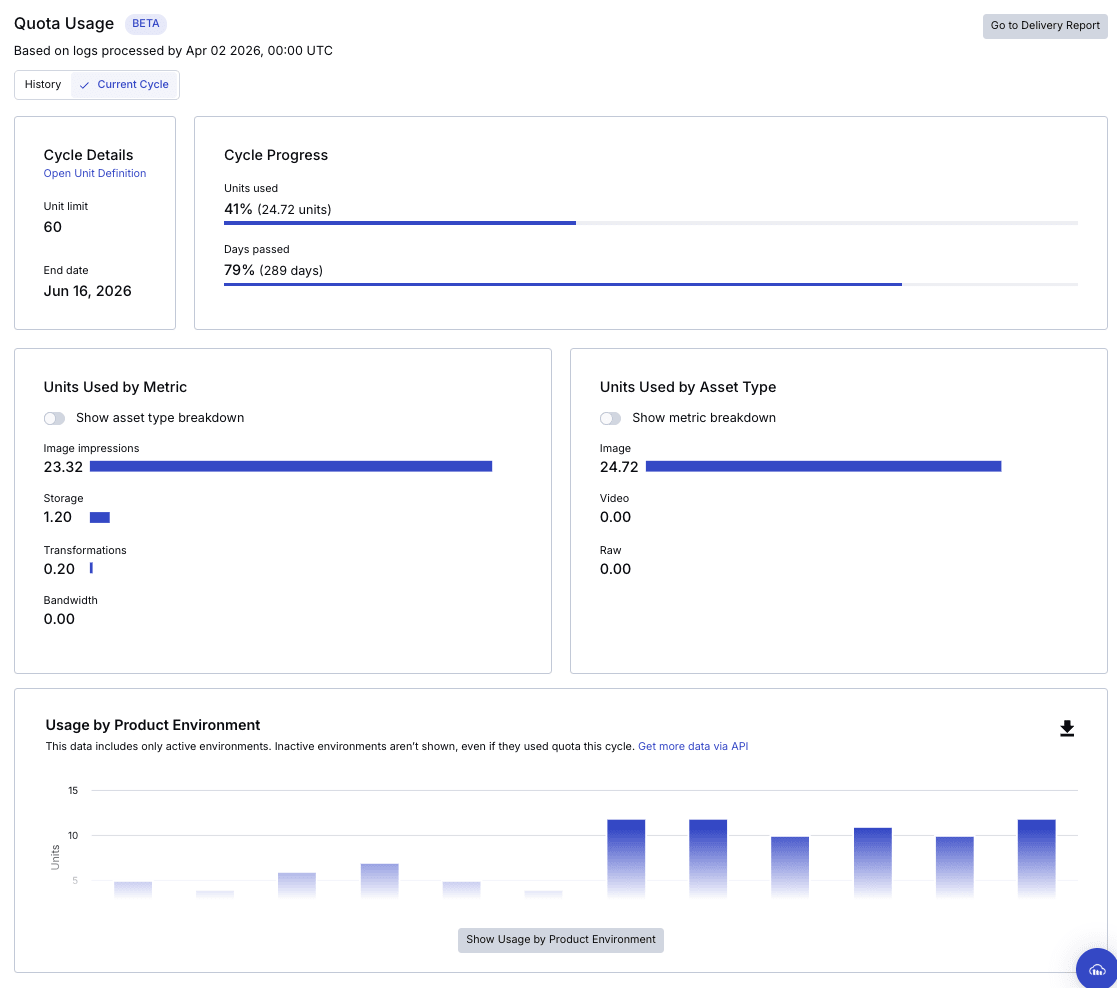
In this account example, out of 60 contracted units for the billing cycle (June 17, 2025 to June 16, 2026), 24.72 have already been used.
The "Cycle Progress" provides an easy-to-understand comparison between the elapsed percentage of the billing cycle period and the unit consumption rate.
Other information that can currently be checked includes:
- Usage by Product Environment
- Usage Summary (unit consumption by month)
- Units Used by Metric (unit consumption by month and metric)
- Storage Usage by Asset Type (storage unit consumption by asset type)
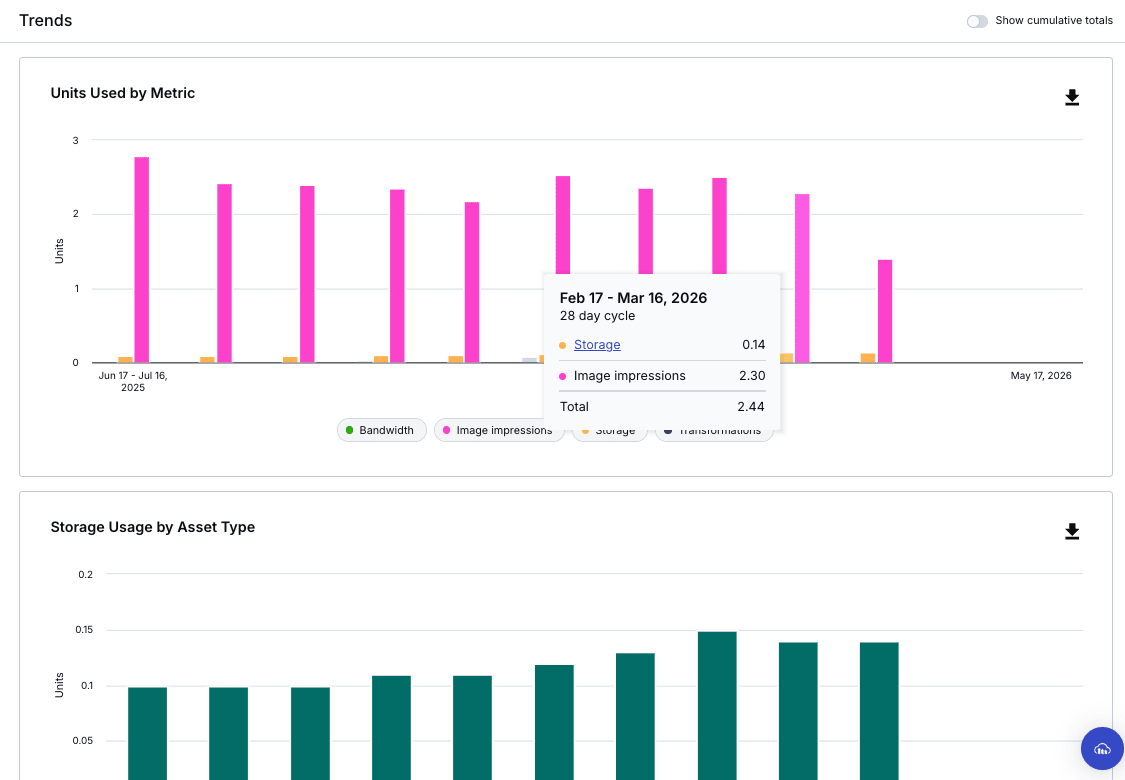
When I inquired with support, they mentioned that since it's still in Beta, they cannot guarantee values for billing and audit purposes, but when I repeatedly executed the recommended API usage() method over the billing cycle period and totaled it up, I confirmed that the numbers matched.
Python script
from datetime import date, timedelta

import cloudinary, cloudinary.api

cloudinary.config(
    cloud_name="cloud name",
    api_key="API key",
    api_secret="API secret",
)

START = "2026-02-17"
END   = "2026-03-16"

d0, d1 = date.fromisoformat(START), date.fromisoformat(END)
dates  = [(d0 + timedelta(n)).isoformat() for n in range((d1 - d0).days + 1)]

rows = []
for day in dates:
    r = cloudinary.api.usage(date=day)
    t, b, s, i = r["transformations"], r["bandwidth"], r["storage"], r["impressions"]
    rows.append({
        "t_credits": t["credits_usage"],
        "b_credits": b["credits_usage"],
        "s_credits": s["credits_usage"],
        "i_credits": i["credits_usage"],
    })

total_t = sum(r["t_credits"] for r in rows)
total_b = sum(r["b_credits"] for r in rows)
total_s = max(r["s_credits"] for r in rows)
total_i = sum(r["i_credits"] for r in rows)
print(f"t_credits: {total_t:.2f}")
print(f"b_credits: {total_b:.2f}")
print(f"s_credits: {total_s:.2f}  (max)")
print(f"i_credits: {total_i:.2f}")
print(f"total:     {total_t + total_b + total_s + total_i:.2f}")
※ For Storage, the maximum value during the period is used instead of the total
Result (Environment ①)
t_credits: 0.00
b_credits: 0.00
s_credits: 0.12  (max)
i_credits: 1.80
total:     1.92
Result (Environment ②)
t_credits: 0.00
b_credits: 0.00
s_credits: 0.02  (max)
i_credits: 0.50
total:     0.52
→Account total: 2.44 ✅
Since usage() is executed per environment where the API key is issued, you need to sum up the totals if you have multiple environments. Conversely, while Quota Usage doesn't allow detailed analysis by environment, scripts are useful for flexible analysis.
I hope this helps all users feel more comfortable using Cloudinary!