
I compared the estimated scan amount and actual measured values of the new CloudWatch Logs Insights feature "estimate"

This page has been translated by machine translation. View original
Introduction
On September 29, 2026, the estimate command was added to CloudWatch Logs Insights, allowing you to estimate the amount of data scanned by a query before running it.
The estimate query itself incurs no Logs Insights charges and is available in all commercial regions.
This article compares the estimated scan volume returned by estimate against actual measured values to determine whether it can be used as a verification step before running queries.
Checking Scan Volume in the Console
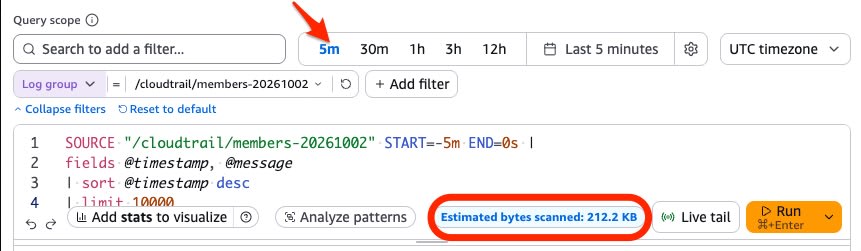
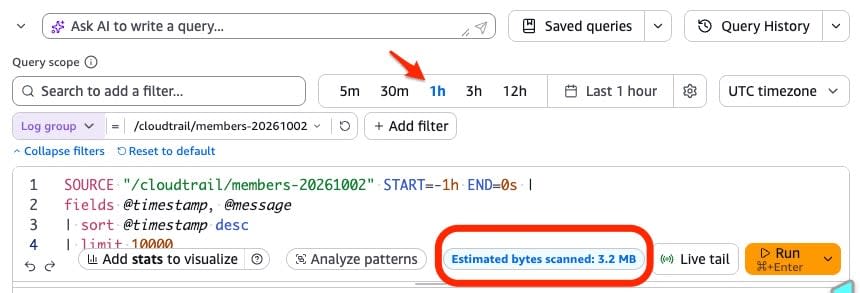
In the management console, even without writing estimate in your query, the estimated scan volume is displayed as "Estimated bytes scanned" at the bottom of the query editor. You can check the scan volume while changing the time range before pressing Run.
Using the same query, only the time range was changed to 5 minutes, 1 hour, and 12 hours.
5 minutes:
1 hour:
12 hours:
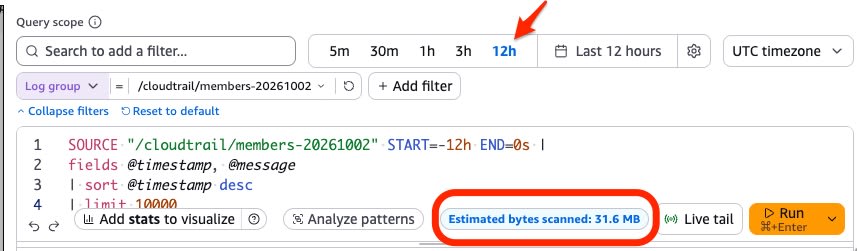
The estimated scan volumes increased to 212.2 KB, 3.2 MB, and 31.6 MB respectively.
Checking Scan Volume via CLI
estimate is passed to --query-string in start-query. Passing only estimate as --query-string "estimate" targets all data in the specified log group and time range.
aws logs start-query \
  --log-group-names \
    "/aws/lambda/function-a" \
    "/aws/lambda/function-b" \
    "/aws/ecs/service-a" \
  --start-time $(date -d '30 days ago' +%s) \
  --end-time $(date +%s) \
  --query-string "estimate"
estimate must be placed as the last command in a query. To estimate a filtered query, append | estimate at the end.
aws logs start-query \
  --log-group-name "LOG_GROUP_NAME" \
  --start-time START_TIME \
  --end-time END_TIME \
  --query-string "fields @timestamp, @message | filter @message like /ERROR/ | estimate"
Results are retrieved with get-query-results. The estimated value is stored in the @estimatedBytesScanned field. The following is the result of the first command (3 log groups, 30 days).
{
  "results": [[{"field": "@estimatedBytesScanned", "value": "85634"}]],
  "statistics": {"bytesScanned": 0.0, "logGroupsScanned": 3.0},
  "status": "Complete"
}
statistics.bytesScanned is 0.0, confirming that no actual scanning occurred with estimate.
Running a query without a filter (stats count(*) as cnt) on the same log groups and time period places the actual measured value in statistics.bytesScanned. Since this query scans all data, standard Logs Insights charges apply.
{
  "results": [[{"field": "cnt", "value": "478"}]],
  "statistics": {
    "recordsMatched": 478.0,
    "recordsScanned": 478.0,
    "bytesScanned": 85634.0,
    "logGroupsScanned": 3.0
  },
  "status": "Complete"
}
The estimated value and the actual measured value matched exactly.
Comparison Across Multiple Patterns
A comparison was made across 4 patterns with different log groups and time periods (including the example above). The estimated value is the result of --query-string "estimate" alone, and the actual measured value is the bytesScanned from a query without a filter (stats count(*) as cnt). In all cases, the entire data within the log groups and time period was the scan target.
| Log Groups (Type) | Period | Estimated (bytes) | Actual (bytes) | Difference |
|---|---|---|---|---|
| Lambda ×2 + ECS ×1 (3 groups) | 30 days | 85,634 | 85,634 | 0% |
| EventBridge | 365 days | 3,299,539 | 3,299,539 | 0% |
| CloudWatch Synthetics | 2026-01-01 to 2026-07-01 | 18,817,667 | 18,817,667 | 0% |
| ECS | 365 days | 906,347 | 906,347 | 0% |
In all 4 patterns, the estimated value and the actual measured value matched to the byte.
The official documentation states that the value returned by estimate is approximate and may differ from the actual scan volume when the query is executed.
Summary
Logs Insights charges are determined by the amount of data scanned. Being able to check the scan volume before execution makes it easier to avoid unexpected scanning.
Until now, it was difficult to estimate scan volumes in advance for queries spanning many log groups or queries specifying long time periods for log groups whose output volume varies by season. In the console, the estimated scan volume is displayed in the query editor, allowing you to check it before clicking Run when specifying a long time range. When handling queries via CLI that may result in large scan volumes, it is recommended to perform a dry run with estimate before execution.

