
[Quick Tip] If you're handing a task off to Claude Code and stepping away, turn ON cmux's "Keep Mac awake" setting

This page has been translated by machine translation. View original
Hello. I'm Takeda from the Service Development Department.
I use the terminal application cmux. The other day, when I opened the application menu, I found an unfamiliar new item called "Keep Mac Awake".
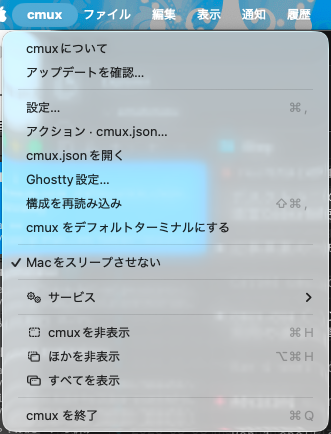
Judging by the name alone, is it a feature that keeps things running even when you hand a task off to something like Claude Code and step away? I was curious, so I looked into it.
For details about cmux itself, please see Sakai's article.
When was it added?
Its name in the app is Keep Mac Awake, and it was added in the following PR. It was merged on August 15, 2026, and has been included in releases since v0.64.23 (September 15, 2026).
The same PR also added a toggle for keeping the Mac awake to the settings screen on the iOS side, and the intended use case is the iOS version of cmux. It's a feature that lets you connect to cmux on a Mac from an iPhone or iPad and operate the terminal, and if the Mac goes to sleep, the connection is lost. The official documentation's iOS setup instructions also say, "If your Mac sleeps, shuts down, or disconnects, you can't connect to the terminal from your phone." It continues, "If a sleep prevention option appears during setup, you can use it to keep your Mac reachable." The iOS version is a TestFlight beta at the time of writing.
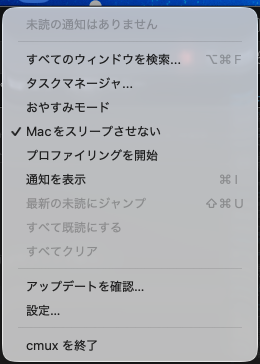
The toggle is in both the application menu and the menu bar icon, and both share the same state.
It's just a single assertion
The implementation is in Sources/CaffeineController.swift, and the core is only a few dozen lines. When enabled, it holds one activity using Foundation's ProcessInfo.beginActivity, and when disabled, it releases it.
ProcessInfo.processInfo.beginActivity(
    options: [.idleSystemSleepDisabled],
    reason: "cmux Keep Mac Awake"
)
A comment at the top of the source says "Intentionally not persisted. It is always released when cmux quits," and it's also explicitly disabled in the application's termination handling. If you restart cmux, it goes back to OFF.
If you run pmset -g assertions while it's enabled, you can see the assertion held by cmux.
$ pmset -g assertions
...
Listed by owning process:
   pid 1234(cmux): [0x...] 00:09:49 PreventUserIdleSystemSleep named: "cmux Keep Mac Awake"
You can also operate it through cmux's socket. caffeinate.status is not it; use caffeine.status to get the state and caffeine.set to switch it. It was synchronized with the result of toggling from the menu.
$ cmux rpc caffeine.status
{
  "enabled" : true
}
$ cmux rpc caffeine.set '{"enabled":false}'
{
  "enabled" : false
}
It only prevents idle sleep
.idleSystemSleepDisabled corresponds to IOKit's PreventUserIdleSystemSleep assertion. As the name suggests, what it prevents is only "sleep caused by the user not doing anything." The IOKit header file IOPMLib.h says the following.
The display may dim and idle sleep while kIOPMAssertPreventUserIdleSystemSleep is enabled, but the system may not idle sleep. The system may still sleep for lid close, Apple menu, low battery, or other sleep reasons.
It says that even if the display turns off, the system won't idle sleep, but the Mac will still sleep when the lid is closed, when sleep is chosen from the Apple menu, when the battery runs low, and so on.
The reason your own Mac went to sleep is recorded in pmset -g log.
$ pmset -g log | grep "Entering Sleep state"
(抜粋)
2026-11-01 02:22:00 +0900 Sleep  Entering Sleep state due to 'Clamshell Sleep':TCPKeepAlive=active Using Batt (Charge:50%) 254 secs
2026-11-01 12:57:00 +0900 Sleep  Entering Sleep state due to 'Idle Sleep':TCPKeepAlive=active Using AC (Charge:100%) 937 secs
2026-11-01 14:21:00 +0900 Sleep  Entering Sleep state due to 'Idle Sleep':TCPKeepAlive=active Using AC (Charge:100%) 908 secs
During the day when I stepped away while plugged in, it was Idle Sleep, and when I closed the lid, it was Clamshell Sleep. Looking at pmset -g custom, my setting is sleep 15 even on AC power. If I leave it for 15 minutes with the lid open, it goes into Idle Sleep. If you turn ON "Keep Mac Awake", this Idle Sleep no longer occurs.
Maintenance Sleep and Sleep Service Back to Sleep, which appear in large numbers in the log, are records of the Mac waking briefly in DarkWake during sleep and then going back to sleep. They are not the reason it first went to sleep.
Difference from Sleepy Mode
The menu bar icon's menu also lists "Sleepy Mode" (named Sleepy Mode in English). This is a full-screen screen saver added in June 2026. It takes both system sleep and display sleep assertions via IOKit's IOPMAssertionCreateWithName. It's a feature premised on leaving the Mac alone with the screen on.
With "Keep Mac Awake", the display turns off. There's no need to keep the terminal visible while I'm away, so this one is enough for me.
Claude Code itself also runs caffeinate
Claude Code also launches caffeinate on its own. The output of pmset -g assertions had multiple lines saying caffeinate command-line tool, and when I traced the parent processes, each one was claude.
claude
└── caffeinate -i -t 300
-i prevents idle sleep, and -t 300 is a 300-second timeout. I saw it being relaunched every 5 minutes several times. All the CHANGELOG mentions is the fix in 2.1.83 for a bug where a caffeinate process remained after exit; it doesn't say under what conditions it launches or under what conditions it relaunches. There is also an issue requesting an opt-out, but it was closed as stale with no response from the maintainers.
On my machine, a session that had been left running since the previous day kept relaunching caffeinate even the next day. On the other hand, during the daytime of the previous day, while that same session was alive, the Mac went into Idle Sleep twice. Claude Code's caffeinate alone was not preventing sleep while I was away. Since cmux's "Keep Mac Awake" is held the whole time it's ON, you don't have to think about such conditions.
The differences between the three mechanisms are as follows.
| How it's acquired | System idle sleep | Display sleep | How long it's held | |
|---|---|---|---|---|
| cmux "Keep Mac Awake" | ProcessInfo.beginActivity |
Prevents | Doesn't prevent | From turning ON until turning OFF or quitting cmux |
| cmux "Sleepy Mode" | IOPMAssertionCreateWithName |
Prevents | Prevents | Until you exit the mode |
Claude Code's caffeinate -i -t 300 |
caffeinate command |
Prevents | Doesn't prevent | 5 minutes from launch; conditions for relaunch unconfirmed |
Summary
Whether you're giving instructions from your smartphone while away, or handing a task to Claude Code and leaving your seat, turn ON "Keep Mac Awake" and leave the lid open. When you quit cmux, the setting goes back to OFF. On days when you've restarted, check the checkmark in the menu, or run cmux rpc caffeine.set '{"enabled":true}' at startup to be sure. If you close the lid and carry the Mac around, it will sleep even with this toggle on.