I tried accessing the console without internet connection using AWS Management Console Private Access

This page has been translated by machine translation. View original
Introduction
On June 15, 2026, AWS Management Console Private Access added support for operation without an internet connection.
The traditional Console Private Access was primarily used for account restrictions via VPC endpoints for console / signin, but an internet connection was required to retrieve the static assets (JS / CSS / images) needed to render the console UI. With the addition of the console-static endpoint, it is now possible to use the entire console access, including UI rendering, without going through the internet.
In this article, we placed a Windows EC2 instance in a VPC without internet access and verified sign-in to the console and the display of some service screens and API communication by operating a browser via Fleet Manager Remote Desktop.
Verification Environment and Configuration
- Region: ap-northeast-1 (Tokyo)
- VPC: 10.0.0.0/16, DNS support / DNS hostnames enabled
- Subnet: Private only (10.0.1.0/24), no IGW / NAT
- EC2: Windows Server 2022, t3.medium, no public IP
- Connection method: SSM Fleet Manager (Remote Desktop)
- Sign-in method: IAM user
The scope of "no internet connection" refers to the communication path from the EC2 instance inside the VPC to the console / AWS API. The path from the management terminal used to open Fleet Manager is out of scope.
VPC Endpoints
For Management Console (Interface type, PrivateDNS enabled)
| Service Name | Purpose |
|---|---|
| com.amazonaws.ap-northeast-1.console | Management Console |
| com.amazonaws.ap-northeast-1.signin | Sign-in |
| com.amazonaws.ap-northeast-1.console-static | Static content delivery (added this time) |
For SSM connection (Interface type, PrivateDNS enabled)
| Service Name | Purpose |
|---|---|
| com.amazonaws.ap-northeast-1.ssm | SSM service |
| com.amazonaws.ap-northeast-1.ssmmessages | SSM session communication |
| com.amazonaws.ap-northeast-1.ec2messages | EC2 messages |
For service API (Gateway type)
| Service Name | Purpose |
|---|---|
| com.amazonaws.ap-northeast-1.s3 | S3 API (for verifying bucket list screen display) |
| com.amazonaws.ap-northeast-1.dynamodb | DynamoDB API (for verifying console screen display) |
The security group for endpoints allows inbound 443/TCP from the VPC CIDR.
CloudFormation Template
CloudFormation Template (console-private-access.yaml)
AWSTemplateFormatVersion: "2010-09-09"
Description: Console Private Access - Internet-free VPC with Management Console access via PrivateLink

Parameters:
  LatestWindowsAmi:
    Type: AWS::SSM::Parameter::Value<AWS::EC2::Image::Id>
    Default: /aws/service/ami-windows-latest/Windows_Server-2022-English-Full-Base

Resources:
  # VPC
  VPC:
    Type: AWS::EC2::VPC
    Properties:
      CidrBlock: 10.0.0.0/16
      EnableDnsSupport: true
      EnableDnsHostnames: true
      Tags:
        - Key: Name
          Value: console-private-access-vpc

  # Private Subnet
  PrivateSubnet:
    Type: AWS::EC2::Subnet
    Properties:
      VpcId: !Ref VPC
      CidrBlock: 10.0.1.0/24
      AvailabilityZone: !Select [0, !GetAZs ""]
      MapPublicIpOnLaunch: false
      Tags:
        - Key: Name
          Value: console-private-access-private-subnet

  # Route Table (no routes to internet)
  PrivateRouteTable:
    Type: AWS::EC2::RouteTable
    Properties:
      VpcId: !Ref VPC
      Tags:
        - Key: Name
          Value: console-private-access-rt

  PrivateSubnetRouteTableAssociation:
    Type: AWS::EC2::SubnetRouteTableAssociation
    Properties:
      SubnetId: !Ref PrivateSubnet
      RouteTableId: !Ref PrivateRouteTable

  # Security Group for VPC Endpoints
  EndpointSG:
    Type: AWS::EC2::SecurityGroup
    Properties:
      GroupDescription: Allow HTTPS from VPC
      VpcId: !Ref VPC
      SecurityGroupIngress:
        - IpProtocol: tcp
          FromPort: 443
          ToPort: 443
          CidrIp: 10.0.0.0/16
      Tags:
        - Key: Name
          Value: console-private-access-endpoint-sg

  # Security Group for EC2
  EC2SG:
    Type: AWS::EC2::SecurityGroup
    Properties:
      GroupDescription: EC2 instance SG
      VpcId: !Ref VPC
      Tags:
        - Key: Name
          Value: console-private-access-ec2-sg

  # VPC Endpoints - Console
  ConsoleEndpoint:
    Type: AWS::EC2::VPCEndpoint
    Properties:
      VpcId: !Ref VPC
      ServiceName: !Sub com.amazonaws.${AWS::Region}.console
      VpcEndpointType: Interface
      SubnetIds:
        - !Ref PrivateSubnet
      SecurityGroupIds:
        - !Ref EndpointSG
      PrivateDnsEnabled: true

  SigninEndpoint:
    Type: AWS::EC2::VPCEndpoint
    Properties:
      VpcId: !Ref VPC
      ServiceName: !Sub com.amazonaws.${AWS::Region}.signin
      VpcEndpointType: Interface
      SubnetIds:
        - !Ref PrivateSubnet
      SecurityGroupIds:
        - !Ref EndpointSG
      PrivateDnsEnabled: true

  ConsoleStaticEndpoint:
    Type: AWS::EC2::VPCEndpoint
    Properties:
      VpcId: !Ref VPC
      ServiceName: !Sub com.amazonaws.${AWS::Region}.console-static
      VpcEndpointType: Interface
      SubnetIds:
        - !Ref PrivateSubnet
      SecurityGroupIds:
        - !Ref EndpointSG
      PrivateDnsEnabled: true

  # VPC Endpoints - SSM
  SsmEndpoint:
    Type: AWS::EC2::VPCEndpoint
    Properties:
      VpcId: !Ref VPC
      ServiceName: !Sub com.amazonaws.${AWS::Region}.ssm
      VpcEndpointType: Interface
      SubnetIds:
        - !Ref PrivateSubnet
      SecurityGroupIds:
        - !Ref EndpointSG
      PrivateDnsEnabled: true

  SsmMessagesEndpoint:
    Type: AWS::EC2::VPCEndpoint
    Properties:
      VpcId: !Ref VPC
      ServiceName: !Sub com.amazonaws.${AWS::Region}.ssmmessages
      VpcEndpointType: Interface
      SubnetIds:
        - !Ref PrivateSubnet
      SecurityGroupIds:
        - !Ref EndpointSG
      PrivateDnsEnabled: true

  Ec2MessagesEndpoint:
    Type: AWS::EC2::VPCEndpoint
    Properties:
      VpcId: !Ref VPC
      ServiceName: !Sub com.amazonaws.${AWS::Region}.ec2messages
      VpcEndpointType: Interface
      SubnetIds:
        - !Ref PrivateSubnet
      SecurityGroupIds:
        - !Ref EndpointSG
      PrivateDnsEnabled: true

  # VPC Endpoints - Gateway
  S3Endpoint:
    Type: AWS::EC2::VPCEndpoint
    Properties:
      VpcId: !Ref VPC
      ServiceName: !Sub com.amazonaws.${AWS::Region}.s3
      VpcEndpointType: Gateway
      RouteTableIds:
        - !Ref PrivateRouteTable

  DynamoDBEndpoint:
    Type: AWS::EC2::VPCEndpoint
    Properties:
      VpcId: !Ref VPC
      ServiceName: !Sub com.amazonaws.${AWS::Region}.dynamodb
      VpcEndpointType: Gateway
      RouteTableIds:
        - !Ref PrivateRouteTable

  # IAM Role for EC2 (SSM)
  EC2Role:
    Type: AWS::IAM::Role
    Properties:
      RoleName: console-private-access-ec2-role
      AssumeRolePolicyDocument:
        Version: "2012-10-17"
        Statement:
          - Effect: Allow
            Principal:
              Service: ec2.amazonaws.com
            Action: sts:AssumeRole
      ManagedPolicyArns:
        - arn:aws:iam::aws:policy/AmazonSSMManagedInstanceCore

  EC2InstanceProfile:
    Type: AWS::IAM::InstanceProfile
    Properties:
      Roles:
        - !Ref EC2Role

  # EC2 Instance
  WindowsInstance:
    Type: AWS::EC2::Instance
    Properties:
      ImageId: !Ref LatestWindowsAmi
      InstanceType: t3.medium
      SubnetId: !Ref PrivateSubnet
      SecurityGroupIds:
        - !Ref EC2SG
      IamInstanceProfile: !Ref EC2InstanceProfile
      Tags:
        - Key: Name
          Value: console-private-access-windows

Outputs:
  InstanceId:
    Value: !Ref WindowsInstance
    Description: EC2 Instance ID (use SSM Fleet Manager to RDP)
  VpcId:
    Value: !Ref VPC
Trying It Out
Sign-in
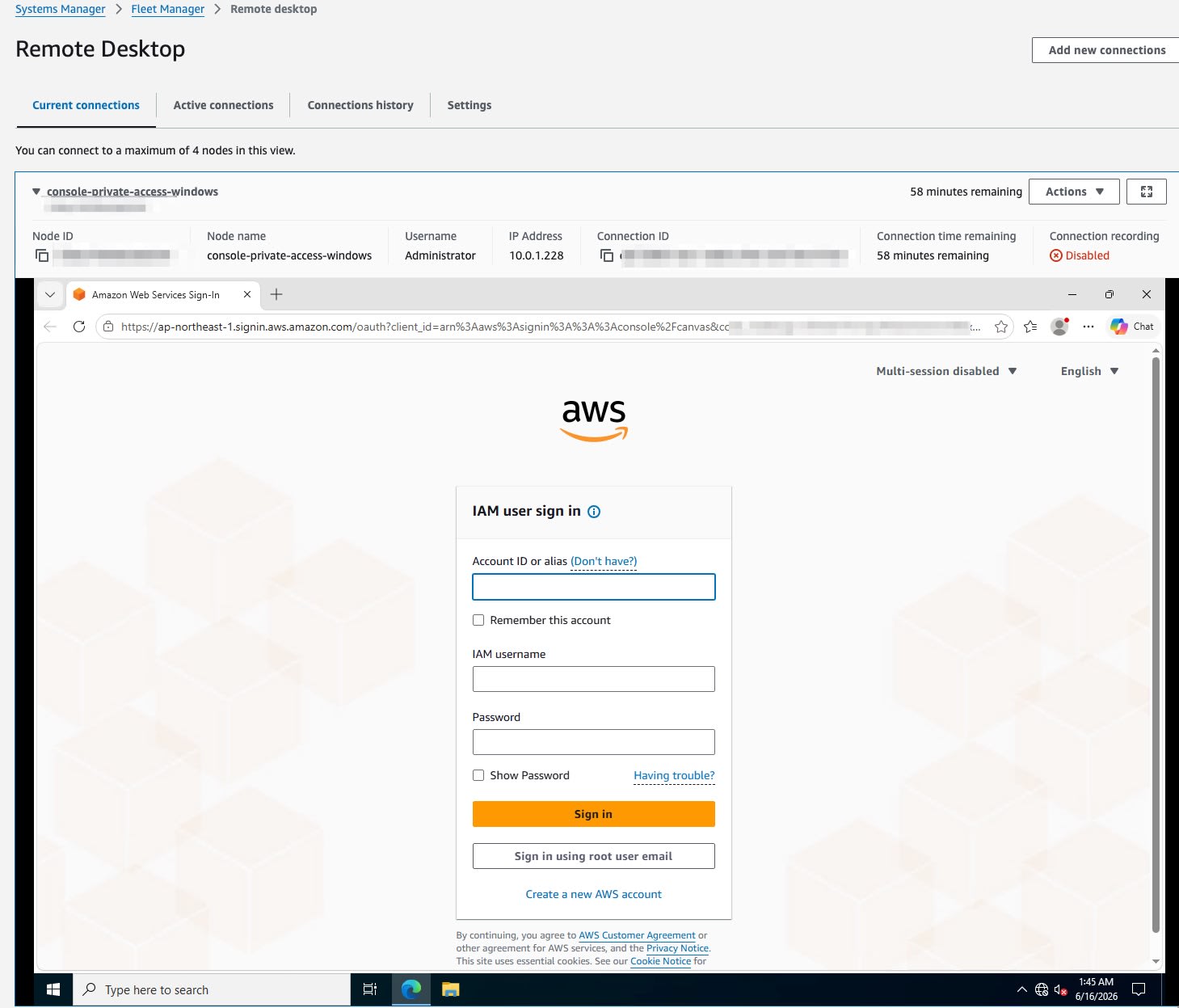
After deploying the CloudFormation stack, I confirmed that the EC2 instance was registered as an SSM managed instance and connected via RDP using Fleet Manager Remote Desktop. I accessed https://console.aws.amazon.com from the Edge browser inside the EC2 instance.
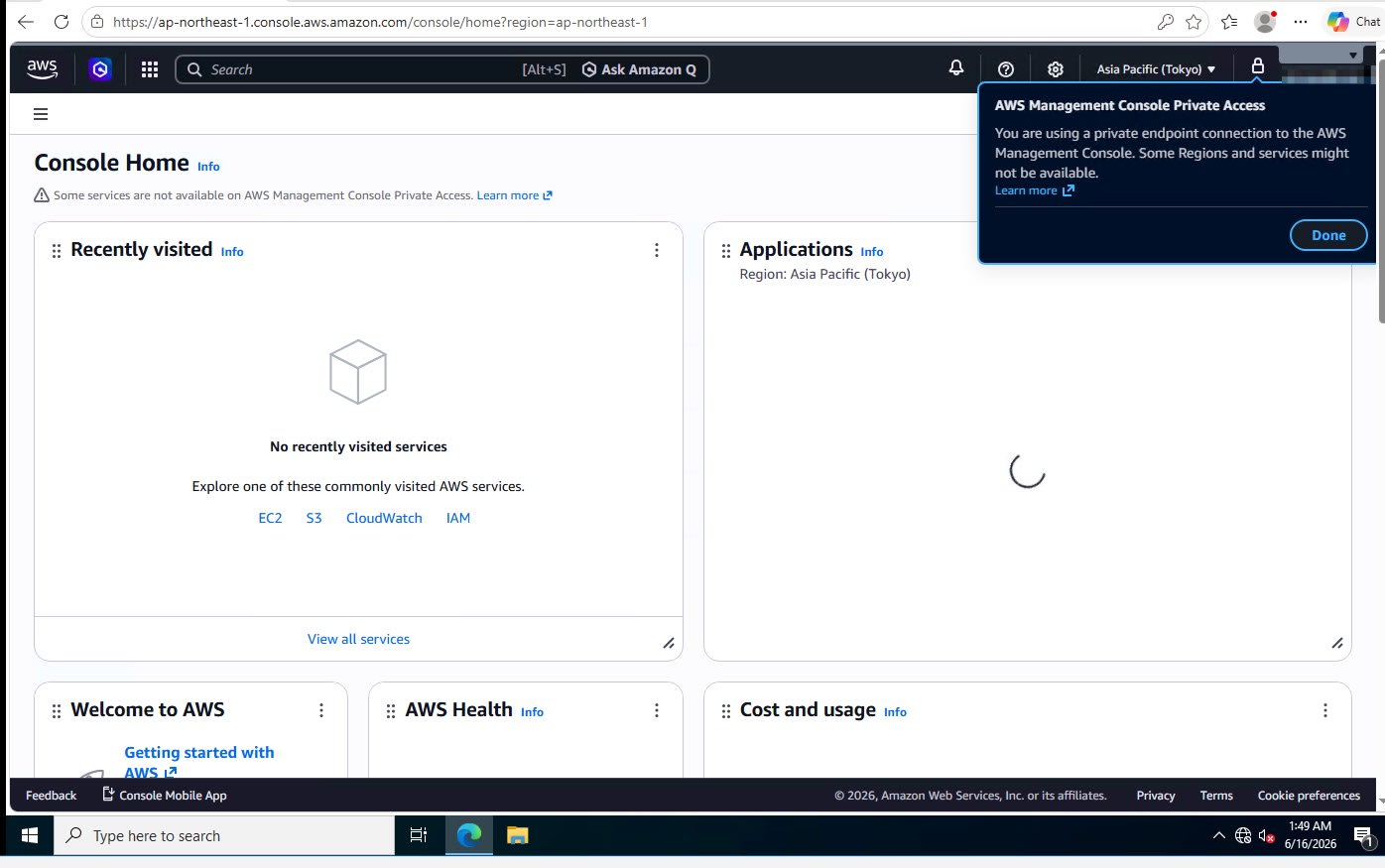
After entering the IAM user credentials and signing in, the Console Home was displayed. A Private Access banner is shown at the top of the screen.
Verifying Console Screens for Supported Services
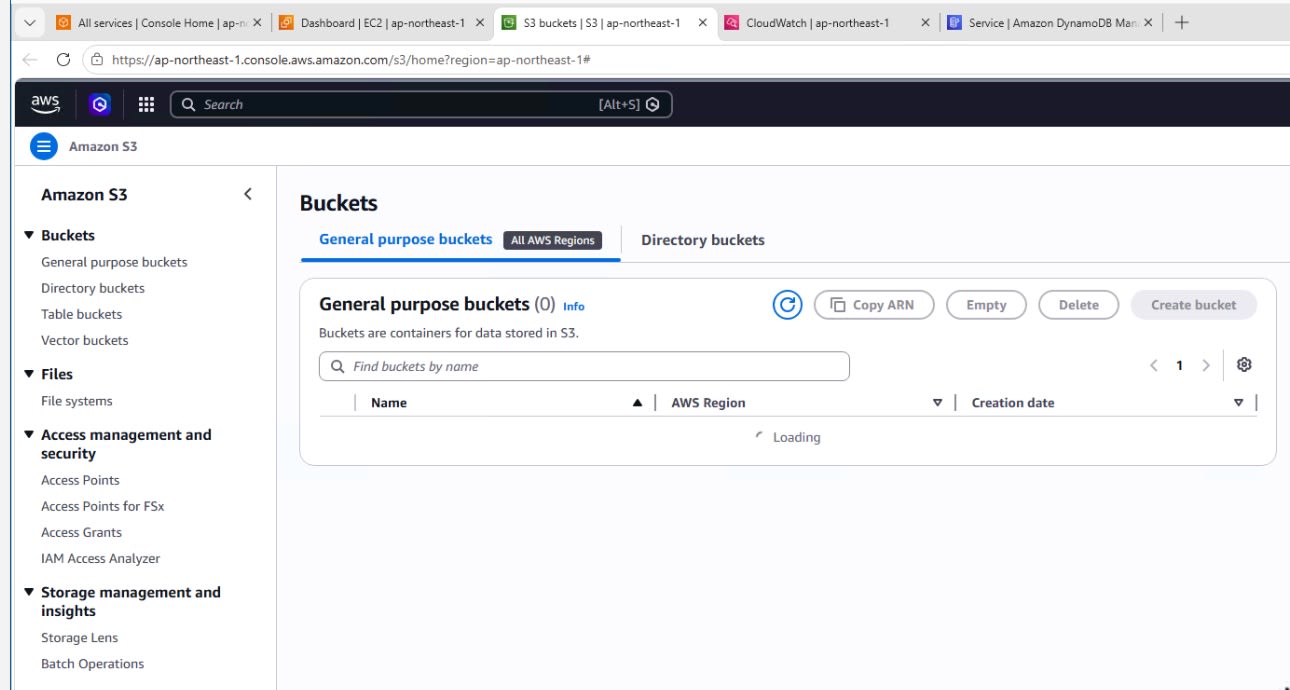
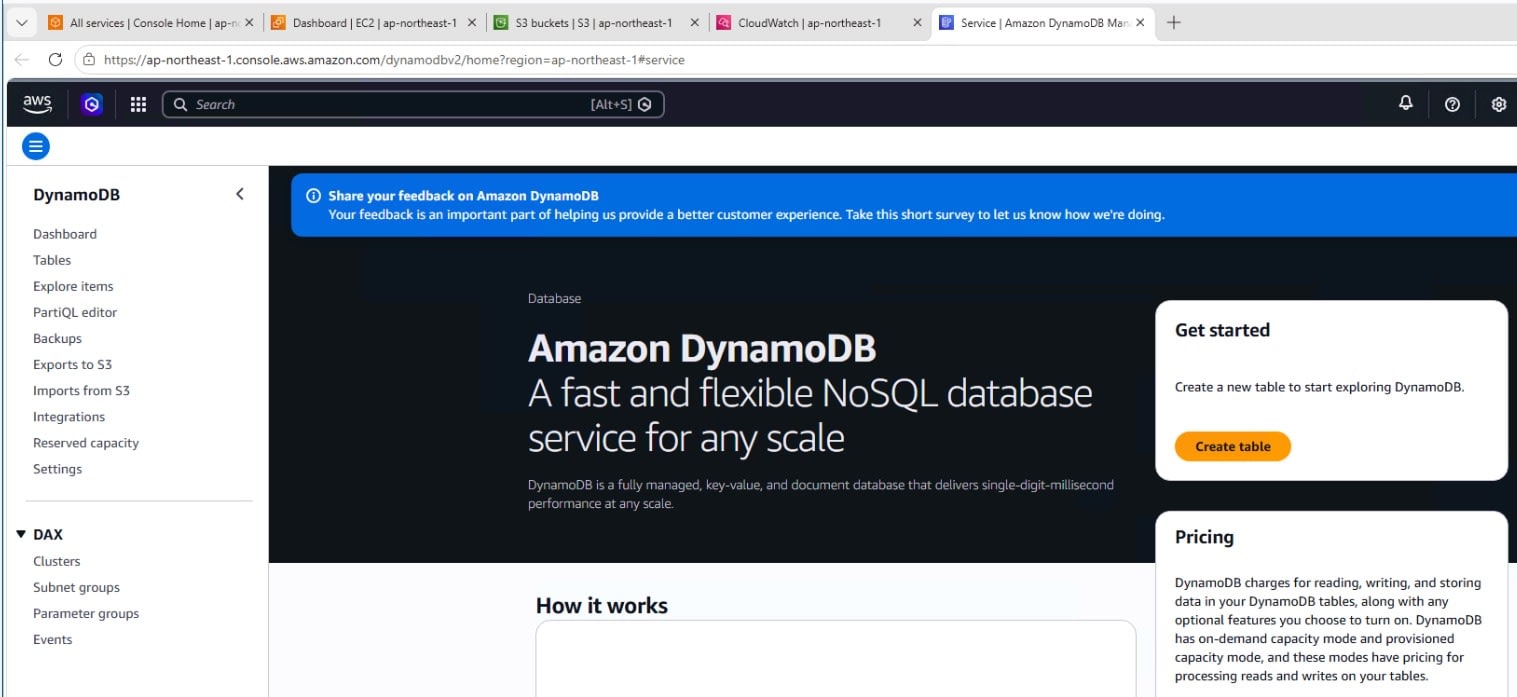
I checked the console screens for S3 and DynamoDB. Since this configuration includes Gateway Endpoints for S3 / DynamoDB, I was able to display the S3 bucket list screen and the DynamoDB console screen.
S3
DynamoDB
Behavior When Service API Endpoint Is Not Added
When I opened the EC2 console screen, the screen itself was displayed, but since no EC2 service API endpoint was added, resource information retrieval failed and multiple API Errors occurred.
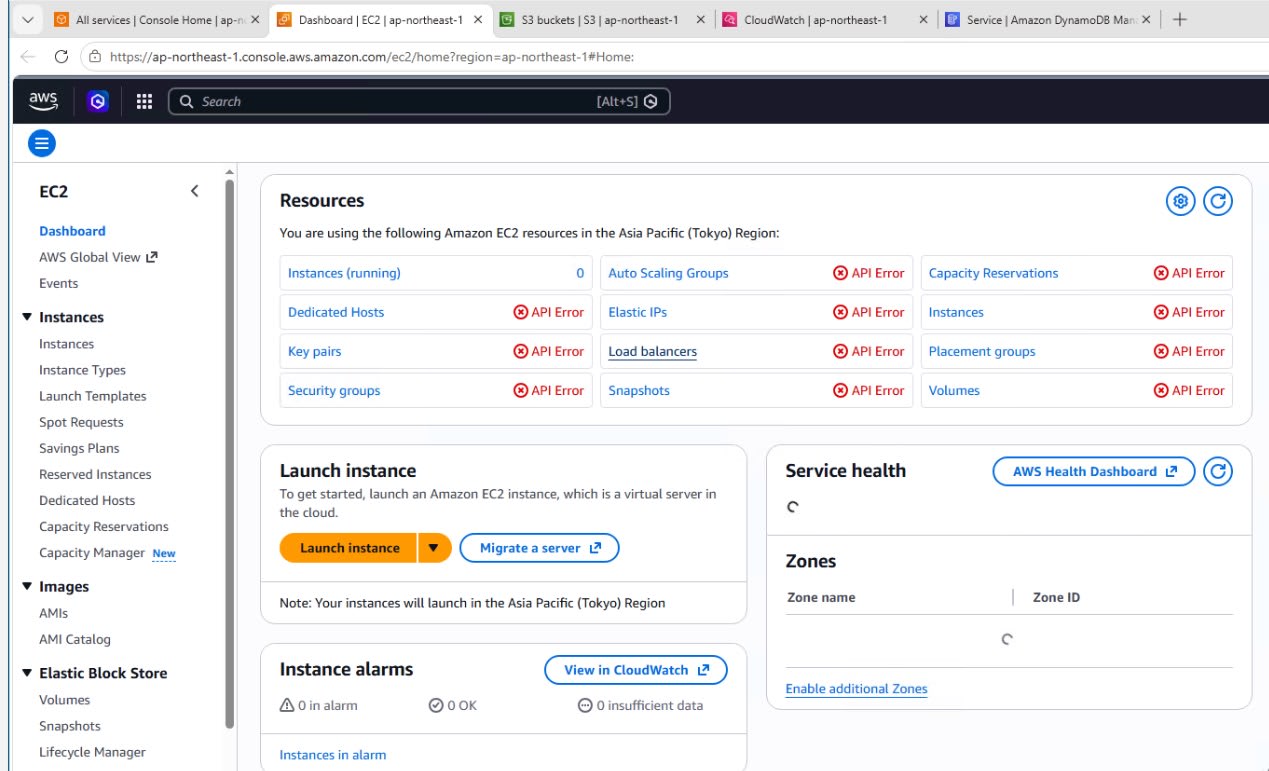
The console UI display (via console / signin / console-static endpoints) and service API connectivity are separate layers. Even if you can display the console screen, data retrieval will fail if the service API endpoint required for that screen or its operations is not present.
Notes
- A list of supported services is provided in the official documentation (approximately 45 services as of June 16, 2026). Service consoles not on the list are not supported via Private Access. A separate path such as an internet route is required to use them
- AWS CloudShell and the Default Region setting cannot be used via Private Access
- Depending on the console operations performed, additional service API endpoints may be required
- This verification uses a minimal configuration prioritizing reproducibility. For production use, please control the scope of access using IAM policies, endpoint policies for the corresponding VPC Endpoints, etc.
- Gateway Endpoints are dedicated to resources within the VPC. Separate design is required when using them from on-premises via Direct Connect
Summary
When Console Private Access was released in 2023, an internet connection was still required to retrieve static assets.
With the addition of the console-static endpoint this time, this restriction has been resolved. In this verification, by combining the Interface Endpoints for console display (console / signin / console-static) and the VPC Endpoints for the required service APIs from a Windows EC2 instance placed in a VPC without an IGW / NAT, I confirmed sign-in to the AWS Management Console, the S3 bucket list screen, and the DynamoDB console screen.
For supported service consoles, it is now possible to configure console access via VPC Endpoints, expanding the options for network control. On the other hand, configurations that eliminate the internet path introduce additional considerations such as availability design for private connectivity and costs, so we recommend evaluating these factors when adopting this approach.
Reference Links
