AWS Management Console Private Access でインターネット接続なしにコンソールへアクセスしてみた

はじめに
2026年6月15日、AWS Management Console Private Access がインターネット接続なしでの動作に対応しました。
従来の Console Private Access は console / signin の VPC エンドポイントによるアカウント制限が主な用途でしたが、コンソール UI の描画に必要な静的アセット(JS / CSS / 画像)の取得にはインターネット接続が必須でした。今回、console-static エンドポイントが追加されたことで、UI 描画を含むコンソールアクセス全体をインターネット経由せずに利用できるようになりました。
本記事ではインターネットアクセスのない VPC に Windows EC2 を配置し、Fleet Manager Remote Desktop 経由でブラウザを操作してコンソールへのサインインと、一部サービス画面の表示・API 通信を検証しました。
検証環境と構成
- リージョン: ap-northeast-1(東京)
- VPC: 10.0.0.0/16、DNS サポート / DNS ホスト名 有効
- サブネット: プライベートのみ(10.0.1.0/24)、IGW / NAT なし
- EC2: Windows Server 2022、t3.medium、パブリック IP なし
- 接続方法: SSM Fleet Manager(Remote Desktop)
- サインイン方式: IAM ユーザー
「インターネット接続なし」の対象は VPC 内 EC2 からコンソール / AWS API への通信経路です。Fleet Manager を開く管理端末側の経路は対象外です。
VPC エンドポイント
マネジメントコンソール用(Interface 型、PrivateDNS 有効)
| サービス名 | 用途 |
|---|---|
| com.amazonaws.ap-northeast-1.console | マネジメントコンソール |
| com.amazonaws.ap-northeast-1.signin | サインイン |
| com.amazonaws.ap-northeast-1.console-static | 静的コンテンツ配信(今回追加) |
SSM 接続用(Interface 型、PrivateDNS 有効)
| サービス名 | 用途 |
|---|---|
| com.amazonaws.ap-northeast-1.ssm | SSM サービス |
| com.amazonaws.ap-northeast-1.ssmmessages | SSM セッション通信 |
| com.amazonaws.ap-northeast-1.ec2messages | EC2 メッセージ |
サービス API 用(Gateway 型)
| サービス名 | 用途 |
|---|---|
| com.amazonaws.ap-northeast-1.s3 | S3 API(バケット一覧画面表示の確認用) |
| com.amazonaws.ap-northeast-1.dynamodb | DynamoDB API(コンソール画面表示の確認用) |
セキュリティグループはエンドポイント用にインバウンド 443/TCP を VPC CIDR から許可しています。
CloudFormation テンプレート
CloudFormation テンプレート(console-private-access.yaml)
AWSTemplateFormatVersion: "2010-09-09"
Description: Console Private Access - Internet-free VPC with Management Console access via PrivateLink

Parameters:
  LatestWindowsAmi:
    Type: AWS::SSM::Parameter::Value<AWS::EC2::Image::Id>
    Default: /aws/service/ami-windows-latest/Windows_Server-2022-English-Full-Base

Resources:
  # VPC
  VPC:
    Type: AWS::EC2::VPC
    Properties:
      CidrBlock: 10.0.0.0/16
      EnableDnsSupport: true
      EnableDnsHostnames: true
      Tags:
        - Key: Name
          Value: console-private-access-vpc

  # Private Subnet
  PrivateSubnet:
    Type: AWS::EC2::Subnet
    Properties:
      VpcId: !Ref VPC
      CidrBlock: 10.0.1.0/24
      AvailabilityZone: !Select [0, !GetAZs ""]
      MapPublicIpOnLaunch: false
      Tags:
        - Key: Name
          Value: console-private-access-private-subnet

  # Route Table (no routes to internet)
  PrivateRouteTable:
    Type: AWS::EC2::RouteTable
    Properties:
      VpcId: !Ref VPC
      Tags:
        - Key: Name
          Value: console-private-access-rt

  PrivateSubnetRouteTableAssociation:
    Type: AWS::EC2::SubnetRouteTableAssociation
    Properties:
      SubnetId: !Ref PrivateSubnet
      RouteTableId: !Ref PrivateRouteTable

  # Security Group for VPC Endpoints
  EndpointSG:
    Type: AWS::EC2::SecurityGroup
    Properties:
      GroupDescription: Allow HTTPS from VPC
      VpcId: !Ref VPC
      SecurityGroupIngress:
        - IpProtocol: tcp
          FromPort: 443
          ToPort: 443
          CidrIp: 10.0.0.0/16
      Tags:
        - Key: Name
          Value: console-private-access-endpoint-sg

  # Security Group for EC2
  EC2SG:
    Type: AWS::EC2::SecurityGroup
    Properties:
      GroupDescription: EC2 instance SG
      VpcId: !Ref VPC
      Tags:
        - Key: Name
          Value: console-private-access-ec2-sg

  # VPC Endpoints - Console
  ConsoleEndpoint:
    Type: AWS::EC2::VPCEndpoint
    Properties:
      VpcId: !Ref VPC
      ServiceName: !Sub com.amazonaws.${AWS::Region}.console
      VpcEndpointType: Interface
      SubnetIds:
        - !Ref PrivateSubnet
      SecurityGroupIds:
        - !Ref EndpointSG
      PrivateDnsEnabled: true

  SigninEndpoint:
    Type: AWS::EC2::VPCEndpoint
    Properties:
      VpcId: !Ref VPC
      ServiceName: !Sub com.amazonaws.${AWS::Region}.signin
      VpcEndpointType: Interface
      SubnetIds:
        - !Ref PrivateSubnet
      SecurityGroupIds:
        - !Ref EndpointSG
      PrivateDnsEnabled: true

  ConsoleStaticEndpoint:
    Type: AWS::EC2::VPCEndpoint
    Properties:
      VpcId: !Ref VPC
      ServiceName: !Sub com.amazonaws.${AWS::Region}.console-static
      VpcEndpointType: Interface
      SubnetIds:
        - !Ref PrivateSubnet
      SecurityGroupIds:
        - !Ref EndpointSG
      PrivateDnsEnabled: true

  # VPC Endpoints - SSM
  SsmEndpoint:
    Type: AWS::EC2::VPCEndpoint
    Properties:
      VpcId: !Ref VPC
      ServiceName: !Sub com.amazonaws.${AWS::Region}.ssm
      VpcEndpointType: Interface
      SubnetIds:
        - !Ref PrivateSubnet
      SecurityGroupIds:
        - !Ref EndpointSG
      PrivateDnsEnabled: true

  SsmMessagesEndpoint:
    Type: AWS::EC2::VPCEndpoint
    Properties:
      VpcId: !Ref VPC
      ServiceName: !Sub com.amazonaws.${AWS::Region}.ssmmessages
      VpcEndpointType: Interface
      SubnetIds:
        - !Ref PrivateSubnet
      SecurityGroupIds:
        - !Ref EndpointSG
      PrivateDnsEnabled: true

  Ec2MessagesEndpoint:
    Type: AWS::EC2::VPCEndpoint
    Properties:
      VpcId: !Ref VPC
      ServiceName: !Sub com.amazonaws.${AWS::Region}.ec2messages
      VpcEndpointType: Interface
      SubnetIds:
        - !Ref PrivateSubnet
      SecurityGroupIds:
        - !Ref EndpointSG
      PrivateDnsEnabled: true

  # VPC Endpoints - Gateway
  S3Endpoint:
    Type: AWS::EC2::VPCEndpoint
    Properties:
      VpcId: !Ref VPC
      ServiceName: !Sub com.amazonaws.${AWS::Region}.s3
      VpcEndpointType: Gateway
      RouteTableIds:
        - !Ref PrivateRouteTable

  DynamoDBEndpoint:
    Type: AWS::EC2::VPCEndpoint
    Properties:
      VpcId: !Ref VPC
      ServiceName: !Sub com.amazonaws.${AWS::Region}.dynamodb
      VpcEndpointType: Gateway
      RouteTableIds:
        - !Ref PrivateRouteTable

  # IAM Role for EC2 (SSM)
  EC2Role:
    Type: AWS::IAM::Role
    Properties:
      RoleName: console-private-access-ec2-role
      AssumeRolePolicyDocument:
        Version: "2012-10-17"
        Statement:
          - Effect: Allow
            Principal:
              Service: ec2.amazonaws.com
            Action: sts:AssumeRole
      ManagedPolicyArns:
        - arn:aws:iam::aws:policy/AmazonSSMManagedInstanceCore

  EC2InstanceProfile:
    Type: AWS::IAM::InstanceProfile
    Properties:
      Roles:
        - !Ref EC2Role

  # EC2 Instance
  WindowsInstance:
    Type: AWS::EC2::Instance
    Properties:
      ImageId: !Ref LatestWindowsAmi
      InstanceType: t3.medium
      SubnetId: !Ref PrivateSubnet
      SecurityGroupIds:
        - !Ref EC2SG
      IamInstanceProfile: !Ref EC2InstanceProfile
      Tags:
        - Key: Name
          Value: console-private-access-windows

Outputs:
  InstanceId:
    Value: !Ref WindowsInstance
    Description: EC2 Instance ID (use SSM Fleet Manager to RDP)
  VpcId:
    Value: !Ref VPC
やってみた
サインイン
CloudFormation スタックのデプロイ後、EC2 が SSM マネージドインスタンスとして登録されたことを確認し、Fleet Manager の Remote Desktop で RDP 接続しました。EC2 内の Edge ブラウザで https://console.aws.amazon.com にアクセスしました。
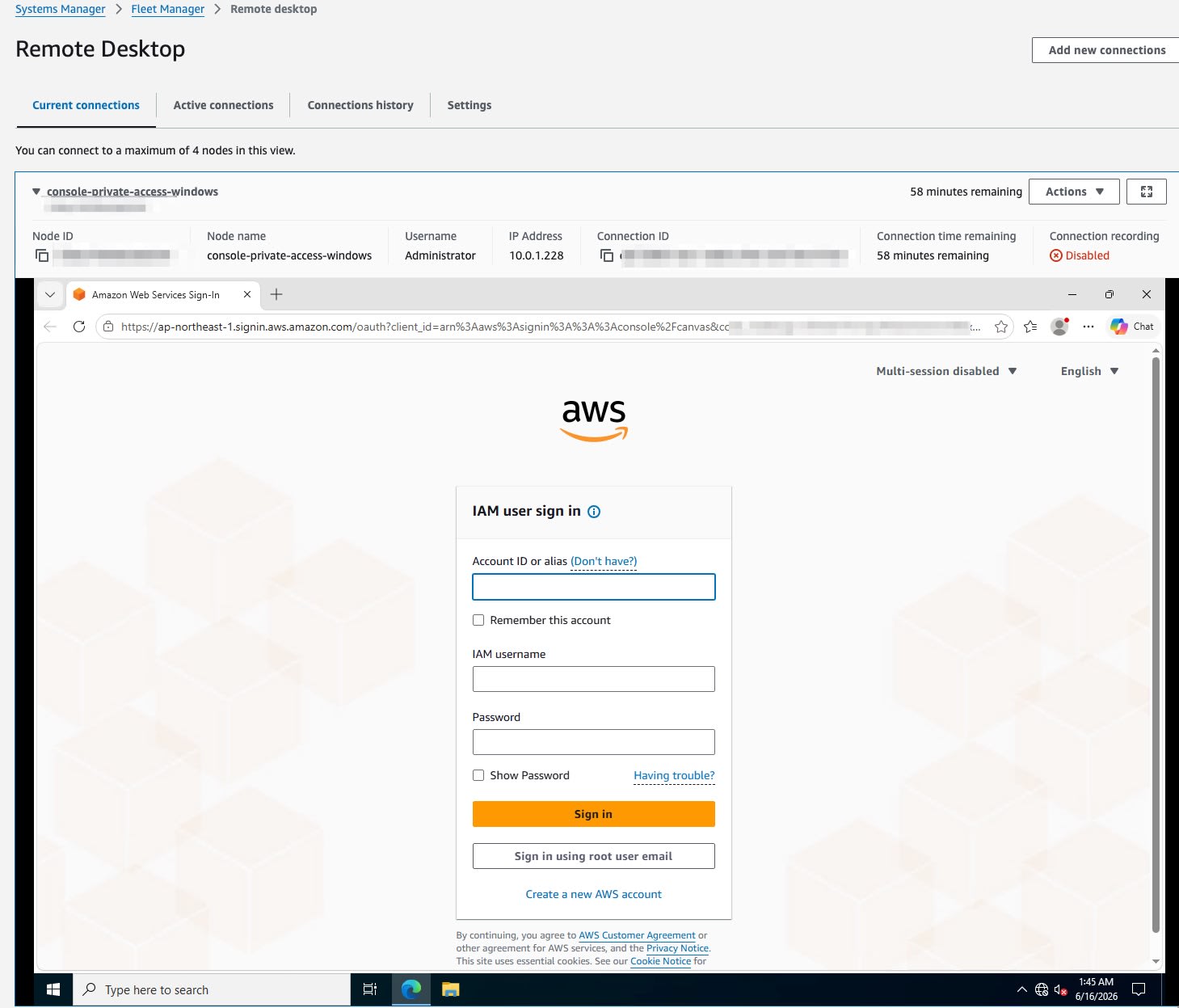
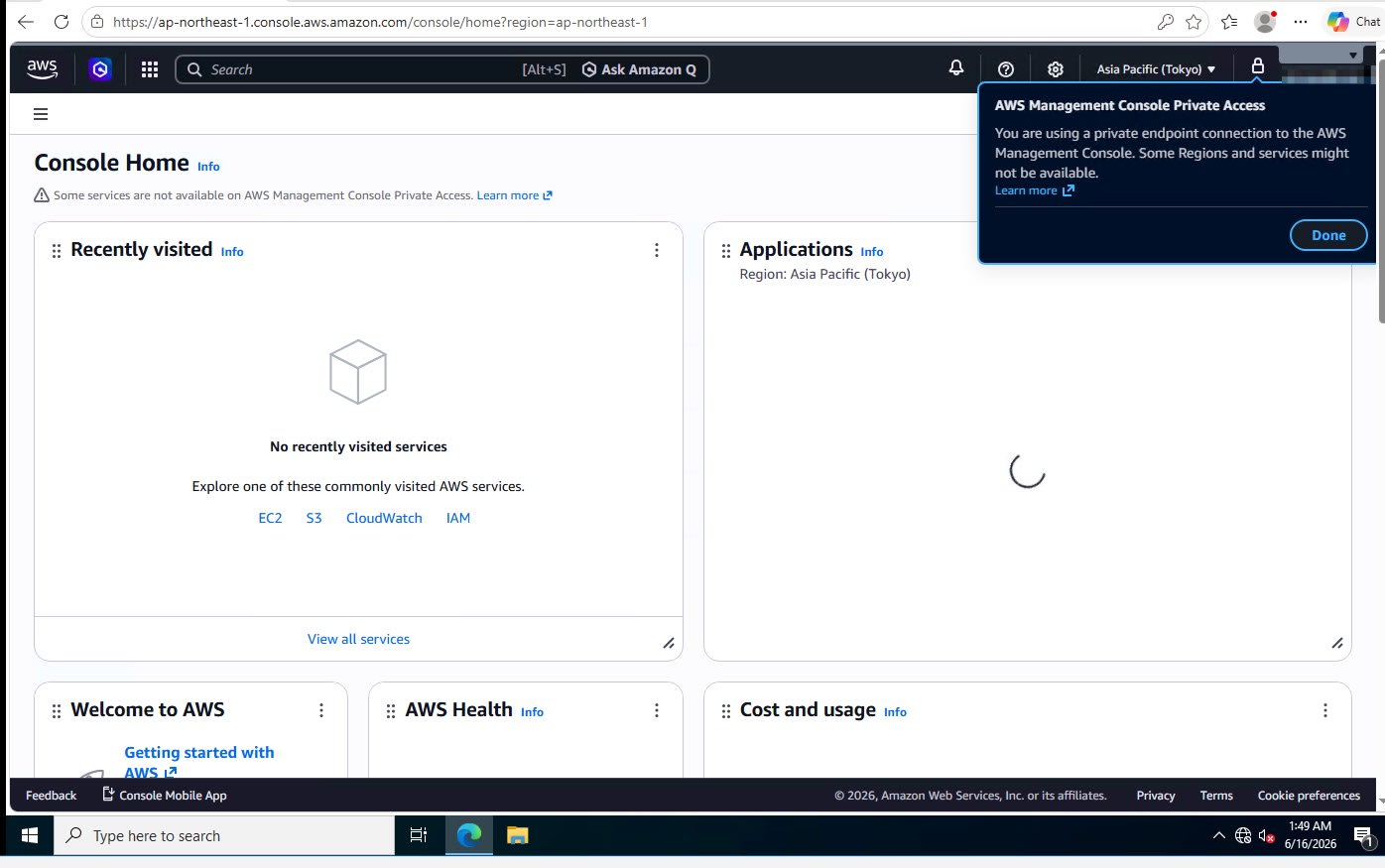
IAM ユーザーの認証情報を入力してサインインすると、Console Home が表示されました。画面上部に Private Access バナーが表示されています。
サポート対象サービスのコンソール確認
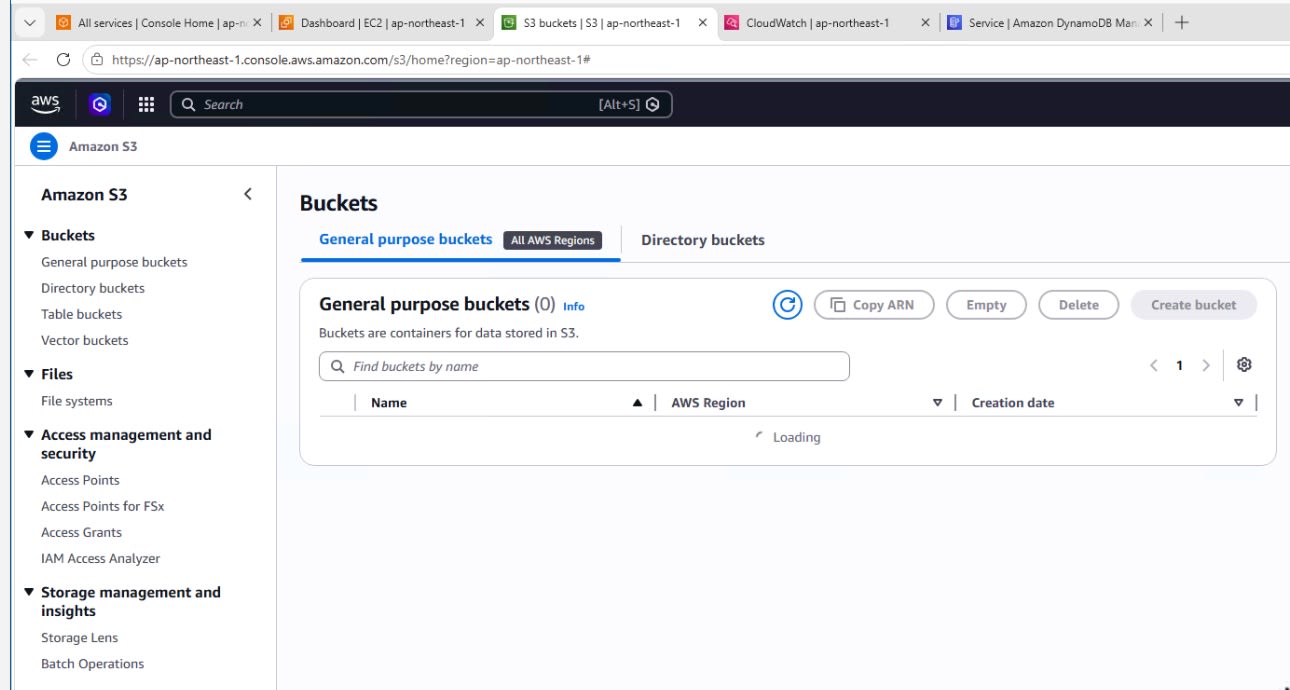
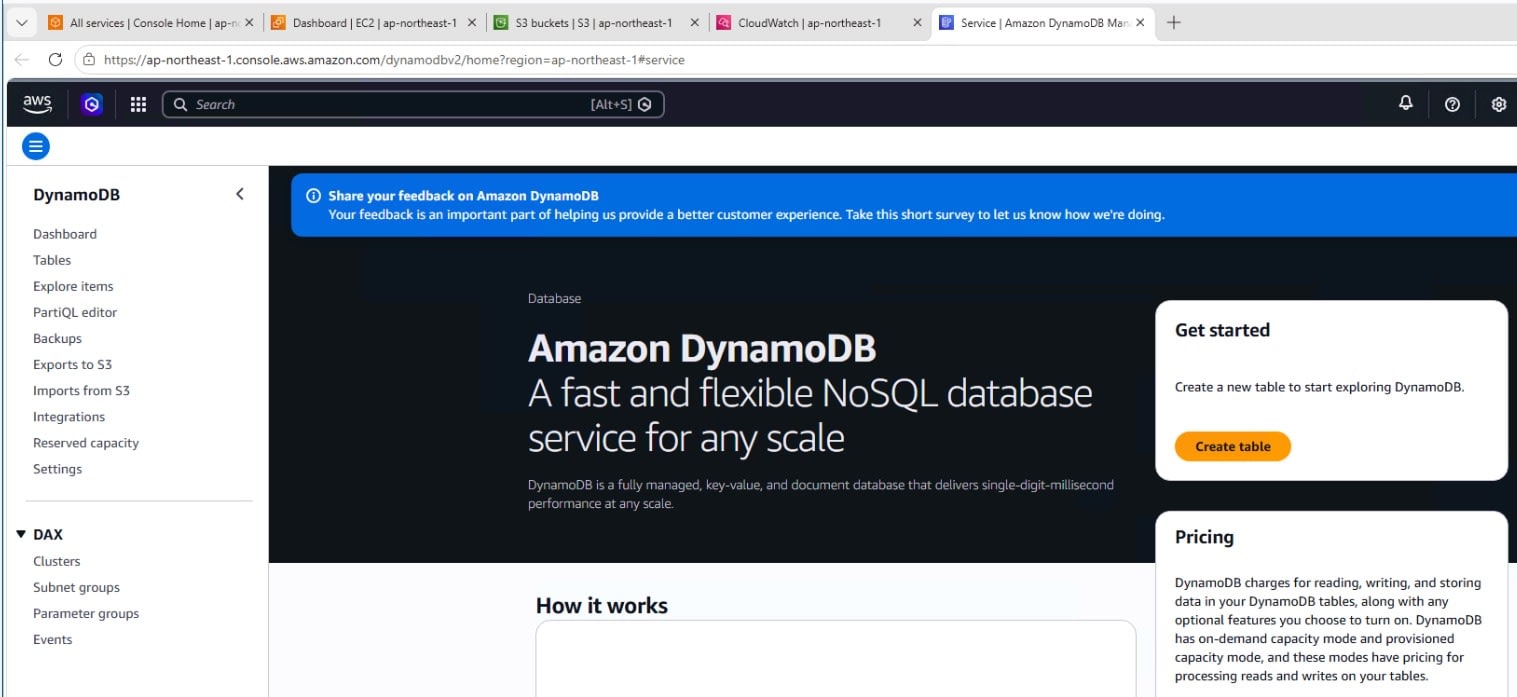
S3 と DynamoDB のコンソール画面を確認しました。今回の構成では S3 / DynamoDB の Gateway Endpoint を作成しているため、S3 のバケット一覧画面と DynamoDB のコンソール画面を表示できました。
S3
DynamoDB
サービス API エンドポイント未追加時の挙動
EC2 コンソール画面を開いたところ、画面自体は表示されますが、EC2 サービスの API エンドポイントを追加していないためリソース情報の取得に失敗し、API Error が多発しました。
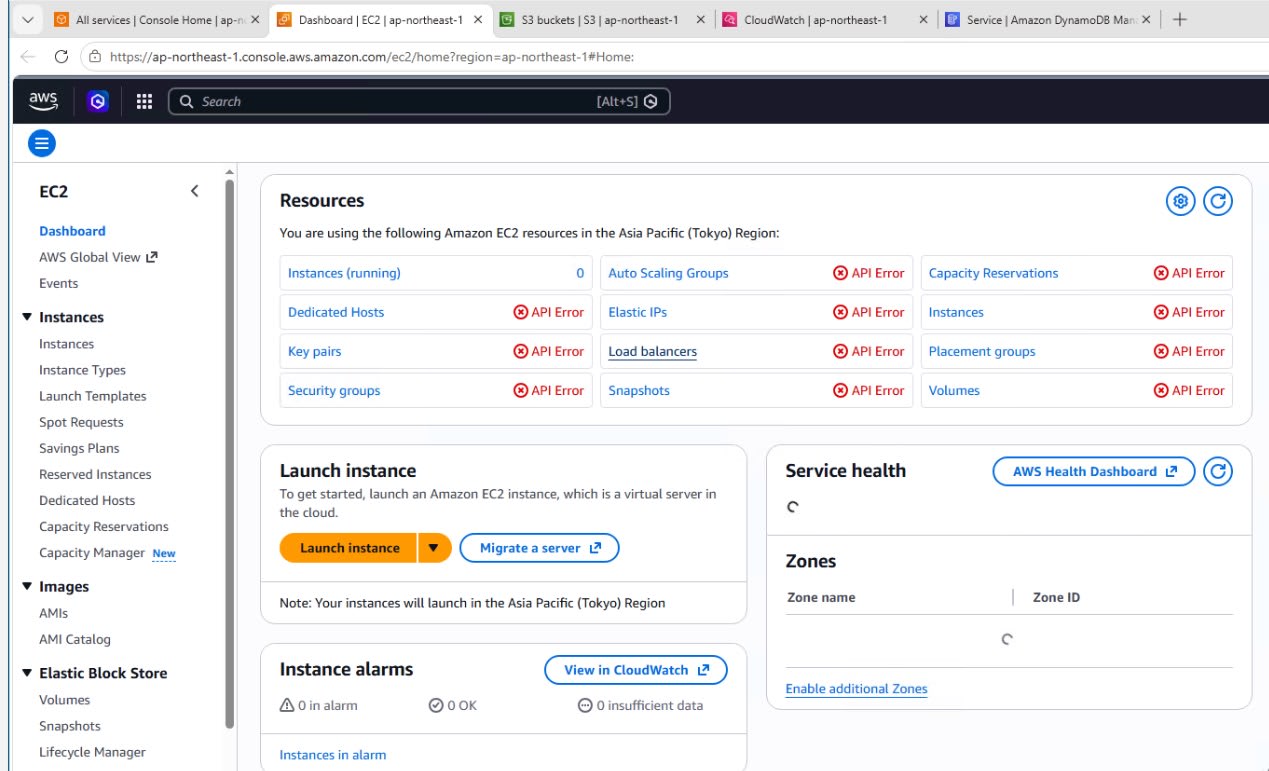
コンソールの UI 表示(console / signin / console-static エンドポイント経由)とサービス API の疎通は別レイヤーです。コンソール画面を表示できても、その画面や操作で必要となるサービス API エンドポイントがなければ、データ取得に失敗する場合があります。
注意事項
- サポート対象サービスは公式ドキュメントに一覧が掲載されています(2026年6月16日時点で約45サービス)。一覧外のサービスコンソールは Private Access 経由ではサポートされません。利用する場合はインターネット経路など別経路が必要です
- AWS CloudShell および Default Region 設定は、Private Access 経由では利用できません
- コンソール操作の内容によっては、追加のサービス API エンドポイントが必要になる場合があります
- 本検証では再現性を優先した最小構成としています。本番利用時は IAM policy や、対応する VPC Endpoint の endpoint policy 等でアクセス範囲を制御してください
- Gateway Endpoint は VPC 内リソース専用です。オンプレミスから Direct Connect 経由で利用する場合は別途設計が必要です
まとめ
2023年に Console Private Access がリリースされた際は、静的アセットの取得にインターネット接続が必要な状態でした。
今回、console-static エンドポイントの追加により、この制約が解消されました。今回の検証では、IGW / NAT のない VPC に配置した Windows EC2 から、コンソール表示用の Interface Endpoint(console / signin / console-static)と必要なサービス API 用の VPC Endpoint を組み合わせることで、AWS マネジメントコンソールへのサインイン、S3 のバケット一覧画面、DynamoDB のコンソール画面の表示を確認しました。
サポート対象のサービスコンソールであれば、コンソールアクセスを VPC Endpoint 経由で構成できるようになり、ネットワーク制御の選択肢が広がりました。一方で、インターネット経路を排除する構成では閉域接続の可用性設計やコストなど考慮すべき点も増えるため、採用時はこれらを含めた評価をおすすめします。
参考リンク