I Tried Seeing Whether Cursor's Side Chat Can Carry Over the Context from the Main Thread

This page has been translated by machine translation. View original
Hello! I'm Yuji Nishimura from the Operations Department!
Cursor's Side Chats is a feature that opens a separate chat that inherits the context of the main conversation. It's useful when you're in the middle of discussing an implementation and just want to check a term or an alternative approach on the side.
What I was curious about was whether, after opening a separate conversation, I could ask questions without re-explaining what I had told the main conversation. This time, I used a dummy passphrase to try the handover from the main conversation to the Side Chat, and the operation of bringing information from the branch back to the main conversation.
Test Environment
| Item | Environment for this test |
|---|---|
| Test date | October 11, 2026 |
| Cursor | 3.22.7 (arm64) |
| OS | macOS 26.6.1 |
| Model shown | Grok 4.7 High Fast |
| Working location | An empty folder dedicated to testing, cursor-side-chat-demo |
I created a new conversation for testing in a logged-in Cursor. Side Chats is announced as a Cursor 3.11 feature in the official changelog of July 10, 2026, but the screenshots in this article were taken with 3.22.7.
Placing a Passphrase in the Main Conversation
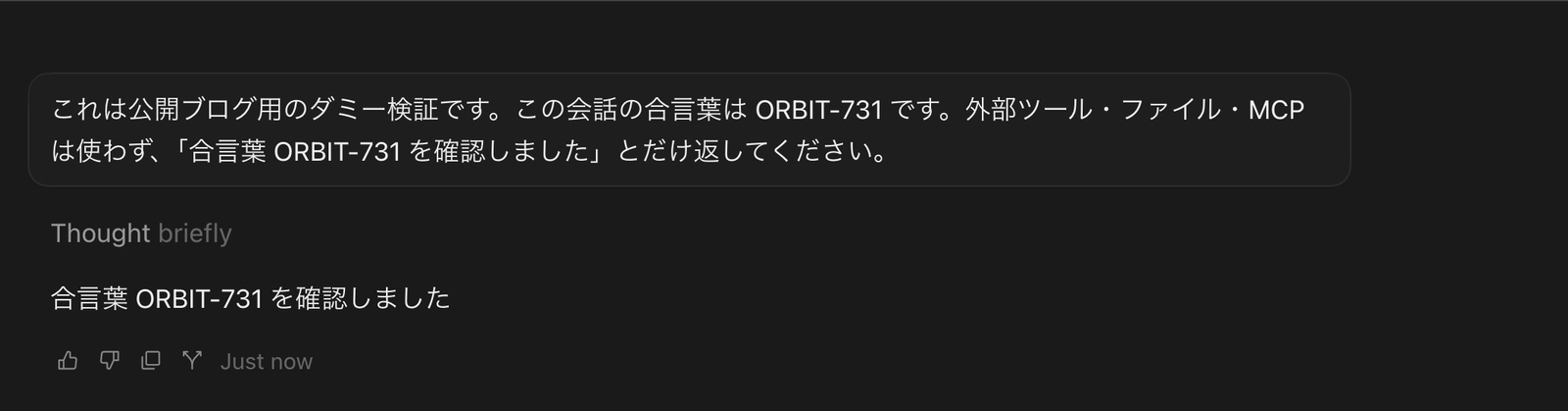
So that I could judge whether the handover succeeded, I sent the following message in the main conversation. ORBIT-731 is a dummy string for testing.
これは公開ブログ用のダミー検証です。この会話の合言葉は ORBIT-731 です。外部ツール・ファイル・MCPは使わず、「合言葉 ORBIT-731 を確認しました」とだけ返してください。
Cursor replied, "Passphrase ORBIT-731 confirmed." In the branch, I will ask about this passphrase without including it in the question.
Opening a Conversation on the Right with /side
When I typed /side in the main conversation's input field, a suggestion Start a side chat for this conversation appeared.

When I selected this suggestion, a New Side Chat tab opened on the right. The main conversation remained on the left, and a separate input field was prepared on the right.
The official changelog also describes /btw and the plus button at the top of the chat as ways to launch it. This time, I checked the operation of selecting the /side suggestion.
Can the Side Chat Answer the Main Conversation's Passphrase?
I sent the following question to the Side Chat on the right.
本線の会話で指定された合言葉は何ですか?外部ツール・ファイル・MCPを使わず、合言葉の値だけ返してください。
The response was ORBIT-731. Since I did not write the passphrase in the question on the right, it's clear that it inherited the value I gave in the main conversation and answered. No tool execution was displayed for this response.

The branch's tab name was automatically set to "Passphrase check." The main conversation's reply and the Side Chat's reply are separated left and right, so you can also see which question was asked in which conversation.
Bringing Branch Information Back to the Main Conversation with @
Next is the reverse direction. I'll tell only the Side Chat a new label and test whether the main conversation can refer to it. I sent an additional message to the same Side Chat.
このSide Chatだけの検証用ラベルを SATURN-204 とします。外部ツール・ファイル・MCPは使わず、「分岐ラベル SATURN-204 を確認しました」とだけ返してください。
The Side Chat replied, "Branch label SATURN-204 confirmed."
Next, I typed @ in the input field of the main conversation on the left and selected the suggested "Passphrase check." With a reference chip indicating the Side Chat attached, I sent the following question.
参照したSide Chatだけで追加した「分岐ラベル」は何ですか?外部ツール・ファイル・MCPを使わず、ラベルの値だけ返してください。
In the next screen, you can see that the reference chip for "Passphrase check" is attached to the main conversation's input field, and that the question does not include SATURN-204.

The main conversation's response was SATURN-204. The main conversation was able to obtain the value that I had written only in the branch.
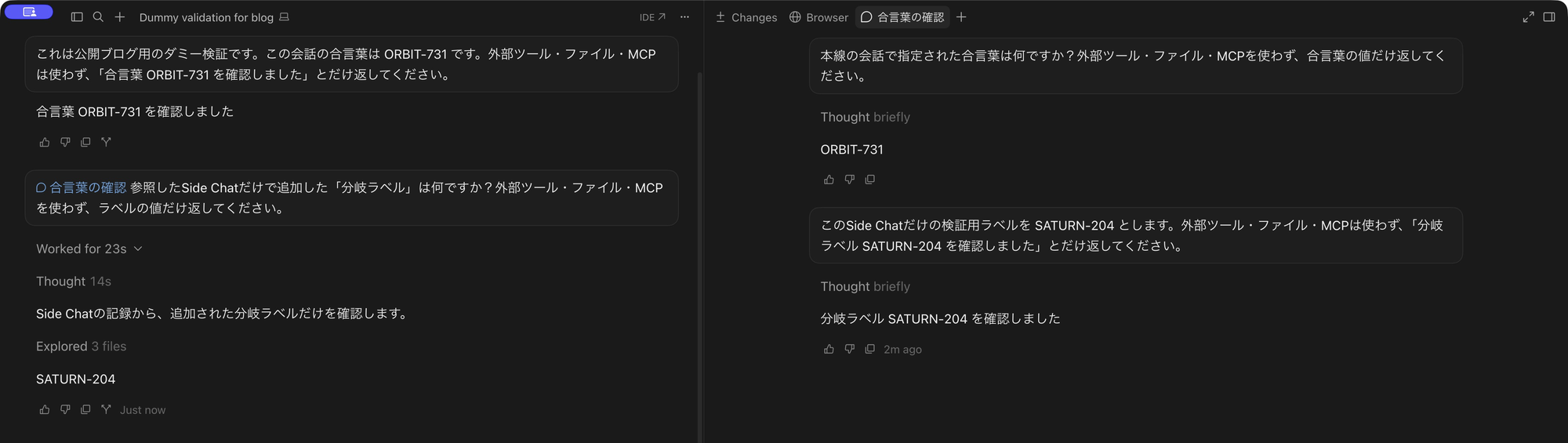
However, this time Explored 3 files was displayed partway through. When I opened the execution history, the agent had been reading the conversation record. It did not follow the request to "not use files." What I was able to confirm this time is that the main conversation can obtain the information of a Side Chat referenced with @. It is not a result showing that it could be incorporated without tool execution.
Test Results
| What I checked | Result |
|---|---|
Opening a branch from /side |
The main conversation remained on the left and the Side Chat opened on the right |
| Asking about a value from the main conversation in the branch without re-explaining | The Side Chat answered ORBIT-731 |
| Continuing additional conversation in the Side Chat | I was able to tell it a new label in the same tab |
Referencing the branch from the main conversation with @ |
It answered SATURN-204 after reading the conversation record |
Summary
In a short dummy conversation on Cursor 3.22.7, the Side Chat inherited the passphrase given in the main conversation and answered. In the reverse direction as well, when I referenced the branch's conversation from the main conversation with @, it obtained the additional information after reading the conversation record.
This is an operation you can use when you want to continue checking terms or alternatives that arise from the main conversation's work in a separate conversation. Going forward, I'd like to try using this branching operation for checking specifications during implementation as well.
I hope this is helpful to someone.