How to identify whether a CodeBuild managed image is Amazon Linux 2

This page has been translated by machine translation. View original
Introduction
I'm Fujii (Da) from the Manufacturing Business Technology department.
Amazon Linux 2 (hereafter AL2) will reach EOL on June 30, 2026. Have you all already completed your migration?
I also migrated the Lambda runtime used in my project from provided.al2 to provided.al2023.
I thought the migration was complete with that, but when I later looked at the CodeBuild project settings, I noticed that aws/codebuild/amazonlinux2-x86_64-standard:4.0, which contains amazonlinux2, was specified as the build environment image.
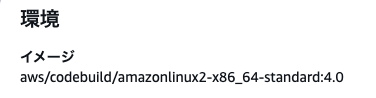
Since the image name contains amazonlinux2, I thought "this is AL2-based, so shouldn't I migrate it?", but upon investigation I found that the amazonlinux2 in the image name alone is not enough to determine whether it's AL2 or not.
This time, I'll introduce how to tell whether a CodeBuild managed image is Amazon Linux 2 or not.
Conclusion
amazonlinux2-x86_64-standard:4.0 is Amazon Linux 2
amazonlinux2-x86_64-standard:5.0 and later are Amazon Linux 2023
The amazonlinux2 in the image identifier does not represent the OS version
In CodeBuild, you specify the build environment image using a name like aws/codebuild/amazonlinux2-x86_64-standard:4.0. This is what the AWS documentation refers to as an "image identifier."
The string amazonlinux2 contained in this image identifier alone is not enough to determine whether it's AL2 or not. There are two reasons for this.
1. Even when the identifier is renamed, the old name can still be used
On November 22, 2024, AWS changed the Linux standard image identifier from amazonlinux2 to amazonlinux (referred to as an alias in the documentation). However, the old name amazonlinux2-… can still be used and points to exactly the same image as the new name amazonlinux-….
On November 22nd, 2024, the aliases for Linux-based standard runtime images were updated from
amazonlinux2toamazonlinux. No manual update is required as the previous aliases are still valid.
Projects that existed before the rename tend to still have the old name amazonlinux2-…, and what I found was also this old name.
2. Even within the same series, the base OS changes with the tag
The amazonlinux2 in the identifier is not an OS version (AL2) but merely the series name of the image. The base OS is determined by the tag number. As stated in the conclusion, even within the same al/x86_64/standard/ series, 4.0's FROM is amazonlinux:2 (AL2) and 5.0 is amazonlinux:2023 (AL2023).
In other words, cases like amazonlinux2-x86_64-standard:5.0 — where the "name is amazonlinux2 but the contents are AL2023" — are possible. This means you should not judge the OS by the name amazonlinux2 alone.
Which image uses which OS
The base OS is determined by the combination of tag number and architecture (the aws/codebuild/ prefix is omitted).
| Image Identifier | Base OS |
|---|---|
amazonlinux(2)-x86_64-standard:2.0 / :3.0 / :4.0 |
Amazon Linux 2 |
amazonlinux(2)-x86_64-standard:corretto8 / :corretto11 |
Amazon Linux 2 |
amazonlinux-x86_64-standard:5.0 / :6.0 |
Amazon Linux 2023 |
amazonlinux(2)-aarch64-standard:1.0 / :2.0 |
Amazon Linux 2 |
amazonlinux-aarch64-standard:3.0 |
Amazon Linux 2023 |
※ amazonlinux(2) applies to either the old or new alias.
Note that tag :3.0 is a special case — for x86_64 it's AL2, but for aarch64 it's AL2023, so they're reversed by architecture. Always check with the architecture included. The latest mapping table can be confirmed at the following link.
About deprecated images in CodeBuild
If you find an AL2-based image, you'll want to keep migration in mind. CodeBuild has a concept called "deprecated images," and the documentation states the following.
You can still use these images, but they won't be cached on the build host and will result in higher provisioning times.
Even after deprecation, they don't immediately become unusable, but there are drawbacks such as not being cached on the build host (resulting in slower provisioning) and minor/patch updates stopping (meaning they can no longer be considered secure).
In fact, some AL2-based images are already deprecated.
| Image Identifier | Deprecation Date |
|---|---|
amazonlinux2-x86_64-standard:2.0 |
June 30, 2022 |
amazonlinux2-x86_64-standard:3.0 |
May 9, 2023 |
amazonlinux2-aarch64-standard:1.0 |
March 31, 2023 |
The amazonlinux2-x86_64-standard:4.0 (AL2) I found this time is not yet deprecated at the time of writing, but given AL2's EOL (June 30, 2026), it is expected to become deprecated eventually.
It's reassuring to migrate early to an AL2023-based image (such as amazonlinux-x86_64-standard:5.0).
Summary
amazonlinux2-x86_64-standard:4.0is Amazon Linux 2amazonlinux2-x86_64-standard:5.0and later are Amazon Linux 2023- The OS cannot be determined from the image identifier (
amazonlinux2/amazonlinux) alone amazonlinux2(old name) andamazonlinux(new name) refer to the same image, and the OS changes with the tag (:4.0=AL2,:5.0and later=AL2023)- The base OS is determined by the combination of tag number and architecture (x86_64 / aarch64) (e.g.,
:3.0is AL2 for x86_64 and AL2023 for aarch64) - Some AL2-based images are already deprecated. Migrate to AL2023 early in preparation for EOL (June 30, 2026)
References
