![[Quick Tip] I Tried Sending Data to a Lambda Function in a Different Region Using a CloudWatch Logs Subscription Filter](https://images.ctfassets.net/ct0aopd36mqt/wp-thumbnail-d6a3bc85cad6419960fbda152152cd8c/ba5841cea06b96f4933878762028b090/amazon-cloudwatch?w=3840&fm=webp)
[Quick Tip] I Tried Sending Data to a Lambda Function in a Different Region Using a CloudWatch Logs Subscription Filter

This page has been translated by machine translation. View original
Conclusion First
In the console, you cannot specify a Lambda function in another region for a CloudWatch Logs subscription filter, but by using the put-subscription-filter command, you can specify a Lambda function in a different region within the same account.
Trying It Out
① Based on the following blog, create an SNS topic and a Lambda function (testLambda) in the Tokyo region
• I set the following environment variables for the Lambda function
SNS_TOPIC_ARN: ARN of the created SNS topic
ALARM_SUBJECT: OtherRegionSubscriptionFilterTest
• I set the following resource policy on the Lambda function
{
  "Version": "2012-10-17",
  "Statement": [
    {
      "Sid": "Statement1",
      "Effect": "Allow",
      "Principal": {
        "Service": "logs.amazonaws.com"
      },
      "Action": "lambda:InvokeFunction",
      "Resource": "arn:aws:lambda:ap-northeast-1:XXXXXXXXXXXX:function:testLambda"
    }
  ]
}
• I added permission for the sns:publish action to the Lambda function's role
② Create a log group (testOtherRegionLambdaLog) in the N. Virginia region
③ Set a subscription filter on the log group
Since the Lambda function is not displayed in the console, specify the Lambda function in the Tokyo region using the following aws cli command
aws logs put-subscription-filter \
--log-group-name "testOtherRegionLambdaLog" \
--filter-name "testLambda" \
--filter-pattern "Error" \
--destination-arn "arn:aws:lambda:ap-northeast-1:XXXXXXXXXXXX:function:testLambda"
④ Put logs into the log group
aws logs put-log-events --log-group-name testOtherRegionLambdaLog \
--log-stream-name testOtherRegionLambdaLogStream \
--log-events timestamp=`date +%s%3N`,message="This is Error"
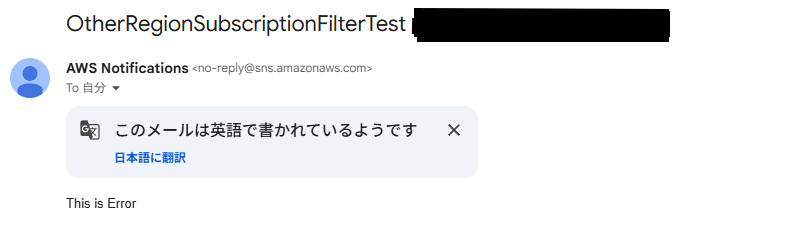
⑤ The Lambda function was executed, and an email was received from the SNS topic
Notes
In the "destination-arn" option of the command executed in ③, the Lambda function is specified directly,
but please note that it must be a Lambda function within the same account.
PutSubscriptionFilter - Request Parameters
destinationArn
The ARN of the destination to deliver matching log events to. Currently, the supported destinations are:
...
A Lambda function belonging to the same account as the subscription filter, for same-account delivery.
In Closing
If you have a requirement to integrate data across regions, I hope this blog is helpful.
About Classmethod Operations Co., Ltd.
We are the operations company of the Classmethod Group.
Our specialist teams in operations, maintenance and development, support, corporate IT, and back office are a group of experts who, through "mechanisms" that make full use of IT and AI, provide everything from business process outsourcing for our customers to problem solving and high-value-added services.
We are recruiting members for a variety of roles.
If you are interested in the culture, mechanisms, and working styles that together realize "Operational Excellence" and "working and living your own way," please be sure to visit the Classmethod Operations Co., Ltd. recruitment site. Note: In January 2026, the company name was changed from Annotation Inc.
