The Story of How Dependabot's Major Version Bumps Broke Due to Ecosystem Unreadiness — The Traps of ESLint 10 and TypeScript 7

This page has been translated by machine translation. View original
Introduction
Are you auto-merging major version bumps proposed by Dependabot?
In one project, Dependabot proposed a bump of eslint 9 → 10. We had it configured to auto-merge if CI passed, but sure enough, CI failed. Upon investigation, we encountered a pattern that's all too common with Dependabot: downstream plugins hadn't yet caught up, not the eslint core itself.
At the same time, a typescript 6 → 7 bump had also come in, and it was broken for the same reason.
This article summarizes the process from investigation to resolution, along with how to safely manage major bumps with Dependabot.
What Broke with ESLint 10
The Error
The following error occurred in the lint step of CI:
TypeError: contextOrFilename.getFilename is not a function
Cause: Breaking API Changes in ESLint 10
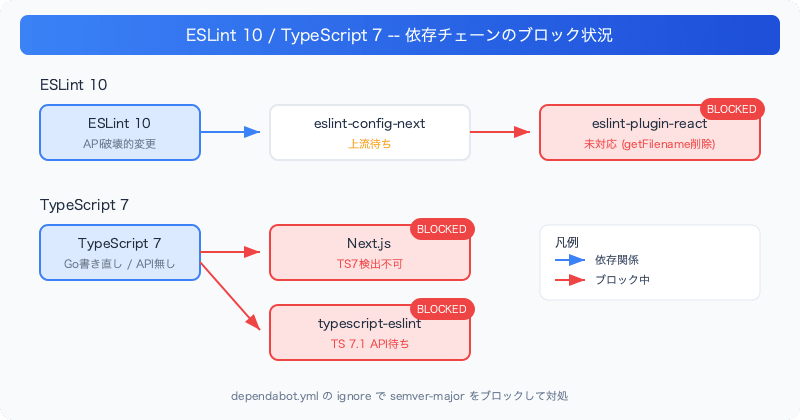
In ESLint 10 (released February 2026), methods such as context.getFilename(), context.getCwd(), and context.getSourceCode() were removed and replaced with property accessors (like context.filename).
This change had been signaled with deprecation warnings since ESLint 9, but whether plugins actually update to reflect this is a separate matter.
eslint-plugin-react Was Not Compatible
eslint-plugin-react@7.37.5 (the latest version on npm) internally calls context.getFilename(). A fix PR exists, but as of July 2026, it has not yet been merged or released.
| Item | Status |
|---|---|
| eslint-plugin-react latest version | 7.37.5 (released over a year ago) |
| ESLint 10 compatibility issue | #3977 — Open |
| Fix PR | #3979 — Not merged |
| eslint-config-next compatibility | vercel/next.js#91702 — Open |
Since eslint-config-next depends on eslint-plugin-react, ESLint 10 cannot be used in Next.js projects until the upstream plugin catches up.
What Broke with TypeScript 7
Right after dealing with ESLint 10, I noticed that the typescript 6 → 7 Dependabot PR had also caused CI to fail.
TypeScript 6 was the last JavaScript-based release, and TypeScript 7 is a new compiler rewritten in Go. The version numbers are sequential, but internally they are completely different things.
Error 1: Next.js Build
It looks like you're trying to use TypeScript but do not have the required package(s) installed.
Despite TypeScript 7 being installed, Next.js was unable to detect it.
Error 2: ESLint
TypeError: Cannot read properties of undefined (reading 'Cjs')
    at @typescript-eslint/typescript-estree@8.63.0_typescript@7.0.2
typescript-eslint crashed while trying to access TypeScript 7's API.
Cause: TypeScript 7 Has No Programmatic API
TypeScript 7 is a new compiler rewritten in Go and does not include the traditional Node.js-oriented programmatic API. The API is expected to be provided in TypeScript 7.1.
| Item | Status |
|---|---|
| typescript-eslint compatibility issue | #12518 — "not planned" (waiting for TS 7.1) |
| Interim workaround | Using @typescript/typescript6 compatibility package to run TS 6 in parallel for ESLint |
| TS 7.1 release estimate | TBD |
Resolution: ignore Rules in dependabot.yml
Until the ecosystem catches up, we configured Dependabot to stop proposing major bumps.
updates:
  - package-ecosystem: "npm"
    directory: "/frontend"
    schedule:
      interval: "weekly"
    ignore:
      # eslint 10 breaks eslint-plugin-react (getFilename removed).
      # Unblock once eslint-config-next supports eslint 10.
      # Tracking: https://github.com/vercel/next.js/issues/91702
      - dependency-name: "eslint"
        update-types: ["version-update:semver-major"]
      # TS 7 has no programmatic API; typescript-eslint and Next.js don't support it.
      # Unblock once typescript-eslint ships TS 7 support (expected after TS 7.1).
      # Tracking: https://github.com/typescript-eslint/typescript-eslint/issues/12518
      - dependency-name: "typescript"
        update-types: ["version-update:semver-major"]
Key points:
update-types: ["version-update:semver-major"]blocks only major bumps. Minor and patch updates will still be proposed- Include Tracking issue URLs in comments to make it clear when the block should be lifted
cooldown.semver-major-daysonly reduces frequency and cannot stop proposals entirely. Useignoreto block them completely
Investigation Workflow
Here is a summary of the process from investigation to resolution in this case. Use this as a reference if you encounter a similar issue.
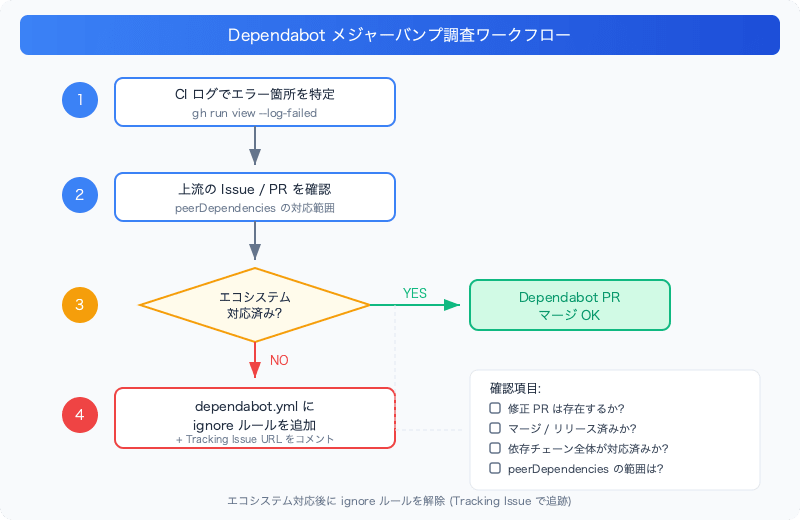
1. Identify the failing area from CI logs
gh run view <run-id> --log-failed
Use the error message to identify which package is broken.
2. Check upstream issues/PRs
- Search the package's GitHub repository for compatibility status
- Check the supported range in
peerDependencies
3. Assess the ecosystem's readiness
Questions to ask:
- Does a fix PR exist? Has it been merged?
- Has it been released?
- Is the entire dependency chain compatible? (e.g., eslint-config-next → eslint-plugin-react → eslint)
4. Add ignore rules to dependabot.yml
If upstream is not yet compatible, set up an ignore rule with a link to the tracking issue.
Summary
- For major version bumps, you need to verify not just the target package but the compatibility of the entire ecosystem
- It is not uncommon for ecosystems to take months or even over a year to catch up after ESLint 10 and TypeScript 7 releases (the ESLint 9 flat config migration also took over a year)
- By specifying
update-types: ["version-update:semver-major"]in Dependabot'signorerules, you can block only major bumps - Leave comments in ignore rules with Tracking issue URLs. This prevents forgetting to remove the block and helps team members understand the background