
Complete Guide to Security Scanning on Developer Machines — Covering Three Threat Axes with Bumblebee, TruffleHog, and OSV-Scanner

This page has been translated by machine translation. View original
Introduction
Now that MCP (Model Context Protocol) servers have exceeded 200 and Coding Agents have become commonplace, the attack surface has expanded beyond production environments to developers' local machines. According to Perplexity's report, supply chain attacks targeting developer machines have increased by 60% this year.
"Do you know which MCP servers are installed on your machine?" "Are tokens stored in plain text in your Cursor or Claude Desktop configuration files?" "Are there known vulnerabilities in your npm dependencies?"
These questions led me to research and test security scanning tools for developer machines. The conclusion: three tools can cover three threat axes.
Three Threat Axes and Corresponding Tools
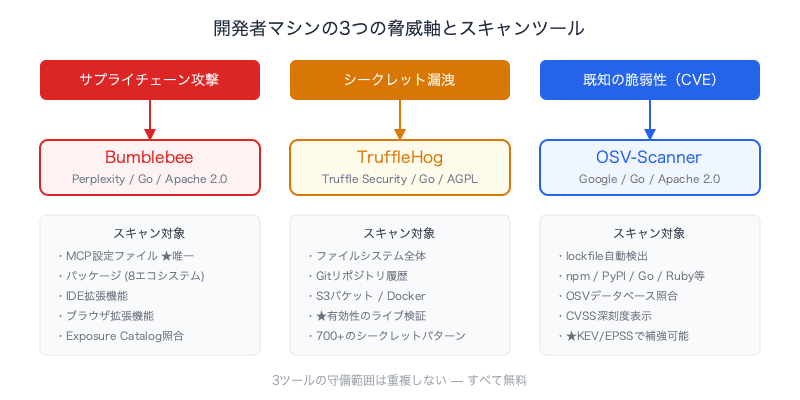
Security risks on developer machines can be broadly divided into three axes.
| Threat Axis | Content | Tool | Cost |
|---|---|---|---|
| Supply chain attacks | Tampered packages, malicious MCP servers | Bumblebee | Free |
| Secret leakage | Plain text tokens and API keys in config files | TruffleHog | Free |
| Known vulnerabilities (CVE) | Published vulnerabilities in dependency packages | OSV-Scanner | Free |
Each tool's coverage is completely different and non-overlapping.
Bumblebee — The Only Tool That Can Scan MCP Configurations
What is Bumblebee
A Go binary released as open source by Perplexity that scans packages, IDE extensions, browser extensions, and MCP configuration files on a developer's local machine in read-only mode.
Key points:
- Never executes code — only reads lockfiles and metadata directly. Does not launch install scripts or package managers
- The first OSS scanner to treat MCP configuration files as a security surface
- Born from the response to the Shai-Hulud worm that contaminated packages from TanStack, SAP, and Zapier
Scan Targets
| Category | Targets |
|---|---|
| Packages | npm, pnpm, Yarn, Bun, PyPI, Go modules, RubyGems, Composer |
| MCP configs | Configuration files for Claude Desktop, Cursor, Windsurf, VSCodium, etc. |
| IDE extensions | VS Code, Cursor, Windsurf, VSCodium |
| Browser extensions | Chromium, Firefox |
Installation and Usage
# Go 1.25+ required
brew install go

# Install Bumblebee
go install github.com/perplexityai/bumblebee/cmd/bumblebee@latest

# Add to PATH (if not already set)
echo 'export PATH=$PATH:$HOME/go/bin' >> ~/.zshrc

# Verify installation
bumblebee selftest

# Baseline scan
bumblebee scan --profile baseline
There are three scan profiles:
| Profile | Purpose |
|---|---|
baseline |
Routine laptop check |
project |
Scan targeting a specific repository or workspace |
deep |
Full scan for incident response |
Output is NDJSON — Not Human-Readable As-Is
Bumblebee outputs in NDJSON (Newline-Delimited JSON). NDJSON is a format where one JSON object is placed per line. Unlike a regular JSON array, each line can be parsed independently, making it suitable for streaming processing and pipelines.
{"ecosystem":"mcp","package_name":"slack","source_type":"mcp-config",...}
{"ecosystem":"npm","package_name":"react","version":"18.2.0",...}
However, visually checking 6.3MB of NDJSON output is not realistic.
Making Output Human-Readable with a Wrapper Script
So I created a Python wrapper script.
Source code for bumblebee-summary.py
#!/usr/bin/env python3
"""
Bumblebee NDJSON scan summary with colored output.

Usage:
    bumblebee scan --profile baseline 2>/dev/null | python3 bumblebee-summary.py
    bumblebee scan --profile baseline 2>/dev/null | python3 bumblebee-summary.py --verbose
"""

import sys
import json
import argparse
from collections import Counter

# ANSI colors
GREEN = "\033[92m"
YELLOW = "\033[93m"
RED = "\033[91m"
CYAN = "\033[96m"
BOLD = "\033[1m"
DIM = "\033[2m"
RESET = "\033[0m"

def colored(text, color):
    return f"{color}{text}{RESET}"

def severity_color(level):
    return {"critical": RED, "high": RED, "medium": YELLOW, "low": DIM}.get(
        level, RESET
    )

def categorize_mcp_source(source_file):
    if "claude-plugins-official" in source_file or "local-agent-mode" in source_file:
        return "first-party"
    if ".cursor" in source_file:
        return "cursor"
    if "claude_desktop_config" in source_file:
        return "claude-desktop"
    return "third-party"

def main():
    parser = argparse.ArgumentParser(description="Bumblebee scan summary")
    parser.add_argument(
        "--verbose", "-v", action="store_true", help="Show detailed MCP server list"
    )
    args = parser.parse_args()

    ecosystems = Counter()
    findings = []
    mcp_servers = []
    browser_exts = []
    editor_exts = []
    mcp_categories = Counter()

    for line in sys.stdin:
        line = line.strip()
        if not line:
            continue
        try:
            r = json.loads(line)
        except json.JSONDecodeError:
            continue

        # skip selftest fixtures
        if "selftest" in r.get("source_file", "") or "selftest" in r.get(
            "package_name", ""
        ):
            continue

        record_type = r.get("record_type", "")

        if record_type == "finding":
            findings.append(r)
            continue

        eco = r.get("ecosystem", "unknown")
        ecosystems[eco] += 1

        if eco == "mcp":
            cat = categorize_mcp_source(r.get("source_file", ""))
            mcp_categories[cat] += 1
            mcp_servers.append(
                {
                    "name": r.get("server_name") or r.get("package_name", "?"),
                    "manager": r.get("package_manager", ""),
                    "spec": r.get("requested_spec", ""),
                    "category": cat,
                }
            )
        elif eco == "browser-extension":
            browser_exts.append(r.get("package_name", ""))
        elif eco == "editor-extension":
            editor_exts.append(r.get("package_name", ""))

    total = sum(ecosystems.values())

    # Header
    print()
    print(colored("=" * 50, BOLD))
    print(colored("  Bumblebee Scan Summary", BOLD + CYAN))
    print(colored("=" * 50, BOLD))
    print()

    # Status
    if findings:
        status = colored(f"  FINDINGS: {len(findings)} known-bad match(es)", BOLD + RED)
    else:
        status = colored("  STATUS: CLEAN", BOLD + GREEN)
    print(status)
    print()

    # Findings detail
    if findings:
        print(colored("  --- Findings ---", BOLD + RED))
        for f in findings:
            sev = f.get("severity", "unknown")
            sc = severity_color(sev)
            print(
                f"  {colored(sev.upper(), BOLD + sc):>20s}  "
                f"{f.get('ecosystem', '?')}/{f.get('package_name', '?')}@{f.get('version', '?')}"
            )
            if f.get("catalog_id"):
                print(f"{'':>22s}  catalog: {f['catalog_id']}")
            if f.get("source_file"):
                print(colored(f"{'':>22s}  {f['source_file']}", DIM))
        print()

    # Inventory
    print(colored("  --- Inventory ---", BOLD))
    print(f"  {'Total records':.<30s} {total:>6,}")
    print()
    for eco, count in ecosystems.most_common():
        label = eco.replace("-", " ").title()
        print(f"    {label:.<28s} {count:>6,}")
    print()

    # MCP breakdown
    if mcp_servers:
        print(colored("  --- MCP Servers ---", BOLD))
        first = mcp_categories.get("first-party", 0)
        third = mcp_categories.get("third-party", 0)
        cursor = mcp_categories.get("cursor", 0)
        desktop = mcp_categories.get("claude-desktop", 0)

        print(f"    {colored('First-party (Claude managed)', DIM):.<50s} {first:>4}")
        if cursor:
            print(
                f"    {colored('Cursor config', YELLOW):.<50s} {colored(str(cursor), YELLOW):>4}"
            )
        if desktop:
            print(
                f"    {colored('Claude Desktop config', YELLOW):.<50s} {colored(str(desktop), YELLOW):>4}"
            )
        if third:
            print(
                f"    {colored('Third-party / unknown', RED):.<50s} {colored(str(third), BOLD + RED):>4}"
            )
        else:
            print(f"    {colored('Third-party / unknown', DIM):.<50s}    0")
        print()

        # Verbose: list all MCP servers
        if args.verbose:
            seen = set()
            print(colored("  --- MCP Server Details ---", BOLD))
            for cat_label, cat_key, color in [
                ("First-party", "first-party", DIM),
                ("Cursor", "cursor", YELLOW),
                ("Claude Desktop", "claude-desktop", YELLOW),
                ("Third-party", "third-party", RED),
            ]:
                servers = [s for s in mcp_servers if s["category"] == cat_key]
                if not servers:
                    continue
                print(f"\n    {colored(f'[{cat_label}]', BOLD + color)}")
                for s in servers:
                    key = (s["name"], s["spec"])
                    if key in seen:
                        continue
                    seen.add(key)
                    target = s["spec"] or "(local)"
                    print(f"      {s['name']:<22s} {colored(target, DIM)}")
            print()

    # Footer
    print(colored("-" * 50, DIM))
    note = "  Note: 0 findings = no known-bad catalog matches."
    print(colored(note, DIM))
    print(colored("  Run with --verbose for MCP server details.", DIM))
    print(colored("  Use --exposure-catalog for threat matching.", DIM))
    print()

if __name__ == "__main__":
    main()
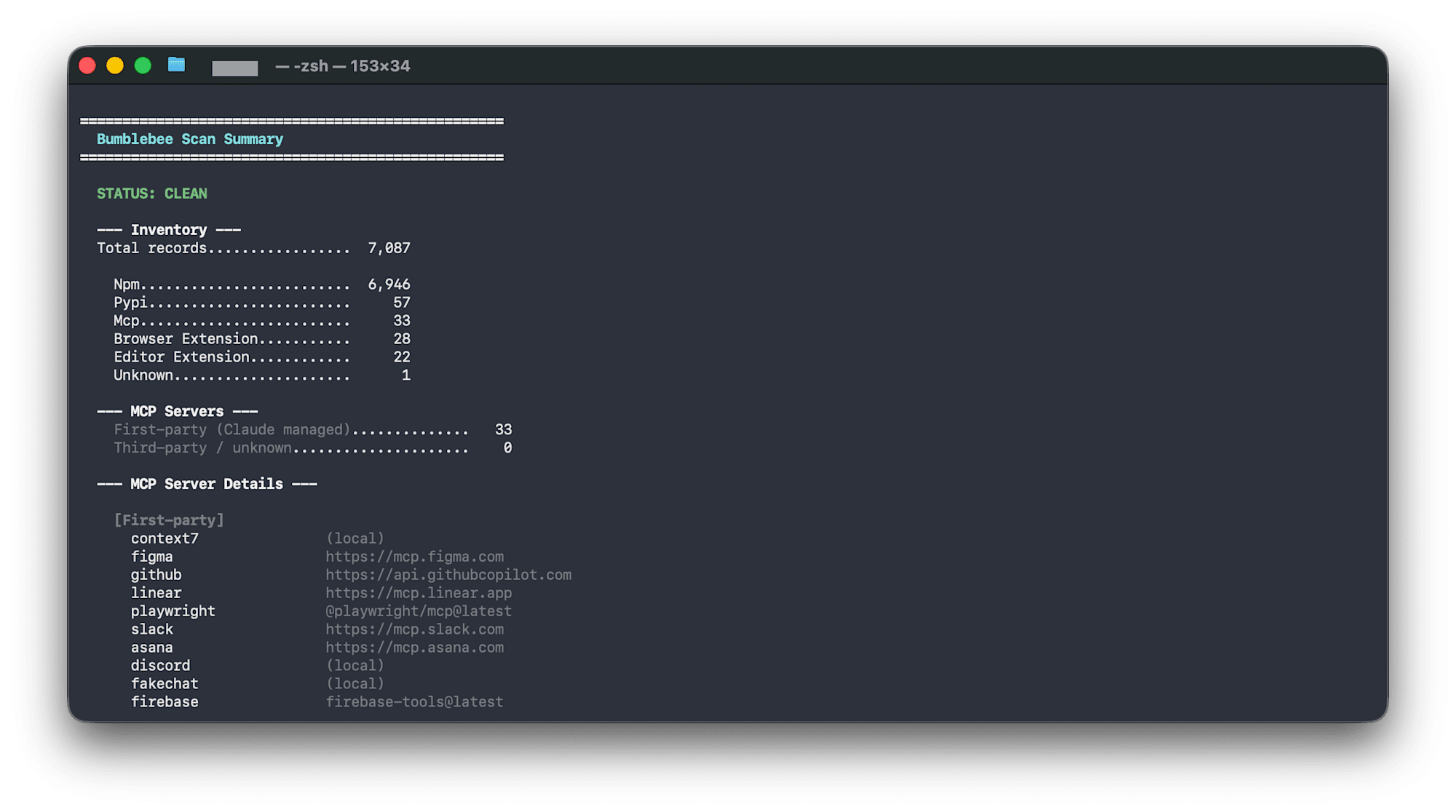
bumblebee scan --profile baseline 2>/dev/null | python3 bumblebee-summary.py
Example output:
==================================================
  Bumblebee Scan Summary
==================================================

  STATUS: CLEAN

  --- Inventory ---
  Total records.................  7,087

    Npm.........................  6,946
    Pypi........................     57
    Mcp.........................     33
    Browser Extension...........     28
    Editor Extension............     22

  --- MCP Servers ---
    First-party (Claude managed)..............   33
    Third-party / unknown.....................    0
MCP configurations are automatically classified as "First-party (Claude managed)" or "Third-party."
MCP Configuration Risk Classification
What running Bumblebee revealed is that risk varies greatly depending on where the MCP server came from.
| Type | Example | Risk |
|---|---|---|
| Claude Cowork official connectors | Slack, Gmail, Notion, Google Calendar | Managed by Anthropic. Via OAuth. Low risk |
| Vendor official MCP | Figma (mcp.figma.com), Linear (mcp.linear.app) |
Managed by vendor. Medium risk |
| MCP servers cloned from GitHub | Individually developed MCP servers | Self-managed. No SOC2, no responsible disclosure program. High risk |
The Exposure Catalog Challenge
Bumblebee's true value lies in matching against the Exposure Catalog (a list of known malicious packages).
bumblebee scan --profile baseline --exposure-catalog catalog.json --findings-only
However, the only practical catalog currently available is Perplexity's internal one. Until a public or community-managed catalog emerges, Bumblebee's value is primarily as an inventory tool.
TruffleHog — Detect and Verify Secret Leakage
Why TruffleHog Instead of gitleaks
| gitleaks | TruffleHog | |
|---|---|---|
| Speed | Fastest (sub-second) | Slower |
| Detection | 150+ regex patterns | regex + entropy |
| Verification | None | Yes — actually calls the API to confirm validity |
| Scan targets | Git repositories | Git + S3 + Docker + Slack + filesystem |
TruffleHog's decisive advantage is its verification feature. Rather than saying "this AWS key matches the pattern," it tells you "this AWS key is valid at this very moment."
Installation and Usage
brew install trufflehog

# Show only verified secrets
trufflehog filesystem ~/.claude/ --only-verified

# Scan a specific directory
trufflehog filesystem ~/.cursor/ --only-verified

# Entire development repository
trufflehog filesystem ~/Developer/ --only-verified
Adding --only-verified significantly reduces noise.
Also Easier to Read with a Wrapper Script
TruffleHog's output is also hard to read because logs and secrets are mixed together, so I created a wrapper script.
Source code for trufflehog-summary.py
#!/usr/bin/env python3
"""
TruffleHog stderr/stdout summary with colored output.

Usage:
    trufflehog filesystem ~/.claude/ --only-verified 2>&1 | python3 trufflehog-summary.py
    trufflehog filesystem ~/Developer/ 2>&1 | python3 trufflehog-summary.py
    trufflehog filesystem ~/Developer/ 2>&1 | python3 trufflehog-summary.py --verbose
"""

import sys
import json
import re
import argparse

# ANSI colors
GREEN = "\033[92m"
YELLOW = "\033[93m"
RED = "\033[91m"
CYAN = "\033[96m"
BOLD = "\033[1m"
DIM = "\033[2m"
RESET = "\033[0m"

def colored(text, color):
    return f"{color}{text}{RESET}"

def format_bytes(b):
    if b >= 1_000_000_000:
        return f"{b / 1_000_000_000:.1f} GB"
    if b >= 1_000_000:
        return f"{b / 1_000_000:.0f} MB"
    if b >= 1_000:
        return f"{b / 1_000:.0f} KB"
    return f"{b} B"

def parse_secret_line(line):
    """Parse a detected secret result line from TruffleHog stdout."""
    result = {}
    # TruffleHog outputs JSON for findings when using --json, otherwise plaintext
    try:
        data = json.loads(line)
        result = {
            "detector": data.get("DetectorType", data.get("detectorType", "?")),
            "verified": data.get("Verified", data.get("verified", False)),
            "source": data.get("SourceMetadata", {})
            .get("Data", {})
            .get("Filesystem", {})
            .get("file", "?"),
            "raw": data.get("Raw", "")[:40] + "...",
        }
        return result
    except (json.JSONDecodeError, AttributeError):
        pass

    # Plaintext format: "Found verified result 🐷🔑"
    if "Found" in line and "result" in line:
        result["raw_line"] = line.strip()
        result["verified"] = "verified" in line.lower()
        return result

    return None

def main():
    parser = argparse.ArgumentParser(description="TruffleHog scan summary")
    parser.add_argument(
        "--verbose", "-v", action="store_true", help="Show skipped file details"
    )
    args = parser.parse_args()

    errors = []
    secrets = []
    scan_stats = {}
    scan_dir = "?"
    finished = False

    for line in sys.stdin:
        line = line.strip()
        if not line:
            continue

        # Parse structured log lines (tab-separated)
        if "\ttrufflehog\t" in line:
            parts = line.split("\t")
            # Extract message and JSON payload
            msg = parts[3] if len(parts) > 3 else ""
            json_part = parts[4] if len(parts) > 4 else "{}"

            try:
                payload = json.loads(json_part)
            except json.JSONDecodeError:
                payload = {}

            if "error reading chunk" in msg:
                errors.append(
                    {
                        "path": payload.get("path", "?").split("/")[-1],
                        "mime": payload.get("mime", "?"),
                        "error": payload.get("error", "?"),
                    }
                )
            elif "running source" in msg:
                continue
            elif "finished scanning" in msg:
                finished = True
                scan_stats = {
                    "chunks": payload.get("chunks", 0),
                    "bytes": payload.get("bytes", 0),
                    "verified": payload.get("verified_secrets", 0),
                    "unverified": payload.get("unverified_secrets", 0),
                    "duration": payload.get("scan_duration", "?"),
                    "version": payload.get("trufflehog_version", "?"),
                }
            elif payload.get("unit"):
                scan_dir = payload["unit"]
            continue

        # Check for secret findings (non-log lines)
        secret = parse_secret_line(line)
        if secret:
            secrets.append(secret)

    verified = scan_stats.get("verified", len([s for s in secrets if s.get("verified")]))
    unverified = scan_stats.get("unverified", len([s for s in secrets if not s.get("verified")]))
    total_secrets = verified + unverified

    # Header
    print()
    print(colored("=" * 50, BOLD))
    print(colored("  TruffleHog Scan Summary", BOLD + CYAN))
    print(colored("=" * 50, BOLD))
    print()

    # Status
    if verified > 0:
        print(colored(f"  STATUS: {verified} VERIFIED SECRET(S) FOUND", BOLD + RED))
    elif unverified > 0:
        print(colored(f"  STATUS: {unverified} UNVERIFIED SECRET(S)", BOLD + YELLOW))
    elif finished:
        print(colored("  STATUS: CLEAN", BOLD + GREEN))
    else:
        print(colored("  STATUS: NO SCAN DATA FOUND", BOLD + YELLOW))
        print(colored("  Make sure to pipe both stderr and stdout:", DIM))
        print(colored("    trufflehog filesystem <dir> 2>&1 | python3 trufflehog-summary.py", DIM))
        print()
        return
    print()

    # Scan stats
    if scan_stats:
        print(colored("  --- Scan Stats ---", BOLD))
        print(f"    {'Directory':.<30s} {scan_dir}")
        print(f"    {'Chunks scanned':.<30s} {scan_stats['chunks']:>,}")
        print(f"    {'Bytes scanned':.<30s} {format_bytes(scan_stats['bytes'])}")
        print(f"    {'Duration':.<30s} {scan_stats['duration']}")
        print(f"    {'TruffleHog version':.<30s} {scan_stats['version']}")
        print()

    # Secrets
    print(colored("  --- Results ---", BOLD))
    v_color = RED + BOLD if verified > 0 else GREEN
    u_color = YELLOW if unverified > 0 else GREEN
    print(f"    {colored('Verified secrets', v_color):.<50s} {colored(str(verified), v_color)}")
    print(f"    {colored('Unverified secrets', u_color):.<50s} {colored(str(unverified), u_color)}")
    print()

    # Secret details
    if secrets:
        print(colored("  --- Secret Details ---", BOLD + RED))
        for s in secrets:
            if s.get("detector"):
                v_tag = colored("[VERIFIED]", BOLD + RED) if s["verified"] else colored("[unverified]", YELLOW)
                print(f"    {v_tag} {s['detector']}")
                print(colored(f"      file: {s.get('source', '?')}", DIM))
            elif s.get("raw_line"):
                print(f"    {s['raw_line']}")
        print()

    # Errors
    if errors:
        err_color = DIM
        print(colored(f"  --- Skipped Files ({len(errors)}, non-critical) ---", DIM))
        if args.verbose:
            for e in errors:
                print(colored(f"    {e['path']:<40s} {e['mime']}", DIM))
        else:
            print(colored(f"    {len(errors)} binary/unreadable file(s) skipped", DIM))
            print(colored("    Run with --verbose to see details", DIM))
        print()

    # Footer
    print(colored("-" * 50, DIM))
    print(colored("  Verified = secret confirmed active via API call.", DIM))
    print(colored("  Unverified = pattern match, may be rotated/fake.", DIM))
    print()

if __name__ == "__main__":
    main()
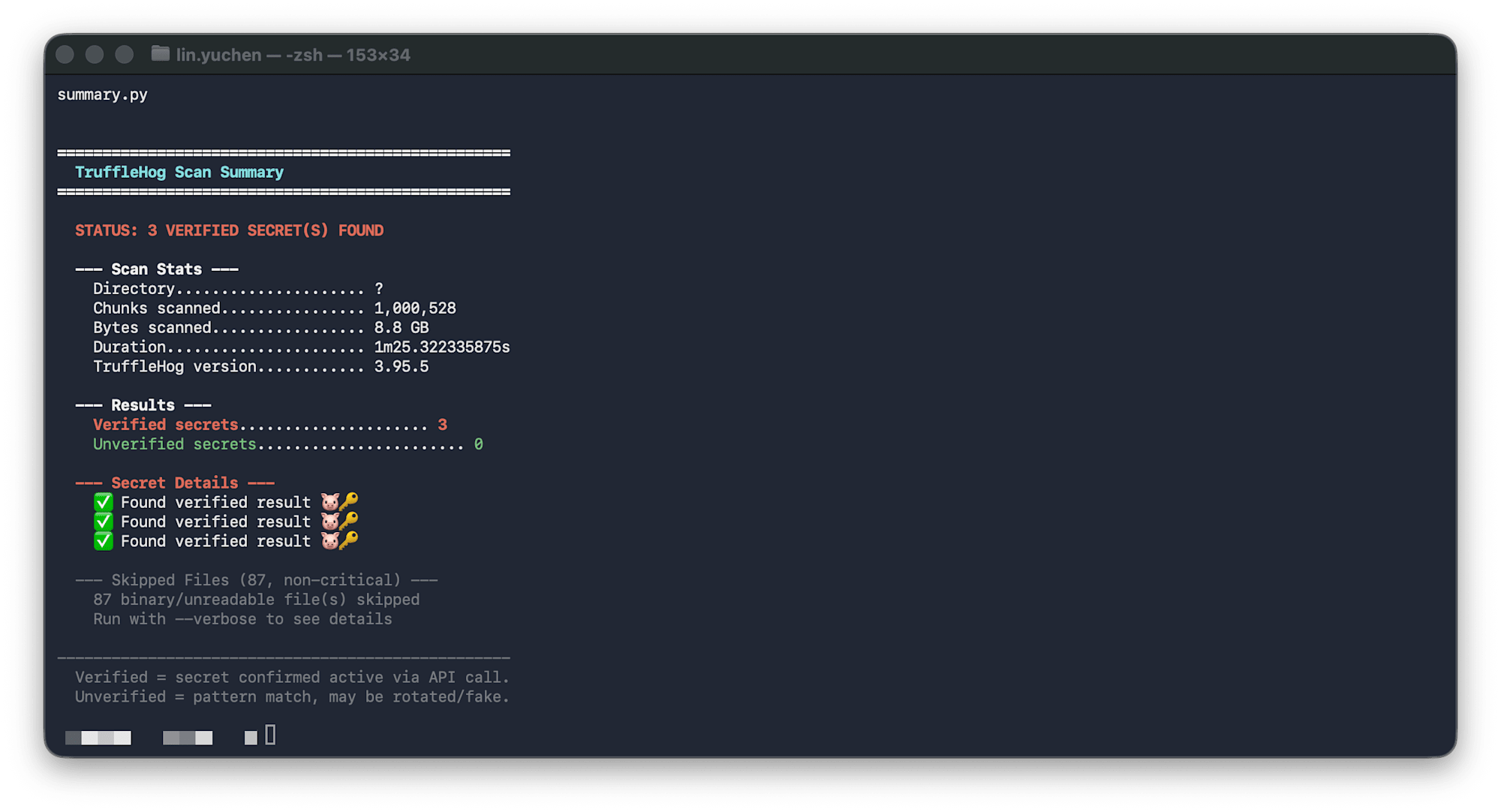
trufflehog filesystem ~/.claude/ --only-verified 2>&1 | python3 trufflehog-summary.py
Note: TruffleHog outputs logs to stderr and detection results to stdout, so use 2>&1 to pipe both.
Example output:
==================================================
  TruffleHog Scan Summary
==================================================

  STATUS: CLEAN

  --- Scan Stats ---
    Directory..................... ~/.claude/
    Chunks scanned................ 70,048
    Bytes scanned................. 552 MB
    Duration...................... 14.4s

  --- Results ---
    Verified secrets......................... 0
    Unverified secrets....................... 0

  --- Skipped Files (2, non-critical) ---
    2 binary/unreadable file(s) skipped
OSV-Scanner — Detecting CVEs in Dependency Packages
What is OSV-Scanner
A free OSS tool developed by Google that reads lockfiles from multiple ecosystems including npm, PyPI, Go modules, RubyGems, Cargo, and Maven, then cross-references them against the OSV database (which aggregates NVD, GitHub Advisories, etc.) to detect known vulnerabilities.
brew install osv-scanner

# Automatically detect and scan lockfiles recursively under a directory
osv-scanner scan -r ~/Developer/

# You can also specify a specific lockfile
osv-scanner scan --lockfile=pnpm-lock.yaml
Specifying a directory with the -r (recursive) option automatically detects and scans lockfiles such as package-lock.json, pnpm-lock.yaml, go.sum, and requirements.txt.
Comparison with Similar Tools
| OSV-Scanner | Snyk | Grype | |
|---|---|---|---|
| Maintainer | Snyk Inc. | Anchore | |
| Cost | Completely free | Freemium (free up to 200 tests/month) | Free |
| Container scanning | None | Yes | Yes (primary feature) |
| Ecosystem coverage | Broad | Broad | Broad |
OSV-Scanner is the best option for individual developers. No account required, no limits.
CVSS Alone Is Not Enough — Using CISA KEV and EPSS to Prioritize
The Problem: "30 Critical Issues" Doesn't Enable Action
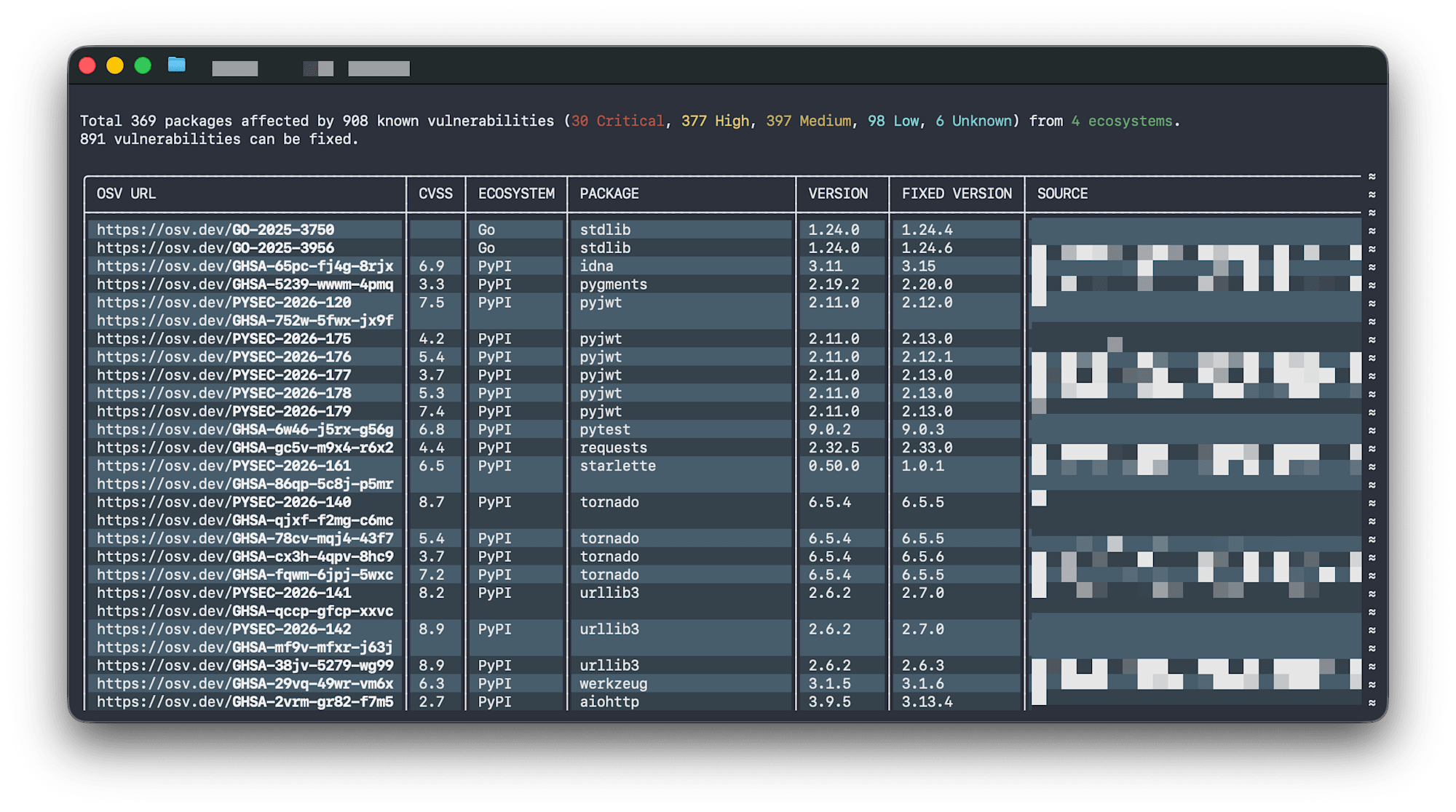
Running OSV-Scanner against ~/Developer/ reported 908 vulnerabilities, with 30 classified as Critical. However, two problems arise here:
- Results are displayed by ecosystem, so they cannot be viewed in order of severity
- It's unclear whether all 30 Critical issues are truly urgent — are they actually being exploited in attacks? Do they need immediate attention?
CVSS Limitations
CVSS (Common Vulnerability Scoring System) measures theoretical maximum impact.
| Rating | CVSS Score | Meaning |
|---|---|---|
| Critical | 9.0 - 10.0 | Remotely exploitable without authentication for complete compromise |
| High | 7.0 - 8.9 | Serious but conditional (requires authentication or user interaction) |
| Medium | 4.0 - 6.9 | Limited impact, or difficult to exploit |
| Low | 0.1 - 3.9 | Minimal impact |
However, CVSS does not reflect real-world exploitation status. A High vulnerability being actively exploited in the wild is more urgent than a Critical vulnerability in a function that is never called from code.
Two Additional Data Sources
| Data Source | Provider | What It Tells You |
|---|---|---|
| CISA KEV (Known Exploited Vulnerabilities) | US CISA | This CVE has been confirmed exploited in actual attacks. Patch immediately. |
| EPSS (Exploit Prediction Scoring System) | FIRST.org | The probability that this CVE will be exploited within the next 30 days is 37%. |
Importantly, neither CISA KEV nor EPSS are built into OSV-Scanner. They exist as separate public databases, and calling external APIs is required to cross-reference them.
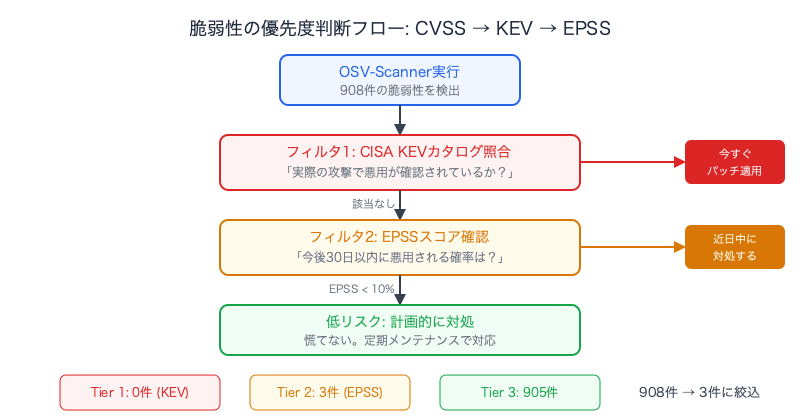
Prioritized Output with an Enrichment Script
I created a Python script that takes OSV-Scanner's JSON output, queries the CISA KEV catalog (free JSON download) and the EPSS API (FIRST.org, free), and classifies findings into three risk tiers.
Source code for osv-enrich.py
#!/usr/bin/env python3
"""
OSV-Scanner enrichment script with CISA KEV and EPSS data.

Reads osv-scanner JSON output, cross-references CISA KEV (Known Exploited
Vulnerabilities) and EPSS (Exploit Prediction Scoring System), then outputs
a prioritized summary grouped by real-world risk.

Usage:
    osv-scanner scan -r /path/to/project --format json 2>/dev/null | python3 osv-enrich.py
    osv-scanner scan -r /path/to/project --format json 2>/dev/null | python3 osv-enrich.py --verbose
    osv-scanner scan -r /path/to/project --format json 2>/dev/null | python3 osv-enrich.py --skip-epss
"""

import sys
import json
import argparse
import urllib.request
import urllib.error

# ANSI colors
GREEN = "\033[92m"
YELLOW = "\033[93m"
RED = "\033[91m"
CYAN = "\033[96m"
MAGENTA = "\033[95m"
BOLD = "\033[1m"
DIM = "\033[2m"
RESET = "\033[0m"

CISA_KEV_URL = "https://www.cisa.gov/sites/default/files/feeds/known_exploited_vulnerabilities.json"
EPSS_API_URL = "https://api.first.org/data/v1/epss"
EPSS_BATCH_SIZE = 100

def colored(text, color):
    return f"{color}{text}{RESET}"

def fetch_json(url, timeout=30):
    req = urllib.request.Request(url, headers={"User-Agent": "osv-enrich/1.0"})
    with urllib.request.urlopen(req, timeout=timeout) as resp:
        return json.loads(resp.read().decode())

def fetch_kev_set():
    """Download CISA KEV catalog and return set of CVE IDs."""
    sys.stderr.write(colored("  Fetching CISA KEV catalog...", DIM) + "\n")
    try:
        data = fetch_json(CISA_KEV_URL, timeout=15)
        vulns = data.get("vulnerabilities", [])
        kev_set = {v["cveID"] for v in vulns if "cveID" in v}
        sys.stderr.write(
            colored(f"  KEV catalog loaded: {len(kev_set)} CVEs\n", DIM)
        )
        return kev_set
    except Exception as e:
        sys.stderr.write(colored(f"  Warning: Failed to fetch KEV: {e}\n", YELLOW))
        return set()

def fetch_epss_scores(cve_ids):
    """Fetch EPSS scores for a list of CVE IDs. Returns dict of cve -> {epss, percentile}."""
    if not cve_ids:
        return {}

    sys.stderr.write(
        colored(f"  Fetching EPSS scores for {len(cve_ids)} CVEs...", DIM) + "\n"
    )
    scores = {}
    batches = [
        list(cve_ids)[i : i + EPSS_BATCH_SIZE]
        for i in range(0, len(cve_ids), EPSS_BATCH_SIZE)
    ]

    for i, batch in enumerate(batches):
        cve_param = ",".join(batch)
        url = f"{EPSS_API_URL}?cve={cve_param}"
        try:
            data = fetch_json(url, timeout=15)
            for entry in data.get("data", []):
                scores[entry["cve"]] = {
                    "epss": float(entry.get("epss", 0)),
                    "percentile": float(entry.get("percentile", 0)),
                }
        except Exception as e:
            sys.stderr.write(
                colored(f"  Warning: EPSS batch {i + 1} failed: {e}\n", YELLOW)
            )

    sys.stderr.write(colored(f"  EPSS scores loaded: {len(scores)} CVEs\n", DIM))
    return scores

def severity_from_osv(vuln):
    """Extract severity from OSV vulnerability object."""
    # Check database_specific
    db = vuln.get("database_specific", {})
    if db.get("severity"):
        return db["severity"].upper()

    # Check severity array
    for s in vuln.get("severity", []):
        score_str = s.get("score", "")
        # CVSS v3 vector string contains severity
        if "CVSS" in s.get("type", ""):
            try:
                # Parse base score from vector or score field
                if isinstance(score_str, str) and score_str.replace(".", "").isdigit():
                    score = float(score_str)
                elif isinstance(score_str, (int, float)):
                    score = float(score_str)
                else:
                    continue
                if score >= 9.0:
                    return "CRITICAL"
                if score >= 7.0:
                    return "HIGH"
                if score >= 4.0:
                    return "MEDIUM"
                return "LOW"
            except (ValueError, TypeError):
                continue

    return "UNKNOWN"

def extract_cve_ids(vuln):
    """Get all CVE aliases from a vulnerability."""
    ids = set()
    vid = vuln.get("id", "")
    if vid.startswith("CVE-"):
        ids.add(vid)
    for alias in vuln.get("aliases", []):
        if alias.startswith("CVE-"):
            ids.add(alias)
    return ids

def main():
    parser = argparse.ArgumentParser(description="OSV-Scanner enrichment with KEV + EPSS")
    parser.add_argument(
        "--verbose", "-v", action="store_true", help="Show all vulnerabilities"
    )
    parser.add_argument(
        "--skip-epss", action="store_true", help="Skip EPSS API calls (faster)"
    )
    args = parser.parse_args()

    # Parse OSV-Scanner JSON from stdin
    try:
        osv_data = json.load(sys.stdin)
    except json.JSONDecodeError:
        print(colored("Error: Invalid JSON. Make sure to use: osv-scanner scan -r <dir> --format json", RED))
        sys.exit(1)

    # Collect all vulnerabilities with package info
    vuln_records = []
    seen_vuln_ids = set()

    for result in osv_data.get("results", []):
        source = result.get("source", {}).get("path", "?")
        for pkg_entry in result.get("packages", []):
            pkg = pkg_entry.get("package", {})
            pkg_name = pkg.get("name", "?")
            pkg_version = pkg.get("version", "?")
            pkg_eco = pkg.get("ecosystem", "?")

            for vuln in pkg_entry.get("vulnerabilities", []):
                vid = vuln.get("id", "?")
                if vid in seen_vuln_ids:
                    continue
                seen_vuln_ids.add(vid)

                cve_ids = extract_cve_ids(vuln)
                severity = severity_from_osv(vuln)

                vuln_records.append(
                    {
                        "id": vid,
                        "cve_ids": cve_ids,
                        "severity": severity,
                        "package": f"{pkg_eco}/{pkg_name}@{pkg_version}",
                        "source": source,
                        "summary": vuln.get("summary", ""),
                    }
                )

    if not vuln_records:
        print()
        print(colored("=" * 56, BOLD))
        print(colored("  OSV-Scanner Enriched Summary", BOLD + CYAN))
        print(colored("=" * 56, BOLD))
        print()
        print(colored("  STATUS: CLEAN — no vulnerabilities found", BOLD + GREEN))
        print()
        return

    # Collect all CVE IDs for enrichment
    all_cves = set()
    for r in vuln_records:
        all_cves.update(r["cve_ids"])

    # Fetch enrichment data
    sys.stderr.write("\n")
    kev_set = fetch_kev_set()
    epss_scores = {} if args.skip_epss else fetch_epss_scores(all_cves)
    sys.stderr.write("\n")

    # Enrich records
    for r in vuln_records:
        r["in_kev"] = bool(r["cve_ids"] & kev_set)
        best_epss = 0.0
        best_percentile = 0.0
        for cve in r["cve_ids"]:
            if cve in epss_scores:
                e = epss_scores[cve]
                if e["epss"] > best_epss:
                    best_epss = e["epss"]
                    best_percentile = e["percentile"]
        r["epss"] = best_epss
        r["epss_percentile"] = best_percentile

    # Categorize by risk tier
    tier1_kev = [r for r in vuln_records if r["in_kev"]]
    tier2_high_epss = [
        r for r in vuln_records if not r["in_kev"] and r["epss"] >= 0.1
    ]
    tier3_rest = [
        r for r in vuln_records if not r["in_kev"] and r["epss"] < 0.1
    ]

    # Severity counts
    sev_counts = {}
    for r in vuln_records:
        s = r["severity"]
        sev_counts[s] = sev_counts.get(s, 0) + 1

    sev_order = ["CRITICAL", "HIGH", "MEDIUM", "LOW", "UNKNOWN"]
    sev_colors = {
        "CRITICAL": RED + BOLD,
        "HIGH": RED,
        "MEDIUM": YELLOW,
        "LOW": DIM,
        "UNKNOWN": DIM,
    }

    # Output
    print()
    print(colored("=" * 56, BOLD))
    print(colored("  OSV-Scanner Enriched Summary", BOLD + CYAN))
    print(colored("=" * 56, BOLD))
    print()

    # Overall status
    if tier1_kev:
        print(colored(f"  STATUS: {len(tier1_kev)} ACTIVELY EXPLOITED", BOLD + RED))
    elif tier2_high_epss:
        print(colored(f"  STATUS: {len(tier2_high_epss)} HIGH EXPLOIT PROBABILITY", BOLD + YELLOW))
    else:
        print(colored(f"  STATUS: {len(vuln_records)} vuln(s), none actively exploited", BOLD + GREEN))
    print()

    # Severity breakdown
    print(colored("  --- By Severity (CVSS) ---", BOLD))
    for s in sev_order:
        if s in sev_counts:
            c = sev_colors.get(s, RESET)
            print(f"    {colored(s, c):.<50s} {colored(str(sev_counts[s]), c)}")
    print(f"    {'':.<38s} {'─' * 6}")
    print(f"    {'Total':.<38s} {len(vuln_records):>6}")
    print()

    # Tier 1: CISA KEV
    kev_label = colored("ACTIVELY EXPLOITED", BOLD + RED) if tier1_kev else colored("ACTIVELY EXPLOITED", DIM)
    kev_count = colored(str(len(tier1_kev)), BOLD + RED) if tier1_kev else "0"
    print(colored("  --- CISA KEV (confirmed exploited in the wild) ---", BOLD))
    print(f"    Count: {kev_count}")
    if tier1_kev:
        print()
        for r in sorted(tier1_kev, key=lambda x: -x["epss"]):
            sc = sev_colors.get(r["severity"], RESET)
            epss_str = f"EPSS {r['epss']:.0%}" if r["epss"] > 0 else ""
            print(f"    {colored('!!! FIX NOW', BOLD + RED)}  {colored(r['severity'], sc):<10s}  {r['package']}")
            cve_str = ", ".join(r["cve_ids"]) if r["cve_ids"] else r["id"]
            print(colored(f"{'':>16s}{cve_str}  {epss_str}", DIM))
            if r["summary"]:
                print(colored(f"{'':>16s}{r['summary'][:80]}", DIM))
    print()

    # Tier 2: High EPSS
    print(colored("  --- High Exploit Probability (EPSS >= 10%) ---", BOLD))
    print(f"    Count: {len(tier2_high_epss)}")
    if tier2_high_epss:
        print()
        for r in sorted(tier2_high_epss, key=lambda x: -x["epss"]):
            sc = sev_colors.get(r["severity"], RESET)
            epss_val = r["epss"]
            epss_label = colored(f"EPSS {epss_val:.0%}", BOLD + YELLOW)
            print(
                f"    {epss_label:>20s}  "
                f"{colored(r['severity'], sc):<10s}  {r['package']}"
            )
            cve_str = ", ".join(r["cve_ids"]) if r["cve_ids"] else r["id"]
            print(colored(f"{'':>22s}{cve_str}", DIM))
            if args.verbose and r["summary"]:
                print(colored(f"{'':>22s}{r['summary'][:80]}", DIM))
    print()

    # Tier 3: Rest
    print(colored("  --- Low Risk (EPSS < 10%) ---", BOLD))
    print(f"    Count: {len(tier3_rest)}")
    if args.verbose and tier3_rest:
        print()
        for r in sorted(tier3_rest, key=lambda x: (-x["epss"], x["severity"])):
            sc = sev_colors.get(r["severity"], RESET)
            epss_str = f"EPSS {r['epss']:.1%}" if r["epss"] > 0 else "EPSS n/a"
            cve_str = ", ".join(r["cve_ids"]) if r["cve_ids"] else r["id"]
            print(
                f"    {epss_str:>12s}  {colored(r['severity'], sc):<10s}  "
                f"{r['package']:<40s}  {colored(cve_str, DIM)}"
            )
    elif tier3_rest:
        # Compact summary by severity
        rest_by_sev = {}
        for r in tier3_rest:
            rest_by_sev.setdefault(r["severity"], []).append(r)
        for s in sev_order:
            if s in rest_by_sev:
                c = sev_colors.get(s, RESET)
                print(f"      {colored(s, c)}: {len(rest_by_sev[s])}")
        print(colored("      Run with --verbose to see all", DIM))
    print()

    # Footer
    print(colored("-" * 56, DIM))
    print(colored("  Risk tiers:", DIM))
    print(colored("    1. CISA KEV = confirmed exploited, fix immediately", DIM))
    print(colored("    2. EPSS >= 10% = likely to be exploited soon", DIM))
    print(colored("    3. EPSS < 10% = lower probability, monitor", DIM))
    if args.skip_epss:
        print(colored("  Note: EPSS scores skipped (--skip-epss)", YELLOW))
    print()

if __name__ == "__main__":
    main()
osv-scanner scan -r ~/Developer/ --format json 2>/dev/null | python3 osv-enrich.py
Example output:
========================================================
  OSV-Scanner Enriched Summary
========================================================

  STATUS: 908 vuln(s), none actively exploited

  --- By Severity (CVSS) ---
    CRITICAL........................................ 30
    HIGH............................................ 150
    MEDIUM.......................................... 500
    LOW............................................. 228

  --- CISA KEV (confirmed exploited in the wild) ---
    Count: 0

  --- High Exploit Probability (EPSS >= 10%) ---
    Count: 3

       EPSS 45%  HIGH      npm/example-pkg@1.2.3
                  CVE-2025-12345

  --- Low Risk (EPSS < 10%) ---
    Count: 905
      CRITICAL: 30
      HIGH: 148
      MEDIUM: 500
      LOW: 227
      Run with --verbose to see all
With this, 908 vulnerabilities are narrowed down to 3–5 items that actually require action.
UX Challenges with Scanning Tools
A common challenge I noticed across all three tools was that the output is machine-readable, not human-readable.
| Tool | Output Format | Challenge |
|---|---|---|
| Bumblebee | NDJSON (6.3MB) | Designed for pipelines. Unreadable without a wrapper |
| TruffleHog | Log output on stderr mixed with detection results on stdout | Error logs and scan statistics are mixed together |
| OSV-Scanner | Table display | Not sorted by severity per ecosystem. 908 items are impossible to act on by just looking |
These tools are designed for SIEM integration and CI/CD pipelines, and are not suited for the use case of "an individual developer checking results locally."
The three wrapper scripts created this time address this challenge:
| Script | Function |
|---|---|
bumblebee-summary.py |
NDJSON → color-coded summary. Classifies MCP settings into First-party/Third-party |
trufflehog-summary.py |
Mixed stderr+stdout → CLEAN/FINDINGS display + scan statistics |
osv-enrich.py |
JSON → CISA KEV + EPSS enrichment → 3-tier priority classification |
Summary
Setup Commands for the 3 Tools
# Bumblebee (supply chain + MCP)
go install github.com/perplexityai/bumblebee/cmd/bumblebee@latest

# TruffleHog (secret leaks)
brew install trufflehog

# OSV-Scanner (known CVEs)
brew install osv-scanner
Daily Scan Commands
# Supply chain + MCP configuration check
bumblebee scan --profile baseline 2>/dev/null | python3 bumblebee-summary.py

# Secret leak check
trufflehog filesystem ~/.cursor/ --only-verified 2>&1 | python3 trufflehog-summary.py

# CVE check for dependency packages (with prioritization)
osv-scanner scan -r ~/Developer/ --format json 2>/dev/null | python3 osv-enrich.py
Decision Criteria
- Listed in CISA KEV → Patch immediately
- EPSS ≥ 10% → Address in the near future
- CVSS Critical/High but EPSS < 10% → Address on a planned schedule. No need to rush
- Third-party servers found in MCP configuration → Review source code and maintenance status
- Plaintext token detected → Rotate immediately + migrate to environment variables or 1Password CLI
As the agent ecosystem expands, developer machine security needs to be treated not as an "individual habit" but as organizational hygiene management. With three free tools and wrapper scripts, you can take that first step.
