
開発者マシンのセキュリティスキャン完全ガイド — Bumblebee・TruffleHog・OSV-Scannerで3つの脅威軸をカバーする

はじめに
MCP(Model Context Protocol)サーバーが200を超え、Coding Agentが当たり前になった今、攻撃面はproduction環境だけでなく開発者のローカルマシンにも広がっています。Perplexityの報告では、開発者マシンを狙ったサプライチェーン攻撃は今年60%増加しているとのことです。
「自分のマシンにどんなMCPサーバーが入っているか把握していますか?」「CursorやClaude Desktopの設定ファイルにトークンが平文で保存されていませんか?」「npm依存関係に既知の脆弱性はありませんか?」
こういった疑問から、開発者マシン向けのセキュリティスキャンツールを一通り調べて試してみました。結論として、3つのツールで3つの脅威軸をカバーできることがわかりました。
3つの脅威軸と対応ツール
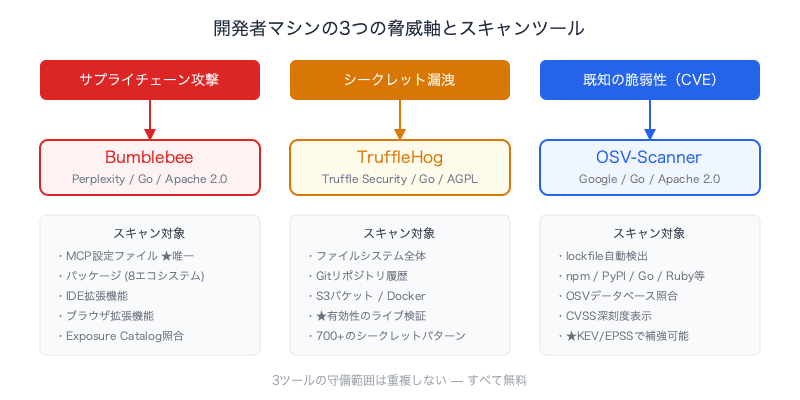
開発者マシンのセキュリティリスクは、大きく3つの軸に分けられます。
| 脅威軸 | 内容 | ツール | コスト |
|---|---|---|---|
| サプライチェーン攻撃 | 改ざんされたパッケージ、悪意あるMCPサーバー | Bumblebee | 無料 |
| シークレット漏洩 | 設定ファイル中の平文トークン、APIキー | TruffleHog | 無料 |
| 既知の脆弱性(CVE) | 依存パッケージの公開済み脆弱性 | OSV-Scanner | 無料 |
それぞれの守備範囲は全く異なり、重複しません。
Bumblebee — MCP設定をスキャンできる唯一のツール
Bumblebeeとは
PerplexityがオープンソースとしてリリースしたGo製のバイナリで、開発者のローカルマシン上のパッケージ、IDE拡張機能、ブラウザ拡張機能、そしてMCP設定ファイルを読み取り専用でスキャンします。
重要なポイント:
- 絶対にコードを実行しない — lockfileやメタデータを直接読むだけ。インストールスクリプトやパッケージマネージャーは起動しない
- MCP設定ファイルをセキュリティサーフェスとして扱う初のOSSスキャナー
- TanStack、SAP、Zapierのパッケージを汚染したShai-Huludワームへの対応から生まれた
スキャン対象
| カテゴリ | 対象 |
|---|---|
| パッケージ | npm, pnpm, Yarn, Bun, PyPI, Go modules, RubyGems, Composer |
| MCP設定 | Claude Desktop, Cursor, Windsurf, VSCodiumなどの設定ファイル |
| IDE拡張 | VS Code, Cursor, Windsurf, VSCodium |
| ブラウザ拡張 | Chromium, Firefox |
インストールと使い方
# Go 1.25+が必要
brew install go

# Bumblebeeインストール
go install github.com/perplexityai/bumblebee/cmd/bumblebee@latest

# PATHに追加(未設定の場合)
echo 'export PATH=$PATH:$HOME/go/bin' >> ~/.zshrc

# 動作確認
bumblebee selftest

# ベースラインスキャン
bumblebee scan --profile baseline
3つのスキャンプロファイルがあります:
| プロファイル | 用途 |
|---|---|
baseline |
日常的なラップトップチェック |
project |
特定のリポジトリ・ワークスペースを対象にしたスキャン |
deep |
インシデント対応時のフルスキャン |
出力はNDJSON — そのままでは読めない
BumblebeeはNDJSON(Newline-Delimited JSON)で出力します。NDJSONとは、1行に1つのJSONオブジェクトを配置する形式で、通常のJSON配列と違い各行が独立してパースできるため、ストリーミング処理やパイプラインに適しています。
{"ecosystem":"mcp","package_name":"slack","source_type":"mcp-config",...}
{"ecosystem":"npm","package_name":"react","version":"18.2.0",...}
しかし、6.3MBのNDJSON出力を目視でチェックするのは現実的ではありません。
ラッパースクリプトで人間が読める出力に
そこで、Pythonのラッパースクリプトを作成しました。
bumblebee-summary.py のソースコード
#!/usr/bin/env python3
"""
Bumblebee NDJSON scan summary with colored output.

Usage:
    bumblebee scan --profile baseline 2>/dev/null | python3 bumblebee-summary.py
    bumblebee scan --profile baseline 2>/dev/null | python3 bumblebee-summary.py --verbose
"""

import sys
import json
import argparse
from collections import Counter

# ANSI colors
GREEN = "\033[92m"
YELLOW = "\033[93m"
RED = "\033[91m"
CYAN = "\033[96m"
BOLD = "\033[1m"
DIM = "\033[2m"
RESET = "\033[0m"

def colored(text, color):
    return f"{color}{text}{RESET}"

def severity_color(level):
    return {"critical": RED, "high": RED, "medium": YELLOW, "low": DIM}.get(
        level, RESET
    )

def categorize_mcp_source(source_file):
    if "claude-plugins-official" in source_file or "local-agent-mode" in source_file:
        return "first-party"
    if ".cursor" in source_file:
        return "cursor"
    if "claude_desktop_config" in source_file:
        return "claude-desktop"
    return "third-party"

def main():
    parser = argparse.ArgumentParser(description="Bumblebee scan summary")
    parser.add_argument(
        "--verbose", "-v", action="store_true", help="Show detailed MCP server list"
    )
    args = parser.parse_args()

    ecosystems = Counter()
    findings = []
    mcp_servers = []
    browser_exts = []
    editor_exts = []
    mcp_categories = Counter()

    for line in sys.stdin:
        line = line.strip()
        if not line:
            continue
        try:
            r = json.loads(line)
        except json.JSONDecodeError:
            continue

        # skip selftest fixtures
        if "selftest" in r.get("source_file", "") or "selftest" in r.get(
            "package_name", ""
        ):
            continue

        record_type = r.get("record_type", "")

        if record_type == "finding":
            findings.append(r)
            continue

        eco = r.get("ecosystem", "unknown")
        ecosystems[eco] += 1

        if eco == "mcp":
            cat = categorize_mcp_source(r.get("source_file", ""))
            mcp_categories[cat] += 1
            mcp_servers.append(
                {
                    "name": r.get("server_name") or r.get("package_name", "?"),
                    "manager": r.get("package_manager", ""),
                    "spec": r.get("requested_spec", ""),
                    "category": cat,
                }
            )
        elif eco == "browser-extension":
            browser_exts.append(r.get("package_name", ""))
        elif eco == "editor-extension":
            editor_exts.append(r.get("package_name", ""))

    total = sum(ecosystems.values())

    # Header
    print()
    print(colored("=" * 50, BOLD))
    print(colored("  Bumblebee Scan Summary", BOLD + CYAN))
    print(colored("=" * 50, BOLD))
    print()

    # Status
    if findings:
        status = colored(f"  FINDINGS: {len(findings)} known-bad match(es)", BOLD + RED)
    else:
        status = colored("  STATUS: CLEAN", BOLD + GREEN)
    print(status)
    print()

    # Findings detail
    if findings:
        print(colored("  --- Findings ---", BOLD + RED))
        for f in findings:
            sev = f.get("severity", "unknown")
            sc = severity_color(sev)
            print(
                f"  {colored(sev.upper(), BOLD + sc):>20s}  "
                f"{f.get('ecosystem', '?')}/{f.get('package_name', '?')}@{f.get('version', '?')}"
            )
            if f.get("catalog_id"):
                print(f"{'':>22s}  catalog: {f['catalog_id']}")
            if f.get("source_file"):
                print(colored(f"{'':>22s}  {f['source_file']}", DIM))
        print()

    # Inventory
    print(colored("  --- Inventory ---", BOLD))
    print(f"  {'Total records':.<30s} {total:>6,}")
    print()
    for eco, count in ecosystems.most_common():
        label = eco.replace("-", " ").title()
        print(f"    {label:.<28s} {count:>6,}")
    print()

    # MCP breakdown
    if mcp_servers:
        print(colored("  --- MCP Servers ---", BOLD))
        first = mcp_categories.get("first-party", 0)
        third = mcp_categories.get("third-party", 0)
        cursor = mcp_categories.get("cursor", 0)
        desktop = mcp_categories.get("claude-desktop", 0)

        print(f"    {colored('First-party (Claude managed)', DIM):.<50s} {first:>4}")
        if cursor:
            print(
                f"    {colored('Cursor config', YELLOW):.<50s} {colored(str(cursor), YELLOW):>4}"
            )
        if desktop:
            print(
                f"    {colored('Claude Desktop config', YELLOW):.<50s} {colored(str(desktop), YELLOW):>4}"
            )
        if third:
            print(
                f"    {colored('Third-party / unknown', RED):.<50s} {colored(str(third), BOLD + RED):>4}"
            )
        else:
            print(f"    {colored('Third-party / unknown', DIM):.<50s}    0")
        print()

        # Verbose: list all MCP servers
        if args.verbose:
            seen = set()
            print(colored("  --- MCP Server Details ---", BOLD))
            for cat_label, cat_key, color in [
                ("First-party", "first-party", DIM),
                ("Cursor", "cursor", YELLOW),
                ("Claude Desktop", "claude-desktop", YELLOW),
                ("Third-party", "third-party", RED),
            ]:
                servers = [s for s in mcp_servers if s["category"] == cat_key]
                if not servers:
                    continue
                print(f"\n    {colored(f'[{cat_label}]', BOLD + color)}")
                for s in servers:
                    key = (s["name"], s["spec"])
                    if key in seen:
                        continue
                    seen.add(key)
                    target = s["spec"] or "(local)"
                    print(f"      {s['name']:<22s} {colored(target, DIM)}")
            print()

    # Footer
    print(colored("-" * 50, DIM))
    note = "  Note: 0 findings = no known-bad catalog matches."
    print(colored(note, DIM))
    print(colored("  Run with --verbose for MCP server details.", DIM))
    print(colored("  Use --exposure-catalog for threat matching.", DIM))
    print()

if __name__ == "__main__":
    main()
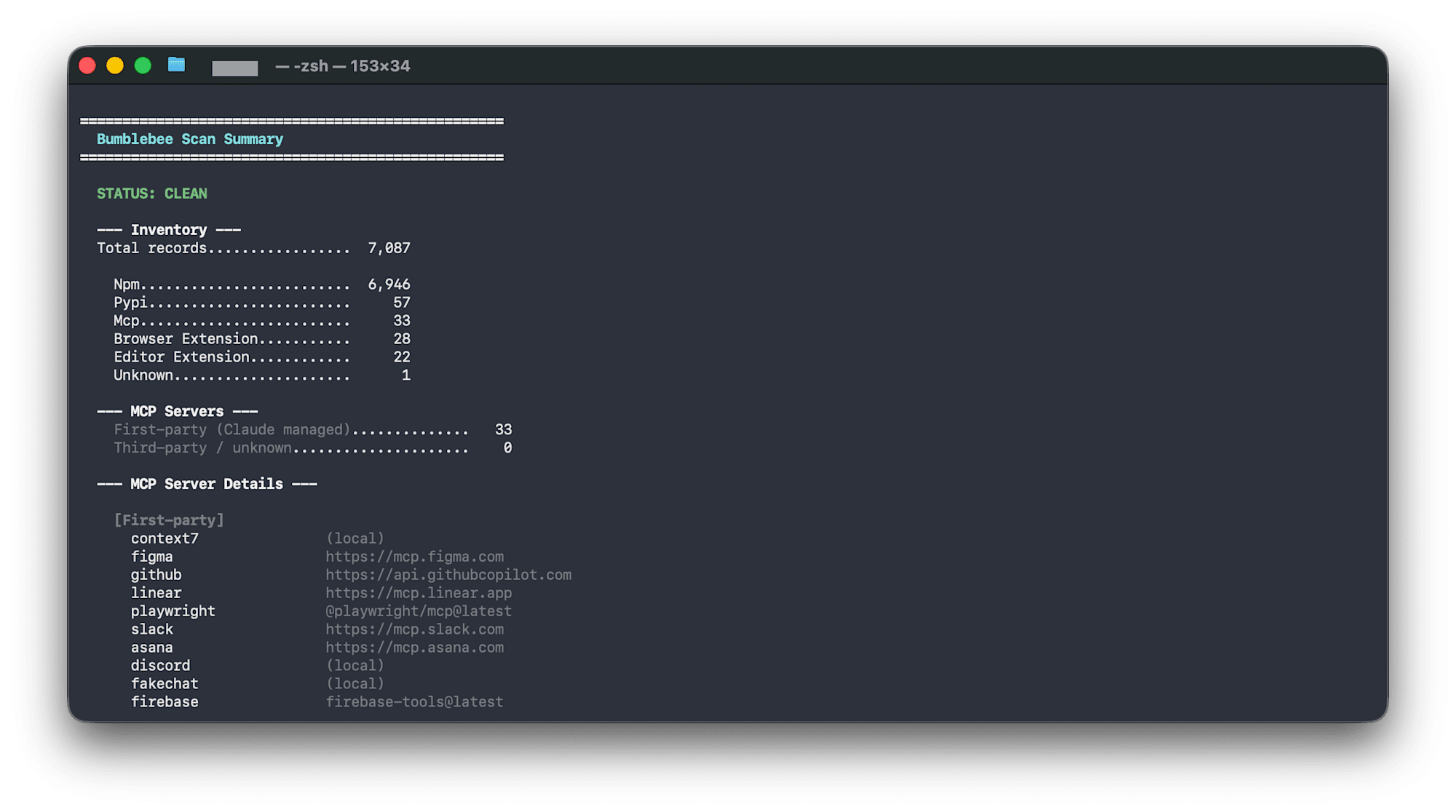
bumblebee scan --profile baseline 2>/dev/null | python3 bumblebee-summary.py
出力例:
==================================================
  Bumblebee Scan Summary
==================================================

  STATUS: CLEAN

  --- Inventory ---
  Total records.................  7,087

    Npm.........................  6,946
    Pypi........................     57
    Mcp.........................     33
    Browser Extension...........     28
    Editor Extension............     22

  --- MCP Servers ---
    First-party (Claude managed)..............   33
    Third-party / unknown.....................    0
MCP設定は「First-party(Claude管理)」と「Third-party」に自動分類されます。
MCP設定のリスク分類
Bumblebeeを実行してわかったのは、どこから来たMCPサーバーかで、リスクが大きく異なるということです。
| 種類 | 例 | リスク |
|---|---|---|
| Claude Cowork公式コネクタ | Slack, Gmail, Notion, Google Calendar | Anthropicが管理。OAuth経由。低リスク |
| ベンダー公式MCP | Figma (mcp.figma.com), Linear (mcp.linear.app) |
ベンダーが管理。中リスク |
| GitHubからクローンしたMCPサーバー | 個人開発のMCPサーバー | 自己管理。SOC2なし、責任開示プログラムなし。高リスク |
Exposure Catalogの課題
Bumblebeeの真価は、Exposure Catalog(既知の悪意あるパッケージリスト)とのマッチングにあります。
bumblebee scan --profile baseline --exposure-catalog catalog.json --findings-only
ただし、実用的なカタログは現時点ではPerplexity社内のものだけです。公開カタログやコミュニティ管理のカタログが出てくるまでは、Bumblebeeは「インベントリツール」としての価値がメインになります。
TruffleHog — シークレット漏洩を検出して検証する
なぜgitleaksではなくTruffleHogか
| gitleaks | TruffleHog | |
|---|---|---|
| 速度 | 最速(サブ秒) | 遅め |
| 検出 | 150+のregexパターン | regex + エントロピー |
| 検証 | なし | あり — 実際にAPIを叩いて有効か確認 |
| スキャン対象 | Gitリポジトリ | Git + S3 + Docker + Slack + ファイルシステム |
TruffleHogの決定的な優位点は検証機能です。「このAWSキーはパターンに合致する」ではなく「このAWSキーは今この瞬間、有効である」と教えてくれます。
インストールと使い方
brew install trufflehog

# 検証済みシークレットのみ表示
trufflehog filesystem ~/.claude/ --only-verified

# 特定ディレクトリをスキャン
trufflehog filesystem ~/.cursor/ --only-verified

# 開発リポジトリ全体
trufflehog filesystem ~/Developer/ --only-verified
--only-verifiedを付けると、ノイズが大幅に減ります。
こちらもラッパースクリプトで見やすく
TruffleHogもログとシークレットが混在して読みにくいため、ラッパースクリプトを作成しました。
trufflehog-summary.py のソースコード
#!/usr/bin/env python3
"""
TruffleHog stderr/stdout summary with colored output.

Usage:
    trufflehog filesystem ~/.claude/ --only-verified 2>&1 | python3 trufflehog-summary.py
    trufflehog filesystem ~/Developer/ 2>&1 | python3 trufflehog-summary.py
    trufflehog filesystem ~/Developer/ 2>&1 | python3 trufflehog-summary.py --verbose
"""

import sys
import json
import re
import argparse

# ANSI colors
GREEN = "\033[92m"
YELLOW = "\033[93m"
RED = "\033[91m"
CYAN = "\033[96m"
BOLD = "\033[1m"
DIM = "\033[2m"
RESET = "\033[0m"

def colored(text, color):
    return f"{color}{text}{RESET}"

def format_bytes(b):
    if b >= 1_000_000_000:
        return f"{b / 1_000_000_000:.1f} GB"
    if b >= 1_000_000:
        return f"{b / 1_000_000:.0f} MB"
    if b >= 1_000:
        return f"{b / 1_000:.0f} KB"
    return f"{b} B"

def parse_secret_line(line):
    """Parse a detected secret result line from TruffleHog stdout."""
    result = {}
    # TruffleHog outputs JSON for findings when using --json, otherwise plaintext
    try:
        data = json.loads(line)
        result = {
            "detector": data.get("DetectorType", data.get("detectorType", "?")),
            "verified": data.get("Verified", data.get("verified", False)),
            "source": data.get("SourceMetadata", {})
            .get("Data", {})
            .get("Filesystem", {})
            .get("file", "?"),
            "raw": data.get("Raw", "")[:40] + "...",
        }
        return result
    except (json.JSONDecodeError, AttributeError):
        pass

    # Plaintext format: "Found verified result 🐷🔑"
    if "Found" in line and "result" in line:
        result["raw_line"] = line.strip()
        result["verified"] = "verified" in line.lower()
        return result

    return None

def main():
    parser = argparse.ArgumentParser(description="TruffleHog scan summary")
    parser.add_argument(
        "--verbose", "-v", action="store_true", help="Show skipped file details"
    )
    args = parser.parse_args()

    errors = []
    secrets = []
    scan_stats = {}
    scan_dir = "?"
    finished = False

    for line in sys.stdin:
        line = line.strip()
        if not line:
            continue

        # Parse structured log lines (tab-separated)
        if "\ttrufflehog\t" in line:
            parts = line.split("\t")
            # Extract message and JSON payload
            msg = parts[3] if len(parts) > 3 else ""
            json_part = parts[4] if len(parts) > 4 else "{}"

            try:
                payload = json.loads(json_part)
            except json.JSONDecodeError:
                payload = {}

            if "error reading chunk" in msg:
                errors.append(
                    {
                        "path": payload.get("path", "?").split("/")[-1],
                        "mime": payload.get("mime", "?"),
                        "error": payload.get("error", "?"),
                    }
                )
            elif "running source" in msg:
                continue
            elif "finished scanning" in msg:
                finished = True
                scan_stats = {
                    "chunks": payload.get("chunks", 0),
                    "bytes": payload.get("bytes", 0),
                    "verified": payload.get("verified_secrets", 0),
                    "unverified": payload.get("unverified_secrets", 0),
                    "duration": payload.get("scan_duration", "?"),
                    "version": payload.get("trufflehog_version", "?"),
                }
            elif payload.get("unit"):
                scan_dir = payload["unit"]
            continue

        # Check for secret findings (non-log lines)
        secret = parse_secret_line(line)
        if secret:
            secrets.append(secret)

    verified = scan_stats.get("verified", len([s for s in secrets if s.get("verified")]))
    unverified = scan_stats.get("unverified", len([s for s in secrets if not s.get("verified")]))
    total_secrets = verified + unverified

    # Header
    print()
    print(colored("=" * 50, BOLD))
    print(colored("  TruffleHog Scan Summary", BOLD + CYAN))
    print(colored("=" * 50, BOLD))
    print()

    # Status
    if verified > 0:
        print(colored(f"  STATUS: {verified} VERIFIED SECRET(S) FOUND", BOLD + RED))
    elif unverified > 0:
        print(colored(f"  STATUS: {unverified} UNVERIFIED SECRET(S)", BOLD + YELLOW))
    elif finished:
        print(colored("  STATUS: CLEAN", BOLD + GREEN))
    else:
        print(colored("  STATUS: NO SCAN DATA FOUND", BOLD + YELLOW))
        print(colored("  Make sure to pipe both stderr and stdout:", DIM))
        print(colored("    trufflehog filesystem <dir> 2>&1 | python3 trufflehog-summary.py", DIM))
        print()
        return
    print()

    # Scan stats
    if scan_stats:
        print(colored("  --- Scan Stats ---", BOLD))
        print(f"    {'Directory':.<30s} {scan_dir}")
        print(f"    {'Chunks scanned':.<30s} {scan_stats['chunks']:>,}")
        print(f"    {'Bytes scanned':.<30s} {format_bytes(scan_stats['bytes'])}")
        print(f"    {'Duration':.<30s} {scan_stats['duration']}")
        print(f"    {'TruffleHog version':.<30s} {scan_stats['version']}")
        print()

    # Secrets
    print(colored("  --- Results ---", BOLD))
    v_color = RED + BOLD if verified > 0 else GREEN
    u_color = YELLOW if unverified > 0 else GREEN
    print(f"    {colored('Verified secrets', v_color):.<50s} {colored(str(verified), v_color)}")
    print(f"    {colored('Unverified secrets', u_color):.<50s} {colored(str(unverified), u_color)}")
    print()

    # Secret details
    if secrets:
        print(colored("  --- Secret Details ---", BOLD + RED))
        for s in secrets:
            if s.get("detector"):
                v_tag = colored("[VERIFIED]", BOLD + RED) if s["verified"] else colored("[unverified]", YELLOW)
                print(f"    {v_tag} {s['detector']}")
                print(colored(f"      file: {s.get('source', '?')}", DIM))
            elif s.get("raw_line"):
                print(f"    {s['raw_line']}")
        print()

    # Errors
    if errors:
        err_color = DIM
        print(colored(f"  --- Skipped Files ({len(errors)}, non-critical) ---", DIM))
        if args.verbose:
            for e in errors:
                print(colored(f"    {e['path']:<40s} {e['mime']}", DIM))
        else:
            print(colored(f"    {len(errors)} binary/unreadable file(s) skipped", DIM))
            print(colored("    Run with --verbose to see details", DIM))
        print()

    # Footer
    print(colored("-" * 50, DIM))
    print(colored("  Verified = secret confirmed active via API call.", DIM))
    print(colored("  Unverified = pattern match, may be rotated/fake.", DIM))
    print()

if __name__ == "__main__":
    main()
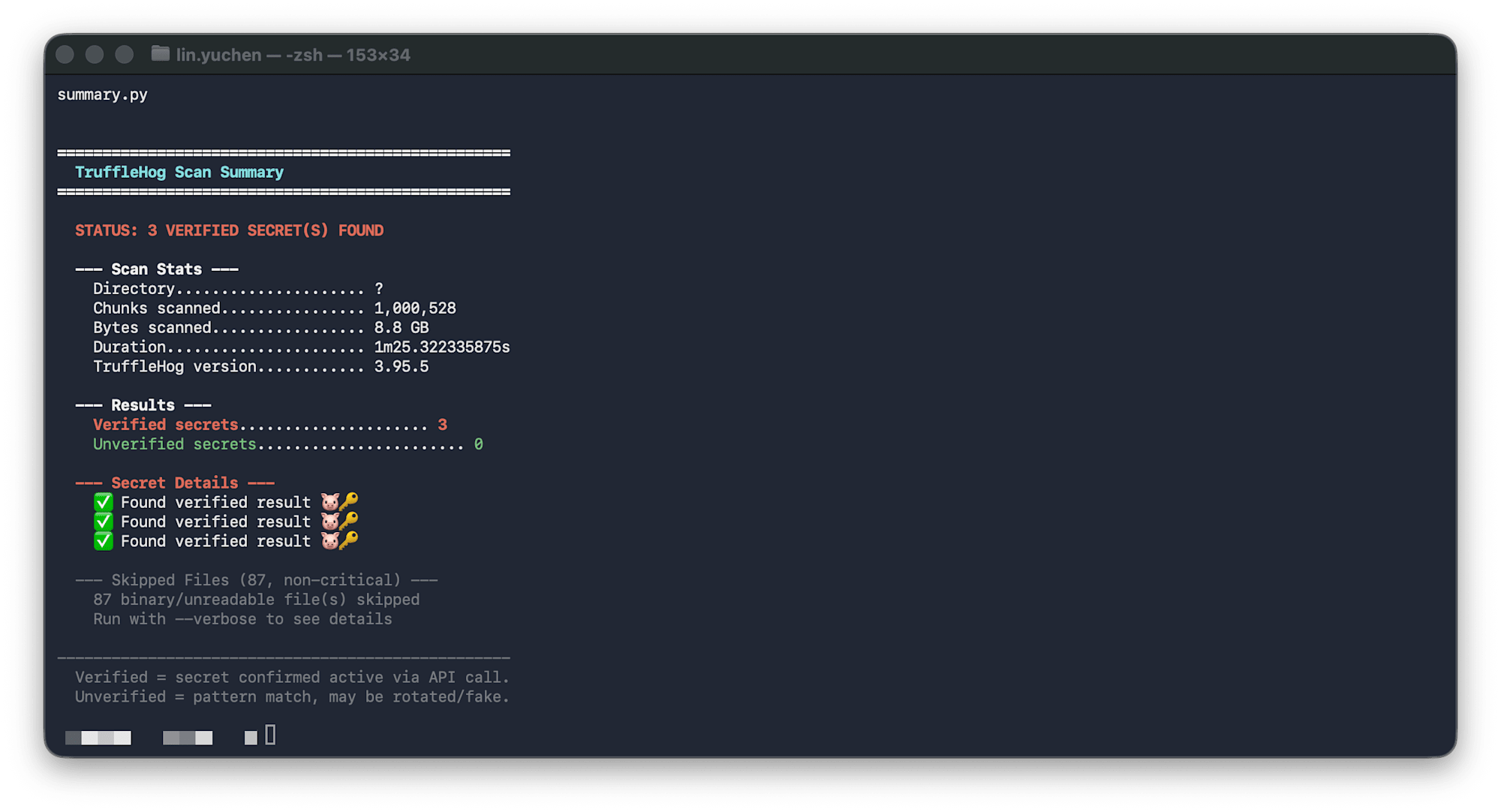
trufflehog filesystem ~/.claude/ --only-verified 2>&1 | python3 trufflehog-summary.py
ポイント: TruffleHogはログをstderrに、検出結果をstdoutに出力するため、2>&1で両方をパイプに流します。
出力例:
==================================================
  TruffleHog Scan Summary
==================================================

  STATUS: CLEAN

  --- Scan Stats ---
    Directory..................... ~/.claude/
    Chunks scanned................ 70,048
    Bytes scanned................. 552 MB
    Duration...................... 14.4s

  --- Results ---
    Verified secrets......................... 0
    Unverified secrets....................... 0

  --- Skipped Files (2, non-critical) ---
    2 binary/unreadable file(s) skipped
OSV-Scanner — 依存パッケージのCVEを検出する
OSV-Scannerとは
Googleが開発した無料のOSSで、npm、PyPI、Go modules、RubyGems、Cargo、Mavenなど複数のエコシステムのlockfileを読み取り、OSVデータベース(NVD、GitHub Advisoriesなどを集約)と照合して既知の脆弱性を検出します。
brew install osv-scanner

# ディレクトリ配下のlockfileを再帰的に自動検出してスキャン
osv-scanner scan -r ~/Developer/

# 特定のlockfileを指定することも可能
osv-scanner scan --lockfile=pnpm-lock.yaml
-r(再帰)オプションでディレクトリを指定すると、package-lock.json、pnpm-lock.yaml、go.sum、requirements.txtなどのlockfileを自動検出してスキャンします。
類似ツールとの比較
| OSV-Scanner | Snyk | Grype | |
|---|---|---|---|
| メンテナ | Snyk社 | Anchore | |
| コスト | 完全無料 | フリーミアム(200テスト/月まで無料) | 無料 |
| コンテナスキャン | なし | あり | あり(主力機能) |
| エコシステムカバレッジ | 広い | 広い | 広い |
個人開発者にはOSV-Scannerが最適です。アカウント不要、制限なし。
CVSSだけでは足りない — CISA KEVとEPSSで優先度を判断する
問題: 「Critical 30件」では行動できない
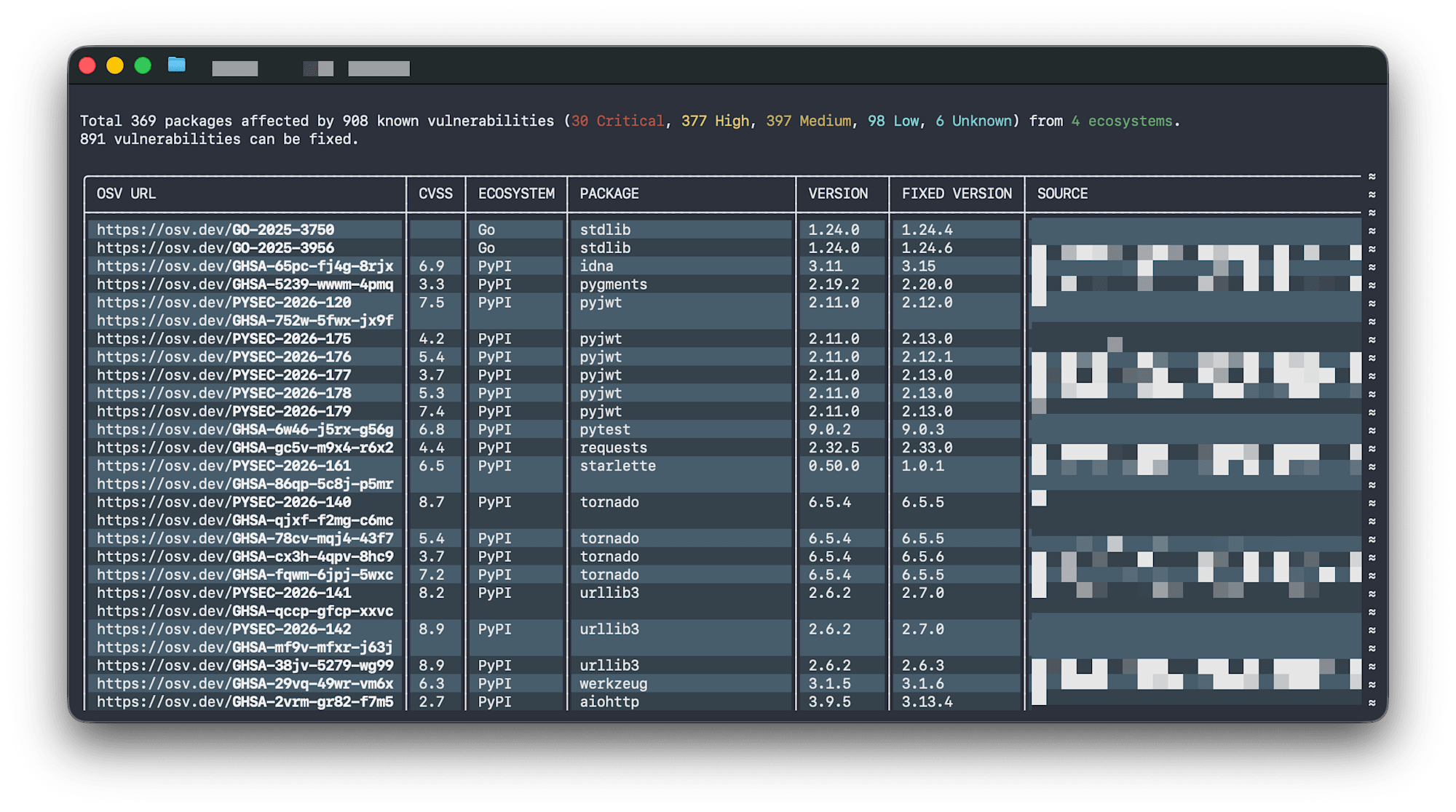
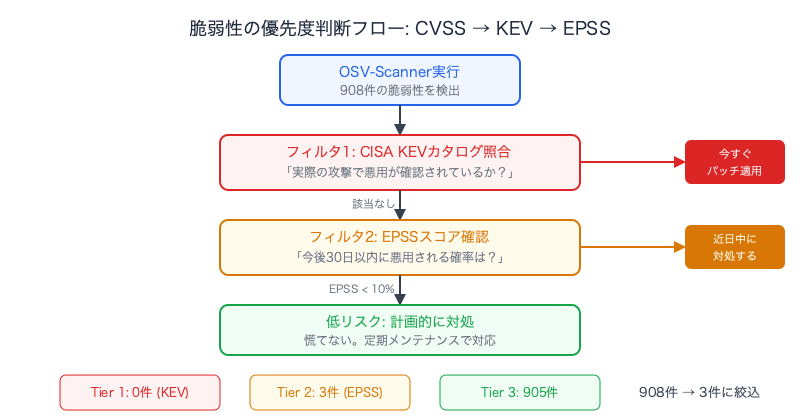
OSV-Scannerを~/Developer/に対して実行すると、908件の脆弱性、うち30件がCriticalと報告されました。しかし、ここで2つの問題があります:
- エコシステム別に表示されるため、深刻度順に見られない
- 30件のCriticalが本当に緊急かわからない — 実際に攻撃に使われているのか?すぐ対処が必要なのか?
CVSSの限界
CVSS(Common Vulnerability Scoring System)は理論的な最大影響度を測定します。
| レーティング | CVSSスコア | 意味 |
|---|---|---|
| Critical | 9.0 - 10.0 | リモートから認証なしで完全侵害可能 |
| High | 7.0 - 8.9 | 深刻だが条件付き(認証やユーザー操作が必要) |
| Medium | 4.0 - 6.9 | 限定的な影響、または悪用が困難 |
| Low | 0.1 - 3.9 | 最小限の影響 |
しかし、CVSSは実際の悪用状況を反映しません。コードから呼び出されない関数のCritical脆弱性よりも、野生で悪用されているHigh脆弱性のほうが緊急です。
2つの追加データソース
| データソース | 提供元 | 教えてくれること |
|---|---|---|
| CISA KEV (Known Exploited Vulnerabilities) | 米国CISA | このCVEは実際の攻撃で悪用が確認されている。今すぐパッチを。 |
| EPSS (Exploit Prediction Scoring System) | FIRST.org | このCVEが今後30日以内に悪用される確率は37%。 |
重要な点として、CISA KEVもEPSSもOSV-Scannerには組み込まれていません。別の公開データベースとして存在しており、クロスリファレンスするには外部APIを呼ぶ必要があります。
エンリッチメントスクリプトで優先度付き出力に
OSV-ScannerのJSON出力を受け取り、CISA KEVカタログ(無料JSONダウンロード)とEPSS API(FIRST.org、無料)を叩いて、3つのリスクティアに分類するPythonスクリプトを作成しました。
osv-enrich.py のソースコード
#!/usr/bin/env python3
"""
OSV-Scanner enrichment script with CISA KEV and EPSS data.

Reads osv-scanner JSON output, cross-references CISA KEV (Known Exploited
Vulnerabilities) and EPSS (Exploit Prediction Scoring System), then outputs
a prioritized summary grouped by real-world risk.

Usage:
    osv-scanner scan -r /path/to/project --format json 2>/dev/null | python3 osv-enrich.py
    osv-scanner scan -r /path/to/project --format json 2>/dev/null | python3 osv-enrich.py --verbose
    osv-scanner scan -r /path/to/project --format json 2>/dev/null | python3 osv-enrich.py --skip-epss
"""

import sys
import json
import argparse
import urllib.request
import urllib.error

# ANSI colors
GREEN = "\033[92m"
YELLOW = "\033[93m"
RED = "\033[91m"
CYAN = "\033[96m"
MAGENTA = "\033[95m"
BOLD = "\033[1m"
DIM = "\033[2m"
RESET = "\033[0m"

CISA_KEV_URL = "https://www.cisa.gov/sites/default/files/feeds/known_exploited_vulnerabilities.json"
EPSS_API_URL = "https://api.first.org/data/v1/epss"
EPSS_BATCH_SIZE = 100

def colored(text, color):
    return f"{color}{text}{RESET}"

def fetch_json(url, timeout=30):
    req = urllib.request.Request(url, headers={"User-Agent": "osv-enrich/1.0"})
    with urllib.request.urlopen(req, timeout=timeout) as resp:
        return json.loads(resp.read().decode())

def fetch_kev_set():
    """Download CISA KEV catalog and return set of CVE IDs."""
    sys.stderr.write(colored("  Fetching CISA KEV catalog...", DIM) + "\n")
    try:
        data = fetch_json(CISA_KEV_URL, timeout=15)
        vulns = data.get("vulnerabilities", [])
        kev_set = {v["cveID"] for v in vulns if "cveID" in v}
        sys.stderr.write(
            colored(f"  KEV catalog loaded: {len(kev_set)} CVEs\n", DIM)
        )
        return kev_set
    except Exception as e:
        sys.stderr.write(colored(f"  Warning: Failed to fetch KEV: {e}\n", YELLOW))
        return set()

def fetch_epss_scores(cve_ids):
    """Fetch EPSS scores for a list of CVE IDs. Returns dict of cve -> {epss, percentile}."""
    if not cve_ids:
        return {}

    sys.stderr.write(
        colored(f"  Fetching EPSS scores for {len(cve_ids)} CVEs...", DIM) + "\n"
    )
    scores = {}
    batches = [
        list(cve_ids)[i : i + EPSS_BATCH_SIZE]
        for i in range(0, len(cve_ids), EPSS_BATCH_SIZE)
    ]

    for i, batch in enumerate(batches):
        cve_param = ",".join(batch)
        url = f"{EPSS_API_URL}?cve={cve_param}"
        try:
            data = fetch_json(url, timeout=15)
            for entry in data.get("data", []):
                scores[entry["cve"]] = {
                    "epss": float(entry.get("epss", 0)),
                    "percentile": float(entry.get("percentile", 0)),
                }
        except Exception as e:
            sys.stderr.write(
                colored(f"  Warning: EPSS batch {i + 1} failed: {e}\n", YELLOW)
            )

    sys.stderr.write(colored(f"  EPSS scores loaded: {len(scores)} CVEs\n", DIM))
    return scores

def severity_from_osv(vuln):
    """Extract severity from OSV vulnerability object."""
    # Check database_specific
    db = vuln.get("database_specific", {})
    if db.get("severity"):
        return db["severity"].upper()

    # Check severity array
    for s in vuln.get("severity", []):
        score_str = s.get("score", "")
        # CVSS v3 vector string contains severity
        if "CVSS" in s.get("type", ""):
            try:
                # Parse base score from vector or score field
                if isinstance(score_str, str) and score_str.replace(".", "").isdigit():
                    score = float(score_str)
                elif isinstance(score_str, (int, float)):
                    score = float(score_str)
                else:
                    continue
                if score >= 9.0:
                    return "CRITICAL"
                if score >= 7.0:
                    return "HIGH"
                if score >= 4.0:
                    return "MEDIUM"
                return "LOW"
            except (ValueError, TypeError):
                continue

    return "UNKNOWN"

def extract_cve_ids(vuln):
    """Get all CVE aliases from a vulnerability."""
    ids = set()
    vid = vuln.get("id", "")
    if vid.startswith("CVE-"):
        ids.add(vid)
    for alias in vuln.get("aliases", []):
        if alias.startswith("CVE-"):
            ids.add(alias)
    return ids

def main():
    parser = argparse.ArgumentParser(description="OSV-Scanner enrichment with KEV + EPSS")
    parser.add_argument(
        "--verbose", "-v", action="store_true", help="Show all vulnerabilities"
    )
    parser.add_argument(
        "--skip-epss", action="store_true", help="Skip EPSS API calls (faster)"
    )
    args = parser.parse_args()

    # Parse OSV-Scanner JSON from stdin
    try:
        osv_data = json.load(sys.stdin)
    except json.JSONDecodeError:
        print(colored("Error: Invalid JSON. Make sure to use: osv-scanner scan -r <dir> --format json", RED))
        sys.exit(1)

    # Collect all vulnerabilities with package info
    vuln_records = []
    seen_vuln_ids = set()

    for result in osv_data.get("results", []):
        source = result.get("source", {}).get("path", "?")
        for pkg_entry in result.get("packages", []):
            pkg = pkg_entry.get("package", {})
            pkg_name = pkg.get("name", "?")
            pkg_version = pkg.get("version", "?")
            pkg_eco = pkg.get("ecosystem", "?")

            for vuln in pkg_entry.get("vulnerabilities", []):
                vid = vuln.get("id", "?")
                if vid in seen_vuln_ids:
                    continue
                seen_vuln_ids.add(vid)

                cve_ids = extract_cve_ids(vuln)
                severity = severity_from_osv(vuln)

                vuln_records.append(
                    {
                        "id": vid,
                        "cve_ids": cve_ids,
                        "severity": severity,
                        "package": f"{pkg_eco}/{pkg_name}@{pkg_version}",
                        "source": source,
                        "summary": vuln.get("summary", ""),
                    }
                )

    if not vuln_records:
        print()
        print(colored("=" * 56, BOLD))
        print(colored("  OSV-Scanner Enriched Summary", BOLD + CYAN))
        print(colored("=" * 56, BOLD))
        print()
        print(colored("  STATUS: CLEAN — no vulnerabilities found", BOLD + GREEN))
        print()
        return

    # Collect all CVE IDs for enrichment
    all_cves = set()
    for r in vuln_records:
        all_cves.update(r["cve_ids"])

    # Fetch enrichment data
    sys.stderr.write("\n")
    kev_set = fetch_kev_set()
    epss_scores = {} if args.skip_epss else fetch_epss_scores(all_cves)
    sys.stderr.write("\n")

    # Enrich records
    for r in vuln_records:
        r["in_kev"] = bool(r["cve_ids"] & kev_set)
        best_epss = 0.0
        best_percentile = 0.0
        for cve in r["cve_ids"]:
            if cve in epss_scores:
                e = epss_scores[cve]
                if e["epss"] > best_epss:
                    best_epss = e["epss"]
                    best_percentile = e["percentile"]
        r["epss"] = best_epss
        r["epss_percentile"] = best_percentile

    # Categorize by risk tier
    tier1_kev = [r for r in vuln_records if r["in_kev"]]
    tier2_high_epss = [
        r for r in vuln_records if not r["in_kev"] and r["epss"] >= 0.1
    ]
    tier3_rest = [
        r for r in vuln_records if not r["in_kev"] and r["epss"] < 0.1
    ]

    # Severity counts
    sev_counts = {}
    for r in vuln_records:
        s = r["severity"]
        sev_counts[s] = sev_counts.get(s, 0) + 1

    sev_order = ["CRITICAL", "HIGH", "MEDIUM", "LOW", "UNKNOWN"]
    sev_colors = {
        "CRITICAL": RED + BOLD,
        "HIGH": RED,
        "MEDIUM": YELLOW,
        "LOW": DIM,
        "UNKNOWN": DIM,
    }

    # Output
    print()
    print(colored("=" * 56, BOLD))
    print(colored("  OSV-Scanner Enriched Summary", BOLD + CYAN))
    print(colored("=" * 56, BOLD))
    print()

    # Overall status
    if tier1_kev:
        print(colored(f"  STATUS: {len(tier1_kev)} ACTIVELY EXPLOITED", BOLD + RED))
    elif tier2_high_epss:
        print(colored(f"  STATUS: {len(tier2_high_epss)} HIGH EXPLOIT PROBABILITY", BOLD + YELLOW))
    else:
        print(colored(f"  STATUS: {len(vuln_records)} vuln(s), none actively exploited", BOLD + GREEN))
    print()

    # Severity breakdown
    print(colored("  --- By Severity (CVSS) ---", BOLD))
    for s in sev_order:
        if s in sev_counts:
            c = sev_colors.get(s, RESET)
            print(f"    {colored(s, c):.<50s} {colored(str(sev_counts[s]), c)}")
    print(f"    {'':.<38s} {'─' * 6}")
    print(f"    {'Total':.<38s} {len(vuln_records):>6}")
    print()

    # Tier 1: CISA KEV
    kev_label = colored("ACTIVELY EXPLOITED", BOLD + RED) if tier1_kev else colored("ACTIVELY EXPLOITED", DIM)
    kev_count = colored(str(len(tier1_kev)), BOLD + RED) if tier1_kev else "0"
    print(colored("  --- CISA KEV (confirmed exploited in the wild) ---", BOLD))
    print(f"    Count: {kev_count}")
    if tier1_kev:
        print()
        for r in sorted(tier1_kev, key=lambda x: -x["epss"]):
            sc = sev_colors.get(r["severity"], RESET)
            epss_str = f"EPSS {r['epss']:.0%}" if r["epss"] > 0 else ""
            print(f"    {colored('!!! FIX NOW', BOLD + RED)}  {colored(r['severity'], sc):<10s}  {r['package']}")
            cve_str = ", ".join(r["cve_ids"]) if r["cve_ids"] else r["id"]
            print(colored(f"{'':>16s}{cve_str}  {epss_str}", DIM))
            if r["summary"]:
                print(colored(f"{'':>16s}{r['summary'][:80]}", DIM))
    print()

    # Tier 2: High EPSS
    print(colored("  --- High Exploit Probability (EPSS >= 10%) ---", BOLD))
    print(f"    Count: {len(tier2_high_epss)}")
    if tier2_high_epss:
        print()
        for r in sorted(tier2_high_epss, key=lambda x: -x["epss"]):
            sc = sev_colors.get(r["severity"], RESET)
            epss_val = r["epss"]
            epss_label = colored(f"EPSS {epss_val:.0%}", BOLD + YELLOW)
            print(
                f"    {epss_label:>20s}  "
                f"{colored(r['severity'], sc):<10s}  {r['package']}"
            )
            cve_str = ", ".join(r["cve_ids"]) if r["cve_ids"] else r["id"]
            print(colored(f"{'':>22s}{cve_str}", DIM))
            if args.verbose and r["summary"]:
                print(colored(f"{'':>22s}{r['summary'][:80]}", DIM))
    print()

    # Tier 3: Rest
    print(colored("  --- Low Risk (EPSS < 10%) ---", BOLD))
    print(f"    Count: {len(tier3_rest)}")
    if args.verbose and tier3_rest:
        print()
        for r in sorted(tier3_rest, key=lambda x: (-x["epss"], x["severity"])):
            sc = sev_colors.get(r["severity"], RESET)
            epss_str = f"EPSS {r['epss']:.1%}" if r["epss"] > 0 else "EPSS n/a"
            cve_str = ", ".join(r["cve_ids"]) if r["cve_ids"] else r["id"]
            print(
                f"    {epss_str:>12s}  {colored(r['severity'], sc):<10s}  "
                f"{r['package']:<40s}  {colored(cve_str, DIM)}"
            )
    elif tier3_rest:
        # Compact summary by severity
        rest_by_sev = {}
        for r in tier3_rest:
            rest_by_sev.setdefault(r["severity"], []).append(r)
        for s in sev_order:
            if s in rest_by_sev:
                c = sev_colors.get(s, RESET)
                print(f"      {colored(s, c)}: {len(rest_by_sev[s])}")
        print(colored("      Run with --verbose to see all", DIM))
    print()

    # Footer
    print(colored("-" * 56, DIM))
    print(colored("  Risk tiers:", DIM))
    print(colored("    1. CISA KEV = confirmed exploited, fix immediately", DIM))
    print(colored("    2. EPSS >= 10% = likely to be exploited soon", DIM))
    print(colored("    3. EPSS < 10% = lower probability, monitor", DIM))
    if args.skip_epss:
        print(colored("  Note: EPSS scores skipped (--skip-epss)", YELLOW))
    print()

if __name__ == "__main__":
    main()
osv-scanner scan -r ~/Developer/ --format json 2>/dev/null | python3 osv-enrich.py
出力例:
========================================================
  OSV-Scanner Enriched Summary
========================================================

  STATUS: 908 vuln(s), none actively exploited

  --- By Severity (CVSS) ---
    CRITICAL........................................ 30
    HIGH............................................ 150
    MEDIUM.......................................... 500
    LOW............................................. 228

  --- CISA KEV (confirmed exploited in the wild) ---
    Count: 0

  --- High Exploit Probability (EPSS >= 10%) ---
    Count: 3

       EPSS 45%  HIGH      npm/example-pkg@1.2.3
                  CVE-2025-12345

  --- Low Risk (EPSS < 10%) ---
    Count: 905
      CRITICAL: 30
      HIGH: 148
      MEDIUM: 500
      LOW: 227
      Run with --verbose to see all
これで、908件の脆弱性が実際に行動すべき3-5件に絞り込めます。
スキャンツールのUX課題
今回3つのツールを試して感じた共通の課題は、出力が機械向けで人間に読めないことです。
| ツール | 出力形式 | 課題 |
|---|---|---|
| Bumblebee | NDJSON(6.3MB) | パイプライン向け。ラッパーなしでは読めない |
| TruffleHog | stderrにログ + stdoutに検出結果が混在 | エラーログとスキャン統計が混ざる |
| OSV-Scanner | テーブル表示 | エコシステム別で深刻度順でない。908件を眺めても行動できない |
これらのツールはSIEM連携やCI/CDパイプラインを想定しており、「個人開発者が手元で結果を確認する」ユースケースには向いていません。
今回作成したラッパースクリプト3本で、この課題を解消しました:
| スクリプト | 機能 |
|---|---|
bumblebee-summary.py |
NDJSON → カラー付きサマリー。MCP設定をFirst-party/Third-partyに分類 |
trufflehog-summary.py |
stderr+stdout混在 → CLEAN/FINDINGS表示 + スキャン統計 |
osv-enrich.py |
JSON → CISA KEV + EPSS enrichment → 3ティア優先度分類 |
まとめ
3ツールのセットアップコマンド
# Bumblebee(サプライチェーン + MCP)
go install github.com/perplexityai/bumblebee/cmd/bumblebee@latest

# TruffleHog(シークレット漏洩)
brew install trufflehog

# OSV-Scanner(既知CVE)
brew install osv-scanner
日常のスキャンコマンド
# サプライチェーン + MCP設定チェック
bumblebee scan --profile baseline 2>/dev/null | python3 bumblebee-summary.py

# シークレット漏洩チェック
trufflehog filesystem ~/.cursor/ --only-verified 2>&1 | python3 trufflehog-summary.py

# 依存パッケージのCVEチェック(優先度付き)
osv-scanner scan -r ~/Developer/ --format json 2>/dev/null | python3 osv-enrich.py
判断基準
- CISA KEVに載っている → 今すぐパッチを当てる
- EPSS ≥ 10% → 近日中に対処する
- CVSS Critical/Highだが EPSS < 10% → 計画的に対処。慌てない
- MCP設定にThird-partyサーバーがある → ソースコードとメンテナンス状況を確認する
- 平文トークンが検出された → 即座にローテーション + 環境変数 or 1Password CLIに移行
Agent生態系が拡大するほど、開発者マシンのセキュリティは「個人の習慣」ではなく組織の衛生管理として扱う必要があります。3つの無料ツール + ラッパースクリプトで、その第一歩が踏み出せます。