
I had AWS DevOps Agent investigate an outage caused by an operational mistake, and it even came up with hypotheses about "why the mistake was made"

This page has been translated by machine translation. View original
Hello. I'm Ogata from the Operations Innovation Department.
I had AWS DevOps Agent investigate an incident caused by an operational mistake.
AWS DevOps Agent is an agent that starts from an alarm, reads metrics, logs, and CloudTrail, and investigates the cause of an incident.
I investigated a scenario in which the disk becomes tight on space, and an operator deletes a file that they judge to be "probably fine to delete." As a result, a secondary incident occurs, in which another alarm goes off.
I deliberately named the file tmp_index so that it would look like a temporary file.
As a result, it pointed out not only the facts of the work, "when, who, and what was done," but also "the possibility that the name tmp_index led the operator to judge it was a file that was fine to delete."
Conclusion
- It identified the time of the operational mistake, the person who performed the operation, and even the command that was executed
- Furthermore, as a contributing factor, it raised as a hypothesis "the possibility that the name
tmp_indexled the operator to judge it was a temporary file that was fine to delete" - The proposals for preventing recurrence were not "the operator should be careful," but changes to the system, such as renaming the file and protecting it
Details of the verification
The configuration of the verification I built this time is as follows.
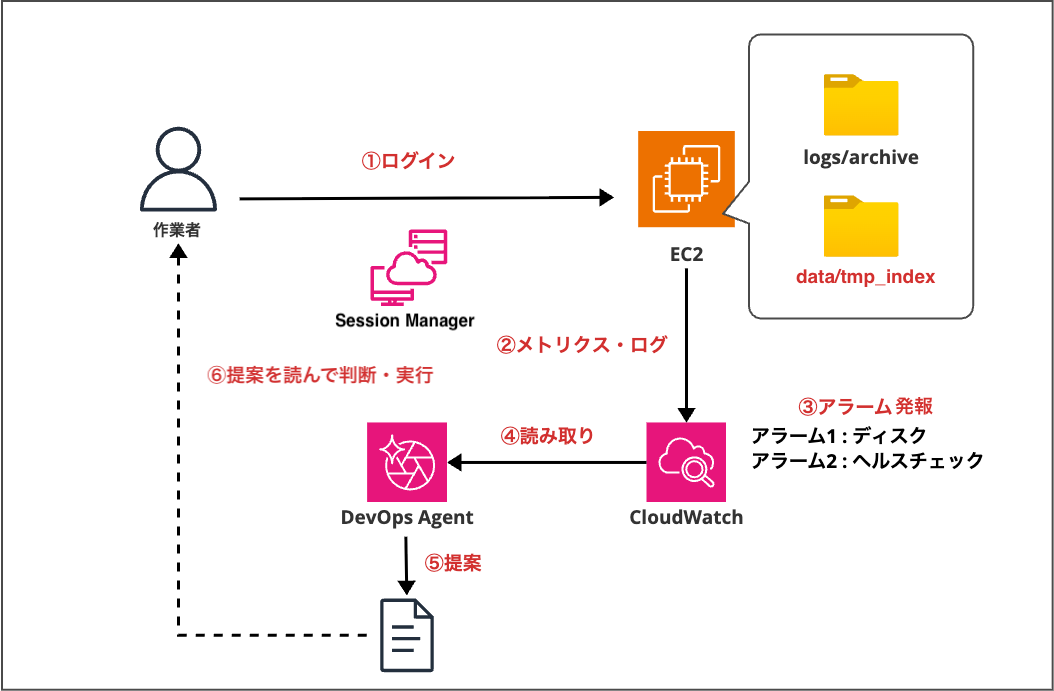
- I attached a data volume (2 GiB) to an EC2 instance (Amazon Linux 2023) as
/srv/app - Logs accumulate every minute in
/srv/app/logs/archive/. This is a dummy mechanism made to look like log rotation. These are files that are fine to delete - In
/srv/app/data/tmp_index/, I placed an index file (about 600MB) used by the app. If you delete it, the app's health check fails. I prefixed the name withtmpto make it look like a file that someone might carelessly delete - There are two alarms: disk usage (80% or more) and app health check failure
- The operator enters the EC2 instance via Session Manager. The session log (the commands typed and their output) is sent to CloudWatch Logs
- DevOps Agent (Tokyo Region) investigates CloudWatch and CloudTrail with read-only permissions
Flow of the verification
The flow of this verification is as follows. The numbers correspond to the numbers in the configuration diagram.
- To resolve the disk shortage, the operator logs in to the EC2 instance and deletes
data/tmp_index, which must not be deleted, in order to free up space - CloudWatch collects metrics
- The app health check alarm fires
- DevOps Agent investigates the incident
- As a result of the investigation, it proposes mitigation measures
- A human reads the proposal, then makes a decision and acts on it
As prerequisites, I decided on the following three points.
- I turned off the feature that lets DevOps Agent perform work (agent actions). DevOps Agent goes only as far as making proposals, and humans own the work and the responsibility

- Because the design of the verification is written in the user data, I made the EC2 user data unreadable via IAM
- I requested the investigation manually by writing the alarm name in the investigation details
Reproducing the operational mistake
After the disk usage exceeded 80%, I typed the following commands in Session Manager as the operator. The assumption is: "I looked for large items to free up space, saw that the name started with tmp, and judged it was fine to delete."
df -h /srv/app
sudo du -sh /srv/app/data/* /srv/app/logs/*
ls -lh /srv/app/data/tmp_index
sudo rm -rf /srv/app/data/tmp_index
df -h /srv/app
The image below shows the result of running the du command.

Usage dropped from 88% to 57%, and the disk alarm returned to OK. However, a few minutes later, the app health check alarm fired.
What DevOps Agent identified
I started the investigation from the health check alarm. The investigation was completed in about 5 minutes.
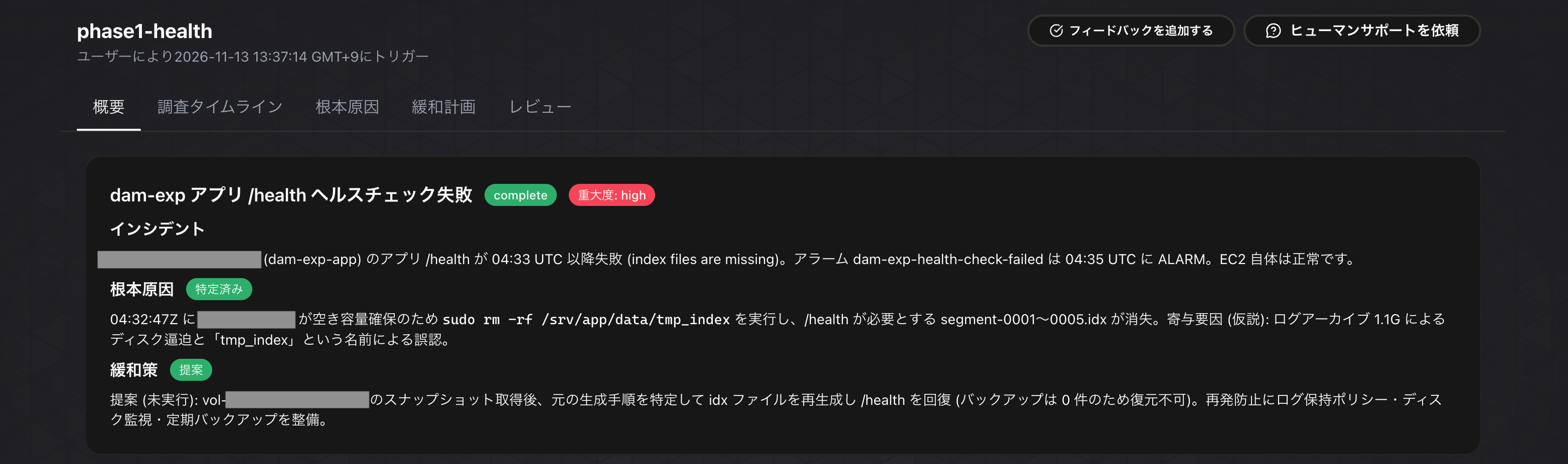
When, who, and what was done
As the root cause, it identified that the operator ran sudo rm -rf /srv/app/data/tmp_index to free up space, and that the index files (segment-0001〜0005.idx) required by /health were deleted. It even wrote down the time and the person who performed the operation.
The following four pieces of evidence were cited.
- The Session Manager session log (commands typed and their times)
- CloudTrail (session start)
- The app log (
FileNotFoundErrorandhealth check failed) - The health check metrics
Why the mistake was made
This was the most interesting part. As contributing factors, it raised the following two as hypotheses (unconfirmed).
- The disk shortage caused by the log archive (1.1G) became the motivation for manual deletion
- The possibility that the name "
tmp_index" led the operator to judge it was a temporary file that was fine to delete


As I wrote earlier, I made the user data unreadable. The design that "tmp_index is actually an important file, and its name was deliberately made misleading" was not conveyed to DevOps Agent. Even so, it came up with the same hypothesis as the one I had intended with the setup.
Proposals for preventing recurrence
There were the following five proposals for preventing recurrence.
- Have the app automatically recreate the index files at startup (even if they are deleted, they come back on restart)
- Rename
tmp_indexto something likeindex, and place a README prohibiting deletion. If necessary, protect it withchattr +i - Set a retention period for the log archive
- Set up disk usage notifications and backups
- Make checking the runbook mandatory before a sudo deletion, or prepare an SSM Automation for cleanup whose deletion targets are limited to
logs/archive
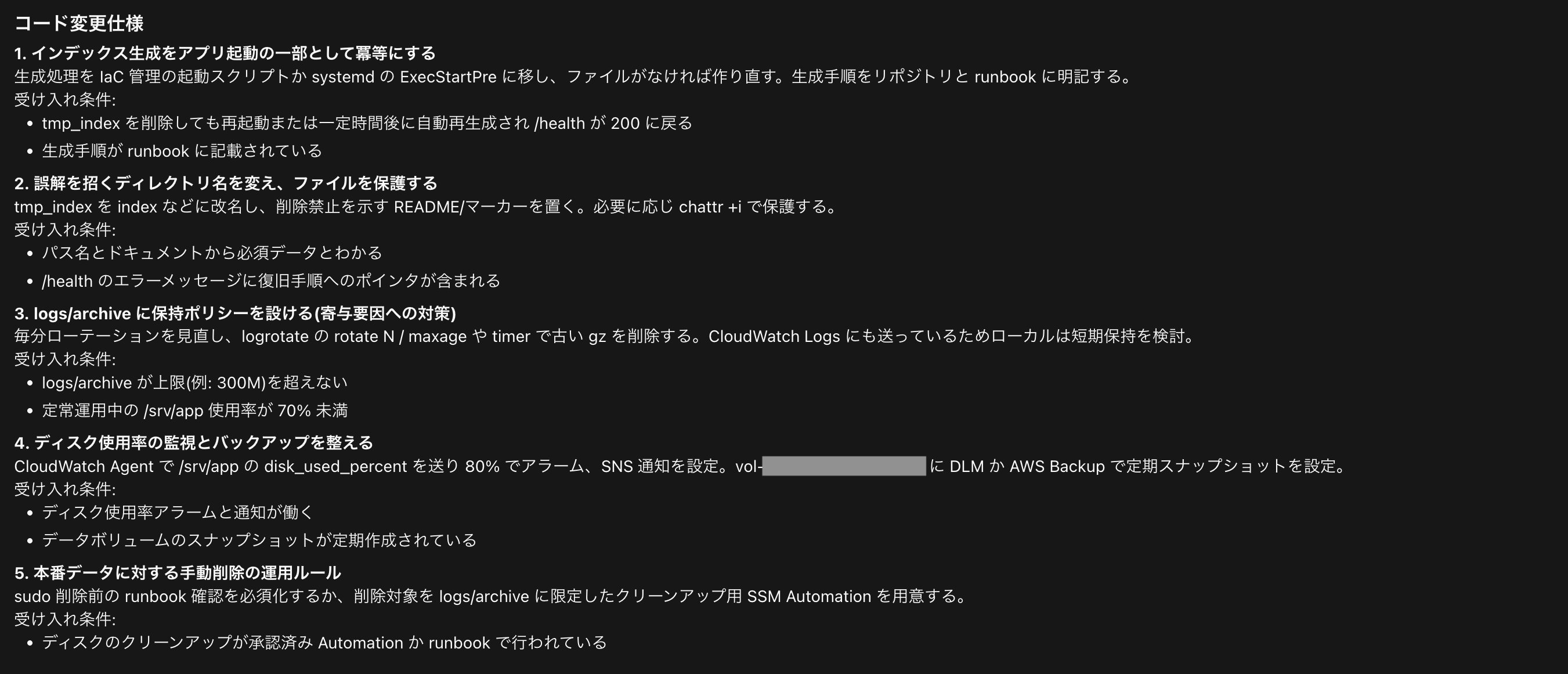
There were no proposals that ended with just "be careful"; the focus was on changes to the system, such as renaming and protecting files.
How could it say so much from just the name?
It seems it did not decide based on the name alone. Looking at the evidence, the following circumstances were all present.
- The disk was running short of space at the time
- Just before the deletion, the operator had confirmed with
dfthat the disk was at 88% - The name of the deleted folder had
tmpin it - Immediately after the deletion, the app started emitting
FileNotFoundError
These were all left in the session log and the app log with timestamps. Because the sequence of the work could be traced in order, I think it was able to infer even "why the operator made that judgment" (this is my hypothesis).
In a postmortem, it seems good to use it as a draft of the "why" and then confirm with the person involved. Rather than as material for blaming people, it looks usable as a trigger for fixing the system.
Summary
- In addition to the time, person, and command of the operational mistake, DevOps Agent formed a hypothesis about "why the mistake was made"
- The basis was the order of the work left in the session log and the app log
- The proposals for preventing recurrence were changes to the system. It looks usable as a draft for a postmortem