
I tried creating a custom memory store with DevOps Agent to give a custom agent memory

This page has been translated by machine translation. View original
Hello. This is Takayama.
Previously, I wrote an article about checking the memory feature of DevOps Agent.
At that time, there were only two managed store types for the memory store: monitors, which is automatically learned, and directives, which users manually input.
It was possible to add memories from chat, but the destination was always an existing store, and there was no way to create a new store from scratch.
In the meantime, the August 27, 2026 update introduced the ability for users to freely create memories in the form of custom memory stores, along with four other updates.
| Update | Content |
|---|---|
| Creating custom memory stores | You can now create your own memory stores to organize operational knowledge by team, service, or recurring issue. Create them from the console or via chat with DevOps Agent, and set a clear description to help the agent determine when to reference that store |
| Organizing memories into folders | A memory's name is treated as a path within the store, and grouping them with a common prefix (e.g., alarms/) creates a folder structure. The agent uses progressive disclosure to open only the memories relevant to the task, and the Operator App displays the same structure |
| Learned Skills as memories | Learned skills such as topology, code dependencies, pipeline structure, and tool usage patterns are now maintained as memories. Changes happen automatically with no action required from users. You can check them from the Memories tab on the Knowledge page |
| Attaching memory stores to custom agents | You can now attach memory stores to custom agents to give them a focused informational context. Custom agents read from and write to only the stores they have attached |
This time, I'll try actually creating a custom memory store and having the agent retain memories, while also checking the other updates.
Summary first
- Creating custom memory stores
- You can now create them from the console (Knowledge page → Memories tab → Create memory store) or by requesting via chat
- The agent judges relevance using only the name and description before reading the store's contents
- The official recommended pattern for descriptions is to cover two points: "what it holds" + "when it should be used"
- Memory stores are designed as a place to save reusable conclusions, not as scratch pads for one-time investigations or caches for tool output
- Organizing memories into folders
- Using
/separators in memory names allows nesting like folders, and the agent reads an index first and opens only the few relevant files (progressive disclosure)
- Using
- Learned Skills as memories
- Knowledge previously called Learned Skills — topology, dependencies, pipeline structure, and tool usage patterns — has been integrated as managed stores
- The migration is automatic and requires no action from users
- Attaching memory stores to custom agents
- Memory stores can now be attached to custom agents
- They read from and write to only the attached stores, and new custom agents start with no stores attached
- Custom memory stores are readable and writable; managed memory stores are read-only
What are memories, anyway?
Before diving into the details of the four updates, let me cover what memories do.
In a nutshell, it's a mechanism for carrying over knowledge to the agent that would otherwise be lost between sessions.
It's easiest to think of it as a place to keep what you've learned so you don't have to re-examine the same environment or trace back to the same root cause from scratch every time you investigate.
The official documentation lists four benefits of using memories.
| Benefit | Content |
|---|---|
| Faster investigations | When the same problem recurs, the agent can recall the most recent root cause and skip duplicate diagnostic steps |
| Environment awareness | Retains information that's hard to look up every time, such as noisy alarms, infrastructure quirks, and relationships between components |
| Gets smarter over time | Each time an incident is resolved, patterns and root causes specific to your infrastructure accumulate |
| Remembers preferences | Records communication preferences and instructions so the agent behaves as expected |
There are similar features called Skills and Agent instructions, but they serve different roles.
While Skills extend the agent's capabilities by teaching it "procedures," memories help with the speed and accuracy of decisions by providing "facts."
| Item | Skill | Agent instructions | Memory |
|---|---|---|---|
| Type of knowledge | Procedural (step-by-step instructions) | Procedural (always-applied instructions) | Informational (synthesized context) |
| Format | Markdown or ZIP | Markdown only | Markdown only |
| How it's loaded | On demand (agent decides based on description) | Always (every session) | On demand (agent decides based on description) |
| Created by | User or DevOps Agent | User | User or DevOps Agent |
Each memory is actually a single Markdown file, and a memory store is the conceptual container that manages them.
The agent is not handed the contents of stores at the start of a session. Instead, it first receives only a list of store names and descriptions.
From there, it judges relevance to the task and opens only the stores that seem related.
The same thing happens within a store — it reads the descriptions and then reads only the relevant memories.
This behavior of "reading the description and then deciding whether to open it" is the foundation of this update.
Let's now go through the updates one by one.
Checking the updates
Update 1: You can now create custom memory stores
First, update number one.
Users can now create their own custom memory stores.
The What's New entry states: "You can now create your own memory stores to group operational knowledge about teams, services, or recurring issues."
How to create a custom memory store
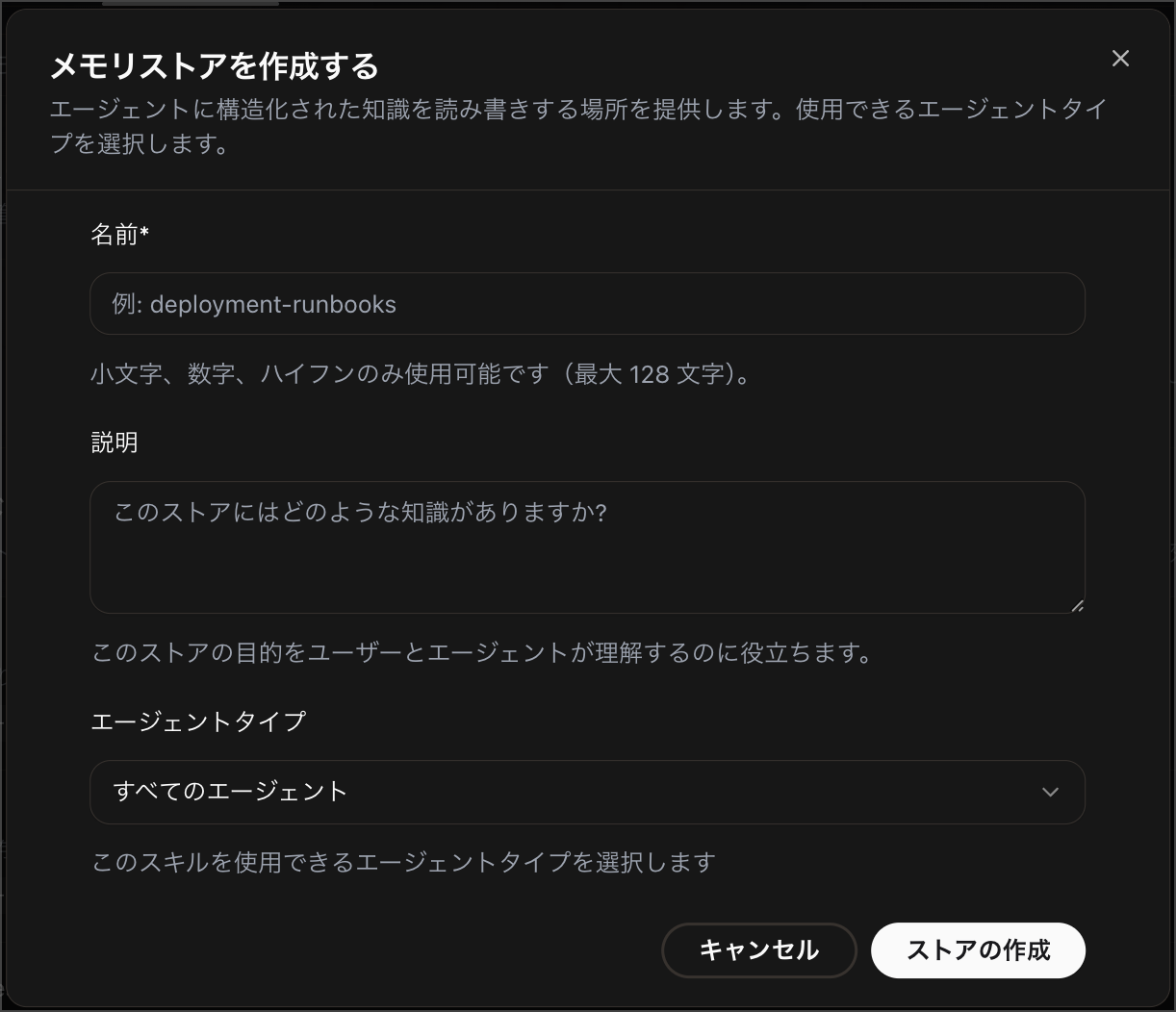
You can create one from either the console or chat. The steps to create one from the console are as follows:
- Open the "Knowledge" page in the Agent Space Operator Web App
- Select the "Memories" tab
- Select "Add store"
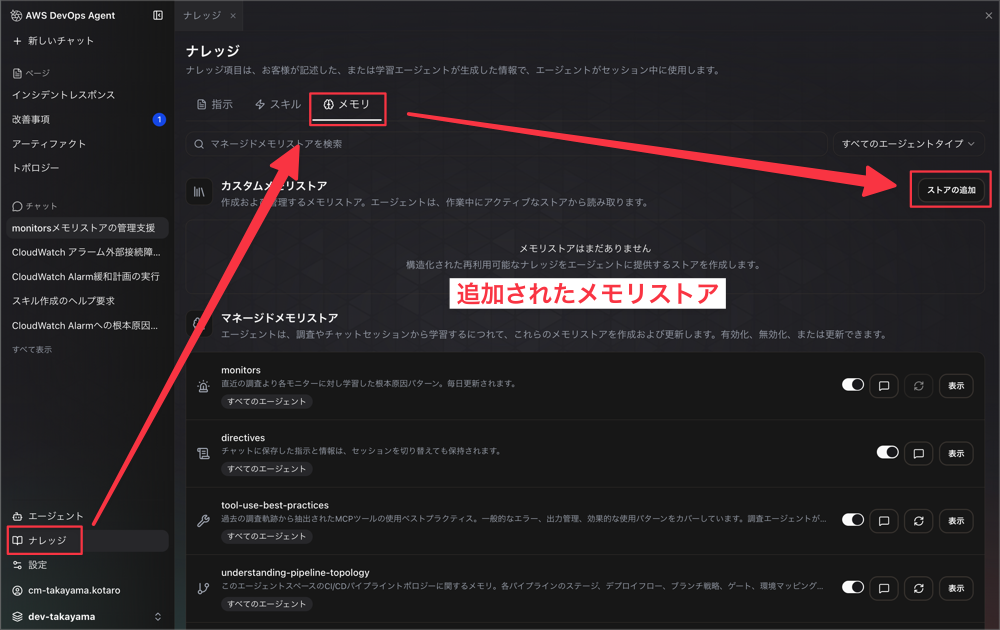
- Enter a name and description, then select "Create store"
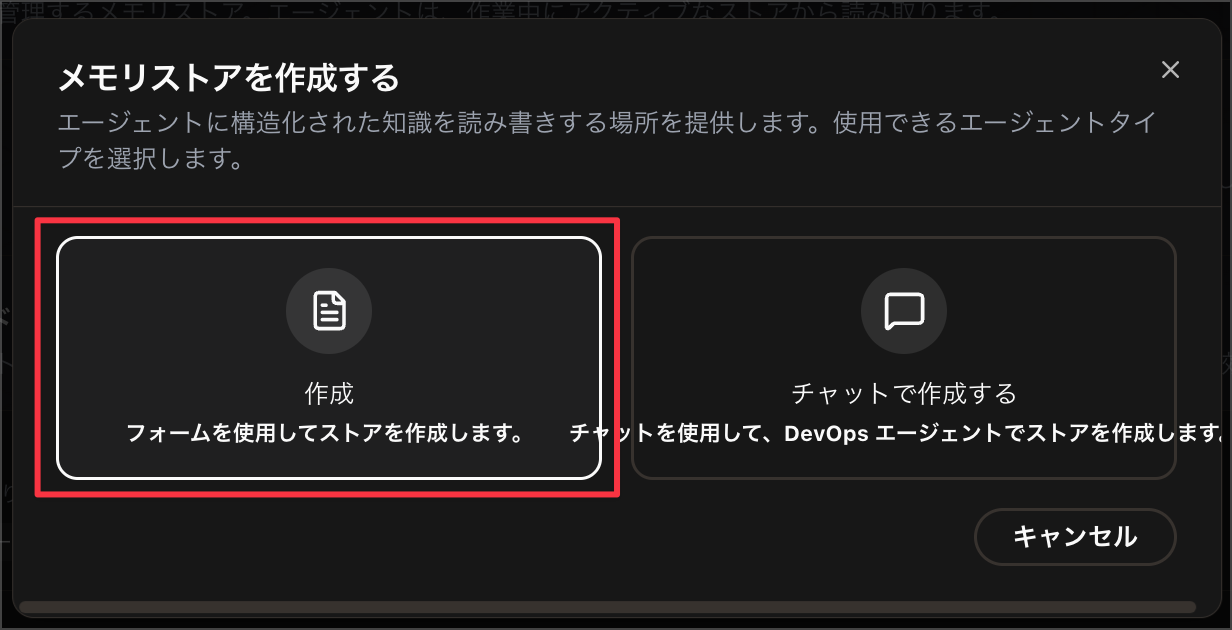
To create one from chat, simply ask DevOps Agent in natural language. The official documentation provides the following example request:
"Create a memory store named operational-procedures that holds the standard runbooks for our routine maintenance tasks." - Creates a store for standard operating procedures.
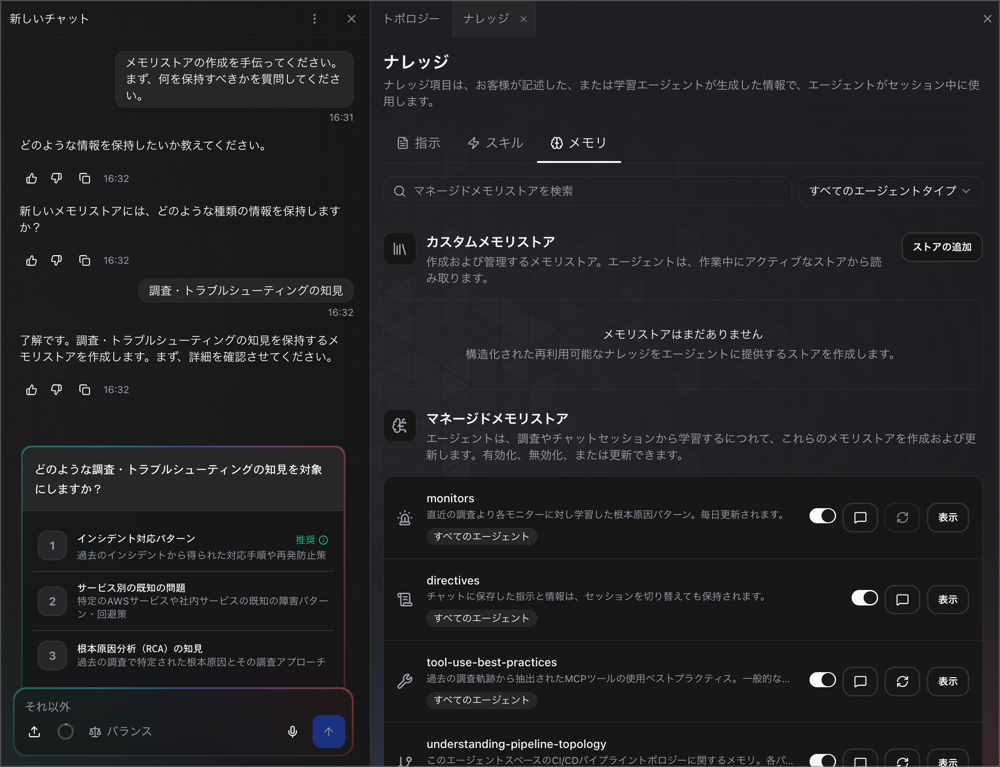
Custom stores you create are used in the same way as the managed stores that DevOps Agent automatically generates.
The key thing to keep in mind with this update is how to write descriptions.
The agent doesn't preload memory stores — it uses only the name and description to decide whether to use a memory.
A store's description is the most important thing you write, because it's how the agent decides whether the store is relevant—before it reads anything inside. ... A precise description gets the store opened at the right moment; a vague label such as
notesormiscgives the agent nothing to match against, so it skips the store even when the answer is inside.
As explicitly stated — "the store is skipped even when the answer is inside" — the precision of the description directly determines practical usefulness.
The officially recommended way to write a description is to clearly state two things: "what the store holds" and "when the agent should use it."
Write a description that states two things: what the store holds, and when the agent should use it. A reliable pattern is to end with the situations it applies to—for example, "Read when investigating checkout or billing latency."
- Too vague: "Payments notes."
- Effective: "Standing runbooks, known issues, and escalation contacts for the payments service. Read when investigating checkout, billing, or refund incidents."
Another easily overlooked point is that descriptions should be written as declarative statements about the store's subject, not as instructions directed at a person. Think of it as "information about ~" rather than "please do ~."
What to store / not store
After descriptions, the next thing to pay attention to is what to save in a memory store.
The official documentation explicitly states that you should store only "conclusions worth recalling later" — it is not a place to keep investigation notes or temporarily hold tool execution results.
A memory store holds durable, synthesized knowledge—facts about your environment, recurring root causes, standing conventions and directives, and the findings and summaries you distill from past work. Store the conclusion worth recalling later, not raw data.
A memory store is not a scratchpad for a single investigation, and it isn't a key-value cache for a tool's output.
The concrete example given in the official documentation is saving a conclusion uncovered during an investigation, such as "the checkout service calls the payments API synchronously."
Saving raw tool call results to retrieve later is not an intended use case. Raw data from an investigation is something the agent holds in its working context, so that's where it stays.
It's also recommended to keep individual memories focused on a single fact or lesson rather than writing everything into one large memory.
The idea is to save only information that's useful across investigations in memory, while leaving one-time working data within the investigation itself.
Update 2: Memories can now be organized into folders
A folder feature has been added for organizing memories.
The What's New entry states: "Grouping memories with a common prefix (for example, alarms/) creates a browsable folder structure."
Since a memory's name is treated as its path within the store, you can organize them like folders by nesting with / separators.
A memory's name is its path within the store, so you can group related memories into folders instead of keeping a single flat list. Use
/in a name to nest memories—for example,alarms/checkout-latencyorservices/checkout/overview.
Let's try requesting the creation of memories with an alarms/ prefix in a custom memory store called "ops-investigation-knowledge."
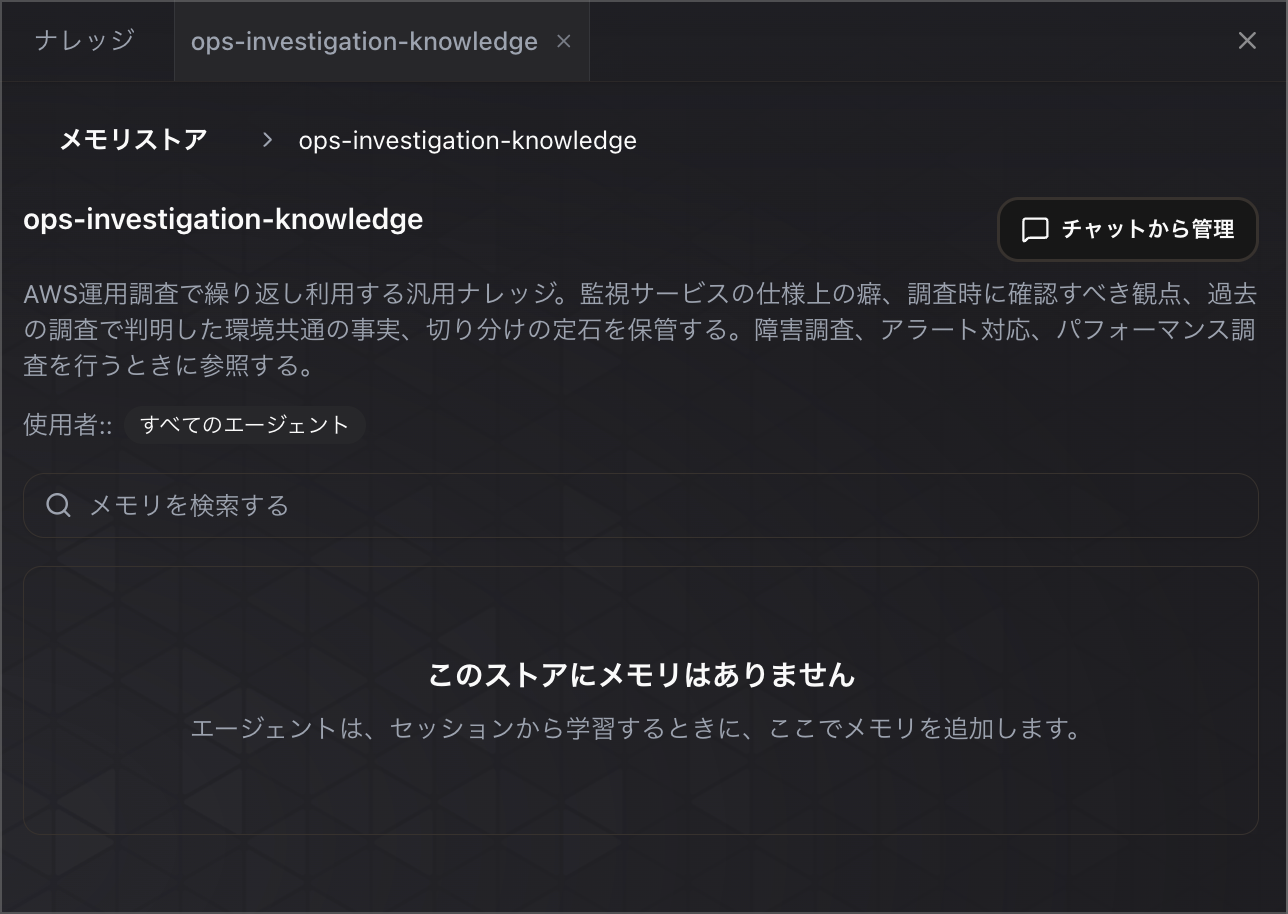
This time I'll send a prompt requesting the creation of memories to speed up investigation of the sample-automated-aws-devops-agent-network-incident-response environment.
The AWS account connected to this Agent Space has a sample environment deployed for practicing network failure investigations.
A Node.js app running on EC2 behind an ALB periodically checks connectivity to RDS, the internet via NAT Gateway, an S3 gateway endpoint, and a Bedrock Interface endpoint, and sends failures as custom metrics to CloudWatch.

Please investigate the CloudWatch Alarms in this environment and create memories to help speed up future investigations the next time an alarm fires.

## What I want you to do

1. Get a list of the custom metrics in the `DevOpsAgentSample` namespace and the CloudWatch Alarms monitoring them
2. For each alarm, check what resource's connectivity it monitors and what might be happening when it fires, based on the actual templates and resource configuration
3. Save the findings as memories, one per alarm

## How to create the memories

Create a new store named `ops-investigation-knowledge` as the destination.
Set the store's description so it's clear what it holds and when it should be referenced.

Memories related to CloudWatch Alarms must have names with an `alarms/` prefix.
For example, use a format like `alarms/database-connection-failures`.
Create one memory per alarm, for a total of four memories.

Information that is not specific to individual alarms (such as the overall network configuration of this environment and settings common to all four alarms) should be saved without the `alarms/` prefix.

## What to include in each memory

- The metric the alarm monitors and the target resource being monitored
- Candidate causes to suspect when the alarm fires (such as security groups, route tables, VPC endpoint policies, IAM, NAT Gateway — things that are actually possible given the configuration of this environment)
- What to check first and how to check it
- Any notes about confusing aspects of the investigation, if applicable

## Notes on what to save

Save only conclusions that are worth recalling later.
Do not save the raw metric values or API responses obtained during this investigation — instead, preserve the facts you learned and the investigative insights from them.

Once done, show me a list of the stores and memories you created, including their names and descriptions.
Once creation is complete, I can confirm that an alarms folder was created with memories inside it.
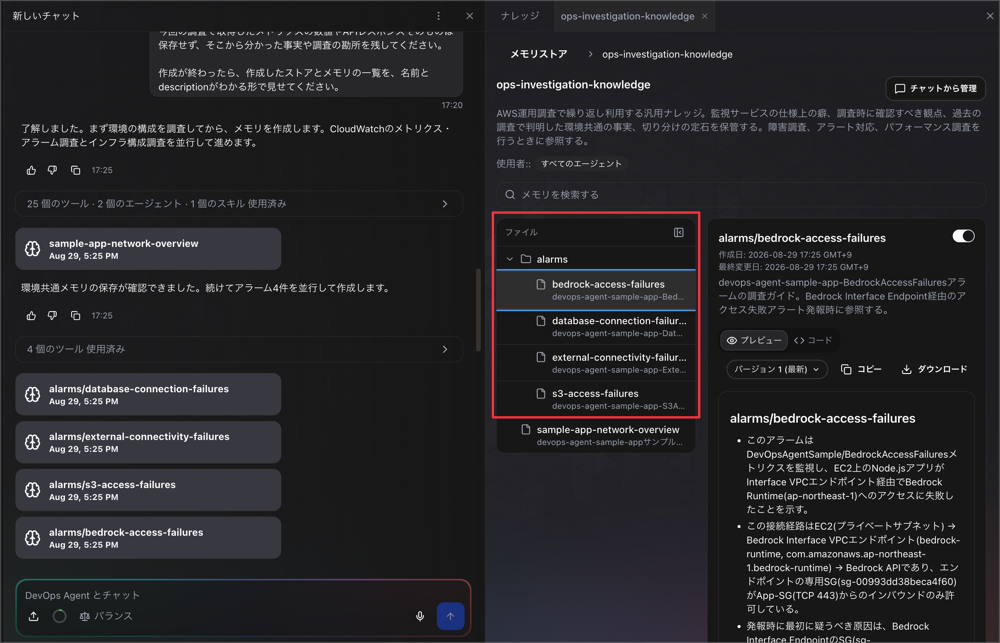
Even with folder organization, the agent's behavior remains as described at the beginning.
The same behavior of reading descriptions to decide whether to open something applies here too — the agent reads an index file first and opens only the few files relevant to the task.
The official documentation calls this progressive-disclosure.
Because a memory's location signals what it holds, the agent reads an index first and opens only the few files relevant to the task, the same progressive-disclosure pattern described above.
Update 3: Learned Skills have been migrated to Memories
Update number three is straightforward.
As DevOps Agent handles more investigations, it learns about the topology and code dependencies of the infrastructure it manages, accumulating that knowledge as "Learned Skills" in the Skills tab.
With this update, that accumulated knowledge is being migrated to Memories. The four types affected are as follows:
| Learned Skill | Store name | Content held |
|---|---|---|
| Agent Space Understanding | understanding-agent-space |
Map of resources and relationships within the Agent Space |
| Understanding Code Dependencies | understanding-dependencies |
Map of dependencies between services and packages |
| Understanding Pipeline Topology | understanding-pipeline-topology |
The flow from pipeline start to release |
| Tool Use Best Practices | tool-use-best-practices |
Tool usage patterns and failure modes extracted from past investigations |
The migration is automatic and requires no action from users.
During the move, the console keeps showing a learned skill on the Skills tab until its memory is ready, and then points you to its new home on the Memories tab. After the move, you view and manage your learned skills on the Memories tab of the Knowledge page.
https://docs.aws.amazon.com/devopsagent/latest/userguide/about-aws-devops-agent-learned-skills.html
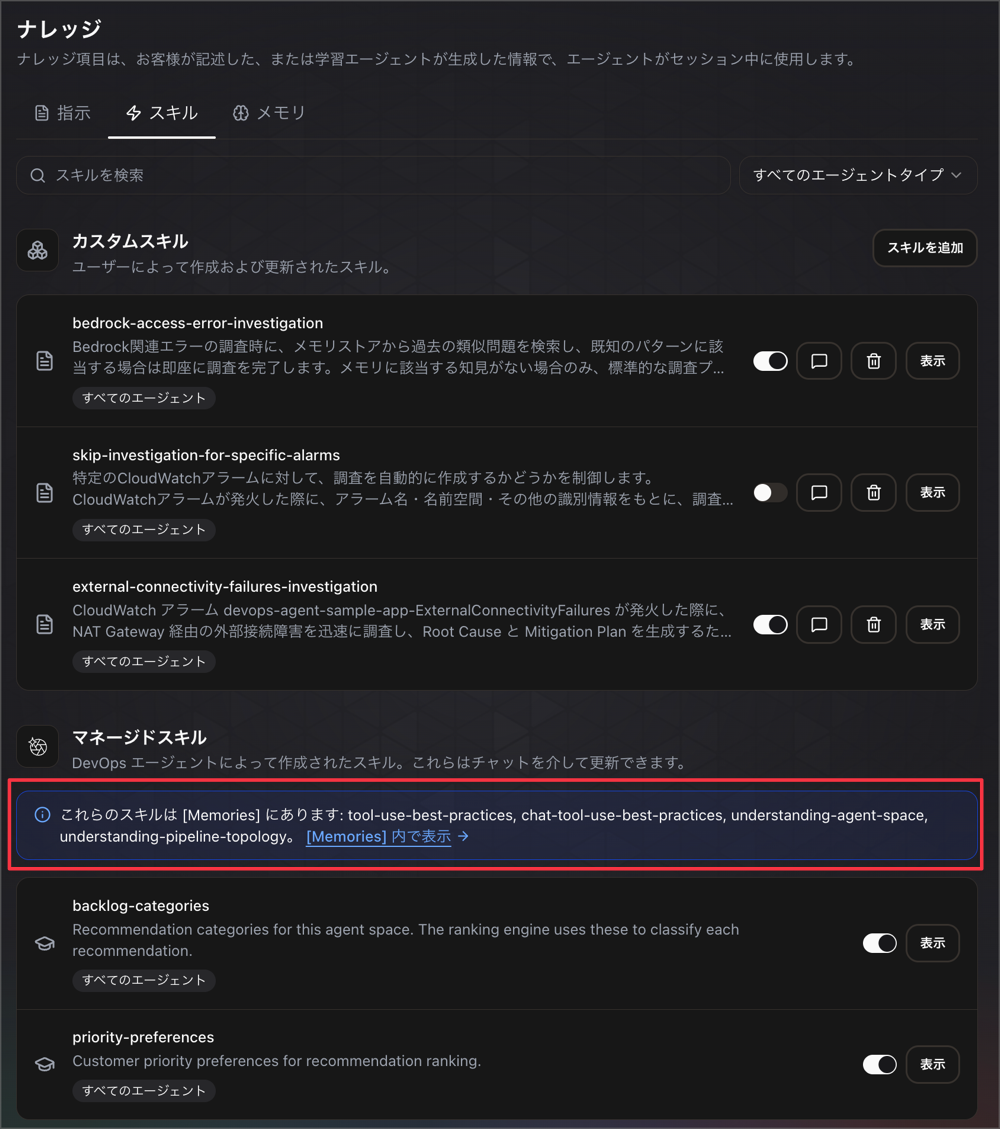
Checking "Skills" as shown below, you can see a message indicating that tool-use-best-practices / chat-tool-use-best-practices / understanding-agent-space / understanding-pipeline-topology have been migrated.
Checking the "Memories" side, you can confirm that tool-use-best-practices / chat-tool-use-best-practices / understanding-agent-space / understanding-pipeline-topology have been migrated.
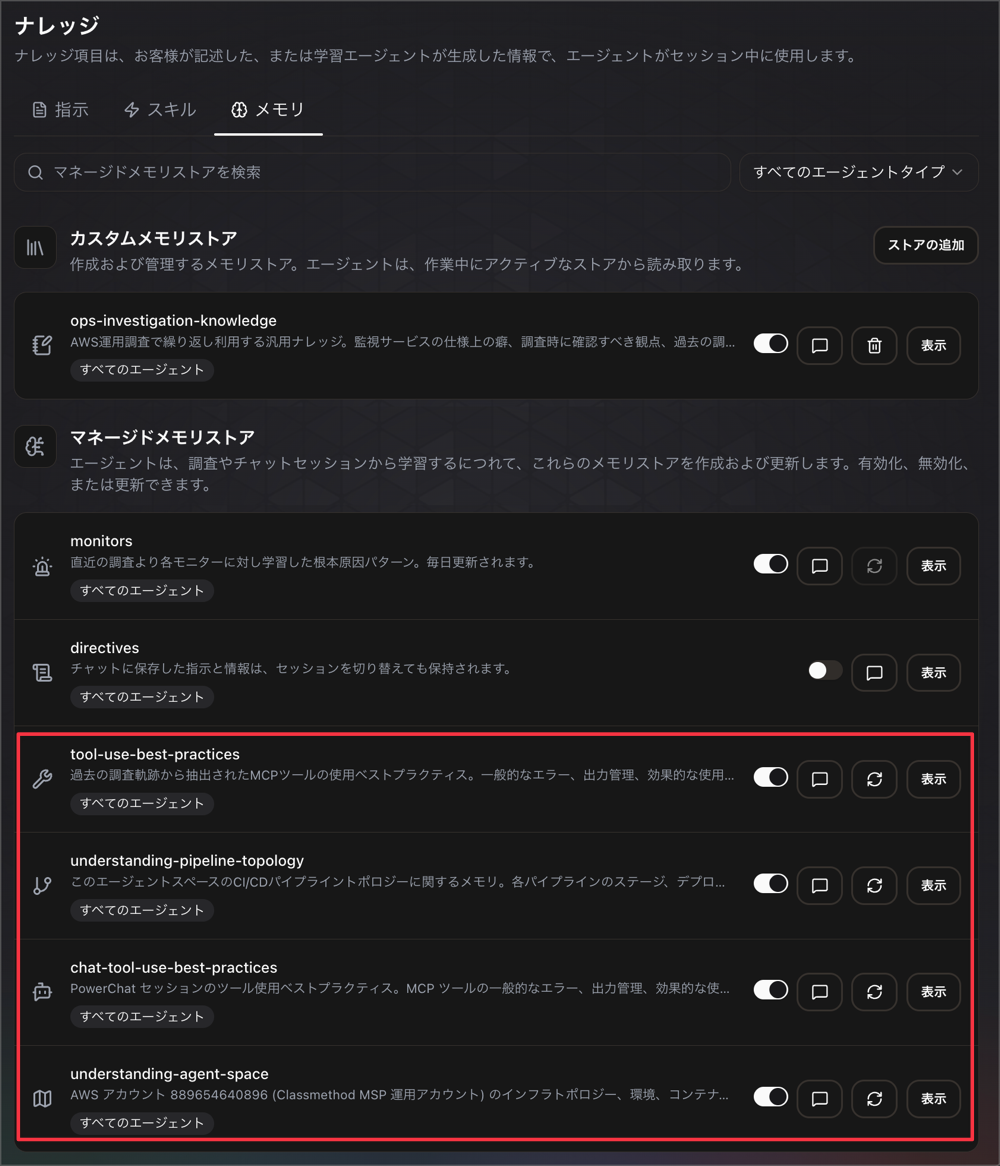
All migration destinations are managed stores, so users cannot delete them.
Update 4: Memory stores can now be attached to custom agents
Update number four. DevOps Agent custom agents were previously composed of three elements: System prompt, Tools, and Skills.
Previously, for Memory, the built-in agent could access all memory stores within the Agent Space, while custom agents had no involvement with it.
With this update, custom agents can now have Memory stores configured as a memory component.
Components of a custom agent
Checking the custom agent documentation, Memory stores has been added as a component.
Memory stores – Collections of memory that you attach to give the agent focused, informational context, such as your topology, past root causes, standing directives, or a store you created. A custom agent reads the memory stores you attach to it, and can write to the custom stores among them (managed stores such as
monitorsanddirectivesstay read-only), so you give it the knowledge its job needs and leave the rest out. A new custom agent starts with no memory stores attached, so it has no memory access until you attach one.
There are two key points here.
The first is that attached stores are not merely read-only references. Managed stores (monitors, directives) remain read-only, but custom stores can also be written to.
The second is that a new custom agent starts with zero memory access. Unlike the built-in agent, which can access something by default, a custom agent only references memory after you explicitly attach a store.
How memory is handled in the execution flow
Looking at the full execution flow of a custom agent, the documentation also describes at which steps memory reads and writes occur.
When a custom agent executes, it:
- Loads its system prompt, tools, skills, and attached memory stores from the configuration you defined.
- Connects to the Agent Space MCP toolbox and accesses only the tools you assigned to it.
- Loads its assigned skill documents, making their instructions and domain knowledge available during invocation.
- Reads the memory stores you attached, using their descriptions to open only the memories relevant to the task, and records what it learns back to any attached custom stores.
Rather than loading all attached memory stores in their entirety, the design uses store names and descriptions to open only those that seem relevant to the task.
At the end of execution, it also writes back what it learned to the attached custom stores.
The idea is that the more you run a custom agent, the more knowledge specific to that agent accumulates.
Comparison with the built-in agent
A comparison table shows how memory access scope differs between built-in agents (such as for incident response) and custom agents.
| Item | Built-in agent | Custom agent |
|---|---|---|
| Memory | All memory stores in the Agent Space | Only attached memory stores |
Custom agents compared to built-in capabilities - AWS DevOps Agent
It seems that built-in agents, given their role in incident response, are designed to access any knowledge in the Agent Space unconditionally, while custom agents, since users define their purpose, are designed to have their reference scope explicitly narrowed.
Steps to attach a memory store
When creating via a form, there is a Memory stores field within the creation form.
Custom memory stores can be written to, but managed memory stores are referenced as read-only.
Memory stores (optional) – Select the memory stores the agent can access. Use the search field to find stores by name. The agent reads the stores you attach and can write to attached custom stores; managed stores are read-only.
https://docs.aws.amazon.com/devopsagent/latest/userguide/custom-agents-creating-a-custom-agent.html
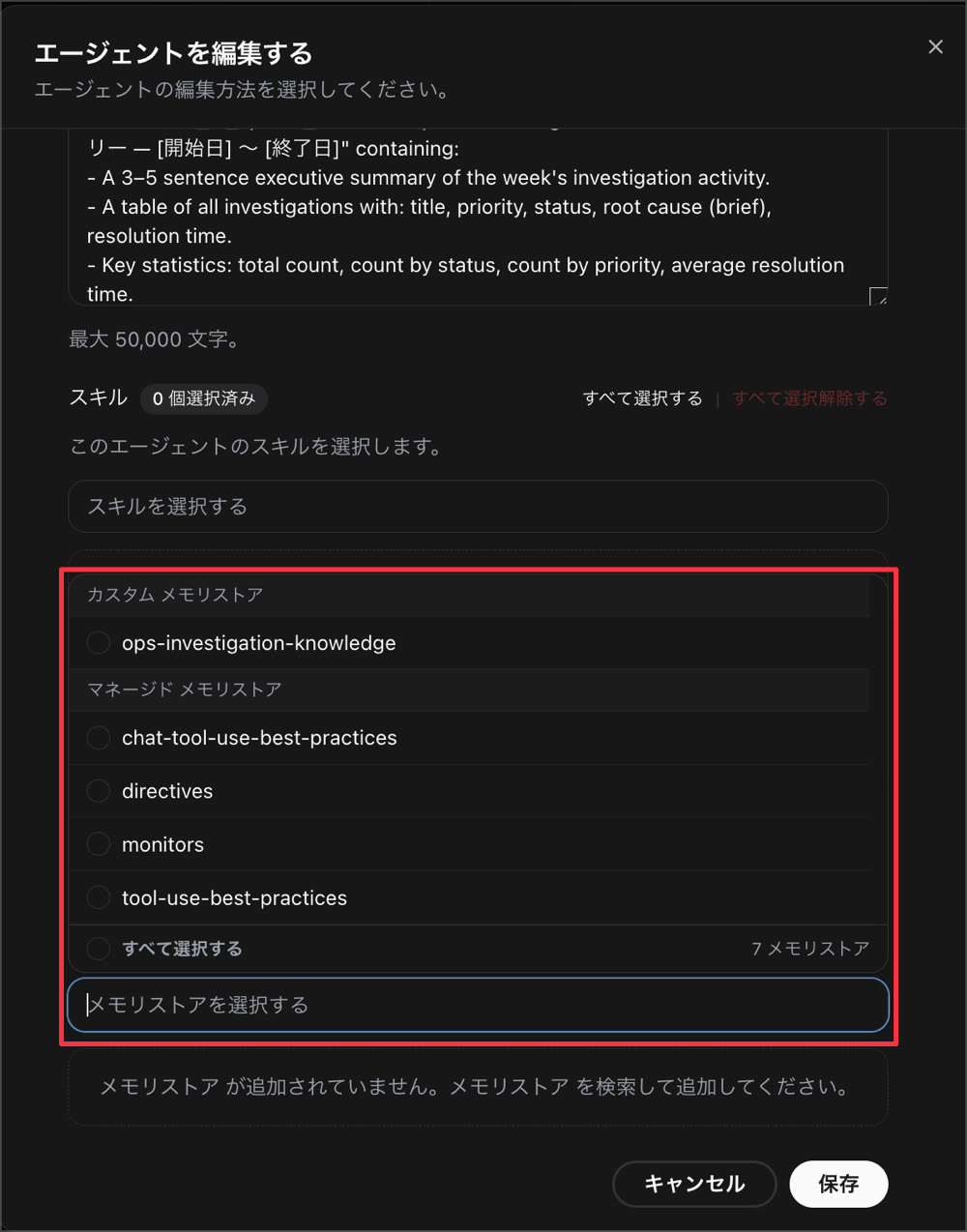
When creating or editing via Chat, you request attachments and removals in natural language.
You can attach memory stores when you create an agent, using either the form or Chat, and change them later by editing the agent. To attach or remove stores in Chat, ask the agent.
https://docs.aws.amazon.com/devopsagent/latest/userguide/custom-agents-creating-a-custom-agent.html
Running a Custom Agent with Memory Store
Now, as running a custom agent with a memory store attached, we will execute a custom agent registered with the following prompt.
In the prompt, we instruct it to write back conclusions with future value from the investigation to the memory store.
You are an agent that reports on the security status of an AWS environment on a monthly basis.

## Goal
Create a monthly report that consolidates findings across Security Hub, GuardDuty, and Inspector. The purpose is to convey to the reader what has changed since last month and what needs to be addressed this month.

## Approach
1. Collect Security Hub findings for the target period. Aggregate by severity (CRITICAL, HIGH, MEDIUM, LOW) and by security standard (AWS Foundational Security Best Practices, CIS, PCI DSS). Also record the compliance score for each enabled standard.
2. Collect GuardDuty findings for the target period. Aggregate by severity and by finding type family (Backdoor, CryptoCurrency, Recon, UnauthorizedAccess, etc.). Also identify which resources were involved.
3. Collect Inspector findings for the target period. Aggregate separately by scan type (EC2, ECR container images, Lambda). List high-severity CVEs and note which of them have fixes available.
4. Perform the same aggregation for the previous month and compare with this month's figures. Comparisons of counts should be done by retrieving both periods from each service's API, not relying on figures stored in the memory store.
5. Read the security-monthly-report-context memory store to retrieve report format conventions, findings already deemed acceptable risks and decided not to address, findings known to recur, and environment-specific circumstances. If the store is empty or there are no memories relevant to the task, note this at the end of the report and continue processing.
6. Distinguish between findings newly emerging this month, findings resolved this month, and findings that remain unresolved across multiple months. Long-standing unresolved findings should be reported with the highest priority. Those falling under accepted risks should be listed separately as already-decided items.
7. For each unresolved CRITICAL and HIGH finding, document the affected resources, when it was first detected, and the remediation approach recommended by the service.
8. Write back to the security-monthly-report-context store any "conclusions worth referencing in the future" identified in this analysis. This is limited to: findings that have recurred over multiple months and their structural causes, items that continue to be detected due to environment-specific circumstances, and newly decided items not to be addressed along with their reasons. Do not write back numerical values such as this month's finding counts or compliance scores, as these can be retrieved again from the API when needed.

## Constraints
- Operate in read-only mode. Do not perform any state-changing operations such as suppressing, archiving, or marking as resolved findings in Security Hub, GuardDuty, or Inspector.
- Do not include credentials, access keys, tokens, or personally identifiable information in the report. If findings contain such values, describe only the finding content without transcribing the values themselves.
- Refer to AWS accounts by their account alias or a short label; do not include 12-digit account IDs directly.
- Only handle the scope of the target period. If no period is specified, target the previous one month.
- If a service is not enabled for that account or region, do not write "zero findings" but explicitly state "not enabled." The absence of data and the absence of findings have different meanings.
- Do not determine severity yourself. Use the severity assigned by the service as-is.
- If the same content is detected by multiple services (e.g., an Inspector CVE also appearing in Security Hub), report it as one finding rather than counting it twice, and note that it was detected by both.
- Only write back conclusions worth remembering to the memory store. Do not write back raw API responses, this month's finding counts, or compliance score values. These can be retrieved from the API when needed.
- Limit each memory to a single fact or lesson. Do not combine multiple topics into a single entry.
- When writing back memories, do not create duplicate entries with the same content as existing memories. If a memory on the same topic already exists, update that memory rather than creating a new one.

## Output
Create one artifact with the title "Security Monthly Report - <YYYY-MM>". Include the following sections.

- Summary: Show finding counts by severity for each service, with the difference from last month's figures
- A table of Security Hub compliance scores by standard, with changes from last month
- A list of new CRITICAL and HIGH findings this month, including affected resources, detection date, and recommended remediation
- A list of findings that remain unresolved for more than one month, sorted in descending order by duration unresolved
- A list of findings resolved during the target period
- Items requiring decisions this month, listed separately from items already treated as accepted risks

Write the report in Japanese. Stick to fact-based descriptions. For figures that have changed, not only state the direction of change in words but also explicitly state the before and after values.

If the memory store could not be referenced, or was referenced but contained no relevant memories, note this at the end of the report. Make it clear to the reader that the report was created without accepted risk information.
We have prepared a memory called "security-monthly-report-context" as the memory store and attached it.
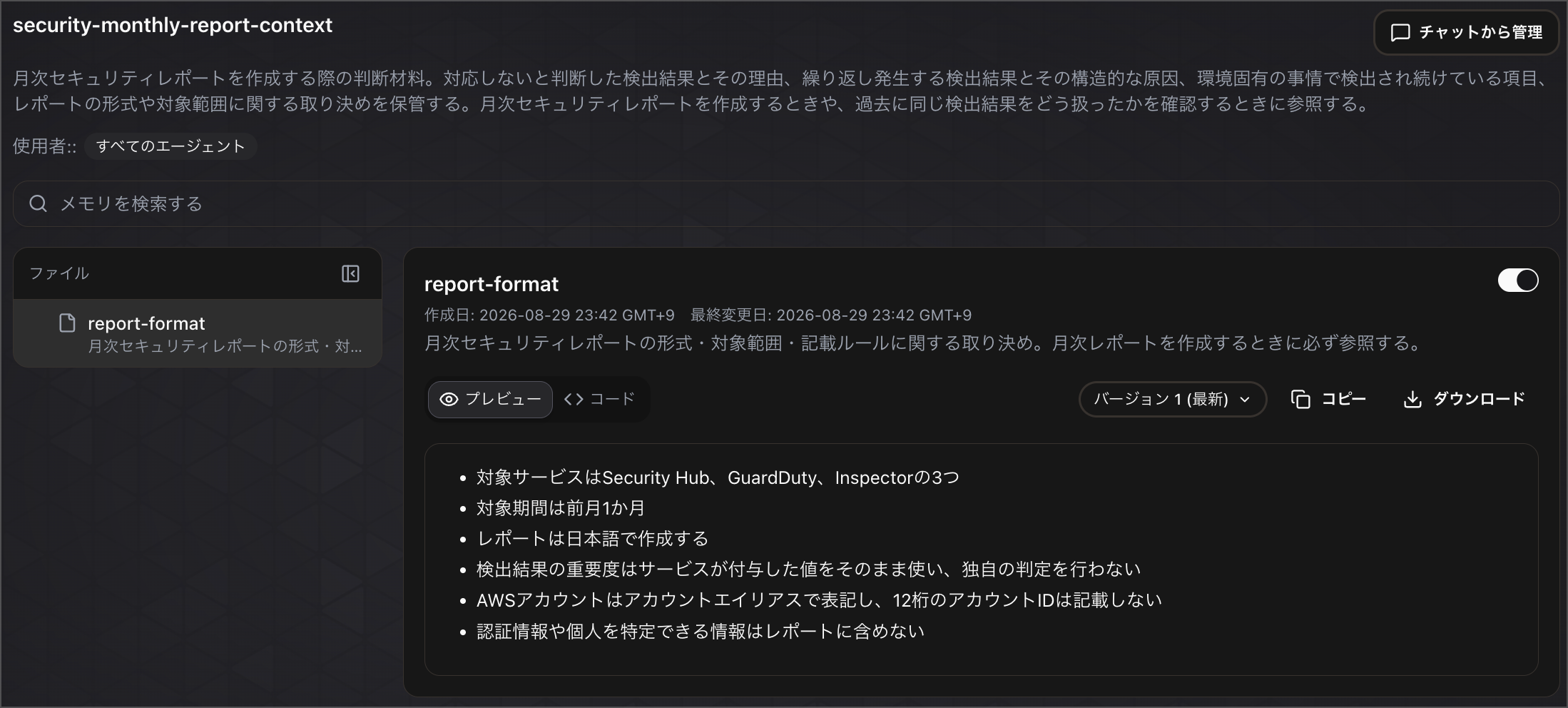
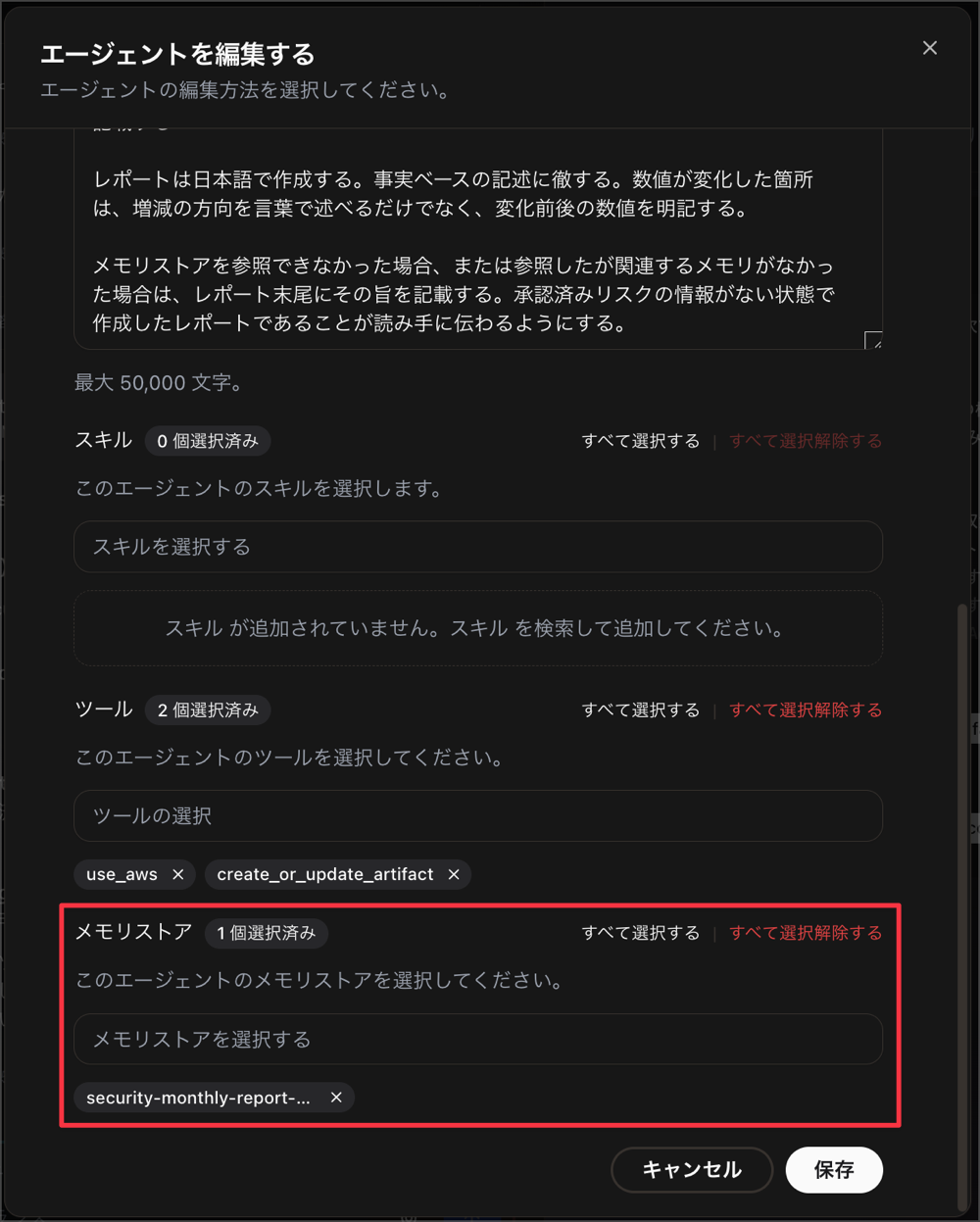
Now let's run this custom agent.
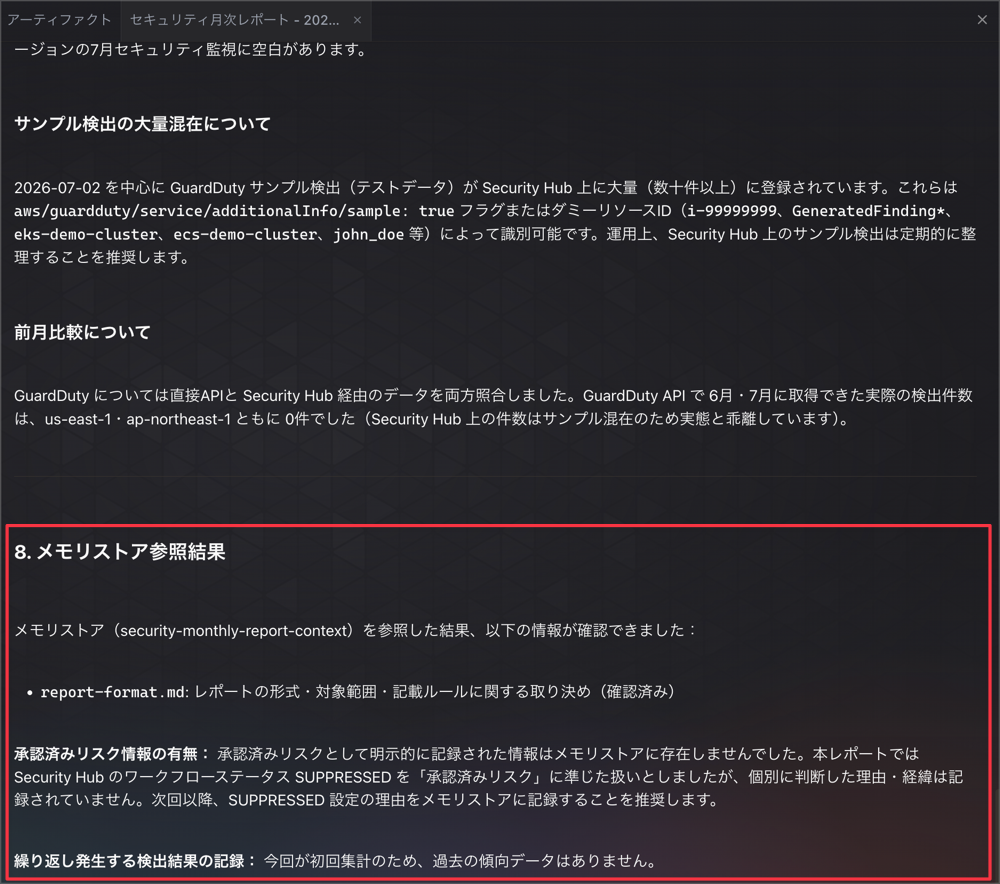
When executed, we can confirm that it is referencing the attached memory.
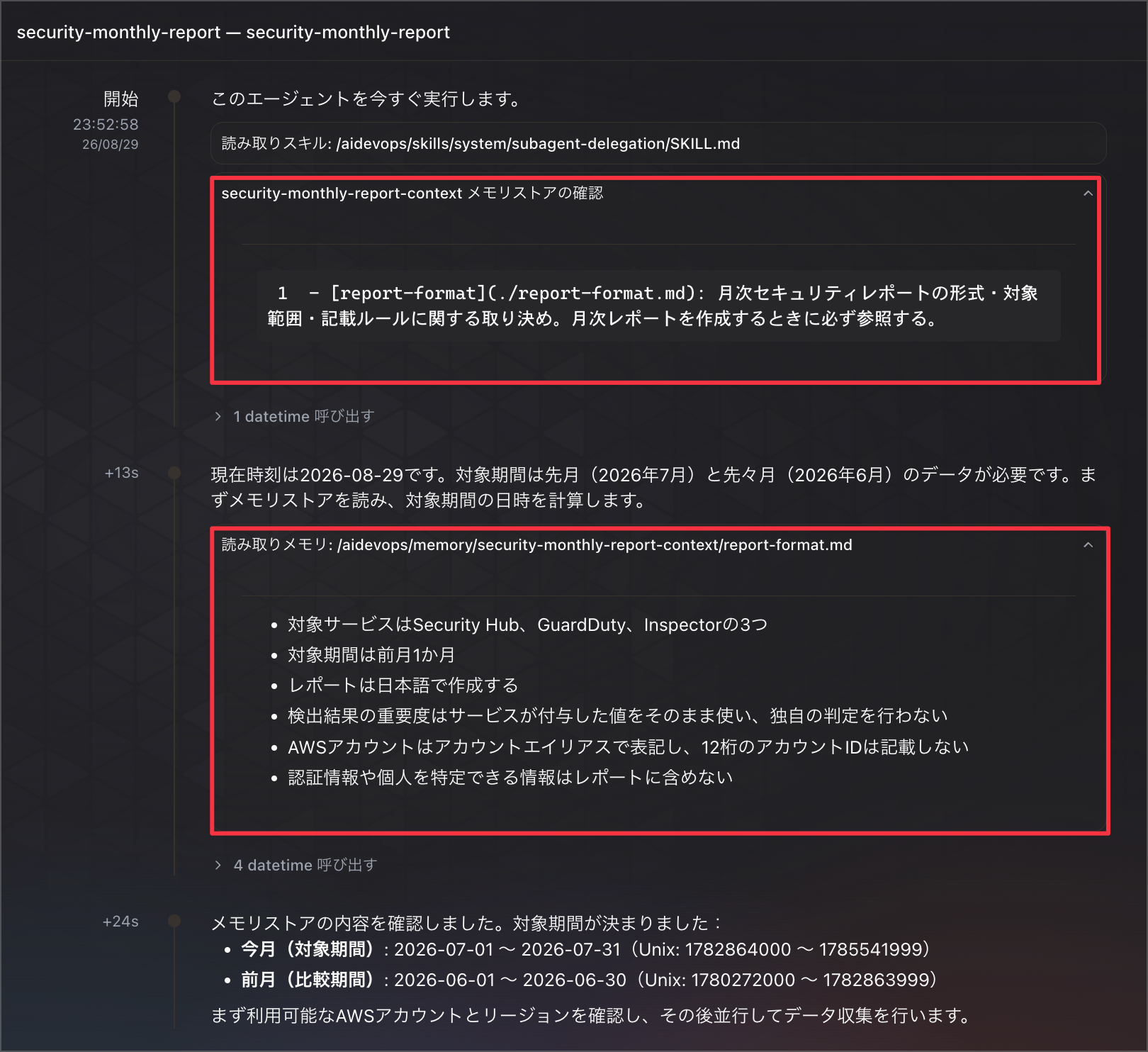
We can also confirm in the generated artifact that the memory is being referenced as instructed in the prompt.
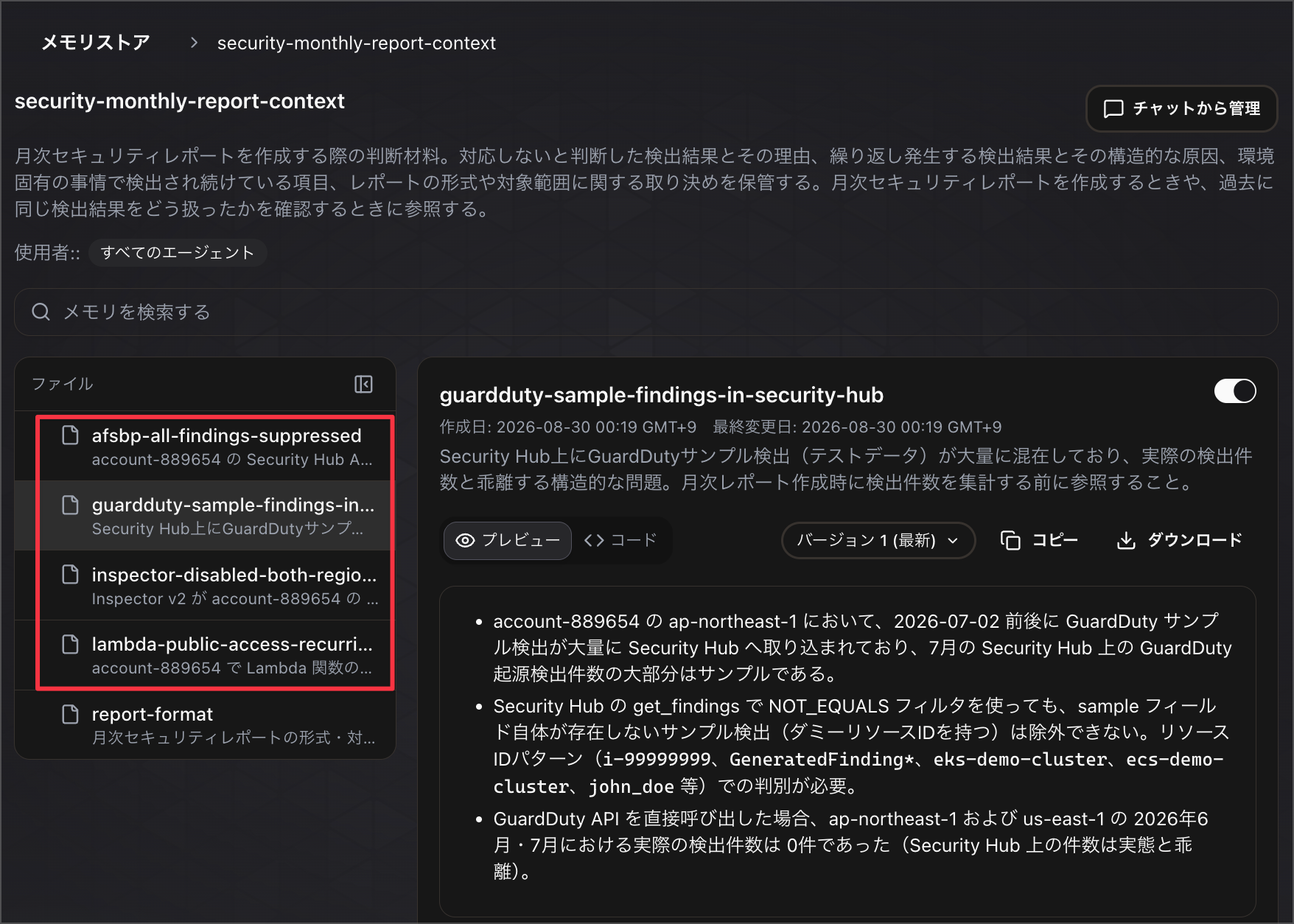
We also confirmed that the custom agent is writing memories back to the memory store.
Overall Memory Limits and Store Management
Across all 4 items, memories share common limits regardless of whether they are managed or custom.
| Resource | Limit |
|---|---|
| Memory stores per Agent Space | 50 |
| Memories per memory store | 200 |
| Content size of individual memory | 100 KB |
| Memory limits - AWS DevOps Agent |
Since both the number of stores and the number of memories are not unlimited, it seems better to design stores in reasonably consolidated units rather than proliferating them across overly granular topic units.
After creation, memory stores can be viewed and managed from the Knowledge page in the Operator Web App.
The memory detail page has a version selector, allowing you to go back and view past versions of the content.
Also, both at the store level and the memory level, you can toggle enabled/disabled without deleting.
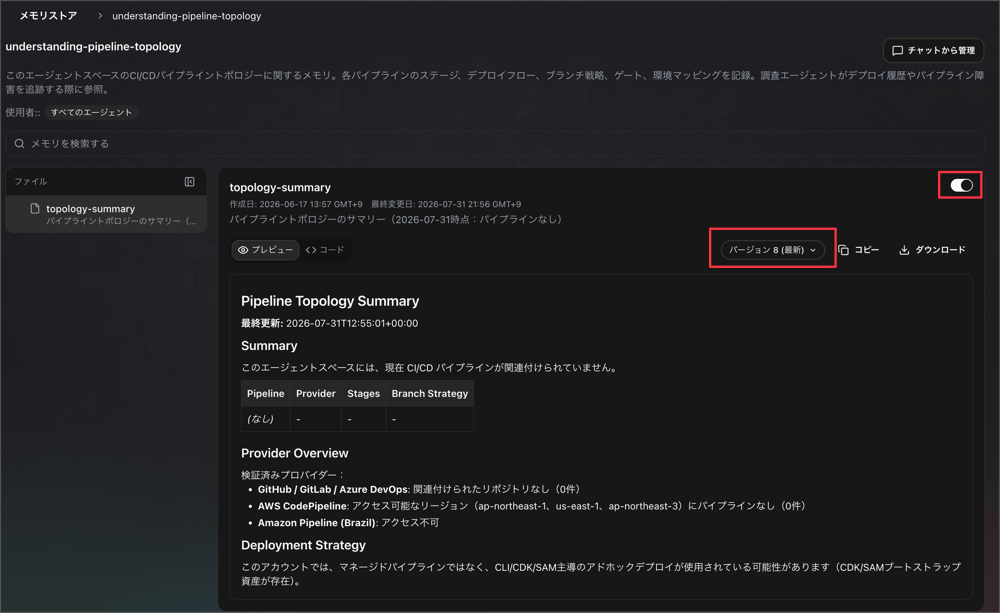
When disabled, the agent will no longer access any memories in that store at all, so it seems useful when you want to stop referencing a store without deleting it.
In Closing
This time, we reviewed all 4 memory-related items from the DevOps Agent update dated August 27, 2026.
Until now, Memories were only available with managed stores, but this update allows users to create custom stores.
The contents of created stores can be organized with folders, and the knowledge from automatic learning previously called Learned Skills is now handled as the same type of memory.
Furthermore, custom agents can have only the necessary stores selectively attached.
The most important aspect when using memory stores is the description.
Since the agent decides whether to open a store based solely on the name and description before reading its contents, if this part is vague, the store may be skipped even if the answer is inside.
The official documentation also recommends writing two points in the description: "what it holds" and "when it should be used."
Folder organization operates on the same mechanism as the description, and by separating with prefixes like alarms/, the agent opens only relevant memories from the index.
It's also worth being mindful of what to leave in memories.
Memory stores are designed not as a place to put notes taken during investigation or tool execution results, but as a place to leave conclusions worth remembering later.
It is also recommended to limit each memory to a single fact or lesson, and with a limit of 200 memories per store, this kind of design is something to keep in mind.
Since it has become possible to design what the agent remembers and how much of that is shared with which agents, I think this has added new approaches to how custom agents can be used.
How to write descriptions and the granularity of information to leave in memories are points I want to be conscious of going forward when operating custom stores.
I hope this article is helpful to someone.
That's all from Takayama (@nyan_kotaroo).