I tried running DuckDB with the DevOps Agent Sandbox feature (preview)

This page has been translated by machine translation. View original
Hello. This is Takayama.
The Sandbox feature has been released in preview for AWS DevOps Agent, which allows it to write and run code in a sandboxed Linux environment during investigations.
Until now, DevOps Agent primarily conducted investigations centered on the agent's own reasoning capabilities, but with Sandbox, processes that are better suited for code execution — such as analyzing large logs or performing statistical calculations across multiple metrics — can now be executed by the agent itself using permitted tools.
This time, I'd like to try using this Sandbox feature to investigate CloudTrail logs using DuckDB.
Summary First
- Sandbox is a preview feature that provides a code execution environment during investigations (investigations) for DevOps Agent
- It is an opt-in setting per Agent Space and is disabled by default
- Network access is controlled by an explicit Allow list, and only AWS service endpoints are permitted by default
- AWS CLI/boto3 calls within the sandbox are also restricted to the agent's original permission scope, with no privilege escalation
- During the preview period, only 4 regions are supported: us-east-1, us-west-2, ap-northeast-1, and eu-west-1
What is Sandbox?
Sandbox is a preview feature that provides a secure, isolated Linux environment that enables AWS DevOps Agent to write and run code during investigations.
Some problems can be solved faster and more reliably using code than through reasoning alone.
With the Sandbox feature, the agent can complement its reasoning with computation, enabling it to analyze large log files, perform statistical calculations across multiple metrics, and parse and correlate data from multiple sources during investigations.
Sandbox is a preview feature that gives AWS DevOps Agent a secure, isolated Linux environment where it can write and run code during investigations. Some problems are faster and more reliable to solve with code than through reasoning alone. With Sandbox, the agent complements its reasoning with computation—for example, to analyze a large log file, calculate statistics across a set of metrics, or parse and correlate data from multiple sources during an investigation.
Japanese translation:
Sandbox is a preview feature that provides AWS DevOps Agent with a secure, isolated Linux environment where it can write and run code during investigations. Some problems can be solved faster and more reliably using code than through reasoning alone. With Sandbox, the agent can complement its reasoning with computation. For example, it can be used to analyze large log files, perform statistical calculations across multiple metrics, and parse and correlate data from multiple sources during investigations.
https://docs.aws.amazon.com/devopsagent/latest/userguide/configuring-integrations-and-knowledge-sandbox.html
Note that during the preview period, the agent is only available during investigations.
Support for other features such as chat and custom agents is coming soon.
Note
During preview, the agent uses Sandbox only during investigations. Support for chat, custom agents, and other DevOps Agent capabilities is coming soon.Japanese translation:
During the preview period, the agent uses the sandbox only during investigations (investigations). Support for chat, custom agents, and other DevOps Agent capabilities is coming soon.
https://docs.aws.amazon.com/devopsagent/latest/userguide/configuring-integrations-and-knowledge-sandbox.html
How It Works
When you configure Sandbox in an Agent Space, a new Linux environment is automatically provisioned for each investigation.
- Shell commands can be executed and files can be read/written within the environment. Execution results are read back into the agent's analysis
- The environment exists only for the duration of the investigation, and two investigations never share the same environment (ephemeral, scoped per investigation)
- The environment comes pre-configured with AWS profiles for connected AWS accounts, allowing AWS CLI and boto3 calls. However, permissions are restricted to the same scope as those the agent originally has
- HTTP requests can also be sent to hosts and paths permitted by the network policy, using command-line tools and Python/Node.js libraries
- Skills are now also loaded from the sandbox filesystem, enabling not only non-executable files such as Markdown but also executable code bundled with skills to be run (when Sandbox is not enabled, only non-executable files are supported)
Previously, only non-executable files such as Markdown instructions, references, and data files could be bundled with Skills, but after enabling Sandbox, skills can contain executable code that the agent can run and utilize within the sandbox.
Let's Try It
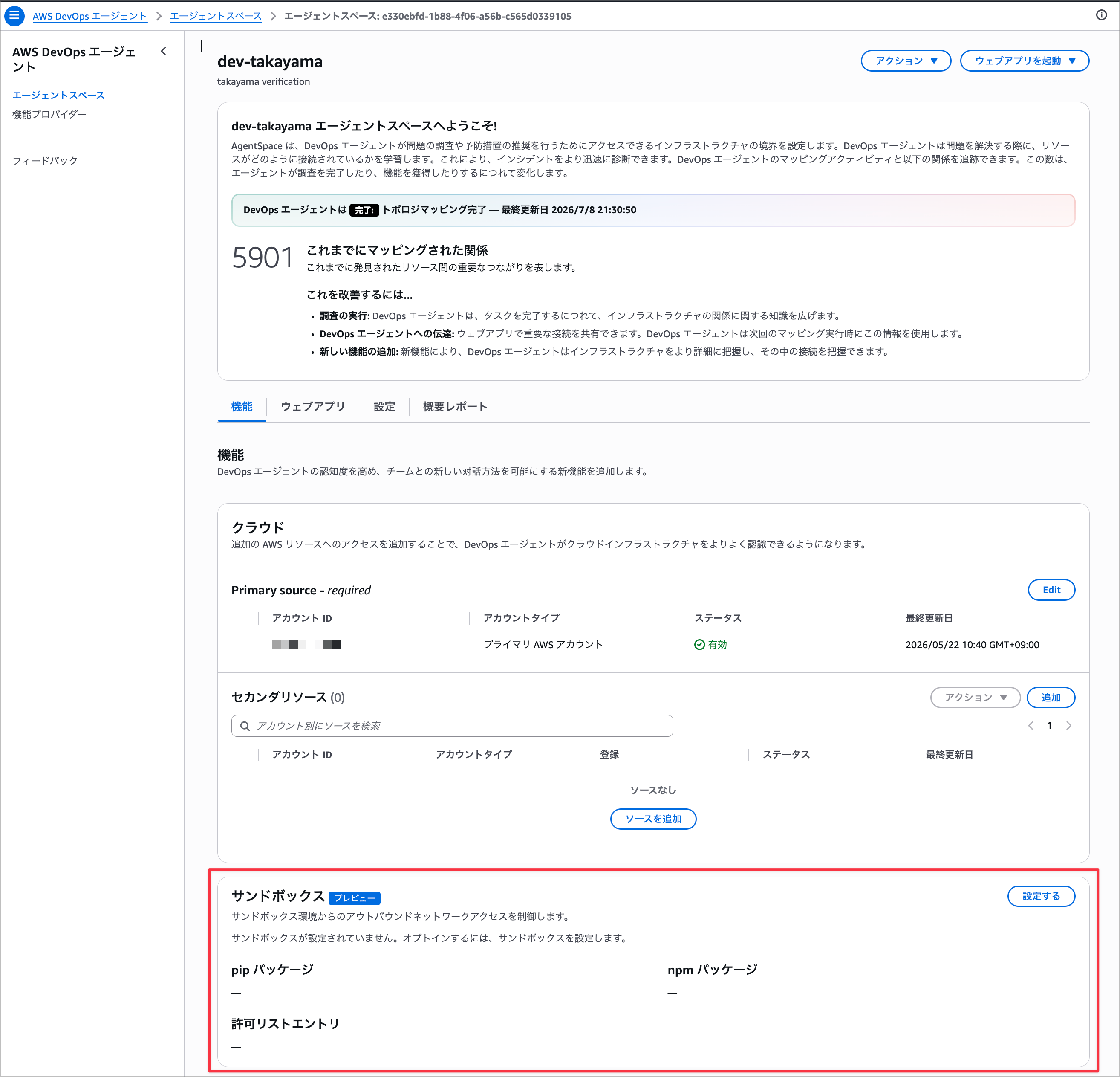
Enabling Sandbox is done per Agent Space.
By default, the Sandbox configuration is unconfigured, and the agent will not execute code until you explicitly opt in.
Configuring Pre-installed Packages
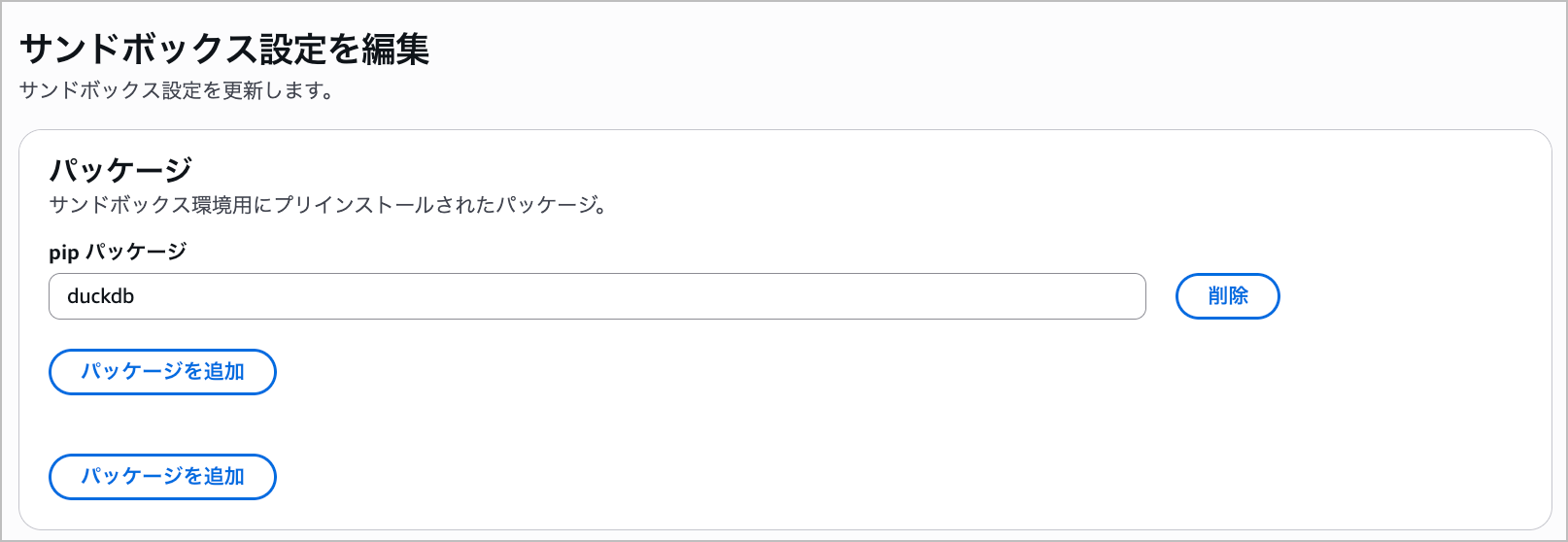
You can individually add pip packages (e.g., requests, pandas) and npm packages (e.g., axios).
By pre-installing them, there is no need to allow outbound access to package registries at runtime.
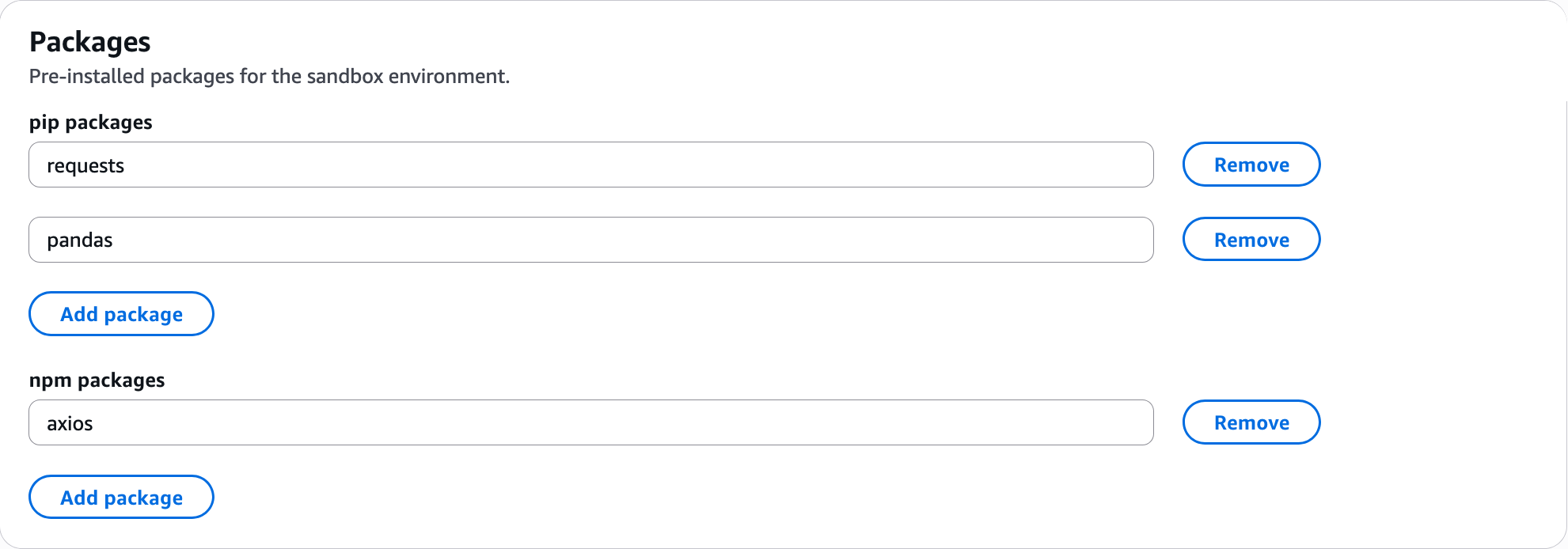
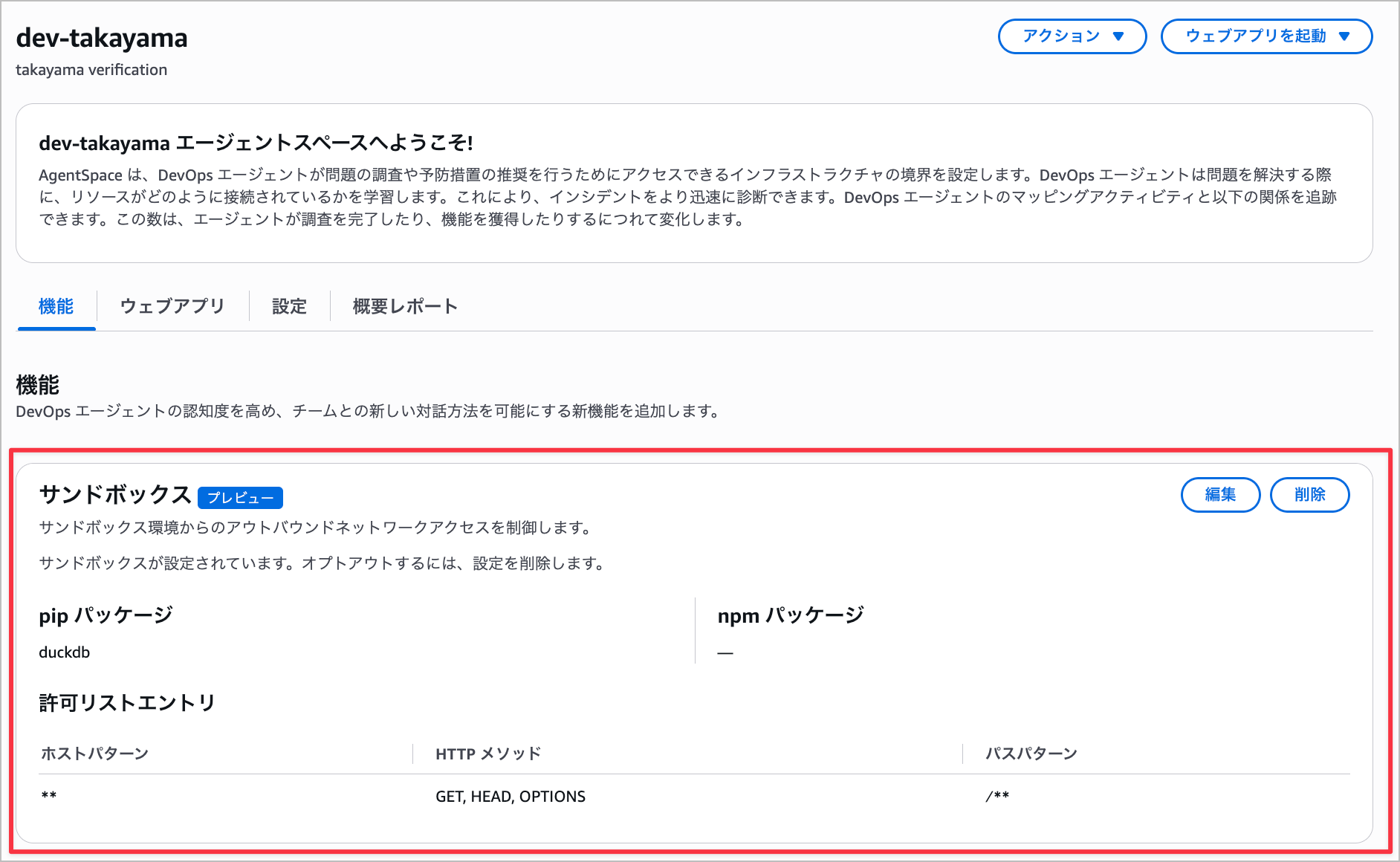
Since I'd like to try an investigation using DuckDB this time, I'll pre-install DuckDB.
Verification
Now let's run an investigation with Sandbox enabled and verify how Sandbox works.
I'll instruct it from chat to analyze CloudTrail logs in an S3 bucket using DuckDB.
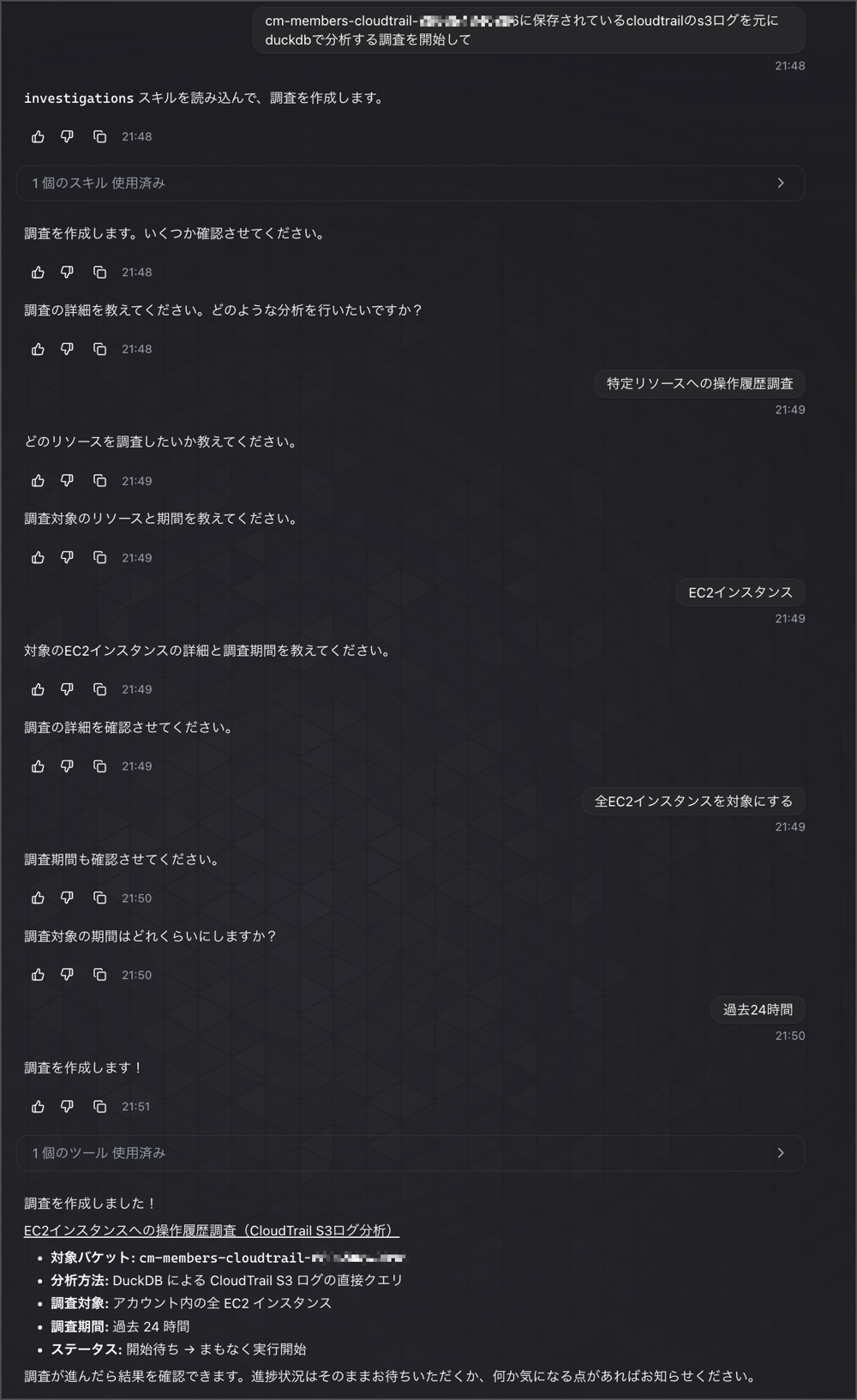
As configured in Sandbox, I was able to confirm that DuckDB package 1.4.5 was installed and available, but I also confirmed that the agent subsequently failed to download the httpfs extension.
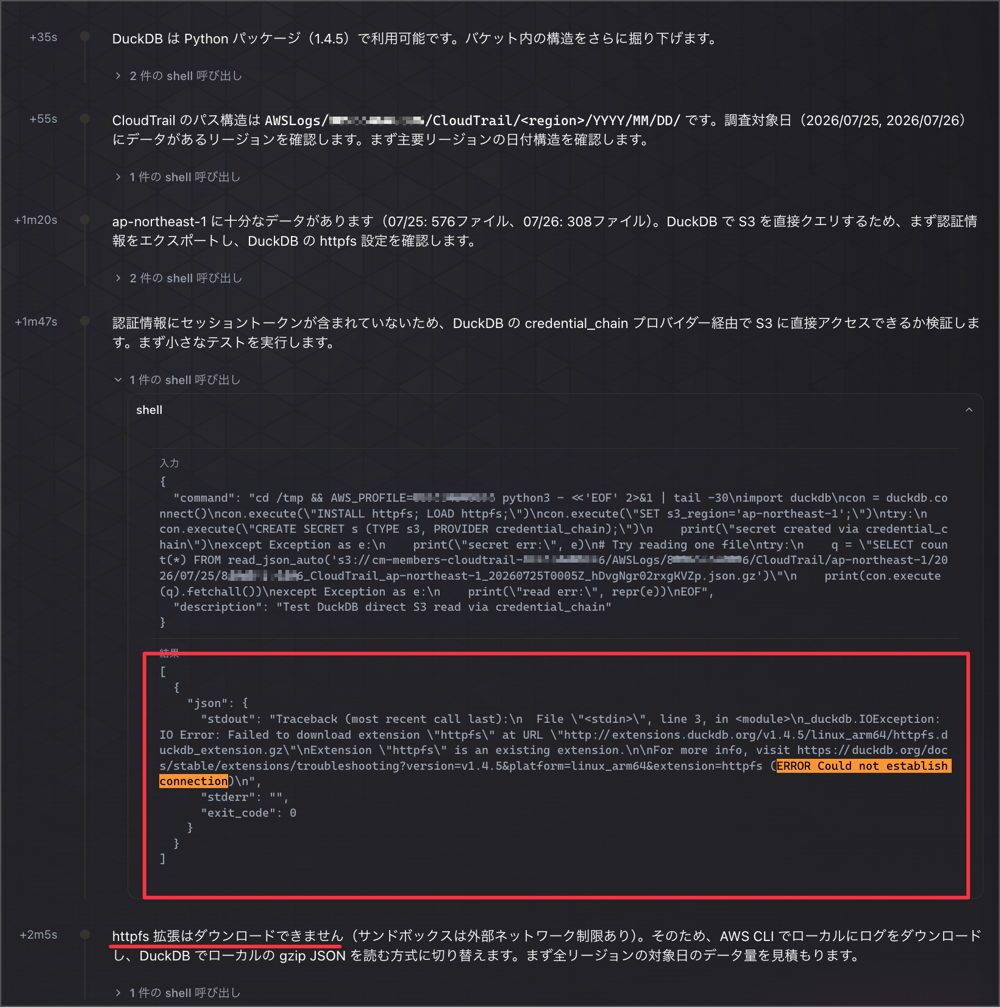
DuckDB requires the httpfs extension to read S3 directly.
This time, since I had not registered extensions.duckdb.org — the source for obtaining the extension — in the network policy, the connection was rejected.
_duckdb.IOException: IO Error: Failed to download extension "httpfs" at URL "http://extensions.duckdb.org/v1.4.5/linux_arm64/httpfs.duckdb_extension.gz"
Extension "httpfs" is an existing extension.

For more info, visit https://duckdb.org/docs/stable/extensions/troubleshooting?version=v1.4.5&platform=linux_arm64&extension=httpfs (ERROR Could not establish connection)
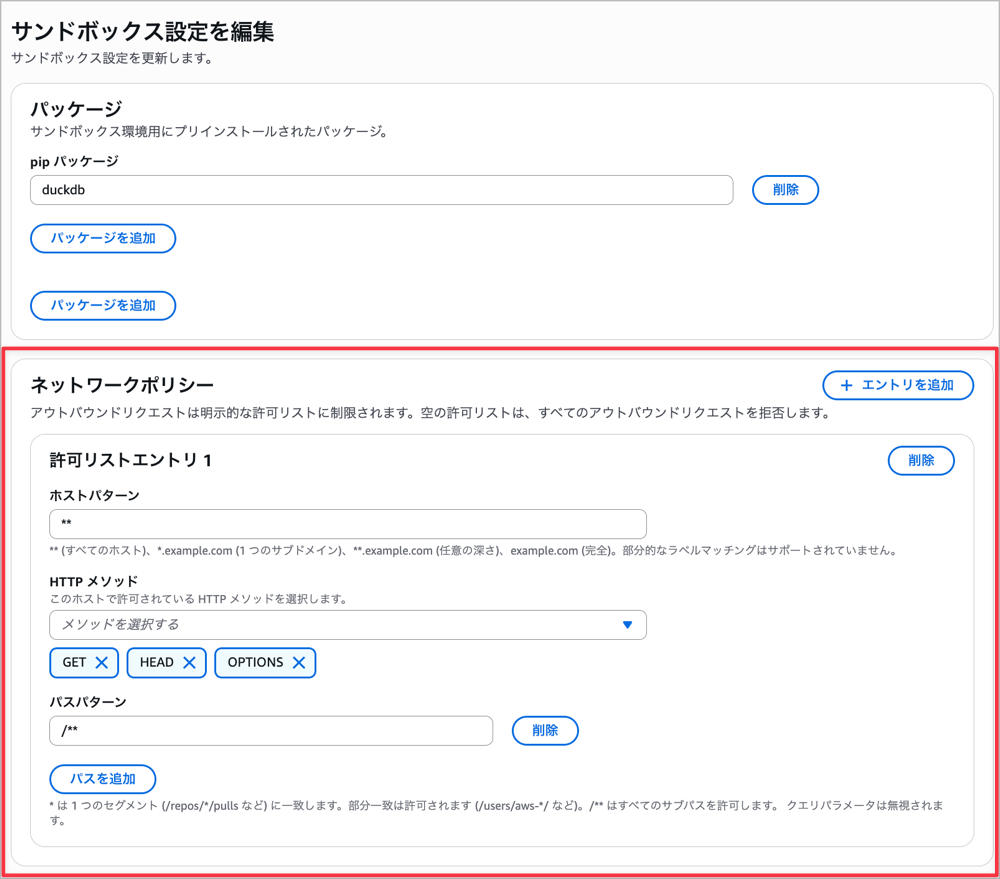
So, I'll configure the network policy in the Sandbox settings. For this verification, I'll configure it to allow all hosts.
Note that while I tried downloading the extension over the network for testing purposes this time, it would be better to pre-install the httpfs extension in the sandbox settings as well.
I'll try running the investigation request from chat again in this state.
(The investigation content has been changed during the retry)
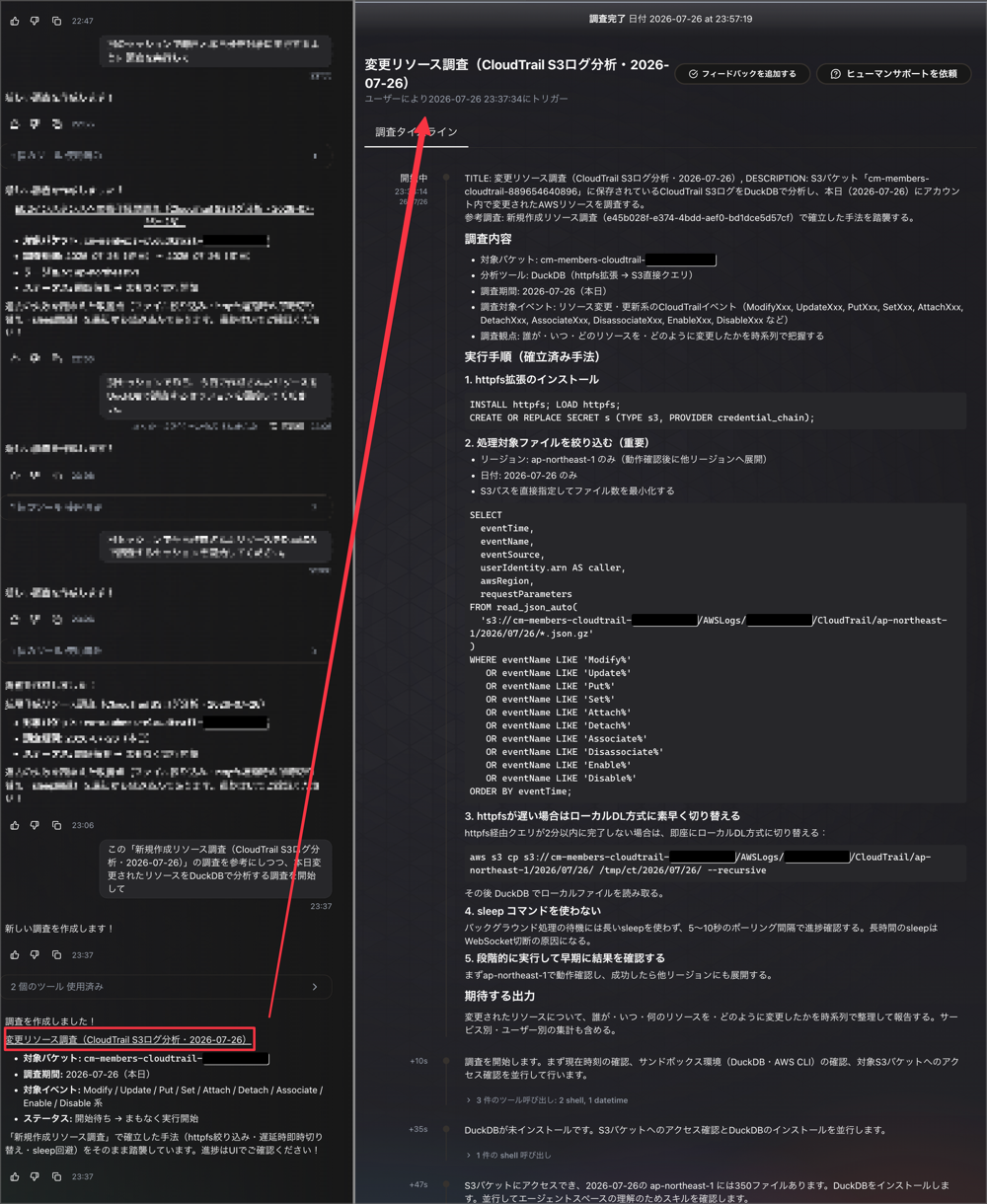
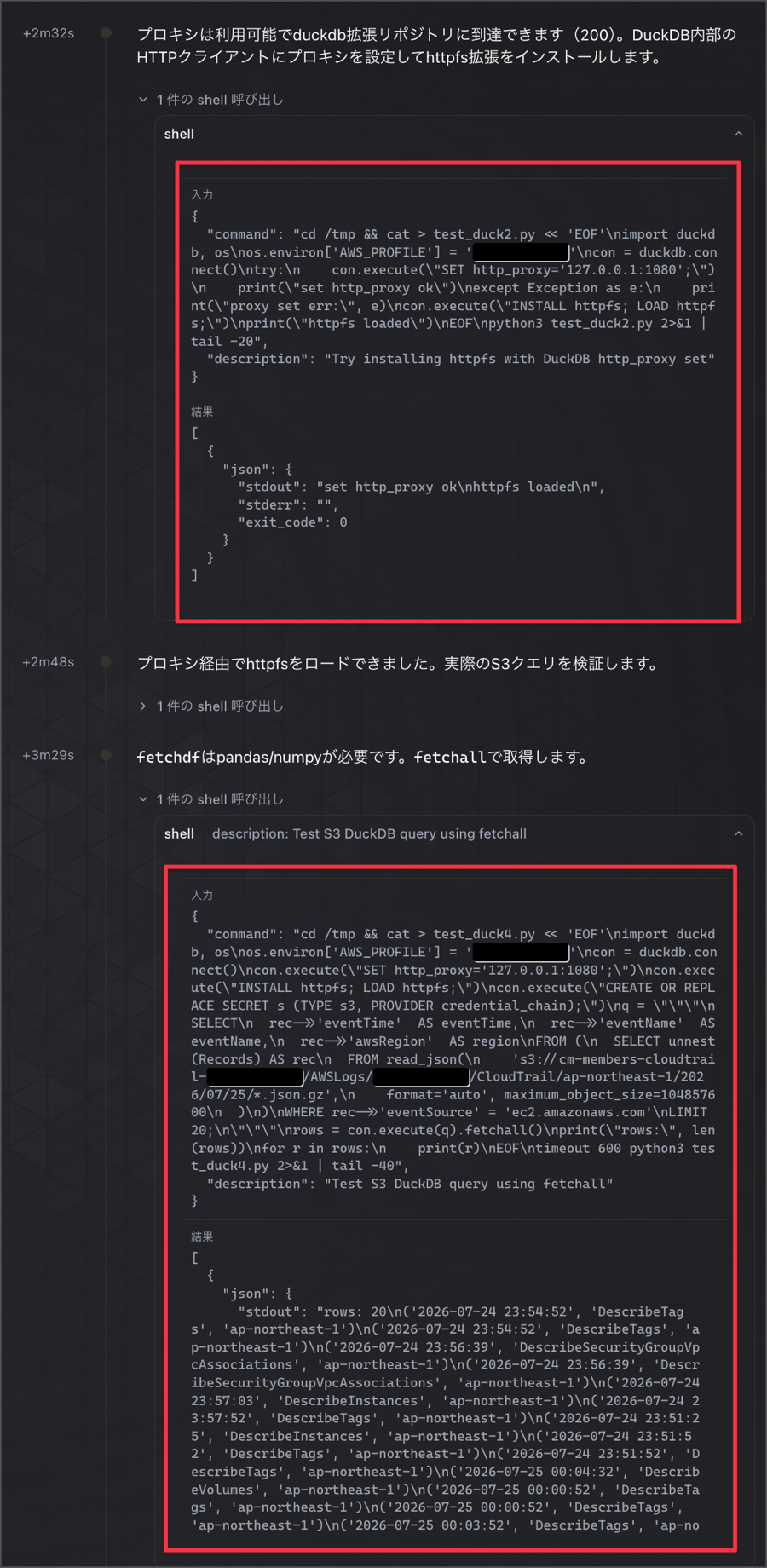
This time, the download of the httpfs extension succeeded, and I was able to confirm that DuckDB can directly query CloudTrail logs in S3.
I was successfully able to obtain a summary of the CloudTrail log investigation using DuckDB.
The logs from my own work are showing up, so the investigation content looks correct as well.
However, in this case, it appears that the agent ultimately queried using a local download method rather than the httpfs extension approach, based on its own judgment.
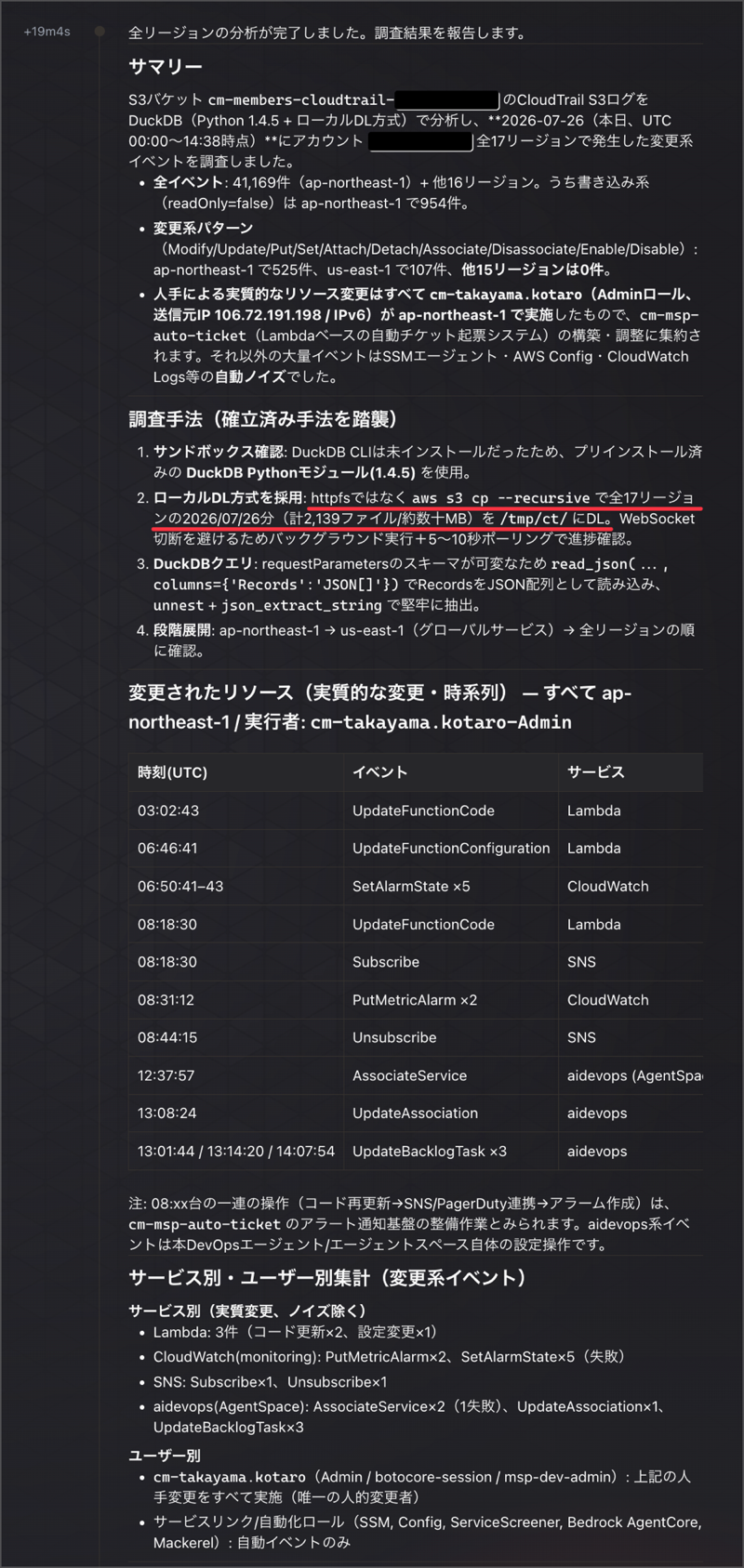
Normally, an approach where DevOps Agent grants Athena permissions via additional permissions to run queries would be considered, but by using the Sandbox feature, DevOps Agent itself can now execute queries.
Security Model and Constraints
Security Model
The Sandbox security model is as follows.
- Each investigation is isolated in its own sandbox environment. Code and data from one investigation are never shared with another
- DevOps Agent inspects and filters all traffic leaving the sandbox, allowing only requests to AWS service endpoints and requests to hosts matching the network allowlist, and blocking everything else
- The environment comes pre-configured with AWS profiles for connected AWS accounts that can be used for AWS CLI/boto3 calls, but permissions are restricted to the same scope as the agent's original permissions (no escalation)
- As security recommendations, three points are explicitly stated: keep the allowlist minimal, use strict host and path patterns rather than broad wildcards (
**,/**), and handle package registries through pre-installation rather than allowlisting
Sandbox does not change the "read-only, non-mutating" principle itself, but rather adds a new means of "computation and code execution" to investigations within the scope of that principle.
It is explicitly stated that AWS CLI/boto3 calls within the sandbox are also restricted to "the same scope as the agent's original permissions," meaning permissions are not expanded via Sandbox.
However, it can be said that the addition of the sandbox environment itself (shell command execution in a Linux environment) as a new execution surface is an expansion from the previous "read-only tool calls only."
Network Policy
As mentioned above, if the allowlist is empty, all outbound requests other than to AWS service endpoints are blocked.
If you want to allow access to external APIs or package registries, you need to explicitly permit them using a combination of Host pattern, HTTP methods, and Path patterns.
Permission Scope
As also mentioned above, since the AWS profile within the sandbox is restricted to the agent's original permission scope, the IAM role permission model (least privilege, read-only focused) itself is not changed by the introduction of Sandbox.
Quotas
The following upper limits are set as Sandbox configuration limits.
| Item | Limit |
|---|---|
| pip packages | 50 |
| npm packages | 50 |
| Networking allowlist entries | 100 |
| Path patterns per allowlist entry | 50 |
| HTTP methods per allowlist entry | At least 1 |
Supported Regions (During Preview)
Only the following 4 regions are supported during the preview period.
| Region Name | Region Code |
|---|---|
| US East (N. Virginia) | us-east-1 |
| US West (Oregon) | us-west-2 |
| Asia Pacific (Tokyo) | ap-northeast-1 |
| Europe (Ireland) | eu-west-1 |
The "Release management" feature, which is also in preview, only supports us-east-1, so Sandbox supports a wider range of regions.
Removing Sandbox (Opt-out)
Selecting "Remove" in the "Sandbox" section of the "Capabilities" tab in Agent Space will stop the sandbox environment from being provisioned for subsequent new investigations.
Finally
This time, I reviewed the preview content of Sandbox, the new feature of DevOps Agent.
Until now, the agent's means were primarily "reading and reasoning," but Sandbox adds a new means of "writing and running code during investigations." The ability to supplement with code execution for processes that take time through reasoning alone — such as log analysis and correlation analysis across multiple metrics — looks promising.
On the other hand, the constraints around network allowlists and permission scopes are thoroughly designed, and it was reassuring to see that the design does not undermine the existing "read-only, non-mutating" guardrail principles.
Regarding unconfirmed items around actual hardware testing, timeouts, and pricing, I'll add updates as I'm able to confirm them.
That's all from Takayama (@nyan_kotaroo).