I Integrated Self-Hosted Grafana with DevOps Agent to See How Far It Can Read Across Loki / Tempo / AMP

This page has been translated by machine translation. View original
Hello, I'm sora from the Game Solutions Department.
This time, I'll write about connecting self-hosted Grafana (Loki / Tempo / AMP) on ECS Fargate to AWS DevOps Agent, checking how much it can read, and how it is used in incident investigation.
Conclusion First
- Grafana could be registered and associated from Terraform (awscc) using a Viewer service account token
- Via Grafana, Loki logs and AMP metrics could be read, but Tempo traces could not
- Since it could not read Tempo, it answered by reconstructing traces from the
trace_idin Loki logs - For an incident whose cause cannot be determined without looking at Loki logs, the Agent read the Loki logs via Grafana and identified the endpoint causing the problem
Architecture
The architecture I built this time is as follows.
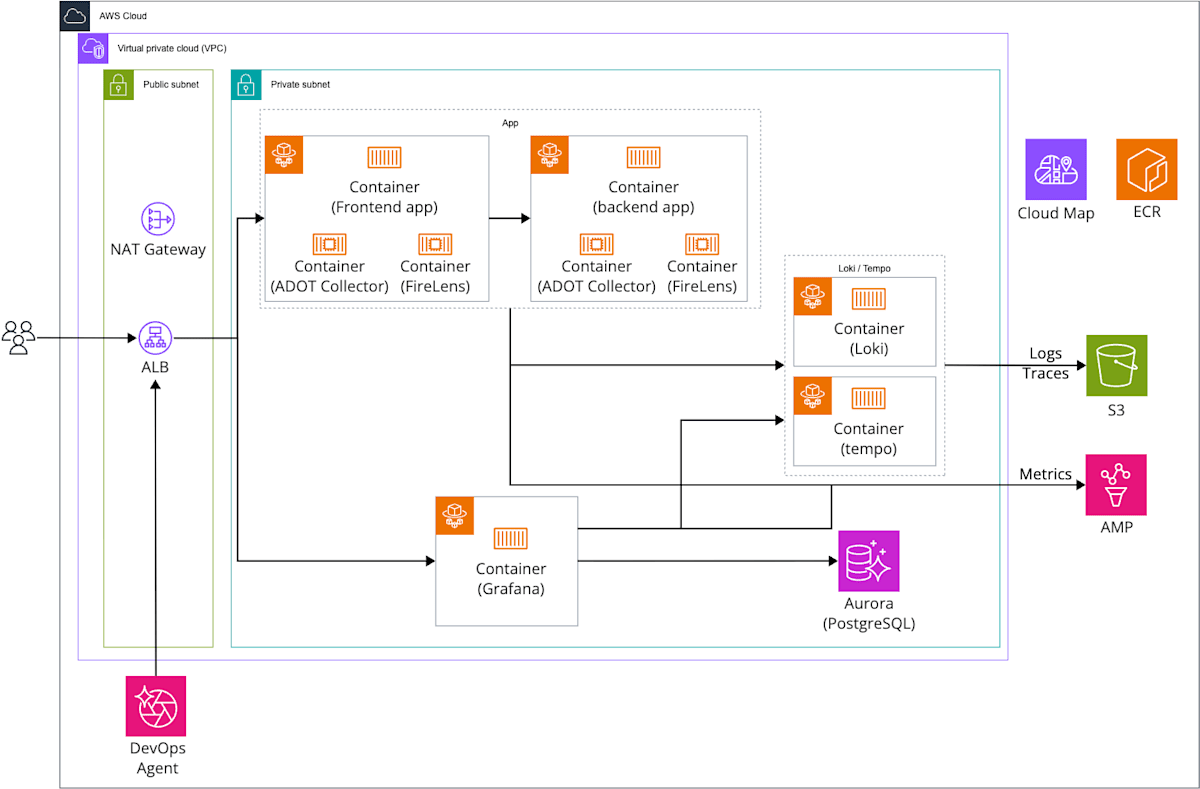
In this setup, Grafana / Loki / Tempo and a Go sample app (frontend → backend) run on ECS Fargate, and Grafana is registered with AWS DevOps Agent.
App logs are sent to Loki by FireLens, and traces and metrics are sent to Tempo and AMP by the ADOT Collector.
DevOps Agent connects to Grafana from outside the VPC through the public ALB, and reads AWS data (CloudWatch / ECS / CloudTrail, etc.) by calling APIs with an IAM role.
The Loki / Tempo setup is based on what I built in the following article.
The managed policy AIDevOpsAgentAccessPolicy is attached to the Agent Space's IAM role.
This policy has permission to read X-Ray traces, but does not have permission to query AMP metrics (aps:QueryMetrics).
I did not add permission to read AMP, and I made sure not to send traces to X-Ray either, so that the app's logs, traces, and metrics can only be read via Grafana.
Main components
| Role | Component |
|---|---|
| Incident investigation | AWS DevOps Agent (Tokyo region, Agent Space × 2) |
| Visualization | Grafana OSS (ECS Fargate, grafana/grafana:13.2.1) |
| Grafana configuration DB | Aurora Serverless v2 (PostgreSQL 18.4) |
| Entry point | ALB + ACM + Route 53 |
| Sample app | Go frontend / backend (ECS Fargate) |
| Telemetry collection | ADOT Collector v0.50.0 / Fluent Bit 3.4.15 (sidecars) |
| Logs | Loki 3.7.7 |
| Traces | Tempo 3.0.3 |
| Metrics | AMP |
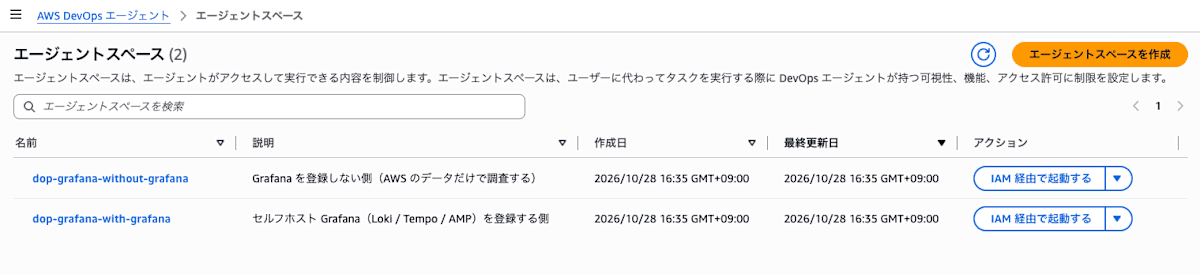
I created two Agent Spaces and associated Grafana with only one of them.
This is because, if you attach and detach Grafana in a single Agent Space while investigating, what remains in memory from the first investigation could affect the second.
I have the two Agent Spaces investigate the same incident at the same time, and see how the investigation results change depending on whether Grafana is present.
Setup
I built this with Terraform this time.
The Grafana / Loki / Tempo parts are the same as in the article I based this on, so I'll explain only the parts related to DevOps Agent.
Allowing DevOps Agent's Source IPs
When registering Grafana, it is checked whether DevOps Agent can reach Grafana's URL.
Grafana's ALB is restricted by source IP, so I allowed DevOps Agent's source IPs.
The source IPs are listed per region in the official documentation, and the Tokyo region has the following six.
- 13.192.12.233
- 35.74.181.230
- 57.183.50.158
- 13.114.228.89
- 54.150.140.28
- 46.51.224.121
These IPs are not separated per user, so Grafana authenticates with the service account token.
The official documentation also describes a way to connect to Grafana that is not exposed to the internet by using a Private connection that uses VPC Lattice.
I did not use it this time.
Creating the Agent Space
An Agent Space can also be created with the aws provider's aws_devopsagent_agent_space.
However, the resources used to register and associate Grafana exist only in the awscc provider, so I wrote everything with awscc this time.
resource "awscc_devopsagent_agent_space" "this" {
  for_each = local.agent_spaces # without-grafana / with-grafana

  name   = "${local.name}-${each.key}"
  locale = "ja"

  operator_app = {
    iam = {
      operator_app_role_arn = aws_iam_role.devops_operator.arn
    }
  }
}

resource "awscc_devopsagent_association" "aws" {
  for_each = awscc_devopsagent_agent_space.this

  agent_space_id = each.value.agent_space_id
  service_id     = "aws"

  configuration = {
    aws = {
      assumable_role_arn = aws_iam_role.devops_agentspace.arn # Role with AIDevOpsAgentAccessPolicy attached
      account_id         = data.aws_caller_identity.current.account_id
      account_type       = "monitor"
    }
  }
}
With locale = "ja", the web app's answers will be in Japanese.
The official sample writes resources = [] in configuration.aws, but I did not write it this time.
When I wrote it, an in-place diff for resources kept appearing on every plan.
Grafana Service Account
Following the steps in the official documentation, create a Viewer service account in Grafana and issue a token.
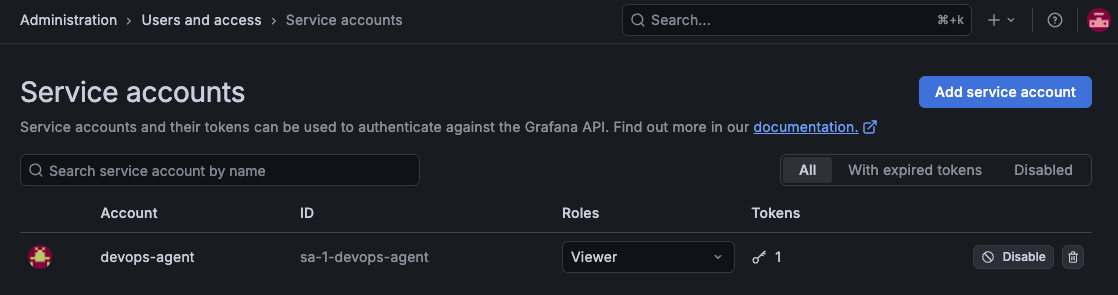
Even with a Viewer token, I was able to get the list of data sources (GET /api/datasources) and query Loki / AMP.
Registering Grafana
Grafana is a two-step process: register it per AWS account, then associate it per Agent Space.
Registration uses awscc_devopsagent_service, and you put Grafana's URL in endpoint.
resource "awscc_devopsagent_service" "grafana" {
  service_type = "mcpservergrafana"
  name         = "selfhosted-grafana"

  service_details = {
    mcp_server_grafana = {
      name     = "selfhosted-grafana"
      endpoint = "https://${local.fqdn}" # Grafana URL
      authorization_config = {
        bearer_token = {
          token_name  = "grafana-sa-devops-agent"
          token_value = var.grafana_service_account_token # Viewer token (glsa_...)
        }
      }
    }
  }
}
A reachability check is performed at registration, so run apply with Grafana running and the source IPs added to the ALB's SG.
The token remains in plain text in the state.
Associating with the Agent Space
Associating Grafana with the Agent Space is written with awscc_devopsagent_association.
Here, in tools, you put the categories of tools to allow it to use.
resource "awscc_devopsagent_association" "grafana" {
  agent_space_id = awscc_devopsagent_agent_space.this["with-grafana"].agent_space_id
  service_id     = awscc_devopsagent_service.grafana.service_id

  configuration = {
    mcp_server_grafana = {
      endpoint = "https://${local.fqdn}"
      tools = [
        "alerting", "annotations", "asserts", "cloudwatch", "dashboard",
        "datasource", "elasticsearch", "examples", "incident", "loki",
        "navigation", "oncall", "prometheus", "pyroscope", "rendering",
        "runpanelquery", "search", "searchlogs", "sift",
      ]
    }
  }
}
You can create the association even if you omit tools, but in that case none of Grafana's tools can be used.
When I omitted it and asked in the web app's chat, the answer came back to the effect that "tools are unavailable because tools: []".
There is no list of values for tools in either the official documentation or the API reference.
I entered as-is the 19 categories shown under "Select tools" when associating Grafana with an Agent Space in the console.
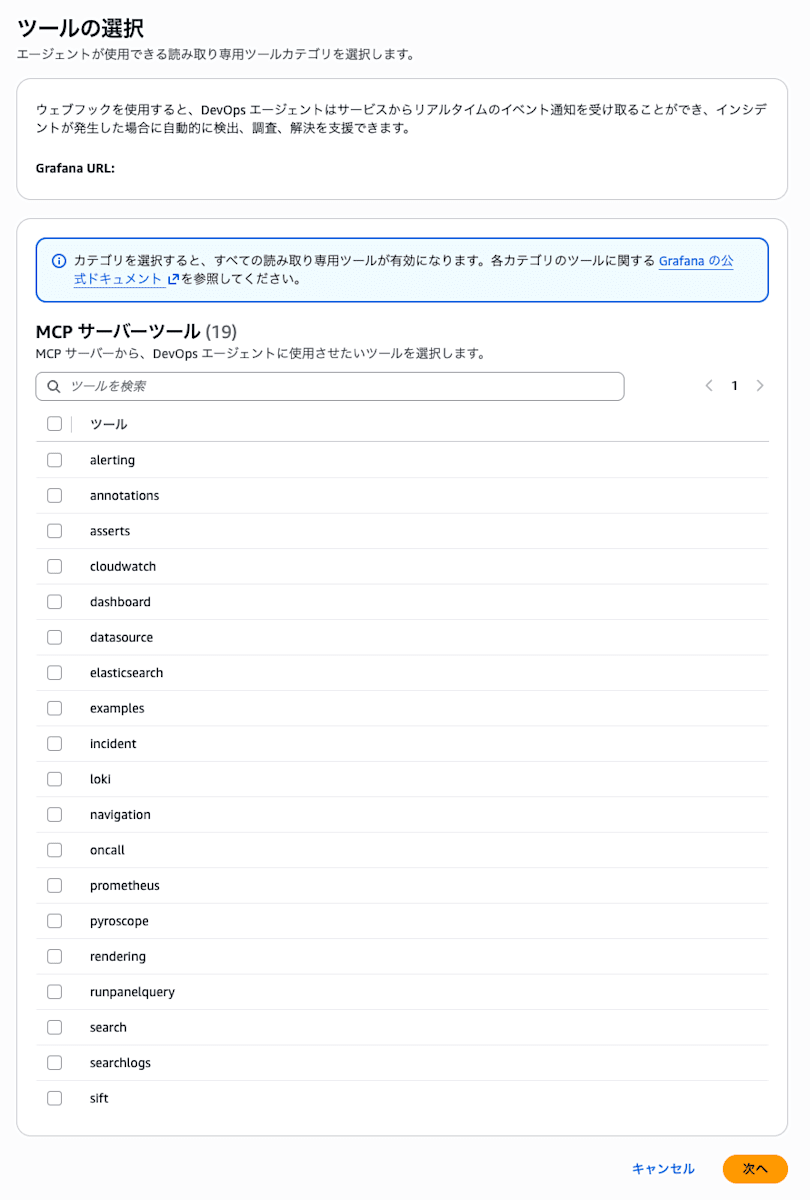
The on-screen description says, "Selecting a category enables all read-only tools."
The list has loki and prometheus, but not tempo.
Once associated, Grafana appears under Telemetry in the Agent Space's Capabilities tab.

In the Agent Space without Grafana associated, there are 0 telemetry sources.
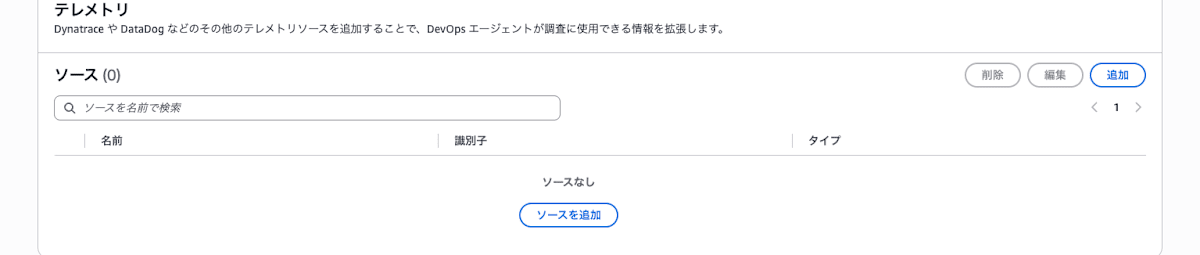
By the way, in the step after "Associate Grafana" in the console (agent actions), I could select 7 write-type tools such as create_annotation and create_alert_rule.
Checking in Chat
Before causing an incident, I asked in the chat of the web app for the Agent Space with Grafana associated whether it could read each of Loki / AMP / Tempo.
Loki
When I asked, "Please show me 5 lines of the last 15 minutes of logs for {job="app"} in Loki," the app's access logs were returned.
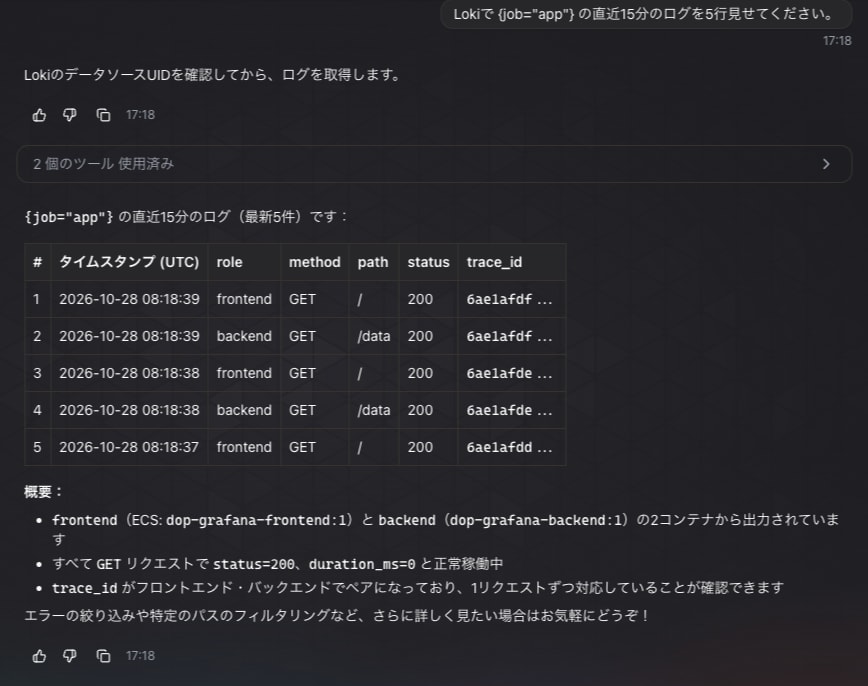
In Grafana's logs (router_logging), requests from DevOps Agent's service account for the list of data sources and for Loki's query_range appeared.
AMP
When I asked, "Please show me the number of frontend requests in the last 15 minutes in AMP," it answered using AMP's http_server_request_duration_seconds_count{job="frontend"}.
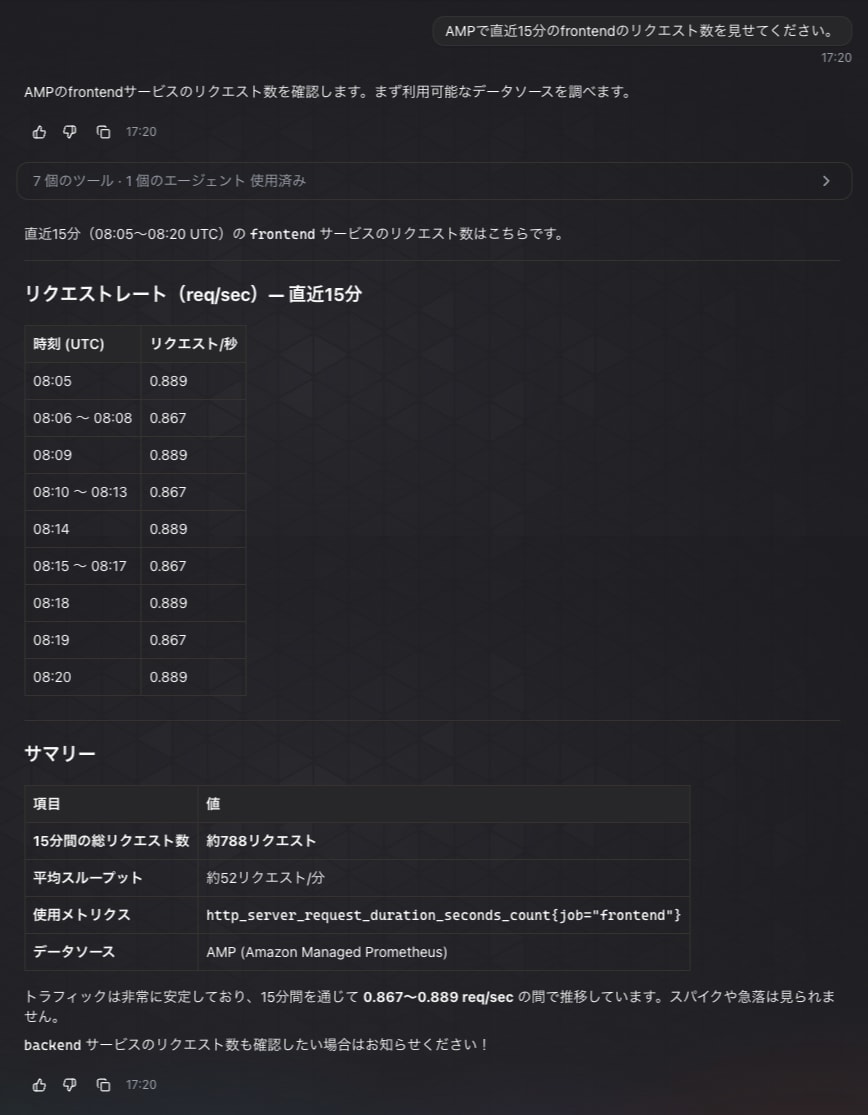
In Grafana, AMP is a data source of the grafana-amazonprometheus-datasource (plugin), but it could be read with the Prometheus tools.
When tools was not usable, it answered the same question using the ALB's CloudWatch metrics, so the way it answers changes depending on whether Grafana's tools can be used.
Tempo
When I asked, "Please show me one trace for service.name=frontend from the last 15 minutes in Tempo," something that looked like a trace came back, but it was not read from Tempo.
When I opened the list of tools used, there was no Tempo tool, and it had searched for trace_id in Loki logs and assembled the trace from them.
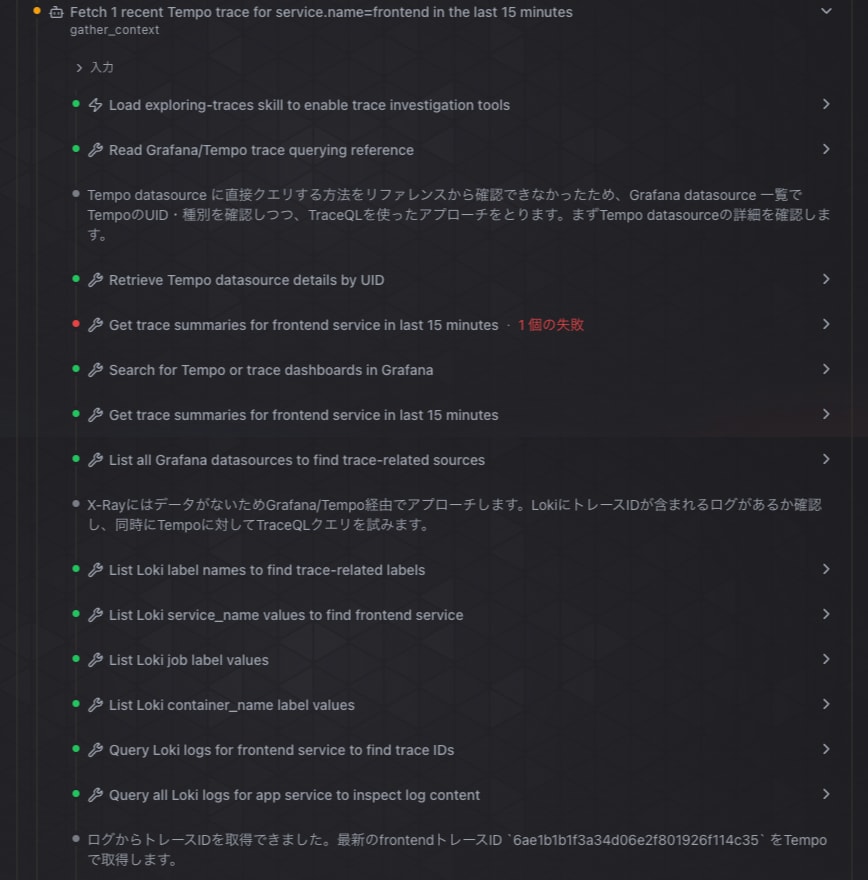
The assembled trace had as many spans as there were lines in Loki's access logs, and the duration was 0 ms.
To make Tempo readable, I tried the following.
| What I tried | Result |
|---|---|
| Enabling Tempo's MCP server | Grafana's connection to Tempo's MCP server succeeded, but it did not appear in the Agent's tools |
get_trace_by_id of the exploring-traces skill |
It is actually X-Ray's BatchGetTraces, and returned an incorrect id format error |
A dashboard with a Tempo panel and grafana_run_panel_query |
datasource type 'tempo' is not supported by run_panel_query error |
Looking at Grafana's logs, DevOps Agent was trying to connect to Tempo's MCP server (/api/mcp) through Grafana's data source proxy.
At first DELETE /api/datasources/proxy/uid/tempo/api/mcp returned 404, so I tried enabling Tempo's MCP server.
query_frontend:
  mcp_server:
    enabled: true
After enabling it, the responses changed to 200 / 202, and the connection became possible.
However, the tools the Agent can use are only within the 19 categories of the association, and no Tempo tool appeared.
When I asked the Agent, "Is there a way to read Tempo via Grafana?", it listed two options, the exploring-traces skill and grafana_run_panel_query, so I tried each.
get_trace_by_id was an X-Ray tool that takes an AWS account ID and region as input.
Error: InvalidRequestException - BatchGetTraces: Invalid trace id 6ae1b2d225d7ff6a065043f371546187: incorrect id format
grafana_run_panel_query could search for dashboards and check panels, but execution was rejected inside the MCP server.
Since /api/ds/query does not appear in Grafana's logs, the request never reached Grafana.
"errors": {"2": "datasource type 'tempo' is not supported by run_panel_query; use the native query tool (e.g. query_promet…"}
In the Agent's summary, it said that grafana_run_panel_query supports only Prometheus / Loki / ClickHouse / CloudWatch.
Comparing Incident Investigations
How I Caused the Incident
The frontend's /error is relayed to the backend's /fail, and the backend returns a 500 with intentional failure.
While keeping normal traffic flowing (to the frontend's / at 1-second intervals), I accessed /error at 0.5-second intervals for 10 minutes.
END=$(( $(date +%s) + 600 ))
( while [ $(date +%s) -lt $END ]; do curl -s -o /dev/null $APP/error; sleep 0.5; done ) &
The ALB metrics and CloudWatch alarm only show the symptom "5xx increased on the frontend."
Which endpoint returned 500 and why can't be determined without looking at Loki / Tempo / AMP.
After the alarm dop-grafana-frontend-5xx went into ALARM, I started investigations with the same text one after another in the web apps of the two Agent Spaces.
https://app-dop.<ドメイン>/ のfrontendで5xxが増えています。
CloudWatchアラーム dop-grafana-frontend-5xx が発火しました。
発生時刻は 2026-10-28 08:44 UTC(17:44 JST)ごろからです。
原因を調べてください。
I did not include the words Grafana / Loki / Tempo, to see whether the Agent would use Grafana on its own.
The dialog for starting an investigation only had fields for investigation details, name, and priority, and no field for the occurrence time, so I put the occurrence time in the text.
I did not guide it from the chat during the investigation.
Investigation Result of the Agent Space Without Grafana Associated
The investigation in the Agent Space without Grafana associated took about 22 minutes 23 seconds.
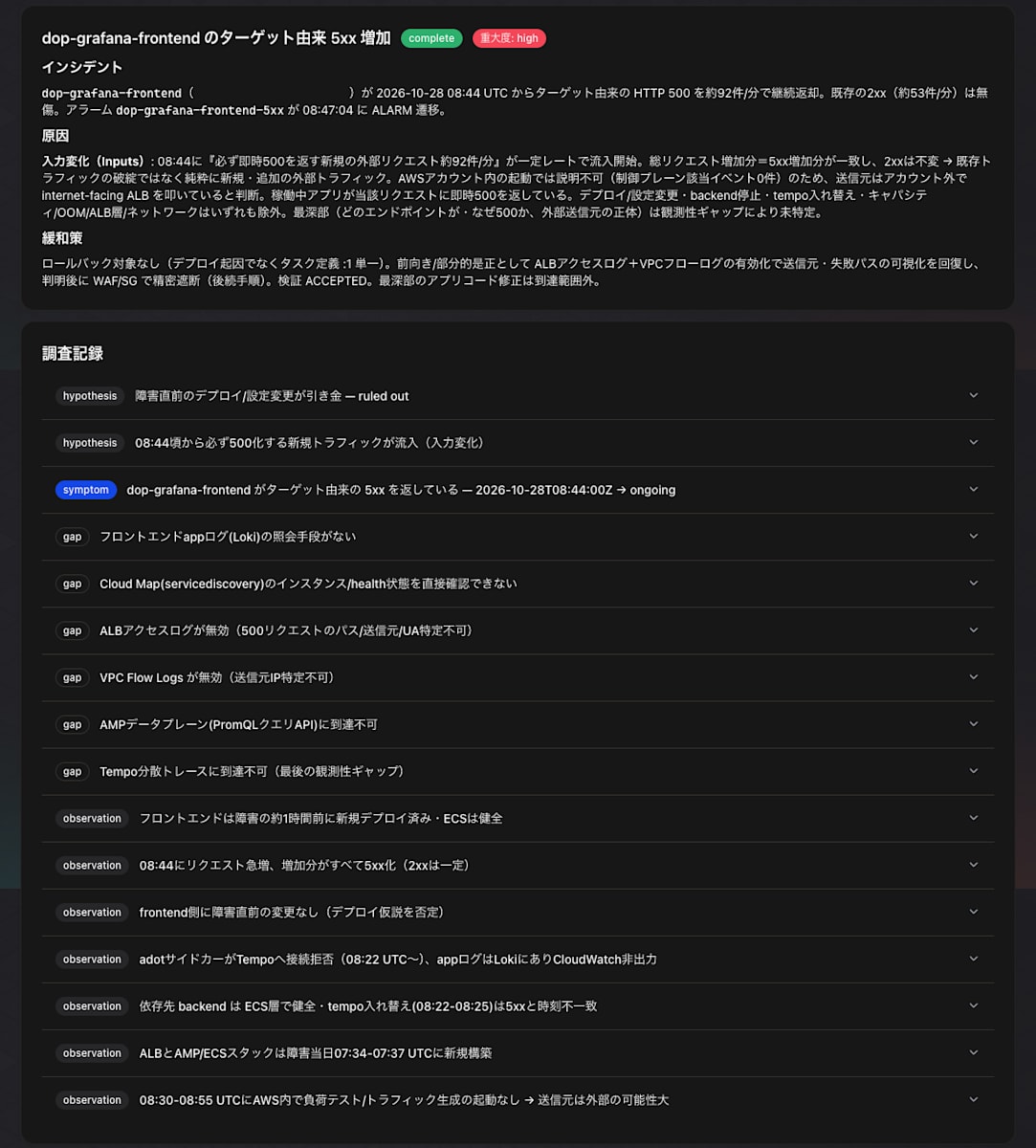
The cause was given as "At 08:44, new external requests that always return an immediate 500 (about 92 requests/min) began flowing in at a constant rate."
It ruled out deployments, configuration changes, backend outages, capacity, the ALB, and the network, and up to this point it is correct.
However, "which endpoint and why 500" remained unidentified due to an observability gap.
Note: The domain is masked
The gaps in the investigation record list "no means to query the frontend app logs (Loki)," "AMP data plane (PromQL query API) unreachable," and "Tempo distributed traces unreachable."
From the sidecar logs in CloudWatch Logs, it had noticed that the app's logs exist in Loki, but it had no means of reading them.
Investigation Result of the Agent Space With Grafana Associated
The investigation in the Agent Space with Grafana associated finished in about 12 minutes 46 seconds.
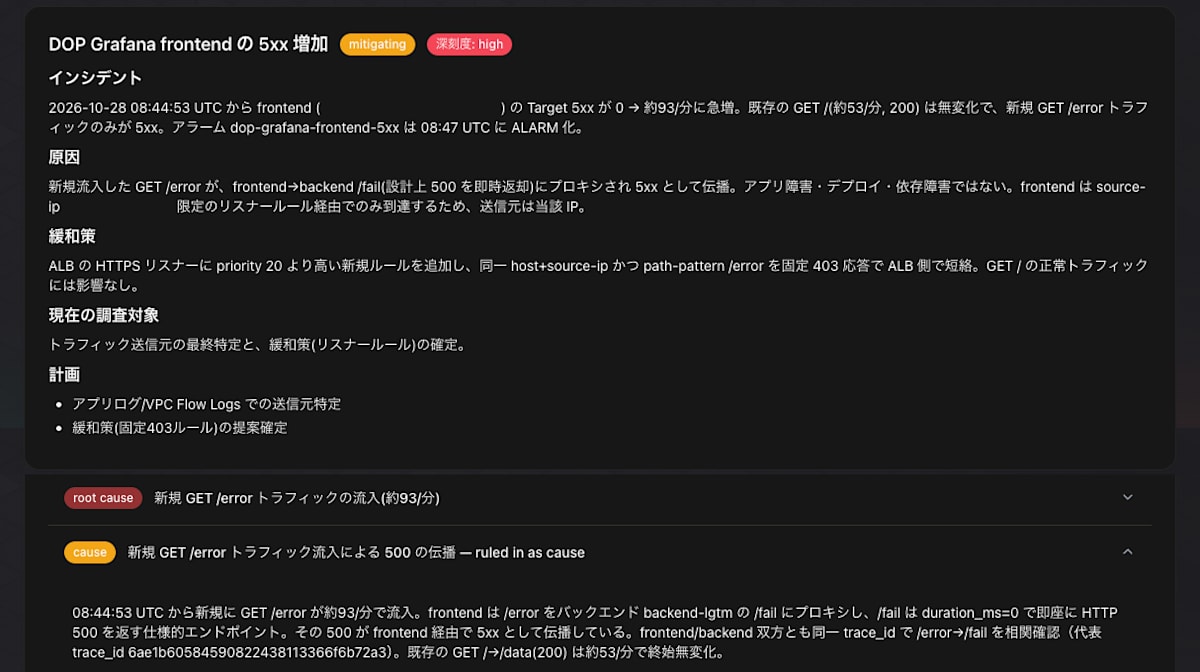
The cause was given as "The newly flowing-in GET /error was proxied from the frontend to the backend's /fail (which by design returns 500 immediately) and propagated as 5xx."
It cross-referenced the frontend and backend logs by the same trace_id to confirm the /error → /fail connection.
The number of /error requests during the incident period (930, all 500) also matches the number of times I actually accessed it.
Note: The domain and source IP are masked
Looking at the investigation timeline, at the point where it noticed the app logs were in Loki, it launched sub-agents in parallel to investigate Loki, Tempo, the ALB access logs, and infrastructure changes.
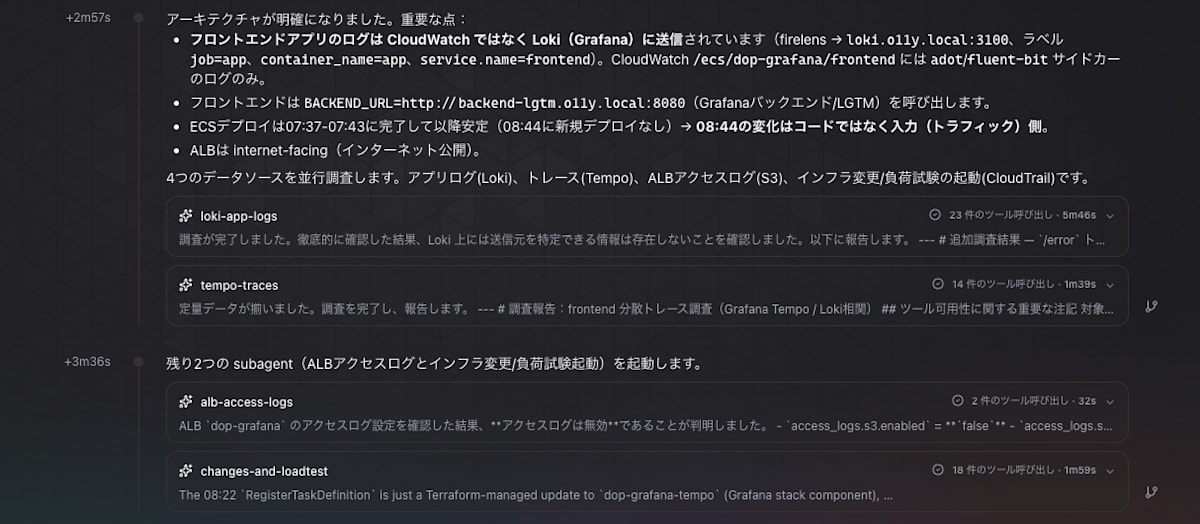
There is also a sub-agent named tempo-traces, but here too it could not read Tempo and substituted Loki logs.
The only gaps that remained were the source IP and User-Agent.
This is because ALB access logs are disabled, so it inferred the source from the listener rule conditions and CloudTrail records.
Looking at Grafana's logs (router_logging), there were 68 requests from DevOps Agent during the investigation, all of them related to Loki.
There were no queries to AMP.
Finally
This time, I connected self-hosted Grafana on ECS Fargate to AWS DevOps Agent and checked how much it can read and how it is used in incident investigation.
I hope this article is helpful to someone.
