
Creating Articles automatically from Ticket comments with DevRev Snap-in

This page has been translated by machine translation. View original
Introduction
I built a system using DevRev's Snap-in that "manages blog post writing with Tickets, and when you finish writing an article and set the Ticket to Resolved, the content is automatically imported into DevRev's Article (knowledge base)." The goal is to automate operations so knowledge accumulates in DevRev as you complete tasks.
Snap-in is a developer extension that allows you to run TypeScript functions on DevRev. Unlike GUI-based Workflows, it enables more flexible processing such as external HTTP requests. I initially tried building this with Workflows but abandoned it due to HTTP response size limitations. The detailed process is documented in a separate article.
Target Audience
- Engineers interested in automation using DevRev Snap-ins
- Those considering integration between Tickets and Articles in DevRev
- Those who want to learn the Snap-in development flow (init → implementation → deployment → activation)
References
Overview of the Completed Workflow
By commenting a blog URL in the Ticket's customer messages and changing the stage to Resolved, the article content is automatically registered as an Article.
Setting Up the Development Environment
Authenticate with DevRev CLI and generate a template.
devrev profiles authenticate -o <org_slug> -u <email>
devrev snap_in_version init
The generated project structure is as follows:
Project Structure
devrev-snaps-typescript-template/
├── manifest.yaml                          # Event source and function definitions
└── code/
    ├── package.json
    ├── tsconfig.json
    └── src/
        ├── function-factory.ts            # Function registration
        ├── index.ts
        └── functions/
            └── on_work_creation/          # Template function (to be replaced)
                └── index.ts
The template includes a sample function that responds to the work_created event. We'll change this to work_updated and proceed with implementation.
Manifest Configuration
In the manifest, we define three elements: event sources, functions, and automations. We subscribe to the work_updated event in event_sources and connect events with functions in automations. Stage determination is performed in the function code.
manifest.yaml
version: "2"
name: "Ticket to Article"
description: "Ticket のステージが resolved に変更されたとき Article を作成する"

service_account:
  display_name: DevRev Bot

event_sources:
  organization:
    - name: devrev-event-source
      description: Ticket のステージ変更を監視するイベントソース
      display_name: Ticket stage change listener
      type: devrev-webhook
      config:
        event_types:
          - work_updated

functions:
  - name: on_ticket_resolved
    description: Ticket が resolved になったときに Article を作成する関数

automations:
  - name: handle-ticket-resolved
    source: devrev-event-source
    event_types:
      - work_updated
    function: on_ticket_resolved
Function Implementation (Initial Version: Extracting URL from Description)
In the initial implementation, I extracted the URL from the Ticket Description using a regular expression and detected stage changes from the work_updated event payload. Since event.context.secrets.service_account_token automatically passes the service account token, there's no need to manage authentication information.
on_ticket_resolved/index.ts (Excerpt from initial version)
function extractUrl(text: string): string | null {
  const urlRegex = /https?:\/\/[^\s<>"{}|\\^`\[\]]+/g;
  const matches = text.match(urlRegex);
  return matches ? matches[0] : null;
}

export async function handleEvent(event: any) {
  const devrevPAT = event.context.secrets.service_account_token;
  const APIBase = event.execution_metadata.devrev_endpoint;
  const devrevSDK = client.setup({
    endpoint: APIBase,
    token: devrevPAT,
  });

  const payload = event.payload;
  const work = payload.work_updated.work;

  // Only process transitions from work_in_progress → resolved for Tickets
  if (work.type !== "ticket") return;
  if (work.stage?.name !== "resolved") return;
  if (payload.work_updated.old_work?.stage?.name !== "work_in_progress") return;

  const url = extractUrl(work.body || "");
  // ... Retrieve content from URL and create Article
}
This initial version of the workflow functioned properly.
Specification Change: Getting URLs from Customer Messages
After running the initial version, a team member suggested that "retrieving URLs from customer messages rather than the Description might be easier to operate."
Indeed, the Description is typically written when creating a Ticket. Adding a blog URL later seems unnatural and can mix with other content. Sharing the URL in a comment before setting to Resolved creates a more natural operational flow. Since comments might contain multiple URLs, we decided to treat the last posted one as the valid one.
Additionally, we needed to modify the code to limit referenced URLs to DevelopersIO only.
The changes can be summarized as follows:
- Target domain limitation: Changed to only match
dev.classmethod.jp - Visibility filter: Specified
PublicandExternalto retrieve only customer messages, excluding internal discussions and events - Pagination: Used
cursorto scan all records and return the last URL found
on_ticket_resolved/index.ts (Main parts after specification change)
function extractDevClassmethodUrl(text: string): string | null {
  const regex = /https?:\/\/dev\.classmethod\.jp\/[^\s<>"{}|\\^`\[\]]*/g;
  const matches = text.match(regex);
  return matches ? matches[matches.length - 1] : null;
}

async function findLastDevClassmethodUrl(
  devrevSDK: publicSDK.Api<unknown>,
  workId: string
): Promise<string | null> {
  let lastUrl: string | null = null;
  let cursor: string | undefined = undefined;

  do {
    const request: publicSDK.TimelineEntriesListRequest = {
      object: workId,
      limit: 50,
      visibility: [
        publicSDK.TimelineEntryVisibility.Public,
        publicSDK.TimelineEntryVisibility.External,
      ],
      ...(cursor ? { cursor, mode: publicSDK.ListMode.After } : {}),
    };

    const response = await devrevSDK.timelineEntriesListPost(request);
    const entries = response.data?.timeline_entries || [];

    for (const entry of entries) {
      const body = (entry as any).body;
      if (typeof body === "string") {
        const found = extractDevClassmethodUrl(body);
        if (found) {
          lastUrl = found;
        }
      }
    }

    cursor = response.data?.next_cursor || undefined;
  } while (cursor);

  return lastUrl;
}
In case of errors, the process notifies via comment on the Ticket and skips processing. It handles failures in timeline retrieval, URL not found, and content retrieval.
HTML Parsing and Article Creation
Extract the content of the <title> and <article> tags (or <body> if not available) from the page, and create an Article with createArticle. Setting resource.url to the original URL maintains a reference from the Article to the original post.
HTML Parsing and Article Creation
function parseHtml(html: string): { title: string; body: string } {
  const titleMatch = html.match(/<title[^>]*>([\s\S]*?)<\/title>/i);
  const title = titleMatch ? titleMatch[1].trim() : "Untitled";

  const articleMatch = html.match(/<article[^>]*>([\s\S]*?)<\/article>/i);
  const bodyMatch = html.match(/<body[^>]*>([\s\S]*?)<\/body>/i);

  let rawBody = articleMatch ? articleMatch[1] : (bodyMatch ? bodyMatch[1] : "");

  const body = rawBody
    .replace(/<script[^>]*>[\s\S]*?<\/script>/gi, "")
    .replace(/<style[^>]*>[\s\S]*?<\/style>/gi, "")
    .replace(/<[^>]+>/g, "")
    .replace(/\s+/g, " ")
    .trim();

  return { title, body };
}

// Create Article
const articleRequest: publicSDK.ArticlesCreateRequest = {
  title: title,
  description: body,
  owned_by: [work.owned_by?.[0]?.id || work.created_by?.id],
  resource: { url: url },
  status: publicSDK.ArticleStatus.Published,
};
const articleResponse = await devrevSDK.createArticle(articleRequest);
Deployment and Verification
Deployment consists of 3 steps:
# 1. Create package (first time only)
devrev snap_in_package create-one --slug ticket-to-article

# 2. Create version (build and upload happen automatically)
devrev snap_in_version create-one --path . --package <package_id> -w 5

# 3. Create draft and activate
devrev snap_in draft --snap_in_version <version_id>
devrev snap_in activate <snap_in_id>
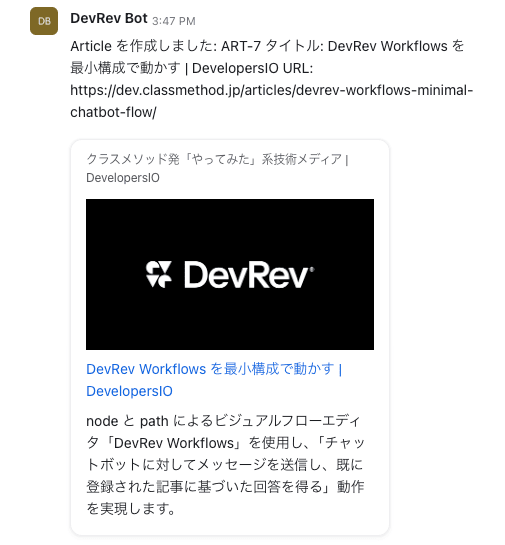
For verification, I created a Ticket, posted a DevelopersIO article URL in the comments, and changed the stage from Work in Progress to Resolved. After a few seconds, the following comment was automatically posted on the Ticket:
Article を作成しました: ART-7
タイトル: DevRev Workflows を最小構成で動かす | DevelopersIO
URL: https://dev.classmethod.jp/articles/devrev-workflows-minimal-chatbot-flow/
Conclusion
Initially, I designed the system to extract URLs from the Description, but based on team member feedback, I changed it to retrieve from customer messages. Sharing the URL in a comment before setting to Resolved creates a more natural operational flow and keeps the Description clean.
Snap-ins are suitable for cases requiring external HTTP requests or complex data processing. If your flow can be completed with just DevRev object operations, GUI-based Workflows are more appropriate, and it's best to choose based on your specific needs.