
I tried the LLM evaluation platform NeMo Evaluator on DGX Spark

This page has been translated by machine translation. View original
Introduction
Hello, I'm Morishige from Classmethod's Manufacturing Business Technology Department.
Many of you may be wondering what to use for LLM evaluation. MMLU alone can measure reasoning but not safety, and if you want to evaluate code generation, you'll want HumanEval. Benchmarks are scattered by purpose, each with different repositories and APIs. Honestly, having to look things up every time you evaluate a model — "which one should I run this time?" — is a bit draining.
That's where NVIDIA stepped in with a "we'll handle everything" approach, introducing NeMo Evaluator. It's an evaluation platform that can call multiple harnesses from a single configuration file and evaluate them side by side under the same conditions.
However, "all-in-one" tools tend to become black boxes, and when trouble arises, you often find yourself lost wondering "where do I even start?" This article focuses specifically on dissecting the internals of NeMo Evaluator to understand how it works. A measurement report with actual evaluations run across multiple models will be published in a separate article.
The testing environment is my own DGX Spark (GB10, ARM64, 128GB unified memory). To give the conclusion upfront: NeMo Evaluator has a 2-layer structure of "core evaluation engine + launcher," and the major harnesses run as-is on DGX Spark's ARM64. The BYOB mechanism for adding custom benchmarks has also become considerably simpler in recent versions.
What Is NeMo Evaluator
NeMo Evaluator is an OSS LLM evaluation platform published by NVIDIA. The repository is at NVIDIA-NeMo/Evaluator, and two packages are arranged as a monorepo.
One is nemo-evaluator, which serves as the core evaluation engine. This is designed to run inside a container. The other is nemo-evaluator-launcher, commonly called nel, which is the launcher that orchestrates from outside the container.
To use a cooking analogy for the division of roles: nel is the "head chef who reads the recipe," and the container is the "kitchen fully stocked with knives and ingredients." The head chef doesn't pick up a knife themselves — they trust the kitchen and delegate the work.
In NVIDIA's positioning, NeMo Evaluator sits right between NeMo RL (post-training) and NeMo Agent Toolkit. It's the middle piece in the flow of evaluating trained models and applying those results to agent building.
To clarify who this tool is for, it should make your life easier in the following situations:
- You want to run multiple benchmarks (MMLU, HumanEval, BFCL, safety-related, etc.) all at once
- You want to compare multiple models side by side under the same conditions
- You want to integrate your own custom benchmarks into the same platform as other benchmarks
The third point in particular — being able to integrate custom benchmarks into the same platform — seems especially useful when you want to run evaluations on internal data in a reproducible manner.
The Architecture Is Built on "Containers × Pipelines"
NeMo Evaluator is divided into two layers: a launcher that orchestrates from the outside, and a container that runs the actual evaluations on the inside. The overall picture looks like this.
As you can see, nel is the orchestrator that pulls and launches containers, while the nemo-evaluator core inside the container is what actually calls the LLM endpoint and runs the evaluations.
What's surprising here is that even though these are packages in the same repository, nel does not directly call the core's Python API. nel doesn't import and use functions from nemo-evaluator. It always launches a container and lets everything complete inside it.
This is a subtly thoughtful design — even if the nel version and the core version are running separately, there's no risk of dependency conflicts. The Python environment on the evaluation job side is also separated by the container, even if the required versions differ between harnesses.
The Adapter / Interceptor Pipeline Is Interesting
Peeking inside the container's nemo-evaluator reveals another interesting mechanism. LLM API requests and responses are processed through a chain of components called Interceptors. Counting the implementations listed in packages/nemo-evaluator/src/nemo_evaluator/adapters/interceptors/, there are 10 registered classes.
| Interceptor | Role | Type |
|---|---|---|
SystemMessageInterceptor |
Injects system prompts | Request |
PayloadParamsModifierInterceptor |
Adds, removes, or renames request payload parameters | Request |
RequestLoggingInterceptor |
Logs requests | Request |
CachingInterceptor |
Caches results | RequestToResponse + Response |
EndpointInterceptor |
The actual component that calls the LLM API | RequestToResponse |
ResponseLoggingInterceptor |
Logs responses | Response |
ProgressTrackingInterceptor |
Notifies progress to external webhooks | Response + PostEvalHook |
RaiseClientErrorInterceptor |
Converts client errors to exceptions | Response |
ResponseReasoningInterceptor |
Handles reasoning traces like <think> tags |
Response + PostEvalHook |
ResponseStatsInterceptor |
Aggregates latency and token counts | Response + PostEvalHook |
This is essentially the middleware concept from web frameworks applied directly to LLM evaluation. What's clever is that the cache layer lives inside the pipeline — results that have already been evaluated don't get recomputed. Even if the process crashes midway, only the failed samples need to be re-evaluated, which is something that really pays off in production use.
Incidentally, the reason CachingInterceptor has two types listed is that it serves a dual role: on a cache hit, it returns the response at the request stage as a shortcut, and on a cache miss, it saves the result at the response stage. The implementation uses multiple inheritance from both RequestToResponseInterceptor and ResponseInterceptor.
The PostEvalHook type on the right side of the table refers to "Interceptors that handle both response processing and post-evaluation hooks." The three that fall into this category — ProgressTracking, ResponseReasoning, and ResponseStats — handle both metrics collection during inference and summary generation after evaluation completion, all within the same class. It's an efficient design.
Having ResponseReasoningInterceptor is also quite a thoughtful touch. It separates the content inside <think>...</think> tags — returned by models like Nemotron and DeepSeek-R1 — from the main body, so you don't need to write extra preprocessing on the scoring side.
The Launcher's Toolset
On the nel side, there's a full set of components for job management beyond just launching containers.
The Executor, which switches between execution environments, supports three types: local execution, Slurm clusters, and Lepton. For personal use on a DGX Spark, Local is the normal choice, but it's convenient for organizations that have Slurm on their internal clusters, as they can scale directly.
The Exporter, which selects where results are sent, supports MLflow, Weights & Biases, Google Sheets, and local files. If you're running many jobs and want to compare them across runs, it's easier to accumulate everything in MLflow from the start.
Execution history is recorded in a SQLite ExecutionDB, and past jobs can be retrieved by invocation ID. This history is useful when you want to re-evaluate or find the best checkpoint.
And mapping.toml is what resolves task names to container images. It's a central registry that says "this evaluation runs with this harness in this container," and nel references it at startup to pull the appropriate container.
Beyond this, there's also a standalone command called nel-watch that links training and evaluation. Since this is an operational topic, I'll cover it together in the latter part of the article.
23 Integrated Harnesses, 421 Tasks
The evaluation harnesses covered by NeMo Evaluator number 23, with 421 tasks in total (as of nel v0.2.4). Let's first take a broad look at the categories.
| Category | Harness | What It Primarily Measures |
|---|---|---|
| General LLM | lm-evaluation-harness / simple-evals | MMLU / GSM8K / HellaSwag / GPQA |
| Code | bigcode-evaluation-harness / livecodebench / scicode | HumanEval / MBPP / LiveCodeBench |
| Safety | garak / safety-eval | Vulnerability probes / Bias / Content safety |
| Agent | nemo-skills / bfcl / tooltalk / tau2_bench | BFCL / Tool use / Function calling |
| Conversation / Instruction following | mtbench / ifbench | Multi-turn dialogue / Complex instruction following |
| Multilingual | mmath | Math reasoning in 10 languages |
| VLM | vlmevalkit | AI2D / ChartQA / OCRBench / SlideVQA |
| Long context | ruler / AA-LCR | Context length evaluation |
| Specialized domain | helm / profbench / hle | Medical / Business / Academic |
| Embedding | mteb | Embedding model evaluation |
| Data contamination detection | codec (contamination-detection) | Detecting if benchmark data was mixed into training |
| Performance | genai-perf | Throughput and latency |
Starting with the two major general LLM harnesses, lm-evaluation-harness and simple-evals, the coverage extends to code, safety, agents, multilingual, VLM, and long context — giving the impression that a full range of evaluation dimensions is covered.
Counting 421 Tasks on Real Hardware
With nel installed on DGX Spark, running ls tasks lists all tasks.
$ nemo-evaluator-launcher ls tasks
[I 2026-04-18] Loaded external tasks from IRs total_tasks=421
[I 2026-04-18] Using merged IRs total_tasks=421 internal_tasks=0 external_tasks=421
...
Aggregating task counts by harness gives the following distribution.
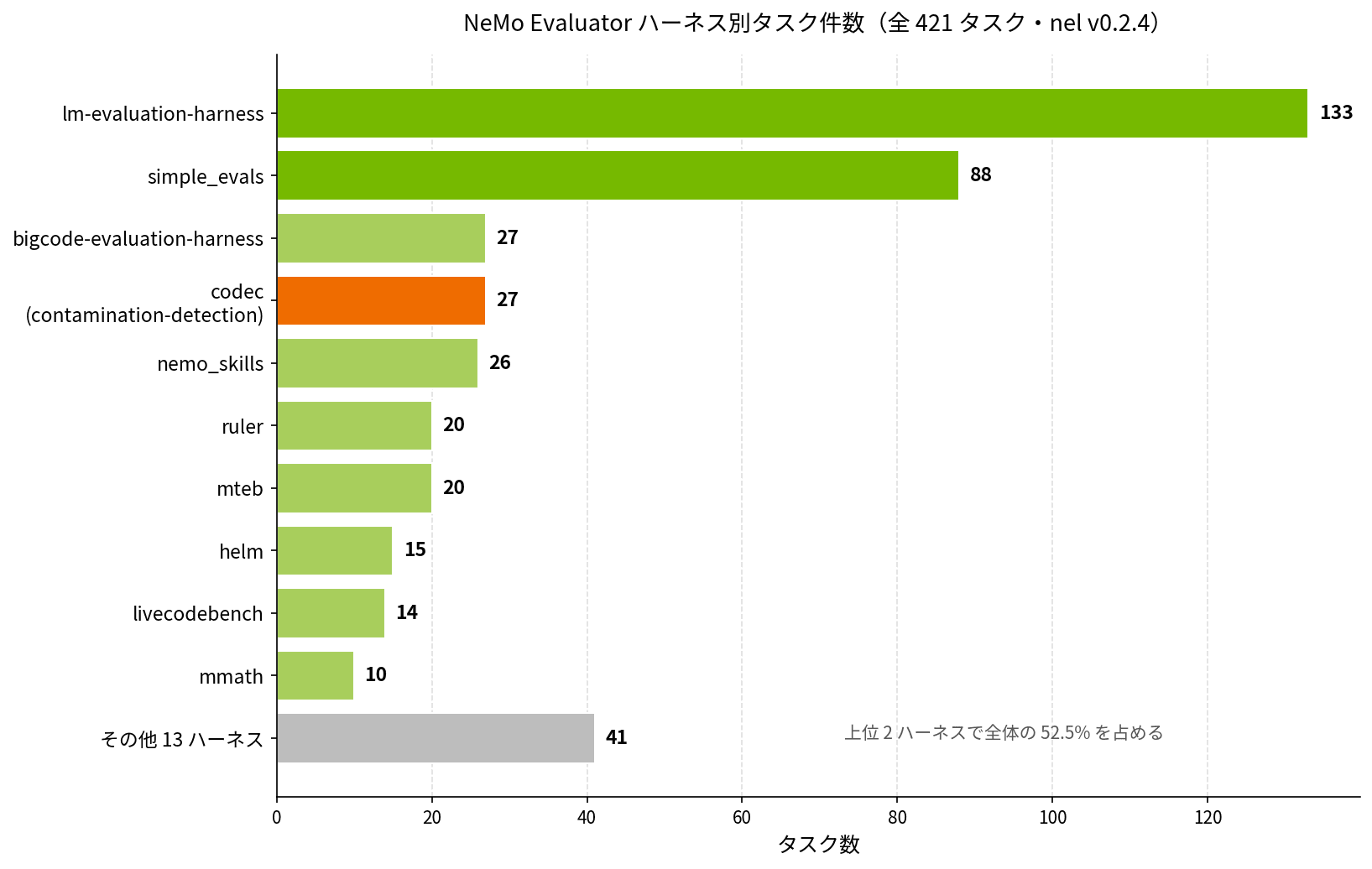
The same distribution in numbers:
| Harness | Task Count |
|---|---|
| lm-evaluation-harness | 133 |
| simple_evals | 88 |
| bigcode-evaluation-harness | 27 |
| codec (contamination-detection) | 27 |
| nemo_skills | 26 |
| ruler | 20 |
| mteb | 20 |
| helm | 15 |
| livecodebench | 14 |
| mmath | 10 |
| Other 13 harnesses (vlmevalkit / bfcl / safety_eval, and more) | 41 |
The Distribution Reveals Imbalances
Looking at this distribution, a few things stand out.
First, lm-eval and simple_evals together account for 221 tasks — more than half the total is covered by just these two major harnesses. MMLU, GSM8K, HumanEval, and other benchmarks commonly seen in papers mostly come through these two.
Another thing that catches the eye is the 27 tasks from the codec harness. This is a set for contamination detection — detecting whether benchmark data has leaked into a model's training data — serving to ensure the integrity of evaluation scores. The fact that NVIDIA has allocated a substantial chunk here is likely because answering the question "are those scores contaminated by data leakage?" is important when evaluating Nemotron and other models.
There are also about 18 tasks with the adlr_ prefix. ADLR stands for NVIDIA Applied Deep Learning Research, and this is a set that reproduces the exact evaluation conditions used in Nemotron papers. It seems quite valuable when you want to align benchmark results with what's published in papers.
The multilingual coverage is also substantial, with global_mmlu_full_{ja, ko, ar, ...} alone covering over 40 languages. It's straightforwardly usable for cross-lingual evaluation of Japanese models as well.
On the other hand, vlmevalkit (VLM evaluation) is modest at 7 tasks, limited to things like AI2D, ChartQA, OCRBench, and SlideVQA. This area still seems to have room to grow.
NVIDIA's Strategy of Not Reinventing the Wheel
When you hear "managing 23 harnesses together," you might momentarily think NVIDIA rewrote everything from scratch. But that's not actually the case — they're using existing OSS harnesses almost as-is.
Looking inside the container nvcr.io/nvidia/eval-factory/lm-evaluation-harness:26.03 that nel pulls, the contents are simply EleutherAI's lm-evaluation-harness packaged up — NVIDIA hasn't rewritten it independently.
What NVIDIA has written themselves is only the adapter layer that wraps the outside of the containers, the 10-stage interceptor pipeline, and the mapping.toml and launcher-side CLI. The clear separation between "the layer that trusts existing OSS" and "the layer that needs to be built in-house" is an interesting design choice from a maintainability perspective.
Does It Actually Run on DGX Spark (ARM64)?
This is the part that DGX Spark users care about most. Do the NGC containers distributed by NeMo Evaluator actually run on ARM64?
The official documentation has no explicit mention of ARM64 support, and there's the precedent of ARM64 NV-Ingest not being available for DGX Spark, so I checked with docker manifest inspect with some apprehension.
Looking Directly at the Manifest
Let's start by checking the lm-evaluation-harness container.
$ docker manifest inspect nvcr.io/nvidia/eval-factory/lm-evaluation-harness:26.03
{
  "schemaVersion": 2,
  "mediaType": "application/vnd.docker.distribution.manifest.list.v2+json",
  "manifests": [
    {
      "platform": { "architecture": "amd64", "os": "linux" }
    },
    {
      "platform": { "architecture": "arm64", "os": "linux" }
    }
  ]
}
Both amd64 and arm64 appear in the manifest list. When you docker pull on an ARM64 host (DGX Spark), Docker automatically fetches the arm64 image.
Actual Results for 5 Major Harnesses
Repeating the same check across the major harnesses and summarizing in a table:
| Harness | amd64 | arm64 |
|---|---|---|
| lm-evaluation-harness | ✅ | ✅ |
| bigcode-evaluation-harness | ✅ | ✅ |
| simple-evals | ✅ | ✅ |
| garak | ✅ | ✅ |
| vlmevalkit | ✅ | ❌ |
Only vlmevalkit is distributed as amd64-only; all other major harnesses had ARM64 manifests.
What This Means
To summarize these results: on DGX Spark (Grace CPU = ARM64), standard harnesses run just by doing docker pull — no additional cross-compilation needed. Using nel's local execution mode, you can run evaluations without any extra cross-building.
On the other hand, if you want to do VLM evaluation, vlmevalkit doesn't support ARM64, so your options diverge. You can either use BYOB with the --platform linux/amd64 option to create a cross-built custom image, or run nel on an x86 server and point the LLM API target at the DGX Spark.
Either way, there are workarounds available. The next chapter covers how to write the BYOB cross-build.
Adding Custom Benchmarks with Minimal BYOB Configuration
A common scenario when using an LLM evaluation platform is "the existing harnesses aren't enough." You might want to evaluate with a QA set built from your company's data, or run a custom benchmark designed for internal documents. That's what BYOB (Bring Your Own Benchmark) in NeMo Evaluator is for.
Old Method vs. New Method
There are actually two ways to write BYOB. Both remain due to historical reasons, and the writing experience differs quite a bit depending on which you use.
| Method | Era | How It Works |
|---|---|---|
| FDF YAML + mapping.toml | Mainstream before v0.2.4 | Write framework definitions in YAML, register in mapping.toml, and bundle into container |
| nemo-evaluator-byob CLI + decorators | Recommended since v0.2.5 | Just write @benchmark and @scorer in a single Python file |
The new method appeared in v0.2.5 and is considerably more pleasant to write — I recommend it. This article will proceed with the new method.
Writing It in 16 Lines of Python
Let's write a simple benchmark that uses the SQuAD dataset and scores with exact match.
from nemo_evaluator.contrib.byob import benchmark, scorer, ScorerInput

@benchmark(
    name="my-qa-bench",
    dataset="hf://rajpurkar/squad?split=validation",
    prompt="Context: {context}\nQuestion: {question}\nAnswer:",
    target_field="answers",
    endpoint_type="chat",
    requirements=["datasets"],
)
@scorer
def my_qa_scorer(sample: ScorerInput) -> dict:
    predicted = sample.response.strip().lower()
    gold = sample.target["text"][0].lower() if sample.target["text"] else ""
    return {"exact_match": predicted == gold}
That's all it takes — just 16 lines without comments. The @benchmark decorator handles dataset loading and prompt formatting, and the @scorer function becomes the scoring logic.
The Build and Execution Flow
Here's the overall flow for turning a written benchmark into a form that nel can call.
To make the written file callable from nel, use the nemo-evaluator-byob CLI. Start with a syntax check, then proceed to local installation and container build.
# Syntax check only (Docker not required)
$ nemo-evaluator-byob my_benchmark.py --dry-run
Validation passed. Benchmarks found:
  - my-qa-bench (normalized: my_qa_bench)
    Dataset: hf://rajpurkar/squad?split=validation
    Requirements: datasets

# Install to local environment
$ nemo-evaluator-byob my_benchmark.py
  Benchmark: my-qa-bench
  Package:   byob_my_qa_bench
  Location:  /home/morishige/.nemo-evaluator/byob_packages/byob_my_qa_bench
  Installed: byob_my_qa_bench (discoverable by nemo-evaluator)
Compiled 1 benchmark(s) successfully.

# Check the eval_type name
$ nemo-evaluator-byob --list
Installed BYOB benchmarks (/home/morishige/.nemo-evaluator/byob_packages/):
  byob_my_qa_bench.my_qa_bench
You can see that the benchmark name my-qa-bench is normalized from hyphens to underscores, and the eval_type is generated in a two-level structure of byob_<name>.<name>. This byob_my_qa_bench.my_qa_bench becomes the value for the name field in nel's evaluation configuration YAML.
Trying the Container Build
Let's build a container on DGX Spark (ARM64).
$ nemo-evaluator-byob my_benchmark.py \
    --containerize \
    --tag byob_qa:local-test
...
[I ...] Downloading HuggingFace dataset dataset=rajpurkar/squad split=validation
[I ...] Converted HuggingFace dataset to JSONL records=10570
[I ...] Building Docker image tag=byob_qa:local-test-linux-aarch64 ...
[I ...] Docker image built successfully tag=byob_qa:local-test-linux-aarch64
Docker image built: byob_qa:local-test
A 530MB ARM64 image was completed in about 36 seconds. What's clever is that during the build, it automatically fetches the SQuAD dataset from HuggingFace, converts it to JSONL (10,570 records), and bundles it into the container. Because the image is self-contained, you can run evaluations later in a different environment without any external network access.
Another small discovery: the --tag value automatically gets a platform identifier appended. For the specified byob_qa:local-test, the actual tag became byob_qa:local-test-linux-aarch64. This reflects a design where platform-specific images are stored separately in the registry.
Cross-Building for amd64
The --platform linux/amd64 flag is useful when you want to use vlmevalkit — which doesn't support ARM64 — on DGX Spark (added in v0.2.5 PR #832). It generates an image for a different platform via Docker buildx.
nemo-evaluator-byob my_benchmark.py \
  --containerize \
  --platform linux/amd64 \
  --tag byob_qa:cross-amd64
Building an amd64 image from an ARM64 host goes through qemu emulation, so it takes significantly longer than native (36 seconds). In the author's environment, it was still in progress after 2 minutes, so in practice you'll either want to build on CI (x86 Linux) or be prepared to wait.
The scenario where this cross-build is particularly useful on DGX Spark is the problem mentioned in the previous chapter — vlmevalkit not supporting ARM64. Having a cross-built custom image with --platform linux/amd64 avoids the dead end of "VLM evaluation isn't possible." Of course, it's also handy for the standard use case of building your own custom benchmarks, evaluating Nemotron or Gemma with internal data, and accumulating results in MLflow.
Integration with nel via YAML
When calling the built container from nel, you don't need to touch mapping.toml. With the new method, you simply write the container URL directly in the container field of the evaluation configuration YAML.
evaluation:
  tasks:
    - name: byob_my_qa_bench.my_qa_bench
      container: registry.example.com/byob_qa:latest

deployment:
  target:
    api_endpoint:
      url: http://localhost:8000
      model_id: my-model
      type: chat
With the old method, managing mapping.toml was surprisingly cumbersome, but the new method lets you consolidate everything into the evaluation configuration YAML, which is much cleaner.
Potential Pitfalls
Here are a few places where you're likely to get stuck when actually running BYOB.
First, a somewhat unexpected gotcha: --containerize won't work unless nemo-evaluator is installed as an editable install from the source tree. In a wheel environment installed via pip install nemo-evaluator, you'll get a not found error at the COPY nemo_eval_pkg/ ... step during the build. The reason is that nemo-evaluator itself needs to be baked into the container, so it looks for the source directory at build time. Here's the workaround:
git clone --depth 1 https://github.com/NVIDIA-NeMo/Evaluator.git
uv pip install -e ./Evaluator/packages/nemo-evaluator
This makes nemo-evaluator-byob --containerize work as expected.
There's also a pitfall with imports: the module name is nemo_evaluator.contrib.byob, not directly under nemo_evaluator. Writing from nemo_evaluator import benchmark will result in an import error that gets caught even at the dry-run stage.
Next, if the {field} names in the prompt don't match the column names in the dataset, you'll get a KeyError at runtime. When column names differ, use the field_mapping parameter to align them, or adjust the prompt side to match.
The eval_type names that appear in --list have a byob_ prefix, and the file name and benchmark name are normalized (lowercased, non-alphanumeric characters converted to underscores, truncated to 50 characters). Specify this normalized name in the name field of the nel YAML.
If you get an error like unknown platform during cross-building, Docker buildx's multiplatform builder may not be configured. You can enable it with docker buildx create --use. In environments without qemu-user-static, the buildx PLATFORMS column may only show arm64, so it's worth checking with docker buildx ls to be safe.
Operational Tools: nel-watch
One important operational tool to be aware of is the nel-watch command added in v0.2.5 (PR #857). It periodically scans a specified directory and automatically submits evaluation jobs to SLURM whenever a new checkpoint appears — a welcome tool for MLOps pipelines that want to link training and evaluation together. Result exports to MLflow, W&B, and Google Sheets also work through the exporter configured in the evaluation YAML.
However, nel-watch is SLURM-only and currently doesn't support Local Executor or Lepton Executor. For personal use on a single DGX Spark, it's somewhat overkill, and in many cases it's faster to just run nel run manually. It's best thought of as a feature aimed at organizations already operating a SLURM cluster.
Conclusion
We've done a rough dissection of NeMo Evaluator's internals, and also actually got our hands dirty with BYOB. Looking back, the thorough commitment to a "containerized evaluation platform" architecture feels like a genuinely well-designed system from the perspectives of reproducibility and dependency isolation.
The 2-layer structure of launcher (nel) and core (nemo-evaluator), the 10-stage Interceptor pipeline, and a catalog of 23 harnesses and 421 tasks. On top of all that, having BYOB where you can write a custom benchmark in 16 lines of Python and containerize it — that's quite a comprehensive offering.
From a DGX Spark user's perspective, here's what this verification confirmed:
- Of the 5 harnesses checked, 4 (lm-eval / bigcode / simple-evals / garak) already support ARM64 and run as-is
- Only
vlmevalkitis amd64-only, but this can be worked around with BYOB's--platform linux/amd64cross-build - Custom BYOB benchmarks take about 36 seconds to build natively on ARM64, and SQuAD's 10,570 records are automatically converted to JSONL and baked into the container at build time
- The only caveat when using
--containerizeis that you need to reinstall from the source tree usingpip install -e nel-watchrequires SLURM, so for personal use on a DGX Spark, directly runningnel runis more practical

