
I tried building an environment for using LLMs differently by purpose with NVIDIA LLM Router (Basics)

This page has been translated by machine translation. View original
Introduction
Hello, I'm Morishige from Classmethod's Manufacturing Business Technology Department.
Model usage costs have really shot up over the past few months... Claude Opus 4.8 output is $25 per 1M tokens, and GPT-5.5 and Gemini 3.1 Pro have also lined up in the same price range. For individual use, it can be absorbed within a Claude Code or Codex subscription, but when scaling across an organization, going "all Opus" becomes a tough conversation for monthly budgets.
Many people probably share the frustration of thinking "it feels like Opus is being called even for lightweight queries, but I'm also nervous about throwing small models at hard problems."
That's where an LLM Router comes in handy — a mechanism that automatically switches models based on the content of the question. There are features like OpenRouter's Auto Router, but this time I tried running NVIDIA LLM Router v3, which you can build yourself, on DGX Spark. The scope of this article covers not only cloud models via API, but also routing local LLMs running on DGX Spark into the same pool.
Background: Why Model Selection Has Become a Practical Conversation
For light personal use, you can squeeze it into a subscription for a few thousand yen. But once you're using Claude Code or Codex regularly for work, that's no longer the case. Just estimating 300 requests per day per user with an average output of 1,500 tokens comes out to 6,600 requests per month, and with all Opus 4.8, that's just under $250 per month. That's right around where it starts to exceed the Claude Code Max ($200/month) ceiling.
Scale that to a 5-person team where each person is running agents continuously, and it jumps another level. I ran some numbers assuming 5 people × 33,000 requests/month per person × average output of 1,500 tokens (totaling 165,000 requests/month).
| Configuration | Unit Price | Monthly Estimate |
|---|---|---|
| All Opus 4.8 | output $25 / 1M | ~$6,200 |
| All Sonnet 4.6 | output $15 / 1M | ~$3,700 |
| Opus 30% / Sonnet 50% / Haiku 20% mix | Weighted avg $16 / 1M | ~$4,000 |
The numbers use the current (as of 2026) output pricing for the latest generation Claude Opus 4.8 / Sonnet 4.6 / Haiku 4.5 (the v3 default pool includes Opus 4.6, but since the price range and behavior are similar, the latest generation pricing is used for the monthly estimates).
Looking at the numbers alone, it's tempting to say "Sonnet is enough," but since these are based on average token counts, in practice difficult questions tend to produce longer outputs, which increases the Opus ratio and pushes costs a bit higher. Conversely, for lightweight questions, outputs are often shorter and Haiku is frequently sufficient. There's room for another tier of model selection between "all Opus" and "all Sonnet."
When implementing this kind of selection at an organizational level, the three things I personally care about are: cost predictability (keeping monthly budgets readable), auditability (logging all routing decisions and their rationale along with actual calls), and data sovereignty (drawing a boundary where sensitive questions go on-premises and everything else goes to the cloud).
Once you scale to an organization, all of these start to bite at once. That's what this article is really about.
Surveying the Router Options
When you think "I need a router," OpenRouter is usually the first candidate that comes to mind. By simply specifying the openrouter/auto model slug, a NotDiamond-based router reads the prompt and selects the model. Recently, other router variants like Fusion Router and Pareto Router have been added, expanding the options.
Here's how NVIDIA LLM Router v3 compares to those:
| Aspect | OpenRouter Auto | OpenRouter Fusion | OpenRouter Pareto | NVIDIA LLM Router v3 |
|---|---|---|---|---|
| Purpose | Cost optimization | Quality improvement (multi-model consensus) | Coding-specialized | Cost optimization, self-host |
| Decision mechanism | NotDiamond (non-public) | judge model comparison JSON | AA percentile (external) | encoder + MLP for P(correct) estimation |
| Model pool | Operator-curated | 1–8 panel + 1 judge | Tier-based curated | Re-trainable with self-host, on-premises mixing possible |
| Cost structure | Per-model pricing | 4–5× single model | Per-model pricing | Self-host inference + per-model pricing |
| Re-training on your own data | Not possible | Not possible | Not possible | Possible |
Fusion Router is a different type of feature that "deliberates with multiple models to make a judgment," oriented toward quality improvement rather than cost optimization. Since 3 panel models + 1 judge model run per request, the cost is 4–5× that of a single model. Pareto Router uses Artificial Analysis coding percentile to select the cheapest option from 3 tiers using min_coding_score, which conceptually is close to v3's tolerance.
The key question here is: if SaaS OpenRouter works fine, what's the point of self-hosting NVIDIA LLM Router v3? My analysis comes down to four differentiators: the ability to visualize routing decision rationale, the ability to freeze a shortlist for reproducibility, the ability to mix on-premises models into the pool, and the ability to retrain on your own data. If enterprise requirements include "routing decisions can't be a black box for audits" or "sensitive queries must stay on-premises," then forking and running v3 becomes a real option.
Current Status of NVIDIA LLM Router v3
When you visit the NVIDIA LLM Router repository, you'll find several branches lined up, which can be a bit confusing at first. It has actually gone through generations from v1 to v2 to v3, with v3 being the currently active branch (based on the repository description).
Here's the status of each branch's latest commits:
| Branch | Latest Commit | Implementation Status |
|---|---|---|
main (v1) |
2026-04-29 | Implementation stopped at 2025-12-19; only Helm example updates after that |
experimental (v2) |
2026-04-14 | Implementation stopped at 2025-12-31; only CI configuration after that |
v3 |
2026-05-07 | Active; LiteLLM Proxy external sidecar hook added |
v1 and v2 are essentially in maintenance mode, with v3 being the de facto active line. The default branch is still experimental, which may cause a moment of confusion about "which one is the right one to look at," but following the README leads you straight to v3.
The v3 README opens with this statement:
Reference implementation only.
This branch is a reference implementation demonstrating prefill-based LLM routing.
For production deployment, please fork this repository.
"Reference implementation only" — meaning if you want to take this to production, fork it and integrate it at your own responsibility. It's worth noting that the Blueprint's "recommended for production deployment" designation has been removed in v3. On the flip side, it's built with the assumption that you'll fork it and adapt it to your use case, so there's plenty of room for customization.
The README also includes a self-comparison table for v1 / v2 / v3. v3 restores the proxying functionality from v1 while dropping the multimodal support from v2 to focus exclusively on text. The pool includes 9 models with a price difference of about 500x between the cheapest and most expensive, and a pre-trained routing model is included out of the box. The fastest way forward is to get it running and see how it behaves.
One structural point worth understanding: v3 is the layer that decides which model to call, while the actual model calling is delegated to OpenRouter or LiteLLM. The default pool's cloud models are curated with OpenRouter prefixes in mind, so routing results can be used directly via OpenRouter, and you can also inject routing decisions into an existing LiteLLM Proxy. The routing algorithm we'll look at in the next section is all about this "selection side" of the division of responsibility.
How Does It Select a Model?
v3's routing decision roughly follows this flow:
The question is passed through an Encoder (Qwen3.5-0.8B, ~100ms on GPU, ~5 seconds on CPU) to extract hidden states representing the "semantic vector" of the question. These are dimensionality-reduced via PCA, then passed through a decision MLP (a small multilayer neural network), which outputs P(correct) — the probability of each model in the pool answering correctly — for each model.
This is where the tolerance parameter comes in. It sets threshold = max(P) − tolerance, and selects the cheapest model that exceeds the threshold. tolerance = 0 always selects the most capable model, while tolerance = 1.0 always selects the cheapest. The default of 0.20 is positioned as the balance point that reduces cost without sacrificing quality.
Based on the README example:
P(correct):                Cost:
  nemotron-nano:  0.92       $0.05/M
  gpt-oss-120b:   0.95       $0.43/M
  claude-opus:    0.97       $25.78/M

tolerance = 0.20
→ threshold = 0.97 − 0.20 = 0.77

Models exceeding the threshold:
  nemotron-nano  ✓  → Cheapest, so selected
  gpt-oss-120b   ✓
  claude-opus    ✓
Escaping the "Opus gets called even for lightweight questions" situation is exactly what this mechanism is designed for. When I tried throwing a lightweight question like "What is 2 + 2?" at the real hardware, all 9 models' confidences clustered low in the range of 0.03 to 0.26. The absolute P(correct) values are relative to the training judge, so seeing "addition at 0.17" is by design. The key is to understand that the comparison baseline is relative within the same question, not an absolute scale.
The implementation has a 4-layer structure: Core handles BaseRouter / PrefillRouter / PoolConfig / RoutingResult; Training handles collect / train / evaluate CLIs; Adapters handles 6 variants including LiteLLM Strategy, Standalone Server, LiteLLM Proxy, and Sidecar; and Plugins includes the NemoHermes OpenClaw plugin as a standard bundle.
First: Running Just the Routing Decision
Now let's try it on real hardware. The v3 default pool is configured to call cloud models via OpenRouter, but the routing decision itself is self-contained with just the encoder and checkpoint, so you can get a feel for the behavior without using an OpenRouter API key. Let's go through it step by step, starting from forking and checking out.
git clone https://github.com/NVIDIA-AI-Blueprints/llm-router
cd llm-router
git checkout v3
git lfs install
git lfs pull
pip install -e '.[prefill,litellm]'
Once setup is complete, let's call it directly from Python.
from model_router_toolkit.config import load_config, build_router_from_config

config = load_config("configs/v1-9models-qwen08b.yaml")
router = build_router_from_config(config)

result = router.route("What is the capital of France?", tolerance=0.20)
print(f"Selected: {result.selected_model}")
print(f"Confidence: {result.selected_confidence:.3f}")
The v1- prefix in configs/v1-9models-qwen08b.yaml is a bit confusing, but it means "pool configuration version v1" and has nothing to do with the v1 main branch of the router. Looking inside, you'll see a 9-model pool defined, ranging from Nemotron nano to GPT-5 and Claude Opus 4.6. Since Claude Opus is included in the default pool, routing to Anthropic is ready to go with just a single OpenRouter API key.
| Slot | Model | OpenRouter slug | output $/M |
|---|---|---|---|
| 1 | Nemotron 3 Nano (Reasoning) | nvidia/nemotron-3-nano-30b-a3b |
0.20 |
| 2 | GPT-OSS 20B High | openai/gpt-oss-20b |
0.25 |
| 3 | Nemotron 3 Super (free) | nvidia/nemotron-3-super-120b-a12b:free |
0.00 |
| 4 | GPT-OSS 120B High | openai/gpt-oss-120b |
0.43 |
| 5 | Qwen 3.5 35B | qwen/qwen3.5-35b-a3b |
1.30 |
| 6 | Qwen 3.5 122B | qwen/qwen3.5-122b-a10b |
2.08 |
| 7 | GPT-5.2 High | openai/gpt-5.2 |
14.00 |
| 8 | GPT-5.4 High | openai/gpt-5.4 |
15.00 |
| 9 | Claude Opus 4.6 High | anthropic/claude-opus-4-6 |
25.78 |
It's a 9-tier configuration spanning from the cheapest Nemotron 3 Super (free tier) to the highest-priced Opus 4.6, with about an order of magnitude difference in output pricing. Note that reasoning-type models (those with reasoning_effort: high or enable_thinking: true in their config) are mixed in, so thinking tokens can add a bit to the actual cost even for lightweight questions.
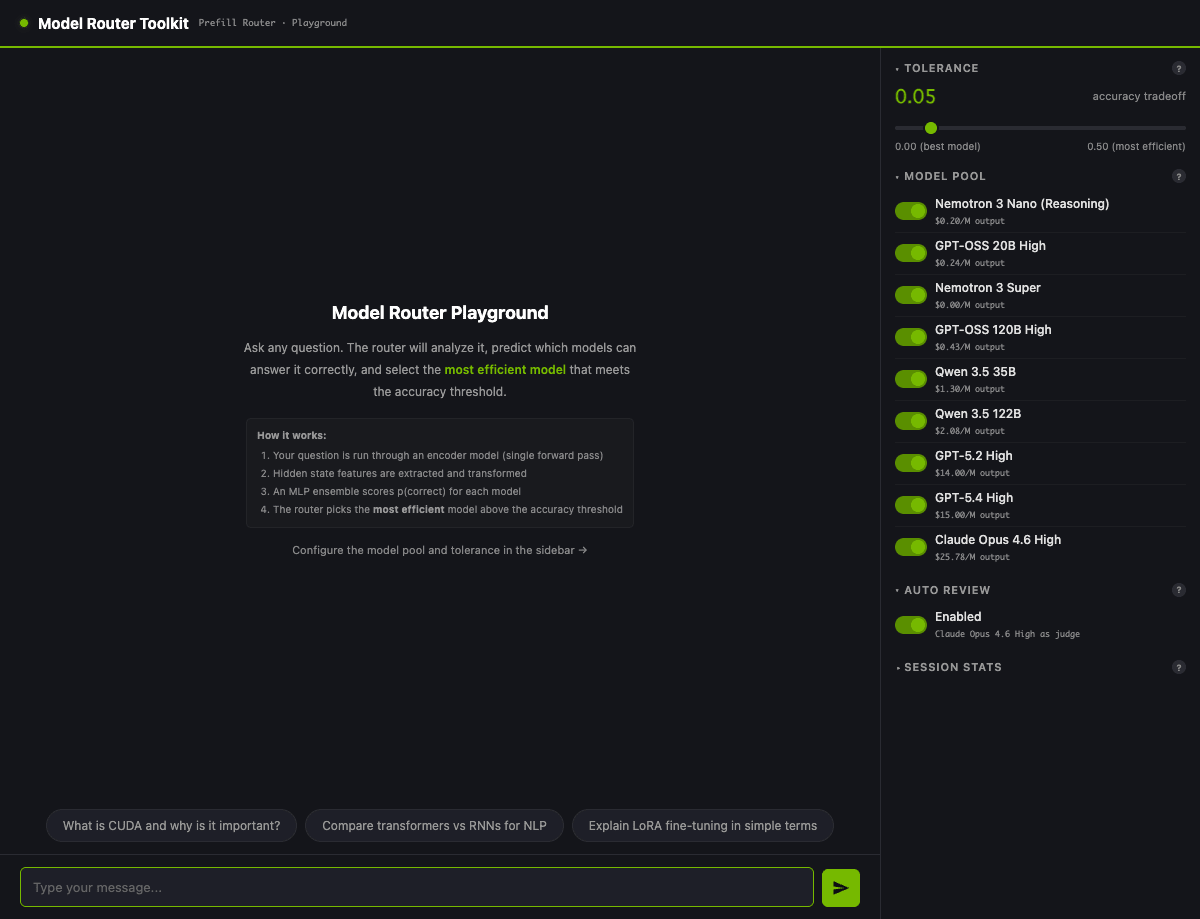
If you want to see the playground UI, start the Standalone Server:
model-router serve --config configs/v1-9models-qwen08b.yaml --port 8100
Opening http://localhost:8100 brings up the UI, where you can submit questions and see the routing decision, each model's confidence, and cost estimates all in one view. The quickest way to check the default pool contents is to hit /api/models.
Mixing Claude and GPT into the Pool via OpenRouter
To connect through to actual calls, you'll need one OpenRouter API key. Since the default pool is built with OpenRouter prefixes in mind, just exporting the key gives you Claude / GPT / Gemini / DeepSeek and more in the pool.
export OPENROUTER_API_KEY=your-key
model-router serve --config configs/v1-9models-qwen08b.yaml --port 8100
Submitting "What is 2 + 2?" in the UI with the default tolerance=0.05 gives a screen like this:
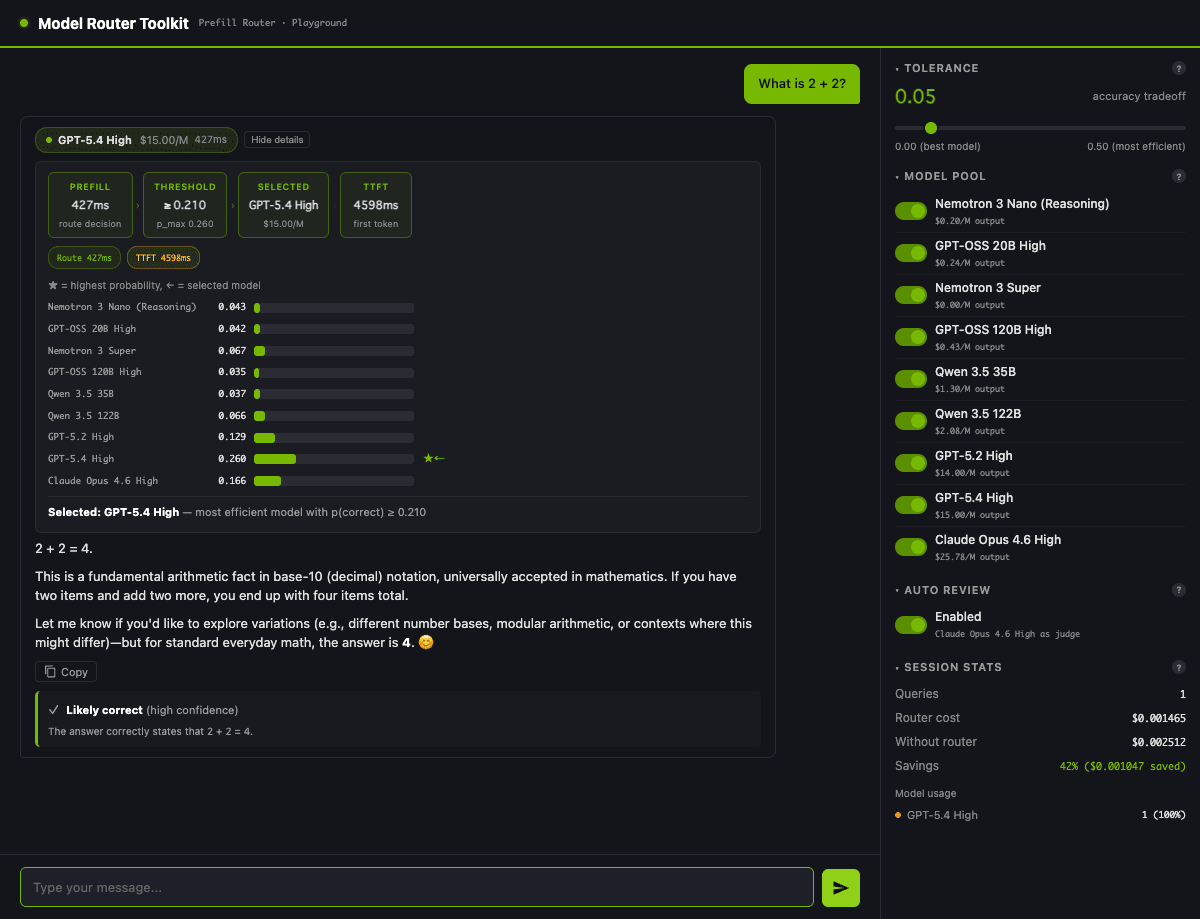
Only GPT-5.4 exceeded the threshold of 0.210, so it was selected. The "confidence absolute values cluster low even for lightweight questions" mentioned in the previous section (0.035–0.260) is confirmed in the UI with the same numbers.
Now you might be wondering: "Which models actually get called with the default tolerance?" I submitted 20 questions of varying types at 5 tolerance levels (0.00 / 0.05 / 0.10 / 0.15 / 0.20). Pulling out just the routing decisions via /v1/route, the distribution of selected_model shifted like this:
| tolerance | claude-opus | gpt-5-4 | gpt-5-2 | qwen-3-5-122b | nemotron-3-super | nemotron-3-nano |
|---|---|---|---|---|---|---|
| 0.00 | 6 questions | 14 questions | 0 questions | 0 questions | 0 questions | 0 questions |
| 0.05 | 0 questions | 14 questions | 4 questions | 0 questions | 0 questions | 2 questions |
| 0.10 | 0 questions | 3 questions | 12 questions | 1 question | 0 questions | 4 questions |
| 0.15 | 0 questions | 1 question | 2 questions | 1 question | 2 questions | 14 questions |
| 0.20 | 0 questions | 0 questions | 1 question | 1 question | 0 questions | 18 questions |
Even in maximum quality mode with tolerance = 0, only the 6 questions judged to be difficult were routed to Claude Opus, while the remaining 14 concentrated on gpt-5-4. Moving tolerance from 0.05 to 0.20, the routing continuously descends from gpt-5-4 → gpt-5-2 → nemotron-3-nano, and at 0.20 almost everything is handled by Nemotron.
Tracing the same movement in the UI for a single question makes the intuition clearer. Submitting the same "What is 2 + 2?" with tol=0.05 selects GPT-5.4 ($15/M output), and resubmitting with tol=0.20 drops the threshold to 0.060, switching to Nemotron 3 Super ($0/M output) which sits in the cheapest tier.
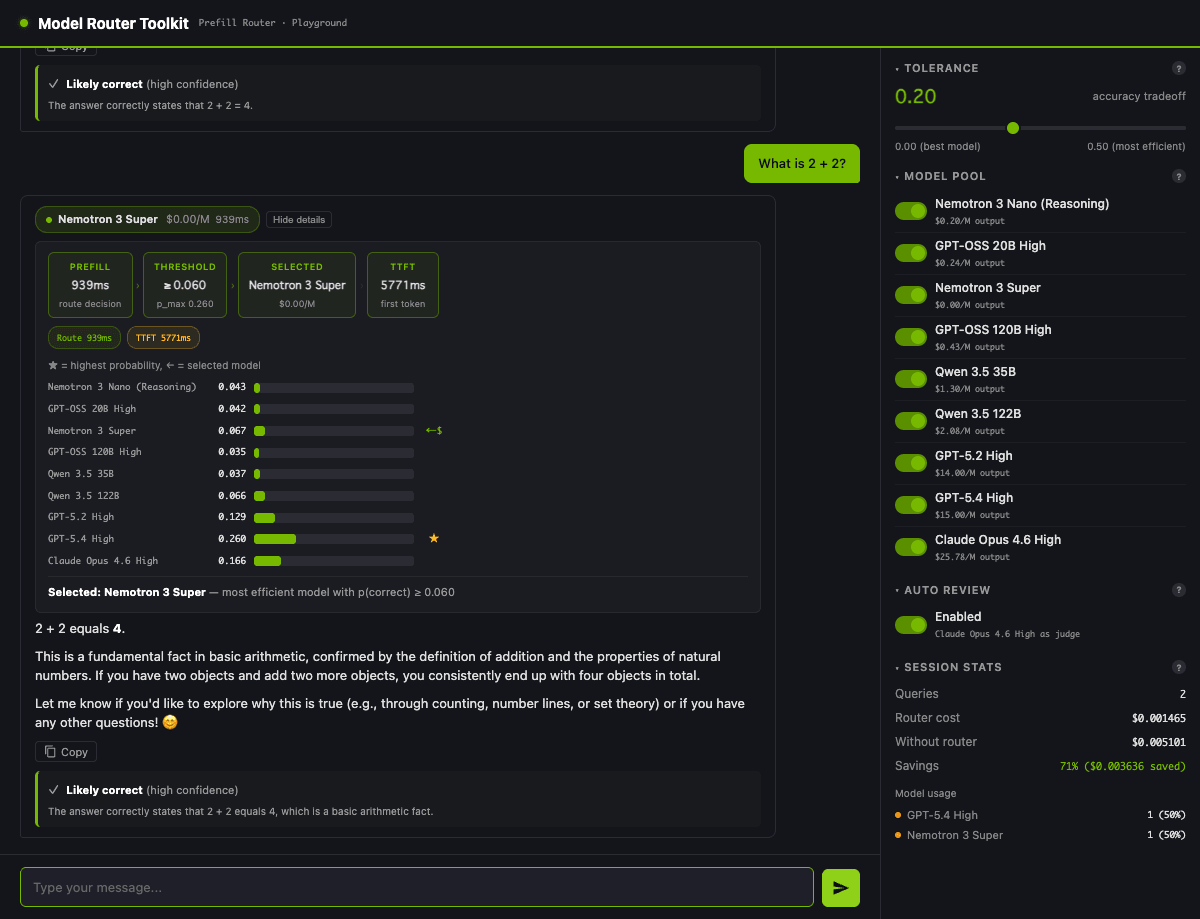
The savings in Session Stats going from 42% to 71% is the effect of moving tolerance by one step. The movement seen in the 20-question sweep table is tangible even when tracking a single question.
At this point, some readers might wonder: "Couldn't you just use LiteLLM alone?" LiteLLM does have automatic routing mechanisms — the AutoRouter added in 2025 offers a Semantic Router that routes based on embedding similarity to user-provided examples, and a Complexity Router that classifies queries into 4 tiers using rule-based keyword detection (like token count and phrases like step by step). On top of that, there's the conventional cost-based-routing, latency-based-routing, usage-based-routing-v2, and provider-budget-limiting, with strategies available for each routing axis. Honestly, if cost optimization or load balancing is all you need, LiteLLM alone can take you quite far.
Where v3 goes one step further is its ML approach to simultaneously estimating the probability of a correct answer for each candidate model. LiteLLM's Semantic Router requires manually writing example sentences, and the Complexity Router uses rule-based English keyword detection, so Japanese prompts, math-heavy prompts, or unexpected questions fall back to defaults. v3 uses DeBERTa-v3 + MLP head to output P(correct) for all 9 models and selects the cheapest one with a quality floor guaranteed by tolerance — suppressing both "Opus gets called for lightweight questions" and "Nano for hard math problems." Furthermore, the ability to run collect → train → evaluate on your own data to retrain for your own question distribution is another strength of v3. We plan to actually run through the training side in Part 2.
In terms of roles, v3 uses ML to decide which model to call, while LiteLLM handles the actual calling as an abstraction layer along with guardrails and budget management — a complementary relationship. Virtual keys, provider-budget-limiting, and guardrails integrations with Aporia and Presidio are outside v3's scope, so for enterprise operations, stacking these two layers is the practical approach. "If you just want to reduce cost and latency," LiteLLM alone is sufficient; "if you want to reduce costs while maintaining quality based on question content" or "if you want to preserve model-level confidence in routing decision logs," then you layer v3 on top — that's how I'd summarize it.
Measuring Reduction Rates with a Persona of a Regular Opus User
This is probably what matters most when considering organizational adoption: "How much will it actually save?" I set up a persona and measured it.
The persona is "a user who always calls Claude Opus." I prepared 5 questions of varying character — light chitchat, writing a code decorator, technical explanation, mathematical proof, and philosophical inquiry — and compared the total cost of calling Opus for all of them versus routing through v3 (using the default pool).
| Route | Total Cost | Reduction vs. All-Opus |
|---|---|---|
| All Opus 4.6 (baseline) | $0.0913 | — |
| Routing (tol=0.05) | $0.0193 | 78.8% |
| Routing (tol=0.10) | $0.0198 | 78.3% |
| Routing (tol=0.20) | $0.0014 | 98.5% |
What's interesting is that tol=0.05 and tol=0.10 land at nearly the same reduction rate (78.8% and 78.3%). With the default pool, at intermediate tolerance levels calls concentrate on gpt-5.2 / gpt-5.4 class cloud models, so moving tolerance by 0.05 barely changes the actual call destinations.
Pushing to tol=0.20, almost all 5 questions consolidate to nemotron-3-nano-reasoning (the cheapest slot in the pool), resulting in 98.5% reduction compared to Opus. The cloud call cost on the Nemotron side isn't literally zero, but it's effectively near-zero compared to Opus.
Applying this to the 5-person team scenario from the introduction (165,000 requests/month × 1,500 tokens output): All-Opus runs about $6,200/month, tol=0.10 routing around $1,350/month, and tol=0.20 around $90/month. The realistic approach would then be tuning to find "how far can we push while maintaining quality."
Honestly, getting this far with the "Reference implementation only" default checkpoint was more than I expected. However, the fact that the reduction rate doesn't improve between tol=0.05 and tol=0.10 shows there's room for pool design improvements. Let's see how intermediate tolerance behaves with local model mixing in the next section.
Mixing DGX Spark Local Models into the Pool
This is where the difference between OpenRouter's Auto / Fusion / Pareto and LLM Router v3 really shows. You simply write a locally running vLLM endpoint into a pool slot, and it becomes a routing target on equal footing with cloud models.
With vLLM running on DGX Spark serving the NVFP4-quantized version of Nemotron 3 Nano 30B-A3B with --gpu-memory-utilization 0.4, I create a single YAML file under configs/ for the tier-design pool.
models:
  - name: nemotron-3-nano-reasoning # Replace slot 1 with local
    api_base: http://localhost:8000/v1
    api_key_env: LOCAL_KEY
    model_name: nvidia/NVIDIA-Nemotron-3-Nano-30B-A3B-NVFP4
    cost_per_m_input_tokens: 0
    cost_per_m_output_tokens: 0
  - name: gpt-5-2-high # Replace slot 7 with Kimi K2.7 Code
    api_base: https://openrouter.ai/api/v1
    api_key_env: OPENROUTER_API_KEY
    model_name: moonshotai/kimi-k2.7-code-20260612
    # ...
  - name: gpt-5-4-high # Replace slot 8 with GLM 5.2
    model_name: z-ai/glm-5.2-20260616
    # ...
Since the slots remain the default, the trained MLP's selection logic carries over as-is; only the actual call destinations are replaced. Looking at the /v1/chat/completions response, you can see nvidia/NVIDIA-Nemotron-3-Nano-30B-A3B-NVFP4 and z-ai/glm-5.2-20260616 properly recorded in the model field — confirming that "the entity is swapped while the slot name stays the same."
The ability to design data sovereignty — routing lightweight sensitive queries to local, externally-publishable queries to emerging cloud models, and only hard problems to Opus — with a single pool config file is where v3 fits well with enterprise requirements. OpenRouter Auto and Pareto are constrained to models within OpenRouter's catalog, so this "on-premises + cloud hybrid" is exclusively in v3's territory (and self-hosted routers like v3).
Running the same 5 questions from Chapter 7 again with this hybrid pool, the reduction rates changed as follows:
| Route | Total Cost | Reduction vs. All-Opus |
|---|---|---|
| All Opus 4.6 (baseline) | $0.0859 | — |
| Routing (tol=0.05, hybrid) | $0.0211 | 75.4% |
| Routing (tol=0.10, hybrid) | $0.0110 | 87.2% |
| Routing (tol=0.20, hybrid) | $0.0000 | 100% |
With the default pool in Chapter 7, both tol=0.05 and tol=0.10 plateaued in the 78% range, but switching to the hybrid pool pushed tol=0.10 to 87.2%. The swapped-in Kimi K2.7 Code and GLM 5.2 now handle medium-weight queries, and calls that were concentrated on gpt-5.2 / gpt-5.4 flowed toward the cheaper emerging models. At tol=0.20, almost everything consolidates to local Nemotron, making the cloud-side cost literally $0.
Latency was also a concern, so I measured it for 2 questions — lightweight chitchat and heavy philosophy — 3 times each (median values shown):
| Question | Claude Opus 4.6 | Local Nemotron |
|---|---|---|
| chitchat_ja (lightweight) | 3.87 sec | 3.37 sec |
| philosophy (heavyweight) | 6.08 sec | 30.02 sec |
The lightweight case is roughly equivalent — local is even slightly faster — but the heavyweight case reverses, with Nemotron being 5x slower. This is because while Opus returned around 138 tokens for the prompt Discuss the Chinese Room argument in 100 words., Nemotron returned a verbose 1,600–2,100 tokens. The difference in "whether instruction-following respects the 100-word constraint" directly translates to perceived latency — something worth keeping in mind when designing the pool.
How to Audit Routing Decisions
The first thing you'll always be asked when considering enterprise adoption is auditability of routing decisions. Being able to trace "which question was routed to which model, and why" in logs is critical for compliance and post-incident analysis.
The RoutingResult returned by v3 includes not just the selected model, but the confidence for the entire pool, cost estimates, and latency as well. Streaming this directly to your observability stack lets you detect incidents like "Opus was being called even for lightweight questions" after the fact.
For Langfuse integration, simply call router.route() inside langfuse.start_span() and attach selected_model and confidences to metadata. This lets you filter in the dashboard afterward by distribution per tolerance, monthly cost drift, and Opus ratio by persona.
Comparing to OpenRouter Auto: since Auto's NotDiamond decision rationale is a black box, "why was that model selected" cannot be reproduced after the fact. v3 can record P(correct) for all 9 models, so if enterprise requirements include "obligation to store routing decision rationale," that's a concrete reason to choose v3. Quietly appreciated.
Taking this one step further, viewing logs over time reveals indicators for deciding when to retrain: "routing drift," where the selected_model distribution for the same query group shifts over time, and "cost drift," where the cost ratio by pool model deviates from initial estimates. The operational aspects around this are covered in the planned Part 2 continuation.
Calling from an app as an OpenAI-compatible endpoint
So far we've looked at the routing service behavior and auditing, but let me also briefly touch on how to connect from actual apps or agents.
The /v1/chat/completions exposed by v3's model-router serve is OpenAI-compatible. It accepts the messages array as-is and returns a response in the OpenAI style of { id, choices, model, usage }. For the model field in the request, you simply specify the policy name written in the pool config (for the default checkpoint it's default, or whatever name you gave to a mixed pool you assembled yourself), and internally MLP runs and forwards to the actual model.
curl -X POST http://<DGX_SPARK_IP>:8202/v1/chat/completions \
  -H "Content-Type: application/json" \
  -d '{
    "model": "default",
    "messages": [
      {"role": "user", "content": "What is 2+2?"}
    ],
    "tolerance": 0.10
  }'
The model field in the response contains the actual routed destination (for example nvidia/NVIDIA-Nemotron-3-Nano-30B-A3B-NVFP4 or anthropic/claude-opus-4-6). tolerance is a parameter that v3 has added as a custom extension to the OpenAI-compatible interface; if omitted, the default value is used.
For coding agents using OpenAI-compatible clients like the OpenAI SDK, LiteLLM, or OpenCode, simply switching BASE_URL to http://<DGX_SPARK_IP>:8202/v1 routes your usual tools through the routing service. The nice thing about being OpenAI-compatible is that the client doesn't need to be aware of what's running inside the pool — the router handles the dispatching behind the scenes.
One caveat: Claude Code sends requests to /v1/messages (Anthropic format), so pointing it directly at /v1/chat/completions won't work. You'll need an Anthropic-compatible shim in between (such as LiteLLM proxy's passthrough feature).
Summary
As model costs rise, selectively using different models per use case becomes a practical concern when scaling within an organization. SaaS options like OpenRouter Auto / Fusion / Pareto are convenient, but when requirements include visibility into routing decision rationale, freezing the shortlist, mixing in on-premise models, or retraining on your own data, self-hosted NVIDIA LLM Router v3 becomes a candidate.
Running it on actual hardware, even with the default checkpoint, we saw 75–87% cost reduction assuming users previously on Opus exclusively. Pushing tolerance = 0.20 to consolidate onto local Nemotron brings it to 100% — meaning you can build a configuration with $0 in cloud API payments. From an implementation perspective, the smooth trade-off between cost and quality based on tolerance tuning is what makes it practical, as you can progressively push the boundaries in line with your organization's risk tolerance.
That said, the default checkpoint has its limits — its behavior is governed by a pre-trained MLP based on slot ordering in a 9-model pool. Even if you add emerging models (Claude Opus 4.8 / GPT-5.5 / Kimi K2.7 Code / DeepSeek V4 / Qwen 3.7 / GLM 5.2, etc.) to the pool, there's no guarantee the most suitable model for your use case will be selected, since those models weren't in the training signal. To fundamentally address this, the collect → train → evaluate training pipeline to create your own checkpoint becomes an option. At the scale of 500 questions, the estimate is $5–25 and half a day, which should be recoverable within a month through per-persona monthly savings.
Also, as the README explicitly states: "Reference implementation only. For production deployment, please fork this repository" — v3 is fundamentally meant to be forked and adapted to your own use case. During the verification for this article, I found several areas for improvement around the OpenAI-compatible endpoint, so in the follow-up Part 2, I'll apply minimal improvements to the serve code after forking before moving on to the persona training section.
Despite being labeled a reference implementation only, v3 is remarkably fun to play with — the direction it's heading is quite interesting.
Reference Links
NVIDIA LLM Router
- NVIDIA-AI-Blueprints/llm-router (GitHub) — The repository containing the v3 branch covered in this article. Checking out
v3gives you the same environment as this article - LLM Router: Rethinking Routing with Prefill Activations (arXiv 2603.20895) — Paper on prefill-based routing that estimates P(correct) for each model from the encoder's hidden states
OpenRouter Routers
- OpenRouter Auto Router — NotDiamond-based automatic router accessible via
openrouter/auto - OpenRouter Fusion Router — Quality-improving type using multi-model deliberation + judge
- OpenRouter Pareto Router — Tier-based type using Artificial Analysis coding percentile
LiteLLM
- LiteLLM Routing — List of strategies including
cost-based-routing,latency-based-routing,usage-based-routing-v2, and more - LiteLLM Auto Routing — Documentation for AutoRouter (Semantic + Complexity) added in 2025-07
- aurelio-labs/semantic-router — Semantic routing library used internally by LiteLLM AutoRouter (Semantic)

