
I tried connecting two DGX Sparks together to test distributed inference of large-scale models

This page has been translated by machine translation. View original
Introduction
Hello, I'm Morishige from Classmethod's Manufacturing Business Technology Department.
Through the verification done in previous articles, we confirmed that a single DGX Spark can run large-scale MoE models like Qwen3-235B and that a code completion environment can be set up.
However, I had always been wondering: "If I connect two units, can I run even larger models? Will it be faster?" NVIDIA's official Connect Two Sparks Playbook also publishes a procedure for clustering two units with a 200Gb/s QSFP direct connection.
To give away the conclusion: connecting two units did not make things faster. However, since models of 143GB or 168GB that don't fit on a single unit can run at practical speeds, being able to run larger models is the biggest advantage of a two-unit configuration.
In this article, I'll walk through everything from the physical connection with a QSFP cable to actual measurement data from distributed inference — what does a two-unit configuration actually look like in practice?
Verification Environment
Hardware Configuration
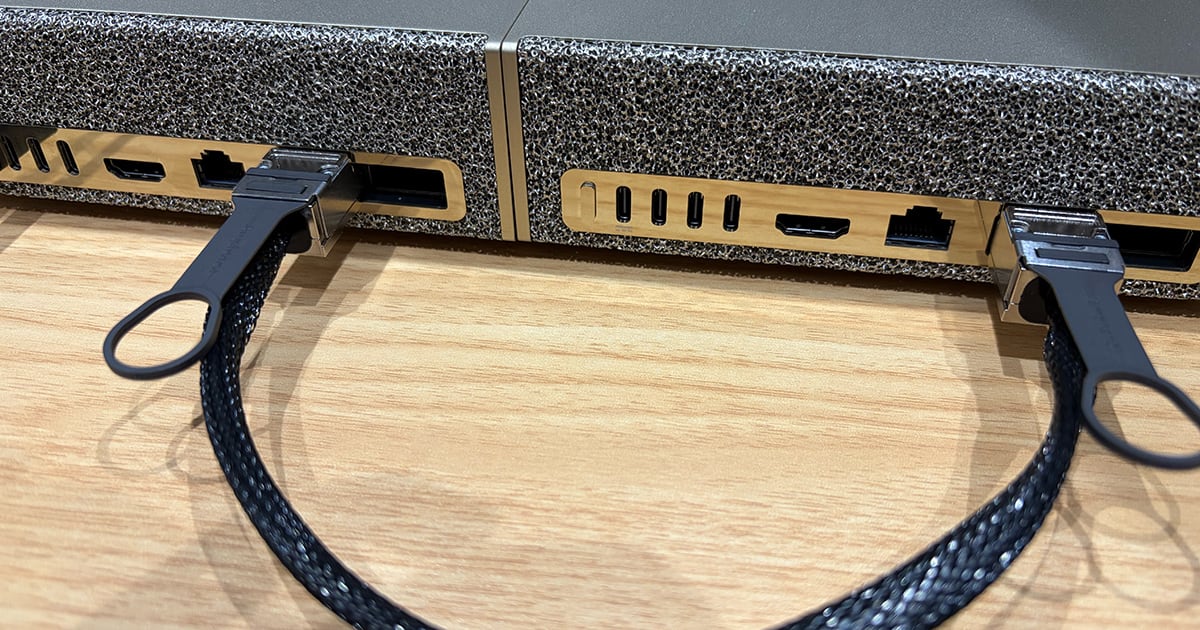
This is a configuration where two DGX Sparks are directly connected using a QSFP112 DAC cable.
| Item | Specs (common to both units) |
|---|---|
| SoC | GB10 Grace Blackwell |
| Memory | 128GB LPDDR5x (273 GB/s) |
| GPU | Blackwell (CUDA 6,144 cores) |
| OS | Ubuntu 24.04 ARM |
| NIC | ConnectX-7 (QSFP112) |
Combined memory across both units is 256GB. However, they are not physically unified — the model is distributed across the two units using llama.cpp's RPC protocol.
Software Stack
| Component | Version |
|---|---|
| llama.cpp | v8012 (built with -DGGML_CUDA=ON -DGGML_RPC=ON) |
| CUDA | 13.0 |
| iperf3 | 3.16+ |
This time we use llama.cpp directly rather than Ollama. Since Ollama does not currently support RPC distributed inference, the configuration uses llama-bench to measure raw throughput.
Models Tested
Five models were tested, including both Dense and MoE architectures, ranging from those that run on a single unit to those that require two units.
| Model | Architecture | Active Parameters | Quantization | File Size | Runs on 1 unit? |
|---|---|---|---|---|---|
| Devstral 2 123B | Dense | 123B | Q4_K_M | 75GB | Easily |
| Qwen3-235B-A22B | MoE | 22B | Q3_K_M | 105GB | Barely |
| Llama 4 Maverick 17B-128E | MoE | 17B | UD-Q2_K_XL | 143GB | No |
| Qwen3-Coder-480B-A35B | MoE | 35B | UD-Q2_K_XL | 168GB | No |
| DeepSeek-V3-0324 | MoE | 37B | UD-IQ2_XXS | 204GB | No |
All GGUF files are from unsloth.
Environment Setup
Connecting the QSFP Cable
The back of the DGX Spark has a ConnectX-7 Smart NIC port, and the physical connection is complete simply by inserting the QSFP112 DAC cable. It supports hot-plugging, so I was able to work without powering down.
Network Configuration
After connecting the cable, assign IP addresses using netplan. In my environment, the interface name was enp1s0f0np0.
network:
  version: 2
  ethernets:
    enp1s0f0np0:
      addresses:
        - 192.168.100.10/24  # Node A
      mtu: 1500
For Node B, set 192.168.100.11/24.
# Apply the configuration
sudo netplan apply

# Verify connectivity
ping -c 3 192.168.100.11
Building llama.cpp
Build on both nodes with CUDA and RPC enabled.
git clone https://github.com/ggml-org/llama.cpp.git
cd llama.cpp
mkdir build && cd build
cmake .. -DGGML_CUDA=ON -DGGML_RPC=ON -DCMAKE_BUILD_TYPE=Release
cmake --build . --parallel $(nproc)
The build completed without any particular issues even in the ARM environment.
Starting RPC and Verifying Operation
The distributed inference flow is as follows: start the RPC server on Node B, then from Node A, distribute and run the model across two units via RPC.
# Node B: Start RPC server
CUDA_VISIBLE_DEVICES=0 ./build/bin/rpc-server \
  --host 192.168.100.11 -p 50052

# Node A: Start local RPC server
CUDA_VISIBLE_DEVICES=0 ./build/bin/rpc-server -p 50052 &

# Node A: Run benchmark (2-unit configuration)
./build/bin/llama-bench \
  -m ~/models/Devstral-2-123B-Q4_K_M/Q4_K_M/Devstral-2-123B-Instruct-2512-Q4_K_M-00001-of-00002.gguf \
  --rpc 192.168.100.11:50052,127.0.0.1:50052 \
  -ngl 99 -fa 1 \
  -p 128 -n 256 -r 5
# -ngl 99: Offload all layers to GPU
# -fa 1: Enable Flash Attention
# -p 128 -n 256: 128 prompt tokens, 256 generated tokens
# -r 5: Run 5 times and take the average
If the model file is placed on Node A, it will be streamed to the RPC server. Loading takes a little time, but once loaded, inference automatically runs in a distributed manner.
Actual Network Bandwidth Measurement
The performance of distributed inference depends heavily on network bandwidth. I measured it with iperf3 before benchmarking.
| Test Condition | Bandwidth |
|---|---|
| Single stream | 33 Gbps |
| 4 parallel | 106 Gbps |
| Bidirectional | 63 Gbps |
These numbers are with MTU at 1500. Against the theoretical value of a 200Gb/s link, that's about 53% utilization, but since llama.cpp's RPC only sends and receives tensors on a per-layer basis, bandwidth is unlikely to become a bottleneck.
Benchmark Results
Now for the main topic. llama-bench was used to separately measure prefill (prompt processing) and decode (token generation). The values below are averages and standard deviations over 5 runs each.
llama.cpp's RPC offers two model split modes. Layer split divides the model into first and second halves by layer for pipeline parallelism, while row split divides tensors along the row dimension for tensor parallelism. In the tables below, single-unit is denoted S1, two-unit layer split as D2-layer, and row split as D2-row.
Establishing a Baseline with Devstral 2 123B as a Dense Model
First, let's look at the Dense model Devstral 2. At 75GB, it runs comfortably on a single unit. I measured it as a baseline to see whether two units would be faster.
| Test | 1 unit (S1) | 2 units (D2-layer) | Ratio |
|---|---|---|---|
| pp128 | 188.80 ± 2.37 | 191.74 ± 1.28 | 1.02x |
| pp512 | 176.15 ± 0.91 | 172.37 ± 0.70 | 0.98x |
| pp2048 | 169.37 ± 0.20 | 211.68 ± 0.46 | 1.25x |
| tg256 | 2.64 ± 0.02 | 2.64 ± 0.00 | 1.00x |
Units are tok/s. pp = prefill, tg = decode (token generation).
Decode is exactly the same 2.64 tok/s for both one and two units. Dense 123B token generation is bottlenecked by memory bandwidth, and even when distributed across two units, the RPC communication overhead seems to cancel out the bandwidth benefit.
The only difference appeared in long-prompt prefill (pp2048) at +25%. Since this is the phase where computation increases and GPU compute power comes into play, the two units' computational resources are having an effect here.
However, 2.64 tok/s for decode is honestly quite slow and difficult to use interactively. If you're running Dense 123B on DGX Spark, a single unit is sufficient from a speed perspective.
Checking Distributed Effects for MoE Models with Qwen3-235B
Next is the MoE model Qwen3-235B. At 105GB, it barely fits on a single unit. This was personally the test I was most curious about — whether there would be a speed difference between one and two units.
| Test | 1 unit (S1) | 2 units (D2-layer) | 2 units (D2-row) | layer ratio | row ratio |
|---|---|---|---|---|---|
| pp128 | 167.28 ± 3.70 | 165.48 ± 4.55 | 166.46 ± 4.07 | 0.99x | 0.99x |
| pp512 | 377.82 ± 3.32 | 377.86 ± 3.29 | 377.86 ± 2.77 | 1.00x | 1.00x |
| pp2048 | 389.47 ± 1.17 | 453.86 ± 1.93 | 442.61 ± 8.28 | 1.17x | 1.14x |
| tg256 | 15.51 ± 0.03 | 14.57 ± 0.06 | 14.12 ± 0.05 | 0.94x | 0.91x |
Decode is slightly slower with two units.
MoE (Active 22B) delivers 15.5 tok/s on a single unit, which is a sufficiently practical speed. With two units, there's a slight decrease due to RPC latency overhead. Prefill shows a +17% improvement for long prompts (pp2048), but not seeing any benefit in decode was a bit surprising.
The reason is that MoE only reads out the Active parameters (22B) worth of memory during token generation, so a single unit's memory bandwidth is already sufficient. Even when distributed, the bottleneck doesn't change, and only the communication overhead increases.
Models That Only Run on Two Units
This is where the two-unit configuration really shines. Models that don't fit in 128GB simply cannot run on a single unit.
Llama 4 Maverick (143GB)
Meta's MoE model, notable for its configuration of 128 experts.
| Test | D2-layer | D2-row | Difference |
|---|---|---|---|
| pp128 | 138.42 ± 4.23 | 143.15 ± 2.78 | row +3.4% |
| pp512 | 358.87 ± 4.12 | 331.29 ± 15.85 | layer +8.3% |
| pp2048 | 384.07 ± 1.95 | 362.22 ± 4.17 | layer +6.0% |
| tg256 | 11.04 ± 0.22 | 13.16 ± 0.33 | row +19.2% |
An interesting finding emerged here. In decode, row split outperforms layer split by +19%. Maverick is a MoE with 128 experts, and with row split dividing tensors along the row dimension, each expert's tensor is evenly distributed across the two units, which appears to improve efficiency during the decode phase.
Since Qwen3-235B performed better with layer split, it seems the optimal split mode varies depending on the number of experts and model size.
Decode at 13.16 tok/s is at a level usable for interactive applications, and I think it's genuinely valuable to have a 143GB model running at this speed in a two-unit configuration.
Qwen3-Coder-480B (168GB)
A coding-specialized 480B MoE model.
| Test | D2-layer (tok/s) |
|---|---|
| pp128 | 77.76 ± 10.56 |
| pp512 | 154.62 ± 0.66 |
| pp2048 | 201.39 ± 12.34 |
| tg256 | 9.86 ± 0.27 |
Decode at 9.86 tok/s. It's slower than Maverick (17B active) due to having Active parameters of 35B, but a 480B parameter model running on two desktop units and achieving nearly 10 tok/s is impressive.
When loading 168GB across two units' 256GB, Node A's memory usage reached up to 116/119GB. The practical upper limit appears to be around 170GB.
DeepSeek-V3-0324 (204GB) — Abandoned Due to OOM
The most anticipated model, DeepSeek-V3-0324 (204GB), couldn't even be loaded. Even with KV cache quantization (q8_0), Node A froze... At this point, the practical upper limit appears to be around 170GB.
Let's see how constraining this limit is with the latest models. At the time of writing, the trending GLM-5 is a 744B parameter MoE with 40B active, and even with unsloth's Dynamic 1-bit quantization it's 176GB, and 241GB at 2-bit. Even at 1-bit, it's 8GB larger than Qwen3-Coder-480B (168GB), slightly exceeding the practical upper limit of the two-unit configuration.
The estimated decode speed based on Active 40B would be around 8–9 tok/s, roughly equivalent to Qwen3-Coder even if it did run. While I'd love to try the latest large-scale MoE locally, it was just out of reach with the current DGX Spark two-unit + llama.cpp RPC setup.
Comparing Decode Performance Across All Models
Let's line up the results so far by decode (tg256).
| Model | Architecture | Active | Size | Config | tg256 (tok/s) |
|---|---|---|---|---|---|
| Qwen3-235B | MoE | 22B | 105GB | 1 unit | 15.51 |
| Qwen3-235B | MoE | 22B | 105GB | 2-unit layer | 14.57 |
| Maverick | MoE | 17B | 143GB | 2-unit row | 13.16 |
| Maverick | MoE | 17B | 143GB | 2-unit layer | 11.04 |
| Qwen3-Coder-480B | MoE | 35B | 168GB | 2-unit layer | 9.86 |
| Devstral 2 | Dense | 123B | 75GB | 1 unit | 2.64 |
| Devstral 2 | Dense | 123B | 75GB | 2-unit layer | 2.64 |
Decode speed is roughly proportional to the size of Active parameters. While Dense 123B Devstral 2 achieves 2.64 tok/s, MoE 22B active Qwen3-235B achieves 15.5 tok/s — about 6x faster. On the DGX Spark, where memory bandwidth of 273 GB/s is the bottleneck, MoE models with small Active parameters are a natural fit.
Choosing a Split Mode
To summarize the findings on layer split and row split mentioned at the beginning of the benchmark results, the following tendencies were observed:
| Model | Prefill | Decode |
|---|---|---|
| Qwen3-235B | layer slightly better | layer slightly better |
| Maverick | layer better | row +19% |
The reason row won significantly for Maverick's decode is that dividing the many expert tensors (128 experts) along the row dimension likely makes it easier for each node's computation to be evenly balanced. Qwen3-235B has only 16 experts, so the benefit of tensor splitting is smaller.
There's no universally optimal split mode, so for large MoE models, it's prudent to try both.
An Honest Assessment of $7,998
Two DGX Sparks at $7,998. Let me break down whether this investment is worthwhile by use case.
Cases Where Two Units Are Worth It
If you want to run models that don't fit on a single unit, this is the biggest and essentially the only use case. Decode at 13 tok/s for Maverick (143GB) and 10 tok/s for Qwen3-Coder-480B (168GB) are at usable levels for interactive applications, and being able to try large-scale models locally without cloud APIs seems useful for research and verification.
Cases Where Two Units Are Not Necessary
For models of 105GB or less, a single unit is sufficient. Qwen3-235B delivers 15.5 tok/s on a single unit, and adding a second unit won't make it faster. Rather than investing an additional $3,999, it would be more cost-effective to put that money toward cloud API usage.
The Upper Limit Wall
With the current state of llama.cpp RPC, the practical upper limit for model size is approximately 170GB. As shown by DeepSeek-V3 (204GB) failing to load, "256GB combined across two units" doesn't translate directly to usable memory. If you want to run DeepSeek-V3-class models, it's currently more realistic to consider an M3 Ultra Mac Studio (up to 512GB) or cloud-based A100/H100.
Summary
After testing five models in a two DGX Spark configuration, I think the decision criteria for buying a second unit comes down to: "Do I absolutely need to run models that don't fit in 128GB locally?" The results showing Maverick (143GB) at 13 tok/s decode and Qwen3-Coder-480B (168GB) at 10 tok/s decode — usable even for interactive applications — were genuinely satisfying. On the other hand, this configuration is not suited for speeding up models that already run on a single unit. In that case, a hybrid configuration of one unit + cloud API would offer more flexibility.
This verification used llama.cpp + RPC, but DGX Spark also has another option: NVIDIA's native TensorRT-LLM + NVFP4 quantization. I'm curious how the two-unit results would change with NCCL-based tensor parallelism. Also, EXO Labs reported a 2.8x improvement with a heterogeneous cluster of DGX Spark + Apple Silicon, so I'd also like to try a configuration that combines DGX Spark's compute power with Mac's bandwidth.

