
I tried referencing Iceberg tables synced to S3 Tables from Snowflake using DynamoDB Zero-ETL integration

This page has been translated by machine translation. View original
Introduction
Amazon DynamoDB can replicate DynamoDB tables to Amazon SageMaker Lakehouse as a source through Zero-ETL integration.
At this time, S3 Tables can be specified as the target catalog. This allows DynamoDB data to be written as Apache Iceberg format tables in an S3 table bucket.
S3 table buckets provide an Iceberg REST endpoint, which can be queried directly from compatible clients.
Snowflake, through a feature called catalog link databases, connects to external Iceberg REST catalogs and automatically discovers and synchronizes namespaces and Iceberg tables from external catalogs, making them accessible from Snowflake.
In this article, I tried the steps to integrate DynamoDB tables through Zero-ETL integration and reference tables synchronized to S3 Tables from Snowflake.
DynamoDB Zero-ETL Integration
DynamoDB's Zero-ETL integration is a feature that synchronizes DynamoDB table data to a SageMaker Lakehouse (Glue Data Catalog) target via AWS Glue.
This feature is described below.
The main points are as follows.
- The first run synchronizes the full dataset, and subsequent runs use change data capture (CDC) to synchronize only the added, updated, and deleted differences
- Internally, it uses exports from DynamoDB's PITR (Point-in-Time Recovery), so it does not consume the table's read capacity
- The update interval can be set to a minimum of 15 minutes
When near-real-time integration between DynamoDB and an analytics platform is required, using DynamoDB Streams may be necessary, but Zero-ETL integration is characterized by its ability to continue synchronization without building or operating an ETL pipeline.
The following articles are also available as verification of this feature. They should also be helpful as references.
Prerequisites
Verification Environment
The following environment is used.
- AWS Region: Tokyo (
ap-northeast-1) - Source: Amazon DynamoDB
- Target: S3 Tables catalog (table bucket
lab-zetl-analytics,s3tablescatalog/lab-zetl-analytics) - Query engines: Amazon Athena, Snowflake
Preliminary Setup
Create a DynamoDB Table
For verification, create a table lab-orders assuming order data. The partition key is order_id.
For Zero-ETL integration, PITR must be enabled on the source table. Also, set a resource policy on the table so that Glue can export the table.
Created with the following CloudFormation template.
DynamoDB table CloudFormation template
AWSTemplateFormatVersion: "2010-09-09"
Description: DynamoDB table for Zero-ETL verification (PITR + resource policy for Glue)

Parameters:
  TableName:
    Type: String
    Default: lab-orders

Resources:
  OrdersTable:
    Type: AWS::DynamoDB::Table
    Properties:
      TableName: !Ref TableName
      BillingMode: PAY_PER_REQUEST
      AttributeDefinitions:
        - AttributeName: order_id
          AttributeType: S
      KeySchema:
        - AttributeName: order_id
          KeyType: HASH
      PointInTimeRecoverySpecification:
        PointInTimeRecoveryEnabled: true
      ResourcePolicy:
        PolicyDocument:
          Version: "2012-10-17"
          Statement:
            - Sid: AllowGlueZeroEtlExport
              Effect: Allow
              Principal:
                Service: glue.amazonaws.com
              Action:
                - dynamodb:ExportTableToPointInTime
                - dynamodb:DescribeTable
                - dynamodb:DescribeExport
              Resource: "*"
              Condition:
                StringEquals:
                  aws:SourceAccount: !Ref AWS::AccountId
                ArnLike:
                  aws:SourceArn: !Sub arn:aws:glue:${AWS::Region}:${AWS::AccountId}:integration:*
Since the integration does not exist at this point and its ARN is unknown, a wildcard (integration:*) is used for aws:SourceArn in the resource policy. After creating the integration, it will be narrowed down to the integration ARN in the steps described later.
Sample Data
As sample data, 1,000 order records with the following attributes were added.
| Attribute | Type | Content |
|---|---|---|
order_id |
String | Order ID (key) |
customer_id, category, status, prefecture, ordered_at |
String | Customer, category, status, etc. |
quantity, unit_price, total_amount |
Number | Quantity, unit price, total amount |
In addition, one item containing nested maps, lists, and sets was added to verify type conversion.
{
  "order_id":     { "S": "ORD-NESTED-0001" },
  "quantity":     { "N": "2" },
  "discount_rate": { "N": "0.15" },
  "is_gift":      { "BOOL": true },
  "gift_note":    { "NULL": true },
  "shipping": {
    "M": {
      "method":  { "S": "宅配便" },
      "fee":     { "N": "500" },
      "address": { "M": { "zip": { "S": "100-0001" }, "city": { "S": "千代田区" } } }
    }
  },
  "items": {
    "L": [
      { "M": { "sku": { "S": "BK-001" }, "qty": { "N": "1" } } },
      { "M": { "sku": { "S": "BK-002" }, "qty": { "N": "1" } } }
    ]
  },
  "mixed_list": { "L": [ { "S": "a" }, { "N": "1" } ] },
  "tags":   { "SS": ["ギフト", "急ぎ"] },
  "scores": { "NS": ["1", "2.5"] }
}
Create an S3 Table Bucket and IAM Role
Create the target S3 table bucket lab-zetl-analytics and an IAM role required for Glue to write to S3 Tables when the integration runs.
CloudFormation template for S3 table bucket and IAM role
Resources:
  AnalyticsTableBucket:
    Type: AWS::S3Tables::TableBucket
    Properties:
      TableBucketName: lab-zetl-analytics

  GlueTargetRole:
    Type: AWS::IAM::Role
    Properties:
      RoleName: lab-zetl-glue-role
      AssumeRolePolicyDocument:
        Version: "2012-10-17"
        Statement:
          - Effect: Allow
            Principal:
              Service: glue.amazonaws.com
            Action: sts:AssumeRole
            Condition:
              StringEquals:
                aws:SourceAccount: !Ref AWS::AccountId
      Policies:
        - PolicyName: s3tables-write
          PolicyDocument:
            Version: "2012-10-17"
            Statement:
              - Effect: Allow
                Action:
                  - s3tables:ListTableBuckets
                  - s3tables:GetTableBucket
                  - s3tables:GetTableBucketEncryption
                  - s3tables:GetNamespace
                  - s3tables:CreateNamespace
                  - s3tables:ListNamespaces
                  - s3tables:CreateTable
                  - s3tables:DeleteTable
                  - s3tables:GetTable
                  - s3tables:GetTableEncryption
                  - s3tables:ListTables
                  - s3tables:GetTableMetadataLocation
                  - s3tables:UpdateTableMetadataLocation
                  - s3tables:GetTableData
                  - s3tables:PutTableData
                Resource:
                  - !GetAtt AnalyticsTableBucket.TableBucketARN
                  - !Sub ${AnalyticsTableBucket.TableBucketARN}/table/*
              - Effect: Allow
                Action:
                  - cloudwatch:PutMetricData
                Resource: "*"
                Condition:
                  StringEquals:
                    cloudwatch:namespace: AWS/Glue/ZeroETL
              - Effect: Allow
                Action:
                  - logs:CreateLogGroup
                  - logs:CreateLogStream
                  - logs:PutLogEvents
                Resource: "*"
The permissions for this role are aligned with the target IAM role permissions described in the following documentation (s3tables permissions, CloudWatch metrics, CloudWatch Logs).
Enable Analytics Service Integration for S3 Tables
To make the S3 table bucket visible from the Glue Data Catalog, enable integration with analytics services.
According to the following documentation, this setting is described as a prerequisite when using an S3 table bucket as a target.
This was done from the console. Open the table bucket screen in the S3 Tables console and select "Enable integration."
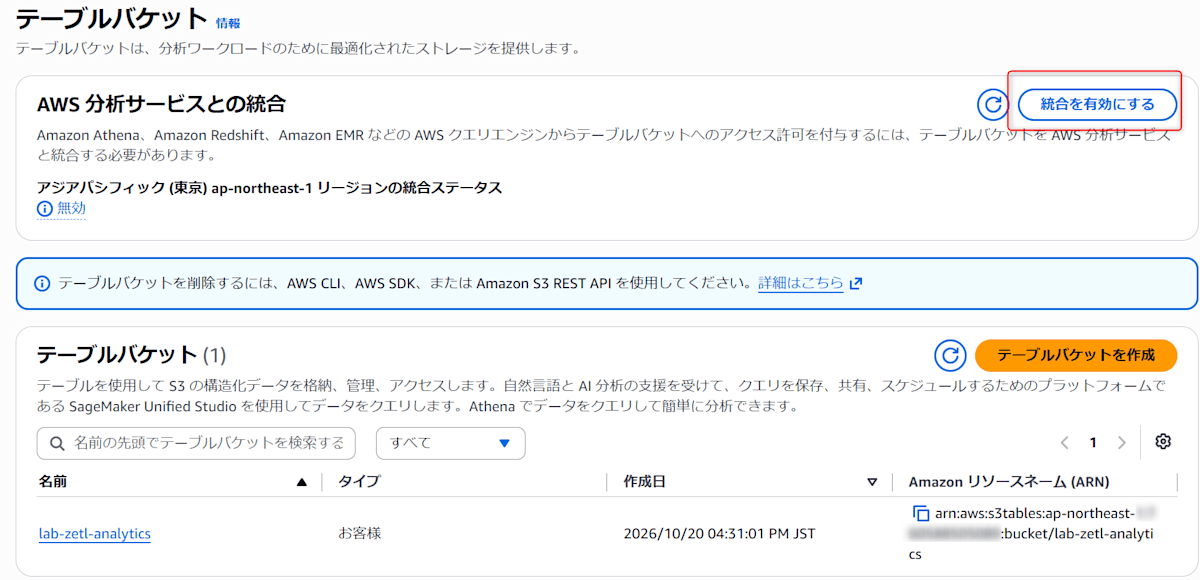
After enabling, you can confirm that s3tablescatalog has been created with aws glue get-catalogs.
$ aws glue get-catalogs
{
    "CatalogList": [
        {
            "CatalogId": "<AccountID>:s3tablescatalog",
            "Name": "s3tablescatalog",
            "FederatedCatalog": {
                "Identifier": "arn:aws:s3tables:ap-northeast-1:<AccountID>:bucket/*",
                "ConnectionName": "aws:s3tables"
            },
            ...
        }
    ]
}
s3tablescatalog is a federated catalog that makes S3 Tables appear under the Glue Data Catalog. Rather than copying S3 Tables data and metadata to Glue, it queries the S3 Tables side at reference time.
The following article is helpful for understanding this point.
Create Zero-ETL Integration
In the DynamoDB console, click "Integrations > Amazon SageMaker Lakehouse."
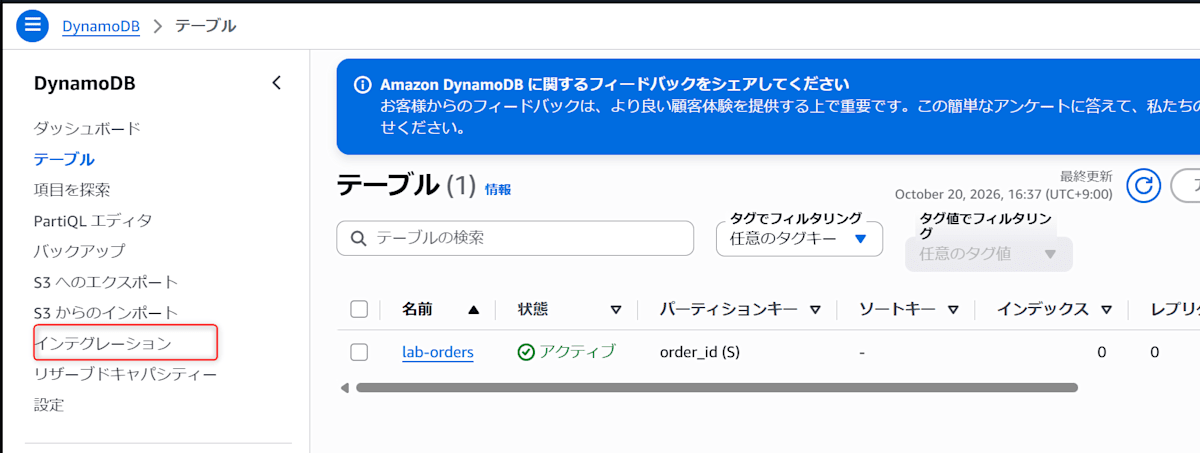

Select Amazon DynamoDB as the source and specify the target table.
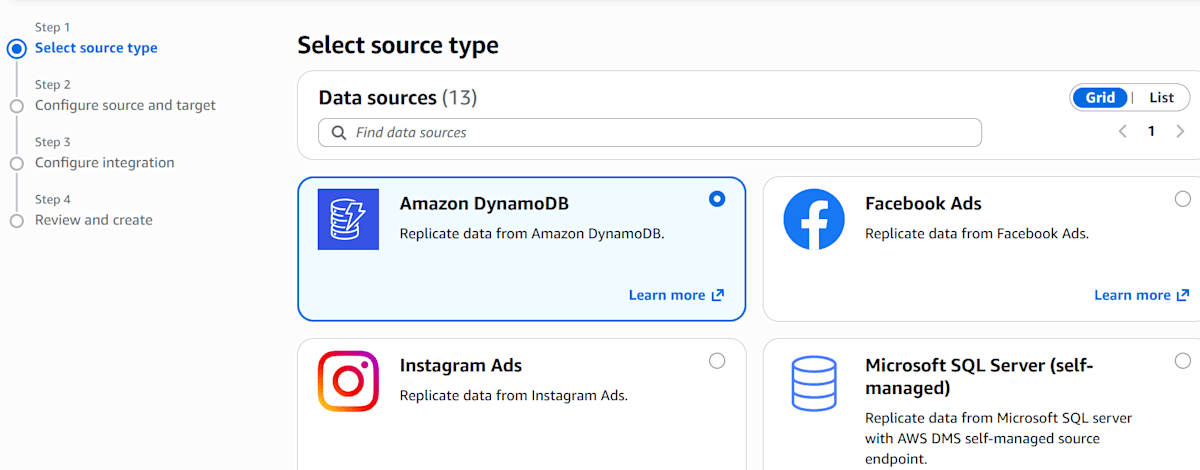
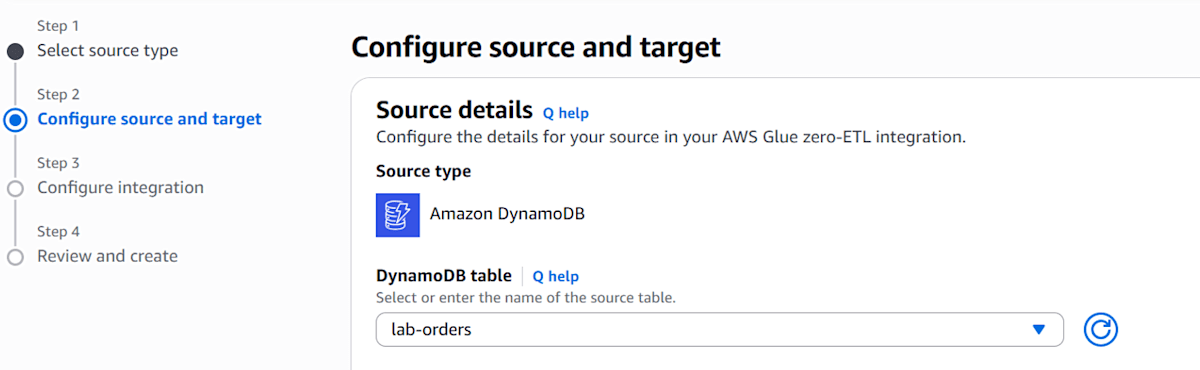
Specify the settings related to the target.
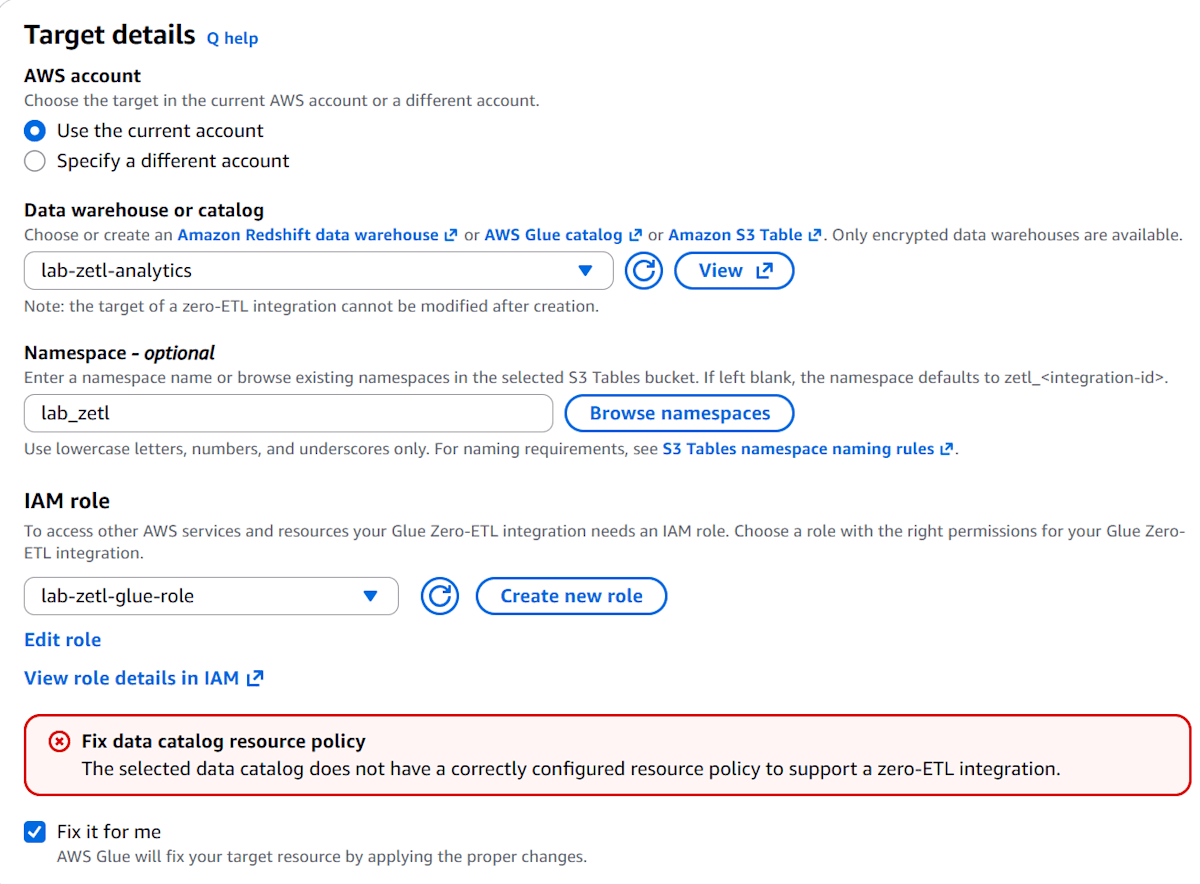
The details of each setting are as follows.
- Target
- Specifies the synchronization destination. You can choose from Redshift, Glue Data Catalog, and S3 Tables catalog; S3 Tables catalog was selected this time
- The S3 Tables catalog is treated as a federated catalog (
s3tablescatalog) registered under the Glue Data Catalog
- Processing role
- The IAM role that Glue assumes when running the integration. Specify a role with permissions such as writing to the S3 table bucket. Here,
lab-zetl-glue-rolecreated in the preliminary setup was specified
- The IAM role that Glue assumes when running the integration. Specify a role with permissions such as writing to the S3 table bucket. Here,
- Namespace
- The namespace (equivalent to a Glue database) where data will be written. It can be created even if left blank, but in that case it will be automatically generated with the name
zetl_<integrationID>. Here it was set tolab_zetl
- The namespace (equivalent to a Glue database) where data will be written. It can be created even if left blank, but in that case it will be automatically generated with the name
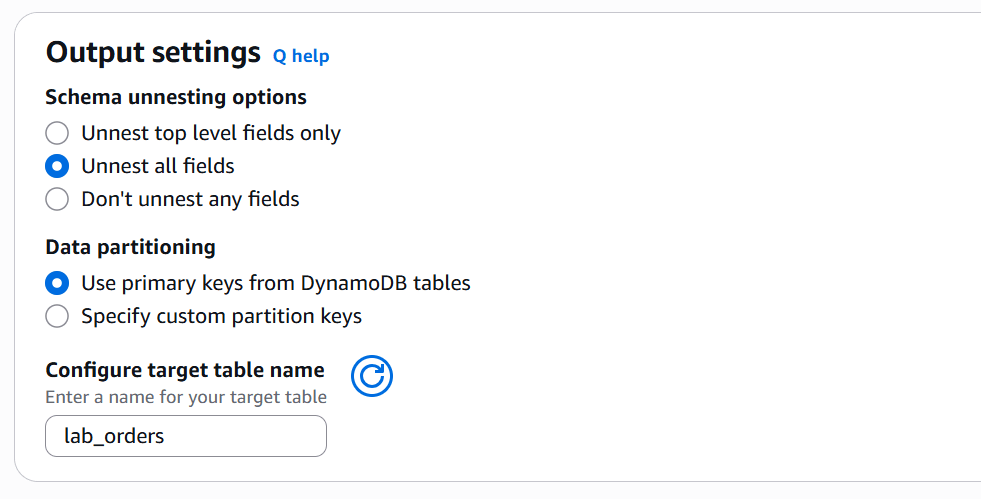
The next settings are as follows.
- Schema unnesting
- This setting determines how far nested maps and other structures are expanded into columns
- The options are
Unnest top level fields only(expand only top-level attributes),Unnest all fields(expand everything including nested content), andDon't unnest any fields(no expansion) - Proceeded with the default
Unnest all fields. Nested maps are expanded into flat columns with dot-separated names (details described later)
- Data partitioning
- This setting determines which columns are used to partition the stored target table
- There are two options:
Use primary keys from DynamoDB tables(use DynamoDB keys) andSpecify custom partition keys(specify arbitrary columns)
- Target table name
- The name of the table created at the target. Set to
lab_orders
- The name of the table created at the target. Set to
When configuring the target, "Fix data catalog resource policy" was displayed. This message indicates that the target Glue catalog does not have a resource policy to accept the Zero-ETL integration. When "Fix it for me" was selected and proceeding to the next step, AWS Glue automatically set the necessary policy.
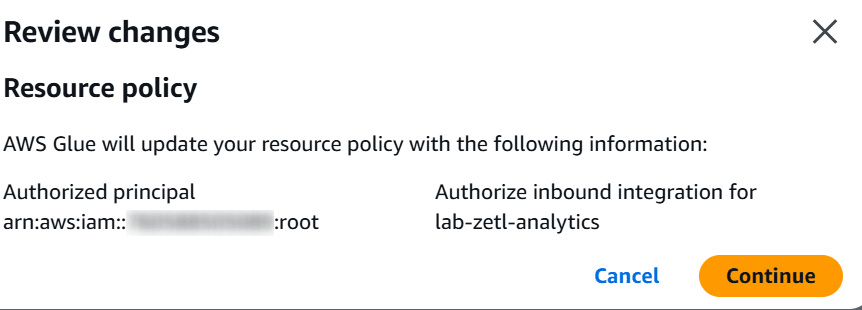
After configuration, checking with aws glue get-resource-policy showed the following policy had been created.
{
  "Version": "2012-10-17",
  "Statement": [
    {
      "Effect": "Allow",
      "Principal": { "AWS": "arn:aws:iam::<AccountID>:root" },
      "Action": "glue:CreateInboundIntegration",
      "Resource": "arn:aws:glue:ap-northeast-1:<AccountID>:catalog/s3tablescatalog/lab-zetl-analytics"
    },
    {
      "Effect": "Allow",
      "Principal": { "Service": "glue.amazonaws.com" },
      "Action": "glue:AuthorizeInboundIntegration",
      "Resource": "arn:aws:glue:ap-northeast-1:<AccountID>:catalog/s3tablescatalog/lab-zetl-analytics"
    }
  ]
}
This is the Glue-side resource policy that allows accepting the integration.
Finally, configure the integration settings.
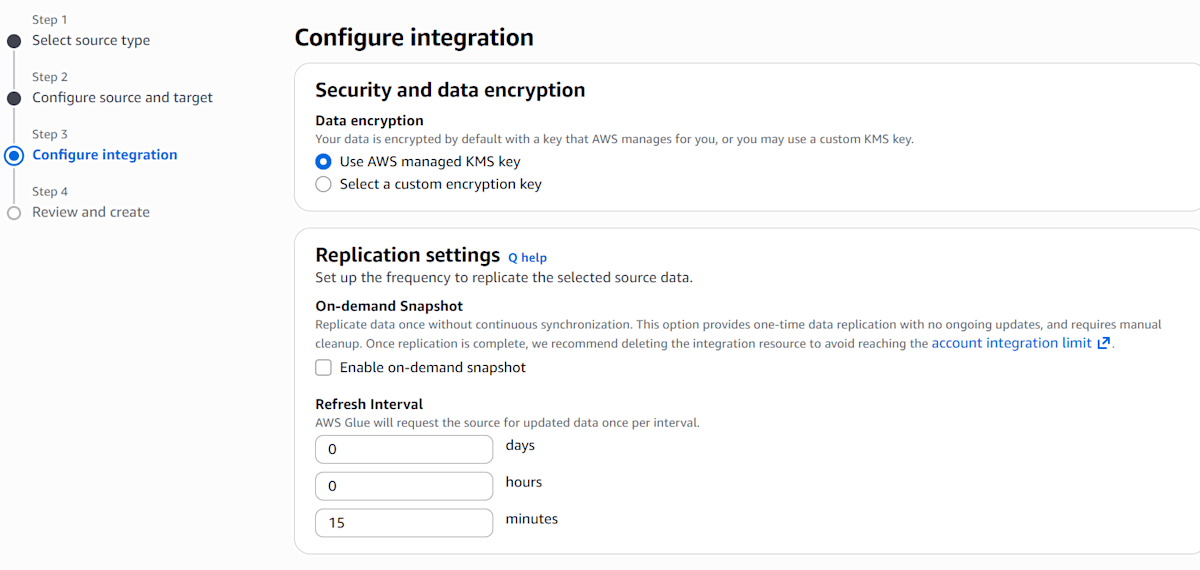
- Data encryption
- Settings for the key used to encrypt data. The default
Use AWS managed KMS keyencrypts with an AWS-managed key - Selecting
Select a custom encryption keyallows you to use a KMS key you created yourself. In that case, Glue and the processing role need permissions to use that key
- Settings for the key used to encrypt data. The default
- On-demand snapshot
- When checked, only a one-time full copy is made, with no subsequent continuous synchronization. After the copy is complete, deleting the integration is recommended (to avoid reaching the per-account integration limit)
- Since I want to verify differential synchronization, this is not checked
- Refresh Interval
- The frequency of updates from the source to the target. Can be specified in days, hours, or minutes, with a minimum of 15 minutes
- Set to the minimum of 15 minutes here
Narrow the Source-Side Policy to the Integration ARN
After creating the integration, the integration ARN becomes known, so narrow the DynamoDB resource policy to the integration ARN.
aws glue describe-integrations --query 'Integrations[].IntegrationArn'
Replace the condition that was ArnLike with integration:* to StringEquals with the integration ARN. The complete policy after replacement is as follows.
{
  "Version": "2012-10-17",
  "Statement": [
    {
      "Sid": "AllowGlueZeroEtlExport",
      "Effect": "Allow",
      "Principal": {
        "Service": "glue.amazonaws.com"
      },
      "Action": [
        "dynamodb:ExportTableToPointInTime",
        "dynamodb:DescribeTable",
        "dynamodb:DescribeExport"
      ],
      "Resource": "*",
      "Condition": {
        "StringEquals": {
          "aws:SourceAccount": "<AccountID>",
          "aws:SourceArn": "arn:aws:glue:ap-northeast-1:<AccountID>:integration:<IntegrationID>"
        }
      }
    }
  ]
}
Saved the above as /tmp/policy.json and applied it with put-resource-policy.
aws dynamodb put-resource-policy \
  --resource-arn arn:aws:dynamodb:ap-northeast-1:<AccountID>:table/lab-orders \
  --policy file:///tmp/policy.json
Verifying the Initial Load
After creating the integration, the lab_zetl namespace and the lab_orders table were created after some time. The namespace also contains zetl_integration_table_state, which is an internal Zero-ETL table.
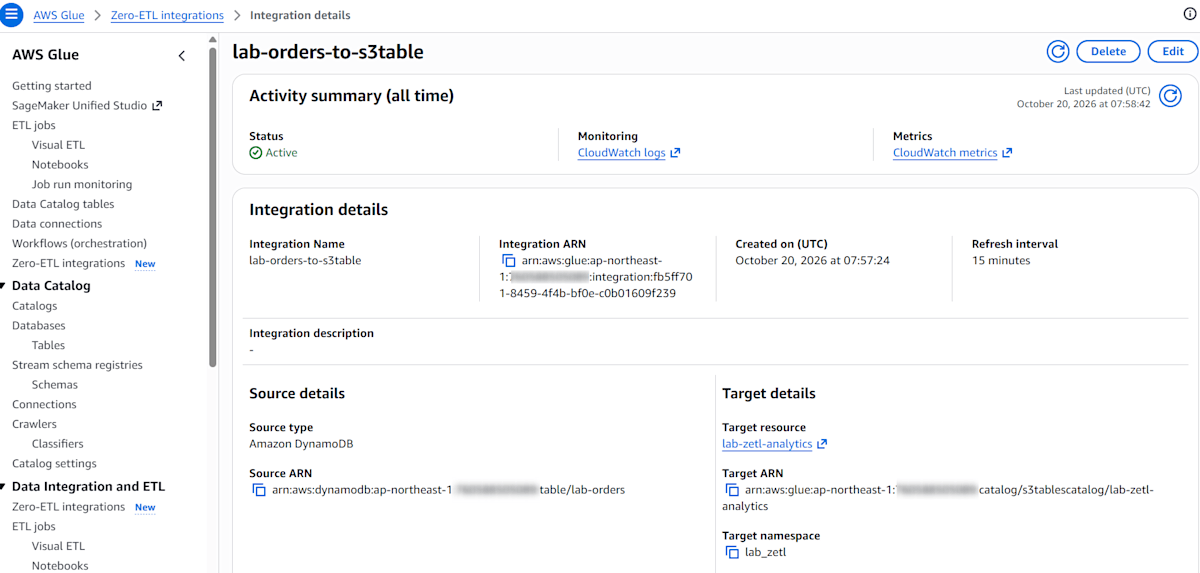
The ingestion status can be checked in CloudWatch Logs. Part of the initial load log was as follows.
{
    "level": "VERBOSE",
    "messageType": "IngestionStarted",
    "details": { "tableName": "lab_orders", "loadType": "SEED", "message": "Successfully started ingestion" }
}
{
    "level": "INFO",
    "messageType": "IngestionTableStatistics",
    "details": { "tableName": "lab_orders", "loadType": "SEED", "insertCount": 1001, "updateCount": 0, "deleteCount": 0 }
}
{
    "level": "VERBOSE",
    "messageType": "IngestionCompleted",
    "details": {
        "tableName": "lab_orders",
        "loadType": "SEED",
        "message": "Successfully completed ingestion",
        "lastSyncedTimestamp": 1792483069544,
        "consumedResourceUnits": "5",
        "consumedDpuHours": "0.2403"
    }
}
The loadType is SEED, indicating the initial full synchronization, which took about 3 minutes from start to finish. The count also matches the DynamoDB record count (insertCount is 1001: 1,000 regular records and 1 nested record).
Let me also verify the count in Athena. Select s3tablescatalog/lab-zetl-analytics as the data source and lab_zetl as the database, then execute.
SELECT COUNT(*) FROM "lab_zetl"."lab_orders";
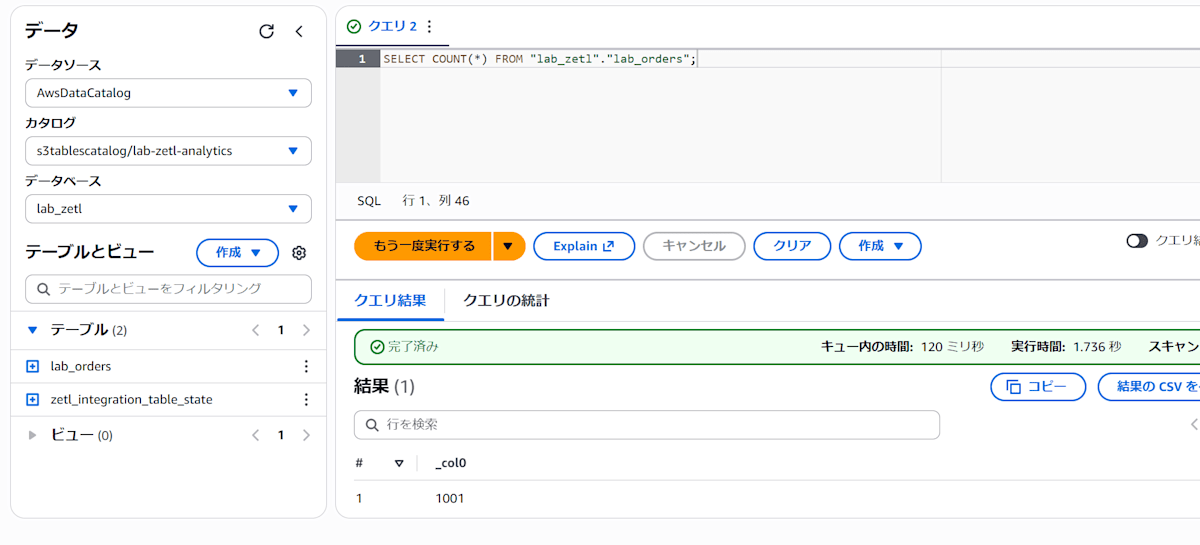
The same 1,001 records as on the DynamoDB side were returned.
Verifying Type Conversion
Run DESCRIBE in Athena to check the column types.
DESCRIBE lab_zetl.lab_orders;
Here is a partial excerpt of the results.
quantity	double
order_id	string
is_gift	boolean
ordered_at	string
shipping.method	string
tags	array<string>
items	array<string>
shipping.fee	double
mixed_list	array<string>
shipping.address.city	string
discount_rate	double
scores	array<double>
shipping.address.zip	string
The correspondence between DynamoDB data types and column types in Athena and Snowflake was as follows. The Snowflake side was verified in the steps described later.
| DynamoDB Type | Attribute | Athena | Snowflake |
|---|---|---|---|
S |
order_id |
string |
VARCHAR(134217728) |
N (integer) |
quantity |
double |
FLOAT |
N (decimal) |
discount_rate |
double |
FLOAT |
BOOL |
is_gift |
boolean |
BOOLEAN |
NULL |
gift_note |
No column | No column |
M (nested) |
shipping |
Expanded into flat columns | Expanded into flat columns |
L (list of maps) |
items |
array<string> |
ARRAY(VARCHAR(134217728)) |
L (mixed types) |
mixed_list |
array<string> |
ARRAY(VARCHAR(134217728)) |
SS (string set) |
tags |
array<string> |
ARRAY(VARCHAR(134217728)) |
NS (number set) |
scores |
array<double> |
ARRAY(FLOAT) |
S (datetime format string) |
ordered_at |
string |
VARCHAR(134217728) |
The main characteristics are as follows.
- All numbers become
double - Nested maps are expanded into flat columns with dot-separated names
As an example, let's look at shipping (a 2-level nested map) for order_id ORD-NESTED-0001.
"shipping": {
  "M": {
    "method":  { "S": "宅配便" },
    "fee":     { "N": "500" },
    "address": { "M": { "zip": { "S": "100-0001" }, "city": { "S": "千代田区" } } }
  }
}
This single attribute is expanded into the following 4 columns.
SELECT order_id, "shipping.method", "shipping.address.city"
FROM "lab_zetl"."lab_orders"
WHERE order_id = 'ORD-NESTED-0001';
#	order_id	shipping.method	shipping.address.city
1	ORD-NESTED-0001	宅配便	千代田区
A map like shipping has its keys become part of the column name, expanded into columns with dot-connected names like shipping.method. Since the column names contain dots, they must be enclosed in double quotes in queries.
- Elements inside lists are not expanded
As a concrete example, let's look at a list of maps (items) and a list with mixed types (mixed_list).
"items": {
  "L": [
    { "M": { "sku": { "S": "BK-001" }, "qty": { "N": "1" } } },
    { "M": { "sku": { "S": "BK-002" }, "qty": { "N": "1" } } }
  ]
},
"mixed_list": { "L": [ { "S": "a" }, { "N": "1" } ] }
Maps inside lists are not expanded; instead, each list element becomes a string with a type symbol (such as {"M":{...}} or {"S":"a"}).
SELECT order_id,
        items,
        items[1] AS first_item,
        mixed_list
FROM "lab_zetl"."lab_orders"
WHERE order_id = 'ORD-NESTED-0001';
#	order_id	items	first_item	mixed_list
1	ORD-NESTED-0001	[{"M":{"qty":{"N":"1"},"sku":{"S":"BK-001"}}}, {"M":{"qty":{"N":"1"},"sku":{"S":"BK-002"}}}]	{"M":{"qty":{"N":"1"},"sku":{"S":"BK-001"}}}	[{"S":"a"}, {"N":"1"}]
In addition, sets (SS, NS) become regular arrays.
Verifying Updates and Deletions
After the initial load, perform updates and deletions on the DynamoDB table and verify the behavior of differential synchronization (CDC).
Execute Updates and Deletions
Among the sample data, the status of 100 records was updated to "Delivered," and the first 50 of those were deleted.
Confirm Synchronization Completion
After about 15 minutes, checking CloudWatch Logs showed that ingestion with loadType of CDC had completed.
{
    "messageType": "IngestionTableStatistics",
    "details": { "tableName": "lab_orders", "loadType": "CDC", "insertCount": 0, "updateCount": 34, "deleteCount": 50 }
}
{
    "messageType": "IngestionCompleted",
    "details": {
        "tableName": "lab_orders",
        "loadType": "CDC",
        "lastSyncedTimestamp": 1792485042578,
        "consumedResourceUnits": "10",
        "consumedDpuHours": "0.5750"
    }
}
The deleteCount was 50 as expected, but updateCount was 34.
Among the 50 records targeted for update, 16 items already had the status "Delivered." 50 − 16 = 34, which matches updateCount, suggesting that updates to the same value were not counted as changes.
Verify in Athena
Check the total count and count by status in Athena.
SELECT COUNT(*) FROM "lab_zetl"."lab_orders";
SELECT status, COUNT(*) FROM "lab_zetl"."lab_orders" GROUP BY status;
status        count
受付          149
キャンセル    182
配達完了      250
出荷済み      202
出荷準備中    168
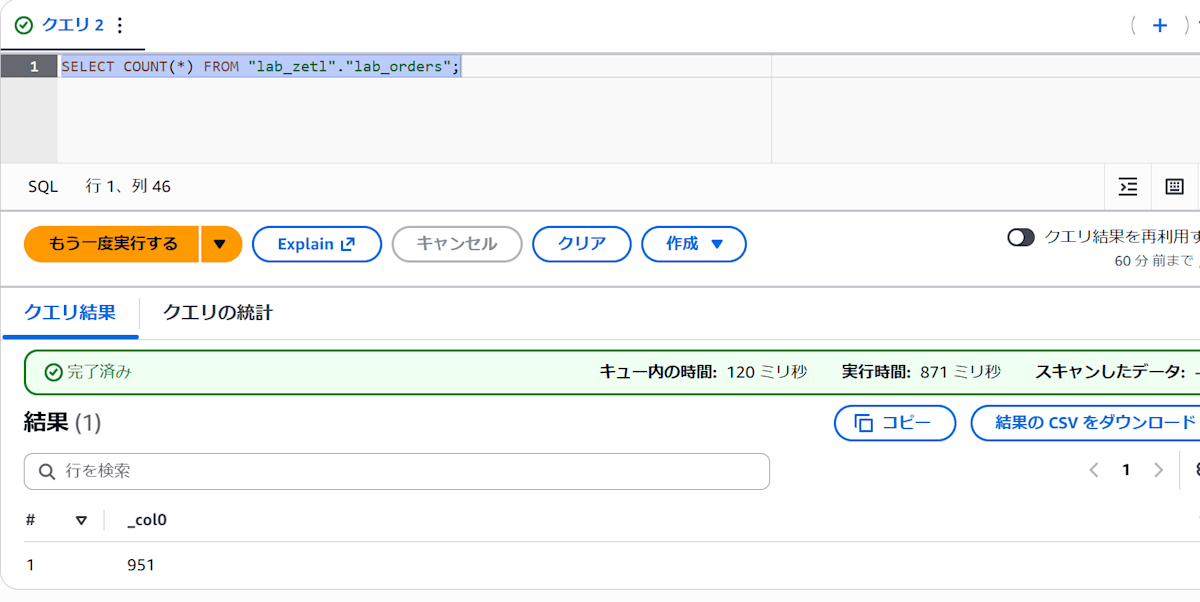
The count was 951 records, and the total by status was also 951 records.
Also verify the deleted and updated items.
-- Deleted items: should return 0 records
SELECT COUNT(*) FROM "lab_zetl"."lab_orders"
WHERE order_id BETWEEN 'ORD-00000000' AND 'ORD-00000049';
#	_col0
1	0
-- Updated items: should return 50 records, all with status "Delivered"
SELECT status, COUNT(*) FROM "lab_zetl"."lab_orders"
WHERE order_id BETWEEN 'ORD-00000050' AND 'ORD-00000099'
GROUP BY status;
#	status	_col1
1	配達完了	50
It was confirmed that both were reflected as expected.
Verifying Insertions and New Attribute Additions
Next, verify how insertions and attributes added later are handled. The following changes were made in DynamoDB.
| Operation | Target | Content |
|---|---|---|
| Update | ORD-00000100 |
Changed status to "SF Confirmed" and added new attribute updated_at |
| Insert | ORD-SF-0001 |
Item with new attributes coupon_code and updated_at |
| Insert | ORD-SF-0002 |
Item with only updated_at |
| Delete | ORD-00000101 |
Delete the item |
updated_at was set to the write time (UTC).
After synchronization is complete, verify in Athena.
DESCRIBE lab_zetl.lab_orders;
Here is a partial excerpt of the output, showing that columns for the new attributes were automatically added. Columns are added at the end, and the type was string.
...
coupon_code	string
updated_at	string
Also verify the records.
SELECT order_id, status, updated_at, coupon_code
FROM "lab_zetl"."lab_orders"
WHERE order_id IN ('ORD-00000100', 'ORD-00000101', 'ORD-SF-0001', 'ORD-SF-0002')
ORDER BY order_id;
order_id        status    updated_at            coupon_code
ORD-00000100    SF確認    2026-10-20T09:16:52Z
ORD-SF-0001     受付      2026-10-20T09:16:52Z  WELCOME10
ORD-SF-0002     受付      2026-10-20T09:16:52Z
As shown above, it was confirmed that the update (ORD-00000100 changed to "SF Confirmed"), insertions (ORD-SF-0001, ORD-SF-0002), and deletion (no row for ORD-00000101) were all reflected. Items without coupon_code become NULL.
Referencing from Snowflake
Up to this point, tables have been synchronized to S3 Tables. Let's verify whether the same tables can be referenced from Snowflake as well.
As of October 2026, the feature to connect directly to the S3 Tables Iceberg REST endpoint from Snowflake is generally available, so let's try connecting via this endpoint. With this method, it connects to S3 Tables without going through Glue, using SigV4 authentication and Vended credentials.
Create an IAM Role
Create an IAM role for Snowflake to access S3 Tables. The IAM user ARN and external ID on the Snowflake side will be updated after the integration is created.
Here, only the permissions required for reading were granted.
{
  "Version": "2012-10-17",
  "Statement": [
    {
      "Effect": "Allow",
      "Action": [
        "s3tables:GetTableBucket",
        "s3tables:ListNamespaces",
        "s3tables:GetNamespace",
        "s3tables:ListTables",
        "s3tables:GetTable",
        "s3tables:GetTableMetadataLocation",
        "s3tables:GetTableData"
      ],
      "Resource": [
        "arn:aws:s3tables:ap-northeast-1:<AccountID>:bucket/lab-zetl-analytics",
        "arn:aws:s3tables:ap-northeast-1:<AccountID>:bucket/lab-zetl-analytics/table/*"
      ]
    }
  ]
}
Create a Catalog Integration
Create a catalog integration on the Snowflake side.
USE ROLE ACCOUNTADMIN;

CREATE OR REPLACE CATALOG INTEGRATION lab_s3tables_int
  CATALOG_SOURCE = ICEBERG_REST
  TABLE_FORMAT = ICEBERG
  REST_CONFIG = (
    CATALOG_URI = 'https://s3tables.ap-northeast-1.amazonaws.com/iceberg'
    CATALOG_API_TYPE = AWS_S3TABLES
    ACCESS_DELEGATION_MODE = VENDED_CREDENTIALS
    CATALOG_NAME = 'arn:aws:s3tables:ap-northeast-1:<AccountID>:bucket/lab-zetl-analytics'
  )
  REST_AUTHENTICATION = (
    TYPE = SIGV4
    SIGV4_IAM_ROLE = 'arn:aws:iam::<AccountID>:role/lab-zetl-snowflake-role'
    SIGV4_SIGNING_REGION = 'ap-northeast-1'
  )
  ENABLED = TRUE;
Run DESCRIBE CATALOG INTEGRATION to check the IAM user ARN and external ID.
DESCRIBE CATALOG INTEGRATION lab_s3tables_int;
Replace the Trust Policy
Set the two values noted in the steps above in the trust policy of the IAM role.
{
  "Version": "2012-10-17",
  "Statement": [
    {
      "Effect": "Allow",
      "Principal": { "AWS": "<Snowflake IAM User ARN>" },
      "Action": "sts:AssumeRole",
      "Condition": {
        "StringEquals": { "sts:ExternalId": "<external ID>" }
      }
    }
  ]
}
Create a Catalog-Linked Database
Create a catalog-linked database targeting only the lab_zetl namespace.
CREATE OR REPLACE DATABASE lab_zetl_db
  LINKED_CATALOG = (
    CATALOG = 'lab_s3tables_int'
    ALLOWED_NAMESPACES = ('lab_zetl')
  );
Verify the Tables
> SHOW SCHEMAS IN DATABASE lab_zetl_db;
+-------------------------------+--------------------+------------+------------+---------------+--------------+-----------------------------------------------------------+---------+----------------+-----------------+---------------------------------+-------------------------------+------------------------+-------------------+-----------+
| created_on                    | name               | is_default | is_current | database_name | owner        | comment                                                   | options | retention_time | owner_role_type | classification_profile_database | classification_profile_schema | classification_profile | object_visibility | is_nested |
|-------------------------------+--------------------+------------+------------+---------------+--------------+-----------------------------------------------------------+---------+----------------+-----------------+---------------------------------+-------------------------------+------------------------+-------------------+-----------|
| 2026-10-20 18:09:09.943 +0900 | INFORMATION_SCHEMA | N          | N          | LAB_ZETL_DB   |              | Views describing the contents of schemas in this database |         | 7              |                 | NULL                            | NULL                          | NULL                   | NULL              | false     |
| 2026-10-20 18:09:00.958 +0900 | lab_zetl           | N          | N          | LAB_ZETL_DB   | ACCOUNTADMIN |                                                           |         | 7              | ROLE            | NULL                            | NULL                          | NULL                   | NULL              | false     |
+-------------------------------+--------------------+------------+------------+---------------+--------------+-----------------------------------------------------------+---------+----------------+-----------------+---------------------------------+-------------------------------+------------------------+-------------------+-----------+

> SHOW ICEBERG TABLES IN SCHEMA lab_zetl_db."lab_zetl";
SHOW SCHEMAS IN DATABASE lab_zetl_db;
+-------------------------------+--------------------+------------+------------+---------------+--------------+-----------------------------------------------------------+---------+----------------+-----------------+---------------------------------+-------------------------------+------------------------+-------------------+-----------+
| created_on                    | name               | is_default | is_current | database_name | owner        | comment                                                   | options | retention_time | owner_role_type | classification_profile_database | classification_profile_schema | classification_profile | object_visibility | is_nested |
|-------------------------------+--------------------+------------+------------+---------------+--------------+-----------------------------------------------------------+---------+----------------+-----------------+---------------------------------+-------------------------------+------------------------+-------------------+-----------|
| 2026-10-20 18:09:09.943 +0900 | INFORMATION_SCHEMA | N          | N          | LAB_ZETL_DB   |              | Views describing the contents of schemas in this database |         | 7              |                 | NULL                            | NULL                          | NULL                   | NULL              | false     |
| 2026-10-20 18:09:00.958 +0900 | lab_zetl           | N          | N          | LAB_ZETL_DB   | ACCOUNTADMIN |                                                           |         | 7              | ROLE            | NULL                            | NULL                          | NULL                   | NULL              | false     |
+-------------------------------+--------------------+------------+------------+---------------+--------------+-----------------------------------------------------------+---------+----------------+-----------------+---------------------------------+-------------------------------+------------------------+-------------------+-----------+

SHOW ICEBERG TABLES IN SCHEMA lab_zetl_db."lab_zetl";
+-------------------------------+------------------------------+---------------+-------------+--------------+----------------------+------------------+--------------------+------------------------------+-------------------+---------------+--------------------+---------+-----------------+--------------+-------------------+-------------------------------------------------------------------------------------------------------------------------------------------------+------------------+---------------------------+------------------------------+
| created_on                    | name                         | database_name | schema_name | owner        | external_volume_name | catalog_name     | iceberg_table_type | catalog_table_name           | catalog_namespace | base_location | can_write_metadata | comment | owner_role_type | name_mapping | catalog_sync_name | auto_refresh_status                                                                                                                             | partition_specs  | current_partition_spec_id | iceberg_table_format_version |
|-------------------------------+------------------------------+---------------+-------------+--------------+----------------------+------------------+--------------------+------------------------------+-------------------+---------------+--------------------+---------+-----------------+--------------+-------------------+-------------------------------------------------------------------------------------------------------------------------------------------------+------------------+---------------------------+------------------------------|
| 2026-10-20 18:09:02.741 +0900 | lab_orders                   | LAB_ZETL_DB   | lab_zetl    | ACCOUNTADMIN | <invalid>            | LAB_S3TABLES_INT | UNMANAGED          | lab_orders                   | lab_zetl          | NULL          | Y                  |         | ROLE            | NULL         |                   | {"currentSnapshotId":null,"lastSnapshotTime":null,"pendingSnapshotCount":0,"executionState":"RUNNING","lastUpdatedTime":"1970-01-01T00:00:00Z"} | [ {              |                         0 |                            2 |
|                               |                              |               |             |              |                      |                  |                    |                              |                   |               |                    |         |                 |              |                   |                                                                                                                                                 |   "spec-id" : 0, |                           |                              |
|                               |                              |               |             |              |                      |                  |                    |                              |                   |               |                    |         |                 |              |                   |                                                                                                                                                 |   "fields" : [ ] |                           |                              |
|                               |                              |               |             |              |                      |                  |                    |                              |                   |               |                    |         |                 |              |                   |                                                                                                                                                 | } ]              |                           |                              |
| 2026-10-20 18:09:02.741 +0900 | zetl_integration_table_state | LAB_ZETL_DB   | lab_zetl    | ACCOUNTADMIN | <invalid>            | LAB_S3TABLES_INT | UNMANAGED          | zetl_integration_table_state | lab_zetl          | NULL          | Y                  |         | ROLE            | NULL         |                   | {"currentSnapshotId":null,"lastSnapshotTime":null,"pendingSnapshotCount":0,"executionState":"RUNNING","lastUpdatedTime":"1970-01-01T00:00:00Z"} | [ {              |                         0 |                            2 |
|                               |                              |               |             |              |                      |                  |                    |                              |                   |               |                    |         |                 |              |                   |                                                                                                                                                 |   "spec-id" : 0, |                           |                              |
|                               |                              |               |             |              |                      |                  |                    |                              |                   |               |                    |         |                 |              |                   |                                                                                                                                                 |   "fields" : [ ] |                           |                              |
|                               |                              |               |             |              |                      |                  |                    |                              |                   |               |                    |         |                 |              |                   |                                                                                                                                                 | } ]              |                           |                              |
+-------------------------------+------------------------------+---------------+-------------+--------------+----------------------+------------------+--------------------+------------------------------+-------------------+---------------+--------------------+---------+-----------------+--------------+-------------------+-------------------------------------------------------------------------------------------------------------------------------------------------+------------------+---------------------------+------------------------------+
Let's check the row count and the count by status.
USE WAREHOUSE <warehouse name>;

> SELECT COUNT(*) FROM lab_zetl_db."lab_zetl"."lab_orders";
+----------+
| COUNT(*) |
|----------|
|      951 |
+----------+

SELECT "status", COUNT(*)
FROM lab_zetl_db."lab_zetl"."lab_orders"
GROUP BY "status";
+------------+----------+
| status     | COUNT(*) |
|------------+----------|
| Shipped    |      202 |
| Delivered  |      250 |
| Preparing  |      168 |
| Received   |      149 |
| Cancelled  |      182 |
+------------+----------+
Both the total row count and the count by status matched the Athena results.
The column types were as shown in the table described above.
DESCRIBE TABLE lab_zetl_db."lab_zetl"."lab_orders";
For reference, the fact that the elements of items remain as DynamoDB JSON strings was also the same as in Athena.
SELECT "order_id", "shipping.method", "shipping.address.city", "tags", "scores", "items"
FROM lab_zetl_db."lab_zetl"."lab_orders"
WHERE "order_id" = 'ORD-NESTED-0001';
+-----------------+-----------------+-----------------------+-------------+--------------------------+-----------------------------------------------------------------+
| order_id        | shipping.method | shipping.address.city | tags        | scores                   | items                                                           |
|-----------------+-----------------+-----------------------+-------------+--------------------------+-----------------------------------------------------------------|
| ORD-NESTED-0001 | Home Delivery   | Chiyoda               | [           | [                        | [                                                               |
|                 |                 |                       |   "Gift",   |   2.500000000000000e+00, |   "{\"M\":{\"qty\":{\"N\":\"1\"},\"sku\":{\"S\":\"BK-001\"}}}", |
|                 |                 |                       |   "Urgent"  |   1.000000000000000e+00  |   "{\"M\":{\"qty\":{\"N\":\"1\"},\"sku\":{\"S\":\"BK-002\"}}}"  |
|                 |                 |                       | ]           | ]                        | ]                                                               |
+-----------------+-----------------+-----------------------+-------------+--------------------------+-----------------------------------------------------------------+
After the earlier updates, inserts, and deletes, we checked in Snowflake at the same time as in Athena, and the new columns coupon_code and updated_at had also been added.
SELECT "order_id", "status", "updated_at", "coupon_code"
FROM lab_zetl_db."lab_zetl"."lab_orders"
WHERE "order_id" IN ('ORD-00000100', 'ORD-00000101', 'ORD-SF-0001', 'ORD-SF-0002')
ORDER BY "order_id";
+--------------+--------+----------------------+-------------+
| order_id     | status | updated_at           | coupon_code |
|--------------+--------+----------------------+-------------|
| ORD-00000100 | SF confirmed | 2026-10-20T09:16:52Z | NULL        |
| ORD-SF-0001  | Received   | 2026-10-20T09:16:52Z | WELCOME10   |
| ORD-SF-0002  | Received   | 2026-10-20T09:16:52Z | NULL        |
+--------------+--------+----------------------+-------------+
The delay in additions on the Snowflake side was not significant within the range we checked. However, the REFRESH_INTERVAL_SECONDS for the Snowflake catalog integration is set to the default of 30 seconds.
Conclusion
We verified the DynamoDB Zero-ETL integration targeting the S3 Tables catalog.
We confirmed the initial full sync, incremental sync for updates, deletions, and inserts, and type conversions, and were able to reference the same table from both Athena and Snowflake. If the 15-minute update frequency is acceptable, this can be used as an integration approach without any setup or operational overhead, which is a notable characteristic.
We hope this content is helpful to someone.