I tried out the newly available ARM64 specification when creating an ECS Express Mode service

This page has been translated by machine translation. View original
Introduction
With AWS CLI v2.36.44 released on September 11, 2026, it became possible to specify ARM64 as the CPU architecture when creating a service in ECS Express Mode.
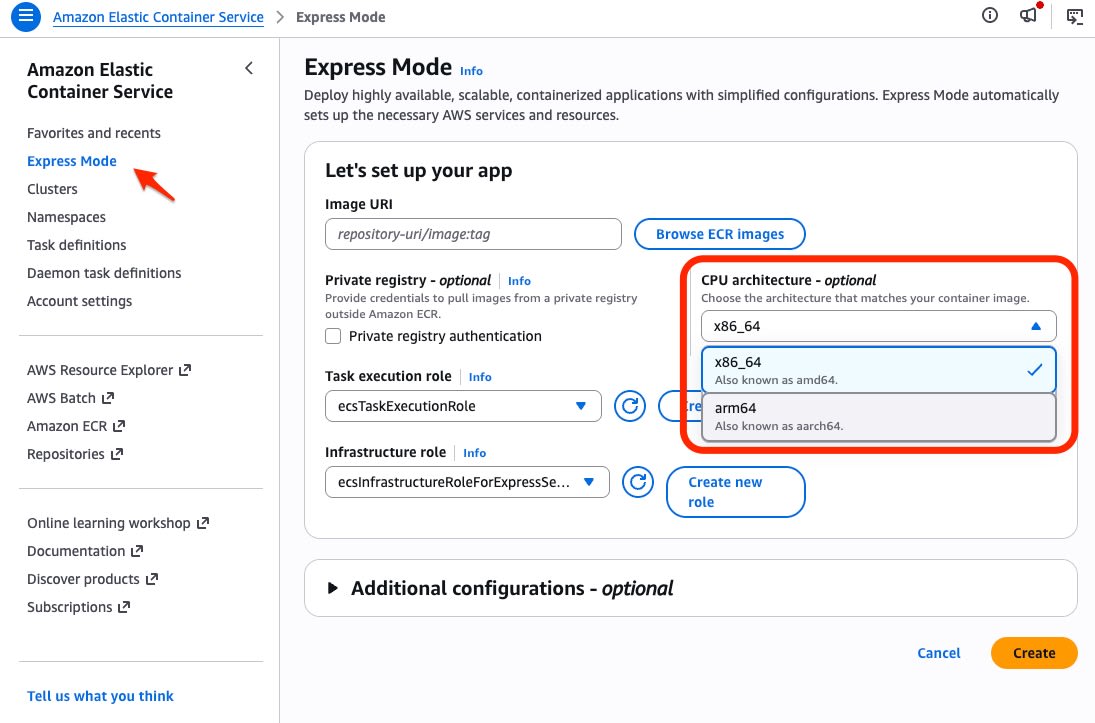
The CPU architecture can now also be selected on the service creation screen in the Management Console.
Verification with CLI
AWS CLI v2.36.46 was used for the CLI operations in this article.
$ aws --version
aws-cli/2.36.46 Python/3.14.6 Linux/...
Since --cpu-architecture was added in v2.36.44, v2.36.44 or later is required to try it via CLI. The following CLI operations were performed in region ap-northeast-1 with cluster default.
Creating a Service with ARM64
The container image public.ecr.aws/nginx/nginx:stable-alpine was used. It was a multi-architecture image supporting both amd64 and arm64 architectures.
The service was created without preparing a task definition. Since network-related parameters (such as VPC and subnet specifications) differ per environment, they were specified by referring to the CLI reference.
aws ecs create-express-gateway-service \
  --service-name express-arm64-explicit \
  --primary-container "image=public.ecr.aws/nginx/nginx:stable-alpine,containerPort=80" \
  --cpu-architecture ARM64 \
  --region ap-northeast-1
When checking the created service, cpuArchitecture was set as specified.
{
    "cpu": "1024",
    "memory": "2048",
    "cpuArchitecture": "ARM64",
    "primaryContainer": {
        "image": "public.ecr.aws/nginx/nginx:stable-alpine"
    }
}
When checking the launched Fargate task with describe-tasks, the ecs.cpu-architecture attribute was arm64.
"attributes": [
  {
    "name": "ecs.cpu-architecture",
    "value": "arm64"
  }
]
It was confirmed from the response headers of the service endpoint that nginx was responding normally.
HTTP/2 200
server: nginx/1.30.4
Custom Task Definition
A custom task definition is required to use ARM64 when adding a service.
In the verification, the ARN of the task execution role was specified for executionRoleArn. Since awslogs-create-group was set to true, the log group was automatically created on the first launch.
{
  "family": "express-arm64-custom-td",
  "networkMode": "awsvpc",
  "requiresCompatibilities": ["FARGATE"],
  "cpu": "256",
  "memory": "512",
  "runtimePlatform": {
    "cpuArchitecture": "ARM64",
    "operatingSystemFamily": "LINUX"
  },
  "executionRoleArn": "arn:aws:iam::123456789012:role/ecsTaskExecutionRole",
  "containerDefinitions": [
    {
      "name": "Main",
      "image": "public.ecr.aws/nginx/nginx:stable-alpine",
      "essential": true,
      "portMappings": [
        {
          "containerPort": 80,
          "protocol": "tcp",
          "name": "http"
        }
      ],
      "logConfiguration": {
        "logDriver": "awslogs",
        "options": {
          "awslogs-group": "/ecs/express-arm64-custom-td",
          "awslogs-region": "ap-northeast-1",
          "awslogs-stream-prefix": "main",
          "awslogs-create-group": "true"
        }
      }
    }
  ]
}
Summary
Previously, when newly creating ECS Express Mode, the first service launched with x86_64, so using ARM64 required creating a service with a custom task definition specifying ARM64 and then replacing the first service, which was cumbersome. With this update, ARM64 can now be used from the creation of the first service.
If your development environment is ARM (such as Mac) and you want to avoid cross-building, or when newly setting up ECS Express Mode for workloads where you want to standardize on the ARM architecture to reduce costs, please try this update.
