![[Trivia] I wanted to intuitively display/edit Gantt charts in Emacs org-mode, so I tried creating an extension](https://devio2024-media.developers.io/image/upload/f_auto,q_auto,w_3840/f_auto,q_auto,w_3840/v1749191463/user-gen-eyecatch/zm4ck09lafulh4woaeor.png)
[Trivia] I wanted to intuitively display/edit Gantt charts in Emacs org-mode, so I tried creating an extension

This page has been translated by machine translation. View original
Recently, my work has been shifting more toward playing manager roles, and I've been having occasional opportunities to write simple WBS and Gantt charts.
Excel and spreadsheets are often mentioned as (familiar) tools for visually and intuitively managing WBS and Gantt charts. However, since I'm someone who can't break away from Emacs org-mode, I was thinking about whether I could somehow keep everything within org-mode.
So, while consulting with Claude Code, I created a minor mode called org-table-bar-mode that displays something resembling a Gantt chart using org-table. In this blog post, I'll introduce that minor mode and show a few samples.
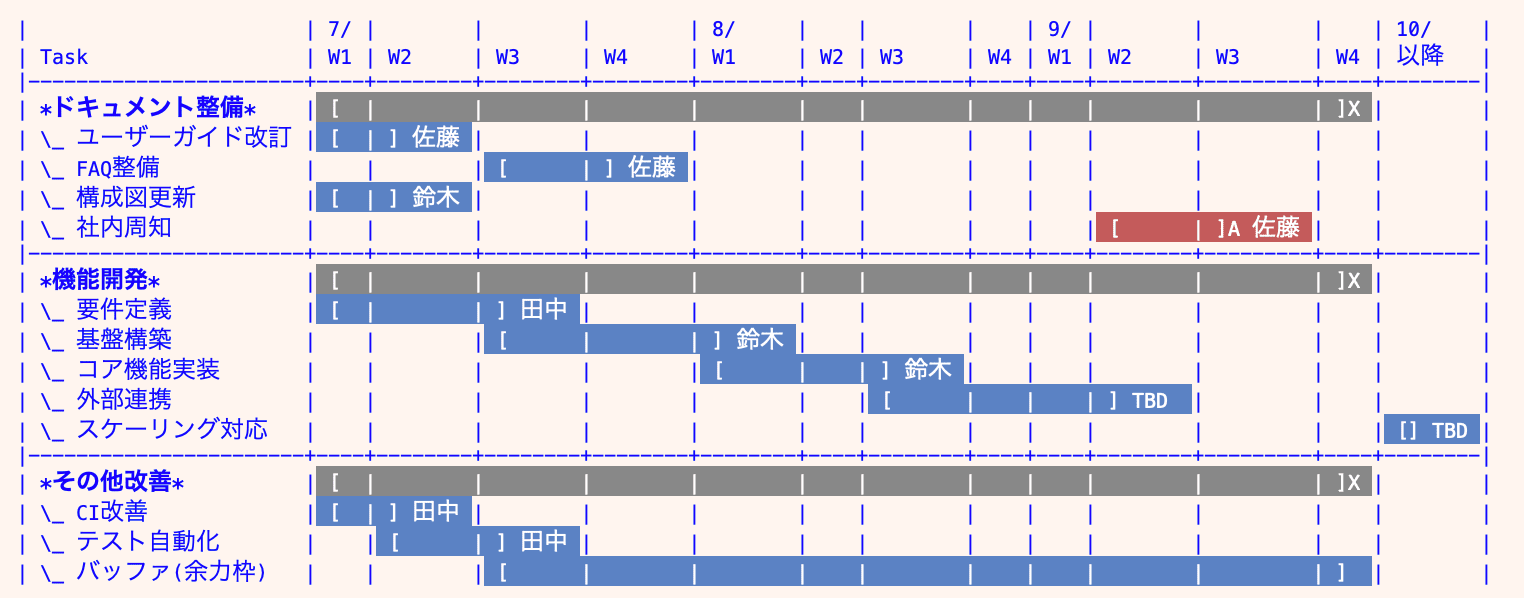
This is the kind of thing I made
What I Made
org-table-bar-mode is a minor mode that highlights cell ranges enclosed by [ and ] within an org-table with background colors. I've uploaded the code to the following Gist.
It's a lightweight implementation of about 150 lines. Using after-change-functions and an idle timer (0.3 seconds), the bars are automatically redrawn when you edit the table. No special data format or commands are needed — just edit the org-table as usual and the bars will appear.
To activate it, run M-x org-table-bar-mode. If you want it enabled automatically for all org files, add a hook to your init.el or similar configuration file as follows.
(require 'org-table-bar)
(add-hook 'org-mode-hook #'org-table-bar-mode)
How to Use
Basic Syntax
The syntax is simple. Writing [ and ] in cells highlights the range between them as a bar.
The cell containing [ is the bar's start, and the cell containing ] is the bar's end. For a single-cell event, write [].
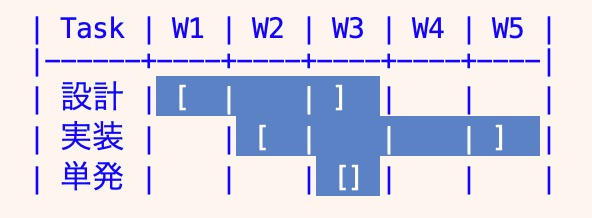
Basic bar display
You can also add text within cells. Adding notes to the start/end markers allows you to express supplementary information.
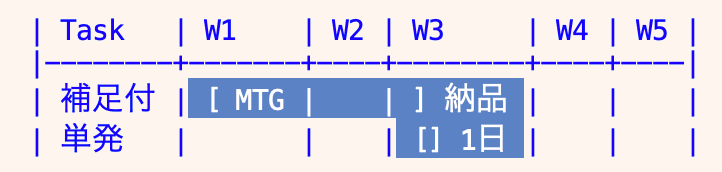
Bar display with text
Color Coding with Suffixes
You can change the color by adding a suffix immediately after ].
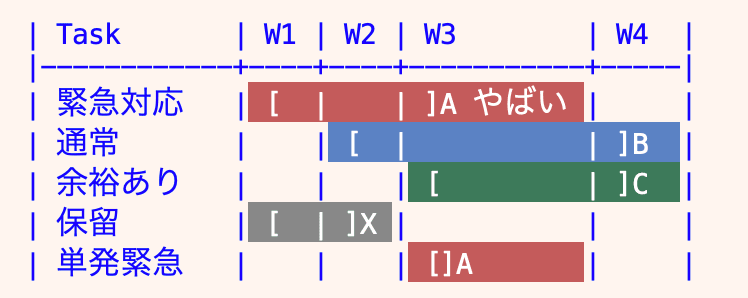
Color coding with suffixes
The four supported suffixes are as follows.
| Suffix | Color | Intended Use |
|---|---|---|
]A |
Red | High priority |
]B / ] |
Blue | Default |
]C |
Green | Low priority |
]X |
Gray | Other |
Usage Examples
Here are some sample use cases to illustrate practical applications.
Migration Schedule
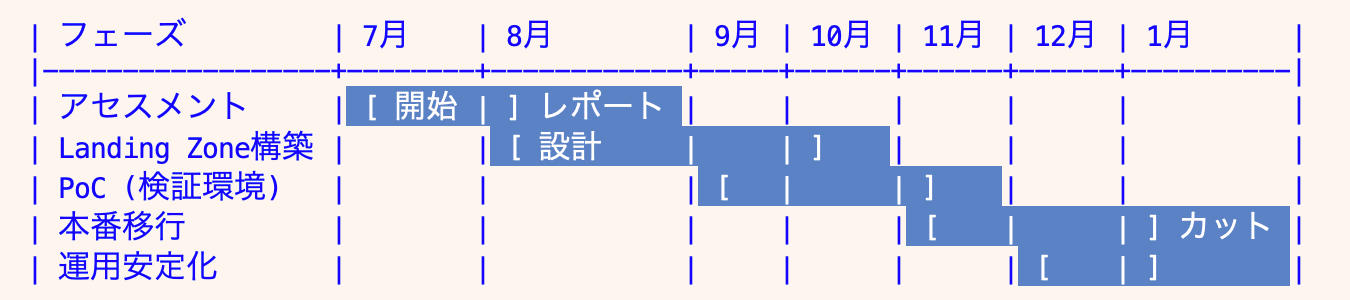
Example of a migration schedule
Team Schedule
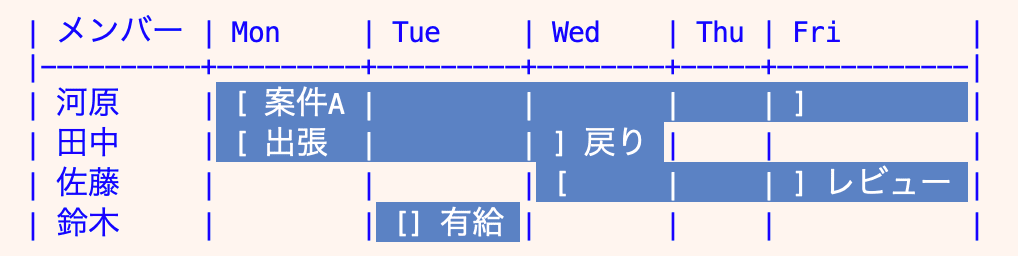
Example of a team schedule
Development Schedule
Example of a development schedule
Bonus: Mermaid Conversion Skill
There are cases where you want to share a Gantt chart made with org-table-bar with team members. However, since almost no one else uses org-mode, I also created a Claude Code skill that converts it to Mermaid Gantt syntax.
You can input the table and request a conversion, and it will be output as a Mermaid Gantt chart code block.
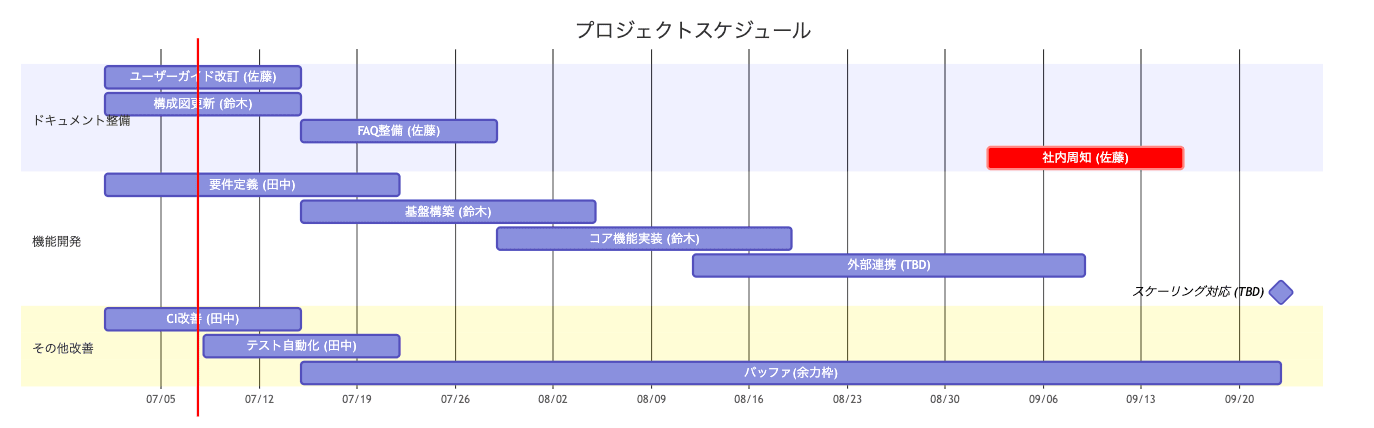
Conversion result to Mermaid Gantt chart
Closing
I tried expressing a Gantt chart using org-table.
The experience of displaying and editing a Gantt chart visually using a simple text structure was really great. It's a good era that such extensions can now be easily created with Claude Code.
By the way, for strict and proper schedule management (in org-mode), it would be more appropriate to combine org-mode's Effort property, org-columns, DEADLINE, and so on. org-mode is great because it can do anything!
That's all — I hope this was helpful.