
I tried getting into a VPC using EventBridge Connection — Requesting an ALB inside a VPC from Step Functions without Lambda

This page has been translated by machine translation. View original
Introduction
This article was inspired by a slide presentation titled "You can get inside a VPC with EventBridge Connection?" by Mr. Shimokawa from AWSJ, presented at JAWS-UG Ibaraki #14 on June 13, 2026. After seeing the slides, I decided to actually try accessing an Internal ALB inside a VPC from Step Functions.
When calling an Internal ALB inside a VPC from Step Functions, the conventional approach was to use a VPC Lambda.
In December 2024, the Private connection feature for EventBridge Connection became GA (Generally Available), making it possible to reach private APIs inside a VPC via VPC Lattice without Lambda.
Additionally, in November 2025, it became possible to directly specify an ALB in private integrations for API Gateway REST APIs, allowing you to call an ALB inside a VPC without Lambda via VPC Link v2 as well.
Despite the GA release in December 2024, there were still few Japanese practical articles, and no comparison articles with API Gateway could be found, so I built and compared the following 2 patterns.
- Pattern A: EventBridge Connection (Private) + via VPC Lattice
- Pattern B: API Gateway REST API + via VPC Link v2
This article confirms that an Internal ALB inside a VPC can be called from Step Functions without Lambda relay, while organizing the differences in access routes, IAM authentication, and constraints.
Verification Environment
- Region: ap-northeast-1
- VPC: No public subnets (Isolated subnets × 3)
- Common backend: Internal ALB (returns
{"status":"ok","source":"internal-alb"}with Fixed Response) - IaC: CloudFormation (2-stack configuration)
Calling via EventBridge Connection (Private)
Architecture Diagram
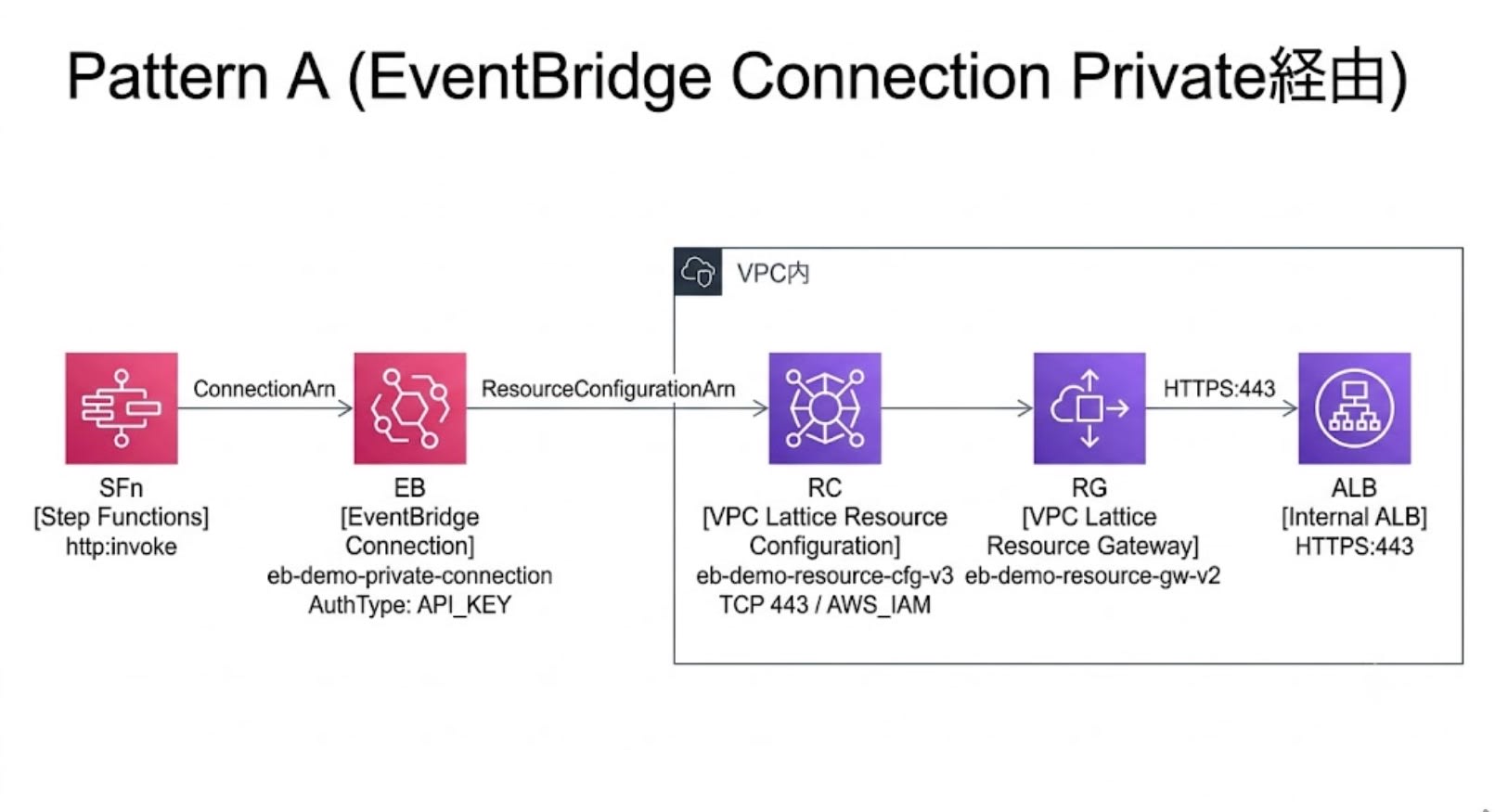
Step Functions → HTTP Task → EventBridge Connection (Private)
  → VPC Lattice (Resource Configuration → Resource Gateway) → Internal ALB
How It Works
EventBridge Connection (Private) uses VPC Lattice's Resource Configuration / Resource Gateway. This allows it to reach private resources inside a VPC.
- Resource Gateway: Placed in a subnet inside the VPC, it serves as an entry point that accepts communication from VPC Lattice
- Resource Configuration: A setting that defines "which domain and port to reach." It is associated with a Resource Gateway
- EventBridge Connection (Private): Used by specifying a Resource Configuration. Requests via the Connection reach the destination in the order: VPC Lattice → Resource Gateway → destination
Data flow:
- Step Functions executes an HTTP Task, referencing the EventBridge Connection
- The authentication information associated with the Connection is used. Since the credentials are held as a Connection-managed Secrets Manager secret, the execution role requires
events:RetrieveConnectionCredentialsand reference permissions for Secrets Manager - Step Functions sends the request. The Resource Configuration associated with the Connection has VPC Lattice handle the routing
- VPC Lattice passes through the Resource Gateway to reach inside the VPC, and with the
IN_VPCsetting, the request is forwarded to the destination (Internal ALB) resolved by VPC internal DNS
Required IAM Permissions
The following permissions are required for the Step Functions execution role.
states:InvokeHTTPEndpoint— Permission to execute HTTP Tasksevents:RetrieveConnectionCredentials— Retrieving Connection credentialssecretsmanager:GetSecretValue/secretsmanager:DescribeSecret— Access to Secrets Manager used internally by the Connectionvpc-lattice-svcs:Invoke— Required when usingResourceConfigurationAuthType: AWS_IAMfor Resource Configuration
Key Points of the CFn Template
Internal ALB (Minimal backend configuration with Fixed Response)
ALB:
  Type: AWS::ElasticLoadBalancingV2::LoadBalancer
  Properties:
    Scheme: internal
    Subnets: !Ref SubnetIds
    SecurityGroups:
      - !Ref AlbSecurityGroup

HttpsListener:
  Type: AWS::ElasticLoadBalancingV2::Listener
  Properties:
    LoadBalancerArn: !Ref ALB
    Port: 443
    Protocol: HTTPS
    Certificates:
      - CertificateArn: !Ref CertificateArn
    DefaultActions:
      - Type: fixed-response
        FixedResponseConfig:
          StatusCode: "200"
          ContentType: application/json
          MessageBody: '{"status":"ok","source":"internal-alb"}'
The endpoint called from Step Functions HTTP Task via EventBridge Connection (Private) must be HTTPS, and the destination's certificate must be verifiable by a public CA (the Resource Configuration side is defined as TCP/443). Therefore, even for an Internal ALB, an ACM public certificate is required and self-signed certificates cannot be used.
Resource Gateway + Resource Configuration
ResourceGateway:
  Type: AWS::VpcLattice::ResourceGateway
  Properties:
    Name: eb-demo-resource-gw-v2
    IpAddressType: IPV4
    ResourceConfigDnsResolution: IN_VPC
    VpcIdentifier: !Ref VpcId
    SubnetIds: !Ref SubnetIds
    SecurityGroupIds:
      - !Ref ResourceGatewaySecurityGroup

ResourceConfiguration:
  Type: AWS::VpcLattice::ResourceConfiguration
  Properties:
    Name: eb-demo-resource-cfg-v3
    ResourceGatewayId: !GetAtt ResourceGateway.Id
    ResourceConfigurationType: SINGLE
    ResourceConfigurationAuthType: AWS_IAM
    ProtocolType: TCP
    PortRanges:
      - "443"
    AllowAssociationToSharableServiceNetwork: true
    ResourceConfigurationDefinition:
      DnsResource:
        DomainName: !Ref AlbDomainName
        IpAddressType: IPV4
Key points:
ResourceConfigDnsResolution: IN_VPC— The destination FQDN is resolved by the DNS resolver inside the VPC. This setting is required for configurations like this one, where a custom FQDN pointing to an Internal ALB is resolved by VPC internal DNSResourceConfigurationAuthType: AWS_IAM— Enables IAM authentication at the VPC Lattice layer. With this setting, grantingvpc-lattice-svcs:Invoketo the Step Functions execution role is mandatory
Resource Gateway Security Group
ResourceGatewaySecurityGroup:
  Type: AWS::EC2::SecurityGroup
  Properties:
    GroupDescription: Security group for VPC Lattice Resource Gateway
    VpcId: !Ref VpcId
    SecurityGroupIngress:
      - IpProtocol: tcp
        FromPort: 0
        ToPort: 65535
        CidrIp: 0.0.0.0/0
      - IpProtocol: tcp
        FromPort: 0
        ToPort: 65535
        CidrIpv6: "::/0"
During verification, allowing only 443/TCP from the VPC CIDR resulted in timeouts. The issue was resolved by conforming to the requirement shown in the official documentation of "allow all TCP ports from 0.0.0.0/0". The reason is explained in the "Pitfalls" section below.
EventBridge Connection Private Connection Settings
PrivateConnection:
  Type: AWS::Events::Connection
  Properties:
    Name: eb-demo-private-connection
    AuthorizationType: API_KEY
    AuthParameters:
      ApiKeyAuthParameters:
        ApiKeyName: x-dummy-key
        ApiKeyValue: dummy
    InvocationConnectivityParameters:
      ResourceParameters:
        ResourceConfigurationArn: !GetAtt ResourceConfiguration.Arn
Specifying the Resource Configuration in InvocationConnectivityParameters is the core of the Private connection. API_KEY is specified for AuthorizationType, but this backend does not validate this API key. Access control is handled by ResourceConfigurationAuthType: AWS_IAM and vpc-lattice-svcs:Invoke.
Step Functions State Machine (Embedding Connection ARN)
StateMachineA:
  Type: AWS::StepFunctions::StateMachine
  Properties:
    StateMachineName: eb-demo-pattern-a-private
    RoleArn: !GetAtt PatternARole.Arn
    DefinitionString:
      Fn::Join:
        - ""
        - - '{"StartAt":"CallPrivateApi","States":{"CallPrivateApi":{"Type":"Task","Resource":"arn:aws:states:::http:invoke","TimeoutSeconds":60,"Parameters":{"ApiEndpoint":"https://eb-demo.example.com/","Method":"GET","Authentication":{"ConnectionArn":"'
          - Fn::GetStackOutput:
              StackName: !Ref InfraStackName
              OutputName: PrivateConnectionArn
          - '"}},"End":true}}}'
Fn::Join is used to embed the Connection ARN into the ASL definition. Cross-stack reference is performed with Fn::GetStackOutput to retrieve the Connection ARN from Stack 1. Fn::GetStackOutput is a CloudFormation intrinsic function that allows referencing output values across stacks without using Fn::ImportValue + Export.
Verification Results
The state machine was executed, and it was confirmed that the Fixed Response from the Internal ALB was returned with StatusCode 200.
{
  "StatusCode": 200,
  "StatusText": "OK",
  "ResponseBody": {"status": "ok", "source": "internal-alb"},
  "Headers": {
    "server": ["awselb/2.0"],
    "content-type": ["application/json; charset=utf-8"]
  }
}
Pitfalls
FQDN is mandatory, and user-managed DNS registration is required
The destination for Resource Configuration is specified by FQDN (IP addresses are not allowed, as stated in the official documentation). It was necessary to register a CNAME record corresponding to the ALB in a DNS managed by the user. In this case, a CNAME from eb-demo.example.com to the ALB DNS name was registered.
Restricting inbound rules on the Resource Gateway security group causes timeouts
Initially, only 443/TCP from the VPC CIDR (192.168.0.0/18) was allowed, but communication from VPC Lattice to the Resource Gateway timed out. The official documentation shows that the Resource Gateway security group requirement is to allow all TCP ports from 0.0.0.0/0, and the issue was resolved by conforming to this requirement. This is also mentioned in the slides.
HTTP Task timeout has a 60-second upper limit
Step Functions HTTP Tasks time out at a maximum of 60 seconds (as stated in the official documentation). This is not suitable for API calls that take a long time.
Calling via API Gateway REST API + VPC Link v2
Architecture Diagram
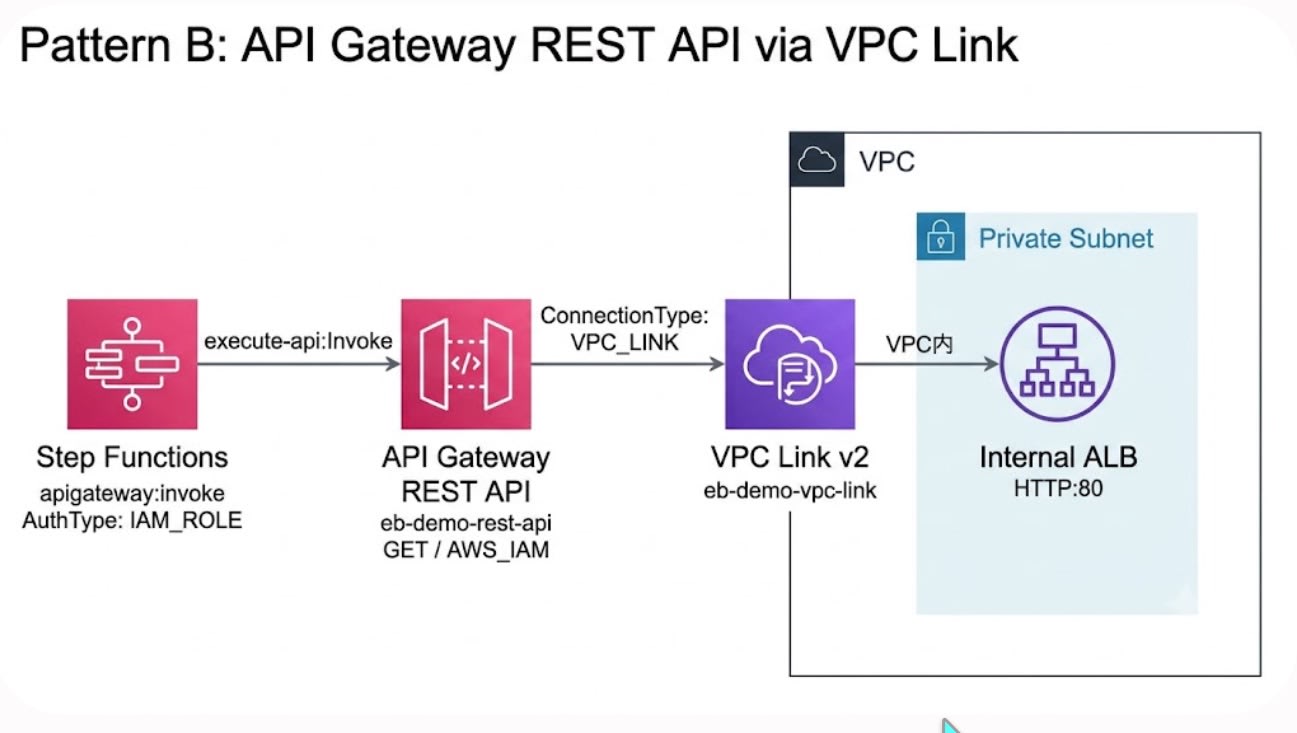
Step Functions → apigateway:invoke (Optimized Integration, with IAM signature)
  → API Gateway REST API (AWS_IAM auth + resource policy)
    → VPC Link v2 → Internal ALB
How It Works
Using the VPC Link integration of API Gateway REST API, HTTP requests are received by the REST API and relayed to the Internal ALB inside the VPC. Step Functions calls it via Optimized Integration (apigateway:invoke). By specifying AuthType: IAM_ROLE, IAM signing using the execution role's credentials is automatically applied.
This uses the update (November 2025) that made it possible to directly specify an ALB in private integrations for REST APIs. VPC Link v2 (AWS::ApiGatewayV2::VpcLink) is now supported for REST APIs as well, enabling direct integration with ALBs without NLB.
Required IAM Permissions
The following permissions are required for the Step Functions execution role.
execute-api:Invoke— Permission to execute the REST API
Compared to Pattern A, the number of required permissions is fewer and simpler.
Key Points of the CFn Template
REST API + VPC Link v2 + AWS_IAM Authentication
VpcLink:
  Type: AWS::ApiGatewayV2::VpcLink
  Properties:
    Name: eb-demo-vpc-link
    SubnetIds: !Ref SubnetIds
    SecurityGroupIds:
      - !Ref VpcLinkSecurityGroup

RestApi:
  Type: AWS::ApiGateway::RestApi
  Properties:
    Name: eb-demo-rest-api
    EndpointConfiguration:
      Types:
        - REGIONAL

RestApiMethod:
  Type: AWS::ApiGateway::Method
  Properties:
    RestApiId: !Ref RestApi
    ResourceId: !GetAtt RestApi.RootResourceId
    HttpMethod: GET
    AuthorizationType: AWS_IAM
    Integration:
      Type: HTTP_PROXY
      IntegrationHttpMethod: GET
      ConnectionType: VPC_LINK
      ConnectionId: !Ref VpcLink
      IntegrationTarget: !Ref HttpListener
      Uri: !Sub "http://${ALB.DNSName}/"
Since this relays to the HTTP listener of the Internal ALB via VPC Link v2, no certificate is needed on the ALB side. The HTTP listener of the ALB is specified in IntegrationTarget (a 200 response was confirmed with Uri also specified). With AuthorizationType: AWS_IAM, requests without IAM signatures are rejected at the REST API layer.
Step Functions Optimized Integration
StateMachineB:
  Type: AWS::StepFunctions::StateMachine
  Properties:
    StateMachineName: eb-demo-pattern-b-apigw
    RoleArn: !GetAtt PatternBRole.Arn
    DefinitionString:
      Fn::Join:
        - ""
        - - '{"StartAt":"CallRestApi","States":{"CallRestApi":{"Type":"Task","Resource":"arn:aws:states:::apigateway:invoke","Parameters":{"ApiEndpoint":"'
          - Fn::GetStackOutput:
              StackName: !Ref InfraStackName
              OutputName: RestApiId
          - '.execute-api.ap-northeast-1.amazonaws.com","Method":"GET","Stage":"prod","AuthType":"IAM_ROLE"},"End":true}}}'
When AuthType: IAM_ROLE is specified, Step Functions automatically generates an IAM signature using the execution role's credentials.
Verification Results
The state machine was executed, and it was confirmed that the Fixed Response from the Internal ALB was returned with StatusCode 200.
{
  "StatusCode": 200,
  "StatusText": "OK",
  "ResponseBody": {"status": "ok", "source": "internal-alb"},
  "Headers": {
    "server": ["awselb/2.0"],
    "apigw-requestid": ["e5Nw0iQQtjMEJUA="],
    "content-type": ["application/json; charset=utf-8"]
  }
}
Additional Control with Resource Policy
With only AWS_IAM authentication on the REST API, any IAM entity within the same account that has execute-api:Invoke permission can access it.
If you want to forcibly deny access from any role other than a specific one on the REST API side, set an explicit Deny with a StringNotEquals condition in the resource policy.
{
  "Version": "2012-10-17",
  "Statement": [
    {
      "Effect": "Deny",
      "Principal": "*",
      "Action": "execute-api:Invoke",
      "Resource": "arn:aws:execute-api:ap-northeast-1:123456789012:<api-id>/prod/GET/",
      "Condition": {
        "StringNotEquals": {
          "aws:PrincipalArn": "arn:aws:iam::123456789012:role/<PatternBRole>"
        }
      }
    },
    {
      "Effect": "Allow",
      "Principal": "*",
      "Action": "execute-api:Invoke",
      "Resource": "arn:aws:execute-api:ap-northeast-1:123456789012:<api-id>/prod/GET/"
    }
  ]
}
Why this is needed: Within the same account, with a configuration using AWS_IAM authentication and only an Allow resource policy, other IAM entities in the account that have execute-api:Invoke via an identity-based policy can also access it. By adding an explicit Deny, access from roles other than the specified one can be reliably rejected.
After applying the resource policy, it was confirmed that Step Functions execution from PatternBRole still succeeds with a 200 response.
Comparison
| Aspect | EventBridge Connection (Private) | API Gateway REST API + VPC Link v2 |
|---|---|---|
| Access route | SFn → Connection → VPC Lattice → ALB | SFn → API Gateway → VPC Link → ALB |
| ALB certificate | Required (public CA) | Not required for this HTTP integration |
| Protocol | HTTPS only | Supports both HTTP and HTTPS |
| Endpoint specification | FQDN required | ALB specified via VPC Link. No custom domain needed |
| Timeout | HTTP Task 60-second upper limit | API Gateway integration timeout default 29 seconds (can be extended with quota increase request) |
| User-managed DNS | Required | Not required |
| Required IAM permissions/control points | states:InvokeHTTPEndpoint + events:RetrieveConnectionCredentials + secretsmanager:GetSecretValue/DescribeSecret + vpc-lattice-svcs:Invoke |
execute-api:Invoke + REST API AWS_IAM + resource policy |
| Step Functions integration method | HTTP Task (http:invoke) |
Optimized Integration (apigateway:invoke) |
| EventBridge Rules integration | A configuration where the same Private Connection can be reused with API Destination is anticipated (not verified in this article) | API Gateway can be set as an EventBridge Rules target, but additional design is needed for AWS_IAM auth configurations |
| VPC Lattice dependency | Yes | No |
| Resource Gateway SG | All TCP / 0.0.0.0/0 allow required |
None (Resource Gateway not needed) |
Selection Criteria
Cases where EventBridge Connection (Private) is suitable:
- The caller is limited to Step Functions / EventBridge
- You don't want to create an execute-api URL of API Gateway as an entry point
- You want to use the same Connection with EventBridge API Destination (use of Private Connection with API Destination is not verified in this article)
- You want VPC Lattice Resource Configuration / Resource Gateway to be the center of access control
- API management features of API Gateway (throttling, usage plans, etc.) are not needed
Cases where API Gateway REST API + VPC Link v2 is suitable:
- You just want to call an Internal ALB from Step Functions and keep the configuration simple
- You want to configure access control clearly with IAM authentication + resource policy
- You want to avoid managing custom domain DNS and preparing public CA certificates
Summary
It was confirmed that an Internal ALB inside a VPC can be called from Step Functions without Lambda relay, using either the EventBridge Connection (Private) or the API Gateway REST API + VPC Link v2 configuration.
The ability to control access centered on IAM is common to both, but the authorization layer and access route differ. Pattern A routes through VPC Lattice / Resource Configuration, while Pattern B uses API Gateway as the entry point. When restricting to a specific role in Pattern B, use an explicit Deny in the REST API resource policy in combination.
When you want to call a VPC internal API limited to Step Functions / EventBridge, EventBridge Connection (Private) is the option; when you want to have an entry point as a REST API through API Gateway, API Gateway REST API + VPC Link v2 is the option.
If asynchronous processing is acceptable, SNS or SQS may be simpler in some cases, but when you need to synchronously call an API inside a VPC and get a return value, please try the two methods described in this article.
Reference Links
Appendix: Complete CloudFormation Templates
Stack 1: 01-infra.yaml (ALB, VPC Lattice, Connection, API Gateway)
AWSTemplateFormatVersion: "2010-09-09"
Description: "Stack 1: Internal ALB + EventBridge Connection (Private) + API Gateway REST API"

Parameters:
  VpcId:
    Type: AWS::EC2::VPC::Id
    Default: vpc-0example1234567890
  SubnetIds:
    Type: CommaDelimitedList
    Default: "subnet-0example1a,subnet-0example1c,subnet-0example1d"
  CertificateArn:
    Type: String
    Default: arn:aws:acm:ap-northeast-1:123456789012:certificate/xxxxxxxx-xxxx-xxxx-xxxx-xxxxxxxxxxxx
  AlbDomainName:
    Type: String
    Default: eb-demo.example.com

Resources:
  # ============================================================
  # Common: Internal ALB
  # ============================================================
  AlbSecurityGroup:
    Type: AWS::EC2::SecurityGroup
    Properties:
      GroupDescription: Allow HTTP/HTTPS from VPC CIDR
      VpcId: !Ref VpcId
      SecurityGroupIngress:
        - IpProtocol: tcp
          FromPort: 80
          ToPort: 80
          CidrIp: 192.168.0.0/18
        - IpProtocol: tcp
          FromPort: 443
          ToPort: 443
          CidrIp: 192.168.0.0/18

  ALB:
    Type: AWS::ElasticLoadBalancingV2::LoadBalancer
    Properties:
      Scheme: internal
      Subnets: !Ref SubnetIds
      SecurityGroups:
        - !Ref AlbSecurityGroup

  HttpListener:
    Type: AWS::ElasticLoadBalancingV2::Listener
    Properties:
      LoadBalancerArn: !Ref ALB
      Port: 80
      Protocol: HTTP
      DefaultActions:
        - Type: fixed-response
          FixedResponseConfig:
            StatusCode: "200"
            ContentType: application/json
            MessageBody: '{"status":"ok","source":"internal-alb"}'

  HttpsListener:
    Type: AWS::ElasticLoadBalancingV2::Listener
    Properties:
      LoadBalancerArn: !Ref ALB
      Port: 443
      Protocol: HTTPS
      Certificates:
        - CertificateArn: !Ref CertificateArn
      DefaultActions:
        - Type: fixed-response
          FixedResponseConfig:
            StatusCode: "200"
            ContentType: application/json
            MessageBody: '{"status":"ok","source":"internal-alb"}'

  # ============================================================
  # Pattern A: EventBridge Connection (Private) via VPC Lattice
  # ============================================================
  ResourceGatewaySecurityGroup:
    Type: AWS::EC2::SecurityGroup
    Properties:
      GroupDescription: Security group for VPC Lattice Resource Gateway
      VpcId: !Ref VpcId
      SecurityGroupIngress:
        - IpProtocol: tcp
          FromPort: 0
          ToPort: 65535
          CidrIp: 0.0.0.0/0
        - IpProtocol: tcp
          FromPort: 0
          ToPort: 65535
          CidrIpv6: "::/0"

  ResourceGateway:
    Type: AWS::VpcLattice::ResourceGateway
    Properties:
      Name: eb-demo-resource-gw-v2
      IpAddressType: IPV4
      ResourceConfigDnsResolution: IN_VPC
      VpcIdentifier: !Ref VpcId
      SubnetIds: !Ref SubnetIds
      SecurityGroupIds:
        - !Ref ResourceGatewaySecurityGroup

  ResourceConfiguration:
    Type: AWS::VpcLattice::ResourceConfiguration
    Properties:
      Name: eb-demo-resource-cfg-v3
      ResourceGatewayId: !GetAtt ResourceGateway.Id
      ResourceConfigurationType: SINGLE
      ResourceConfigurationAuthType: AWS_IAM
      ProtocolType: TCP
      PortRanges:
        - "443"
      AllowAssociationToSharableServiceNetwork: true
      ResourceConfigurationDefinition:
        DnsResource:
          DomainName: !Ref AlbDomainName
          IpAddressType: IPV4

  PrivateConnection:
    Type: AWS::Events::Connection
    Properties:
      Name: eb-demo-private-connection
      AuthorizationType: API_KEY
      AuthParameters:
        ApiKeyAuthParameters:
          ApiKeyName: x-dummy-key
          ApiKeyValue: dummy
      InvocationConnectivityParameters:
        ResourceParameters:
          ResourceConfigurationArn: !GetAtt ResourceConfiguration.Arn

  # ============================================================
  # Pattern B: API Gateway REST API + VPC Link v2
  # ============================================================
  VpcLinkSecurityGroup:
    Type: AWS::EC2::SecurityGroup
    Properties:
      GroupDescription: Security group for API Gateway VPC Link
      VpcId: !Ref VpcId
      SecurityGroupIngress:
        - IpProtocol: tcp
          FromPort: 80
          ToPort: 80
          CidrIp: 192.168.0.0/18

  VpcLink:
    Type: AWS::ApiGatewayV2::VpcLink
    Properties:
      Name: eb-demo-vpc-link
      SubnetIds: !Ref SubnetIds
      SecurityGroupIds:
        - !Ref VpcLinkSecurityGroup

  RestApi:
    Type: AWS::ApiGateway::RestApi
    Properties:
      Name: eb-demo-rest-api
      EndpointConfiguration:
        Types:
          - REGIONAL

  RestApiMethod:
    Type: AWS::ApiGateway::Method
    Properties:
      RestApiId: !Ref RestApi
      ResourceId: !GetAtt RestApi.RootResourceId
      HttpMethod: GET
      AuthorizationType: AWS_IAM
      Integration:
        Type: HTTP_PROXY
        IntegrationHttpMethod: GET
        ConnectionType: VPC_LINK
        ConnectionId: !Ref VpcLink
        IntegrationTarget: !Ref HttpListener
        Uri: !Sub "http://${ALB.DNSName}/"

  RestApiDeployment:
    Type: AWS::ApiGateway::Deployment
    DependsOn: RestApiMethod
    Properties:
      RestApiId: !Ref RestApi

  RestApiStage:
    Type: AWS::ApiGateway::Stage
    Properties:
      RestApiId: !Ref RestApi
      DeploymentId: !Ref RestApiDeployment
      StageName: prod

  PublicConnection:
    Type: AWS::Events::Connection
    Properties:
      Name: eb-demo-public-connection
      AuthorizationType: API_KEY
      AuthParameters:
        ApiKeyAuthParameters:
          ApiKeyName: x-dummy-key
          ApiKeyValue: dummy

Outputs:
  AlbDnsName:
    Value: !GetAtt ALB.DNSName
  AlbHttpsListenerArn:
    Value: !Ref HttpsListener
  PrivateConnectionArn:
    Value: !GetAtt PrivateConnection.Arn
  PublicConnectionArn:
    Value: !GetAtt PublicConnection.Arn
  RestApiEndpoint:
    Value: !Sub "https://${RestApi}.execute-api.${AWS::Region}.amazonaws.com/prod"
  RestApiId:
    Value: !Ref RestApi
Stack 2: 02-stepfunctions.yaml (IAM Role × 2, State Machine × 2)
AWSTemplateFormatVersion: "2010-09-09"
Description: "Stack 2: Step Functions state machines (Pattern A: Private Connection, Pattern B: REST API)"

Parameters:
  InfraStackName:
    Type: String
    Default: eb-connection-infra

Resources:
  # ============================================================
  # IAM Role - Pattern A (Private Connection)
  # ============================================================
  PatternARole:
    Type: AWS::IAM::Role
    Properties:
      AssumeRolePolicyDocument:
        Version: "2012-10-17"
        Statement:
          - Effect: Allow
            Principal:
              Service: states.amazonaws.com
            Action: sts:AssumeRole
      Policies:
        - PolicyName: HttpInvokePrivate
          PolicyDocument:
            Version: "2012-10-17"
            Statement:
              - Effect: Allow
                Action: states:InvokeHTTPEndpoint
                Resource: "*"
              - Effect: Allow
                Action: events:RetrieveConnectionCredentials
                Resource:
                  Fn::GetStackOutput:
                    StackName: !Ref InfraStackName
                    OutputName: PrivateConnectionArn
              - Effect: Allow
                Action:
                  - secretsmanager:GetSecretValue
                  - secretsmanager:DescribeSecret
                Resource:
                  Fn::Join:
                    - ""
                    - - "arn:aws:secretsmanager:"
                      - !Ref AWS::Region
                      - ":"
                      - !Ref AWS::AccountId
                      - ":secret:events!connection/eb-demo-private-connection/*"
              - Effect: Allow
                Action: vpc-lattice-svcs:Invoke
                Resource: "*"

  # ============================================================
  # IAM Role - Pattern B (REST API direct integration)
  # ============================================================
  PatternBRole:
    Type: AWS::IAM::Role
    Properties:
      AssumeRolePolicyDocument:
        Version: "2012-10-17"
        Statement:
          - Effect: Allow
            Principal:
              Service: states.amazonaws.com
            Action: sts:AssumeRole
      Policies:
        - PolicyName: HttpInvokeRestApi
          PolicyDocument:
            Version: "2012-10-17"
            Statement:
              - Effect: Allow
                Action: execute-api:Invoke
                Resource:
                  Fn::Join:
                    - ""
                    - - "arn:aws:execute-api:"
                      - !Ref AWS::Region
                      - ":"
                      - !Ref AWS::AccountId
                      - ":"
                      - Fn::GetStackOutput:
                          StackName: !Ref InfraStackName
                          OutputName: RestApiId
                      - "/prod/GET/"

  # ============================================================
  # State Machine A: Via EventBridge Connection (Private)
  # ============================================================
  StateMachineA:
    Type: AWS::StepFunctions::StateMachine
    Properties:
      StateMachineName: eb-demo-pattern-a-private
      RoleArn: !GetAtt PatternARole.Arn
      DefinitionString:
        Fn::Join:
          - ""
          - - '{"StartAt":"CallPrivateApi","States":{"CallPrivateApi":{"Type":"Task","Resource":"arn:aws:states:::http:invoke","TimeoutSeconds":60,"Parameters":{"ApiEndpoint":"https://eb-demo.example.com/","Method":"GET","Authentication":{"ConnectionArn":"'
            - Fn::GetStackOutput:
                StackName: !Ref InfraStackName
                OutputName: PrivateConnectionArn
            - '"}},"End":true}}}'

  # ============================================================
  # State Machine B: Via API Gateway REST API (Optimized Integration)
  # ============================================================
  StateMachineB:
    Type: AWS::StepFunctions::StateMachine
    Properties:
      StateMachineName: eb-demo-pattern-b-apigw
      RoleArn: !GetAtt PatternBRole.Arn
      DefinitionString:
        Fn::Join:
          - ""
          - - '{"StartAt":"CallRestApi","States":{"CallRestApi":{"Type":"Task","Resource":"arn:aws:states:::apigateway:invoke","Parameters":{"ApiEndpoint":"'
            - Fn::GetStackOutput:
                StackName: !Ref InfraStackName
                OutputName: RestApiId
            - '.execute-api.ap-northeast-1.amazonaws.com","Method":"GET","Stage":"prod","AuthType":"IAM_ROLE"},"End":true}}}'

Outputs:
  StateMachineArnPatternA:
    Value: !GetAtt StateMachineA.Arn
  StateMachineArnPatternB:
    Value: !GetAtt StateMachineB.Arn
