VPCの中にEventBridge Connectionで入ってみた — Step FunctionsからVPC内ALBをLambdaなしでリクエスト

はじめに
2026年6月13日開催のJAWS-UG茨城 #14で発表された、AWSJ下川さんによる「VPCの中、EventBridge Connectionで入れますよ?」のスライド資料を見て、実際にStep FunctionsからVPC内ALBへ入ってみようと思ったのが本記事のきっかけです。
Step FunctionsからVPC内のInternal ALBを呼び出したいとき、従来はVPC Lambdaの利用が一般的でした。
2024年12月、EventBridge ConnectionにPrivate接続機能がGA(一般提供開始)となり、VPC Lattice経由でVPC内のプライベートAPIへLambdaなしで到達できるようになっています。
また、2025年11月にはAPI Gateway REST APIのプライベート統合でALBを直接指定できるようになり、VPC Link v2経由でもLambdaなしでVPC内ALBを呼び出せるようになりました。
2024年12月GAにもかかわらず日本語の実践記事がまだ少なく、API Gatewayとの比較記事も見当たらなかったため、以下の2パターンを実際に構築して比較しました。
- Pattern A: EventBridge Connection (Private) + VPC Lattice経由
- Pattern B: API Gateway REST API + VPC Link v2経由
本記事では、Step FunctionsからVPC内Internal ALBをLambda中継なしで呼び出せることを確認しつつ、到達経路・IAM認証・制約の違いを整理します。
検証環境
- リージョン: ap-northeast-1
- VPC: パブリックサブネットなし(Isolatedサブネット × 3)
- 共通バックエンド: Internal ALB(Fixed Responseで
{"status":"ok","source":"internal-alb"}を返す) - IaC: CloudFormation(2スタック構成)
EventBridge Connection (Private) で呼ぶ
構成図
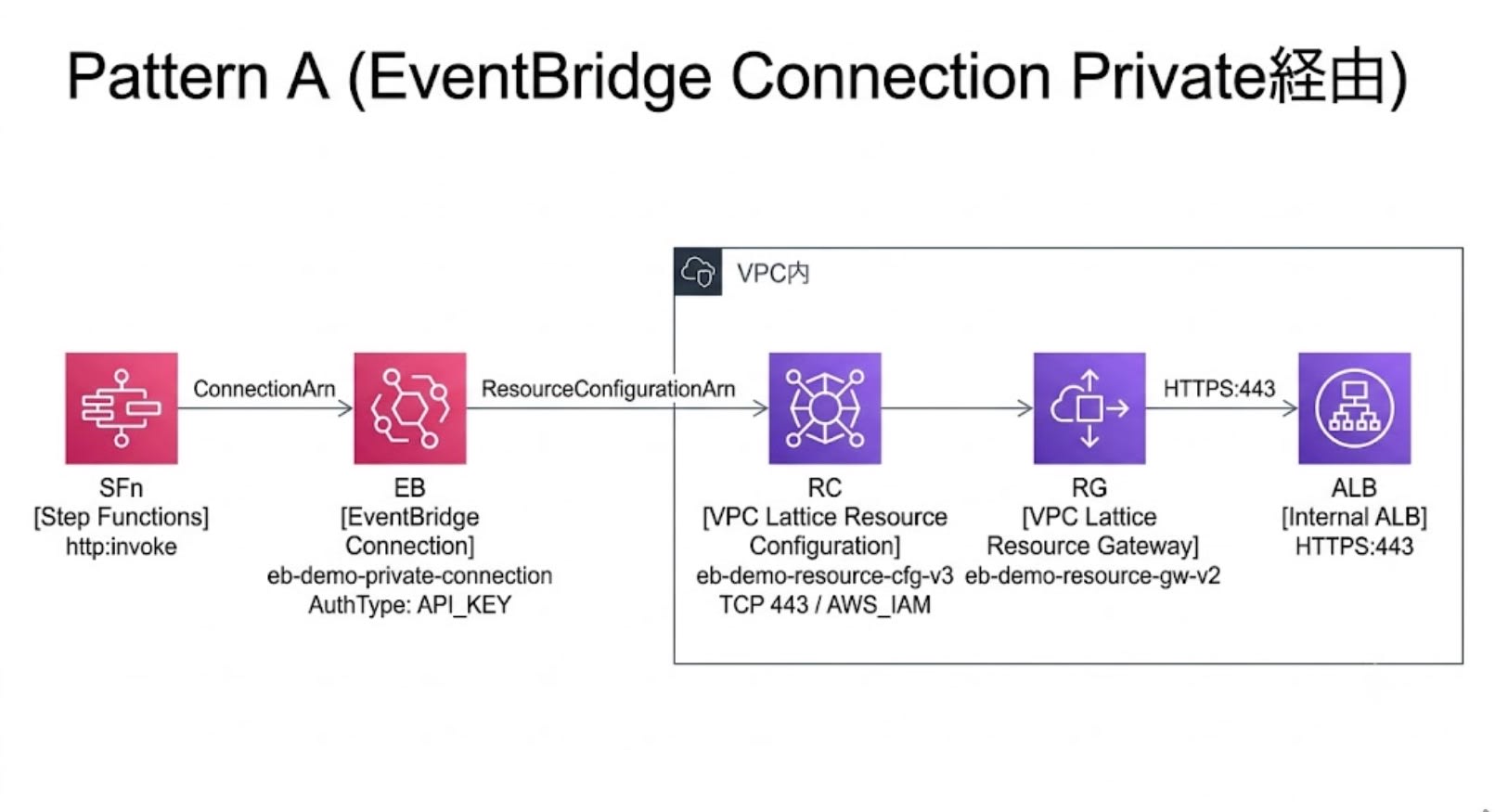
Step Functions → HTTP Task → EventBridge Connection (Private)
  → VPC Lattice (Resource Configuration → Resource Gateway) → Internal ALB
仕組み
EventBridge Connection (Private) はVPC LatticeのResource Configuration / Resource Gatewayを使います。これによりVPC内のプライベートリソースへ到達できます。
- Resource Gateway: VPC内のサブネットに配置され、VPC Latticeからの通信を受け付けるエントリーポイント
- Resource Configuration:「どのドメインの何番ポートに到達するか」を定義する設定。Resource Gatewayと紐付ける
- EventBridge Connection (Private): Resource Configurationを指定して利用する。Connection経由のリクエストはVPC Lattice → Resource Gateway → 宛先の順に到達する
データフローの流れ:
- Step FunctionsがHTTP Taskを実行し、EventBridge Connectionを参照する
- Connectionに紐づく認証情報を利用する。認証情報はConnection管理のSecrets Managerシークレットとして保持されるため、実行ロールには
events:RetrieveConnectionCredentialsとSecrets Managerへの参照権限が必要 - Step Functionsがリクエストを送信。Connectionに紐付いたResource Configurationにより、VPC Latticeがルーティングを担当する
- VPC LatticeがResource Gatewayを経由してVPC内に到達し、
IN_VPC設定によりVPC内DNSで解決された宛先(Internal ALB)にリクエストが転送される
必要な IAM 権限
Step Functionsの実行ロールに以下の権限が必要です。
states:InvokeHTTPEndpoint— HTTP Taskの実行権限events:RetrieveConnectionCredentials— Connectionの認証情報取得secretsmanager:GetSecretValue/secretsmanager:DescribeSecret— Connection内部で使うSecrets Managerへのアクセスvpc-lattice-svcs:Invoke— Resource ConfigurationのResourceConfigurationAuthType: AWS_IAM利用時に必要
CFn テンプレートのポイント
Internal ALB(Fixed Response で最小構成のバックエンド)
ALB:
  Type: AWS::ElasticLoadBalancingV2::LoadBalancer
  Properties:
    Scheme: internal
    Subnets: !Ref SubnetIds
    SecurityGroups:
      - !Ref AlbSecurityGroup

HttpsListener:
  Type: AWS::ElasticLoadBalancingV2::Listener
  Properties:
    LoadBalancerArn: !Ref ALB
    Port: 443
    Protocol: HTTPS
    Certificates:
      - CertificateArn: !Ref CertificateArn
    DefaultActions:
      - Type: fixed-response
        FixedResponseConfig:
          StatusCode: "200"
          ContentType: application/json
          MessageBody: '{"status":"ok","source":"internal-alb"}'
Step Functions HTTP TaskからEventBridge Connection (Private) 経由で呼び出すエンドポイントはHTTPSが必要で、宛先の証明書がパブリックCAで検証可能である必要があります(Resource Configuration側はTCP/443として定義)。そのためInternal ALBであってもACMのパブリック証明書が必要で、自己署名証明書は使えません。
Resource Gateway + Resource Configuration
ResourceGateway:
  Type: AWS::VpcLattice::ResourceGateway
  Properties:
    Name: eb-demo-resource-gw-v2
    IpAddressType: IPV4
    ResourceConfigDnsResolution: IN_VPC
    VpcIdentifier: !Ref VpcId
    SubnetIds: !Ref SubnetIds
    SecurityGroupIds:
      - !Ref ResourceGatewaySecurityGroup

ResourceConfiguration:
  Type: AWS::VpcLattice::ResourceConfiguration
  Properties:
    Name: eb-demo-resource-cfg-v3
    ResourceGatewayId: !GetAtt ResourceGateway.Id
    ResourceConfigurationType: SINGLE
    ResourceConfigurationAuthType: AWS_IAM
    ProtocolType: TCP
    PortRanges:
      - "443"
    AllowAssociationToSharableServiceNetwork: true
    ResourceConfigurationDefinition:
      DnsResource:
        DomainName: !Ref AlbDomainName
        IpAddressType: IPV4
ポイント:
ResourceConfigDnsResolution: IN_VPC— 宛先FQDNがVPC内のDNSリゾルバで解決されます。今回のようにInternal ALB向けの独自FQDNをVPC内DNSで解決させる構成では、この設定が必要ですResourceConfigurationAuthType: AWS_IAM— VPC LatticeレイヤーでIAM認証を有効にします。この設定ではStep Functions実行ロールへのvpc-lattice-svcs:Invoke付与が必須です
Resource Gateway のセキュリティグループ
ResourceGatewaySecurityGroup:
  Type: AWS::EC2::SecurityGroup
  Properties:
    GroupDescription: Security group for VPC Lattice Resource Gateway
    VpcId: !Ref VpcId
    SecurityGroupIngress:
      - IpProtocol: tcp
        FromPort: 0
        ToPort: 65535
        CidrIp: 0.0.0.0/0
      - IpProtocol: tcp
        FromPort: 0
        ToPort: 65535
        CidrIpv6: "::/0"
検証ではVPC CIDRの443/TCPのみの許可ではタイムアウトし、公式ドキュメントが示す「全TCPポートを 0.0.0.0/0 から許可」という要件に合わせることで解決しました。理由は後述の「ハマりどころ」で説明します。
EventBridge Connection の Private 接続設定
PrivateConnection:
  Type: AWS::Events::Connection
  Properties:
    Name: eb-demo-private-connection
    AuthorizationType: API_KEY
    AuthParameters:
      ApiKeyAuthParameters:
        ApiKeyName: x-dummy-key
        ApiKeyValue: dummy
    InvocationConnectivityParameters:
      ResourceParameters:
        ResourceConfigurationArn: !GetAtt ResourceConfiguration.Arn
InvocationConnectivityParameters でResource Configurationを指定するのがPrivate接続の核心です。AuthorizationType にはAPI_KEYを指定していますが、今回のバックエンドではこのAPIキーを検証していません。到達可否は ResourceConfigurationAuthType: AWS_IAM と vpc-lattice-svcs:Invoke で制御しています。
Step Functions ステートマシン(Connection ARN の埋め込み)
StateMachineA:
  Type: AWS::StepFunctions::StateMachine
  Properties:
    StateMachineName: eb-demo-pattern-a-private
    RoleArn: !GetAtt PatternARole.Arn
    DefinitionString:
      Fn::Join:
        - ""
        - - '{"StartAt":"CallPrivateApi","States":{"CallPrivateApi":{"Type":"Task","Resource":"arn:aws:states:::http:invoke","TimeoutSeconds":60,"Parameters":{"ApiEndpoint":"https://eb-demo.example.com/","Method":"GET","Authentication":{"ConnectionArn":"'
          - Fn::GetStackOutput:
              StackName: !Ref InfraStackName
              OutputName: PrivateConnectionArn
          - '"}},"End":true}}}'
ASL定義内にConnection ARNを埋め込むために Fn::Join を使っています。Fn::GetStackOutput でスタック間参照を行い、Stack 1のConnection ARNを取得しています。Fn::GetStackOutput はCloudFormationの組み込み関数で、Fn::ImportValue + Export を使わずにスタック間の出力値を参照できます。
検証結果
ステートマシンを実行し、StatusCode 200でInternal ALBのFixed Responseが返ることを確認しました。
{
  "StatusCode": 200,
  "StatusText": "OK",
  "ResponseBody": {"status": "ok", "source": "internal-alb"},
  "Headers": {
    "server": ["awselb/2.0"],
    "content-type": ["application/json; charset=utf-8"]
  }
}
ハマりどころ
FQDN必須、ユーザー管理のDNS登録が必要
Resource Configurationの宛先はFQDNで指定します(IPアドレス不可、公式ドキュメント記載)。ALBに対応するCNAMEレコードを自前で管理するDNSに登録する必要がありました。今回は eb-demo.example.com → ALB DNS名のCNAMEを登録しています。
Resource Gateway セキュリティグループの Inbound を絞るとタイムアウトする
最初はVPC CIDR(192.168.0.0/18)の443/TCPのみ許可していましたが、VPC LatticeからResource Gatewayへの通信がタイムアウトしました。公式ドキュメントではResource Gatewayのセキュリティグループ要件として全TCPポートを 0.0.0.0/0 から許可することが示されており、この要件に合わせて解決しました。スライドでも言及されています。
HTTP Task のタイムアウトは 60 秒上限
Step Functions HTTP Taskは最大60秒でタイムアウトします(公式ドキュメント記載)。長時間かかるAPI呼び出しには向きません。
API Gateway REST API + VPC Link v2 で呼ぶ
構成図
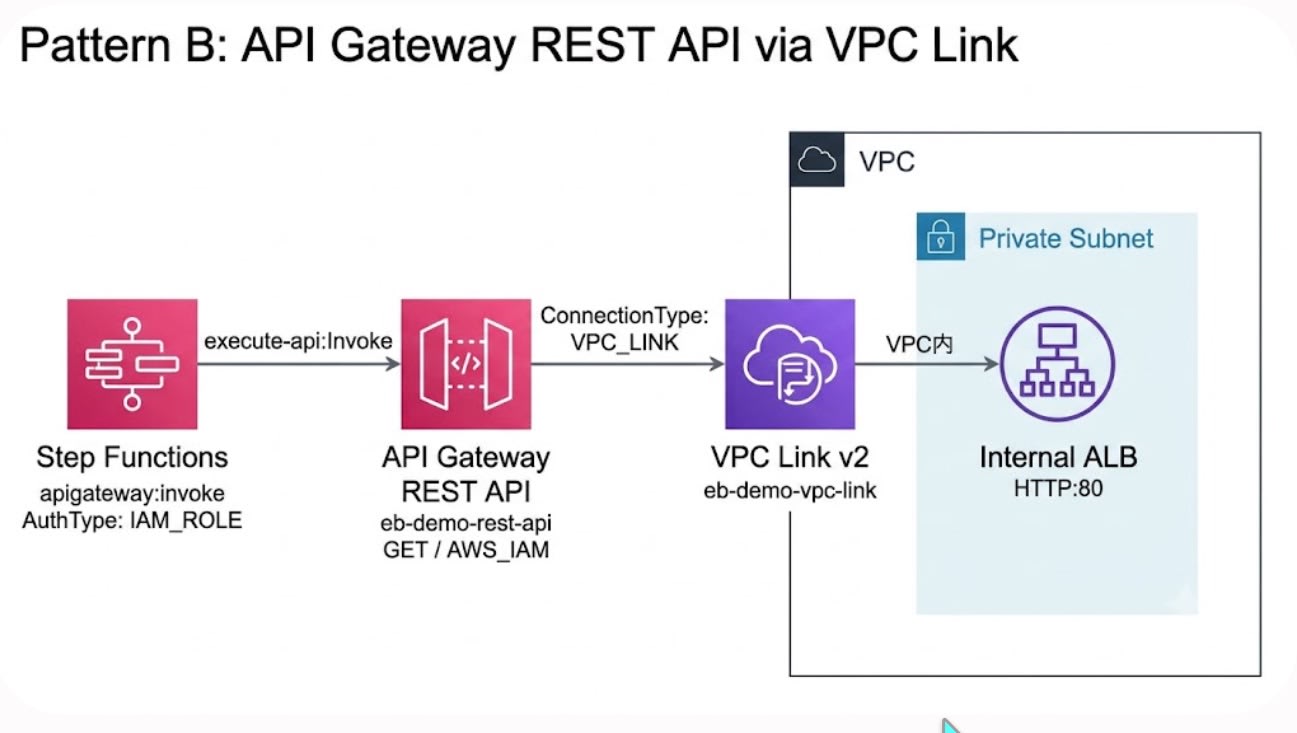
Step Functions → apigateway:invoke (Optimized Integration, IAM 署名付き)
  → API Gateway REST API (AWS_IAM 認証 + リソースポリシー)
    → VPC Link v2 → Internal ALB
仕組み
API Gateway REST APIのVPC Link統合を使い、REST APIでHTTPリクエストを受けてVPC内のInternal ALBに中継します。Step FunctionsからはOptimized Integration(apigateway:invoke)で呼び出します。AuthType: IAM_ROLE を指定することで、実行ロールの認証情報によるIAM署名が自動付与されます。
REST APIのプライベート統合でALBを直接指定できるようになったアップデート(2025年11月)を利用しています。VPC Link v2(AWS::ApiGatewayV2::VpcLink)がREST APIでもサポートされ、NLBなしでALBに直接統合できます。
必要な IAM 権限
Step Functionsの実行ロールに以下の権限が必要です。
execute-api:Invoke— REST APIの実行権限
Pattern Aに比べると、必要な権限の数は少なくシンプルです。
CFn テンプレートのポイント
REST API + VPC Link v2 + AWS_IAM 認証
VpcLink:
  Type: AWS::ApiGatewayV2::VpcLink
  Properties:
    Name: eb-demo-vpc-link
    SubnetIds: !Ref SubnetIds
    SecurityGroupIds:
      - !Ref VpcLinkSecurityGroup

RestApi:
  Type: AWS::ApiGateway::RestApi
  Properties:
    Name: eb-demo-rest-api
    EndpointConfiguration:
      Types:
        - REGIONAL

RestApiMethod:
  Type: AWS::ApiGateway::Method
  Properties:
    RestApiId: !Ref RestApi
    ResourceId: !GetAtt RestApi.RootResourceId
    HttpMethod: GET
    AuthorizationType: AWS_IAM
    Integration:
      Type: HTTP_PROXY
      IntegrationHttpMethod: GET
      ConnectionType: VPC_LINK
      ConnectionId: !Ref VpcLink
      IntegrationTarget: !Ref HttpListener
      Uri: !Sub "http://${ALB.DNSName}/"
今回はVPC Link v2経由でInternal ALBのHTTPリスナーに中継するため、ALB側に証明書は不要です。IntegrationTarget にALBのHTTPリスナーを指定しています(Uri も併記した状態で200応答を確認しています)。AuthorizationType: AWS_IAM により、IAM署名のないリクエストはREST APIレイヤーで拒否されます。
Step Functions Optimized Integration
StateMachineB:
  Type: AWS::StepFunctions::StateMachine
  Properties:
    StateMachineName: eb-demo-pattern-b-apigw
    RoleArn: !GetAtt PatternBRole.Arn
    DefinitionString:
      Fn::Join:
        - ""
        - - '{"StartAt":"CallRestApi","States":{"CallRestApi":{"Type":"Task","Resource":"arn:aws:states:::apigateway:invoke","Parameters":{"ApiEndpoint":"'
          - Fn::GetStackOutput:
              StackName: !Ref InfraStackName
              OutputName: RestApiId
          - '.execute-api.ap-northeast-1.amazonaws.com","Method":"GET","Stage":"prod","AuthType":"IAM_ROLE"},"End":true}}}'
AuthType: IAM_ROLE を指定すると、Step Functionsが実行ロールの認証情報でIAM署名を自動生成します。
検証結果
ステートマシンを実行し、StatusCode 200でInternal ALBのFixed Responseが返ることを確認しました。
{
  "StatusCode": 200,
  "StatusText": "OK",
  "ResponseBody": {"status": "ok", "source": "internal-alb"},
  "Headers": {
    "server": ["awselb/2.0"],
    "apigw-requestid": ["e5Nw0iQQtjMEJUA="],
    "content-type": ["application/json; charset=utf-8"]
  }
}
リソースポリシーによる追加制御
REST APIの AWS_IAM 認証だけでは、同一アカウント内で execute-api:Invoke 権限を持つ任意のIAMエンティティからアクセスできてしまいます。
REST API側で特定ロール以外を強制的に拒否したい場合は、リソースポリシーに StringNotEquals 条件の明示Denyを設定します。
{
  "Version": "2012-10-17",
  "Statement": [
    {
      "Effect": "Deny",
      "Principal": "*",
      "Action": "execute-api:Invoke",
      "Resource": "arn:aws:execute-api:ap-northeast-1:123456789012:<api-id>/prod/GET/",
      "Condition": {
        "StringNotEquals": {
          "aws:PrincipalArn": "arn:aws:iam::123456789012:role/<PatternBRole>"
        }
      }
    },
    {
      "Effect": "Allow",
      "Principal": "*",
      "Action": "execute-api:Invoke",
      "Resource": "arn:aws:execute-api:ap-northeast-1:123456789012:<api-id>/prod/GET/"
    }
  ]
}
これが必要な理由: 同一アカウント内では、AWS_IAM 認証かつAllowのみのリソースポリシー構成の場合、identity-based policyで execute-api:Invoke を持つ他のIAMエンティティからもアクセスできてしまいます。明示Denyを入れることで、指定ロール以外からのアクセスを確実に拒否できます。
リソースポリシー適用後もPatternBRoleからのStep Functions実行が200で成功することを確認しました。
比較
| 観点 | EventBridge Connection (Private) | API Gateway REST API + VPC Link v2 |
|---|---|---|
| 到達経路 | SFn → Connection → VPC Lattice → ALB | SFn → API Gateway → VPC Link → ALB |
| ALB側証明書 | 必須(パブリックCA) | 今回のHTTP統合では不要 |
| プロトコル | HTTPS のみ | HTTP / HTTPS 両対応 |
| エンドポイント指定 | FQDN 必須 | VPC Link で ALB 指定。カスタムドメイン不要 |
| タイムアウト | HTTP Task 60秒上限 | API Gateway統合タイムアウト デフォルト29秒(上限緩和申請で延長可) |
| ユーザー管理DNS | 必要 | 不要 |
| 必要なIAM権限/制御ポイント | states:InvokeHTTPEndpoint + events:RetrieveConnectionCredentials + secretsmanager:GetSecretValue/DescribeSecret + vpc-lattice-svcs:Invoke |
execute-api:Invoke + REST API AWS_IAM + リソースポリシー |
| Step Functions 統合方式 | HTTP Task (http:invoke) |
Optimized Integration (apigateway:invoke) |
| EventBridge Rules連携 | API Destinationで同じPrivate Connectionを流用できる構成が想定される(本記事では未検証) | API GatewayをEventBridge Rulesのターゲットにできるが、AWS_IAM 認証構成では追加設計が必要 |
| VPC Lattice 依存 | あり | なし |
| Resource Gateway SG | 全TCP / 0.0.0.0/0 許可が必要 |
なし(Resource Gateway不要) |
選定基準
EventBridge Connection (Private) が向くケース:
- 呼び出し元がStep Functions / EventBridgeに閉じている
- API Gatewayのexecute-api URLを入口として作りたくない
- EventBridge API Destinationでも同じConnectionを使いたい(API DestinationでのPrivate Connection利用は本記事では未検証)
- VPC Lattice Resource Configuration / Resource Gatewayを到達制御の中心にしたい
- API GatewayのAPI管理機能(スロットリング、使用量プラン等)が不要
API Gateway REST API + VPC Link v2 が向くケース:
- Step FunctionsからInternal ALBを呼ぶだけで、構成をシンプルに保ちたい
- IAM認証 + リソースポリシーで分かりやすくアクセス制御を構成したい
- カスタムドメインのDNS管理やパブリックCA証明書の準備を避けたい
まとめ
EventBridge Connection (Private) とAPI Gateway REST API + VPC Link v2のどちらの構成でも、Step FunctionsからVPC内のInternal ALBをLambda中継なしで呼び出せることを確認しました。
IAMを軸にアクセス制御できる点は共通ですが、認可のレイヤーと到達経路は異なります。Pattern AはVPC Lattice / Resource Configurationを経由する構成、Pattern BはAPI Gatewayを入口にする構成です。Pattern Bで特定ロールに絞る場合は、REST APIのリソースポリシーによる明示Denyを併用します。
Step Functions / EventBridgeに閉じてVPC内APIを呼びたい場合はEventBridge Connection (Private)、API GatewayのREST APIとして入口を持たせたい場合はAPI Gateway REST API + VPC Link v2が選択肢になります。
非同期で問題ない場合はSNSやSQSの方がシンプルなケースもありますが、VPC内APIを同期的に呼び出して戻り値を得たい場合には、本記事の2方式をお試しください。
参考リンク
付録: CloudFormation テンプレート全文
Stack 1: 01-infra.yaml(ALB, VPC Lattice, Connection, API Gateway)
AWSTemplateFormatVersion: "2010-09-09"
Description: "Stack 1: Internal ALB + EventBridge Connection (Private) + API Gateway REST API"

Parameters:
  VpcId:
    Type: AWS::EC2::VPC::Id
    Default: vpc-0example1234567890
  SubnetIds:
    Type: CommaDelimitedList
    Default: "subnet-0example1a,subnet-0example1c,subnet-0example1d"
  CertificateArn:
    Type: String
    Default: arn:aws:acm:ap-northeast-1:123456789012:certificate/xxxxxxxx-xxxx-xxxx-xxxx-xxxxxxxxxxxx
  AlbDomainName:
    Type: String
    Default: eb-demo.example.com

Resources:
  # ============================================================
  # 共通: Internal ALB
  # ============================================================
  AlbSecurityGroup:
    Type: AWS::EC2::SecurityGroup
    Properties:
      GroupDescription: Allow HTTP/HTTPS from VPC CIDR
      VpcId: !Ref VpcId
      SecurityGroupIngress:
        - IpProtocol: tcp
          FromPort: 80
          ToPort: 80
          CidrIp: 192.168.0.0/18
        - IpProtocol: tcp
          FromPort: 443
          ToPort: 443
          CidrIp: 192.168.0.0/18

  ALB:
    Type: AWS::ElasticLoadBalancingV2::LoadBalancer
    Properties:
      Scheme: internal
      Subnets: !Ref SubnetIds
      SecurityGroups:
        - !Ref AlbSecurityGroup

  HttpListener:
    Type: AWS::ElasticLoadBalancingV2::Listener
    Properties:
      LoadBalancerArn: !Ref ALB
      Port: 80
      Protocol: HTTP
      DefaultActions:
        - Type: fixed-response
          FixedResponseConfig:
            StatusCode: "200"
            ContentType: application/json
            MessageBody: '{"status":"ok","source":"internal-alb"}'

  HttpsListener:
    Type: AWS::ElasticLoadBalancingV2::Listener
    Properties:
      LoadBalancerArn: !Ref ALB
      Port: 443
      Protocol: HTTPS
      Certificates:
        - CertificateArn: !Ref CertificateArn
      DefaultActions:
        - Type: fixed-response
          FixedResponseConfig:
            StatusCode: "200"
            ContentType: application/json
            MessageBody: '{"status":"ok","source":"internal-alb"}'

  # ============================================================
  # パターン A: EventBridge Connection (Private) via VPC Lattice
  # ============================================================
  ResourceGatewaySecurityGroup:
    Type: AWS::EC2::SecurityGroup
    Properties:
      GroupDescription: Security group for VPC Lattice Resource Gateway
      VpcId: !Ref VpcId
      SecurityGroupIngress:
        - IpProtocol: tcp
          FromPort: 0
          ToPort: 65535
          CidrIp: 0.0.0.0/0
        - IpProtocol: tcp
          FromPort: 0
          ToPort: 65535
          CidrIpv6: "::/0"

  ResourceGateway:
    Type: AWS::VpcLattice::ResourceGateway
    Properties:
      Name: eb-demo-resource-gw-v2
      IpAddressType: IPV4
      ResourceConfigDnsResolution: IN_VPC
      VpcIdentifier: !Ref VpcId
      SubnetIds: !Ref SubnetIds
      SecurityGroupIds:
        - !Ref ResourceGatewaySecurityGroup

  ResourceConfiguration:
    Type: AWS::VpcLattice::ResourceConfiguration
    Properties:
      Name: eb-demo-resource-cfg-v3
      ResourceGatewayId: !GetAtt ResourceGateway.Id
      ResourceConfigurationType: SINGLE
      ResourceConfigurationAuthType: AWS_IAM
      ProtocolType: TCP
      PortRanges:
        - "443"
      AllowAssociationToSharableServiceNetwork: true
      ResourceConfigurationDefinition:
        DnsResource:
          DomainName: !Ref AlbDomainName
          IpAddressType: IPV4

  PrivateConnection:
    Type: AWS::Events::Connection
    Properties:
      Name: eb-demo-private-connection
      AuthorizationType: API_KEY
      AuthParameters:
        ApiKeyAuthParameters:
          ApiKeyName: x-dummy-key
          ApiKeyValue: dummy
      InvocationConnectivityParameters:
        ResourceParameters:
          ResourceConfigurationArn: !GetAtt ResourceConfiguration.Arn

  # ============================================================
  # パターン B: API Gateway REST API + VPC Link v2
  # ============================================================
  VpcLinkSecurityGroup:
    Type: AWS::EC2::SecurityGroup
    Properties:
      GroupDescription: Security group for API Gateway VPC Link
      VpcId: !Ref VpcId
      SecurityGroupIngress:
        - IpProtocol: tcp
          FromPort: 80
          ToPort: 80
          CidrIp: 192.168.0.0/18

  VpcLink:
    Type: AWS::ApiGatewayV2::VpcLink
    Properties:
      Name: eb-demo-vpc-link
      SubnetIds: !Ref SubnetIds
      SecurityGroupIds:
        - !Ref VpcLinkSecurityGroup

  RestApi:
    Type: AWS::ApiGateway::RestApi
    Properties:
      Name: eb-demo-rest-api
      EndpointConfiguration:
        Types:
          - REGIONAL

  RestApiMethod:
    Type: AWS::ApiGateway::Method
    Properties:
      RestApiId: !Ref RestApi
      ResourceId: !GetAtt RestApi.RootResourceId
      HttpMethod: GET
      AuthorizationType: AWS_IAM
      Integration:
        Type: HTTP_PROXY
        IntegrationHttpMethod: GET
        ConnectionType: VPC_LINK
        ConnectionId: !Ref VpcLink
        IntegrationTarget: !Ref HttpListener
        Uri: !Sub "http://${ALB.DNSName}/"

  RestApiDeployment:
    Type: AWS::ApiGateway::Deployment
    DependsOn: RestApiMethod
    Properties:
      RestApiId: !Ref RestApi

  RestApiStage:
    Type: AWS::ApiGateway::Stage
    Properties:
      RestApiId: !Ref RestApi
      DeploymentId: !Ref RestApiDeployment
      StageName: prod

  PublicConnection:
    Type: AWS::Events::Connection
    Properties:
      Name: eb-demo-public-connection
      AuthorizationType: API_KEY
      AuthParameters:
        ApiKeyAuthParameters:
          ApiKeyName: x-dummy-key
          ApiKeyValue: dummy

Outputs:
  AlbDnsName:
    Value: !GetAtt ALB.DNSName
  AlbHttpsListenerArn:
    Value: !Ref HttpsListener
  PrivateConnectionArn:
    Value: !GetAtt PrivateConnection.Arn
  PublicConnectionArn:
    Value: !GetAtt PublicConnection.Arn
  RestApiEndpoint:
    Value: !Sub "https://${RestApi}.execute-api.${AWS::Region}.amazonaws.com/prod"
  RestApiId:
    Value: !Ref RestApi
Stack 2: 02-stepfunctions.yaml(IAM Role × 2, State Machine × 2)
AWSTemplateFormatVersion: "2010-09-09"
Description: "Stack 2: Step Functions state machines (Pattern A: Private Connection, Pattern B: REST API)"

Parameters:
  InfraStackName:
    Type: String
    Default: eb-connection-infra

Resources:
  # ============================================================
  # IAM Role - Pattern A (Private Connection)
  # ============================================================
  PatternARole:
    Type: AWS::IAM::Role
    Properties:
      AssumeRolePolicyDocument:
        Version: "2012-10-17"
        Statement:
          - Effect: Allow
            Principal:
              Service: states.amazonaws.com
            Action: sts:AssumeRole
      Policies:
        - PolicyName: HttpInvokePrivate
          PolicyDocument:
            Version: "2012-10-17"
            Statement:
              - Effect: Allow
                Action: states:InvokeHTTPEndpoint
                Resource: "*"
              - Effect: Allow
                Action: events:RetrieveConnectionCredentials
                Resource:
                  Fn::GetStackOutput:
                    StackName: !Ref InfraStackName
                    OutputName: PrivateConnectionArn
              - Effect: Allow
                Action:
                  - secretsmanager:GetSecretValue
                  - secretsmanager:DescribeSecret
                Resource:
                  Fn::Join:
                    - ""
                    - - "arn:aws:secretsmanager:"
                      - !Ref AWS::Region
                      - ":"
                      - !Ref AWS::AccountId
                      - ":secret:events!connection/eb-demo-private-connection/*"
              - Effect: Allow
                Action: vpc-lattice-svcs:Invoke
                Resource: "*"

  # ============================================================
  # IAM Role - Pattern B (REST API direct integration)
  # ============================================================
  PatternBRole:
    Type: AWS::IAM::Role
    Properties:
      AssumeRolePolicyDocument:
        Version: "2012-10-17"
        Statement:
          - Effect: Allow
            Principal:
              Service: states.amazonaws.com
            Action: sts:AssumeRole
      Policies:
        - PolicyName: HttpInvokeRestApi
          PolicyDocument:
            Version: "2012-10-17"
            Statement:
              - Effect: Allow
                Action: execute-api:Invoke
                Resource:
                  Fn::Join:
                    - ""
                    - - "arn:aws:execute-api:"
                      - !Ref AWS::Region
                      - ":"
                      - !Ref AWS::AccountId
                      - ":"
                      - Fn::GetStackOutput:
                          StackName: !Ref InfraStackName
                          OutputName: RestApiId
                      - "/prod/GET/"

  # ============================================================
  # ステートマシン A: EventBridge Connection (Private) 経由
  # ============================================================
  StateMachineA:
    Type: AWS::StepFunctions::StateMachine
    Properties:
      StateMachineName: eb-demo-pattern-a-private
      RoleArn: !GetAtt PatternARole.Arn
      DefinitionString:
        Fn::Join:
          - ""
          - - '{"StartAt":"CallPrivateApi","States":{"CallPrivateApi":{"Type":"Task","Resource":"arn:aws:states:::http:invoke","TimeoutSeconds":60,"Parameters":{"ApiEndpoint":"https://eb-demo.example.com/","Method":"GET","Authentication":{"ConnectionArn":"'
            - Fn::GetStackOutput:
                StackName: !Ref InfraStackName
                OutputName: PrivateConnectionArn
            - '"}},"End":true}}}'

  # ============================================================
  # ステートマシン B: API Gateway REST API 経由 (Optimized Integration)
  # ============================================================
  StateMachineB:
    Type: AWS::StepFunctions::StateMachine
    Properties:
      StateMachineName: eb-demo-pattern-b-apigw
      RoleArn: !GetAtt PatternBRole.Arn
      DefinitionString:
        Fn::Join:
          - ""
          - - '{"StartAt":"CallRestApi","States":{"CallRestApi":{"Type":"Task","Resource":"arn:aws:states:::apigateway:invoke","Parameters":{"ApiEndpoint":"'
            - Fn::GetStackOutput:
                StackName: !Ref InfraStackName
                OutputName: RestApiId
            - '.execute-api.ap-northeast-1.amazonaws.com","Method":"GET","Stage":"prod","AuthType":"IAM_ROLE"},"End":true}}}'

Outputs:
  StateMachineArnPatternA:
    Value: !GetAtt StateMachineA.Arn
  StateMachineArnPatternB:
    Value: !GetAtt StateMachineB.Arn