I tried extracting exercise records from Ring Fit Adventure's result screen using the multimodal capabilities of Foundation Models

This page has been translated by machine translation. View original
I'm developing an app called "NSEasyConnect", which analyzes screenshots from Ring Fit Adventure — a game I've been playing for years — using Vision.framework OCR to quantify exercise records. However, misrecognitions like confusing 1 and 7 occur frequently, and I've been handling this by implementing separate numerical correction logic.
With that in mind, I decided to explore whether the multimodal capabilities of Foundation Models could provide a simpler replacement for this processing. The basic usage of multimodal features was introduced in the following article.
This article introduces the implementation steps for extracting specific fields from images as structured data using @Generable. Since I needed to revisit the design several times before getting the expected results, I'll also share that trial-and-error process. I hope this serves as a useful reference for those who want to try similar experiments.
Verification Environment
- MacBook Pro (16-inch, 2023), Apple M2 Pro
- macOS Tahoe 26.4.1
- Xcode 27.0 Beta
- iPhone 16e physical device (iOS 27.0 Beta)
Target Images for Analysis
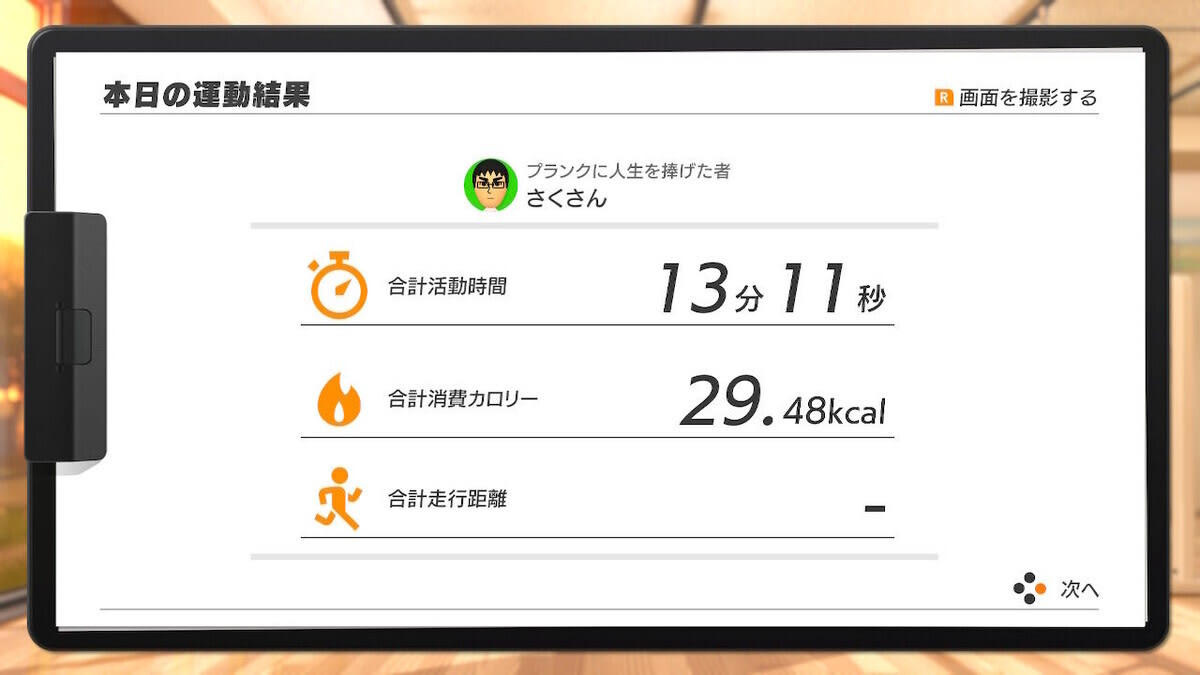
You can save screenshots to the camera roll using Nintendo Switch's "Send to Smartphone" feature. I used the following two images for verification.
The first is a result screen (rfa1) showing two fields: total activity time and total calories burned.
The second is a result screen (rfa2) that displays, in addition to total activity time and total calories burned, the total running distance as well.
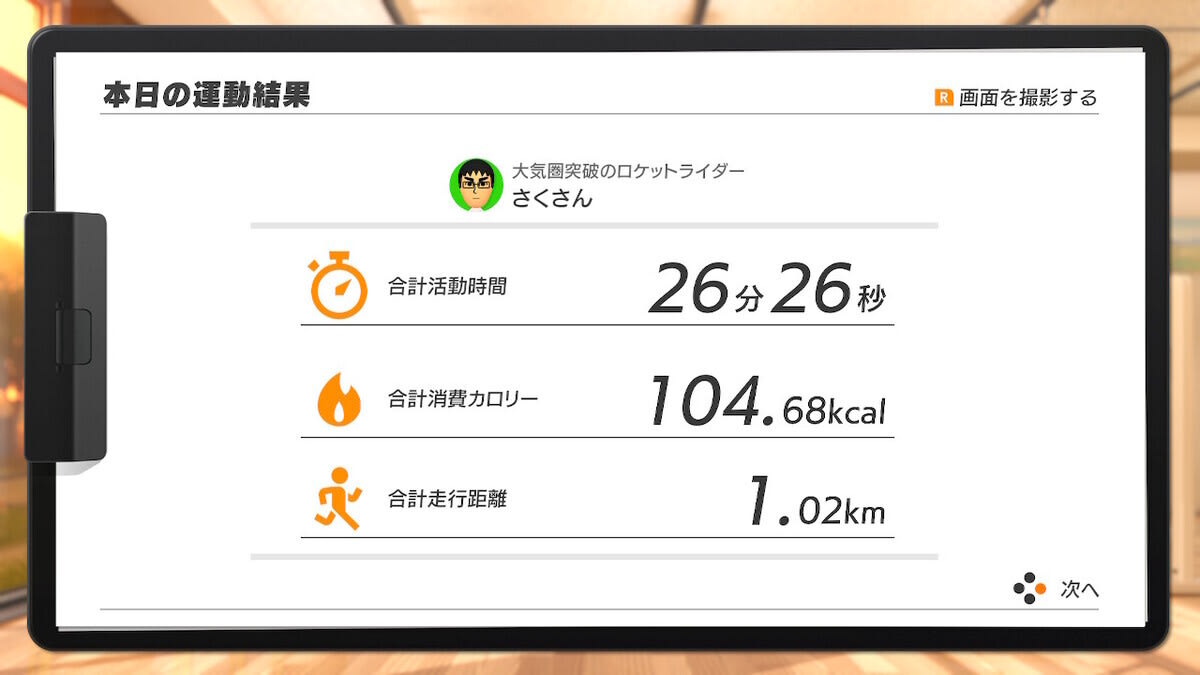
In Ring Fit Adventure, the fields displayed vary depending on the type of workout. Running distance is only shown on days when running-type activities are completed.
Implementation Steps
Step 1: Project Setup
Create a new iOS project in Xcode. The basic setup is the same as in the multimodal basics article.
Add the two target screenshots to .xcassets. Here, I added them with the names rfa1 and rfa2.
First, prepare a simple screen that executes a process and displays results as text when a button is tapped.
import SwiftUI
import FoundationModels

struct ContentView: View {
    @State private var text: String = ""

    var body: some View {
        ScrollView {
            VStack(spacing: 16) {
                Text(text)
                    .frame(maxWidth: .infinity, alignment: .leading)
                    .padding()
                Button("Run", action: action1)
            }
        }
    }

    func action1() {
        // Add processing here
    }
}
Step 2: Define the Struct with @Generable
Define the fields you want to extract as a @Generable struct. RingFitResult should be defined at the top level of the file (outside ContentView).
I'll document the trial-and-error process from the initial design to the final design.
Initial Design (Non-working Version)
I first attempted the following design. The policy was to convert activity time from a display like "13 minutes 11 seconds" to seconds, and represent running distance as an optional Double?.
@Generable
struct RingFitResult {
    @Guide(description: "Total activity time in seconds. Convert from minutes and seconds shown on screen (e.g. 8分56秒 = 536, 25分10秒 = 1510)")
    var totalActivitySeconds: Int
    @Guide(description: "Total calories burned as a decimal number in kcal (e.g. 29.48)")
    var caloriesBurned: Double
    @Guide(description: "Total running distance in km as a decimal number. Set to nil if the running distance is not displayed on the screen")
    var runningDistanceKm: Double?
}
When I analyzed image 1 (13 minutes 11 seconds, 29.48 kcal, no running distance) three times, the same result was returned each time.
Activity time (seconds): 781
Calories burned: 29.48
Running distance: Optional(-1.0)
The calories burned was retrieved correctly, but two problems were found with the activity time and running distance.
Problem 1: Misreading of activity time (781 seconds, correct answer is 791 seconds)
- 781 = 13 × 60 + 1 (calculated as 13 minutes 1 second)
- 791 = 13 × 60 + 11 (correct answer)
The model misread "11 seconds" as "1 second" and then performed the conversion calculation to seconds. There is also the problem that when both reading and calculation are delegated to the model simultaneously, it becomes difficult to determine where the mistake occurred.
Problem 2: Failure to generate nil for running distance (Optional(-1.0) was returned)
While Double? can represent nil at the type level, the model appears to have a strong tendency to "want to return a number in a numeric context," trying to substitute with -1.0 or 0.0.
Additionally, in the process of resolving problems 1 and 2, I needed to rewrite the description multiple times. When writing in English, it's difficult to verify whether the intended meaning is conveyed correctly, making the adjustment cost high. Even if I came up with prohibition phrases like NEVER return -1, it was hard to get a feel for how well they would be understood by the model. Therefore, in the final design, I adopted Japanese description and also verified whether it would affect accuracy.
Final Design (Working Version)
Based on the three issues — problems 1 and 2, and the high adjustment cost of English description — I revised the design as follows.
@Generable
struct RingFitResult {
    @Guide(description: "活動時間の「分」の部分のみを整数で(例:'13分11秒'なら13)")
    var activityMinutes: Int
    @Guide(description: "活動時間の「秒」の部分のみを整数で、0〜59の範囲(例:'13分11秒'なら11)")
    var activitySeconds: Int
    @Guide(description: "合計消費カロリーをkcal単位の小数で(例:29.48)")
    var caloriesBurned: Double
    @Guide(description: "走行距離が数値で表示されていればtrue、'-'または表示なしならfalse")
    var runningDistanceAvailable: Bool
    @Guide(description: "走行距離をkm単位の小数で。runningDistanceAvailableがtrueのときのみ有効")
    var runningDistanceKm: Double
}
Here are three key points of the design changes.
Separate reading from calculation
I removed totalActivitySeconds and split it into two properties: activityMinutes and activitySeconds. The model is only responsible for reading the numbers, while the conversion to seconds (minutes × 60 + seconds) is performed on the app side. By explicitly stating the range constraint 0〜59の範囲 (range of 0 to 59) in the description, the risk of misreading 11 as 1 is also reduced.
Bool + Double separation is more stable than Optional<Double>
I removed runningDistanceKm: Double? and replaced it with the pair runningDistanceAvailable: Bool and runningDistanceKm: Double. The model can make more stable judgments with a Bool binary choice than with generating nil. On the app side, when runningDistanceAvailable is false, it is treated as nil.
Note that I also tried several versions adjusted via prompts to fix the activity time issue, but Optional(0.0) or Optional(-1.0) kept being returned for running distance. Even adding prohibition phrases like NEVER return -1 to the description didn't stabilize things, so the Bool separation approach proved effective.
@Guide description works fine in Japanese
In the multimodal basics article, I recommended writing in English following the official documentation samples. This time, I confirmed that Japanese description with the same content as the English version produced equivalent accuracy across three runs each for both images. If you prioritize code readability, writing in Japanese is fine. However, since this verification focused primarily on simple numeric reading tasks, there remains a possibility that differences could appear in cases requiring more complex conditional branching or abstract judgments.
Step 3: Analyze Image 1
Add processing to action1() to analyze image 1.
func action1() {
    guard SystemLanguageModel.default.isAvailable else {
        text = "Apple Intelligence is not available"
        return
    }
    let session = LanguageModelSession()

    Task {
        let uiImage = UIImage(named: "rfa1")

        // Convert UIImage → CGImage (UIImage cannot be passed directly to Attachment)
        guard let cgImage = uiImage?.cgImage else {
            text = "Failed to load image"
            return
        }

        do {
            let response = try await session.respond(
                generating: RingFitResult.self
            ) {
                "リングフィットアドベンチャーのリザルト画面です。各フィールドの値を取り出してください。"
                Attachment(cgImage)
            }
            let result = response.content
            let totalSeconds = result.activityMinutes * 60 + result.activitySeconds
            let distance: Double? = result.runningDistanceAvailable ? result.runningDistanceKm : nil
            print("Activity time (seconds): \(totalSeconds)")
            print("Calories burned: \(result.caloriesBurned)")
            print("Running distance: \(distance.map { "\($0) km" } ?? "None")")
            text = """
            Activity time (seconds): \(totalSeconds)
            Calories burned: \(result.caloriesBurned) kcal
            Running distance: \(distance.map { "\($0) km" } ?? "None")
            """
        } catch {
            text = "Error: \(error.localizedDescription)"
            print("Error: \(error)\n\(String(reflecting: error))")
        }
    }
}
The analysis results for image 1 are as follows. The same values were returned all three times.
Activity time (seconds): 791
Calories burned: 29.48 kcal
Running distance: None
activityMinutes: 13 and activitySeconds: 11 were read, and the app was able to convert them to 13 × 60 + 11 = 791 seconds. I also confirmed that runningDistanceAvailable: false correctly treated the running distance as "None."
Step 4: Analyze Image 2
Add action2() to ContentView and verify the behavior with image 2, which displays the running distance field. The structure is almost identical to action1(), but duplicate code will be consolidated through refactoring in Step 5.
func action2() {
    guard SystemLanguageModel.default.isAvailable else {
        text = "Apple Intelligence is not available"
        return
    }
    let session = LanguageModelSession()

    Task {
        let uiImage = UIImage(named: "rfa2")

        guard let cgImage = uiImage?.cgImage else {
            text = "Failed to load image"
            return
        }

        do {
            let response = try await session.respond(
                generating: RingFitResult.self
            ) {
                "リングフィットアドベンチャーのリザルト画面です。各フィールドの値を取り出してください。"
                Attachment(cgImage)
            }
            let result = response.content
            let totalSeconds = result.activityMinutes * 60 + result.activitySeconds
            let distance: Double? = result.runningDistanceAvailable ? result.runningDistanceKm : nil
            print("Activity time (seconds): \(totalSeconds)")
            print("Calories burned: \(result.caloriesBurned)")
            print("Running distance: \(distance.map { "\($0) km" } ?? "None")")
            text = """
            Activity time (seconds): \(totalSeconds)
            Calories burned: \(result.caloriesBurned) kcal
            Running distance: \(distance.map { "\($0) km" } ?? "None")
            """
        } catch {
            text = "Error: \(error.localizedDescription)"
            print("Error: \(error)\n\(String(reflecting: error))")
        }
    }
}
The analysis results for image 2 are as follows. The same values were returned all three times.
Activity time (seconds): 1586
Calories burned: 104.68 kcal
Running distance: 1.02 km
activityMinutes: 26 and activitySeconds: 26 were read, and the app was able to convert them to 26 × 60 + 26 = 1586 seconds. runningDistanceAvailable: true was set, and the running distance of 1.02 km was also accurately retrieved.
Step 5: Availability Check and Fallback Processing
The multimodal feature of Foundation Models requires an Apple Intelligence-compatible device and iOS 27 or later. In actual apps, you need to implement fallback to Vision.framework OCR processing for cases where it may not be available depending on the device or settings.
The check is performed at three levels.
func analyzeImage(named imageName: String) async -> RingFitResult? {
    // ① Attachment API requires iOS 27 or later. Devices running earlier versions fall back to Vision
    guard #available(iOS 27, *) else {
        return await fallbackToVisionOCR(named: imageName)
    }

    // ② Fall back if Apple Intelligence is disabled or the model is not downloaded
    //    Note: isAvailable does not check the readiness of Vision submodels,
    //    so runtime errors are caught with catch
    guard SystemLanguageModel.default.isAvailable else {
        return await fallbackToVisionOCR(named: imageName)
    }

    guard let cgImage = UIImage(named: imageName)?.cgImage else {
        return nil
    }

    // ③ Attempt analysis with Foundation Models
    do {
        let session = LanguageModelSession()
        let response = try await session.respond(
            generating: RingFitResult.self
        ) {
            "リングフィットアドベンチャーのリザルト画面です。各フィールドの値を取り出してください。"
            Attachment(cgImage)
        }
        return response.content
    } catch {
        // Runtime error such as Vision submodel not loaded → Fall back to Vision
        print("Foundation Models failed, falling back to Vision: \(error)")
        return await fallbackToVisionOCR(named: imageName)
    }
}

// Existing OCR processing using Vision.framework
func fallbackToVisionOCR(named imageName: String) async -> RingFitResult? {
    // Existing implementation (NSEasyConnect OCR processing)
    return nil
}
The role of each layer is summarized as follows.
| Layer | Judgment Content | Target Cases |
|---|---|---|
#available(iOS 27, *) |
Checks for the existence of the Attachment API |
Devices running iOS 26 or earlier |
isAvailable |
Text generation model readiness state | Apple Intelligence disabled or not downloaded |
catch |
Catching runtime errors | Vision submodel not loaded, etc. |
Refactoring action1() and action2() to call this function will consolidate the duplicate code.
func action1() {
    Task {
        if let result = await analyzeImage(named: "rfa1") {
            let totalSeconds = result.activityMinutes * 60 + result.activitySeconds
            let distance: Double? = result.runningDistanceAvailable ? result.runningDistanceKm : nil
            text = """
            Activity time (seconds): \(totalSeconds)
            Calories burned: \(result.caloriesBurned) kcal
            Running distance: \(distance.map { "\($0) km" } ?? "None")
            """
        }
    }
}
Full source code for Steps 1–5
import SwiftUI
import FoundationModels

@Generable
struct RingFitResult {
    @Guide(description: "活動時間の「分」の部分のみを整数で(例:'13分11秒'なら13)")
    var activityMinutes: Int
    @Guide(description: "活動時間の「秒」の部分のみを整数で、0〜59の範囲(例:'13分11秒'なら11)")
    var activitySeconds: Int
    @Guide(description: "合計消費カロリーをkcal単位の小数で(例:29.48)")
    var caloriesBurned: Double
    @Guide(description: "走行距離が数値で表示されていればtrue、'-'または表示なしならfalse")
    var runningDistanceAvailable: Bool
    @Guide(description: "走行距離をkm単位の小数で。runningDistanceAvailableがtrueのときのみ有効")
    var runningDistanceKm: Double
}

struct ContentView: View {
    @State private var text: String = ""

    var body: some View {
        ScrollView {
            VStack(spacing: 16) {
                Text(text)
                    .frame(maxWidth: .infinity, alignment: .leading)
                    .padding()
                Button("Analyze Image 1", action: action1)
                Button("Analyze Image 2", action: action2)
            }
        }
    }

    func action1() {
        Task {
            if let result = await analyzeImage(named: "rfa1") {
                let totalSeconds = result.activityMinutes * 60 + result.activitySeconds
                let distance: Double? = result.runningDistanceAvailable ? result.runningDistanceKm : nil
                text = """
                Activity time (seconds): \(totalSeconds)
                Calories burned: \(result.caloriesBurned) kcal
                Running distance: \(distance.map { "\($0) km" } ?? "None")
                """
            }
        }
    }

    func action2() {
        Task {
            if let result = await analyzeImage(named: "rfa2") {
                let totalSeconds = result.activityMinutes * 60 + result.activitySeconds
                let distance: Double? = result.runningDistanceAvailable ? result.runningDistanceKm : nil
                text = """
                Activity time (seconds): \(totalSeconds)
                Calories burned: \(result.caloriesBurned) kcal
                Running distance: \(distance.map { "\($0) km" } ?? "None")
                """
            }
        }
    }

    func analyzeImage(named imageName: String) async -> RingFitResult? {
        guard #available(iOS 27, *) else {
            return await fallbackToVisionOCR(named: imageName)
        }
        guard SystemLanguageModel.default.isAvailable else {
            return await fallbackToVisionOCR(named: imageName)
        }
        guard let cgImage = UIImage(named: imageName)?.cgImage else {
            return nil
        }
        do {
            let session = LanguageModelSession()
            let response = try await session.respond(
                generating: RingFitResult.self
            ) {
                "リングフィットアドベンチャーのリザルト画面です。各フィールドの値を取り出してください。"
                Attachment(cgImage)
            }
            return response.content
        } catch {
            print("Foundation Models failed, falling back to Vision: \(error)")
            return await fallbackToVisionOCR(named: imageName)
        }
    }

    func fallbackToVisionOCR(named imageName: String) async -> RingFitResult? {
        // Existing implementation (NSEasyConnect OCR processing)
        return nil
    }
}
Comparison with Vision.framework
In NSEasyConnect, similar processing was implemented using Vision.framework text recognition. Here is a summary of the differences between the two approaches.
| Vision.framework (OCR) | Foundation Models (Multimodal) | |
|---|---|---|
| Implementation cost | Text recognition → numeric conversion → correction logic required | Only @Generable struct definition needed |
| Time conversion | Custom implementation needed for "13 minutes 11 seconds" → seconds conversion | Minutes and seconds read as separate properties; calculation performed on app side |
| Handling misrecognition | Correction heuristics needed for confusions like 1 and 7 | Context understanding reduces misrecognition |
| Optional handling | Presence of running distance field must be determined manually | Stable generation achieved by separating into Bool + Double |
| Operating environment | All devices, offline | Requires Apple Intelligence-compatible device |
| Processing speed | Fast | Takes a few seconds |
Vision.framework operates quickly on all devices, but requires custom implementation of processing to convert and correct recognized text into numbers. While Foundation Models' multimodal feature is limited to Apple Intelligence-compatible devices, it's attractive in that structured data can be extracted simply by defining a struct.
Summary
By combining Foundation Models' multimodal feature with @Generable, I was able to extract exercise records from Ring Fit Adventure result screens as structured data.
I needed to revise the @Generable design once before getting the expected results. The insights gained are summarized below.
- Separating reading from calculation is more stable. When I tried to have the model convert activity time to seconds, misreading and calculation errors compounded. A design where the model only handles reading minutes and seconds, with the calculation performed on the app side, works better.
Bool + Doublepairs are more stable thanOptional<Double>. When asked to generatenil, the model tends to substitute with-1.0or0.0. Separating the existence check into aBoolyields stable results.@Guidedescriptionwritten in Japanese produced equivalent accuracy. Writing in Japanese is fine when prioritizing code readability.- Implementation cost was significantly reduced compared to Vision.framework OCR. Misrecognition correction heuristics also became unnecessary.
I found that the 3B model on iPhone 16e is sufficient for this level of image analysis. For use cases where Apple Intelligence-incompatible device support is not required, Foundation Models' multimodal feature seems like a strong option. I hope this serves as a useful reference for those who want to try similar experiments.
References
- Analyzing images with multimodal prompting | Apple Developer Documentation
- Foundation Models | Apple Developer Documentation
Job Openings: Classmethod is hiring iOS engineers
The Starbucks Digital Technology division is looking for engineers who can develop iOS apps. We're waiting for applications from people who want to work with us while sharing updates about new Xcode and iOS features in the misc-ios channel!
We are also hiring iOS/Android engineers in other areas. Let's talk about mobile app development together!

