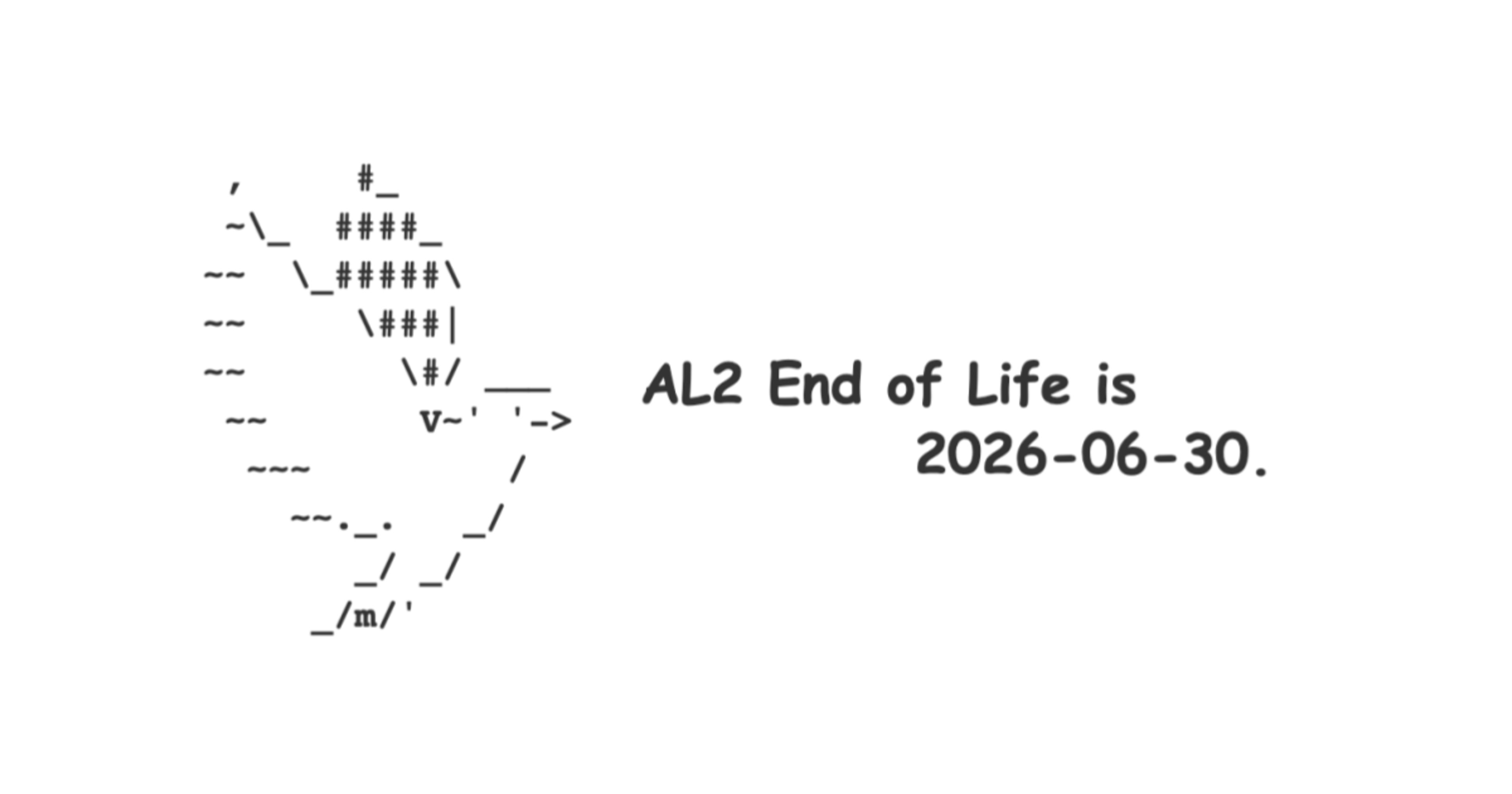
Amazon Linux 2 reaches EOL on June 30, 2026, so I tried letting that bird fly free

This page has been translated by machine translation. View original
Good evening, this is Chiba (Ko).
The end-of-support date for Amazon Linux 2 has been set to June 30, 2026.
Looking back, it has a long history, having gone through the following events:
- November 2017: Announcement of Amazon Linux 2
- June 2018: Official release including 5-year LTS (Long Term Support)
- Summer 2022: Support deadline extended from June 30, 2023 to June 30, 2024
- December 2022: Support deadline extended from June 30, 2024 to June 30, 2025
- December 2024: Support deadline extended from June 30, 2025 to June 30, 2026
I personally relied on it quite a bit around 2020.
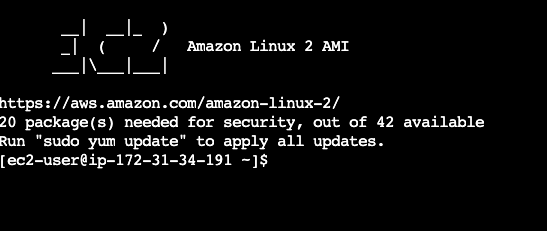
When it comes to Amazon Linux 2, many people probably have the image of the following banner displayed when logging in via SSH:
       __|  __|_  )
       _|  (     /   Amazon Linux 2 AMI
      ___|\___|___|
However, at some point, a bird started greeting you as shown below.
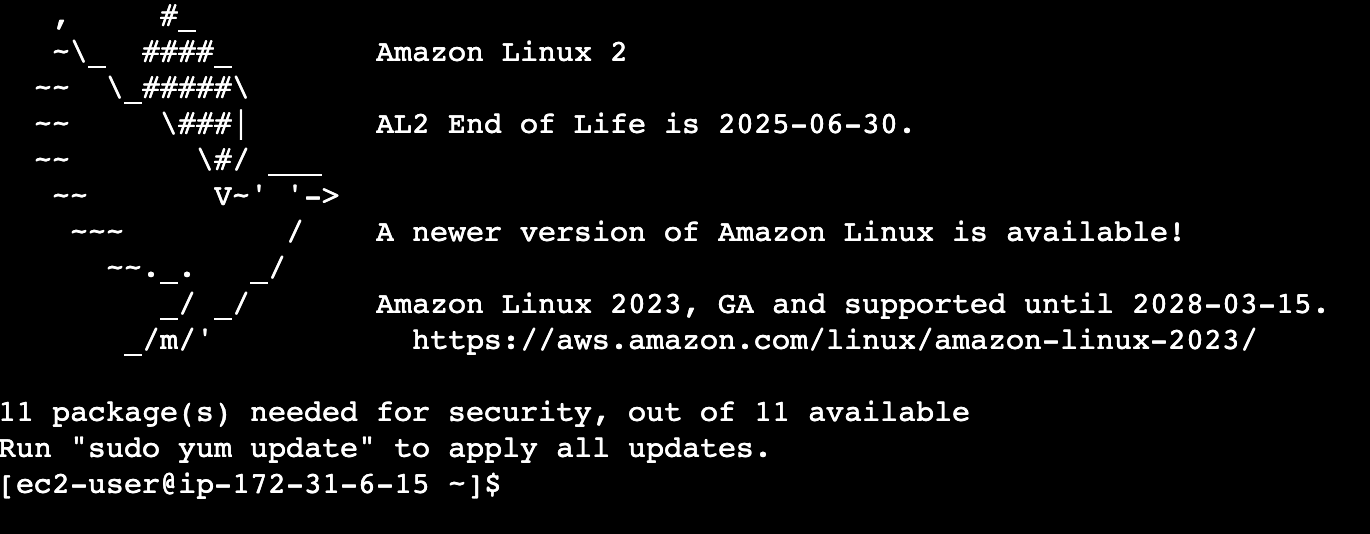
   ,     #_
   ~\_  ####_        Amazon Linux 2
  ~~  \_#####\
  ~~     \###|       AL2 End of Life is 2025-06-30.
  ~~       \#/ ___
   ~~       V~' '->
    ~~~         /    A newer version of Amazon Linux is available!
      ~~._.   _/
         _/ _/       Amazon Linux 2023, GA and supported until 2028-03-15.
       _/m/'           https://aws.amazon.com/linux/amazon-linux-2023/
This is the familiar bird from the Amazon Linux 2023 login banner. When I see a bird of this shape, I want to dye it. Because I know how to dye it.
Just as having a drill makes you want to drill holes, knowing how to dye makes me want to dye this bird too. While I was thinking about what color would look good, I suddenly started thinking: wouldn't it be better to set it free rather than dye it?
To announce its EOL, this bird that has continued to stay in this place that is coming to an end — returning it to that sky. I began to feel that this was the role given to me now. When that thought struck me, lightning ran through the top of my head, and the colors of the world started to look different.
This time, I'd like to set this bird free. There is no longer any cage surrounding you. Let's convey that with everything we've got.
Summary First
- Amazon Linux 2 will reach EOL on June 30, 2026, after which security updates will no longer be provided
- Consider migrating to Amazon Linux 2023 or similar
- You won't have any trouble if you don't read the rest of the text below
Prologue: I Want to Set the Bird Free
The Day the Bird Came to Our Town
Since ancient times, humanity has lived viewing birds as some kind of symbolic presence. Sometimes as symbols of happiness, sometimes as spreaders of misfortune, and sometimes as heralds of seasonal change — and so on.
For us who have no means to soar through the sky, who have only been able to look up at them flying through the heavens on both wings from the ground, perhaps that is only natural. Even after we eventually became able to ride iron masses higher and faster than them through the sky, we continue to look up at birds. "Somewhere other than here." We continue to see them as Icons who can freely move, without any barriers, to that place we are always searching for.
Do you know when the bird came to Amazon Linux 2?
At some point, a bird started appearing in the Amazon Linux 2 login banner. I don't know the exact date, but well, roughly around September 20, 2023.
Excited that "a bird has come!!", I was launching instances from AMIs of that time and recording in my own notes whether a bird was there or not.
% aws ec2 describe-images \
  --owners amazon \
  --filters "Name=name,Values=amzn2-ami-kernel-5.10*x86_64-gp2" \
  --query 'reverse(sort_by(Images, &CreationDate))[].[Name,ImageId]' \
  --output text
amzn2-ami-kernel-5.10-hvm-2.0.20230926.0-x86_64-gp2     ami-0adac58024a7f03bb bird present
amzn2-ami-kernel-5.10-hvm-2.0.20230912.0-x86_64-gp2     ami-03a1b4db103179555 bird absent
amzn2-ami-kernel-5.10-hvm-2.0.20230906.0-x86_64-gp2     ami-0f89bdd365c3d966d
amzn2-ami-kernel-5.10-hvm-2.0.20230822.0-x86_64-gp2     ami-07d6bd9a28134d3b3
amzn2-ami-kernel-5.10-hvm-2.0.20230808.0-x86_64-gp2     ami-044dbe71ee2d3c59e
amzn2-ami-kernel-5.10-hvm-2.0.20230727.0-x86_64-gp2     ami-0e25eba2025eea319 bird absent
amzn2-ami-kernel-5.10-hvm-2.0.20230719.0-x86_64-gp2     ami-09bad682e5ae72267
amzn2-ami-kernel-5.10-hvm-2.0.20230628.0-x86_64-gp2     ami-05ffd9ad4ddd0d6e2
amzn2-ami-kernel-5.10-hvm-2.0.20230612.0-x86_64-gp2     ami-0b51fe1c0254d8fc9
amzn2-ami-kernel-5.10-hvm-2.0.20230530.0-x86_64-gp2     ami-0d739893974bd27d0
amzn2-ami-kernel-5.10-hvm-2.0.20230515.0-x86_64-gp2     ami-07c2a88388bb80eb0
……
I can no longer access the AMIs from that time so I have no choice but to trust my own notes, but it says bird present for the 20230926 AMI and bird absent for the 20230912 AMI.
Of course, I must have included the following user data to prevent updates from being applied at launch from the AMI:
#cloud-config
repo_upgrade: none
So, that's roughly around when the bird came to Amazon Linux 2.
The Day I First Dyed a Bird
I normally work as a Solutions Architect at Classmethod, Inc. I started my current career in January 2020, and have been providing technical support to customers centered on AWS, doing pre-sales activities, writing blog posts, and giving presentations.
In parallel with that, I also started working as a Bird Dyer (torizome-shi) from August 2023. A Bird Dyer is someone who adds color to the bird in Amazon Linux 2023. My main activities consist of occasionally making the bird red and grinning thinking "it'd be interesting to dye this bird too." A unique hardship of being a Bird Dyer is that I tend to almost burst out laughing when I see the Amazon Linux bird during work.
The entry from when I first tried my hand at bird dyeing (torizome) is as follows:
The approach taken was:
- Change text color using color attribute escape sequences in the echo command
- Place a bash script containing echo commands under
/etc/update-motd.d/to display the banner via motd at login time
Please use this as a reference if you want to try bird dyeing yourself.
I Want to Dye the Amazon Linux 2 Bird Too, But...
This is a tweet from September 22, 2023.
My past self from three years ago was trying to fulfill the role of Bird Dyer for the Amazon Linux 2 bird as well. I had actually even partly dyed it. However, midway through I noticed "oh, Amazon Linux 2023 and Amazon Linux 2 work a bit differently," started wondering "is this actually interesting...?", and came back to my senses thinking "what even is dyeing birds? Why am I doing this?", and ended up falling by the wayside. The last update time on my blog draft from that time had been frozen for about 2 years.
However, at this timing when Amazon Linux 2 is finally reaching EOL, I suddenly realized: birds aren't meant to be dyed, they're meant to be set free. Dyeing feels like a second helping, but setting free still feels fresh. Sounds fun. The bird would be happy. And now with generative AI it seems easy to set free.
And so I decided to fulfill my role as a Bird Freer (torinogashi). The Amazon Linux 2 bird, to just be a bird. There is no longer any cage surrounding you.
How to Set the Amazon Linux 2 Bird Free
I'll create a script that runs an animation of the bird flying away. Well, that should be easy enough to do quickly. I'd like to place that script in the right location and have it display when logging in via SSH.
Let me check on the motd-related things, just as I did when dyeing the bird in Amazon Linux 2023.
First, /etc/update-motd.d/:
$ ls -la /etc/update-motd.d/
total 24
drwxr-xr-x  2 root root   86 Jun  8  2021 .
drwxr-xr-x 81 root root 8192 Oct  4 15:18 ..
-rwxr-xr-x  1 root root  553 Sep  4 21:56 30-banner
-rwxr-xr-x  1 root root   67 Sep 13  2021 50-amazon-linux-extras-news
-rwxr-xr-x  1 root root  454 Sep  4 21:56 70-available-updates
The contents of the most important-looking /etc/update-motd.d/30-banner. Would replacing this be the quickest approach?
$ cat /etc/update-motd.d/30-banner
#!/bin/sh
test -e /etc/os-release && os_release='/etc/os-release' || os_release='/usr/lib/os-release'
. "${os_release}"
cat << EOF
   ,     #_
   ~\_  ####_        ${PRETTY_NAME:-Amazon Linux 2}
  ~~  \_#####\\
  ~~     \###|       AL2 End of Life is ${SUPPORT_END:-2025-06-30}.
  ~~       \#/ ___
   ~~       V~' '->
    ~~~         /    A newer version of Amazon Linux is available!
      ~~._.   _/
         _/ _/       Amazon Linux 2023, GA and supported until 2028-03-15.
       _/m/'           https://aws.amazon.com/linux/amazon-linux-2023/

EOF
Let me also check the other files placed there.
$ cat /etc/update-motd.d/50-amazon-linux-extras-news
#!/bin/bash
timeout 5s amazon-linux-extras system_motd 2>/dev/null
$ cat /etc/update-motd.d/70-available-updates
#!/bin/bash

# Possible summaries include:
# No packages needed for security; %d packages available
# %d package(s) needed[ (+%d related)] for security, out of %d available
# There are [[%d security update(s)[ out of ]%d total update(s)]] available
LANG=C timeout 30s /usr/bin/yum \
    --debuglevel 2 \
    --security check-update 2>/dev/null \
        | grep -P '(?<! 0 packages) available$' \
    && echo 'Run "sudo yum update" to apply all updates.'
Let me also quickly check other paths. There are some things that exist in Amazon Linux 2023 but don't exist in Amazon Linux 2.
# ls -l /usr/lib/motd
ls: cannot access /usr/lib/motd: No such file or directory

# ls -l /etc/motd
lrwxrwxrwx 1 root root 25 Oct 13 22:21 /etc/motd -> /var/lib/update-motd/motd

# cat /var/lib/update-motd/motd
   ,     #_
   ~\_  ####_        Amazon Linux 2
  ~~  \_#####\
  ~~     \###|       AL2 End of Life is 2025-06-30.
  ~~       \#/ ___
   ~~       V~' '->
    ~~~         /    A newer version of Amazon Linux is available!
      ~~._.   _/
         _/ _/       Amazon Linux 2023, GA and supported until 2028-03-15.
       _/m/'           https://aws.amazon.com/linux/amazon-linux-2023/

11 package(s) needed for security, out of 11 available
Run "sudo yum update" to apply all updates.

# ls -l /etc/motd.d/
ls: cannot access /etc/motd.d/: No such file or directory

# ls -l /run/motd
ls: cannot access /run/motd: No such file or directory

# ls -l /run/motd.d/
ls: cannot access /run/motd.d/: No such file or directory
Checking update-motd:
$ systemctl status update-motd
● update-motd.service - Dynamically Generate Message Of The Day
   Loaded: loaded (/usr/lib/systemd/system/update-motd.service; enabled; vendor preset: enabled)
   Active: active (exited) since Wed 2023-10-04 15:19:05 UTC; 1min 31s ago
  Process: 3126 ExecStart=/usr/sbin/update-motd (code=exited, status=0/SUCCESS)
 Main PID: 3126 (code=exited, status=0/SUCCESS)
   CGroup: /system.slice/update-motd.service

Oct 04 15:18:33 ip-172-31-38-67.ap-northeast-1.compute.internal systemd[1]: Starting Dynamically Generate Message Of The Day...
Oct 04 15:19:05 ip-172-31-38-67.ap-northeast-1.compute.internal systemd[1]: Started Dynamically Generate Message Of The Day.
Got a general idea.
Place the Script in /etc/profile.d/ Rather Than /etc/update-motd.d/
To state the conclusion first, placing the animation script under /etc/update-motd.d/ did not produce the expected behavior.
It seems that update-motd.service runs only once at boot, executes the scripts under /etc/update-motd.d/, writes the results to /var/lib/update-motd/motd, and subsequent SSH logins simply display that file. (Since spending too much time investigating here would make me start feeling "what am I even doing...", I cut my investigation short at roughly "it seems that way" level.)
To achieve animation, the script needs to run somewhere that can output directly to the TTY. This time I chose /etc/profile.d/.
Scripts in /etc/profile.d/ are sourced from /etc/profile when the SSH login shell starts. Since the TTY is available, interactive display is possible, such as moving the cursor with tput and adding colors.
Configuration for Setting the Amazon Linux 2 Bird Free
This time I'll set it free with the following configuration.
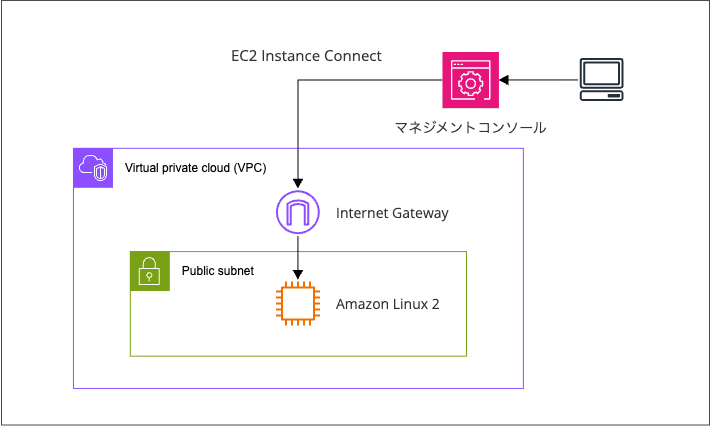
I'll launch an Amazon Linux 2 EC2 instance in a public subnet and connect via SSH using EC2 Instance Connect from the AWS Management Console.
If the bird flies away when SSH connected, my role as a Bird Freer is complete.
By the way, where does the bird escape to? Does it go through the Internet Gateway and out to the internet?
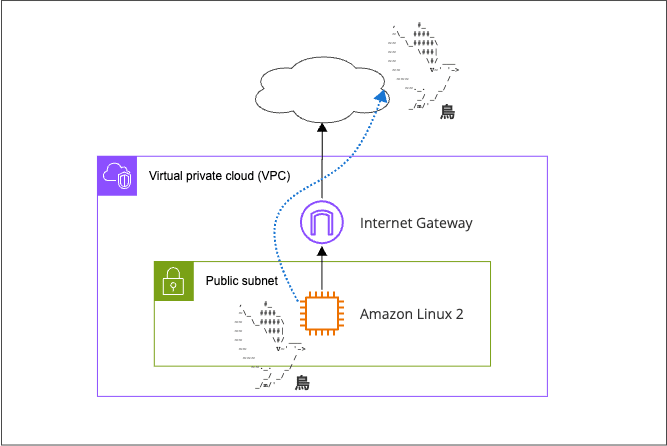
No, while this time I'm connecting via the internet to set it free, the bird should be able to escape even in a configuration that cannot do outbound to the internet. In that case, it would be like this.
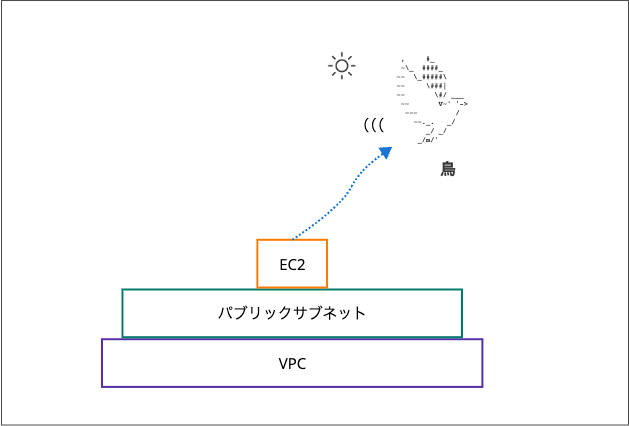
The bird escapes "upward." Birds aren't packets, so they can't read route tables. They probably won't go through the Internet Gateway. What am I saying.
Creating the Configuration to Set the Amazon Linux 2 Bird Free
I created a CloudFormation template that creates everything together.
Expand
AWSTemplateFormatVersion: "2010-09-09"
Description: Free the AL2 Bird - AL2 instance with bird animation on login

Parameters:
  InstanceType:
    Type: String
    Default: t3.micro

Resources:
  # VPC
  Vpc:
    Type: AWS::EC2::VPC
    Properties:
      CidrBlock: 10.0.0.0/16
      EnableDnsSupport: true
      EnableDnsHostnames: true
      Tags:
        - Key: Name
          Value: free-al2-bird-vpc

  InternetGateway:
    Type: AWS::EC2::InternetGateway
    Properties:
      Tags:
        - Key: Name
          Value: free-al2-bird-igw

  VpcGatewayAttachment:
    Type: AWS::EC2::VPCGatewayAttachment
    Properties:
      VpcId: !Ref Vpc
      InternetGatewayId: !Ref InternetGateway

  PublicSubnet:
    Type: AWS::EC2::Subnet
    Properties:
      VpcId: !Ref Vpc
      CidrBlock: 10.0.0.0/24
      AvailabilityZone: !Select [0, !GetAZs ""]
      MapPublicIpOnLaunch: true
      Tags:
        - Key: Name
          Value: free-al2-bird-subnet-public

  RouteTable:
    Type: AWS::EC2::RouteTable
    Properties:
      VpcId: !Ref Vpc
      Tags:
        - Key: Name
          Value: free-al2-bird-rtb-public

  DefaultRoute:
    Type: AWS::EC2::Route
    DependsOn: VpcGatewayAttachment
    Properties:
      RouteTableId: !Ref RouteTable
      DestinationCidrBlock: 0.0.0.0/0
      GatewayId: !Ref InternetGateway

  SubnetRouteTableAssociation:
    Type: AWS::EC2::SubnetRouteTableAssociation
    Properties:
      SubnetId: !Ref PublicSubnet
      RouteTableId: !Ref RouteTable

  # Security Group
  SecurityGroup:
    Type: AWS::EC2::SecurityGroup
    Properties:
      GroupName: free-al2-bird-sg
      GroupDescription: Allow SSH from EC2 Instance Connect (ap-northeast-1)
      VpcId: !Ref Vpc
      SecurityGroupIngress:
        - IpProtocol: tcp
          FromPort: 22
          ToPort: 22
          CidrIp: 3.112.23.0/29
          Description: EC2 Instance Connect ap-northeast-1
      Tags:
        - Key: Name
          Value: free-al2-bird-sg

  # EC2
  Instance:
    Type: AWS::EC2::Instance
    Properties:
      ImageId: ami-06087cfd700858bee
      InstanceType: !Ref InstanceType
      SubnetId: !Ref PublicSubnet
      SecurityGroupIds:
        - !Ref SecurityGroup
      Tags:
        - Key: Name
          Value: free-al2-bird-ec2
      UserData:
        Fn::Base64: |
          #!/bin/bash

          cat << 'BIRDSCRIPT' > /etc/profile.d/bird.sh
          #!/bin/bash

          # Run only at SSH login
          [ -t 1 ]                 || return 0
          [ -n "$TERM" ]           || return 0
          [ -n "$SSH_CONNECTION" ] || return 0

          Q="'"
          BOLD=$'\e[1m'
          RESET=$'\e[0m'
          RAINBOW=($'\e[31m' $'\e[33m' $'\e[32m' $'\e[36m' $'\e[34m' $'\e[35m')
          BIRD_H=10
          TRAVEL=60

          BANNER=(
              "   ,     #_"
              "   ~\\_  ####_        Amazon Linux 2"
              "  ~~  \\_#####\\"
              "  ~~     \\###|       AL2 End of Life is 2026-06-30."
              "  ~~       \\#/ ___"
              "   ~~       V~${Q} ${Q}->"
              "    ~~~         /    A newer version of Amazon Linux is available!"
              "      ~~._.   _/"
              "         _/ _/       Amazon Linux 2023, GA and supported until 2028-03-15."
              "       _/m/${Q}           https://aws.amazon.com/linux/amazon-linux-2023/"
          )

          BIRD=(
              "   ,     #_"
              "   ~\\_  ####_"
              "  ~~  \\_#####\\"
              "  ~~     \\###|"
              "  ~~       \\#/ ___"
              "   ~~       V~${Q} ${Q}->"
              "    ~~~         /"
              "      ~~._.   _/"
              "         _/ _/"
              "       _/m/${Q}"
          )

          draw_bird() {
              local col=$1 row_off=$2 i row
              shift 2
              for ((i = 0; i < BIRD_H; i++)); do
                  row=$(( BASE_ROW + row_off + i ))
                  if (( row >= 0 && row < ROWS )); then
                      tput cup "$row" 0
                      printf '%*s' "$COLS" ''
                      if (( col < COLS )); then
                          tput cup "$row" "$col"
                          if (( flying )); then
                              printf '%s' "${BOLD}${RAINBOW[$(( (i + col / 4) % 6 ))]}$1${RESET}"
                          else
                              printf '%s' "$1"
                          fi
                      fi
                  fi
                  shift
              done
          }

          clear_rows() {
              local row_off=$1 i row
              for ((i = 0; i < BIRD_H; i++)); do
                  row=$(( BASE_ROW + row_off + i ))
                  if (( row >= 0 && row < ROWS )); then
                      tput cup "$row" 0
                      printf '%*s' "$COLS" ''
                  fi
              done
          }

          draw_trail() {
              local bird_col=$1 bird_row_off=$2
              local bird_top=$(( BASE_ROW + bird_row_off ))
              local bird_bot=$(( bird_top + BIRD_H - 1 ))
              local bird_right=$(( bird_col + 22 ))
              local chars=('.' ',' '~' '*' '-')
              local i tr tc n j dots
              for ((i = 0; i < ${#trail_cols[@]}; i++)); do
                  tr=$(( trail_rows[i] + RANDOM % 3 - 1 ))
                  tc=$(( trail_cols[i] + RANDOM % 3 - 1 ))
                  (( tr < 0 || tc < 0 )) && continue
                  (( tr >= bird_top && tr <= bird_bot && tc >= bird_col && tc <= bird_right )) && continue
                  dots=''
                  n=$(( RANDOM % 2 + 1 ))
                  for ((j = 0; j < n; j++)); do dots+="${chars[$(( RANDOM % 5 ))]}"; done
                  tput cup "$tr" "$tc"
                  printf '%s' "$dots"
              done
          }

          COLS=$(tput cols)
          ROWS=$(tput lines)
          BASE_ROW=0

          tput civis
          trap 'tput cnorm; tput cup $(( ROWS - 1 )) 0' EXIT INT TERM
          clear

          flying=0
          draw_bird 0 0 "${BANNER[@]}"
          sleep 0.8

          flying=1
          col=0
          prev_row_off=0
          trail_cols=()
          trail_rows=()

          while (( col <= TRAVEL )); do
              row_off=$(( - col * BIRD_H / TRAVEL ))
              clear_rows "$prev_row_off"

              trail_cols+=("$(( col + 14 ))")
              trail_rows+=("$(( BASE_ROW + row_off + 5 ))")
              while (( ${#trail_cols[@]} > 6 )); do
                  trail_cols=("${trail_cols[@]:1}")
                  trail_rows=("${trail_rows[@]:1}")
              done

              draw_bird "$col" "$row_off" "${BIRD[@]}"
              draw_trail "$col" "$row_off"
              prev_row_off=$row_off
              sleep 0.08
              (( col += 4 ))
          done

          for ((i = 0; i < BIRD_H; i++)); do
              tput cup "$i" 0
              printf '%*s' "$COLS" ''
          done
          tput cup 0 0
          printf '%s\n' "Amazon Linux 2 EOL is 2026/06/30"
          LAST=$(last -n 2 -i "$USER" 2>/dev/null | grep -v "still logged" | grep "$USER" | head -1 | awk '{print $4,$5,$6,$7,"from",$3}')
          [[ "$LAST" =~ ^(Mon|Tue|Wed|Thu|Fri|Sat|Sun) ]] && printf 'Last login: %s\n' "$LAST"
          BIRDSCRIPT

          chmod +x /etc/profile.d/bird.sh

Outputs:
  InstanceId:
    Value: !Ref Instance
  PublicIp:
    Value: !GetAtt Instance.PublicIp
It creates a VPC and all related resources along with an EC2 instance, and also places the script via user data. Here is the list of resources created:
| Logical ID | Resource Type | Name Tag |
|---|---|---|
Vpc |
AWS::EC2::VPC | free-al2-bird-vpc |
InternetGateway |
AWS::EC2::InternetGateway | free-al2-bird-igw |
VpcGatewayAttachment |
AWS::EC2::VPCGatewayAttachment | (no tag) |
PublicSubnet |
AWS::EC2::Subnet | free-al2-bird-subnet-public |
RouteTable |
AWS::EC2::RouteTable | free-al2-bird-rtb-public |
DefaultRoute |
AWS::EC2::Route | (no tag) |
SubnetRouteTableAssociation |
AWS::EC2::SubnetRouteTableAssociation | (no tag) |
SecurityGroup |
AWS::EC2::SecurityGroup | free-al2-bird-sg |
Instance |
AWS::EC2::Instance | free-al2-bird-ec2 |
The AMI ID used is hardcoded. From the following results, the most recent one is specified.
~ $ aws ec2 describe-images \
>   --owners amazon \
>   --filters "Name=name,Values=amzn2-ami-kernel-5.10*x86_64-gp2" \
>   --query 'reverse(sort_by(Images, &CreationDate))[].[Name,ImageId]' \
>   --output text
amzn2-ami-kernel-5.10-hvm-2.0.20260629.0-x86_64-gp2     ami-06087cfd700858bee
amzn2-ami-kernel-5.10-hvm-2.0.20260622.1-x86_64-gp2     ami-07c647553a2f27949
amzn2-ami-kernel-5.10-hvm-2.0.20260615.0-x86_64-gp2     ami-0187c7df27ec175e1
amzn2-ami-kernel-5.10-hvm-2.0.20260608.0-x86_64-gp2     ami-0464ea504c6b43640
amzn2-ami-kernel-5.10-hvm-2.0.20260526.0-x86_64-gp2     ami-0b268943ac284f0c8
amzn2-ami-kernel-5.10-hvm-2.0.20260515.0-x86_64-gp2     ami-0324af2ca26d828c5
amzn2-ami-kernel-5.10-hvm-2.0.20260511.1-x86_64-gp2     ami-0cc213517bf63b8ad
amzn2-ami-kernel-5.10-hvm-2.0.20260508.0-x86_64-gp2     ami-0e56fdd7002dd4962
amzn2-ami-kernel-5.10-hvm-2.0.20260504.0-x86_64-gp2     ami-04633509de692dab5
amzn2-ami-kernel-5.10-hvm-2.0.20260427.1-x86_64-gp2     ami-0f0cee67f8a8a3f07
amzn2-ami-kernel-5.10-hvm-2.0.20260413.0-x86_64-gp2     ami-0d8fbaea8b647edac
amzn2-ami-kernel-5.10-hvm-2.0.20260406.1-x86_64-gp2     ami-0b23654657ee2874f
The script placed in /etc/profile.d/ of the created EC2 instance is as follows:
#!/bin/bash

# Determine if sourced or directly executed and exit early
if (return 0 2>/dev/null); then
    _exit() { return "$1"; }
else
    _exit() { exit "$1"; }
fi
# Run only on SSH login
[ -t 1 ]                 || _exit 0
[ -n "$TERM" ]           || _exit 0
[ -n "$SSH_CONNECTION" ] || _exit 0

Q="'"
BOLD=$'\e[1m'
RESET=$'\e[0m'
RAINBOW=($'\e[31m' $'\e[33m' $'\e[32m' $'\e[36m' $'\e[34m' $'\e[35m')
BIRD_H=10
TRAVEL=60

BANNER=(
    "   ,     #_"
    "   ~\\_  ####_        Amazon Linux 2"
    "  ~~  \\_#####\\"
    "  ~~     \\###|       AL2 End of Life is 2026-06-30."
    "  ~~       \\#/ ___"
    "   ~~       V~${Q} ${Q}->"
    "    ~~~         /    A newer version of Amazon Linux is available!"
    "      ~~._.   _/"
    "         _/ _/       Amazon Linux 2023, GA and supported until 2028-03-15."
    "       _/m/${Q}           https://aws.amazon.com/linux/amazon-linux-2023/"
)

BIRD=(
    "   ,     #_"
    "   ~\\_  ####_"
    "  ~~  \\_#####\\"
    "  ~~     \\###|"
    "  ~~       \\#/ ___"
    "   ~~       V~${Q} ${Q}->"
    "    ~~~         /"
    "      ~~._.   _/"
    "         _/ _/"
    "       _/m/${Q}"
)

draw_bird() {
    local col=$1 row_off=$2 i row
    shift 2
    for ((i = 0; i < BIRD_H; i++)); do
        row=$(( BASE_ROW + row_off + i ))
        if (( row >= 0 && row < ROWS )); then
            tput cup "$row" 0
            printf '%*s' "$COLS" ''
            if (( col < COLS )); then
                tput cup "$row" "$col"
                if (( flying )); then
                    printf '%s' "${BOLD}${RAINBOW[$(( (i + col / 4) % 6 ))]}$1${RESET}"
                else
                    printf '%s' "$1"
                fi
            fi
        fi
        shift
    done
}

clear_rows() {
    local row_off=$1 i row
    for ((i = 0; i < BIRD_H; i++)); do
        row=$(( BASE_ROW + row_off + i ))
        if (( row >= 0 && row < ROWS )); then
            tput cup "$row" 0
            printf '%*s' "$COLS" ''
        fi
    done
}

draw_trail() {
    local bird_col=$1 bird_row_off=$2
    local bird_top=$(( BASE_ROW + bird_row_off ))
    local bird_bot=$(( bird_top + BIRD_H - 1 ))
    local bird_right=$(( bird_col + 22 ))
    local chars=('.' ',' '~' '*' '-')
    local i tr tc n j dots
    for ((i = 0; i < ${#trail_cols[@]}; i++)); do
        tr=$(( trail_rows[i] + RANDOM % 3 - 1 ))
        tc=$(( trail_cols[i] + RANDOM % 3 - 1 ))
        (( tr < 0 || tc < 0 )) && continue
        (( tr >= bird_top && tr <= bird_bot && tc >= bird_col && tc <= bird_right )) && continue
        dots=''
        n=$(( RANDOM % 2 + 1 ))
        for ((j = 0; j < n; j++)); do dots+="${chars[$(( RANDOM % 5 ))]}"; done
        tput cup "$tr" "$tc"
        printf '%s' "$dots"
    done
}

COLS=$(tput cols)
ROWS=$(tput lines)
BASE_ROW=0

tput civis
trap 'tput cnorm' EXIT INT TERM
clear

flying=0
draw_bird 0 0 "${BANNER[@]}"
sleep 0.8

flying=1
col=0
prev_row_off=0
trail_cols=()
trail_rows=()

while (( col <= TRAVEL )); do
    row_off=$(( - col * BIRD_H / TRAVEL ))
    clear_rows "$prev_row_off"

    trail_cols+=("$(( col + 14 ))")
    trail_rows+=("$(( BASE_ROW + row_off + 5 ))")
    while (( ${#trail_cols[@]} > 6 )); do
        trail_cols=("${trail_cols[@]:1}")
        trail_rows=("${trail_rows[@]:1}")
    done

    draw_bird "$col" "$row_off" "${BIRD[@]}"
    draw_trail "$col" "$row_off"
    prev_row_off=$row_off
    sleep 0.08
    (( col += 4 ))
done

# Clear all rows the bird may have passed through
for ((i = 0; i < BIRD_H; i++)); do
    tput cup "$i" 0
    printf '%*s' "$COLS" ''
done
tput cup 0 0
printf '%s\n' "Amazon Linux 2 will reach EOL on 2026/06/30"
LAST=$(last -n 2 -i "$USER" 2>/dev/null | grep -v "still logged" | grep "$USER" | head -1 | awk '{print $4,$5,$6,$7,"from",$3}')
[[ "$LAST" =~ ^(Mon|Tue|Wed|Thu|Fri|Sat|Sun) ]] && printf 'Last login: %s\n' "$LAST"
I deployed this CloudFormation template. Now, let's put it into practice!
I Let the Amazon Linux 2 Bird Fly Free
Let's try connecting to the deployed EC2 instance via EC2 Instance Connect.
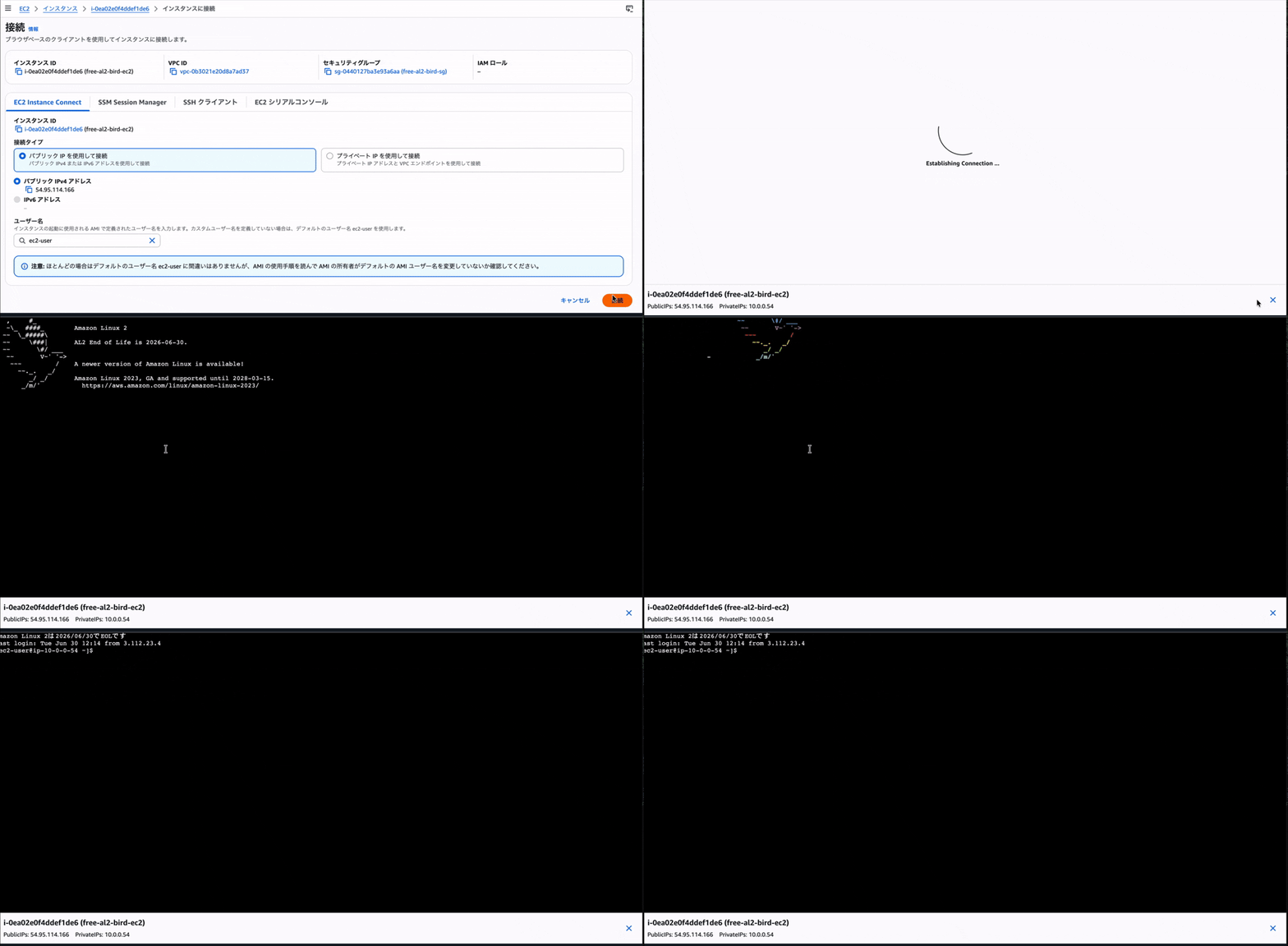
Yes, the bird escaped! Did you catch it?
Let me show it one more time.
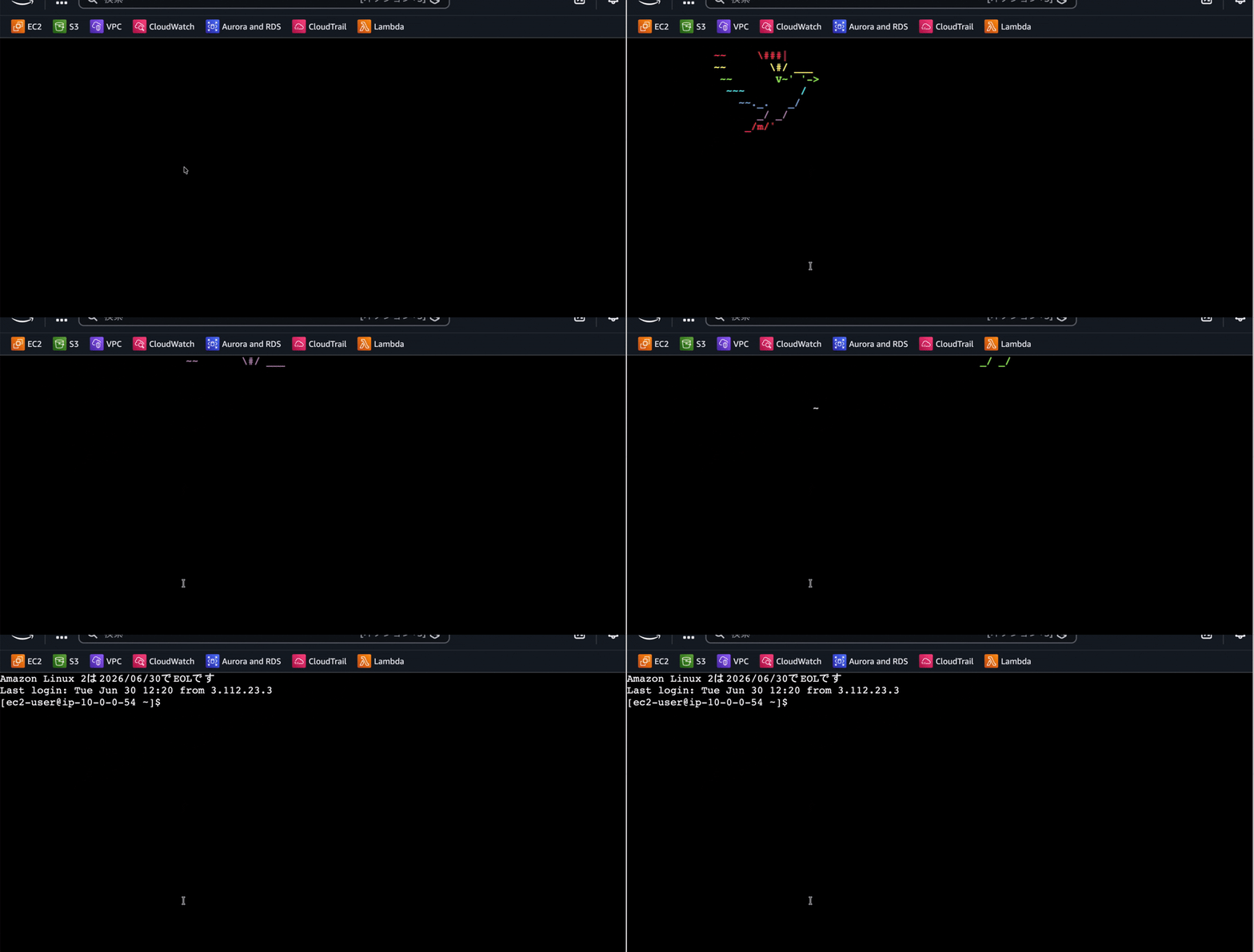
Yes, it's flying away!! It might be hard to tell since it's a gif.
Locally the movement is a bit easier to see, so here it is.
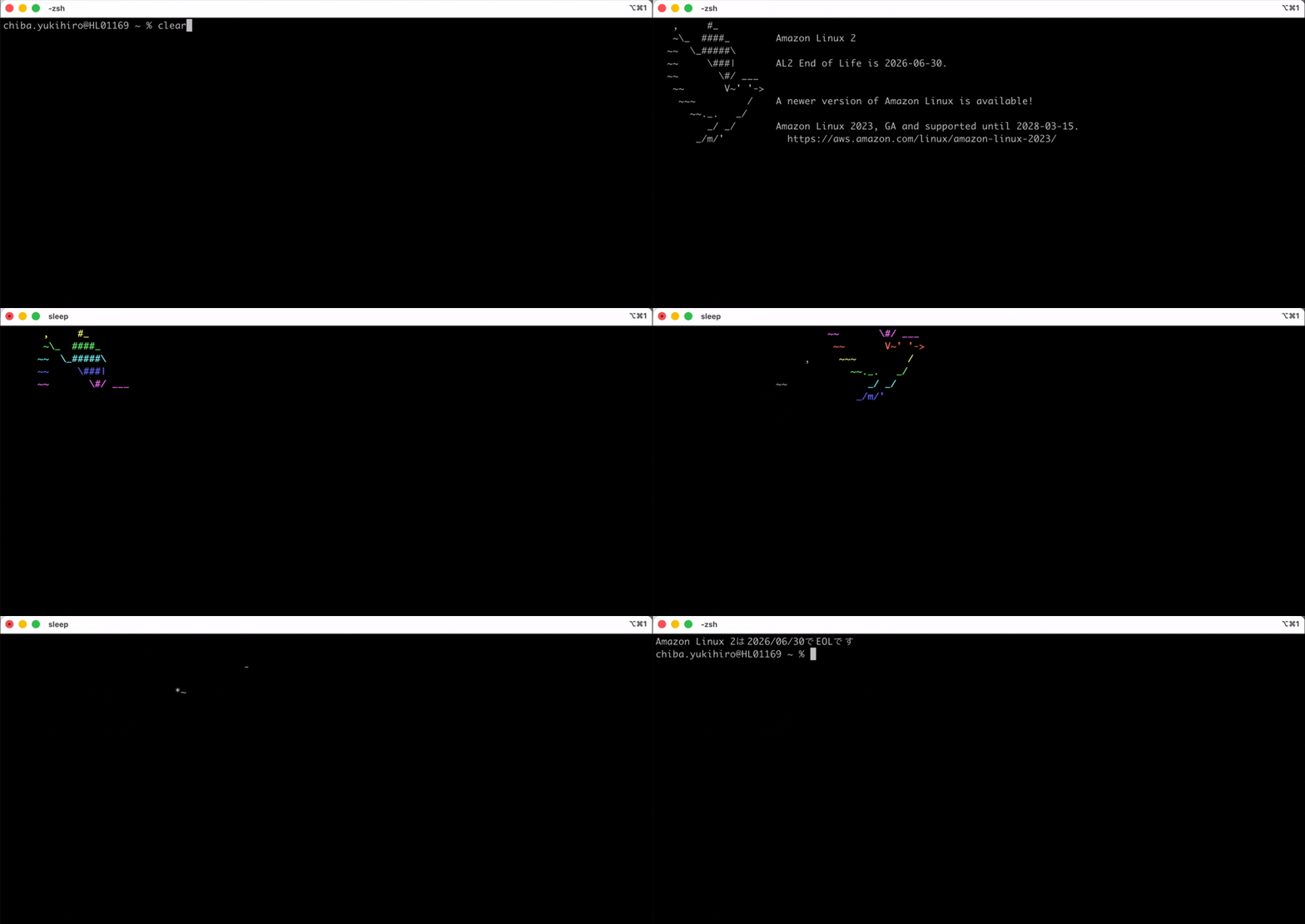
There's a bird flying off to the upper right, changing colors in a rainbow of hues. I was able to return to the sky the bird that had been burdened with the role of announcing EOL. This is my debut as a bird releaser. The cage that surrounds you... no longer exists.
It comes back every time you connect, though. Sweat the small stuff and you lose.
Challenges
When I asked a generative AI "what is this?", it correctly identified it as a bird.
   ,     #_
   ~\_  ####_
  ~~  \_#####\
  ~~     \###|
  ~~       \#/ ___
   ~~       V~' '->
    ~~~         /
      ~~._.   _/
         _/ _/
       _/m/'
However, when I asked it to create about 3 alternative frames to make a flapping animation, it didn't go well. No matter how many times I asked for "a pattern with wings lowered," all it produced was a pile of symbols incomprehensible to the human brain. So I settled for a version where the bird flies away with a fixed pose.
I also struggled with dealing with the recurring feeling of "what on earth am I doing right now." I found myself apologizing to someone, saying that about 70% of this was written outside of work hours, so please forgive me. Perhaps those hours spent releasing a bird after the family had gone to sleep were, in some way, a source of comfort for me.
Closing
This was the story of how I let that bird fly free, since Amazon Linux 2 reaches EOL on June 30, 2026. To reiterate, Amazon Linux 2 reaches EOL on June 30, 2026. Security updates will no longer be provided. Consider migrating sooner rather than later.
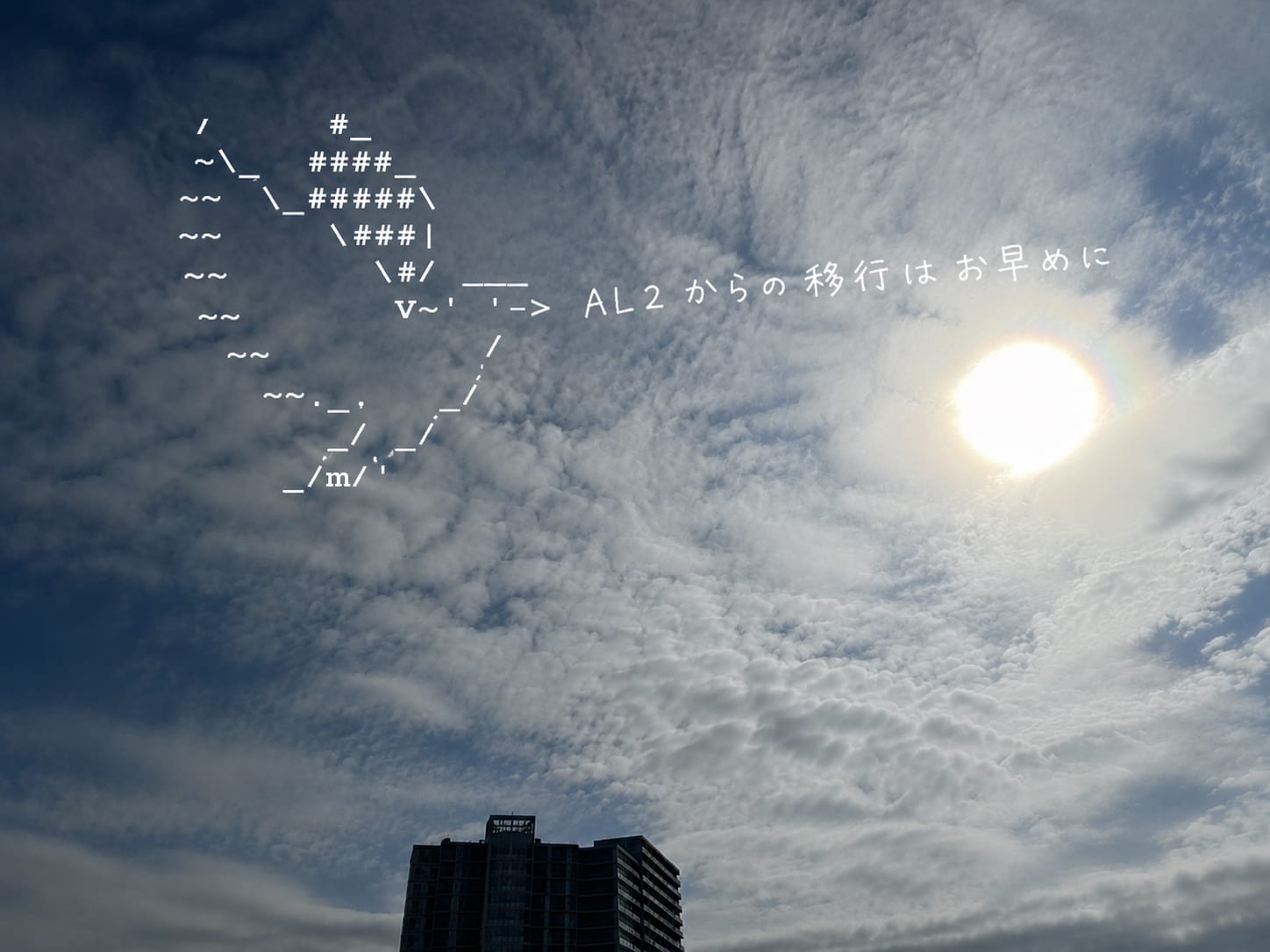
By the way, what is that bird's name anyway? I looked it up but couldn't find anything that clicked. The only example I found was in a GitHub issue where it was referred to as "AL bird." It might be nice to go along with that. If I were free to name it myself, I'd like to suggest the name "Rokunosuke."

This blog was written for the purpose of raising awareness about Amazon Linux 2's EOL. I am absolutely not messing around. However, it may not be the most appropriate thing to read at work. When recommending it to others, please tell them to sneak a read during their break. I think the bird, from somewhere beyond the sky, would want that too.
That's all from Chiba Yuki (@batchicchi).

         ,     #_
         ~\_  ####_
        ~~  \_#####\
        ~~     \###|.      *flap*
        ~~       \#/ ___
         ~~       V~' '->
          ~~~         /
            ~~._.   _/
               _/ _/
      (  ((   _/m/'
References
- Amazon Linux 2のサポート期限が2025年6月末まで延長されました | DevelopersIO
- セッション「Amazon Linux AL2023 and beyond」参加してこれからの Amazon Linux について聞いてきました #AWSreInvent #CMP206 | DevelopersIO
- Amazon Linux パートナー - Amazon Web Services (AWS)
- [Bug] - motd resets when new AL2023 update is available · Issue #358 · amazonlinux/amazon-linux-2023
