
GitHub CLI 2.94.0 now allows reading and writing Discussions via gh discussion, and listing Agent Skills via gh skill.

This page has been translated by machine translation. View original
Hey! I'm Yuji Nishimura from the Operations Department!
In GitHub CLI 2.94.0, the Issue types / sub-issues support for gh issue is a major update, but there's another change you shouldn't miss.
gh discussion for handling GitHub Discussions, and gh skill list / gh skill install --all to reinforce Agent Skills management have been added.
In terms of reading context on GitHub via CLI and AI agents, I think these are long-awaited updates as well. In this article, we'll take a look at gh discussion and gh skill.
What We'll Cover
Of GitHub CLI 2.94.0, this article covers the following two areas.
| Area | What was added / improved |
|---|---|
gh discussion |
A preview command set for list / view / create / edit / comment on Discussions was added |
gh skill |
list, install --all, skipping skills without metadata during update --all, and more were added |
Let's Try It Out
Environment
- macOS / Darwin arm64
- GitHub CLI 2.94.0
Reading Discussions with gh discussion
GitHub CLI 2.94.0 added the gh discussion command set.
GENERAL COMMANDS
  create:        Create a new discussion (preview)
  list:          List discussions in a repository (preview)

TARGETED COMMANDS
  comment:       Add, edit, or delete a comment or a reply on a discussion (preview)
  edit:          Edit a discussion (preview)
  view:          View a discussion (preview)
It includes create, edit, and comment as well, but these modify real data. First, let's check the read-only list / view, and then in the latter half, we'll also try create / edit / comment on our own repository with Discussions enabled.
Let's list the Discussions in a public repository.
gh discussion list --repo cli/cli --limit 3
Here are the results.

While Issues tend to be organized as bugs or tasks, Discussions retain Q&As, consultations, design uncertainties, and usage questions.
Being able to read these from the CLI makes it easier to check in the terminal whether "there's the same inquiry in Discussions even if not in Issues." When investigating OSS or incidents, we often look at Discussions as well as Issues, so having a single entry point through gh is convenient.
Creating, Editing, and Commenting with gh discussion
Since create / edit / comment modify real data, we'll test them not on a public repository but on our own repository with Discussions enabled (referred to as OWNER/REPO below).
create can create a Discussion without an interactive prompt by passing --title / --category / --body.
gh discussion create --repo OWNER/REPO --title "gh discussion operation check (test)" --category General --body "create operation check"
Here are the results. A URL is returned.
https://github.com/<OWNER/REPO>/discussions/<number>
We'll add a top-level comment to the created Discussion using comment. Pass the Discussion number (or URL) as the argument.
gh discussion comment <number> --repo OWNER/REPO --body "comment operation check"
Here are the results. A URL is returned.
https://github.com/<OWNER/REPO>/discussions/<number>#discussioncomment-99999999
We'll update the title and body with edit.
gh discussion edit <number> --repo OWNER/REPO --title "gh discussion operation check (edited)" --body "edit operation check: body updated"
Here are the results. A URL is returned.
https://github.com/<OWNER/REPO>/discussions/<number>
Finally, we'll use view to confirm that the added comment and the title/body edits are reflected.
gh discussion view <number> --repo OWNER/REPO
Here are the results.

Compatibility with AI Agents
Having gh discussion list / view increases the targets that can be investigated by AI agents.
For example, when stuck on how to use a certain CLI, it becomes easier to have an agent investigate in the following order:
- Search for related Issues with
gh issue list - Search for related Discussions with
gh discussion list - Use
viewto summarize found Issues and Discussions - Cross-reference with the README and release notes
Information on GitHub may exist not only in Issues but also in Discussions. Now that Discussions can be handled from the CLI, it becomes natural to expand the agent's research scope.
Listing Agent Skills with gh skill list
In v2.94.0, gh skill list has also been added.
gh skill list
Running this command listed the skills in .agents/skills within the project. The output looks like this:
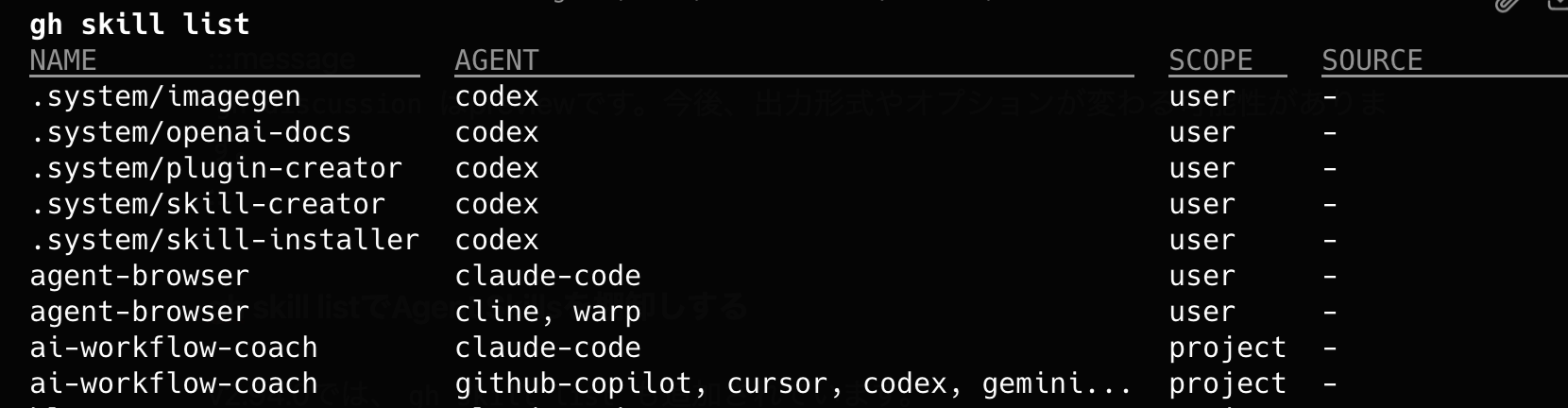
When I previously tried gh skill in GitHub CLI v2.90.0, I wrote that listing installed skills was weak and required looking at the directory directly.
With gh skill list added, at least "which skills are installed, for which agent, and at which scope" can now be easily checked from the CLI.
install --all and skip behavior during updates
In gh skill install --help, --all was also confirmed.
--all Install all skills without prompting for skill selection
When importing a repository containing multiple skills, you can install them all at once without going through an interactive selection.
In gh skill update --help, the behavior of skipping skills without metadata when using --all or in non-interactive mode is also explained.
Skills without GitHub metadata ... With --all or in non-interactive mode, they are skipped with a notice.
This is effective in environments where custom skills or manually placed skills are mixed in. It won't stop at an interactive prompt and defaults to the safe side even in CI or agent execution.
How to Handle This in Practice
The updates to gh discussion and gh skill this time are changes that make it easier to handle "context on GitHub" and "the agent's working environment" from the CLI.
In OSS research and incident investigations, not stopping at Issues alone and also being able to track Discussions where Q&As and consultations are gathered reduces the chance of missing something. Whether narrowing down manually or having an agent investigate, having gh as a single entry point is easy to work with.
gh skill list becomes a useful command in environments where Agent Skills are shared across multiple hosts and multiple agents. Even with shared directories like .agents/skills, being able to list which skills are installed for which host from the CLI makes management easier.
Notes
Here are the notes based on what we confirmed this time.
- Since
gh discussionandgh skillare previews, assume future changes gh skill listalso picks up skills within the project, so results vary depending on the execution directory- Since
gh skill update --allskips skills without metadata, updates for manually placed skills need to be handled separately
Summary
GitHub CLI 2.94.0 also included useful updates for gh discussion and gh skill.
gh discussion allows you to read Q&As and consultations from the CLI that couldn't be captured through Issues alone. gh skill list makes it easier to list Agent Skills when using them across multiple environments.
While not as flashy as Issue types or sub-issues, seen as part of the trend of working with GitHub not just from a browser but also from the CLI and agents, this is quite a practical update.
I hope this is helpful to someone.
Reference Links: