
GitHub Issues labels can now be archived instead of deleted, preserving their history

This page has been translated by machine translation. View original
Hey there! I'm Yuji Nishimura from the Operations team!
In repositories that have been maintained for a long time, unused labels tend to pile up. However, deleting them would also remove their history from past Issues and Pull Requests, which made it hard to commit to cleaning things up. The label archive feature that went GA on 2026-08-27 addresses this "want to remove it but keep the history" dilemma. I looked into what it can do, including whether it can be operated from the CLI or API.
What is Label Archiving?
GitHub labels are a feature for categorizing Issues, Pull Requests, and Discussions. Until now, the only way to clean up unwanted labels was to "delete" them, but deleting a label also removes it from all Issues and PRs it was attached to.
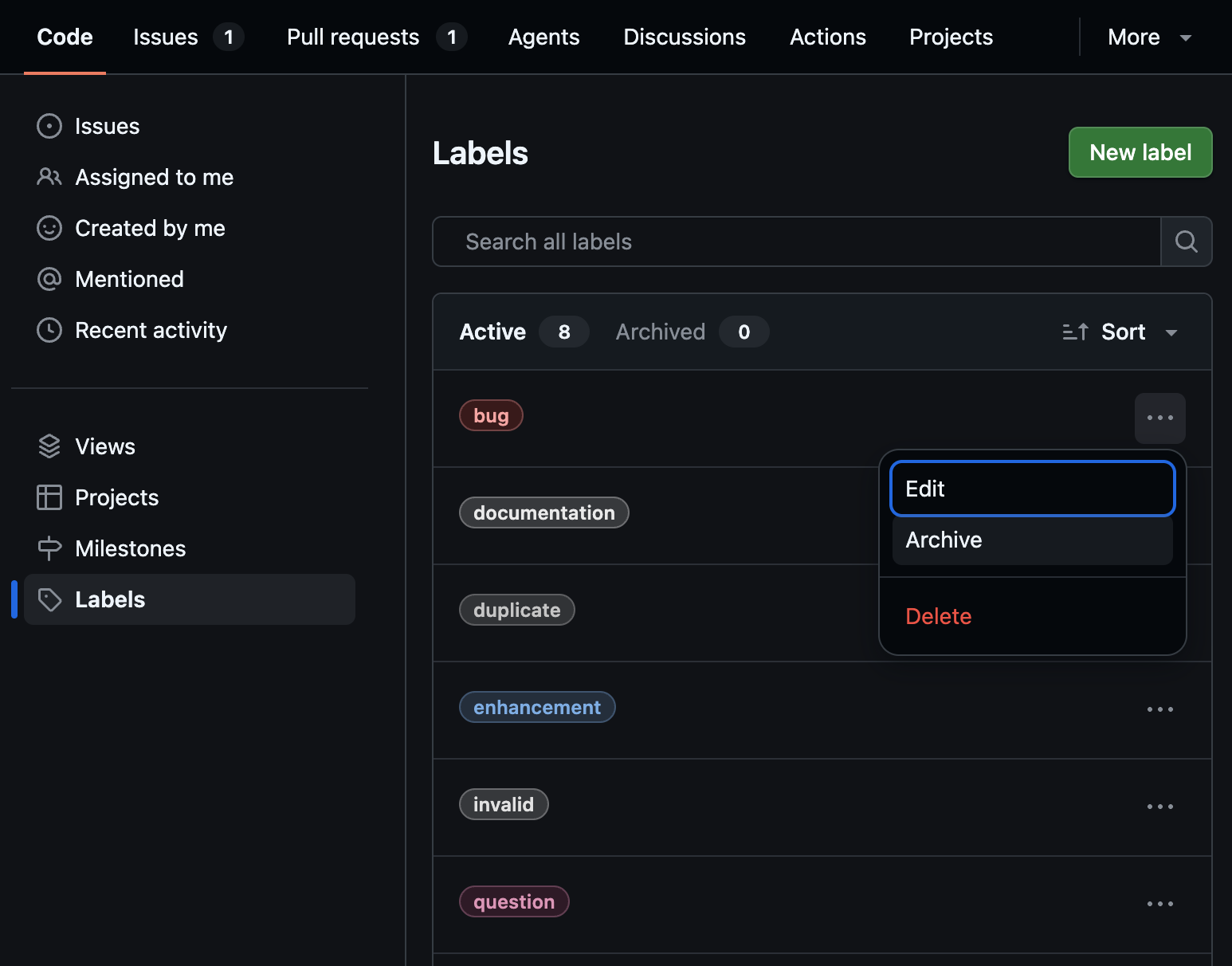
The newly added archive feature is an alternative way to organize labels without deleting them. The official changelog describes it as follows:
You can now archive labels you no longer use without losing their history on existing issues.
Archived labels are removed from the label picker list while preserving the history attached to existing Issues and PRs. The changelog states the following about the picker:
This keeps the label picker focused on active labels, making it faster and easier to find the right one.
While deletion is an operation that "removes along with the history," archiving is positioned as an operation that "hides from the list but keeps the history."
What's New
This update doesn't just include archiving on its own — it also comes with features that make applying labels easier.
Archive and Unarchive
When you archive a label you no longer use, it is removed from the picker list, leaving only active labels visible. Archived labels can also be restored, and the changelog states the following about unarchiving:
You can unarchive a label at any time from the repository Labels page.
Since you can unarchive at any time from the repository's Labels page, you can try archiving a label and restore it if you decide to use it again.
Suggested Labels and Recent Labels
The workflow for applying labels has also been improved. The changelog states:
You can now find the right label faster with suggestions based on what a repository has been using recently.
You can also see Recent labels based on your own usage, making it easier to label issues without searching through the full list.
- Suggested labels: Candidates based on labels recently used in the repository
- Recent labels: Candidates based on labels you have recently used yourself
The idea is that even in repositories with many labels, you can choose from frequently used ones without scrolling through the entire list. The design improves both organization and application in two directions: using archive to remove unused labels from the list, and using Suggested/Recent to quickly select frequently used labels.
Can It Be Operated from the CLI or API?
I was curious whether archiving could be handled via automation or scripts, so I checked using the latest version as of 2026-09-01.
Environment
- GitHub CLI 2.98.0 (latest version as of 2026-09-01)
- Target: github.com
The Latest gh label Also Has No Archive Feature
There was no subcommand for archiving.
gh label --help
The available subcommands are clone / create / delete / edit / list, and no commands equivalent to archive or unarchive are included. In other words, GitHub CLI 2.98.0 does not support label archiving or unarchiving. The only means of cleaning up labels from the CLI remains the conventional gh label delete (which deletes along with history).
The GraphQL Label Type Also Has No Archive-Related Fields
I also checked the GraphQL API side against github.com as of 2026-09-01. When retrieving the fields of the Label type via introspection, the results were as follows:
gh api graphql -f query='
{
  __type(name: "Label") {
    fields { name }
  }
}'
The returned fields were color / createdAt / description / id / isDefault / issues / name / pullRequests / repository / resourcePath / updatedAt / url, and there was no field equivalent to isArchived as used in repository archiving. Within the scope of what I checked, no public API for reading or writing the archive state was found.
Note that the official documentation page Managing labels, as of the time of writing (2026-09-01), covers creating, editing, and deleting labels, but archive procedures are not yet documented. The situation is that primary information about the feature comes from the changelog, and the place to operate it is the repository's Labels page.
Points to Be Aware Of
- Archive means "hide," not "delete": It only removes the label from the picker; the history attached to existing Issues and PRs remains. If you want to remove it completely, deletion is still required as before.
- Cannot currently be incorporated into automation: Since it cannot be operated from the CLI or GraphQL, if you have automated label management with scripts or workflows, archiving cannot be incorporated into those workflows. It will require manual cleanup.
- The changelog is ahead of the official documentation: If you try to check the procedure details in the official documentation, they are not there yet at the time of writing. The actual place to operate it is the repository's Labels page.
When to Use It
- Repositories where the picker is hard to navigate due to too many labels: Archiving unused labels leaves only the active ones, making it easier to select when applying labels. The difference from deletion is that you can organize without losing history.
- Repositories where you want to reference past categorizations later: This is suitable when you want to remove labels used in old releases or projects from the list while keeping their history intact.
Summary
GitHub Issues label archiving went GA on 2026-08-27, making it possible to remove labels from the picker while preserving their history without deleting them. In addition, Suggested labels and Recent labels have improved the workflow for applying labels. However, as of 2026-09-01, GitHub CLI 2.98.0, the latest version at that time, has no archive or unarchive commands, and operations from the GraphQL Label type are also not available. While this is easy to use for repositories where you want to manually organize labels, those who have automated their operations with CLI/API will not be able to incorporate it into their workflows for the time being.
I hope this is helpful to someone.
Reference Links: