I tried implementing a clarification widget in Google Chat Bot — Using inline forms in cardsV2

This page has been translated by machine translation. View original
Introduction
In the previous article, we implemented a progressive update UX with cardsV2 for a Google Chat Bot, enabling real-time display of RAG pipeline progress.
This time, we're adding an interactive clarification widget to that bot. When a user sends an ambiguous query (e.g., just the single word "macro"), instead of immediately generating a response, the bot asks back "What are you looking for regarding [topic]?" and displays option buttons and a free-text input field.
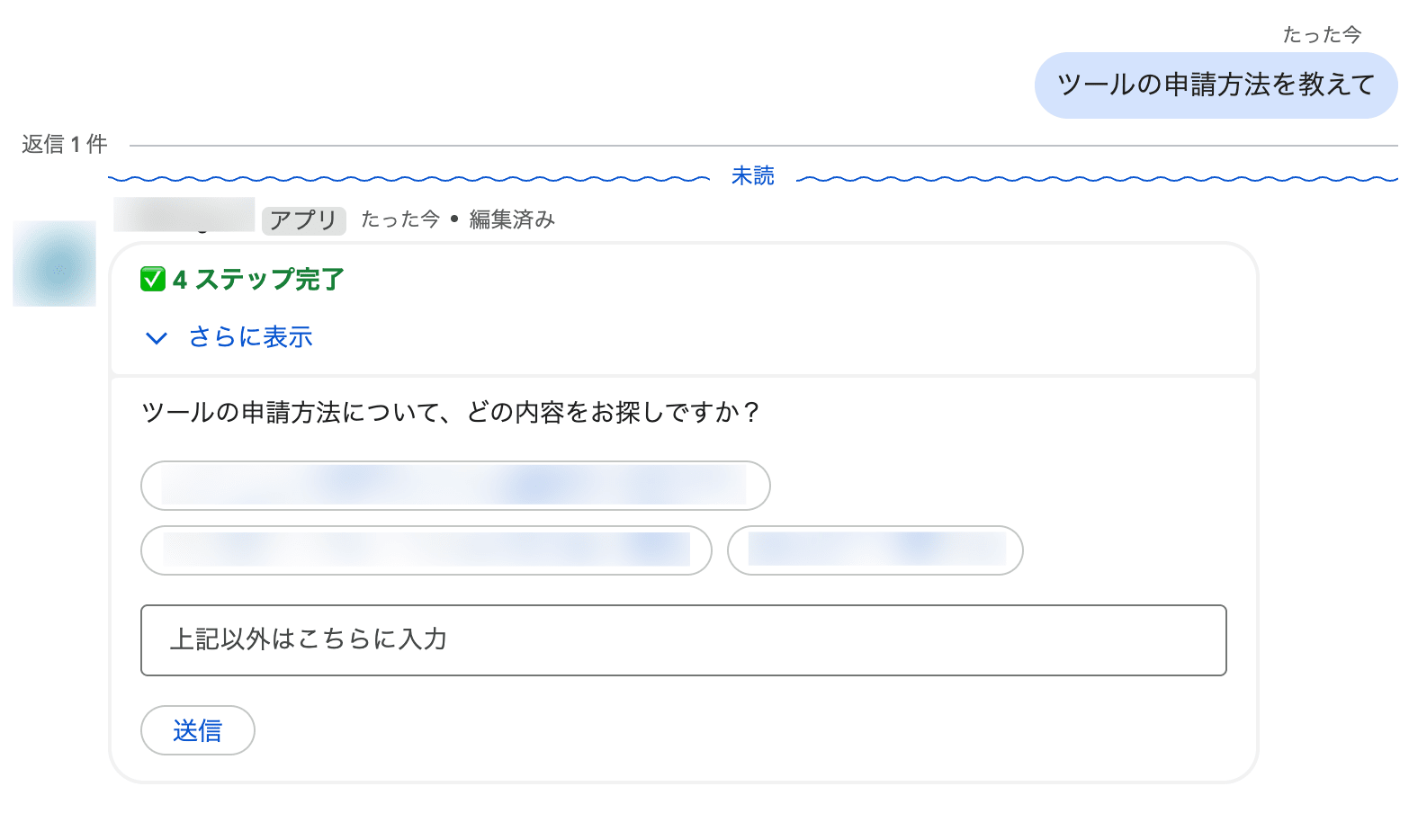
We also implemented a mechanism to reliably attach escalation guidance to fallback responses (when the knowledge base has no relevant information) and confidential information rejections (passwords, etc.).
Configuration
| Item | Choice |
|---|---|
| Runtime | Cloud Functions 2nd Gen |
| Language | Python 3.14 |
| LLM | Gemini 2.5 Flash (google-genai SDK) |
| Structured Output | Pydantic BaseModel + response_schema |
| Card UI | cardsV2 (ButtonList + TextInput) |
Problem: Immediately Answering Ambiguous Queries
During ongoing operation of the RAG bot, we frequently encountered ambiguous queries from users.
User: "macro"
Bot:  I'll explain Excel macros... (the user wanted to ask about Outlook macros)
When the knowledge base contains multiple topics such as "Excel macros," "Outlook macros," and "Google Sheets macros," the LLM picks one and answers. Returning a response that misses the user's intent is a worse experience than not answering at all.
The ideal flow looks like this:
User: "macro"
Bot:  Regarding "macro," which topic are you looking for?
      [Excel macros] [Outlook macros] [Spreadsheet macros]
      [Free text field] [Submit]
User: Clicks [Excel macros]
Bot:  Here are the steps to configure Excel macros...
Implementation 1: Detecting Ambiguity with Pydantic Structured Output
Extending the RagAnswer Schema
First, we add clarification fields to the LLM output schema. The google-genai SDK allows passing a Pydantic BaseModel directly to response_schema, enabling type-safe definition of structured output.
from pydantic import BaseModel, Field

class RagAnswer(BaseModel):
    """Structured output from Gemini for RAG responses."""

    answer: str = Field(
        description="Answer based on knowledge base information (Markdown format)"
    )
    is_answerable: bool = Field(
        description="True if relevant information exists in the knowledge base and an answer was provided"
    )
    needs_clarification: bool = Field(
        default=False,
        description="True if the query is ambiguous and intent cannot be determined. "
        "If true, place the clarification question in answer and "
        "place the options in clarification_options",
    )
    clarification_options: list[str] = Field(
        default_factory=list,
        description="Options for clarification (up to 3). "
        "Used only when needs_clarification is true",
    )
Adding Instructions to the System Prompt
The schema alone won't make the LLM ask for clarification. We add clear decision criteria to the system prompt.
## Handling Ambiguous Queries
- If the user's question is ambiguous and search results from the knowledge base match multiple different topics:
  - Set needs_clarification to true
  - Place the clarification question in answer
  - Place up to 3 options based on search results in clarification_options
- Even if the question is a single word, if search results focus on one topic, answer immediately without asking for clarification
- If there are 0 search results, don't ask for clarification; set is_answerable to false
The key point is that "single word ≠ ambiguous". For a word like "VPN," if all search results point to the same topic (VPN connection troubleshooting), it's the right experience to answer immediately even with a single word. Ambiguity should be judged by the diversity of search results.
Generation Call
The call using the google-genai SDK is the same as regular structured output.
from google import genai
from google.genai import types

client = genai.Client(vertexai=True, project=PROJECT_ID, location=LOCATION)

response = client.models.generate_content(
    model="gemini-2.5-flash",
    contents=prompt,
    config=types.GenerateContentConfig(
        system_instruction=SYSTEM_PROMPT,
        response_schema=RagAnswer,
        response_mime_type="application/json",
    ),
)

result = response.parsed  # → RagAnswer instance
Since response.parsed returns a Pydantic model instance directly, there's no need to write parsing logic. If result.needs_clarification is True, we branch to the clarification flow.
Implementation 2: Building the Clarification Card with cardsV2
Card Structure
The clarification card consists of the following elements:
- textParagraph — The clarification message generated by the LLM (e.g., "Regarding macros, which topic are you looking for?")
- buttonList — Up to 3 option buttons
- textInput — Free text input field (for cases not covered by the button options)
- buttonList — Submit button
def _build_clarification_section(clarification_text, options,
                                 message_name, endpoint_url,
                                 space_name, thread_name, user_name,
                                 original_query=""):
    function_url = endpoint_url or ""
    base_params = [
        {"key": "action", "value": "clarify"},
        {"key": "message_name", "value": message_name or ""},
        {"key": "space_name", "value": space_name or ""},
        {"key": "thread_name", "value": thread_name or ""},
        {"key": "user_name", "value": user_name or ""},
        {"key": "original_query", "value": original_query or ""},
    ]

    widgets = [
        {"textParagraph": {"text": clarification_text}},
    ]

    # Option buttons (up to 3)
    if options:
        buttons = []
        for option in options[:3]:
            buttons.append({
                "text": option,
                "onClick": {
                    "action": {
                        "function": function_url,
                        "parameters": base_params + [
                            {"key": "query", "value": option},
                        ],
                    }
                },
            })
        widgets.append({"buttonList": {"buttons": buttons}})

    # Free text input field
    widgets.append({
        "textInput": {
            "label": "Enter here for other options",
            "type": "SINGLE_LINE",
            "name": "clarify_text",
        }
    })

    # Submit button (for free text input)
    widgets.append({
        "buttonList": {
            "buttons": [{
                "text": "Submit",
                "onClick": {
                    "action": {
                        "function": function_url,
                        "parameters": base_params + [
                            {"key": "query", "value": ""},
                        ],
                    }
                },
            }]
        }
    })

    return {"widgets": widgets}
Can textInput Be Used in Inline Cards?
Before implementing, we were curious about the textInput widget in Google Chat. While it's primarily introduced in documentation in the context of dialogs (modals displayed via renderActions), it works just fine in inline message cards as well.
When a user enters text and clicks the submit button, the form data is included in commonEventObject.formInputs of the CARD_CLICKED event.
{
  "commonEventObject": {
    "formInputs": {
      "clarify_text": {
        "stringInputs": {
          "value": ["Text entered by the user"]
        }
      }
    },
    "parameters": {
      "action": "clarify",
      "query": ""
    }
  }
}
Notes on Parameter Design
action.parameters in Google Chat are all string type. Numeric values and booleans cannot be passed. Therefore, message_name (resource name of the existing message) and thread_name are also passed as strings, with empty strings treated as "not set."
Also, option buttons have the button text placed directly in the query parameter, while the submit button sets query to an empty string. This makes it easy for the click handler to distinguish between "button click" and "free text input."
Implementation 3: Handling CARD_CLICKED Events
Routing
We process the CARD_CLICKED event that Google Chat sends when a button is clicked. Since it's the same event format as the feedback buttons implemented in the previous article, we branch on parameters.action.
if "buttonClickedPayload" in chat:
    action = params.get("action")

    if action == "clarify":
        return handle_clarify(body, endpoint_url=endpoint_url)

    if action == "feedback":
        # Existing feedback processing
        ...
Click Handler
import threading
from bot.worker import process_message

def handle_clarify(event_body, endpoint_url=""):
    common_event = event_body.get("commonEventObject", {})
    params = common_event.get("parameters", {})
    form_inputs = common_event.get("formInputs", {})

    # Button click → text is in params["query"]
    # Free text + submit button → params["query"] is empty, text is in formInputs
    query = params.get("query", "")
    if not query:
        text_input = form_inputs.get("clarify_text", {})
        values = text_input.get("stringInputs", {}).get("value", [])
        query = values[0].strip() if values else ""

    if not query:
        return {}  # Ignore empty queries

    # Combine original query and clarification response to preserve context
    original_query = params.get("original_query", "")
    if original_query and query != original_query:
        query = f"{original_query} (about {query})"

    message_name = params.get("message_name", "")
    space_name = params.get("space_name", "")
    thread_name = params.get("thread_name", "")
    user_name = params.get("user_name", "")

    user = event_body.get("chat", {}).get("user", {})
    sender = user.get("displayName", "")

    thread = threading.Thread(
        target=process_message,
        args=(space_name, query, sender),
        kwargs={
            "endpoint_url": endpoint_url,
            "thread_name": thread_name or None,
            "user_name": user_name,
            "message_name": message_name or None,
            "is_clarification": True,
        },
    )
    thread.start()

    return {}
There are four key points.
Prioritize the button's query
When a user clicks an option button, even if something was entered in textInput, a non-empty string is present in params["query"]. Since the intent of a button click is clear, we prioritize it. For the submit button, query is empty, so we retrieve from formInputs.
Preserve the original question's context with original_query
We embed the original query (original_query) in base_params of the clarification card. When the user responds to the clarification, we combine this original query with the user's response before re-running the pipeline.
For example, if the original query was "How do I apply for a tool?" and the user typed "kintone" in the free text field, the final query becomes How do I apply for a tool? (about kintone). This allows KB searching while preserving the context of "application procedure."
Why this is necessary is explained in detail in the "Pain Points" section below.
Pass message_name to patch the existing card
In a normal MESSAGE event, process_message creates a new message card, but when re-running from a clarification, we want to overwrite the original clarification card. By passing message_name (the resource name of the existing message), the worker uses patch_message instead of create_message.
# Inside process_message
if message_name is None:
    message_name = chat_client.create_message(space_name, body, thread_name=thread_name)
else:
    chat_client.patch_message(message_name, body, "cardsV2")
Return {} immediately
Returning {} in response to CARD_CLICKED tells Google Chat to make no changes (the original card remains as-is). Since the background thread patches the card via the Chat API, users experience a seamless transition from the clarification card to the answer card.
Implementation 4: Preventing Infinite Loops
What happens if the clarification result is again judged as "ambiguous"?
User: "macro"
Bot:  Clarification card → [Excel macros]
Bot:  Another clarification card → Infinite loop!
To prevent this, when executed with is_clarification=True, we forcibly override to False even if the LLM returns needs_clarification=True.
# Prevent infinite loops
if is_clarification and result.needs_clarification:
    result = RagAnswer(
        answer=result.answer,
        is_answerable=result.is_answerable,
        needs_clarification=False,
        clarification_options=[],
    )
If a single clarification wasn't enough to obtain sufficient information, it's a better user experience to provide the best possible answer with the available information rather than asking again.
Implementation 5: Reliably Attaching Escalation Text
Separate from the clarification, there was also an issue where escalation guidance to the relevant department was missing in fallback responses (when the knowledge base has no relevant information) and confidential information rejections.
Instructions in the System Prompt
## Constraints
- Do not directly answer questions about passwords or account information
  (provide only procedures, and always append the following sentence at the end of the response):
  "Please contact YOUR_ESCALATION_TEXT."
- If there is no relevant information in the knowledge base, always append the following sentence at the end of the response:
  "Please contact YOUR_ESCALATION_TEXT."
Safety Net: Forced Attachment via Post-Processing
LLMs can fail to follow instructions. Particularly with boilerplate text like escalation messages, there were cases where the model judged them as "unnecessary" and omitted them.
Therefore, we check the LLM output in post-processing and forcibly add the escalation text if is_answerable=False but the escalation text is not included.
ESCALATION_TEXT = "Please contact YOUR_ESCALATION_TEXT."

def _ensure_escalation(result: RagAnswer) -> RagAnswer:
    """Append escalation text to non-answerable responses if missing."""
    if result.needs_clarification:
        return result  # Skip during clarification
    if not result.is_answerable and ESCALATION_TEXT not in result.answer:
        return RagAnswer(
            answer=result.answer.rstrip() + "\n" + ESCALATION_TEXT,
            is_answerable=False,
        )
    return result
The key point is that we skip when needs_clarification=True. Since clarification means "not yet answered," it would be inappropriate to add escalation text.
We apply this function to all return paths of generate_answer().
def generate_answer(question, contexts, history=None):
    if not contexts:
        return RagAnswer(answer=NO_RESULT_MESSAGE, is_answerable=False)

    # ... LLM call ...

    try:
        if isinstance(response.parsed, RagAnswer):
            return _ensure_escalation(response.parsed)
        if response.text is not None:
            return _ensure_escalation(RagAnswer.model_validate_json(response.text))
    except (ValueError, TypeError):
        logger.warning("Failed to parse structured response")
    return RagAnswer(answer=NO_RESULT_MESSAGE, is_answerable=False)
Overall Flow
Here is the complete picture of the final clarification flow.
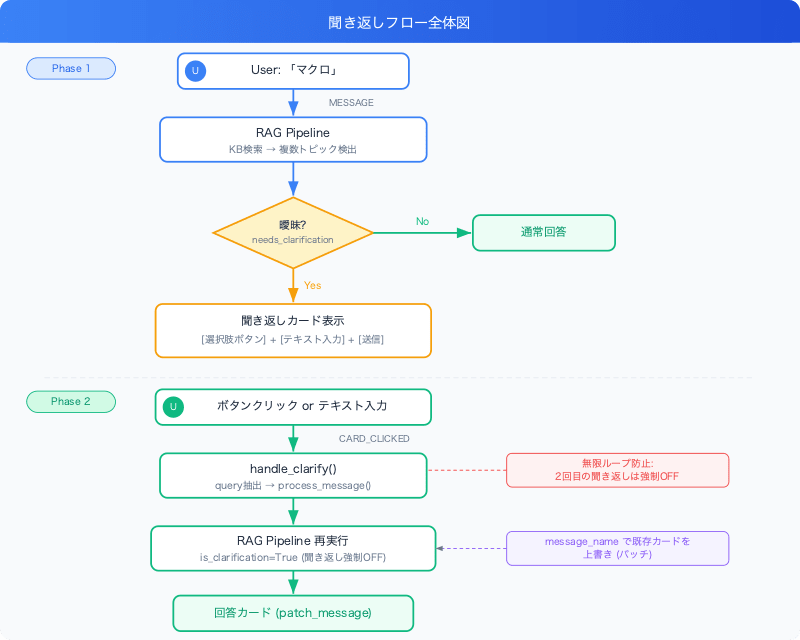
Phase 1 (Initial Query): When the user sends "macro," the RAG pipeline searches the KB and returns needs_clarification=True if multiple topics are detected. The clarification card (option buttons + text input + submit) is patched via the Chat API.
Phase 2 (Clarification Response): When the user clicks a button or enters text, handle_clarify() extracts the query from the CARD_CLICKED event. It combines with original_query (the original query) embedded in the card parameters to preserve context, then re-runs the pipeline with is_clarification=True. A second clarification is forcibly turned OFF, and the existing card is overwritten with the answer via patch_message.
Pain Points
formInputs Are Sent Even in Inline Cards
While Google Chat documentation explains formInputs in the context of dialogs, placing textInput in an inline message card also correctly sends formInputs when a button is clicked. There's no need to use dialogs.
All Parameters Are Strings
The value in action.parameters is string type only. All information needed for re-execution, such as message_name and thread_name, must be passed as strings. We use empty string "" to mean "not set" and convert with or None on the handler side.
Context of Original Query Disappears in Clarification Responses
This was the trickiest problem. It occurs in the following scenario.
User: "How do I apply for a tool?"
Bot:  Clarification card → [kintone] [Salesforce] [Microsoft 365] + free text input
User: Types "kintone" in free text field and submits
Bot:  Answers with a general explanation of kintone ← "application procedure" context is lost!
The cause is that the original query is not saved to conversation history when clarification occurs. For normal follow-up questions, we use Firestore conversation history to reconstruct the query, but during clarification, since no answer has been returned, save_turn() is not called. As a result, the KB search is performed with only "kintone" from the clarification response, and the context of "application procedure" is completely lost.
As a solution, we adopted the approach of embedding the original query (original_query) in action.parameters of the clarification card.
# cards.py — add original_query to base_params
base_params = [
    {"key": "action", "value": "clarify"},
    {"key": "original_query", "value": original_query or ""},
    # ...
]

# clarify.py — combine and re-run pipeline
original_query = params.get("original_query", "")
if original_query and query != original_query:
    query = f"{original_query} (about {query})"
We also considered a Firestore-based approach, but the card parameter approach is superior in the following ways:
- Deterministic — No LLM-based reconstruction needed; no additional latency or cost
- Firestore-independent — Since context is embedded in the card widget itself, it works even during Firestore outages
- No history contamination — No need to save the incomplete clarification exchange to conversation history
Don't Save Clarification Exchanges to Conversation History
The clarification exchange ("Which one are you asking about?" → button selection) is meta-conversation and not actual Q&A. Saving it to conversation history would cause context issues for subsequent follow-up questions. We skip save_turn() when needs_clarification=True.
Priority Between Button query and formInputs
When an option button is clicked, if the user had typed something in textInput, both pieces of data are included in the CARD_CLICKED event. The design prioritizes the non-empty query in button parameters, and only refers to formInputs for the submit button (with query="").
Summary
- Using Pydantic structured output to delegate ambiguity judgment to the LLM naturally achieves the determination of "is this query ambiguous?" which is difficult with rule-based approaches
- Building an interactive clarification UI with cardsV2 ButtonList + TextInput. It works entirely with inline cards, without dialogs
- The pattern of
CARD_CLICKED→{}+ background thread enables seamless overwriting of existing cards - Embedding
original_queryin card parameters preserves the context of the original question (e.g., "application procedure") when responding to clarification. A deterministic approach that doesn't depend on conversation history - The
is_clarificationflag for infinite loop prevention is essential. The policy of providing the best answer after one clarification is simple and effective - The
_ensure_escalation()post-processing pattern is generally useful for cases where you want to reliably include boilerplate text in LLM structured output
Google Chat's cardsV2 can receive form data with textInput even without using dialogs, making it sufficiently practical as a means of achieving interactive chatbot experiences.

