The story of hitting wall after wall when implementing progressive UX with cardsV2 in Google Chat Bot

This page has been translated by machine translation. View original
Introduction
In the previous article, we built a Google Chat Bot as a minimal echo bot using Cloud Functions + Python + uv.
This time, when we tried to turn that bot into a RAG (Retrieval-Augmented Generation) pipeline, we ran into one constraint after another with Google Chat, and we'll walk through the trial and error that ultimately led us to a progressive update UX using cardsV2.
Configuration
| Item | Choice |
|---|---|
| Runtime | Cloud Functions 2nd Generation |
| Language | Python 3.14 |
| Package Manager | uv |
| Region | asia-northeast1 (Tokyo) |
| CPU | 1 vCPU (--no-cpu-throttling) |
| Memory | 512Mi |
Wall 1: Google Chat's Message API is Synchronous
This was the first wall we hit when trying to build a RAG bot.
When developing AI applications normally, we implement streaming responses as a matter of course, where generated text flows in real time. With Discord bots, you can easily add a reaction (👀) after sending a message to indicate "processing," then edit the message when done.
However, with Google Chat's HTTP endpoint method:
- Streaming is not supported — Only one response is returned per HTTP request
- Messages can only be created via synchronous response — HTTP response = bot's reply
- Bots cannot add reactions — The Chat API's
reactions.createonly supports user authentication (OAuth) and cannot be called with bot authentication (chat.botscope). The pattern of "adding 👀 to indicate processing," like in Discord, is not available.
We actually tried adding the chat.messages.reactions.create scope and testing it, but got a 403 error with ACCESS_TOKEN_SCOPE_INSUFFICIENT. Checking the documentation, reactions are clearly stated to "Require user authentication." For a bot to add reactions, either the user's OAuth credentials or domain-wide delegation by a Workspace administrator is required.
This means that for processes that take several seconds to tens of seconds, like a RAG pipeline, users would have to wait with no feedback at all during that time.
User: "Tell me about company regulations"
     ↓
(5–10 seconds of silence)
     ↓
Bot: "Answer text"
This makes for a poor UX. We started looking for a way around it.
Wall 2: The cardsV2 and Chat API "Patch" Pattern
After some research, we found that Google Chat has a rich UI component called cardsV2, and that the Chat API allows you to patch (update) messages after they are created.
This means the following flow is achievable:
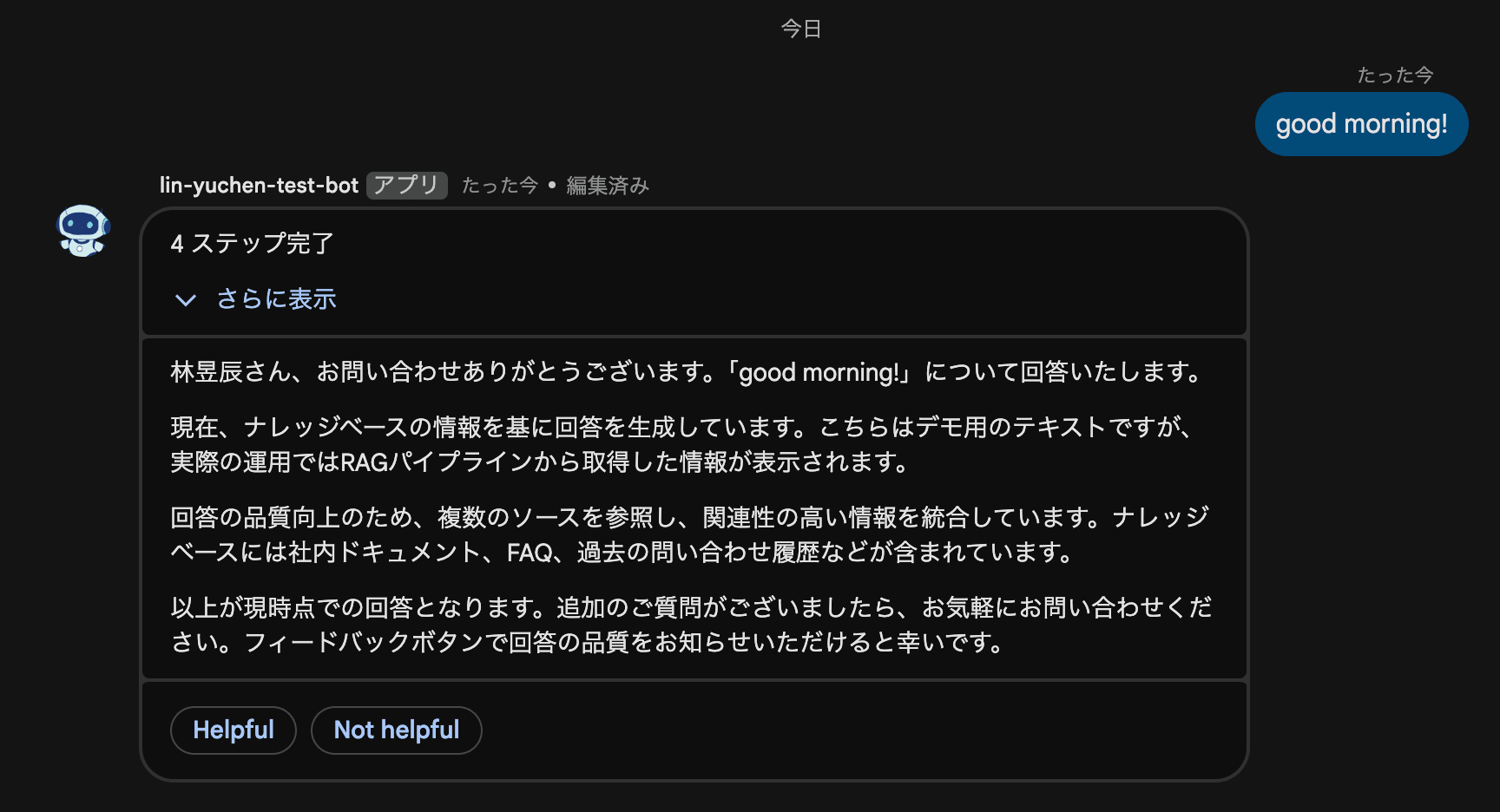
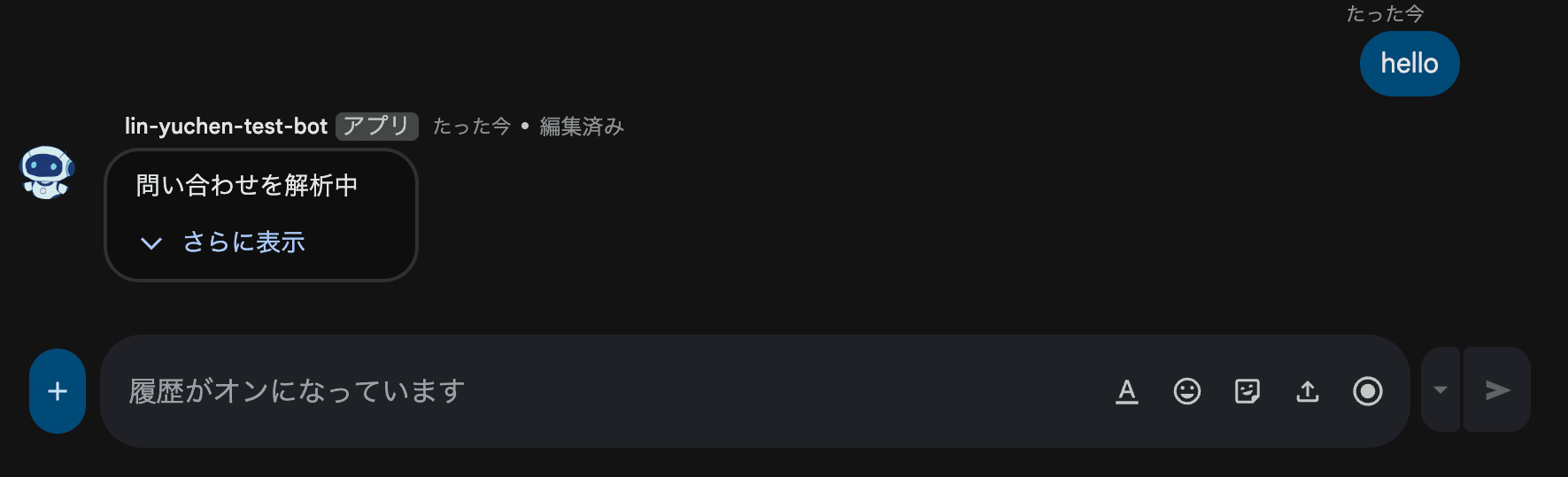
1. Return {} in the HTTP response (return immediately to avoid timeout)
2. Call the Chat API in a background thread to create a "Processing..." card
3. Patch the card to show progress as the pipeline advances
4. Patch the card with the final result upon completion
Calling the Chat API from Code
To use the Chat API from Python, you use build() from google-api-python-client.
from googleapiclient.discovery import build
import google.auth

SCOPES = ["https://www.googleapis.com/auth/chat.bot"]
credentials, _ = google.auth.default(scopes=SCOPES)
service = build("chat", "v1", credentials=credentials)
This enables creating and updating messages.
# Create a message
response = service.spaces().messages().create(
    parent="spaces/SPACE_ID",
    body={"cardsV2": [{"cardId": "my-card", "card": {...}}]}
).execute()

# Update (patch) a message
service.spaces().messages().patch(
    name=response["name"],
    updateMask="cardsV2",
    body={"cardsV2": [{"cardId": "my-card", "card": {...}}]}
).execute()
Collapsible Sections in cardsV2
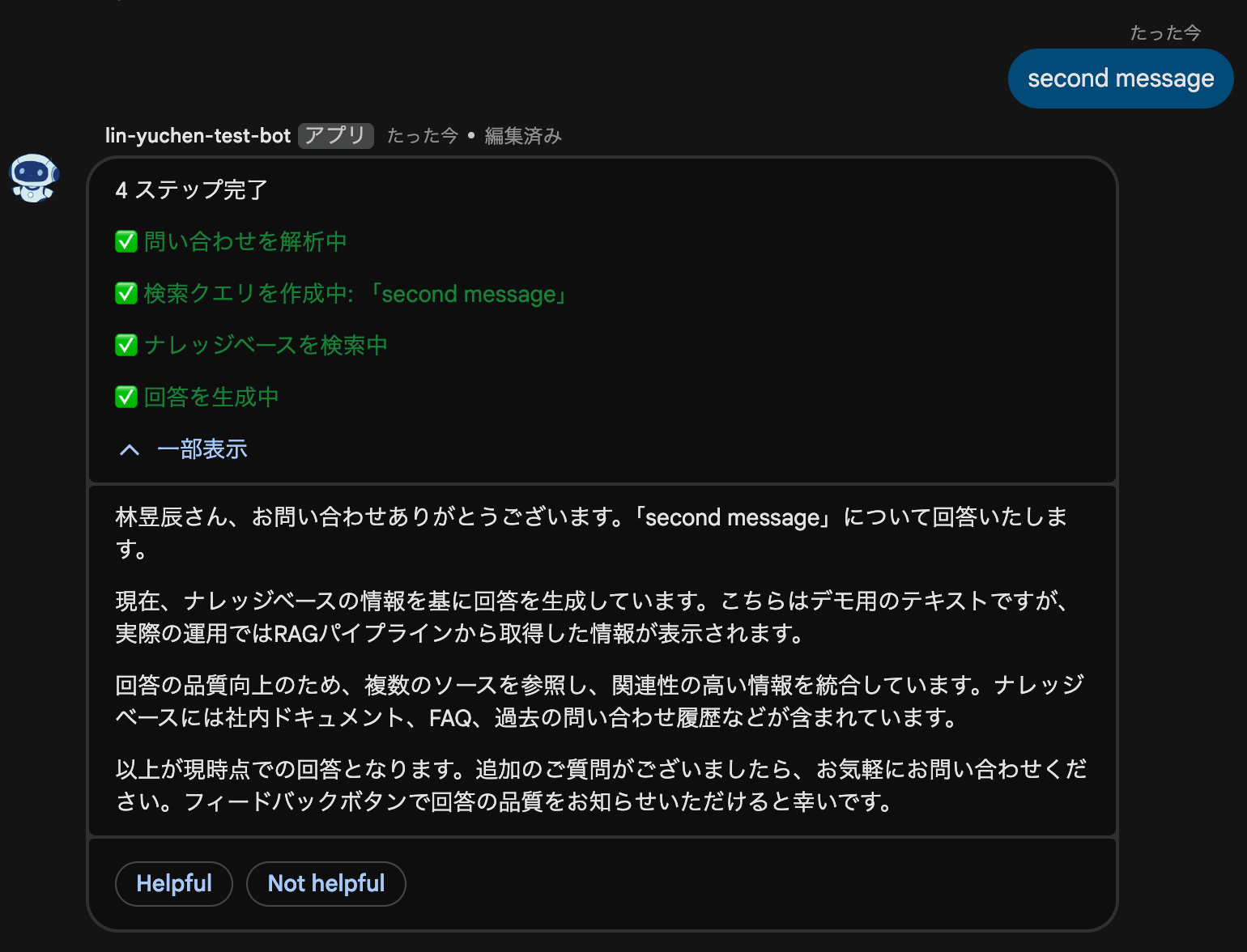
cardsV2 has a property called collapsible that allows widgets within a section to be collapsible. Using this, you can create a UI that displays the pipeline step history in an accordion while always showing only the current status.
{
    "collapsible": True,
    "uncollapsibleWidgetsCount": 1,  # Always show the first one
    "widgets": [
        # ↓ Always visible (status)
        {"decoratedText": {"text": "Generating answer..."}},
        # ↓ Inside the collapsible (step history)
        {"decoratedText": {"text": '<font color="#00C853">✅ Analyzing inquiry</font>'}},
        {"decoratedText": {"text": '<font color="#00C853">✅ Creating search query</font>'}},
        {"decoratedText": {"text": '<font color="#2979FF">⏳ Generating answer</font>'}},
    ]
}
Rate Limit: 1 write/sec/space
There is an important caveat here. The Google Chat API has a rate limit of 1 write per second per space. Both create and patch share this quota.
This means you cannot send a patch for every token like with LLM token streaming. You need to patch at an appropriate granularity, such as step transitions or paragraph units.
To handle this, we created a class called ThrottledPatcher.
class ThrottledPatcher:
    def __init__(self, chat_client, message_name, min_interval=1.0):
        self._chat_client = chat_client
        self._message_name = message_name
        self._min_interval = min_interval
        self._last_patch_time = 0.0
        self._buffered_body = None

    def patch(self, body, force=False):
        now = time.monotonic()
        elapsed = now - self._last_patch_time
        if force or elapsed >= self._min_interval:
            if force and elapsed < self._min_interval:
                time.sleep(self._min_interval - elapsed)
            self._chat_client.patch_message(
                self._message_name, body, "cardsV2"
            )
            self._last_patch_time = time.monotonic()
            self._buffered_body = None
        else:
            self._buffered_body = body  # latest-wins buffer

    def flush(self):
        if self._buffered_body is not None:
            remaining = self._min_interval - (
                time.monotonic() - self._last_patch_time
            )
            if remaining > 0:
                time.sleep(remaining)
            self._chat_client.patch_message(
                self._message_name, self._buffered_body, "cardsV2"
            )
            self._buffered_body = None
The key point is the "latest-wins" buffer strategy. When multiple patches occur within the rate limit, only the latest state is retained and sent at the next available patch opportunity. There's no need to send all intermediate states; users just need to always see the latest progress.
Wall 3: Cold Starts Are Slow Due to Discovery Document Download
Once the cardsV2 + patch pattern was working and we happily deployed it, we noticed that on cold starts, it took about 2 minutes for the first card to appear.
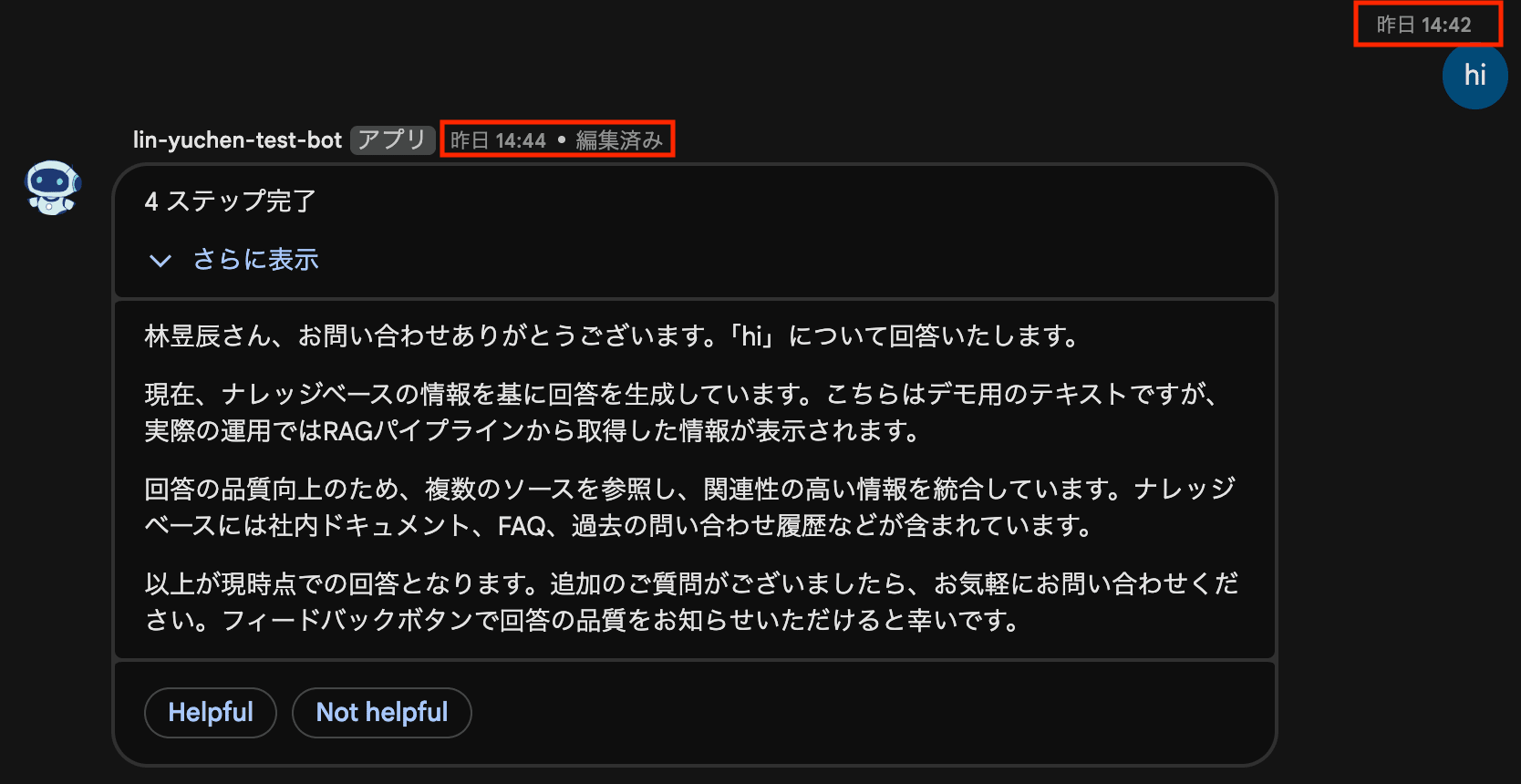
When returning plain text messages as in the previous article, the response was nearly instant even on cold starts. What was different?

The cause was build("chat", "v1").
google-api-python-client's build() downloads the API definition information (Discovery Document) from Google's servers over the network. This file is about 410KB, and downloading it takes time in the low-spec Cloud Functions environment (default 0.17 vCPU).
Return HTTP response (immediately) → Background thread starts
     → Download Discovery Document via build("chat", "v1") (~2 minutes)
     → Call card creation API
     → Card appears to user
First Attempt: Synchronous Message + Async Card
The first approach tried was to return a plain text response synchronously on cold start, then create a cardsV2 message once the Chat API was ready.
@functions_framework.http
def handle_chat(request):
    body = request.get_json(silent=True)
    # ...
    if not is_warm():
        # Cold start: return a text message synchronously
        thread = threading.Thread(target=process_message, args=(...,))
        thread.start()
        return create_message("Processing started. Please wait a moment...")
    else:
        # Warm: create card in background
        thread = threading.Thread(target=process_message, args=(...,))
        thread.start()
        return {}
However, this didn't work either.

Wall 4: CPU Throttling in Cloud Functions Gen 2
After deploying and testing, we found that the synchronous message returned immediately, but the background thread processing never executed at all. No errors. Just silence.
Checking the Cloud Run logs, the request was received, but there were no logs at all from the subsequent Chat API calls.
After investigating the cause, we found it was CPU throttling in Cloud Functions 2nd generation (Cloud Run-based).
gcloud run services describe google-chat-bot --region=asia-northeast1 \
  --format="yaml(spec.template.metadata.annotations)"
annotations:
  run.googleapis.com/cpu-throttling: "true"  # ← This was the cause
Cloud Functions Gen 2 = Cloud Run
Here is an important prerequisite: Cloud Functions 2nd generation is Cloud Run itself. To use an AWS analogy, rather than a proprietary runtime like Lambda, it's closer in positioning to Fargate. When you deploy with gcloud functions deploy, it is internally deployed as a Cloud Run service.
# It's a Cloud Function, but it appears as a Cloud Run service
gcloud run services list --region=asia-northeast1
# NAME: google-chat-bot  ← A Cloud Run service with the same name exists
And Cloud Run has CPU throttling enabled by default. This is a mechanism that allocates CPU resources only while processing HTTP requests, and reduces CPU to near zero after the response is returned.
Why Does This Affect Background Threads?
Recall the bot's architecture:
1. HTTP request received
2. Background thread started
3. HTTP response {} returned immediately  ← CPU allocation drops sharply here
4. Background thread calls Chat API  ← Nearly no CPU available
CPU throttling doesn't "freeze" threads. Threads stay alive, but the CPU allocated to them drops dramatically. From the default 0.17 vCPU, it drops to near zero, making network I/O and response parsing extremely slow.
In practice, the simple pattern implemented in the previous article (creating a thinking card → one patch) only made 2 API calls, so it barely worked under this constraint. However, progressive cards involve 10 or more patches over several seconds, causing extreme delays due to CPU shortage, making it appear effectively unresponsive.
| Pattern | Number of API calls | Behavior under CPU throttling |
|---|---|---|
| thinking → patch (v0.1.0) | 2 | Slow but completes |
| Progressive card | 10+ | Extreme delay, effectively unresponsive |
Solution: Always-on CPU Allocation
Setting --no-cpu-throttling keeps CPU allocated even after the HTTP response is returned. Background threads will reliably run with full CPU.
However, using --no-cpu-throttling requires a minimum of 1 vCPU. --cpu=1 is not needed for performance; it is a prerequisite for enabling --no-cpu-throttling.
# Step 1: Deploy with increased CPU and memory
gcloud functions deploy google-chat-bot \
  --gen2 \
  --runtime=python314 \
  --region=asia-northeast1 \
  --source=. \
  --entry-point=handle_chat \
  --trigger-http \
  --no-allow-unauthenticated \
  --memory=512Mi \
  --cpu=1

# Step 2: Disable CPU throttling
gcloud run services update google-chat-bot \
  --region=asia-northeast1 \
  --no-cpu-throttling
Note: --no-cpu-throttling is not supported in the gcloud functions deploy command, so it must be set separately with gcloud run services update. It's precisely because Cloud Functions Gen 2 is Cloud Run itself that we can configure it directly with the gcloud run command.
Cost Considerations
Increasing CPU from 0.17 vCPU to 1 vCPU and making it always-on will increase costs. However, if min-instances=0 (default) is kept, instances drop to zero when there are no requests, so actual costs remain very low.
| Setting | min-instances | Monthly cost (Tokyo region) |
|---|---|---|
| 0.17 vCPU, 256Mi (default) | 0 | Nearly free |
1 vCPU, 512Mi, --no-cpu-throttling |
0 | ~$0.55 USD/month (billed only when processing requests) |
1 vCPU, 512Mi, --no-cpu-throttling |
1 | ~$50 USD/month (always running) |
We adopted min-instances=0 this time. With approximately 10 seconds of processing time per request and around 100 requests per day, the cost stays around $0.55 USD per month. We chose to accept cold start latency (a few seconds) in order to minimize costs.
For production environments requiring consistently low latency, setting min-instances=1 solves the problem, but incurs a cost of approximately $50 USD/month.
Solving Wall 3: Bundling the Discovery Document
Even after fixing CPU throttling so background threads work, the problem of the Discovery Document download taking 2 minutes on cold start remained.
The solution was simple: bundle the Discovery Document as a static file in the project.
# Download the Discovery Document
curl -o chat_discovery.json \
  'https://chat.googleapis.com/$discovery/rest?version=v1'
import json
from pathlib import Path
from googleapiclient.discovery import build_from_document

_DISCOVERY_DOC_PATH = Path(__file__).parent / "chat_discovery.json"

def _get_default_service():
    credentials, _ = google.auth.default(scopes=SCOPES)
    doc = json.loads(_DISCOVERY_DOC_PATH.read_text())
    return build_from_document(doc, credentials=credentials)
By using build_from_document() instead of build(), network access is completely eliminated. The initial card display on cold start now fits within a few seconds.
This file is approximately 410KB. Note that increasing to --cpu=1 also reduces the build() download time from 2 minutes to a few seconds, but that's still far from the < 100ms of build_from_document(). This optimization remains valid independently of the CPU increase.
What if the Discovery Document becomes outdated?
The Discovery Document is like a "map" that describes the URL paths, parameter names, and request/response schemas for the API. Google's REST APIs maintain strict backward compatibility, so the signatures of existing methods (like spaces.messages.create or spaces.messages.patch) almost never change.
Even with an older Discovery Document, existing functionality continues to work. You simply can't use newer API features. It will work fine for several months to a year, but re-downloading at the following times gives peace of mind:
# Periodically re-download
curl -o chat_discovery.json \
  'https://chat.googleapis.com/$discovery/rest?version=v1'
- When upgrading
google-api-python-client - When you want to use new Chat API features
- As periodic maintenance every few months
Wall 5: The Feedback Button Trap (Three Traps in One)
With the progressive card working, we added buttons so users could provide feedback on answer quality. However, getting these buttons to work required stepping through three traps.
Trap 1: action.function must be the full endpoint URL
The first button definition we wrote looked like this:
# ❌ Doesn't work — specifying a function name in function
{
    "onClick": {
        "action": {
            "function": "feedback",
            "parameters": [
                {"key": "vote", "value": "up"},
            ]
        }
    }
}
Clicking the button showed the error "〇〇 cannot process the request". No logs were delivered to the endpoint.
The cause was that with Workspace Add-ons using the HTTP endpoint method, action.function must specify the bot's endpoint URL itself. Google Chat POSTs the CARD_CLICKED event to this URL.
# ✅ Correct — specify the full HTTPS URL in function
{
    "onClick": {
        "action": {
            "function": "https://asia-northeast1-PROJECT.cloudfunctions.net/google-chat-bot",
            "parameters": [
                {"key": "action", "value": "feedback"},
                {"key": "vote", "value": "up"},
            ]
        }
    }
}
With Apps Script or Dialogflow methods, you specify a function name in function, but with the HTTP endpoint method, you specify a URL. This distinction is a tricky point that is hard to find in the documentation.
Note that since this URL is passed through as-is in invokedFunction, routing is handled by adding an action key to parameters.
Trap 2: Building the correct URL from inside Cloud Functions
To avoid hardcoding the endpoint URL, we tried to build it dynamically from the request.
# ❌ request.base_url returns the internal URL
endpoint_url = request.base_url
# → "http://localhost:8080/" (URL of Cloud Run's internal proxy)
Cloud Functions Gen 2 runs on top of Cloud Run, and the request Flask receives is forwarded from an internal proxy. request.base_url returns the internal localhost:8080 rather than the external URL.
You can get the hostname using X-Forwarded-Host and X-Forwarded-Proto headers, but there's another trap:
# ❌ request.path returns "/"
host = request.headers.get("X-Forwarded-Host")  # "asia-northeast1-PROJECT.cloudfunctions.net"
scheme = request.headers.get("X-Forwarded-Proto")  # "https"
path = request.path  # "/" ← Not "/google-chat-bot"!
The Cloud Functions runtime strips the function name path prefix before passing the request to Flask. Even if the external URL has /google-chat-bot, the request.path Flask sees is /.
The solution is to use the K_SERVICE environment variable. In Cloud Functions Gen 2 (= Cloud Run), this environment variable is automatically set to the service name (= function name).
import os

host = request.headers.get("X-Forwarded-Host") or request.headers.get("Host", "")
scheme = request.headers.get("X-Forwarded-Proto", "https")
service = os.environ.get("K_SERVICE", "")
endpoint_url = f"{scheme}://{host}/{service}" if host else ""
# → "https://asia-northeast1-PROJECT.cloudfunctions.net/google-chat-bot"
Trap 3: The response format is actionResponse
Even after correcting the URL so events reach the endpoint, the wrong response format will prevent things from working.
// ❌ renderActions is for dialogs
{"renderActions": {"action": {"navigations": [{"updateCard": {...}}]}}}

// ❌ updateMessageAction is for updating messages in synchronous responses
{"hostAppDataAction": {"chatDataAction": {"updateMessageAction": {"message": {...}}}}}
The correct response format for CARD_CLICKED events is actionResponse:
// ✅ Correct response for CARD_CLICKED
{
  "actionResponse": {"type": "UPDATE_MESSAGE"},
  "cardsV2": [{
    "cardId": "progressive-card",
    "card": {
      "sections": [{
        "widgets": [{
          "textParagraph": {"text": "Thank you for your feedback!"}
        }]
      }]
    }
  }]
}
To summarize:
| Operation | Response format |
|---|---|
| Synchronous message creation | hostAppDataAction.chatDataAction.createMessageAction |
| Message update on CARD_CLICKED | actionResponse: {type: "UPDATE_MESSAGE"} + cardsV2 |
| Showing a dialog | renderActions.action.navigations[].pushCard |
Wall 6: Thread Replies Creating New Threads
Once the progressive card was complete and the feedback buttons were working, the next issue surfaced. When a user replied to the bot's response within a thread, the bot's response was created as a new top-level message rather than in the same thread.
User: "Tell me about company regulations"
Bot:  [Answer in progressive card]  ← Thread ①

User: "Please tell me more"  ← Reply within Thread ①
Bot:  [Answer in new card]  ← Thread ② (new!)  ← This is the problem
This breaks the conversational flow.
Cause: Default value of messageReplyOption
spaces.messages.create in the Google Chat API has a parameter called messageReplyOption. When this parameter is not specified, the default MESSAGE_REPLY_OPTION_UNSPECIFIED is applied, and messages are always created as new threads.
This meant we needed to retrieve the thread information from the incoming message and pass it when replying.
Solution: Carrying Over thread.name
The message object in the incoming event contains thread.name (the resource name of the thread). Simply extracting this and passing it to spaces.messages.create solved the problem.
# Extract thread information from the incoming event
thread_name = message.get("thread", {}).get("name")
# Attach thread information when creating a message
kwargs = {"parent": space_name, "body": body}
if thread_name:
    kwargs["body"] = {**body, "thread": {"name": thread_name}}
    kwargs["messageReplyOption"] = "REPLY_MESSAGE_FALLBACK_TO_NEW_THREAD"

service.spaces().messages().create(**kwargs).execute()
REPLY_MESSAGE_FALLBACK_TO_NEW_THREAD provides safe fallback behavior: if the specified thread exists, it replies within that thread; if not, it creates a new thread. This single option works correctly for DMs, new messages, and thread replies alike.
Final Architecture
This is the final configuration after overcoming all the walls.
main.py              → HTTP handler (returns {}, starts thread, routes CARD_CLICKED)
worker.py            → Pipeline orchestration (with step tracking)
cards.py             → cardsV2 builder (progressive card)
models.py            → Pipeline data models (StepStatus, PipelineState)
throttle.py          → Rate-limit-aware patcher (1 write/sec/space)
feedback.py          → CARD_CLICKED event handler
chat_api.py          → Chat API wrapper (static Discovery Document)
chat_discovery.json  → Bundled Chat API v1 Discovery Document
Pipeline Flow
1. HTTP request received → {} returned immediately
2. Pipeline started in background thread
3. Initial card created (4 steps shown, all PENDING)
4. Card patched as each step progresses
   - Analyzing inquiry → ✅
   - Creating search query → ✅
   - Searching knowledge base → ✅
   - Generating answer → ✅
5. Patch while adding response paragraphs
6. Show feedback buttons upon completion
Deployment
# Step 1: Deploy the function
gcloud functions deploy google-chat-bot \
  --gen2 \
  --runtime=python314 \
  --region=asia-northeast1 \
  --source=. \
  --entry-point=handle_chat \
  --trigger-http \
  --no-allow-unauthenticated \
  --memory=512Mi \
  --cpu=1

# Step 2: Disable CPU throttling (required for background threads)
gcloud run services update google-chat-bot \
  --region=asia-northeast1 \
  --no-cpu-throttling
Summary
We hit 6 walls before implementing a progressive UX for a RAG pipeline in a Google Chat Bot.
| Wall | Cause | Solution |
|---|---|---|
| Message API is synchronous | Streaming not supported | cardsV2 + Chat API patch |
| Cold start is slow | build() downloads Discovery Document |
Use build_from_document() with a static file |
| Background thread doesn't run | CPU throttling in Cloud Functions Gen 2 | --cpu=1 + --no-cpu-throttling |
| Rate limit | 1 write/sec/space | ThrottledPatcher (latest-wins buffer) |
| Feedback button errors (three traps) | Function name in action.function / URL construction error / wrong response format |
Full URL + K_SERVICE + actionResponse |
| Thread replies creating new threads | messageReplyOption unspecified, always creating new threads |
Carry over thread.name + REPLY_MESSAGE_FALLBACK_TO_NEW_THREAD |
To be honest, compared to Discord Bot or Slack Bot, the Google Chat Bot development experience is still rough around the edges. Many areas of the documentation haven't caught up with the Workspace Add-ons format, and there are many things you can only figure out through trial and error, such as the correct usage of different response formats (createMessageAction / actionResponse / renderActions) and the need for a full URL in action.function.
On the other hand, once progressive updates with cardsV2 are working, the UX is quite good. Users can see the pipeline's progress in real time and feedback can be collected. For organizations using Google Workspace, this investment is well worth it.
Next Steps: Migration to Cloud Tasks
The current architecture works with background threads + --no-cpu-throttling, but when scaling to a full-fledged RAG pipeline, we're considering migrating to Cloud Tasks.
Current:  HTTP request → return {} → background thread runs in the same instance
Future:   HTTP request → enqueue in Cloud Tasks → worker processes as a separate request
Migrating to Cloud Tasks offers the following benefits:
| Aspect | Current (background thread) | Cloud Tasks |
|---|---|---|
| CPU setting | --cpu=1 + --no-cpu-throttling required |
Works with default settings |
| Concurrency | Threads compete for CPU within one instance | Each task runs in a separate instance |
| On failure | Silent failure, no retry | Automatic retry + Dead Letter Queue |
| Timeout | Constrained by HTTP timeout | Up to 30 minutes per task |
Especially for RAG pipelines with heavy processing like LLM calls and vector searches, resource contention under concurrent requests becomes a problem. With Cloud Tasks, it naturally leverages Cloud Run's auto-scaling, eliminating scalability concerns.
Note that the Discovery Document (chat_discovery.json) is a static file bundled in the container image, so it can be used as-is by worker instances launched from the same deployment without any additional configuration.